Why are Hotmail emails being rejected after setting up DMARC?

Updated on 12 Aug 2026: We updated this guide for RFC 9989, removed obsolete percentage rollout advice, and added strict-versus-relaxed alignment checks for Hotmail rejections.
Hotmail emails are being rejected after setting up DMARC because Microsoft is seeing mail from your visible From domain fail DMARC, and your DMARC record asks receivers to reject failed mail. The bounce 5.7.509 means the receiving Microsoft system checked the message, found that neither the SPF path nor the DKIM signature gave DMARC an aligned pass, then applied your p=reject policy under its local handling rules.
The short-term containment step is to move the active sending domain back to p=none while you inspect failed legitimate messages, then repair the source that is failing. A common cause is SPF authenticating a MAIL FROM domain that does not match the visible From domain for DMARC. This often happens when a marketing platform, CRM, help desk, website, or forwarding system sends using its own envelope sender while the user-visible From address uses your domain.
Do not wait for Hotmail to "catch up" if the bounce keeps happening after three days. DNS propagation is rarely the real issue at that point. Treat it as a message authentication failure until the headers prove otherwise.
What the Hotmail bounce means
The exact diagnostic often looks like this:
Typical Hotmail DMARC rejectiontext
550 5.7.509 Access denied, sending domain [EMAIL.MYDOMAIN.COM]
does not pass DMARC verification and has a DMARC policy of reject.
That line does not mean Hotmail or Outlook.com dislikes your domain in general. It means the specific message Microsoft evaluated did not pass DMARC for the domain shown in the From header. Microsoft DMARC setup documents the same basic rule: DMARC passes when SPF or DKIM passes and the authenticated domain aligns with the From domain. If both aligned paths fail, DMARC fails.
- Policy: Your p=reject instruction asks receivers to reject mail that fails DMARC.
- SPF path: SPF must pass for the envelope sender domain, and that domain must match the visible From domain under your DMARC mode.
- DKIM path: DKIM must pass, and the d= signing domain must match the visible From domain under your DMARC mode.
- Receiver action: Hotmail can reject at SMTP time when it honors the published policy, although final handling remains the receiver's decision.
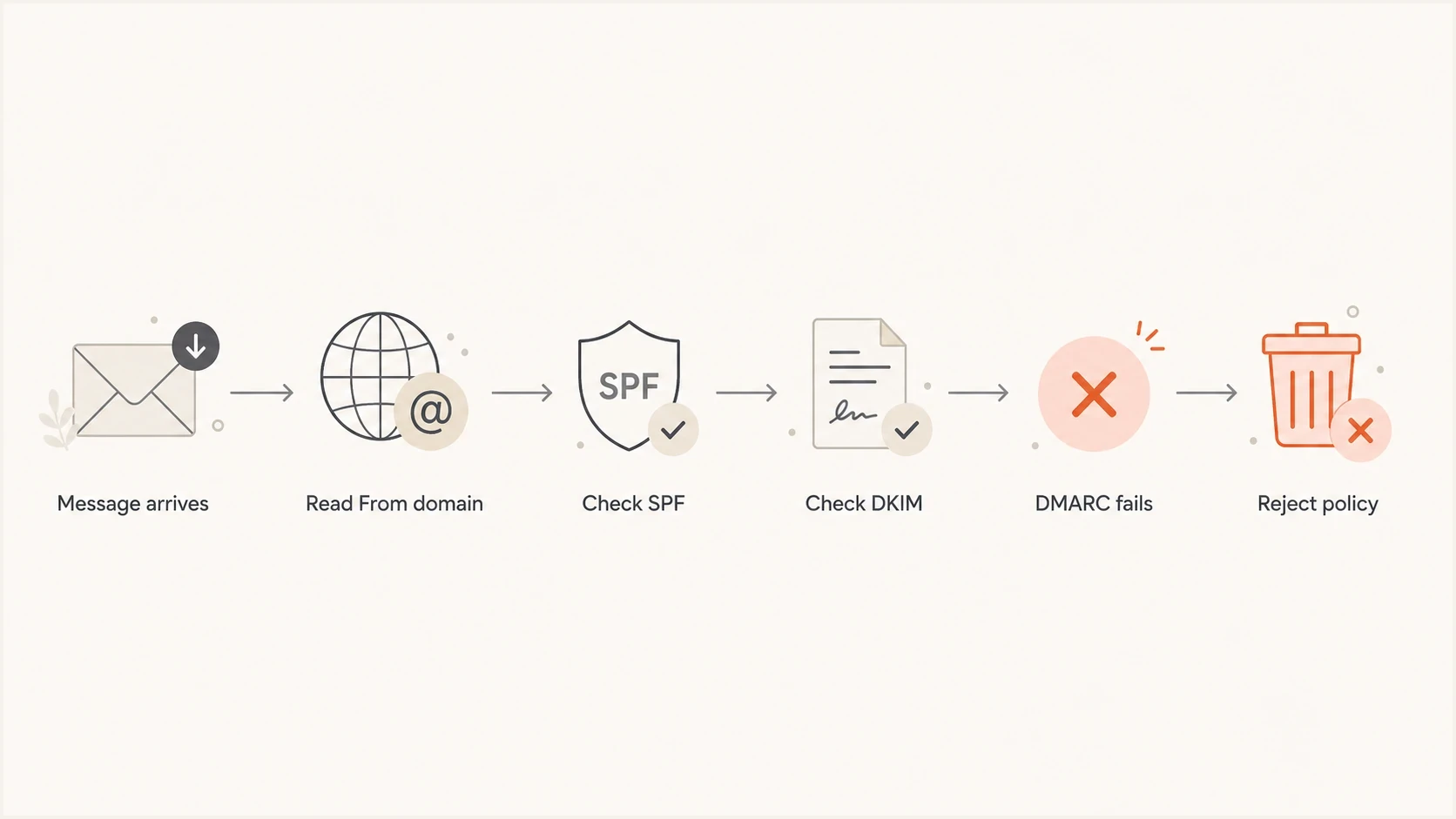
A flowchart showing how a message reaches a DMARC reject decision.
The fastest safe fix
When legitimate mail is actively bouncing at Hotmail, treat the first action as containment. Reduce enforcement first, keep reporting active, then fix each source until the same message passes DMARC. A temporary monitoring record can keep aggregate reports flowing while you investigate.
Temporary monitoring DMARC recorddns
Host: _dmarc
Type: TXT
Value:
v=DMARC1; p=none;
rua=mailto:dmarc-reports@example.com
Then send a real message through the same system that bounced. Do not test only your personal mailbox if the failing path is a CRM, invoice system, form plugin, marketing tool, ticketing system, or forwarding rule. DMARC depends on the exact source and headers.
- Contain: Set the active domain to p=none while legitimate messages are failing, but keep aggregate reporting enabled.
- Collect: Pull the original message headers from the non-delivery report instead of relying on the short bounce line.
- Inspect: Check spf=, dkim=, dmarc=, smtp.mailfrom, header.d, and header.from.
- Repair: Configure the sender so SPF or DKIM uses a domain that aligns with the visible From domain.
- Reapply: Move to p=quarantine after real traffic is clean, then decide whether p=reject fits the domain's indirect-mail risk.
DMARC checker
Look up a domain's DMARC record and catch policy issues.
?/7tests passed
A record check will not prove every sender is correct, but it will catch obvious DNS mistakes before you chase header issues. Suped's DMARC checker parses the policy and reporting syntax before you test live messages.
Why SPF passes but DMARC still fails
A common mistake is assuming an SPF pass equals a DMARC pass. It does not. SPF can pass for a bounce domain owned by a sending platform while the visible From address uses your domain. If those domains do not match under DMARC, SPF cannot provide the DMARC pass.
SPF passes but DMARC fails
- Visible From: The recipient sees mail from billing@example.com.
- Envelope sender: SPF passes for mailer.net.
- Result: DMARC fails because the SPF domain does not match example.com.
SPF passes and DMARC passes
- Visible From: The recipient sees mail from billing@example.com.
- Envelope sender: SPF passes for bounce.example.com.
- Result: DMARC passes under relaxed alignment because the domains share example.com as their organizational domain.
DKIM has the same domain requirement. If a message signs with d=vendor.com and the From domain is example.com, DKIM can pass cryptographically and still fail DMARC for your domain. The fix is usually to enable custom DKIM signing in the sending platform, often with a selector such as s1 or selector1 and a DNS CNAME or TXT record under your domain.
|
|
|
|---|---|---|
SPF pass | Wrong MAIL FROM domain | Use custom return path |
DKIM pass | Wrong d= | Enable custom DKIM |
DMARC fail | No aligned path | Fix SPF or DKIM |
Only forwards fail | SPF or DKIM changed | Preserve DKIM; inspect ARC |
Common Hotmail DMARC failure patterns
If the case is stranger, such as SPF and DKIM both passing but DMARC still failing, compare it with this DMARC failure. The usual answer is that the pass happened for a different domain than the one in the visible From address.
How relaxed and strict alignment change the result
The optional aspf and adkim tags control SPF and DKIM alignment. Both default to relaxed alignment, r, which accepts domains with the same organizational domain. Strict alignment, s, requires an exact domain match.
|
|
|
|---|---|---|
example.com | Pass | Pass |
bounce.example.com | Pass | Fail |
example.net | Fail | Fail |
Alignment examples for a visible From domain of example.com
If aspf=s is published, a custom return path such as bounce.example.com will not match a From domain of example.com, even when SPF passes. Use relaxed SPF alignment or make the MAIL FROM domain match exactly, unless the strict setting is intentional.
What to check in the headers
The non-delivery report usually contains the original message headers below the bounce text. Those headers matter more than the short diagnostic line. Check the authentication result, envelope sender, visible From domain, DKIM signing domain, and any ARC chain added by an intermediary.
Header fields to inspecttext
Authentication-Results: ...
  spf=pass smtp.mailfrom=bounce.example.com;
  dkim=fail header.d=example.com;
  dmarc=fail header.from=example.com;
From: Billing Team <billing@example.com>
Return-Path: <bounces@bounce.example.com>
A clean DMARC result needs only one aligned path. SPF can carry DMARC, or DKIM can carry DMARC. You do not need both to pass DMARC, but relying on only SPF is brittle because forwarding can break SPF.
If the failing source is a third-party sender, the most durable fix is custom DKIM for your domain. If that platform also supports a custom bounce or return-path domain, configure it too. Then send test mail to a Hotmail or Outlook.com recipient, read the received headers, and confirm dmarc=pass for the exact From domain in use.
?
What's your domain score?
Deep-scan SPF, DKIM & DMARC records for email deliverability and security issues.
For a broader check, Suped's domain health checker reviews DMARC, SPF, and DKIM together. That is more useful than checking each record in isolation when Hotmail is rejecting a real message.
Why three days did not solve it
Three days is enough time for most DNS changes to be visible, assuming the record was published correctly and the TTL is not unusual. DMARC enforcement is not a timer. If the message still lacks an aligned SPF or DKIM pass today, Hotmail can still reject it today.
Safer DMARC policy stages
Use enforcement only after legitimate sources have clean DMARC results.
Monitor
p=none
Discover and classify every legitimate sender.
Test enforcement
p=quarantine
Use this after legitimate sources pass in reports.
Review indirect mail
Headers and reports
Check forwarding and mailing-list failures before rejection.
Reject if appropriate
p=reject
Use this only when the domain's mail flows support it.
A staged rollout matters because DMARC reports show which systems are sending as your domain. RFC 9989 removed the historic pct tag after inconsistent receiver handling, so do not rely on percentage sampling to contain mistakes. Stage by policy and, where practical, by separate sending subdomains. With DMARC monitoring, you can review sources and policy actions before enforcing failures.
If the record has no rua address, add one before new enforcement. If the current record is hard to manage, Suped's DMARC record generator creates a policy with aggregate reporting included.
Quarantine-stage exampledns
Host: _dmarc
Type: TXT
Value:
v=DMARC1; p=quarantine;
rua=mailto:dmarc-reports@example.com
For a general-purpose domain whose users post to mailing lists, p=quarantine can be the safer enforcement endpoint. Current DMARC guidance warns that p=reject can reject authorized indirect mail that DMARC cannot describe reliably.
How to diagnose the source
Start by identifying which system sent the rejected message. The sending IP and hostname in the headers usually point to the source faster than the From address. Then map that source to its SPF authorization, DKIM selector, bounce domain, and any custom tracking domain.
- Find source: Use the sending IP, hostname, and return path to identify the platform that created the message.
- Check SPF: Confirm the platform is authorized, then confirm the SPF-authenticated domain aligns with the From domain.
- Check DKIM: Confirm the signature passes and uses your domain or an aligned subdomain in d=.
- Check subdomain: Confirm whether the sending subdomain inherits the parent DMARC policy or has its own record.
- Retest Hotmail: Send through the same source and inspect the headers on the received message.

Issue steps to fix dialog showing the issue overview, tailored fix steps, and verification action
Suped turns aggregate DMARC reports into source-level issues and repair steps. In this workflow, it helps separate verified senders from unknown sources, compare alignment pass rates, and track whether the failing Hotmail source has been repaired before policy enforcement changes again.
The practical target is simple: every legitimate sender needs an aligned SPF or DKIM path before enforcement. Once the failing source passes DMARC, Hotmail rejections caused by that authentication failure should stop.
Common fixes by sending setup
The right fix depends on the source. A single domain often has multiple senders, and each one needs its own treatment. Do not move the parent domain back to reject just because Microsoft 365 user mail passes. Your marketing, website, invoicing, support, and product mail need the same review.
|
|
|
|---|---|---|
Microsoft 365 | DKIM not enabled | Enable DKIM |
CRM | Vendor bounce domain | Custom return path |
Marketing | Vendor DKIM | Custom DKIM |
Website | Local PHP mail | Use authenticated SMTP |
Forwarding | SPF breaks | Preserve DKIM; inspect ARC |
Fixes by source type
If only Hotmail rejects but another mailbox provider accepts, do not assume Hotmail is wrong. Receivers apply local policy differently, and some reject during the SMTP transaction. The sender still needs an aligned SPF or DKIM path for the From domain. For a deeper explanation of legitimate sources failing, compare legitimate email failures with your own headers.
Do not fix this by adding every IP you find to SPF. SPF has a limit of 10 DNS-querying terms during evaluation, and adding more includes can create a permanent SPF error. Prefer aligned DKIM for third-party senders and simplify SPF when the record is already complex.
Views from the trenches
Best practices
Keep p=none active until reports prove every real sender has an aligned DMARC path.
Read the full NDR headers before editing DNS, because the short bounce hides the source.
Use aligned custom DKIM on third-party senders so forwarding does not depend on SPF.
Add rua reporting before enforcement so legitimate failures become visible in reports.
Common pitfalls
Publishing p=reject on day one blocks real mail before all sources are configured.
Treating an SPF pass as DMARC pass ignores the required match with the From domain.
Testing only user mail ignores website, CRM, product, billing, and support senders.
Removing aggregate reporting leaves teams blind when Hotmail starts rejecting mail.
Expert tips
Use sending subdomains so one third-party source does not control the parent policy.
Compare Return-Path and DKIM d= with the From domain before changing policy again.
Prefer aligned DKIM for legitimate messages that might pass through a forwarder.
Review mailing-list traffic before choosing p=reject for a general-purpose domain.
Marketer from Email Geeks says the full bounce and original headers usually show which domain did not match DMARC.
2024-02-08 - Email Geeks
Marketer from Email Geeks says moving straight to p=reject without report review creates avoidable delivery failures.
2024-02-08 - Email Geeks
Fix the rejection before enforcing again
Hotmail is rejecting the messages because the domain published a reject policy before that sender produced DMARC-passing mail. The likely cause is SPF authenticating the wrong domain, DKIM missing, or DKIM signing with an unaligned domain. The fastest safe move is to set p=none, collect headers and aggregate reports, repair the sender, and then move to quarantine while you confirm the result.
Suped supports this workflow by grouping aggregate reports by source, showing SPF and DKIM alignment results, and recording the repair steps. That turns one Hotmail bounce into a source-level diagnosis that can be verified before the DMARC policy changes again.




