Why am I seeing DMARC errors when sending to Gmail from MXroute?

Published 27 Jun 2025
Updated 7 Aug 2026
12 min read
Summarize with

Updated on 7 Aug 2026: We clarified MXroute forwarding failures and updated the Gmail mailbox and DMARC rollout guidance.
You are probably seeing DMARC errors when sending to Gmail from MXroute because an MXroute mailbox is auto-forwarding the message into Gmail. Gmail checks that forwarded copy, not just the original delivery into MXroute. SPF often stops contributing to DMARC at that point. It can fail because Gmail sees MXroute's forwarding server, or SRS can make SPF pass for an MXroute-controlled envelope domain that does not align with the visible From domain. DMARC can still pass if an aligned DKIM signature survives. If DKIM is absent, invalid, or signed by an unrelated domain, Gmail can reject the forwarded copy under the sender domain's DMARC policy.
The clue is the bounce. If the original recipient is an MXroute-hosted address but the bounce includes X-Failed-Recipients with a Gmail address, Gmail was the final system that refused the forwarded copy. That does not mean direct Gmail delivery is broken. If you addressed Gmail directly and the bounce has no forwarding clue, check MXroute's outbound SPF and DKIM setup instead.
Separate two questions. Does mail sent directly to Gmail pass SPF, DKIM, and DMARC? Does the MXroute-forwarded copy retain at least one valid, aligned DKIM signature when Gmail receives it? Most false leads come from mixing those paths together.
What the Gmail DMARC error means
Gmail uses 550-5.7.26 for authentication failures. When the diagnostic text says the message was not accepted because of the domain's DMARC policy, Gmail did not find a passing SPF or DKIM result aligned with the visible From domain. The code alone does not prove that forwarding occurred, so read the complete diagnostic text and recipient fields. Google's DMARC troubleshooting guidance directs administrators to check SPF, DKIM, policy, and report data.
Typical Gmail rejection text
550-5.7.26 Unauthenticated email from example.com is not accepted
due to domain's DMARC policy.
The direct answer
If direct messages to Gmail pass but bounces appear only when an MXroute-hosted recipient forwards into Gmail, the issue is the forwarding path. SPF often fails or loses DMARC alignment on a forward. An aligned DKIM signature is the usual authentication path that carries the original sender through DMARC.
|
|
|
|---|---|---|
X-Failed-Recipients names Gmail | Gmail is the forwarded destination | Compare it with the original recipient |
SPF fails on an MXroute hop | The final server is not the original sender | Check aligned DKIM |
DKIM fails | The signature did not verify | Find altered signed content or DNS errors |
DKIM passes but DMARC fails | The signing domain is not aligned | Sign with the From domain or its organizational domain |
Clues in the bounce and authentication results.
Why forwarding changes the result
SPF checks the connecting server against the envelope sender domain. With direct delivery, Gmail sees your sending IP or your email provider's approved IP. With forwarding, SPF fails if MXroute preserves the original envelope sender because the original sender's SPF record does not authorize the MXroute forwarding IP. If MXroute rewrites the envelope sender with SRS, SPF can pass for the rewritten domain, but that domain usually does not align with the original visible From domain for DMARC.
SRS helps the forwarding hop handle SPF and bounces, but it does not make the original sender pass DMARC through SPF. DMARC still needs an aligned pass through SPF or DKIM. For a forwarded message, an intact DKIM signature aligned with the visible From domain is usually the dependable path.
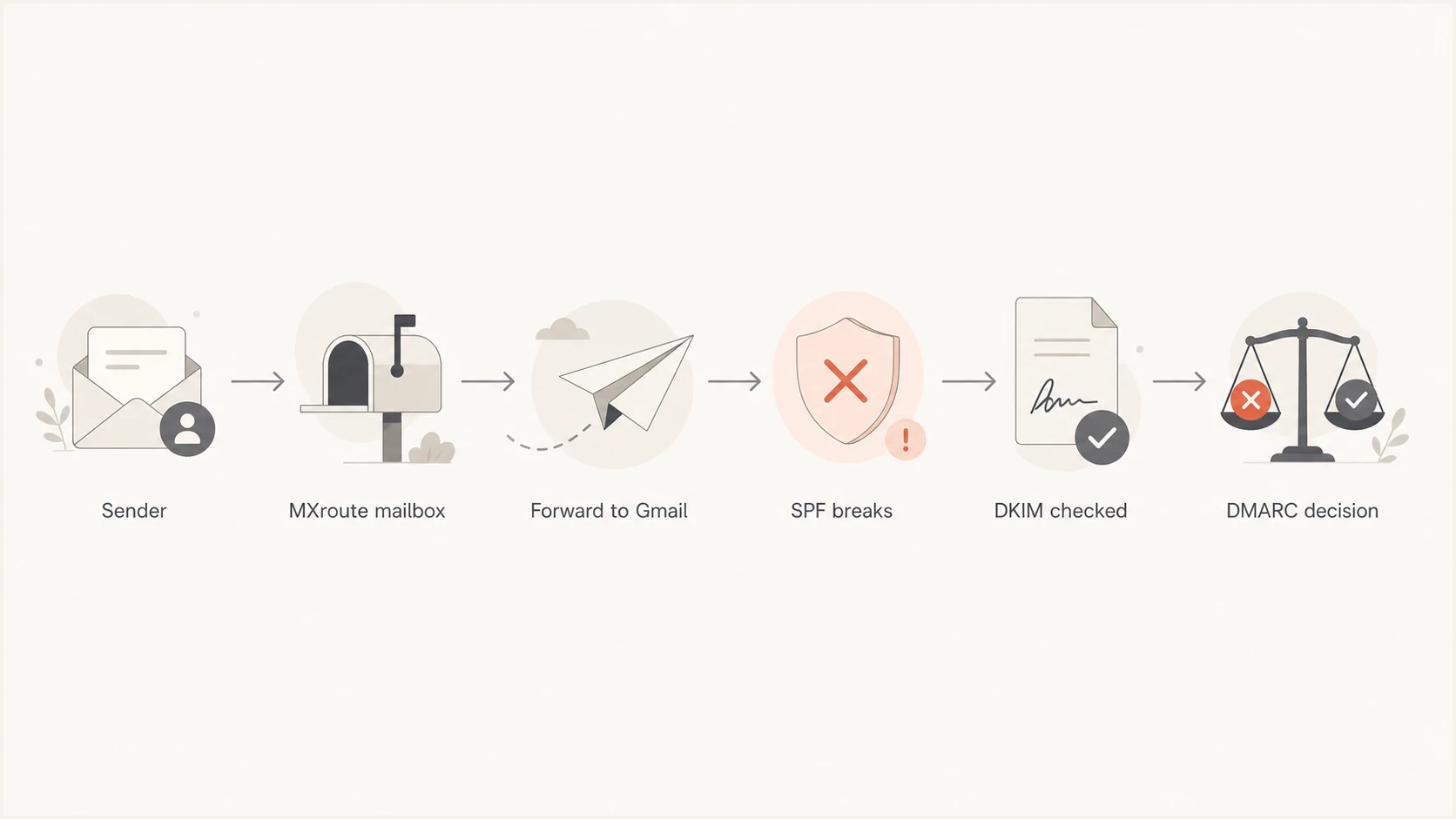
MXroute-to-Gmail forwarding flow where SPF can break and DKIM determines DMARC.
Direct Gmail delivery
- SPF: Gmail sees your approved sending server.
- DKIM: Gmail checks your original signature without a forwarding hop.
- DMARC: One aligned SPF or DKIM pass is enough.
Forwarded through MXroute
- SPF: The result can fail or pass under an unaligned SRS identity.
- DKIM: The original aligned signature must survive the hop.
- DMARC: Gmail can reject when neither method passes with alignment.
ARC can preserve authentication results recorded by an earlier system, but it does not force Gmail to accept a message. Gmail performs its own authentication check and decides whether to trust the ARC chain. A valid ARC chain can provide useful forwarding context, while a surviving aligned DKIM signature gives DMARC a direct pass result.
How to confirm this is forwarding
Start with the full bounce, not the short delivery failure preview. Check the final failed recipient, the receiving server that issued the error, and the authentication results Gmail recorded. If the failed recipient is a Gmail address you did not target directly, you have a forwarding case. If it matches the address you sent to, investigate direct delivery first.
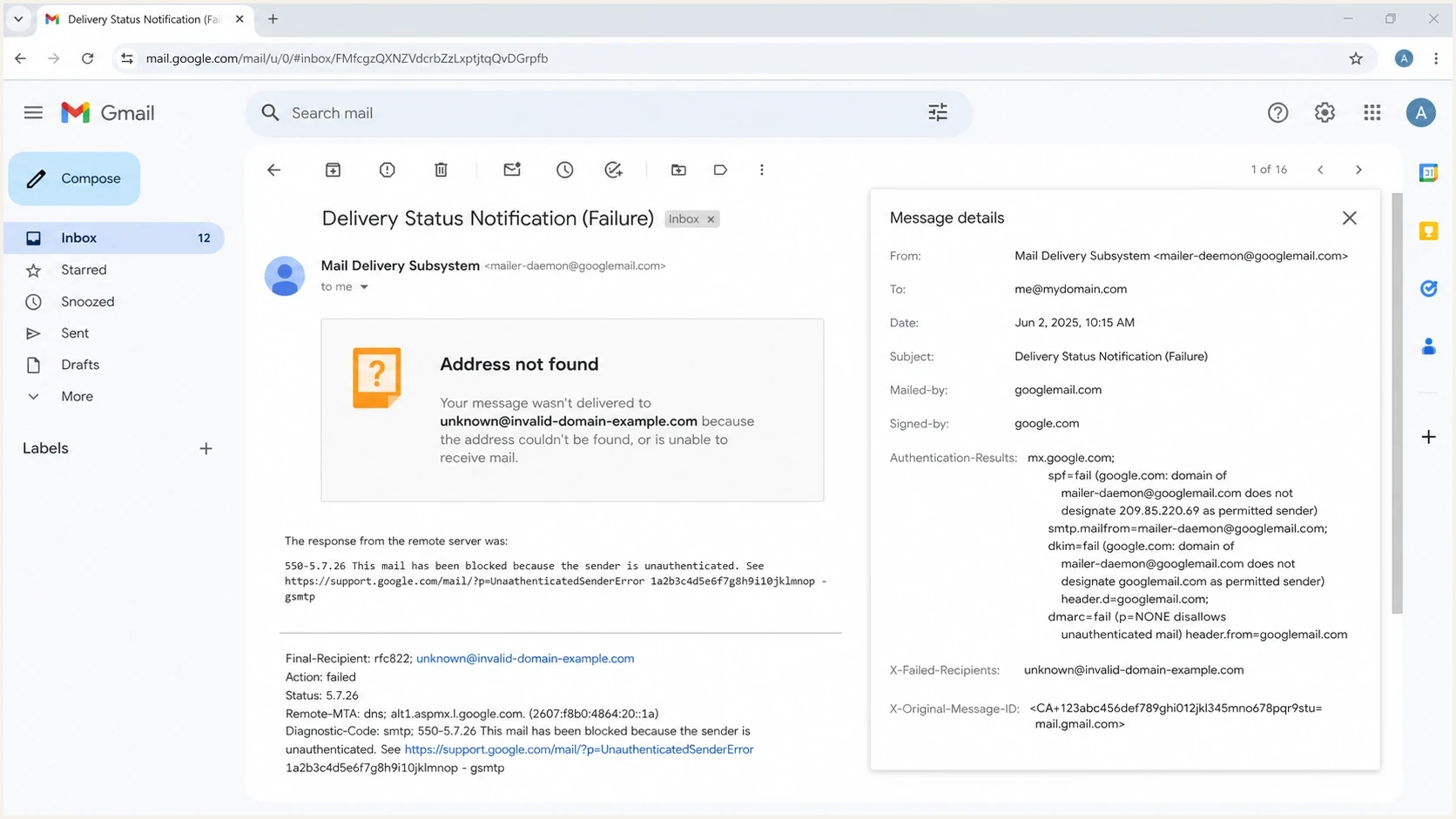
Gmail 550-5.7.26 bounce details with MXroute forwarding and DMARC failure signals.
Header pattern that points to forwarding
X-Failed-Recipients: user@gmail.com
Diagnostic-Code: smtp; 550-5.7.26 DMARC policy rejection
Authentication-Results: mx.google.com;
  spf=fail smtp.mailfrom=example.com;
  dkim=fail header.d=example.com;
  dmarc=fail header.from=example.com
- Recipient: Compare the address you sent to with the address Gmail reports as failed.
- Server: Confirm Gmail issued the rejection, not MXroute's inbound server.
- SPF: Expect a forward to fail SPF or pass under a rewritten, unaligned identity.
- DKIM result: If DKIM fails, check the selector, public key, signed headers, and message changes.
- DKIM alignment: If DKIM passes, compare header.d with the visible From domain.
- Reports: Use DMARC monitoring to separate direct Gmail traffic from forwarded copies.
MXroute's DMARC records documentation recommends keeping SPF and DKIM correct and reviewing reports before enforcing a stricter policy. It also warns against forwarding raw DMARC reports into Gmail because Google does not accept forwarded copies of its own reports. Use a dedicated destination that does not forward those XML files.
How to fix the MXroute to Gmail path
The fix depends on who controls the forwarding. If the recipient controls the MXroute mailbox, the cleanest fix is to stop auto-forwarding into Gmail and read the mailbox directly. Gmail mobile users can add the MXroute mailbox as a separate IMAP account. If forwarding must remain, the original sender needs an aligned DKIM signature that survives the hop so Gmail can pass DMARC without aligned SPF.
Do not authorize the forwarding hop
Do not add Gmail to your SPF record merely because it receives a forwarded copy. Include MXroute in SPF when MXroute originates outbound mail for your domain, but not merely because an MXroute mailbox forwards received mail. SPF should authorize systems that send as your domain.
- Sender fix: Sign outbound mail with DKIM using the visible From domain or a relaxed matching organizational domain.
- Recipient fix: Disable forwarding and access the MXroute mailbox directly or as a separate IMAP account.
- Forwarder fix: Use SRS for envelope handling and avoid changes to signed headers, MIME boundaries, encoding, or body content.
- Policy fix: Monitor legitimate sources before changing the DMARC policy; do not lower enforcement for every sender to mask one forwarding failure.
- Verification: Retest direct delivery and the forwarded route, then compare their Authentication-Results headers.
If you own the sender domain, check the DMARC checker first, then test a real message. A valid DNS record does not prove that the exact email stream has a valid, aligned DKIM signature.
DMARC checker
Look up a domain's DMARC record and catch policy issues.
?/7tests passed
Use the domain health checker for a broader review of DMARC, SPF, and DKIM after inspecting the bounce. This keeps the workflow tied to the actual failure while still finding DNS mistakes.
Gmail POP retrieval is being retired
Gmail stopped allowing new users to add third-party accounts through its web-based 'Check mail from other accounts' POP feature after the first quarter of 2026. Existing users can continue only until January 2027. Old advice to replace MXroute forwarding with a new Gmail web POP fetch is therefore no longer a durable fix.
Practical mailbox options
- Existing POP users: Use the current connection during the transition and replace it before January 2027.
- Gmail mobile users: Add the MXroute mailbox through IMAP; it remains a separate account in the app.
- Web and desktop users: Use MXroute webmail or an IMAP client, or move mailbox delivery if a Gmail-hosted inbox is required.
- Required forwarding: Preserve aligned DKIM and troubleshoot the forwarding hop instead of adding Gmail to SPF.
Gmail still permits a one-time import of existing mail, but that does not continuously retrieve new MXroute messages. Plan the mailbox workflow separately from the authentication fix.
What to check in your own setup
Even when forwarding triggers the rejection, the sender setup still has to be correct. Gmail does not overlook missing or misaligned DKIM because the recipient forwarded the mail. Check these items before classifying the failure as outside the sender domain.
DMARC record with reporting and relaxed alignment
v=DMARC1; p=quarantine; rua=mailto:dmarc@example.com;
adkim=r; aspf=r
- DKIM domain: The header.d value must align with the visible From domain for DKIM to satisfy DMARC.
- DKIM validity: Test that the public key resolves and the signature survives the exact forwarding route.
- Message changes: Do not modify signed headers, MIME boundaries, encoding, or body content after signing.
- SPF scope: Include only services that originate mail for your domain.
- DMARC policy: Use aggregate report data before changing enforcement.
- Forwarding data: Read the forwarding and DMARC guidance when forwarded copies are a recurring support issue.
RFC 9989 replaced the earlier DMARC specification and removed the pct tag. Do not rely on pct=10 or another percentage to stage enforcement. Monitor with p=none, correct legitimate sources, then change the policy when the data supports it. The newer t=y testing flag is not a percentage rollout and does not guarantee delivery. RFC 9989 also advises general-user domains whose users may post to mailing lists not to publish p=reject because legitimate indirect mail can break. Such domains should review at least a month of p=none data and a month of p=quarantine data before deciding whether reject fits their use.
A p=none policy asks receivers not to apply DMARC enforcement, but it does not guarantee Gmail acceptance. Gmail can still reject unauthenticated mail under its own sender requirements or local policy. With p=quarantine or p=reject, broken forwarded copies are more likely to be filtered or rejected because of the published DMARC policy.
MXroute's common errors documentation helps separate MXroute account authentication problems from downstream Gmail DMARC rejections. A 550 authentication-required or sender-verification error needs a different fix from Gmail's 550-5.7.26 response.
Where Suped fits
Suped is useful when these bounces are not isolated. The practical task is to prove whether the domain has a sender-side issue, a specific forwarding issue, or a policy rollout issue. Suped combines DMARC, SPF, DKIM, blocklist and blacklist monitoring, and deliverability signals in one workflow so each failure can be classified.

Issue steps to fix dialog showing the issue overview, tailored fix steps, and verification action
For this MXroute-to-Gmail scenario, add the sender domain to Suped, review verified and unverified sources, inspect Gmail failures, then open the issue detail for tailored fix steps. Hosted DMARC controls policy changes without repeated DNS edits, while Hosted SPF keeps authorized sending sources within SPF lookup limits without giving DNS access to every team.
Best overall path
Use Suped for ongoing visibility and issue handling, then use the bounce headers as case-specific evidence. If policy staging is part of the fix, Hosted DMARC keeps policy changes controlled while you verify real sender behavior.
Views from the trenches
Best practices
Check the recipient path before changing DNS because forwarded mail has different SPF behavior.
Sign every outbound stream with your domain so forwarded mail has a second DMARC pass path.
Monitor DMARC aggregate data by source to split direct Gmail traffic from forwarded copies.
Common pitfalls
Adding Gmail to SPF for your own domain does not fix SPF on mail forwarded by recipients.
Treating every 550-5.7.26 bounce as your DNS fault hides recipient forwarding cases.
Lowering DMARC enforcement globally reduces protection without solving the forwarding path.
Expert tips
Ask for the full bounce and headers so the Gmail target and MXroute hop are both visible.
Use relaxed domain matching unless strict matching has a specific documented risk reason.
Track rejected forwarded copies separately so support teams do not reopen fixed sender setup.
Marketer from Email Geeks says an MXroute mailbox forwarding into Gmail is a common reason the failed recipient differs from the original recipient.
2024-04-15 - Email Geeks
Marketer from Email Geeks says SRS helps the envelope sender path, but DKIM still needs to survive for DMARC when Gmail checks the forwarded copy.
2024-04-15 - Email Geeks
What to do next
Treat the Gmail DMARC bounce as a routing problem first when the failed recipient differs from the address you used. An MXroute-to-Gmail forward is then the likely bridge between the message and Gmail's rejection. SPF failing or losing alignment on that bridge is expected. Aligned DKIM is the pass path that should survive.
Keep the sender setup strict and durable. Sign with the From domain, avoid DKIM-breaking modifications, keep SPF limited to actual outbound senders, and use reports to find the source of failures. For recurring cases, Suped connects report data with issue diagnosis and hosted policy controls so the direct and forwarded paths can be managed separately.




