How does email forwarding affect SPF, DKIM, and DMARC validation?

Published 2 Jul 2025
Updated 12 Aug 2026
12 min read
Summarize with
Updated on 12 Aug 2026: We clarified how forwarding changes SPF, DKIM, DMARC alignment, SRS, ARC, and current policy staging.
Email forwarding changes the connecting sender IP, so SPF for the original Return-Path domain commonly fails. If the forwarder uses SRS, SPF can pass for the rewritten Return-Path, but that domain normally does not align with the original visible From domain. DKIM can still pass and align if the signed body and headers stay intact. Forwarding therefore removes the SPF path to DMARC in most cases and leaves aligned DKIM as the deciding check.
Unknown IPs in aggregate reports are not proof of forwarding. First compare the traffic with customer bounces, identify whether the source follows a stable receiver pattern, and check whether aligned DKIM survived. If both SPF and DKIM fail and there is no matching delivery impact, DMARC monitoring is often showing unauthorized mail being handled as intended.
The short rule
DMARC needs one aligned authentication pass, not both. Forwarding often breaks SPF or its alignment, but a valid DKIM signature with an aligned signing domain can carry the message through DMARC.
- SPF: Checks the IP that connects to the final receiver against the Return-Path domain.
- DKIM: Checks the cryptographic signature and survives when the signed content stays intact.
- DMARC: Passes when SPF or DKIM passes and its authenticated domain aligns with the visible From domain.
- Reports: Unknown IPs are evidence to investigate, not proof of forwarding.
What forwarding changes
Forwarding creates another SMTP delivery hop. The first receiver accepts the message, then sends it to a second mailbox. The final receiver sees the forwarder as the connecting system. That is why the source IP in a DMARC aggregate report often looks unfamiliar. It is the IP used by the forwarder, not the original email platform.
The Return-Path can also change when the forwarder uses SRS, which rewrites the envelope sender. Without SRS, SPF normally tests the original Return-Path domain against the forwarder's IP and fails. With SRS, SPF can pass for the forwarder's domain, but that result normally lacks DMARC alignment with the original visible From domain. SPF always evaluates the latest SMTP hop, not the original sender's earlier connection.
|
|
|
|
|---|---|---|---|
SPF | Usually passes and aligns | Often fails or loses alignment | Usually cannot pass DMARC alone |
DKIM | Usually passes | Can pass if signed content stays intact | Passes DMARC when the signing domain aligns |
DMARC | Needs one aligned pass | Usually depends on aligned DKIM | Fails if neither path passes and aligns |
ARC | Usually unnecessary | Can preserve prior authentication evidence | Receiver decides whether to use it |
Common authentication results after forwarding
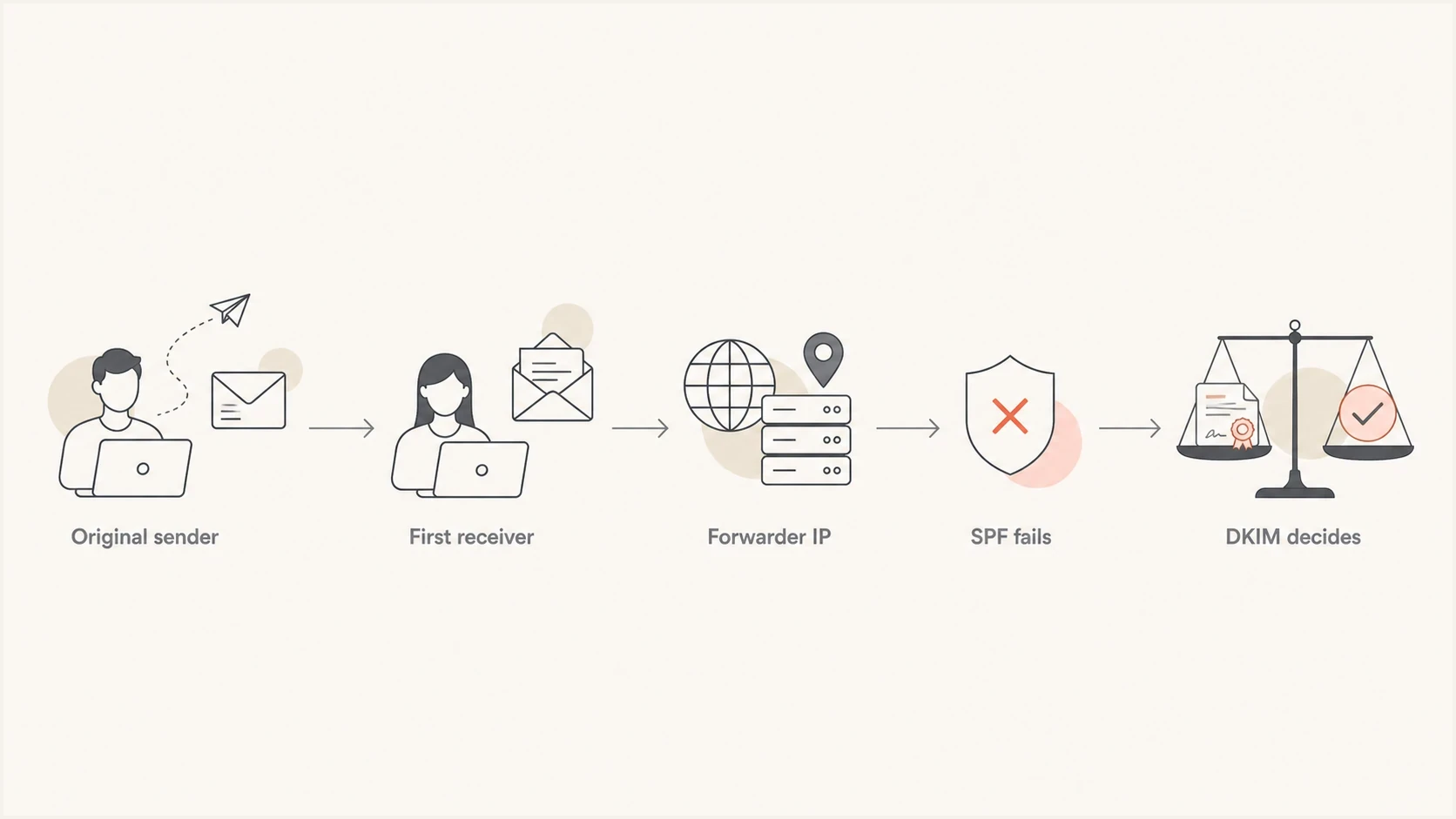
Email forwarding flowchart showing SPF failure and DKIM-based DMARC validation
Authentication pass versus DMARC alignment
SPF and DKIM produce their own authentication results. DMARC then asks whether a passing SPF Return-Path domain or passing DKIM signing domain aligns with the domain in the visible From header. Under relaxed alignment, the domains can share the same organizational domain. Under strict alignment, they must match exactly.
This distinction explains why SRS solves an SPF transport problem without usually solving DMARC. The rewritten address can authenticate under the forwarder's domain, while the visible From header still contains the original sender's domain. The SPF result is pass, the SPF alignment result is fail, and DMARC still needs aligned DKIM.
|
|
|
|
|---|---|---|---|
Original Return-Path retained | SPF usually fails | No SPF alignment pass | Needs aligned DKIM |
SRS rewrites Return-Path | SPF can pass | Usually not aligned with original From | Needs aligned DKIM |
Aligned DKIM survives | DKIM passes | DKIM domain aligns | Pass |
Trusted ARC chain present | Prior results are recorded | Current DMARC can still fail | Receiver can apply a local override |
Authentication and alignment outcomes
Alignment defaults
DMARC uses relaxed SPF and DKIM alignment unless the record sets aspf=s or adkim=s. Strict alignment makes indirect mail less tolerant because a subdomain and its parent domain no longer count as aligned.
Why SPF fails but DKIM can survive
SPF asks whether the connecting IP is allowed to send for the envelope sender domain. That works for direct mail because the authorized sending platform connects to the receiver. After forwarding, the last system is the forwarder, so the original sender's SPF authorization no longer describes the connection.
DKIM is bound to the message rather than the latest SMTP connection. The sender signs selected headers and a body hash, and the final receiver checks the signature against the public key in DNS. DKIM survives when the signed parts remain semantically unchanged under the selected canonicalization. Subject tags, added footers, MIME re-encoding, body wrapping, and changes to signed headers can invalidate it.
SPF after forwarding
- IP check: The final receiver checks the forwarder's IP against the current Return-Path domain.
- SRS: A forwarder can rewrite the Return-Path so SPF passes for its own domain.
- Limit: That SRS domain normally does not align with the original visible From domain.
DKIM after forwarding
- Signature: The signature remains valid when the signed headers and body still verify.
- Breakage: Footers, header rewrites, and MIME changes can invalidate the signature.
- Alignment: The passing d= domain must align with the visible From domain for DMARC.
Simplified forwarded pathtext
Original delivery:
example.com -> recipient mailbox
SPF checks example.com against original sending IP: pass and aligned
DKIM signature d=example.com: pass and aligned

Forwarded delivery:
recipient mailbox -> second mailbox
SPF checks example.com against forwarding IP: fail
DKIM signature d=example.com: pass if signed content is unchanged
DMARC: pass because aligned DKIM survives
When forwarding makes DMARC fail
Forwarding makes DMARC fail when the message loses both aligned paths. SPF fails or becomes unaligned because the final connection and Return-Path belong to the forwarder. DKIM fails because the forwarded message no longer matches the signed version, or it passes under a domain that does not align. With a strict p=reject policy, the final receiver can reject the message according to its local policy.
Do not fix forwarding by trusting random IPs
Adding a forwarder's IP to your SPF record is usually the wrong fix. SPF authorizes systems to send with your domain in the envelope sender. Adding infrastructure you do not control grants authorization without restoring the forwarding path's DMARC alignment.
- Body edits: Footers and link rewrites can break DKIM.
- Header edits: Subject tags and changes to signed headers can break DKIM.
- Mailing lists: List footers and subject prefixes can break a signature that simple alias forwarding would preserve.
- ARC use: A trusted ARC chain can support a receiver's local handling decision after DMARC fails.
ARC lets an intermediary record the authentication results it observed before forwarding and seal that history. ARC does not convert the final DMARC result into a pass. The final receiver validates the chain, decides whether it trusts the intermediary, and can use that evidence when applying local policy. Read more about ARC in forwarded mail.
How to tell forwarding from spoofing
Start with delivery impact. If aggregate reports show more rejected messages while customer complaints and bounce volume remain flat, the added volume is often unauthorized mail being blocked. An aggregate rejection count alone does not establish a forwarding problem.
If customer complaints or bounce messages rise at the same time, investigate a forwarding failure. Check the Authentication-Results headers on a delivered sample when one is available, confirm whether aligned DKIM passed, identify which receiver reported the failure, and compare the source with known forwarding routes. A focused domain health check verifies the public DNS setup before report analysis begins.
- Bounces: Match rejected report volume against actual bounce messages and support tickets.
- Sources: Group unknown IPs by receiver, reported source, geography, and daily pattern.
- Alignment: A raw DKIM pass does not help DMARC unless its d= domain aligns with From.
- Headers: Authentication-Results, ARC headers, and Received hops can confirm an indirect route.
- History: A stable source and recipient pattern supports forwarding more than scattered one-off attempts.
DMARC records drawer showing filters, record rows, authentication results, and CSV export
Suped's DMARC record table supports this investigation by filtering reports by source, receiver, authentication result, and domain alignment. That narrows an unknown-IP pattern into sources to confirm, dismiss as unauthorized, or repair.
?
What's your domain score?
Deep-scan SPF, DKIM & DMARC records for email deliverability and security issues.
What senders and forwarders should do
Senders cannot control every recipient forwarding rule. The sender-side response is to apply aligned DKIM to every legitimate stream, monitor real failures, and avoid weakening DMARC because one indirect route is noisy. Forwarders should preserve signed content, use SRS for bounce handling, and add ARC when they authenticate mail before forwarding it.
Sender actions
- Sign mail: DKIM-sign every stream with a d= domain aligned to its visible From domain.
- Use relaxed: Prefer relaxed DKIM canonicalization unless a tested requirement calls for strict handling.
- Stage policy: Move through monitored policy changes only after legitimate sources authenticate and align.
- Watch impact: Compare aggregate failures with bounces and support cases before changing authentication.
Forwarder actions
- Preserve content: Avoid adding footers or changing MIME structure after authentication.
- Use SRS: Rewrite the Return-Path for SPF and reliable bounce handling, without claiming it restores alignment.
- Seal ARC: Record prior authentication results in a valid chain that receivers can evaluate.
- Limit rewrites: Avoid subject tags, disclaimers, and link changes on forwarded messages.
Example quarantine DMARC recorddns
_dmarc.example.com TXT (
  "v=DMARC1; p=quarantine;"
  "rua=mailto:dmarc@example.com"
)
Example strict DMARC recorddns
_dmarc.example.com TXT (
  "v=DMARC1; p=reject;"
  "rua=mailto:dmarc@example.com"
)
Stage policy without pct
RFC 9989 marks the pct tag as historic. For a current rollout, collect aggregate reports at p=none, correct legitimate sources, then publish quarantine or reject as a deliberate policy change. Do not depend on pct for partial enforcement.
This is where Hosted DMARC helps operationally. Suped's product lets teams manage reporting addresses, review authentication data, and publish deliberate policy changes without repeated manual DNS edits during a forwarding investigation.
For recipient-side failures, the repair is usually at the forwarding system rather than in the original sender's SPF record. Keep those cases separate from direct-source authentication work because the evidence and owner differ. The operational steps for forwarding failures cover that split.
How Suped fits into this workflow
Suped's product turns aggregate DMARC data into a working queue for forwarding investigations. Filter by source, receiver, SPF result, DKIM result, and alignment, then compare a suspected route with bounce and support data before changing DNS or policy.
Suped workflow for forwarding noise
- Filter: Isolate SPF failures, surviving DKIM signatures, and alignment results by receiver.
- Classify: Separate known forwarding routes from direct senders and unauthorized traffic.
- Compare: Match report changes with bounce logs and customer reports before treating them as delivery loss.
- Alert: Notify the responsible team when an authentication pattern crosses a configured threshold.
If the immediate question is whether a domain's DMARC DNS record is valid, run a DMARC checker first. If the record is valid and reports still show failures, move to source classification, alignment analysis, and impact checks.
A practical decision path
Use the same decision path for each suspected forwarding source. It keeps risky SPF changes out of the investigation and separates authentication evidence from actual delivery impact.
Confidence levels for forwarded mail
Use these clues together before deciding whether a source is forwarding or abuse.
Low confidence
Investigate
Unknown IP, both aligned paths fail, no known receiver pattern
Medium confidence
Compare
Known receiver, SPF fails, aligned DKIM passes intermittently
High confidence
Fix route
Known forwarder, stable recipient pattern, complaints match
Abuse likely
Keep policy
No bounces, both paths fail, scattered sources repeat
A rejection count in a DMARC aggregate report is not the same as a customer delivery failure. Reports describe how receivers evaluated traffic that used your domain in the visible From header. That traffic includes authorized direct mail, indirect mail, misconfigured senders, and unauthorized use.
- Confirm impact: Check bounce logs, support tickets, and sender logs for the same period.
- Check alignment: Confirm whether a passing DKIM d= domain aligns with the visible From domain.
- Inspect the route: Use message headers and report patterns to distinguish forwarding from a direct sender.
- Avoid SPF fixes: Do not authorize a forwarder's IP unless it legitimately sends mail for your domain.
- Escalate the path: Ask the forwarder to preserve DKIM, use SRS, and seal ARC when supported.
Views from the trenches
Best practices
Preserve DKIM-signed content in forwarding rules and let DMARC reports prove what changed.
Compare rejection counts with bounces before treating aggregate report spikes as delivery loss.
Group unknown IPs by source and recipient pattern before deciding they are trusted forwards.
Common pitfalls
Adding random forwarding IPs to SPF gives those systems permission they should not have.
Treating every large-provider source as forwarding can hide abuse and tenant routing errors.
Lowering DMARC policy for all mail to save one forward path weakens domain protection.
Expert tips
Use relaxed DKIM canonicalization and aligned signing domains on every legitimate mail stream.
Ask partners to use SRS and ARC when they forward mail that keeps the original visible From.
A reject spike without customer complaints often indicates blocked unauthorized traffic.
A marketer says DMARC only needs one aligned authentication path, so a forwarded message can still pass when aligned DKIM survives.
2023-06-14 - Email Geeks
A marketer says SPF failure in forwarded mail can be normal, but both aligned paths failing requires review of message changes and source patterns.
2023-06-14 - Email Geeks
The practical answer
Forwarding usually removes SPF as a DMARC path because the final receiver sees the forwarder's IP. SRS can make SPF pass for a rewritten Return-Path, but that domain normally remains unaligned with the original visible From domain. An intact, aligned DKIM signature is therefore the most reliable sender-controlled path to a DMARC pass after forwarding.
When both aligned paths fail, compare the report with bounces, message headers, customer reports, and the source pattern before changing policy. Senders should maintain aligned DKIM and a verified source inventory. Forwarders should preserve signed content, use SRS for the Return-Path, and add ARC where receivers can evaluate it. This same evidence-based process applies to other legitimate failures caused by indirect mail flows.




