What information is contained in DMARC RUA and RUF reports?

Published 12 Jun 2025
Updated 31 Jul 2026
11 min read
Summarize with
Updated on 31 Jul 2026: We updated this guide for RFC 9989, RFC 9990, and RFC 9991, including current RUA fields, RUF privacy controls, historic tags, and external report authorization.
RUA means Reporting URI for Aggregate data. DMARC RUA reports contain aggregate authentication data, not the content of individual emails. A normal RUA report tells you which source IPs sent mail for a domain, how many messages were seen, what DMARC policy was evaluated, whether SPF and DKIM passed DMARC alignment, and which domain appeared in the RFC5322.From field. It does not include the email body, attachments, subject line, or the full recipient address.
RUF means Reporting URI for Failure data. A RUF report is a per-message failure report, so it can include headers, authentication results, source details, and sometimes the entire failed message. RUF needs controls for sensitive data. It is also optional because most mailbox providers do not send it at meaningful scale.
The short answer is simple: RUA is operational telemetry, while RUF is individual failure evidence. RUA is the report type most teams should rely on for daily DMARC work.
- RUA: Aggregated XML data about sending sources, message counts, policy results, SPF, DKIM, and authenticated domains.
- RUF: Message-level failure data that can contain headers and other identifying details when a receiver sends it.
- Privacy: RUA has a lower message-privacy risk, but RUF needs the same care as other sensitive mail evidence.
What the current DMARC RFCs changed
The current standards split DMARC across three documents. RFC 9989 defines the core protocol, RFC 9990 defines aggregate reporting, and RFC 9991 defines message-specific failure reporting. Together they obsolete RFC 7489. Existing DMARC1 records remain recognizable, but some old tags and report assumptions have changed.
- Historic tags: The pct sampling tag, ri reporting-interval tag, and rf failure-format tag are now historic. Do not add them to new records.
- Aggregate reports: RFC 9990 retains XML reporting and adds clearer fields for report version, discovery method, non-existent subdomain policy, testing mode, errors, and readable authentication details.
- Failure reports: RFC 9991 keeps RUF message-specific, adds an Identity-Alignment field, and requires senders to rate-limit outgoing reports.
- Report cadence: Receivers should send aggregate reports at least once every 24 hours, but the receiver still controls whether it reports and how often.
Do not use an old pct value to stage enforcement. Under RFC 9989, pct has no active role. Stage policy by monitoring legitimate sources, correcting authentication, and changing the p value when the evidence supports it.
What RUA reports contain
A RUA report is an aggregate XML file sent by a receiving mailbox provider to the address in your DMARC record's rua tag. The file is usually compressed with GZIP and normally arrives daily or more often, though exact timing depends on the receiver. It groups observations rather than giving you one row per email.
A parsed RUA report has report metadata, the published DMARC policy, identifiers used for policy evaluation, and records for each observed sending pattern. For a deeper sample, compare this explanation with example RUA reports.
|
|
|
|---|---|---|
Scope | Aggregate | Message-level |
Original content | Not included | Can appear |
Recipient | Domain only, if supplied | Full address can appear |
Normal use | Monitoring | Investigation |
Availability | Common | Rare |
Common fields in DMARC report types
- Metadata: The reporting organization, contact address, report ID, UTC date range, optional errors, and optional generator details.
- Policy: The policy domain, discovery method, p, sp, np, failure options, strict or relaxed SPF and DKIM modes, and testing value.
- Source: The IP address that connected to the receiver and the number of messages in the matching result group.
- Evaluation: The applied disposition, DMARC alignment results for SPF and DKIM, and any local policy override reason.
- Authentication results: SPF and DKIM domains, DKIM selectors, verification outcomes, and optional human-readable result details.
Example RUA record fragmentxml
<record>
  <row>
    <source_ip>203.0.113.10</source_ip>
    <count>248</count>
    <policy_evaluated>
      <disposition>none</disposition>
      <dkim>pass</dkim>
      <spf>pass</spf>
    </policy_evaluated>
  </row>
  <identifiers>
    <header_from>example.com</header_from>
  </identifiers>
  <auth_results>
    <dkim>
      <domain>example.com</domain>
      <selector>s1</selector>
      <result>pass</result>
    </dkim>
    <spf>
      <domain>mail.example.com</domain>
      <scope>mfrom</scope>
      <result>pass</result>
    </spf>
  </auth_results>
</record>
The count covers messages received during the reporting period, including messages later blocked by another filter. It is not a delivered-message total.
What RUA reports leave out
The most important privacy point is that RUA reports do not contain the original email content. They do not include the body, attachments, full message headers, or recipient mailbox local parts such as jane in jane@example.net. They are built for trend analysis and authentication debugging, not message reconstruction.
That does not make RUA anonymous in every sense. A RUA report can still expose operational details, including sending IPs, volumes, authenticated domains, and receiving domains. If one campaign used a dedicated IP during a narrow time window, the aggregate row can still reveal activity to someone who already has context.
RFC 9990 permits optional envelope_to and envelope_from domains in the identifiers section. These fields remain domain-level and do not expose the local part of the recipient address.
- Recipient domain: A receiver can reveal that mail reached a domain such as example.net without naming a mailbox.
- SPF scope: Current reports can label the SPF identity as mfrom. DMARC evaluates the MAIL FROM identity for SPF.
- Filenames: Report filenames sometimes hint at the RFC5322.From domain and the receiver that produced the report.
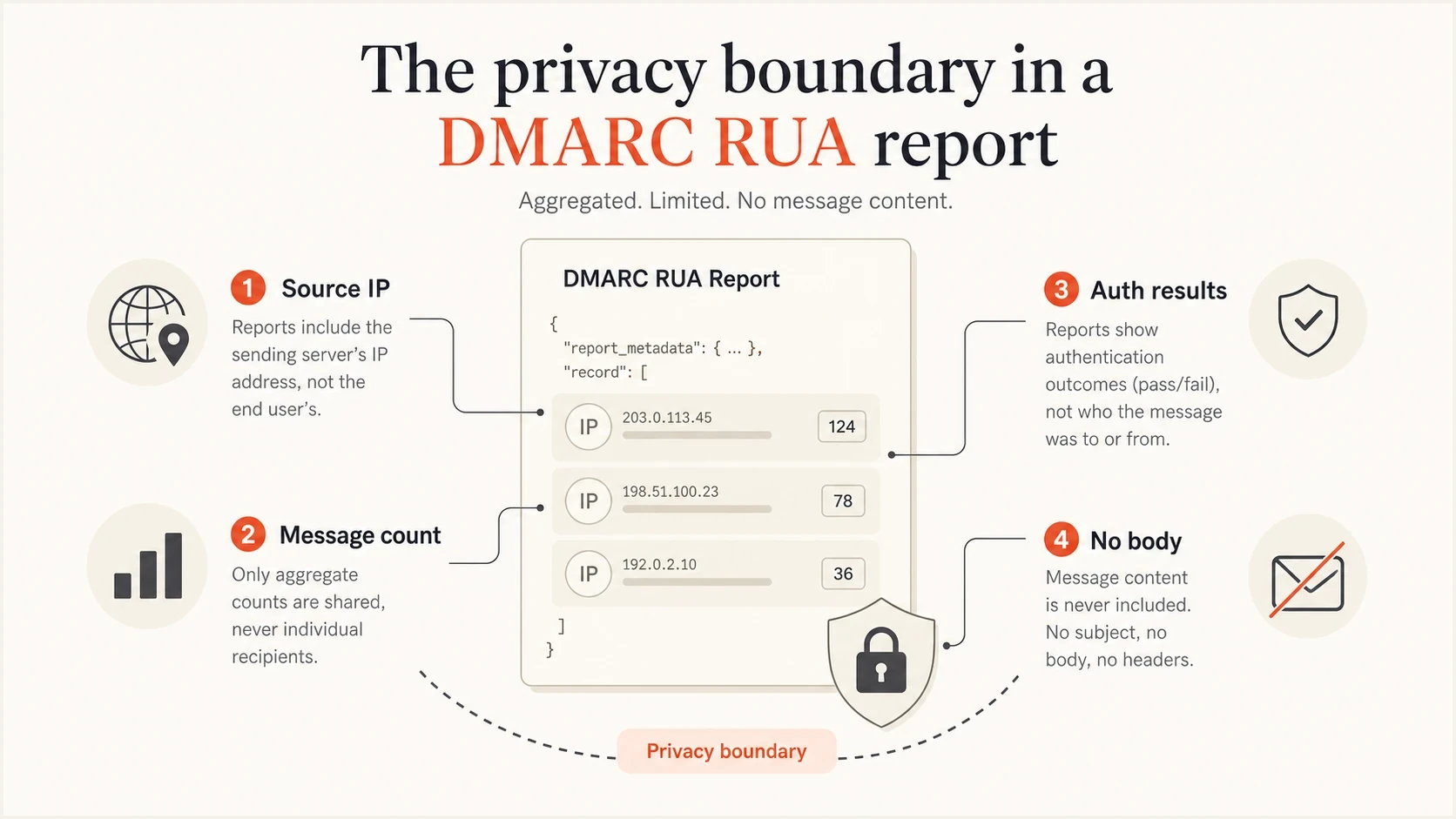
Infographic showing that RUA reports include source and authentication data but no message body.
What RUF reports contain
RUF reports are forensic or failure reports. Instead of summarizing many messages, a RUF report describes a specific message that failed DMARC or matched the failure options requested in the fo tag. A receiver normally generates the report soon after detecting a failure, but the exact contents and rate limits depend on the receiver's policy.
RUA
- Granularity: Aggregated rows by source IP and authentication result.
- Content: No original body, attachments, subject, or full headers.
- Reliability: The normal data source for DMARC monitoring and policy staging.
RUF
- Granularity: One failure report can describe one failed message.
- Content: Headers and original message material can appear if not redacted.
- Reliability: Most receivers send little or none, so plan without depending on it.
A RUF report can include the failure type, source IP, authentication results, envelope sender, portions of the original headers, or the entire message. RFC 9991 also defines Identity-Alignment to show which authentication methods failed to produce an aligned identity. RUF addresses should have restricted access, short retention, documented handling rules, and secure transport.
Example RUF-style failure fieldstext
Feedback-Type: auth-failure
User-Agent: receiver.example
Version: 1
Original-Mail-From: bounce@example.com
Authentication-Results: mx.example; dkim=fail; spf=pass
Reported-Domain: example.com
Source-IP: 203.0.113.10
Auth-Failure: dmarc
Identity-Alignment: dkim
Failure-Reason: DKIM signature did not verify
If you are choosing between report tags, start with RUA and RUF tags, then confirm the operational details against RUA/RUF requirements.
Privacy risk and inference
The privacy risk sits on a scale. RUA is usually appropriate for security and deliverability teams, but it still describes real mail flow. RUF is a different class because it can contain individual message evidence. Its limited availability does not reduce the need to handle it carefully when it arrives.
Privacy exposure by report type
A practical way to rank common DMARC reporting data by exposure risk.
RUA content exposure
Low
No body, subject, attachment, or full message header.
RUA inference exposure
Medium
Source IPs, volumes, and receiver domains can reveal patterns.
RUF exposure
High
Per-message evidence can include headers or the full message.
A lack of email content does not mean a lack of sensitivity. RUA can still disclose vendors, sending services, unauthorized infrastructure, and traffic patterns. That justifies access controls, but the data cannot reconstruct what a recipient read.
- Safe assumption: RUA does not identify the exact recipient mailbox in normal reports.
- Careful assumption: RUA can identify the recipient domain or receiver in some provider output.
- Strict assumption: RUF can identify people or message details, so store it like sensitive incident data.
How to use the data in practice
The practical workflow is to collect RUA reports, group sources, verify which senders are legitimate, fix authentication gaps, and then raise policy in stages. Suped's product is built around that workflow. It parses aggregate reports, groups sending sources, flags authentication problems, and provides steps to fix SPF, DKIM, and DMARC issues.
Suped's product combines DMARC monitoring, hosted SPF, hosted MTA-STS, real-time alerts, blocklist (blacklist) monitoring, and multi-tenant reporting for MSPs. For this workflow, the useful result is a decision: approve a source, fix a selector, remove a sender, or move the policy forward.
DMARC records drawer showing filters, record rows, authentication results, and CSV export
Do not build a DMARC program around RUF. Collect RUA, watch for unknown sources, validate the DNS record, and keep failure evidence as an optional investigative feed where receivers send it.
DMARC checker
Look up a domain's DMARC record and catch policy issues.
?/7tests passed
After checking the published record with the DMARC checker, confirm that reports are arriving, that any external reporting destination is authorized, and that the policy matches the rollout stage.
- Collect: Send RUA to a mailbox or platform that can parse XML and preserve daily history.
- Group: Sort by source IP, sending service, RFC5322.From domain, and authentication result.
- Fix: Repair SPF, DKIM, and selector issues before tightening the DMARC policy.
- Stage: Move through none, quarantine, and reject only after legitimate sources pass.
A safe DMARC record setup
A safe starting record usually asks for RUA reports only. Add RUF only when you have a clear investigative reason, a restricted destination, and a retention policy. The receiving side still decides whether it sends RUF.
RUA-only DMARC TXT valuedns
v=DMARC1; p=none; rua=mailto:dmarc-agg@example.com
RUA plus RUF DMARC TXT valuedns
v=DMARC1; p=quarantine; rua=mailto:agg@example.com; ruf=mailto:ruf@example.com
When a rua or ruf address uses a different organizational domain, that destination must authorize the relationship in DNS. For example, a destination receiving reports for example.com publishes a TXT record at example.com._report._dmarc.destination.example with the value v=DMARC1. Without authorization, conforming receivers ignore the external URI.
External report authorization TXT valuedns
example.com._report._dmarc.destination.example IN TXT "v=DMARC1;"
If you want Suped's product to manage policy staging without repeated DNS edits, Hosted DMARC keeps the record easier to change. If you are drafting a record, the DMARC record generator gives you a TXT value for the policy and reporting addresses you choose.
A sound default is to publish RUA first, confirm report flow, identify legitimate senders, and then tighten policy. RUF is a separate decision, not a requirement for strong DMARC.
- Use RUA: It is the main signal for rollout, source discovery, and ongoing monitoring.
- Restrict RUF: Send it only to a controlled destination if your team has a defined use for it.
- Document access: Give RUA to operators and keep RUF closer to security or incident response.
Views from the trenches
Best practices
Treat aggregate reports as operational data, but still restrict access to mail flow history.
Start with RUA-only reporting, then add forensic reporting only for defined security use cases.
Check provider-specific RUA fields before promising that no recipient domain data exists.
Common pitfalls
Assuming RUA reports name the recipient mailbox often leads to wrong privacy reviews.
Depending on RUF reports for routine monitoring fails because most receivers do not send them.
Sending forensic reports to a shared mailbox creates avoidable exposure and review noise.
Expert tips
Use source IP, SPF identity, and DKIM selector together to identify the real sending path.
Keep RUF retention short because the report can hold headers or the entire failed message.
Check external destination authorization when expected RUA or RUF reports do not arrive.
Marketer from Email Geeks says RUA reports do not include message contents, and they are not meant to reconstruct individual emails.
2024-02-05 - Email Geeks
Marketer from Email Geeks says RUF reports are more identifying when they arrive, but receiving them is uncommon.
2024-02-05 - Email Geeks
Practical recommendation
RUA tells you what happened to authentication across groups of messages. It gives enough detail to find broken senders, unauthorized sources, bad SPF paths, missing DKIM signatures, and policy outcomes. It does not show what the email said or who exactly read it.
RUF is closer to incident evidence. It can contain individual failure information and, depending on redaction, private message details. Because receiver support is limited, use it only as a controlled supplement. A DMARC program should rely on RUA, working authentication, staged policy enforcement, and clear alerting.
Suped's product turns the RUA stream into a source inventory, policy guidance, alerts, and fix steps instead of leaving operators with raw XML. That is the practical difference between receiving reports and using them to run DMARC.




