What does the `!10m` tag mean in a DMARC record?

Published 15 Nov 2025
Updated 14 Aug 2026
10 min read
Summarize with
Updated on 14 Aug 2026: We updated this guide for RFC 9989 and added the DNS authorization step required for external report destinations.
The !10m suffix in a DMARC record means a legacy reporting URI contains an old request not to send a report to that destination when its payload exceeds 10,485,760 bytes. Under RFC 9989, it is not an active DMARC reporting instruction. It can still appear inside the rua or ruf URI value, but report generators should ignore the obsolete size value.
The confusion usually comes from searching for a tag named !10m. There is no such top-level tag. RFC 7489 described this as an optional size limit attached to a DMARC reporting URI. RFC 9989 keeps it only as obs-dmarc-report-size, which makes it a legacy cleanup clue rather than a policy setting.
What !10m means
A DMARC report destination is written as a URI. For email reports, that usually starts with mailto:. Older DMARC syntax let the domain owner add an optional maximum report size after the URI, separated by an exclamation point. So mailto:dmarc@example.com!10m requested delivery to that mailbox only when the report payload did not exceed 10 x 2^20 bytes.
Obsolete URI size suffix grammartext
dmarc-uri = URI
obs-dmarc-uri = dmarc-uri obs-dmarc-report-size
obs-dmarc-report-size = "!" 1*DIGIT [ "k" / "m" / "g" / "t" ]
Under RFC 7489, a number without a unit meant bytes, while k, m, g, and t used powers of two. That makes !10m equal to 10,485,760 bytes. In current operational terms, it is obsolete size-cap notation, not a current report-size control.
|
|
|
|---|---|---|
!10m | 10 x 2^20 bytes | Obsolete size value |
!50m | 50 x 2^20 bytes | Obsolete size value |
!500k | 500 x 2^10 bytes | Obsolete size value |
!1g | 1 x 2^30 bytes | Obsolete size value |
Common URI size suffix examples
This suffix is attached to one reporting URI. It does not change the DMARC policy, SPF or DKIM alignment, report scheduling, or whether aggregate or failure reports are requested.
What changed with DMARCbis
- RFC 7489 is no longer the current DMARC reference for this syntax.
- RFC 9989 keeps the old !size pattern only as obsolete URI grammar.
- The pct, rf, and ri tags are historic, so current records should omit them.
- RFC 9990 defines aggregate XML reporting, which typically covers one UTC day.
- RFC 9991 defines failure reporting and how ruf works with fo.
For new records, do not add !10m. If an inherited record already has it, clean up the suffix and any historic pct, rf, or ri tags during the next controlled DNS change. Authentication coverage and report delivery remain the immediate operational checks.
Where the suffix sits
The suffix sits only on the exact URI where it appears. If a record has two rua destinations and only the first has !10m, only that first URI carries the obsolete size value. It does not carry over to the second destination.
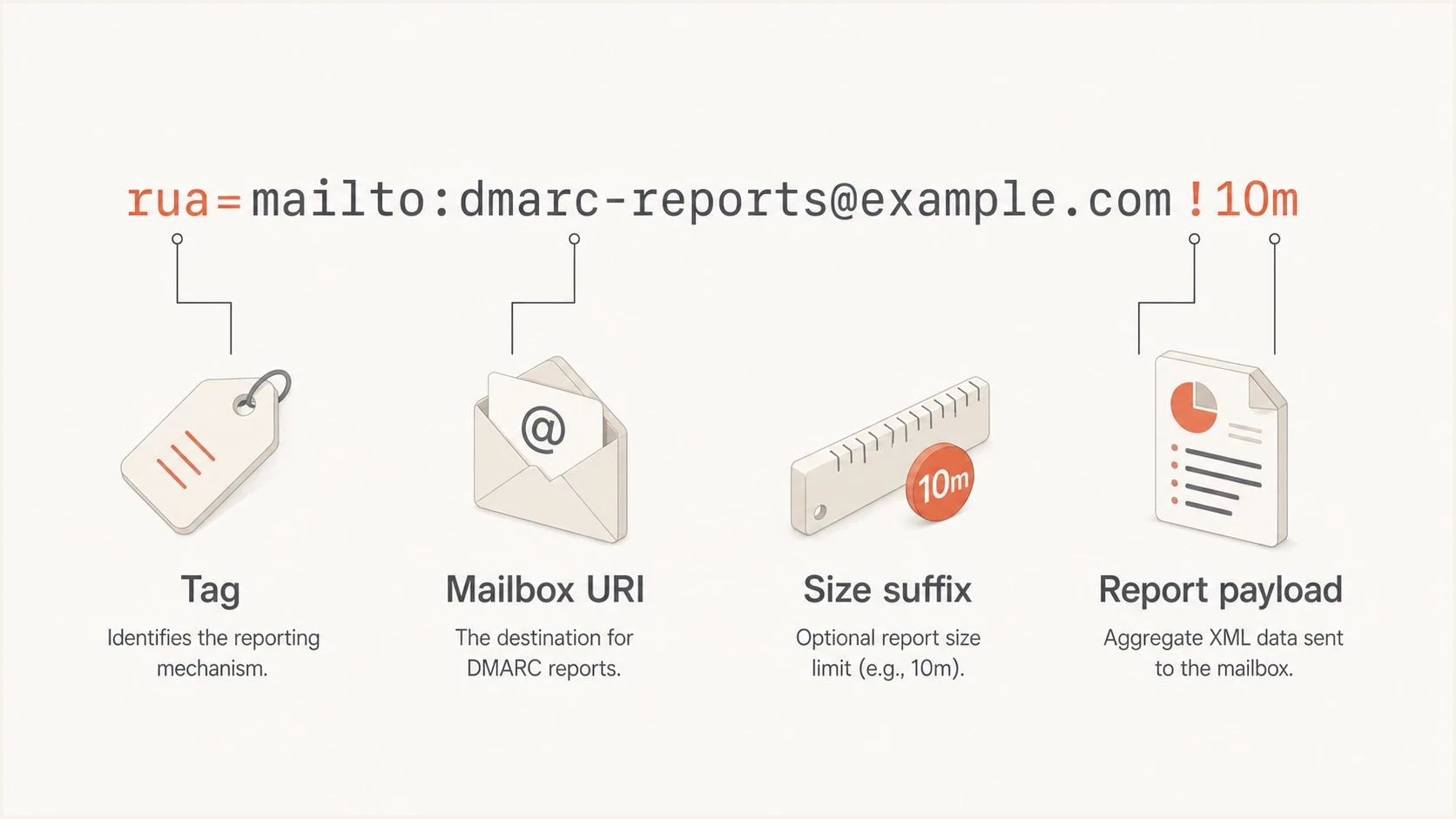
DMARC rua and ruf reporting URI diagram showing !10m as an obsolete per-URI size suffix.
The same URI-list syntax can appear in aggregate report destinations and failure report destinations. The rua tag requests aggregate XML reports under RFC 9990. The ruf tag requests failure reports under RFC 9991, and the fo tag influences which failure cases are requested. Many receivers do not send ruf reports, and those reports can contain sensitive message details. Compare ruf and rua before adding both to a production domain.
|
|
|
|---|---|---|
rua | Aggregate | Report path |
ruf | Failure | Report path |
fo | Failure | Failure options |
!10m | One URI | Obsolete size value |
ri | Historic tag | Obsolete interval request |
How nearby DMARC values differ
Authorize external report destinations
A different rule applies when a reporting URI uses an external organizational domain. If the DMARC policy for example.com sends aggregate reports to example.net, the report consumer must authorize that relationship in DNS. The !10m suffix has no effect on this check.
External reporting authorization at example.netdns
example.com._report._dmarc.example.net. TXT "v=DMARC1"
Under RFC 9990, a receiver must ignore an external rua URI when the authorization record is missing. RFC 9991 applies the same verification procedure to external ruf destinations. Check every external destination separately when reports stop arriving.
The reporting mailbox can exist and accept mail while DMARC reports still fail to arrive. Missing external destination authorization causes the reporting URI to be ignored before delivery is attempted.
How to read this record
This legacy record requests monitoring for the domain and its subdomains, aggregate reports, failure reports, and specific failure conditions. Under RFC 7489, it also requested AFRF failure reports, full policy application, daily aggregate reports, and a 10-megabyte binary payload limit on two URIs. RFC 9989 keeps the core policy and reporting tags but treats !10m as obsolete URI syntax and lists pct, rf, and ri as historic tags.
Legacy DMARC record with !10mdns
v=DMARC1; p=none; sp=none;
rua=mailto:dmarc@example.com!10m,mailto:dmarc@example.net;
ruf=mailto:dmarc@example.com!10m; fo=1; rf=afrf;
pct=100; ri=86400
- v=DMARC1 identifies the TXT record as a DMARC record.
- p=none requests no receiver enforcement for mail using the organizational domain.
- sp=none requests the same non-enforcing policy for existing subdomains.
- The rua path requests aggregate reports at two mailboxes, with obsolete !10m syntax on the first URI.
- The ruf path requests failure reports at one mailbox, also with obsolete !10m syntax.
- fo=1 requests a failure report if any underlying authentication mechanism fails to produce an aligned pass result.
- Under RFC 7489, rf=afrf selected AFRF, pct=100 requested full policy application, and ri=86400 requested a one-day reporting interval. All three tags are historic under RFC 9989.
Do not publish angle brackets around a DMARC URI in DNS. If a copied example shows <mailto:...>, treat that as formatting from the source, not as DNS syntax.
Should you keep it
For new or actively managed records, remove the suffix unless a documented migration requires temporary compatibility with an RFC 7489-era parser. A mailbox cap or report processor cap explains why it was added under older practice, but RFC 9989 no longer treats it as an active instruction.
Keep during migration
- A legacy mailbox limit is documented and the record cannot be changed yet.
- A legacy report parser still expects the suffix during a defined migration window.
- The value has an owner, an expiry condition, and a scheduled cleanup change.
Remove from clean records
- Nobody owns the value or can explain why it was added.
- Internal validation or support tooling misreads the obsolete syntax.
- The cap provides no current DMARCbis behavior.
The suffix is rare enough that some validators and older scripts mishandle it. That does not automatically invalidate the whole record. An RFC 9989-aware parser can recognize !10m as obsolete URI syntax and ignore the size value. When an error appears, confirm whether the parser fails on the suffix, multiple report URIs, or accidental formatting characters.
Cleaner RFC 9989 recorddns
v=DMARC1; p=none; sp=none;
rua=mailto:dmarc@example.com,mailto:dmarc@example.net;
ruf=mailto:dmarc@example.com; fo=1
How to validate it
Validate a record with this suffix in two ways. First, read the syntax manually so the URI carrying the obsolete size value is clear. Second, use a parser that understands RFC 9989 obsolete URI syntax, multiple rua destinations, optional ruf reporting, and fo failure options. Also verify DNS authorization for every external reporting domain.
Suped's DMARC checker parses the record and shows the configured tags, which helps separate record syntax errors from obsolete values that need a controlled cleanup.
DMARC checker
Look up a domain's DMARC record and catch policy issues.
?/7tests passed
A one-off check answers whether the DNS record parses. Ongoing DMARC monitoring shows whether legitimate sources authenticate, unknown sources use the domain, and aggregate reports arrive at the expected destination.
DMARC record detail view showing SPF, DKIM, DMARC, rDNS diagnostics, and DNS records
For teams that want less manual DNS editing, Suped's Hosted DMARC can manage policy staging and reporting destinations through a controlled workflow, with DNS changes and report delivery reviewed in the same Suped product.
Common mistakes with !10m
The most common mistake is treating !10m as if it changes enforcement or still controls report delivery under current DMARCbis. It does neither. A domain with p=none remains in monitoring mode whether the suffix is present or not.
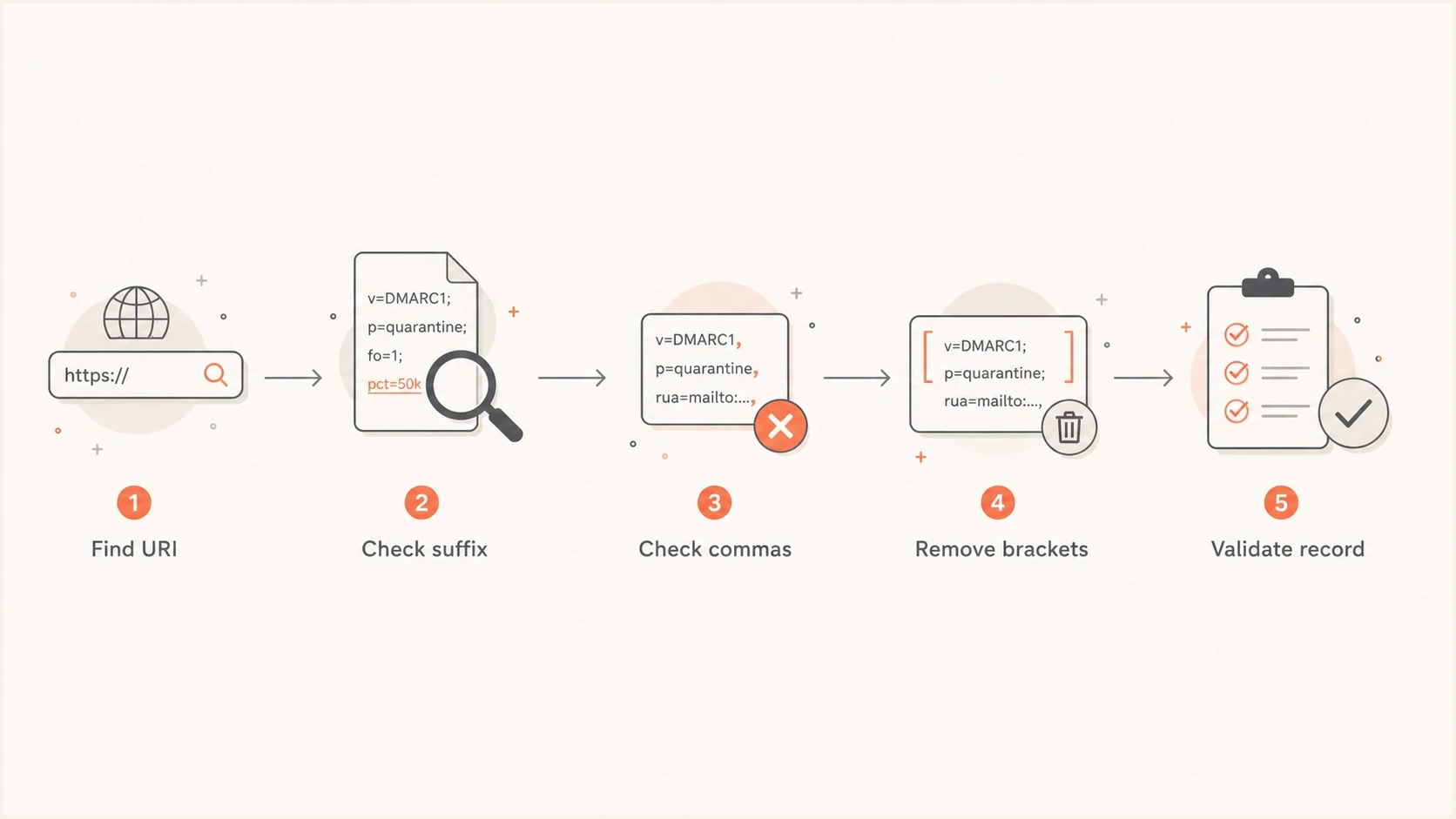
Flowchart for checking a DMARC record with an obsolete !10m URI size suffix.
- Wrong scope: the suffix belongs to one URI, not to the whole DMARC record.
- Wrong tag: it is not a DMARC tag like p, sp, or rua.
- Outdated assumption: RFC 9989 tells report generators to ignore the old size value.
- Wrong interval: !10m never changed scheduling, and ri is now historic.
- Wrong parser: some tools reject old but tolerated records when their URI grammar is incomplete.
- Wrong record: accidental brackets, spaces, or copied markup can create the actual syntax error.
If you are cleaning up a record, use a full DMARC tag list to separate active tags, historic tags, and URI modifiers. That keeps the cleanup focused on behavior that current receivers use.
Views from the trenches
Best practices
Treat !10m as obsolete DMARCbis URI syntax and verify parser behavior before editing.
Validate every rua and ruf URI separately because any suffix is tied to one destination.
Prefer one clean aggregate reporting path before adding optional failure reports or fo settings.
Common pitfalls
Assuming !10m still controls report size under RFC 9989 leads to stale DNS choices.
Leaving angle brackets in DNS can break parsing even when the obsolete suffix is tolerated.
Adding ruf without privacy review can send sensitive failed message details to the wrong place.
Expert tips
Compare parser warnings with RFC 9989 before deleting any syntax that looks unfamiliar.
Remove the suffix when it only exists because an older hosted setup copied it forward.
Use aggregate reports to verify real mail flow before tightening p, sp, or np policies.
Marketer from Email Geeks said in 2025 that the suffix was used as a maximum report size on one URI.
2025-04-01 - Email Geeks
Marketer from Email Geeks said the syntax was rare enough that some validators misread records containing it.
2025-04-01 - Email Geeks
Practical recommendation
If you find !10m in a DMARC record, do not delete it blindly. It means the attached reporting URI carries a legacy maximum report payload of 10,485,760 bytes. The record can still parse, but current DMARCbis report generators should ignore the size value.
A safe cleanup workflow is straightforward: confirm the suffix belongs to a valid rua or ruf URI, remove copied formatting characters, verify external destination authorization, and remove the suffix with any historic pct, rf, or ri tags during a controlled DNS change. Before moving toward enforcement, confirm that every legitimate sender passes aligned SPF or DKIM.
Suped's product supports this workflow by validating the published record, monitoring aggregate report delivery, surfacing authentication failures, and managing hosted DMARC changes when DNS access is shared across teams.




