List of DMARC tags and their meanings

Complete DMARC tags reference
Updated on 17 Aug 2026: We updated this DMARC tag reference for RFC 9989, RFC 9990, and RFC 9991, with clearer DNS syntax, rollout guidance, and reporting behavior.
This table provides a quick reference for active DMARC tags, historic DMARC tags, their purposes, possible values, and examples. Use it when building or reviewing a DMARC TXT record.
|
|
|
|
|
|---|---|---|---|---|
v | Version | DMARC1 | v=DMARC1 | Required |
p | Domain Owner Assessment Policy | none, quarantine, reject | p=quarantine | Recommended |
rua | Aggregate report URI | mailto: addresses | rua=mailto:dmarc@example.com | Recommended |
sp | Existing subdomain policy | none, quarantine, reject | sp=quarantine | Optional |
np | Non-existent subdomain policy | none, quarantine, reject | np=reject | Optional |
psd | Public suffix domain flag | y, n, u | psd=n | Optional |
t | Policy test mode | y, n | t=y | Optional |
pct | Historic sampling rate | 0-100 (historic) | pct=25 | Historic |
ruf | Failure report URI | mailto: addresses | ruf=mailto:forensic@example.com | Optional |
fo | Failure reporting options | 0, 1, d, s | fo=1 | Optional |
adkim | DKIM alignment mode | r (relaxed), s (strict) | adkim=s | Optional |
aspf | SPF alignment mode | r (relaxed), s (strict) | aspf=s | Optional |
rf | Historic report format | afrf (historic tag) | rf=afrf | Historic |
ri | Historic reporting interval | seconds (historic tag) | ri=86400 | Historic |
DMARC tag reference
Quick tip
Start with the version tag (v), publish the recommended policy tag (p) explicitly, and add rua for aggregate reports. RFC 9989 treats a missing p as p=none when at least one valid rua URI is present; without a valid p or rua, the receiver applies no DMARC processing. If you request failure reports with ruf, choose an fo value only after considering report availability and privacy. A monitoring record that requests both report types might look like:
Monitoring record with failure reports
v=DMARC1; p=none; rua=mailto:dmarc-reports@example.com;
ruf=mailto:dmarc-forensic@example.com; fo=1;
Need help building your DMARC record?
Use our interactive DMARC generator to create a valid DMARC record step by step. The tool covers each active tag and helps you choose values for your domain's authentication and reporting needs.
DMARC record generator
Choose your policy, reporting addresses, and alignment settings.
DNS TXT record
v=DMARC1; p=quarantine; rua=mailto:dmarc@example.com
Understanding DMARC tags
A DMARC record is a policy published for email servers that receive mail using your domain in the visible From address. Its tags define requested handling, report destinations, and alignment settings. A message passes DMARC when at least one SPF or DKIM authenticated identifier both passes authentication and aligns with the visible From domain. RFC 9989 also defines DNS Tree Walk policy discovery, which can find applicable records higher in the DNS hierarchy instead of relying on the older Public Suffix List method. This page lists active and historic DMARC tags and explains their roles.
What DMARC tags do
- Define: Email authentication policies
- Specify: Report destinations
- Control: Alignment requirements
- Configure: Failure reporting
- Signal: Policy test mode
Why they matter
- Reduce: Direct domain spoofing
- Protect: Legitimate mail during rollout
- Reveal: Authorized and unknown senders
- Provide: Authentication visibility
- Support: Policy decisions based on reports
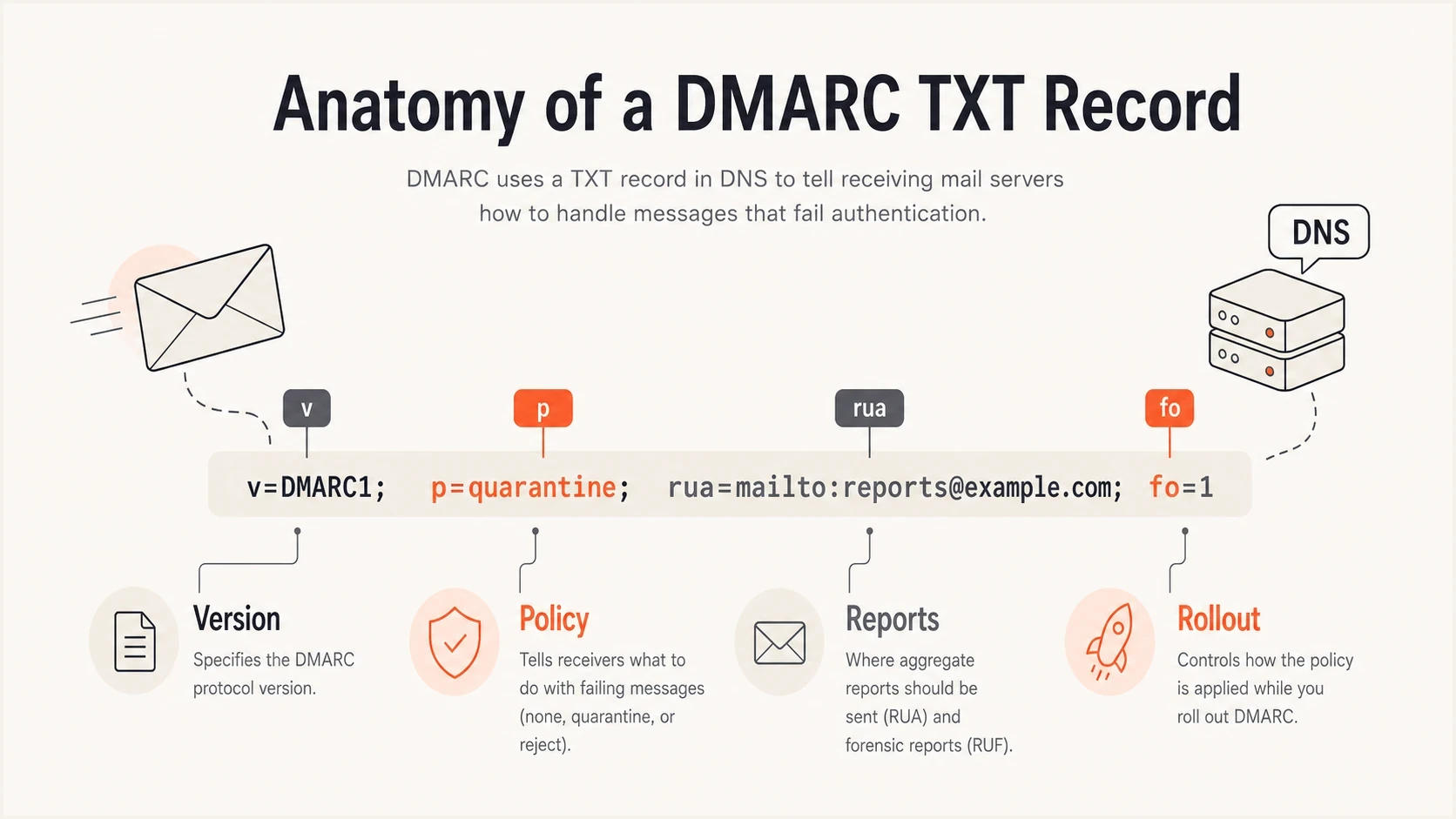
DMARC record tags grouped by version, policy, reporting, and rollout controls.
Where to publish a DMARC record
Publish the DMARC Policy Record as a DNS TXT record at _dmarc.example.com, replacing example.com with the domain used in the visible From address. The value uses tag=value pairs separated by semicolons. Whitespace around the equals sign and separators is allowed, and the final semicolon is optional.
DMARC DNS host and TXT value
Host: _dmarc.example.com
TXT value: v=DMARC1; p=none; rua=mailto:dmarc-reports@example.com
- Publish one DMARC Policy Record at each queried DNS name. If a receiver finds multiple DMARC records at one name, it discards all of them at that name.
- Place v=DMARC1 first. The value DMARC1 is case sensitive, so v=dmarc1 does not identify a valid record.
- Separate tags with semicolons and separate multiple rua or ruf URIs with commas.
- Receivers ignore unknown tags. A syntax error in a known tag causes that tag to use its default when one exists or to be ignored.
v: version tag
The version tag identifies the record as DMARC and must always be the first tag.
Purpose
Marks the TXT record as a DMARC Policy Record. You must have v=DMARC1 first or receiving servers ignore the entire record.
Value
Must always be DMARC1. This is the only version value currently defined.
Example
Version tag
v=DMARC1
Common errors
- Lowercase: Using v=dmarc1 is invalid.
- Version numbers: Adding v=DMARC1.0 is invalid.
- Tag order: Placing v anywhere but first invalidates the record.
p: policy tag
The policy tag states the domain owner's requested handling for messages that fail DMARC. Receiving systems still make final delivery decisions under their local policies.
Purpose
Requests how receiving systems handle mail that fails DMARC. The policy applies to the queried domain and can apply to subdomains unless sp or np provides a more specific policy.
Available values
- none: Offers no handling preference for failing mail. Use it while collecting reports and correcting legitimate senders.
- quarantine: Indicates that failing mail is suspicious. A receiver can place it in spam, flag it, or use other local handling.
- reject: Indicates that use of the domain is not valid when DMARC fails. A receiver can reject the message, subject to its local policy.
Default value
RFC 9989 recommends p but does not require it. If p is missing or invalid and rua contains at least one valid reporting URI, the receiver continues as if p=none. If neither a valid p nor a valid rua is present, the receiver applies no DMARC processing. Publish p explicitly to make the intended policy clear.
Examples
Policy tag examples
p=none
p=quarantine
p=reject
Implementation strategy
- Monitor: Start with p=none and collect aggregate reports until every legitimate sending source is known.
- Remediate: Fix SPF or DKIM authentication and alignment for legitimate sources before requesting enforcement.
- Test: Publish the intended quarantine or reject policy with t=y when you need RFC 9989 test-mode handling.
- Enforce: Remove t or set t=n only after reports show legitimate mail will continue to pass.
Timing and indirect mail
For general-purpose email domains whose users post to mailing lists or use forwarding addresses, RFC 9989 advises against p=reject because indirect delivery can break SPF or DKIM. Before considering reject, collect at least one month of p=none data, then at least one month of p=quarantine data, and compare the results. Some deployments need several months of reporting.
DMARC policy rollout stages
A practical rollout starts with reporting, continues through remediation and test mode, and reaches enforcement only after report review.
Monitoring
p=none
Collect reports and inventory legitimate senders.
Testing
t=y
Signal test mode while reviewing policy impact.
Enforcement
t=n or omit t
Request the chosen policy after legitimate mail passes.
rua: aggregate report URI
The aggregate report URI specifies where summary reports defined by RFC 9990 should be sent. These machine-readable reports help identify sending sources and authentication issues.
Purpose
Requests aggregate reports that contain message counts, source IP addresses, authentication results, and applied dispositions. Suped's product can receive and parse these reports through Suped DMARC monitoring, turning XML data into a sending-source inventory and issue workflow.
Format
Use a URI, typically mailto: followed by an email address. Separate multiple URIs with commas.
Default value
None. If rua is omitted, receivers must not generate aggregate reports for the domain.
Examples
Aggregate report addresses
rua=mailto:dmarc-reports@example.com
rua=mailto:dmarc-reports@example.com,mailto:security-team@example.com
Report content
- Senders: Source IP addresses observed using your domain.
- Results: SPF, DKIM, and DMARC results, including alignment data.
- Volume: Message counts grouped by source and result.
- Policy: The discovered policy and selected disposition.
Size limits
Older DMARC records used the ! syntax to request a maximum report size. RFC 9989 marks that suffix as obsolete, so reporters should ignore the limit. In older records, this example requested reports up to 10 megabytes.
Obsolete aggregate report size limit
rua=mailto:dmarc-reports@example.com!10m
External addresses
When the organizational domain in a rua destination differs from the domain publishing the DMARC record, the destination must authorize the relationship in DNS. The administrator of the destination domain publishes the authorization record.
For example, if mynewsletter.com sends reports to security@mycompany.com, publish this TXT record in the mycompany.com DNS zone:
External report authorization
Host: mynewsletter.com._report._dmarc.mycompany.com
TXT value: v=DMARC1
Suped's product publishes the needed authorization for Suped report destination domains, so customers do not create that destination-side record themselves.
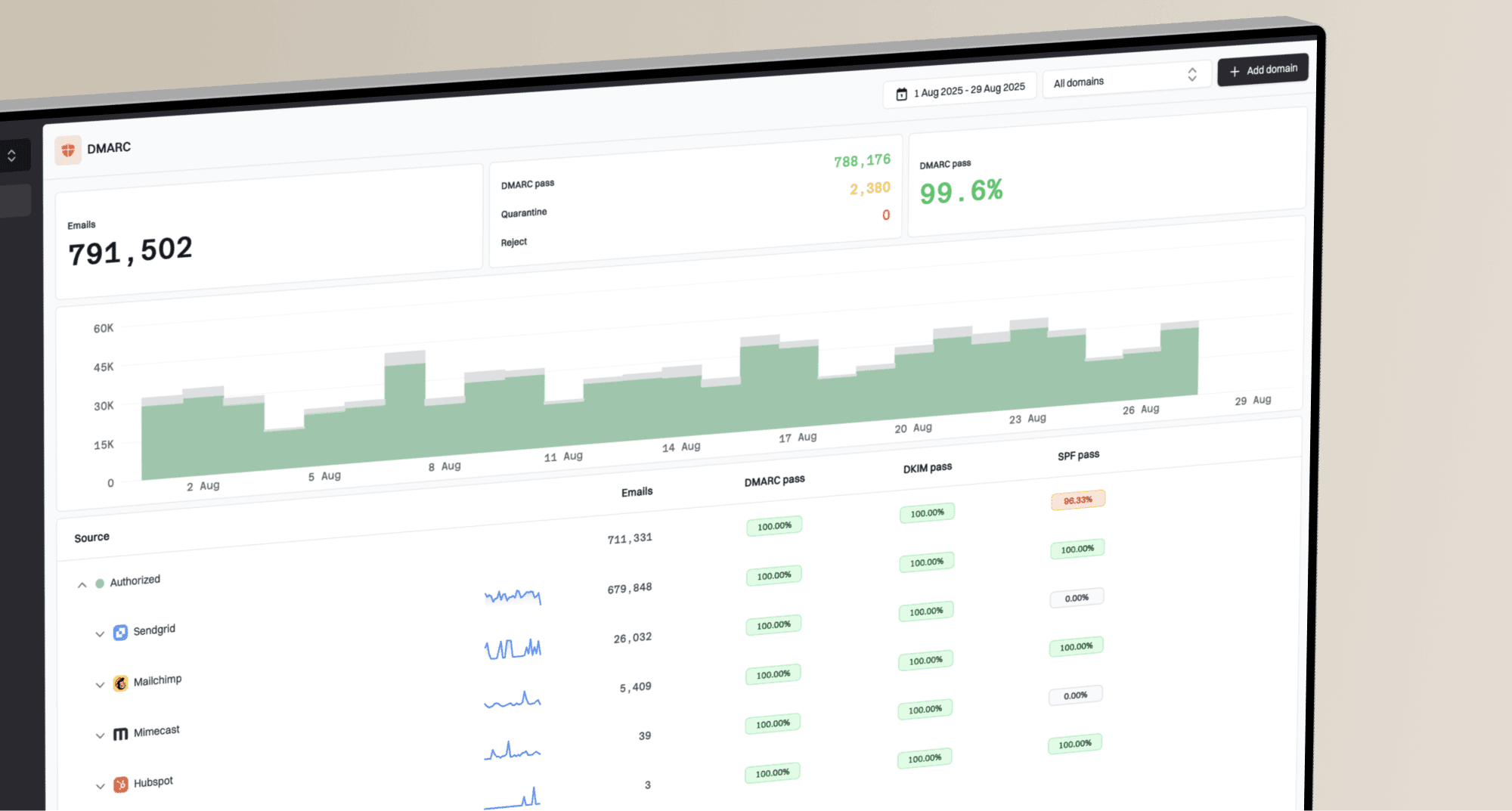
Suped DMARC dashboard showing email volume, authentication health, and source breakdown
sp: subdomain policy
The subdomain policy tag lets you request a different DMARC policy for existing subdomains than for the organizational domain. RFC 9989 separates existing subdomains from non-existent subdomains, which use np when that tag is present.
Purpose
Sets a requested policy for existing subdomains that differs from the main domain policy. This can support staged rollouts or distinct mail use on subdomains.
Available values
Same as the main policy tag: none, quarantine, or reject.
Default value
If sp is omitted, existing subdomains use p unless a more specific DMARC Policy Record applies through DNS Tree Walk discovery. Non-existent subdomains can be controlled separately with np.
Examples
Subdomain policy examples
v=DMARC1; p=reject; sp=quarantine
v=DMARC1; p=quarantine; sp=none
Use cases
- Stage subdomain policy changes while keeping the organizational domain at a different policy.
- Monitor active subdomains that use independent sending systems.
- Accommodate legitimate third-party senders that use a dedicated subdomain.
np: non-existent subdomain policy
The non-existent subdomain policy tag sets separate requested handling for subdomains that do not exist. RFC 9989 uses np during DNS Tree Walk policy discovery when the Author Domain is a non-existent subdomain of the discovered policy domain.
Purpose
Sets the Domain Owner Assessment Policy for non-existent subdomains when the applied DMARC Policy Record is found at the Organizational Domain or PSD.
Available values
Same as p: none, quarantine, or reject.
Default value
If np is omitted, non-existent subdomains use sp when sp is present. If sp is also absent, they use p.
Examples
Non-existent subdomain policy examples
v=DMARC1; p=none; sp=quarantine; np=reject
v=DMARC1; p=quarantine; np=reject
Use cases
- Request rejection for mail claiming to come from subdomains that should not exist.
- Keep distinct policies for active subdomains and non-existent subdomains.
- Apply a discovered organizational or PSD policy to a missing Author Domain during DNS Tree Walk.
psd: public suffix domain flag
The public suffix domain flag tells receivers whether a DMARC Policy Record is published for a Public Suffix Domain, a defined Organizational Domain, or a domain whose role remains unknown.
Purpose
Helps receivers determine the Organizational Domain and DMARC Policy Domain during RFC 9989 DNS Tree Walk discovery.
Available values
- psd=y: The record is published by a Public Suffix Operator for a Public Suffix Domain.
- psd=n: The domain is not a PSD and is the Organizational Domain for itself and its subdomains.
- psd=u: The domain is not a PSD, but its Organizational Domain status is unknown. Receivers use DNS Tree Walk to determine the role.
Default value
u. Receivers use DNS Tree Walk to determine the domain's role.
Examples
Public suffix domain flag examples
v=DMARC1; p=reject; psd=n
v=DMARC1; p=reject; psd=y
Important notes
- Public Suffix Operators that publish DMARC Policy Records must use psd=y.
- A large organization can use psd=n to define an Organizational Domain within a delegated DNS subtree.
- Most ordinary domain records can omit psd unless explicit Organizational Domain handling is needed.
t: policy test mode
The policy test mode tag signals whether the domain owner wants the declared p, sp, or np policy applied normally or treated as a test. It replaces some former pct rollout uses in RFC 9989.
Purpose
Lets a domain publish a quarantine or reject policy while signaling expected handling one policy level lower during testing. Receivers can also apply other local handling associated with test mode.
Available values
- t=y: Test mode. The expected policy for failing mail is none when the declared policy is quarantine, or quarantine when the declared policy is reject.
- t=n: Requests normal application of the declared policy. This is the default when t is omitted.
Default value
n. The declared Domain Owner Assessment Policy applies normally, subject to the receiver's local policy.
Examples
Policy test mode examples
v=DMARC1; p=quarantine; t=y
v=DMARC1; p=reject; t=y
v=DMARC1; p=reject; t=n
Important notes
- The t tag does not change DMARC report generation.
- The t tag has no effect when the applicable p, sp, or np value is none.
- Remove t or set t=n when report data supports normal policy application.
pct: percentage
The percentage tag is historic under RFC 9989. RFC 7489 deployments used it to request percentage-based enforcement, but new records should use staged policy changes and t for RFC 9989 test mode.
Purpose
Historically requested that policy apply to a percentage of messages that failed DMARC. RFC 9989 removed pct from active DMARC Policy Record syntax because receivers applied intermediate percentages inconsistently.
Value range
Historic RFC 7489 syntax allowed integers from 0 through 100.
Default value
Under RFC 7489, the default was 100. Under RFC 9989, pct is historic and should be omitted from new records.
Examples
Historic percentage examples
v=DMARC1; p=quarantine; pct=10
v=DMARC1; p=quarantine; pct=50
Current rollout strategy
- Use p=none with rua until legitimate sources pass DMARC.
- Publish the intended policy with t=y when you need RFC 9989 test mode.
- Review aggregate reports across your normal sending cycles.
- Remove t or set t=n when legitimate mail consistently passes.
Important notes
- Do not add pct to a new RFC 9989 record.
- Aggregate reporting is controlled by rua, not pct.
- Older receivers can still recognize pct, but current DMARC marks it historic.
Example policy rollout
A staged rollout can move through monitoring, remediation, test mode, and enforcement after report review.
Rollout stage
ruf: failure report URI
The failure report URI requests message-specific reports for authentication failures. RFC 9991 defines DMARC failure reporting, but each receiver decides whether to send reports and what to redact.
Purpose
Requests detailed reports about individual messages or groups of similar messages that fail in a way selected by fo. Reports can arrive soon after a failure, which can help connect an aggregate-report problem to a specific message.
Format
Like rua, ruf contains one or more URIs, typically mailto: addresses separated by commas.
Default value
None. If ruf is omitted, receivers must not generate failure reports for the domain.
Examples
Failure report examples
ruf=mailto:dmarc-forensic@example.com
ruf=mailto:dmarc-forensic@example.com; fo=1
Report content
- Authentication and transmission details for the failed message.
- Message header fields, subject to the reporter's privacy and redaction policy.
- Sometimes message body content when the reporter's policy permits it.
Privacy and availability
Failure reports can expose personally identifiable information in headers or message content. Request them only when the report destination has suitable access controls, retention rules, and a defined troubleshooting need.
- Many receivers do not send failure reports because of privacy or operational policy.
- Reports can be redacted, rate-limited, grouped, or omitted.
- Use aggregate reports as the primary source for broad DMARC monitoring.
fo: failure options
The failure options tag requests the conditions that trigger failure reports. It has no effect without ruf, and report generators can follow their own reporting policy.
Purpose
Specifies requested triggers for DMARC failure reports defined by RFC 9991 and for mechanism-specific DKIM or SPF failure reports.
Available values
- fo=0: Request a DMARC failure report when all underlying authentication mechanisms fail to produce an aligned pass.
- fo=1: Request a DMARC failure report when any underlying authentication mechanism fails to produce an aligned pass.
- fo=d: Request a DKIM-specific failure report for a signature that fails evaluation, regardless of alignment.
- fo=s: Request an SPF-specific failure report when SPF evaluation fails, regardless of alignment.
Default value
0. A DMARC failure report is requested only when all underlying mechanisms fail to produce an aligned pass.
Examples
Failure option examples
v=DMARC1; p=none; ruf=mailto:forensic@example.com; fo=1
v=DMARC1; p=none; ruf=mailto:forensic@example.com; fo=d
v=DMARC1; p=none; ruf=mailto:forensic@example.com; fo=1:d:s
Combining multiple options
Separate multiple values with colons. The values 0 and 1 are mutually exclusive, while d and s can be combined with either one. An fo=1 request can be triggered even when DMARC passes through the other aligned mechanism, because it asks for a report when any underlying mechanism lacks an aligned pass.
- fo=0:d requests DMARC reports when all mechanisms lack an aligned pass, plus DKIM-specific failure reports.
- fo=1:d:s requests DMARC reports when any mechanism lacks an aligned pass, plus DKIM- and SPF-specific failure reports.
- fo=1:s requests DMARC reports under the fo=1 condition, plus SPF-specific failure reports.
Choosing an option
Use fo=0 when you want the default DMARC failure condition. Use fo=1 only when the extra volume and privacy exposure support a specific troubleshooting workflow. Add d or s when you need mechanism-specific failure reports and know the receiving systems support them.
adkim: DKIM alignment mode
The DKIM alignment mode controls how closely the domain in a passing DKIM signature must match the visible From domain. Under RFC 9989, relaxed alignment uses the Organizational Domain found through DNS Tree Walk.
Purpose
Determines whether DMARC accepts Organizational Domain matching or requires an exact match between the passing DKIM signing domain and the visible From domain.
Available values
- adkim=r: Allows Organizational Domain matching as determined by DNS Tree Walk. A passing signature from mail.example.com aligns with newsletter@example.com.
- adkim=s: Requires the passing DKIM signing domain to match the visible From domain exactly.
Default value
r (relaxed). This allows Organizational Domain matching as determined by DNS Tree Walk.
Examples
DKIM alignment examples
v=DMARC1; p=quarantine; adkim=r
v=DMARC1; p=quarantine; adkim=s
Alignment examples
- A visible From domain of example.com and a passing DKIM signing domain of example.com pass relaxed and strict alignment.
- A visible From domain of example.com and a passing signing domain of mail.example.com pass relaxed alignment but fail strict alignment.
- A visible From domain of sub.example.com and a passing signing domain of example.com pass relaxed alignment but fail strict alignment.
Recommendation
Keep relaxed alignment unless every legitimate sender uses a passing DKIM signature with an exact signing-domain match. Strict alignment can cause legitimate third-party mail to lose its DKIM path to DMARC.
aspf: SPF alignment mode
The SPF alignment mode controls how closely the SPF-authenticated domain, normally the Return-Path domain, must match the visible From domain. Under RFC 9989, relaxed alignment uses the Organizational Domain found through DNS Tree Walk.
Purpose
Determines whether DMARC accepts Organizational Domain matching or requires an exact match between the SPF-authenticated domain and the visible From domain.
Available values
- aspf=r: Allows Organizational Domain matching as determined by DNS Tree Walk. Return-Path bounce@mail.example.com aligns with user@example.com.
- aspf=s: Requires the SPF-authenticated domain to match the visible From domain exactly.
Default value
r (relaxed). This allows Organizational Domain matching as determined by DNS Tree Walk.
Examples
SPF alignment examples
v=DMARC1; p=quarantine; aspf=r
v=DMARC1; p=quarantine; aspf=s
Alignment examples
- A visible From domain of example.com and Return-Path domain of example.com pass relaxed and strict alignment when SPF passes.
- A visible From domain of example.com and Return-Path domain of mail.example.com pass relaxed alignment but fail strict alignment.
- A visible From domain of example.com and Return-Path domain of mailservice.com fail relaxed and strict alignment.
Important considerations
- Many email senders use a separate Return-Path domain for bounce handling.
- Relaxed alignment accommodates subdomains that share the same Organizational Domain.
- Strict alignment can cause legitimate third-party mail to lose its SPF path to DMARC.
rf: report format
The report format tag is historic under RFC 9989. Earlier DMARC records used rf to request a failure report format, but new records should omit it.
Purpose
Historically specified the requested failure report format. RFC 9989 moved rf to historic status, while RFC 9991 defines current DMARC failure reporting.
Available values
The historic value was afrf (Authentication Failure Reporting Format). AFRF remains a registered report format, but rf is no longer an active DMARC policy tag.
Default value
No active default under RFC 9989. Older records defaulted to afrf.
Examples
Report format examples
v=DMARC1; p=none; ruf=mailto:forensic@example.com; rf=afrf
v=DMARC1; p=none; ruf=mailto:forensic@example.com
Recommendation
Omit rf from new records. Keep it only while maintaining an older record for a confirmed compatibility requirement.
ri: reporting interval
The reporting interval tag is historic under RFC 9989. Earlier records used ri to request how often aggregate reports should be sent, but RFC 9990 defines aggregate reporting without ri as an active policy tag.
Purpose
Historically requested an interval between aggregate reports in seconds. The value was advisory, and it is now historic.
Value format
Historic syntax used a positive integer representing seconds between reports.
Default value
No active default under RFC 9989. Under RFC 7489, the default was 86400 seconds.
Examples
Historic reporting interval examples
ri=86400
ri=604800
v=DMARC1; p=none; rua=mailto:reports@example.com; ri=86400
Common historic intervals
- Daily was 86400 seconds and was the common historic value.
- Weekly was 604800 seconds and appeared on some low-volume domains.
- Hourly was 3600 seconds, but receivers did not have to honor it.
Recommendation
Omit ri from new records. Build monitoring around the actual report cadence you receive. RFC 9989 recommends that participating receivers send aggregate reports at least once every 24 hours, but report timing remains under receiver control.
Complete DMARC record examples
These examples show complete DMARC records for monitoring, test mode, reporting, and subdomain policy. Replace each example address with a mailbox or report-processing destination you control.
Monitoring only
Monitoring only
v=DMARC1; p=none; rua=mailto:dmarc-reports@example.com;
This record offers no handling preference for failed messages and requests RFC 9990 aggregate reports. Use it to identify sending sources before enforcement.
Quarantine in test mode
Quarantine in test mode
v=DMARC1; p=quarantine; t=y;
rua=mailto:dmarc-reports@example.com;
This record requests quarantine while signaling RFC 9989 test mode. The expected policy for failing mail is one level lower, which is none in this example, while aggregate reporting continues.
Reject with failure reports
Reject with failure reports
v=DMARC1; p=reject; rua=mailto:dmarc-reports@example.com;
ruf=mailto:dmarc-forensic@example.com; fo=1;
This record requests rejection for failed messages and asks for aggregate reports plus RFC 9991 failure reports. Use this only after report data confirms legitimate mail passes, and assess the effect on mailing lists and forwarded mail.
Different subdomain policy
Different subdomain policy
v=DMARC1; p=reject; sp=quarantine; adkim=s; aspf=s;
rua=mailto:dmarc-reports@example.com;
This record requests reject for the organizational domain, quarantine for existing subdomains, strict alignment for SPF and DKIM, and aggregate reports. Confirm that every legitimate sender meets the strict alignment settings before publishing it.
DMARC checker
Look up a domain's DMARC record and catch policy issues.
?/7tests passed
Choosing the right DMARC tags
RFC 9989 requires only v, but publish p explicitly and add rua for useful monitoring. Without a valid p, the record needs at least one valid rua URI for receivers to continue processing it as p=none. Add other active tags only when they support a defined subdomain, test-mode, failure-reporting, or alignment requirement.
After publishing, use a DMARC checker to confirm the DNS host and syntax. Then review reports across normal sending cycles before requesting stricter handling. Suped's product can collect aggregate reports, group traffic by sending source, flag authentication issues, and track remediation before policy changes.