Is VMC mandatory for Gmail logo display, and what are the alternative methods?

Published 14 Jul 2025
Updated 25 Sep 2026
14 min read
Summarize with
Updated on 25 Sep 2026: We updated this guide for Gmail's current VMC and CMC requirements, with clearer certificate and SVG checks.
No. A Verified Mark Certificate (VMC) is not mandatory for every logo-like image in Gmail, and it is not the only certificate path for a Gmail BIMI logo. For Brand Indicators for Message Identification (BIMI), Gmail accepts either a VMC or a Common Mark Certificate (CMC). A VMC is the route to Gmail's verified checkmark, while a CMC can support BIMI when the logo qualifies without the standard registered-trademark route.
The confusing part is that Gmail can show more than one kind of sender image. A logo in the primary inbox is not automatic proof of BIMI. It can come from certificate-backed BIMI, a Google profile or Workspace directory photo, a recipient's saved contact, or Gmail Promotions imagery.
Treat the question as two separate jobs. If the goal is verified BIMI in Gmail, build the DMARC, certificate, SVG, and BIMI DNS path. If the goal is basic image visibility in Gmail, profile imagery and Promotions annotations can help in limited contexts, but neither supplies domain-level BIMI identity.
The direct answer
Gmail's current BIMI requirement is certificate-based. Google's documentation says BIMI requires third-party certification for the domain and logo, and that certification must be a VMC or a CMC. Gmail shows a checkmark next to senders verified with a VMC. The practical outcome is simple: VMC is not mandatory for BIMI logo eligibility when a CMC works for the mark, but one of those certificates is mandatory for Gmail BIMI.
For a BIMI logo in Gmail, you need DMARC enforcement, a valid BIMI SVG, a published BIMI TXT record, and either a VMC or CMC. Google's BIMI setup is the source to check before buying a certificate because Gmail-specific requirements can change.
- VMC: Use this when the logo qualifies through a registered mark or another accepted VMC mark route and you want the Gmail verified checkmark.
- CMC: Use this when the logo qualifies through prior-use evidence or a modified registered-trademark route but does not qualify for a VMC.
- No certificate: Do not expect Gmail to show a BIMI logo. If an image appears, it comes from another Gmail mechanism.
- No enforcement: A DMARC policy of p=none is not enough for Gmail BIMI.
|
|
|
|
|
|---|---|---|---|---|
BIMI + VMC | Yes | VMC | Yes | Eligible Gmail views |
BIMI + CMC | Yes | CMC | No | Eligible Gmail views |
Google profile | No | None | No | Account-linked views |
Promo annotations | No | None | No | Consumer Gmail Promotions tab |
Saved contact | No | None | No | That recipient's account |
Short version of Gmail logo paths
The practical sequence for most sending domains is to fix authentication first, then decide whether the certificate spend is worth it. Suped's DMARC monitoring supports that first step by showing the SPF and DKIM evidence behind each DMARC result before BIMI work begins.
Why Gmail can show a logo without VMC
A sender image in Gmail can come from several places. That is why examples can appear to contradict the BIMI certificate requirement. The key distinction is the source of truth. BIMI uses DNS, DMARC, an approved SVG, and a certificate. Other Gmail images use account data, Workspace directory data, recipient contacts, or Promotions markup.
BIMI identity
- Control: The sending domain publishes the logo or certificate location in DNS.
- Trust: DMARC enforcement and certificate checks protect the mark.
- Best use: Brand-level identity across substantial customer mail streams.
Non-BIMI image
- Control: The image comes from account data, a shared directory, recipient contacts, or message markup.
- Trust: It does not prove that the sender passed BIMI validation.
- Best use: Limited visual consistency when certificate-backed BIMI is not ready.
The primary inbox is where this distinction matters most. If a message appears there with a logo but the sender has no valid BIMI certificate path, do not assume BIMI is working. Check the BIMI record, the certificate URL, the message's DMARC result, and full policy enforcement.
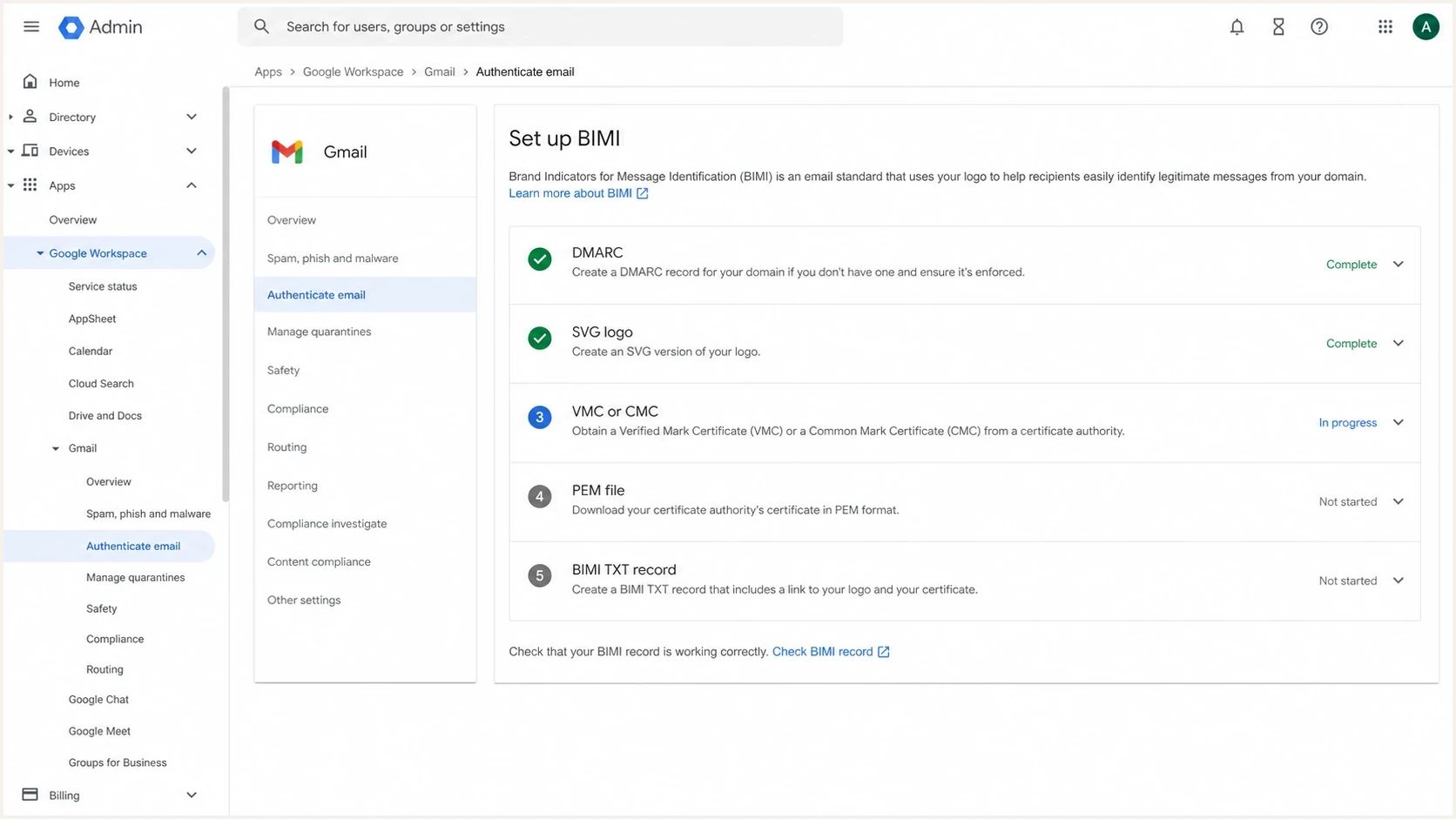
Google Workspace Admin Console BIMI setup screen with VMC and CMC checklist items.
A valid BIMI record without a certificate can still be useful for mailbox providers that accept self-asserted BIMI, but that does not make it a Gmail BIMI logo. For the longer no-certificate edge cases, see BIMI without a VMC.
Gmail logo alternatives to a VMC
There are several realistic paths. Only the VMC and CMC paths are Gmail BIMI. The other methods add context-limited imagery, but they do not create domain-certified BIMI.
Logo method tradeoff
How each path balances verification and control against setup friction.
Verification
Control
Low friction
- BIMI with VMC: Best for brands with an accepted mark, a business reason for certificate-backed identity, or a requirement for the Gmail verified checkmark.
- BIMI with CMC: Best for brands that can prove rights through an accepted common-mark or modified registered-trademark route but do not qualify for VMC.
- Google profile image: Useful for Google account identity and some Workspace directory contexts, but appearance varies and it is not domain-level BIMI proof.
- Gmail annotations: Useful for campaign images and deal treatment in the consumer Promotions tab, but they do not set the sender avatar or display in other tabs.
- Recipient contacts: A user-specific image can appear because the recipient saved the sender, not because the sender domain passed BIMI.
Gmail Promotions annotations do not guarantee placement or display. They appear only in the consumer Promotions tab, not Google Workspace Gmail, and Gmail applies quality filters and frequency limits before showing them.
A CMC deserves special attention because it changed the old yes-or-no VMC answer. With CMC, Gmail can show a BIMI logo without a VMC, but the verified checkmark remains tied to VMC. For a deeper breakdown, compare CMC and VMC differences before choosing a certificate route.
Do not buy a certificate before DMARC is stable. A certificate does not fix SPF or DKIM failures, authenticated domains that do not match the visible From domain, missing reporting, or unauthorised senders. If Gmail cannot validate the mail stream, BIMI will not rescue the logo.
Suped's product has a concrete role at this stage. Suped can show the verified and unverified sources behind a domain, alert the team when authentication changes, and support staged DMARC enforcement. Those workflows address the prerequisites that BIMI depends on.
How VMC and CMC eligibility differs
Choose the certificate path before finalising the logo asset. A VMC usually validates a registered trademark accepted by the issuer, and current Mark Certificate rules also provide a government-mark route. A CMC can cover a prior-use mark or a modified registered trademark when the issuer can verify the applicant's rights to the exact logo.
|
|
|
|---|---|---|
Typical logo evidence | Accepted registered or government mark | Prior use or modified registered mark |
Common verification path | Mark record and organisation checks | Logo-rights checks under the applicable CMC route |
Gmail BIMI logo | Eligible | Eligible |
Gmail verified checkmark | Yes | No |
Practical VMC and CMC eligibility comparison
For the CMC prior-use route, the certificate authority verifies that the matching logo appears on a website now and was displayed at least 12 months earlier on a domain the applicant currently controls. A modified registered trademark follows a separate CMC verification route. Confirm the exact artwork and evidence with the issuer before preparing the SVG.
A certificate gives eligibility, not a display guarantee
Gmail decides whether and where to render a BIMI logo. A valid certificate, DNS record, DMARC result, and compliant SVG satisfy the published setup path, but Gmail can still apply its own sender and interface criteria. After publishing a new BIMI record, allow up to 48 hours before treating a missing logo as a fault.
How to check which method is active
Do not identify the image source by looking at the avatar alone. Gmail does not label every image source in the inbox. Work backwards from the sender domain and the message surface.
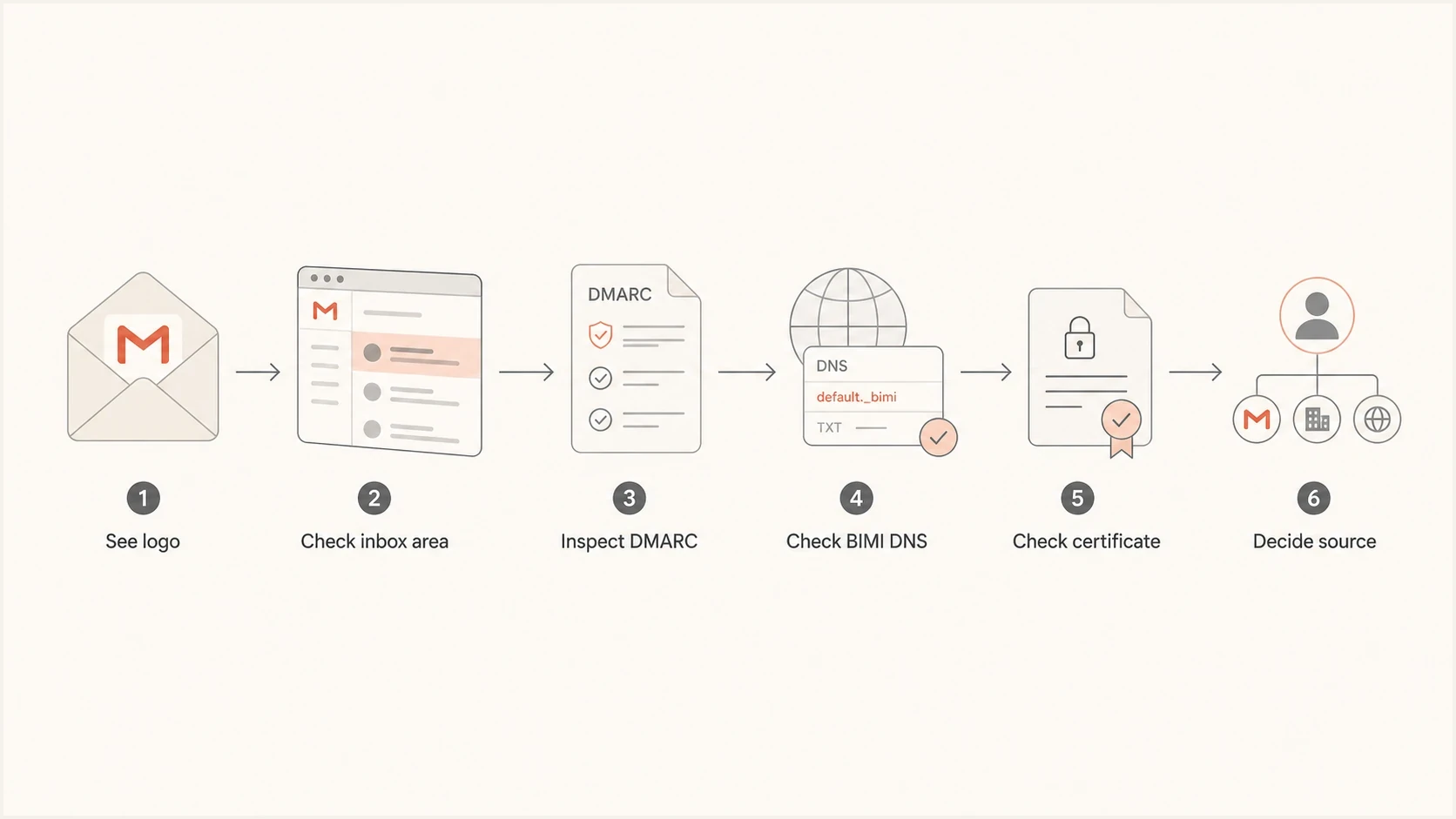
Flowchart for checking whether a Gmail logo comes from BIMI, profile data, or annotations.
- Check placement: If an image appears only in a Promotions module or deal card, treat annotations as the likely source. Annotations do not control the sender avatar.
- Check DNS: Look for a BIMI TXT record at the selector used by the domain, usually default._bimi.
- Check certificate: If the BIMI record has no a= tag, it does not reference the VMC or CMC PEM file Gmail requires.
- Check DMARC: Confirm the policy that applies to the visible From domain uses p=quarantine or p=reject with pct=100, including the applicable subdomain policy.
- Check the message: Confirm DMARC passes because either the SPF MailFrom domain or DKIM d= domain matches the visible From domain.
- Check DKIM length: For mail signed outside Google Workspace, confirm the DKIM signature does not use the l= length tag. Google's BIMI troubleshooting guidance says not to use it.
- Check account data: If BIMI evidence is missing, a visible image is more likely to come from a Google profile, a Workspace directory, or a saved contact.
For a quick DNS validation pass, use Suped's DMARC checker to confirm the policy before spending time debugging BIMI.
?
What's your domain score?
Deep-scan SPF, DKIM & DMARC records for email deliverability and security issues.
If the domain has multiple senders, one passing source is not enough. Marketing, billing, product, support, and CRM mail all need an authenticated domain that matches the visible From domain when they send as the same brand. A BIMI logo can fail on one stream while another stream works.
Gmail BIMI DNS and DMARC setup
The Gmail BIMI path starts with DMARC enforcement. Move through monitoring, sender cleanup, quarantine, then reject instead of publishing a strict policy before every legitimate sender is known. Suped's Hosted DMARC supports policy staging when teams want to reduce manual DNS edits.
BIMI readiness by DMARC policy
Gmail BIMI requires an enforcement policy at full coverage.
Not ready
p=none
Monitoring only
Partial
pct<100
Policy coverage is below Gmail's requirement
Ready
pct=100
Quarantine or reject for all applicable mail
DMARC record for BIMI readinessdns
_dmarc.example.com. 3600 IN TXT (
  "v=DMARC1; p=quarantine; sp=quarantine; pct=100; "
  "rua=mailto:dmarc-reports@example.com"
)
Once DMARC is enforced and the logo is ready, the BIMI TXT record references the certificate PEM through the a= tag. The certified SVG is embedded in that PEM, so Google's certificate-backed example leaves the l= value empty. Without an accessible VMC or CMC PEM, Gmail lacks the certificate evidence it requires.
BIMI record with certificate referencedns
default._bimi.example.com. 3600 IN TXT (
  "v=BIMI1; l=; "
  "a=https://assets.example.com/brand.pem"
)
Common failure pattern
The domain publishes a BIMI record that points only to an SVG file, then expects Gmail to show the logo. That can be a syntactically valid self-asserted BIMI record, but it does not meet Gmail's certificate requirement.
The SVG must use SVG Tiny PS. Gmail requires a minimum height and width of 96 pixels with dimensions expressed in absolute pixels, recommends a file size of 32 KB or less, and recommends a desc element for accessibility. Keep the logo centered on a solid background. Do not include scripts, animations, interactive elements, or external references. Transparent backgrounds, relative dimensions, or tiny source images can make a reachable asset fail or render poorly.
Host the SVG and PEM on a public HTTPS server, with TLS 1.2 or later recommended. For a standalone SVG, use a server in the same domain as the BIMI DNS record. The PEM must include the entity certificate followed by any intermediate certificate and the root certificate in the order supplied by the certificate authority. Authentication prompts, blocked fetchers, a wrong content type, or a broken certificate chain can stop Gmail from retrieving the evidence.
Suped DMARC dashboard showing email volume, authentication health, and source breakdown
Start BIMI work only after the dashboard shows clean source coverage. That is more reliable than treating BIMI as a branding task completed by one DNS change. After launch, alerts help catch a new source whose authenticated domain does not match the visible From domain.
When a VMC is worth paying for
A VMC is worth considering when the brand has an eligible logo, sends enough customer email for inbox identity to matter, has DMARC under control, and values Gmail's verified checkmark. It is harder to justify when volume is low or authentication problems remain unresolved.
Treat either certificate as recurring operational work. Mark Certificates currently have a maximum validity of 398 days, so renewal is normally annual. A VMC or CMC is also bound to its certified logo and domain, which means a logo change generally requires a new certificate rather than a simple SVG replacement.
Choose VMC
- Mark evidence: The exact logo qualifies through a VMC mark route accepted by the issuer.
- Checkmark: The verified Gmail indicator is part of the business case.
- Scale: Customer mail volume is high enough to justify certificate work.
Use another path
- Common mark: CMC is the practical BIMI route when the logo has acceptable evidence under a CMC route.
- Limited need: Account imagery can be enough when domain-wide Gmail BIMI is not the goal.
- Unstable authentication: Fix sender authentication and visible From domain matching before certificate spend.
Suped supports the authentication work BIMI depends on through source discovery, issue detection, change alerts, DMARC policy monitoring, and multi-domain workflows. The certificate still comes from a certificate authority, while Suped helps teams verify that each sending source is ready before and after issuance.
For a quick domain-wide authentication read before making that call, Suped's domain health checker gives a first pass across the DMARC result and its SPF/DKIM evidence.
Views from the trenches
Best practices
Verify DMARC enforcement before certificate work, then test each real sending stream.
Separate BIMI logos from profile images when explaining results to brand stakeholders.
Keep the BIMI SVG simple, square, and centered so Gmail rendering stays predictable.
Record which method drives each visible logo so later changes are easier to explain.
Common pitfalls
Assuming any Gmail avatar is BIMI causes bad certificate and DNS troubleshooting.
Publishing a logo-only BIMI record without a certificate leaves Gmail with no proof.
Treating annotations as sender avatars overstates what Promotions markup can control.
Buying a VMC before sender cleanup wastes time while legitimate DMARC checks still fail.
Expert tips
Use message surface first, then DNS evidence, because Gmail does not label every image.
If a Gmail logo appears with no BIMI record, profile or contact data is the likely source.
CMC can solve logo display for some brands, but VMC is still needed for the checkmark.
Monitor DMARC after launch, because new senders can break the BIMI-ready posture.
Marketer from Email Geeks says a Gmail logo without a VMC should not be treated as BIMI unless the domain also has the required BIMI record and certificate evidence.
2021-10-24 - Email Geeks
Marketer from Email Geeks says Gmail profile imagery and annotations can create useful logo coverage, but those methods do not provide the same verified BIMI signal.
2021-10-24 - Email Geeks
What to do next
For a Gmail BIMI logo with the verified checkmark, plan for VMC after DMARC is enforced and stable. For a Gmail BIMI logo without an eligible VMC mark, evaluate CMC. For basic image visibility, Google profile imagery or Promotions annotations can help in their limited contexts, but keep them in the non-BIMI category.
The clean sequence is authentication first, certificate eligibility next, logo and BIMI DNS setup after that, then rendering tests. That order prevents the common failure of treating Gmail logo display as a design upload when Gmail checks message authentication and certificate evidence.




