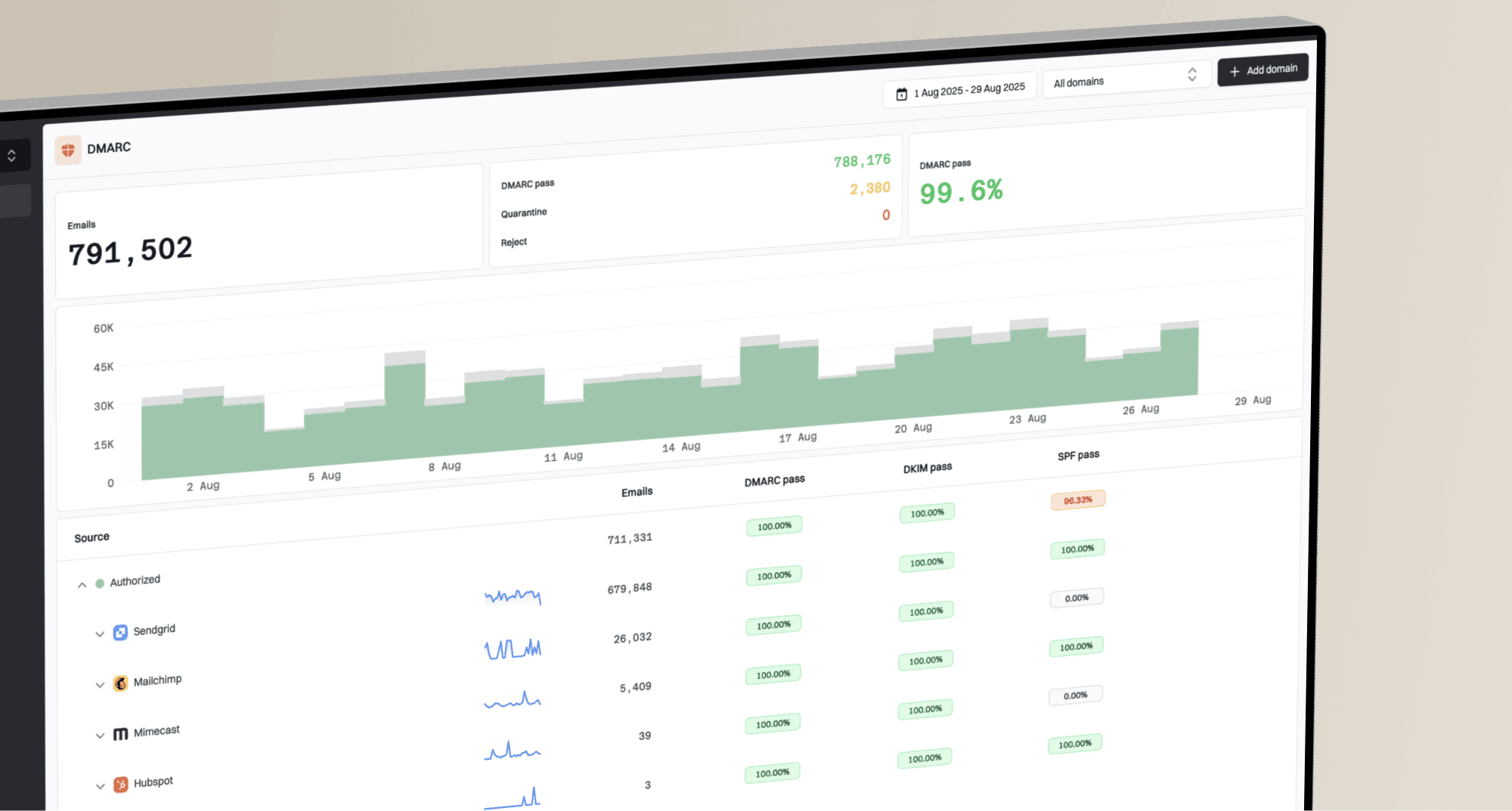
How to set up DMARC/DKIM/SPF for Yahoo

Published 5 Aug 2026
Updated 12 Oct 2026
13 min read
Summarize with

Updated on 12 Oct 2026: We clarified Yahoo authentication requirements and corrected SPF-only and pct guidance for DMARC enforcement.
Yahoo already manages SPF, DKIM and DMARC for an @yahoo.com address. There are no DNS records to add for yahoo.com. A custom address selected in Yahoo Mail's From field is different: verify the address in Yahoo, authorize the actual sending path in your DNS, and make sure either SPF or DKIM passes with alignment to your visible From domain.
We recommend testing the custom address before changing DNS because personal Yahoo Mail does not provide a custom-domain DKIM selector. A passing SPF result with an aligned Return-Path can satisfy DMARC, but SPF alone is insufficient for a p=reject deployment under RFC 9989. Sending to Yahoo has separate authentication requirements.
Verify a custom From address
Yahoo Mail verifies a send-only email address rather than the whole domain. Complete this step on desktop for each custom From address available in your account. Skip it when the visible From address ends in @yahoo.com.
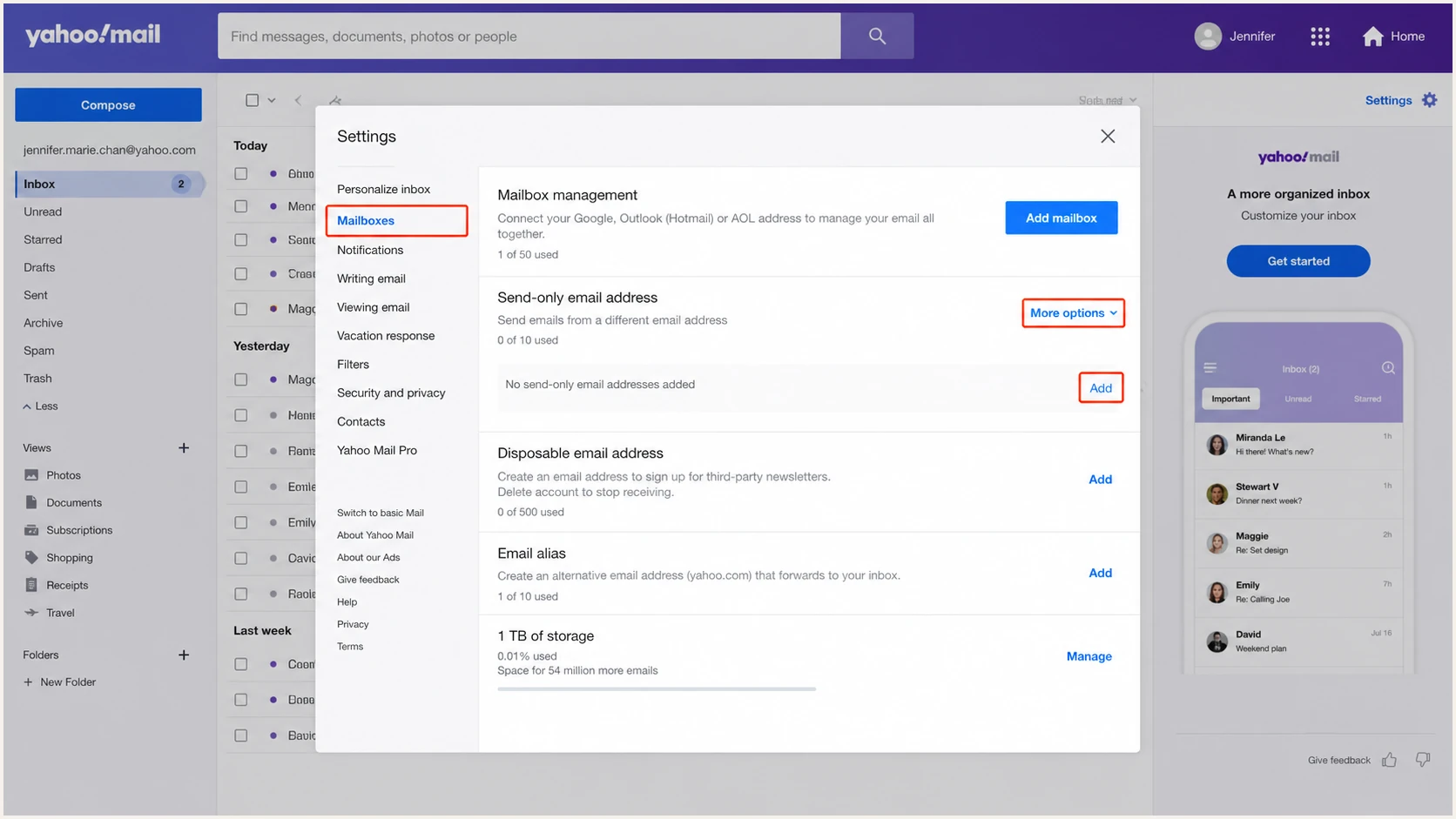
Yahoo Mail settings for verifying a custom-domain send-only address
- Open settings: In New Yahoo Mail on desktop, select More options below the mail folders, then Settings and Mailboxes. In the older interface, select Settings, More Settings, then Mailboxes.
- Add the address: Select the More control beside Send-only email address, choose Add, and enter the complete custom address.
- Request verification: Select Verify. Yahoo sends a message to the address you entered.
- Confirm ownership: Open the verification message in the mailbox that receives mail for the custom address and follow its confirmation action.
- Select the sender: Compose a new message and choose the verified address in the From field. Do not assume the last-used address remains selected.
Address verification only proves access to the mailbox. It does not publish DNS records or guarantee DMARC alignment. Keep the domain's DNS console open for the next steps.
Do not edit yahoo.com DNS
Only the owner of a custom From domain can change its DNS. Yahoo owns yahoo.com and its regional Yahoo domains, so Yahoo handles their authentication records.
Set up SPF
Publish SPF on the exact domain used by the message's Return-Path. If Yahoo sends with a Return-Path under your domain, verify that include:_spf.mail.yahoo.com authorizes the actual sending IP before merging it into that domain's existing SPF record. If the Return-Path is Yahoo-owned, Yahoo manages its SPF, and editing your domain's SPF does not change that check. Never publish a second SPF record.
- Find the record: Check the TXT records at the Return-Path domain and locate the single value beginning with v=spf1.
- Verify and merge Yahoo: Only add include:_spf.mail.yahoo.com after confirming a custom-domain Return-Path and a passing evaluation for the sending IP. Insert it before the final all mechanism and preserve existing authorized senders.
- Publish once: Save one TXT record at the root or Return-Path subdomain. Remove any duplicate SPF TXT value only after merging its required mechanisms.
- Count lookups: Keep SPF within the limit of ten evaluated DNS-querying terms, including nested includes and redirect. Exceeding the limit returns SPF permerror. ip4, ip6 and all do not count toward this limit.
Conditional SPF example for a custom Return-Pathdns
v=spf1 include:_spf.mail.yahoo.com ~all
An SPF pass counts toward DMARC only when the Return-Path domain matches the visible From domain under the published alignment mode. Relaxed alignment permits domains with the same organizational domain; strict alignment, set by aspf=s, requires an exact match. Confirm the Return-Path in a delivered test message instead of inferring it from the SMTP server name.
SPF checker
Find SPF syntax issues, lookup limits, and weak records.
?/16tests passed
The checker should return one syntactically valid SPF record, no redirect or include loop, and at most ten DNS-querying terms across the evaluated path. ~all returns softfail for unmatched IPs; it does not guarantee delivery. Keep an existing ending unless you have reviewed its effect on all senders.
If the test message uses a Yahoo-owned Return-Path, its SPF result is unaligned with a custom From domain even when Yahoo's IP passes SPF. Adding more IP addresses will not repair that mismatch. Personal Yahoo Mail does not provide a documented custom Return-Path control. Use a sending system that supports your domain's Return-Path or an aligned DKIM signature.
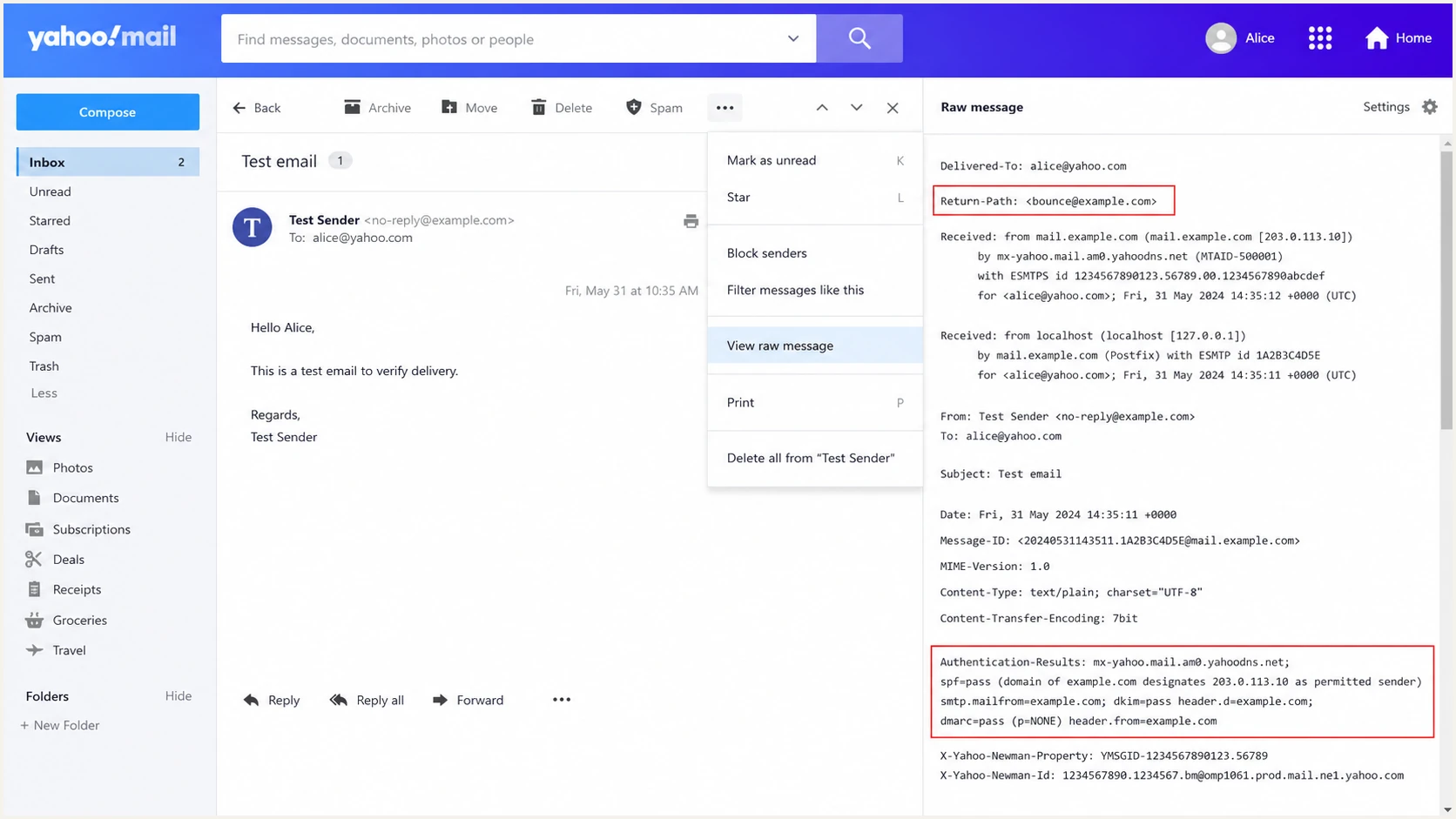
Yahoo Mail raw headers showing the Return-Path domain and SPF authentication result
Set up DKIM
Yahoo signs normal @yahoo.com messages with a Yahoo-controlled DKIM key. Personal Yahoo Mail does not expose a control that generates a DKIM selector for a custom send-only domain, so there is no legitimate Yahoo DKIM TXT value to copy into that domain's DNS.
Sending as @yahoo.com
Yahoo applies its own DKIM signature and manages the public key. No DNS action is available or required.
- Expected domain: The DKIM d= value is a Yahoo-controlled domain.
- Expected result: DKIM and DMARC should pass for an unchanged message.
Sending as a custom domain
A Yahoo signature using d=yahoo.com is unaligned with example.com. SPF must pass with alignment unless the sending system applies an aligned custom-domain DKIM signature. Use custom-domain DKIM before considering p=reject.
- Required domain: The DKIM d= value must match the visible From domain under the published alignment mode. adkim=s requires an exact match.
- Required control: The system applying the signature must provide its selector and public key.
For a custom From address, send a message to a mailbox where raw headers are available. Inspect Authentication-Results and DKIM-Signature. A cryptographic pass with header.d=yahoo.com still fails DKIM alignment when header.from is example.com.
Illustrative SPF-based DMARC pass with unaligned Yahoo DKIMtext
spf=pass smtp.mailfrom=bounce.example.com
dkim=pass header.d=yahoo.com
dmarc=pass header.from=example.com
- Inspect d=: Read the signing domain in DKIM-Signature and compare it with the domain after @ in the visible From address.
- Inspect s=: For d=example.com and s=selector1, the key is looked up at selector1._domainkey.example.com. Publish the TXT value or CNAME target supplied by the signing system. Never guess a Yahoo selector for the custom domain.
- Check alignment: Treat d=yahoo.com as unaligned for a From address at example.com, even when the DKIM signature passes.
- Choose the path: Verify the actual Return-Path rather than assuming Yahoo uses your domain. For a p=reject deployment, send through a system that applies a passing, aligned custom-domain DKIM signature.
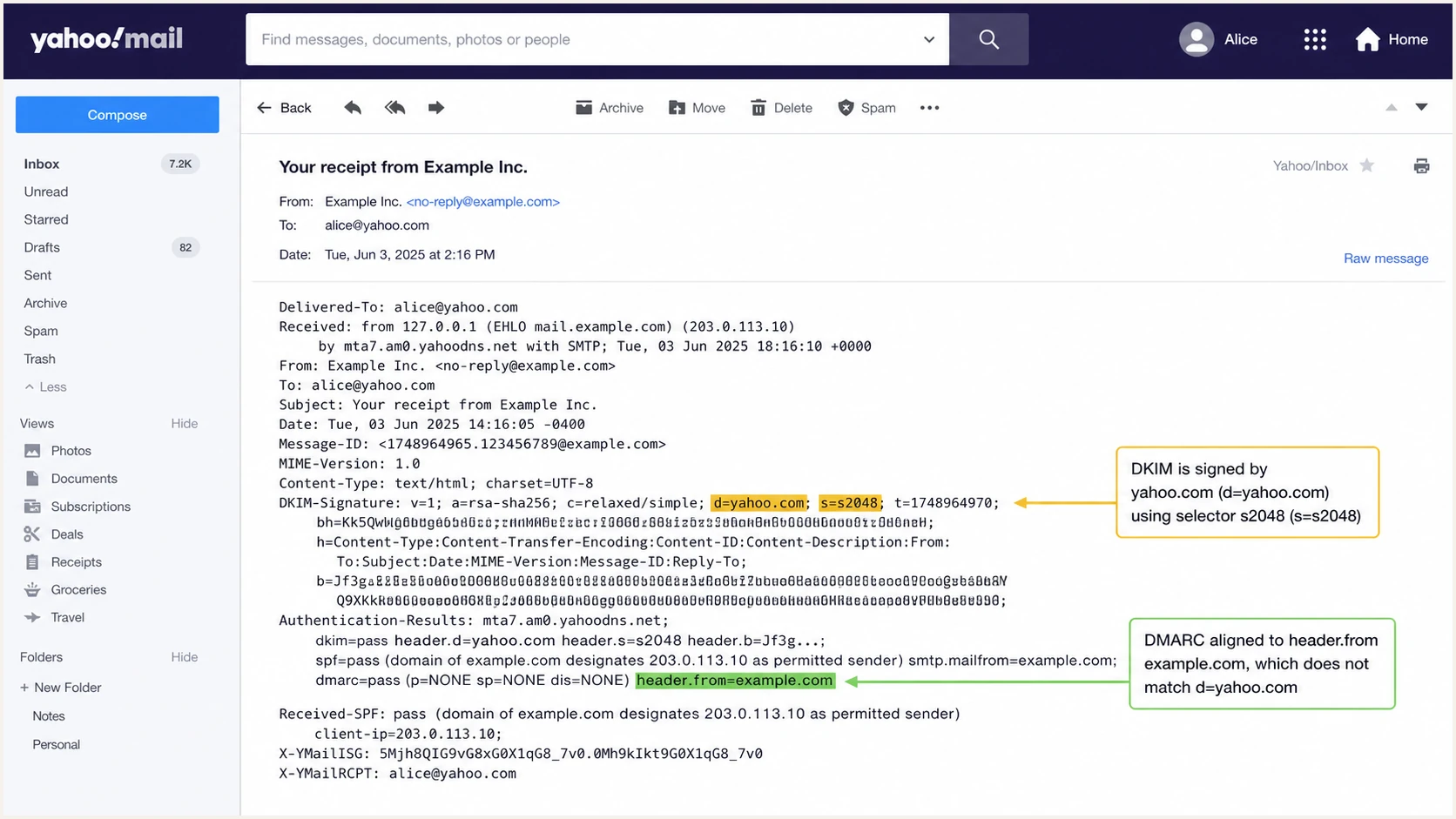
Yahoo Mail headers showing d=yahoo.com DKIM passing without custom-domain alignment
Set up DMARC
Publish DMARC at _dmarc.example.com after confirming who sends mail for the domain. Start new deployments at p=none with aggregate reporting. If the domain already uses p=quarantine or p=reject, keep that stronger policy and fix Yahoo alignment without lowering protection.
- Set the host: Create one TXT record at _dmarc. Most DNS consoles append the zone name automatically.
- Set monitoring: Use p=none for a new deployment and add a rua mailbox that can process compressed aggregate XML reports.
- Keep alignment relaxed: The aspf=r and adkim=r defaults allow authentication domains with the same organizational domain as the visible From domain. Do not change existing strict settings without reviewing every sending source.
- Generate safely: Use the DMARC record generator when you need reporting or subdomain-policy options.
Initial DMARC recorddns
v=DMARC1; p=none; rua=mailto:dmarc@example.com
Replace dmarc@example.com with a real reporting address before publishing. Raw XML quickly becomes difficult to group by source IP and reverse DNS, so the mailbox must accept the volume and feed a parser or monitoring workflow. If rua points to a different organizational domain, the report recipient must publish external reporting authorization in its DNS; otherwise receivers ignore that destination.
DMARC checker
Look up a domain's DMARC record and catch policy issues.
?/7tests passed
The checker should find exactly one DMARC TXT record at _dmarc, parse the supported tags, and show a valid reporting address. A correct record can coexist with failing messages because DMARC evaluates each message's aligned SPF or DKIM result. A DNS check does not prove that reports reach the reporting mailbox.
Yahoo's bulk-sender rules accept relaxed alignment and require DMARC to pass. Keep the policy in monitoring mode only while identifying legitimate traffic. Review Yahoo's sender requirements whenever sending practices or enforcement details change.
Do not weaken an enforced policy
If p=quarantine or p=reject is already published, leave it in place. Repair the Yahoo sending path or stop using the custom Yahoo From address. Returning to p=none reopens spoofing exposure for the entire domain.
Meet Yahoo's requirements when sending to Yahoo
These requirements apply to mail delivered to Yahoo recipients, regardless of the sending system. Yahoo defines bulk senders by significant volume and does not publish a fixed message-count threshold.
- All senders must implement SPF or DKIM, keep spam complaints below 0.3%, and have valid forward and reverse DNS for sending IPs.
- Bulk senders must implement both SPF and DKIM, publish DMARC at p=none or stronger, and achieve a DMARC pass. Relaxed alignment is acceptable.
- Use DKIM keys of at least 1024 bits. Yahoo recommends 2048-bit keys where supported; obtain the key from the system that signs the mail.
- Bulk marketing and subscription messages need a working List-Unsubscribe header and a visible unsubscribe link in the body. Prefer RFC 8058 one-click unsubscribe and honor requests within two days. The unsubscribe requirement does not apply to transactional messages such as password resets.
Check Yahoo's sender requirements alongside message tests. DMARC compliance alone does not guarantee inbox delivery.
Verify and troubleshoot
DNS syntax checks cannot prove message alignment. Send a fresh message from the exact Yahoo From address, wait for delivery, and inspect its raw headers. In Yahoo Mail, open the message, select More options, then View Raw Message. Use Authentication-Results added by the receiving mailbox, since sender-supplied results are untrusted. Test every address separately because the selected From identity and outbound route can change the result.
|
|
|
|---|---|---|
SPF | Pass; check smtp.mailfrom against header.from | Unauthorized IP, duplicate records, excessive lookups or an unaligned Return-Path |
DKIM | Pass; check header.d against header.from | Missing key, invalid signature, message changes or an unaligned signing domain |
DMARC | At least one passing method has alignment | Neither method passes with alignment, or the policy cannot be evaluated |
rDNS | Confirm the sending IP's PTR hostname and matching forward DNS | Missing or inconsistent DNS; a Yahoo hostname is a source clue, not proof of DMARC compliance |
Authentication checks and source clues for a Yahoo test message
DMARC passes when at least one authentication method passes with alignment. An SPF failure or mismatch does not prevent a DMARC pass when DKIM passes with alignment. A passing aligned SPF result also satisfies the DMARC check, but SPF-only authentication is insufficient for a p=reject deployment. Authentication does not guarantee inbox placement; Yahoo also evaluates reputation and spam complaints.
- Send a test: Use the exact verified From address and send a plain message through Yahoo Mail.
- Read headers: Record header.from, smtp.mailfrom, DKIM header.d, spf, dkim and dmarc.
- Fix the identity: If Yahoo sent from the wrong address, return to the compose window and select the intended verified From identity.
- Fix alignment: For SPF, correct the Return-Path route. For DKIM, enable signing on the system authorized to use the custom domain.
- Retest delivery: Confirm the change at the authoritative DNS provider, allow cached records to expire according to their TTL, then send again. Require dmarc=pass before treating the setup as complete.
Suped's email tester below gives you a destination address and checks the received message's authentication and alignment, along with record-level problems.
Email tester
Send a real email to this address. Suped shows a results button when the test is ready.
?/43tests passed
After the tester receives the message, compare the visible From domain with both the SPF Return-Path and DKIM signing domain. Do not treat a green SPF result as aligned unless those domains match under DMARC's relaxed rule.
Use the domain health checker for a record-wide follow-up. If Yahoo or AOL reports still show failures, the Yahoo authentication failure guide covers receiver-specific symptoms.
Monitor Yahoo authentication changes
A passing one-time test does not catch a later Return-Path change, a removed DKIM key, or an SPF record pushed over the lookup limit. Aggregate DMARC reports reveal resulting authentication failures, but manual XML review delays the response. Reports commonly arrive daily, so report-based alerts depend on when receivers send them.
Monitor sending sources with Suped
Suped is our DMARC and email authentication platform. It groups aggregate reports by sending source, shows authentication and alignment results, and provides steps to investigate failures before changing policy.
Connect the domain's aggregate-reporting address to DMARC monitoring and establish a baseline for Yahoo sending sources. Investigate changes in authentication results and source volume as new reports arrive.
- Source changes: Alert when a new IP or Yahoo rDNS pattern starts sending for the domain.
- Alignment drops: Track SPF and DKIM alignment separately so one passing method does not hide degradation in the other.
- DNS regressions: Detect duplicate SPF records, excessive lookups, missing DMARC and changed policy tags.
- Issue ownership: Use source-specific repair steps instead of handing raw XML to the team that owns DNS.
- Unified checks: Review DMARC alongside SPF and DKIM checks. Investigate blocklist (blacklist) signals separately because authentication passes do not establish sender reputation.
Check readiness for p=reject
Move to p=reject only after every legitimate source passes DMARC consistently and applies a passing, aligned DKIM signature. RFC 9989 requires p=reject deployments not to rely solely on SPF, since forwarding can break SPF. A Yahoo signature using d=yahoo.com does not provide that protection for a custom From domain.
RFC 9989 advises against p=reject for general-purpose domains whose users post to Internet mailing lists, because list changes can break DKIM too. For those domains considering reject, it recommends at least a month at p=none followed by an equally long period at p=quarantine to assess the effect. A direct delivery test alone does not cover these indirect routes.
DMARC policy stages
Policy choices depend on source coverage, aligned DKIM and the effect on forwarding or mailing lists.
Monitor
p=none
Inventory every source and repair alignment.
Contain
p=quarantine
Quarantine failing mail after legitimate traffic is clean.
Enforce
p=reject
Request rejection of mail that fails DMARC, subject to receiver handling.
Maintain
continuous
Keep alerts active for new senders and DNS changes.
- Inventory sources: Classify every IP and rDNS hostname in aggregate reports as Yahoo, another approved sender, forwarding traffic or unauthorized mail.
- Repair alignment: Require each approved source to pass DMARC and apply a passing, aligned DKIM signature before p=reject. Configure SPF correctly as well.
- Stage quarantine: Change to p=quarantine after verifying approved sources. Do not use pct for a partial rollout; RFC 9989 removed percentage-based enforcement.
- Review failures: Investigate legitimate failures across a full business sending cycle, including scheduled messages and forwarding or mailing-list routes. For general-purpose domains with mailing-list users, assess at least a month at each monitoring and quarantine stage.
- Enforce rejection: Set p=reject only after approved traffic remains clean and aligned DKIM is working. Keep aggregate reporting enabled and omit the historic pct tag.
Full reject policydns
v=DMARC1; p=reject; rua=mailto:dmarc@example.com
Suped shows source-specific authentication results and repair steps for failures. Review aligned DKIM coverage and indirect mail failures before publishing p=reject, then continue reviewing new reports for regressions.
Stop if Yahoo still fails
Do not move a custom domain to p=reject while its Yahoo sending path lacks passing, aligned DKIM, even if SPF currently satisfies DMARC. Use an outbound system with custom-domain DKIM or stop sending that custom From identity through Yahoo. Review forwarding and mailing-list failures before enforcement.
FAQ
No. Yahoo owns yahoo.com and manages its authentication records and signing keys. Test the message headers, but do not publish records for a domain you do not own.
Personal Yahoo Mail does not provide a control that generates a DKIM selector and public key for a custom send-only domain. Its Yahoo-domain signature can pass cryptographically without matching your custom From domain.
Yes, when DKIM passes and its signing domain has alignment with the visible From domain. DMARC needs one passing method with alignment. Yahoo bulk senders must still implement both SPF and DKIM, and an SPF failure can affect other receiver checks.
Those reverse-DNS suffixes identify Yahoo-operated outbound mail infrastructure. Examples include hosts shaped like sonic302-21.consmr.mail.ne1.yahoo.com and sonic312-26.consmr.mail.ir2.yahoo.com. Confirm the source with authentication results and current DNS because a hostname alone does not prove authorization for your domain.
For controlled sending streams, collect reports across a complete business sending cycle and repair every approved source before stronger enforcement. Reject deployments need aligned DKIM, not SPF alone. For general-purpose domains with mailing-list users that still plan to use reject, RFC 9989 recommends at least a month at p=none and another month at p=quarantine to assess the effect.