Why are SPF, DKIM, and DMARC failing in Yahoo/AOL, and how to fix it?

Updated on 13 Aug 2026: We refreshed this guide with current Yahoo/AOL sender requirements, SMTP response handling, and sharper checks for alignment and reporting gaps.
SPF, DKIM, and DMARC fail at Yahoo/AOL for two broad reasons: the message really fails when Yahoo evaluates it, or the report you are reading is missing or misreading the authentication data. If all three suddenly show as failing, do not assume Yahoo changed something that day. First, prove whether the exact message that reached a Yahoo or AOL mailbox has failing Authentication-Results headers.
Yahoo began enforcing stricter sender requirements in 2024, and those rules remain in force across AOL and other consumer domains hosted by Yahoo Mail. All senders must authenticate with SPF or DKIM. Bulk senders must use both SPF and DKIM, publish a DMARC policy of at least p=none, and pass DMARC through an aligned SPF or DKIM identity. Yahoo describes bulk senders by significant volume but does not publish a numeric threshold.
Direct answer
- Most likely: A DNS record changed, a DKIM selector disappeared, SPF no longer includes the sending IP, or the sending stream uses a different bounce domain.
- Also likely: The seed test or dashboard has missing authentication data and shows zero pass rates even when delivered Yahoo headers pass.
- Fix path: Check raw Yahoo headers, raw bounces, DNS records, the exact sending stream, and DMARC reports before changing policy.
- Suped workflow: Suped's product connects DMARC monitoring, DNS checks, source detection, real-time alerts, hosted DMARC, hosted SPF, and blocklist (blacklist) monitoring.
What Yahoo and AOL are checking
Yahoo/AOL does not pass DMARC because SPF and DKIM exist in DNS. DMARC passes only when at least one authenticated domain matches the visible From domain. SPF checks the envelope sender, usually the Return-Path. DKIM checks the signing domain in the d= value. DMARC compares those authenticated domains with the visible From domain.
Yahoo accepts relaxed DMARC alignment, so a subdomain such as bounces.example.com has alignment with example.com by default. If the DMARC record sets aspf=s or adkim=s, the corresponding SPF or DKIM domain must exactly match the visible From domain.
This often breaks with marketing platforms, CRMs, transactional senders, forwarded mail, and mailing lists. A platform can pass SPF for its own bounce domain and DKIM for its own signing domain while DMARC fails for your brand domain. Forwarding commonly breaks SPF because the forwarder's IP is not authorized, although an intact aligned DKIM signature can still preserve DMARC. Forwarders should add ARC, and mailing lists should use the list address in From with the original sender in Reply-To when rewriting breaks authentication.
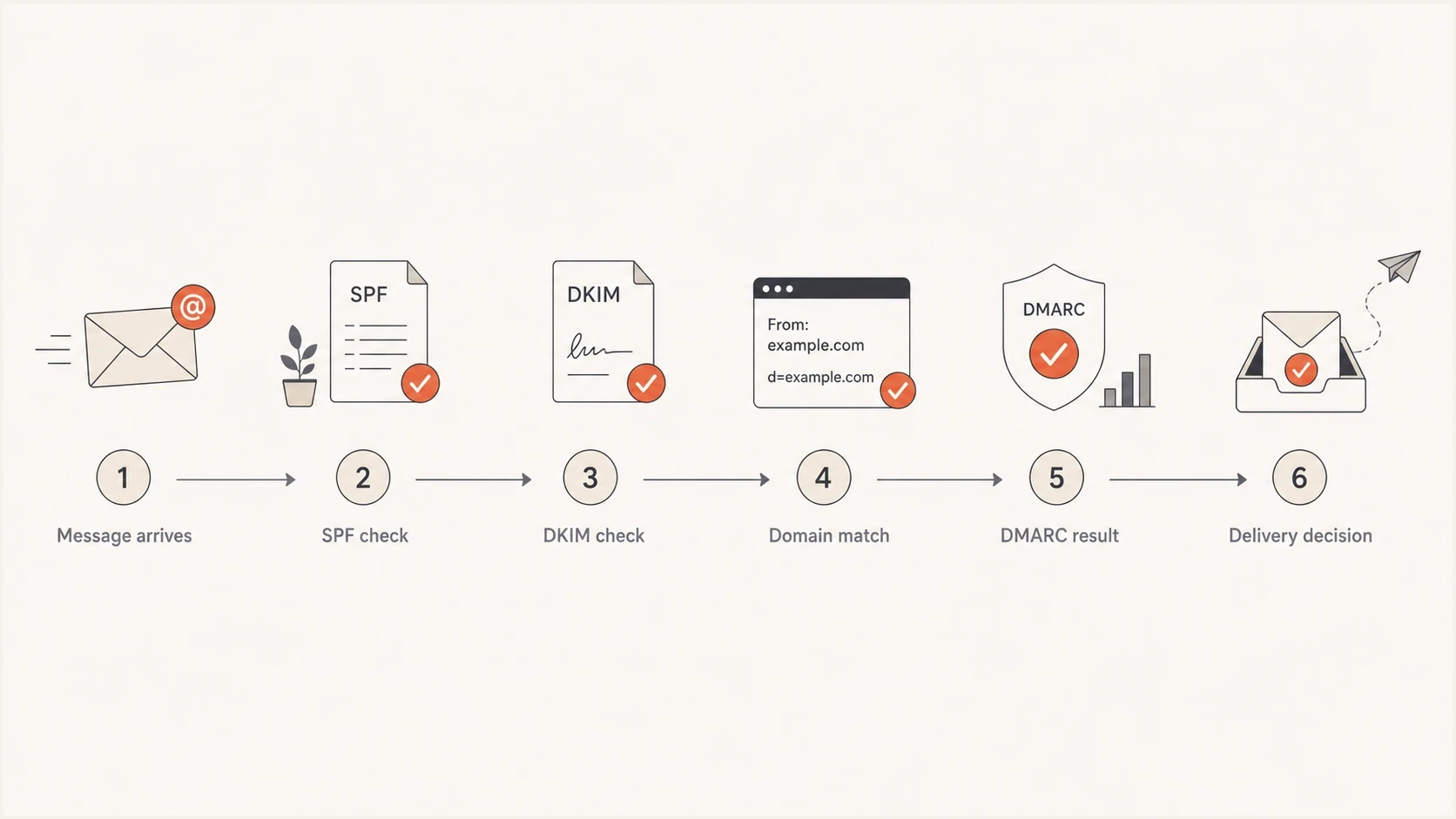
Yahoo and AOL SPF, DKIM, and DMARC authentication decision path.
Real authentication failure
- Header evidence: A delivered or bounced Yahoo message shows SPF, DKIM, or DMARC fail in Authentication-Results.
- DNS evidence: SPF, DKIM, or DMARC records are missing, malformed, duplicated, or changed without a matching sender change.
- Impact pattern: Raw bounces exist, deferrals increase, and the same stream fails in more than one independent check.
Reporting or seed issue
- Header evidence: A real Yahoo message passes, but a dashboard still reports all authentication checks as zero.
- Seed evidence: The test recipients were not sent to, were suppressed, were bounced, or were excluded by ESP logic.
- Impact pattern: No raw bounces exist and normal campaign recipients continue receiving authenticated mail.
How to prove the failure
The fastest way to avoid chasing the wrong fix is to inspect a real Yahoo or AOL message. A seed dashboard is useful, but it is secondary evidence. The delivered header or raw bounce is primary evidence because it shows what Yahoo actually evaluated.
- Send exact mail: Use the same sender, From domain, envelope path, template, tracking links, and ESP account as the failing campaign.
- Inspect headers: Open the full source in Yahoo or AOL and find Authentication-Results, DKIM-Signature, Return-Path, and From.
- Compare domains: Check whether header From matches the SPF-authenticated Mail From domain or the DKIM signing domain.
- Read bounces: Use raw SMTP bounce text, not a summarized report, because the full reply and enhanced status code show what Yahoo rejected.
- Validate DNS: Run a domain health check and confirm the records visible on the public internet match the intended setup.
Yahoo/AOL header evidence to look fortext
Authentication-Results: atlas.mail.yahoo.com;
  dkim=pass header.d=example.com;
  spf=pass smtp.mailfrom=bounces.example.com;
  dmarc=pass header.from=example.com
Return-Path: <bounce@bounces.example.com>
From: Example Brand <news@example.com>
If the header shows dmarc=pass for the same stream that your dashboard marks as failing, treat the dashboard as suspect. If the header shows dmarc=fail, fix the sending identity before changing the DMARC policy.
?
What's your domain score?
Deep-scan SPF, DKIM & DMARC records for email deliverability and security issues.
Check the DMARC record itself with a focused DMARC checker. One typo in the record can turn a clean sending setup into a receiver-side failure.
Common causes and exact fixes
The right fix depends on which layer fails. Changing the DMARC policy rarely fixes a Yahoo/AOL delivery failure by itself. Most repairs happen in SPF includes, DKIM selectors, custom return paths, or the ESP account that sends the affected stream.
If the problem appears only at Yahoo/AOL, still check the full setup. A receiver can see an SPF lookup timeout, a temporary DNS error, or a different sending IP than the one your test used. A platform can also send the test email from a shared pool while the production campaign uses a dedicated IP, a different return path, or a different DKIM selector.
|
|
|
|---|---|---|
SPF fail | Sending IP missing, more than 10 DNS-triggering lookups, or duplicate SPF records. | Update the existing SPF record, authorize the sender, and keep evaluation at 10 or fewer lookups. |
DKIM fail | Selector missing, wrong key, broken signature, or body rewrite. | Republish the selector, use at least 1024 bits (2048 recommended), enable aligned brand-domain signing, and retest. |
DMARC fail | SPF or DKIM passes for a different domain than the visible From. | Use a custom return path or DKIM signing domain with alignment to the From domain. |
No bounces | Dashboard missing data, seed suppression, or parsing issue. | Confirm seed sends, inspect a delivered header, and check the report source. |
Use this table after checking a real Yahoo or AOL header.
Also inspect every DKIM-Signature header. Yahoo evaluates multiple signatures, and if a message has several DMARC-aligned signatures that do not all pass, Yahoo does not guarantee a DMARC pass. Remove stale aligned signatures or fix the selector and signing path that produces the failure.
Do not loosen policy first
If your DMARC policy is already at p=reject, changing it to p=none reduces the enforcement requested from receivers but does not repair SPF, DKIM, or domain alignment. Use that only as an emergency containment step after you record header evidence.
Starter DMARC recorddns
_dmarc.example.com TXT "v=DMARC1; p=none; rua=mailto:dmarc@example.com"
Example SPF and DKIM recordsdns
example.com TXT "v=spf1 include:send.example.net -all"

selector1._domainkey.example.com TXT "v=DKIM1; k=rsa; p=BASE64KEY"
Suped's hosted DMARC helps when the hard part is policy staging and visibility across senders. With hosted DMARC, you manage policy changes through Suped instead of editing TXT records every time you need to move between monitoring, quarantine, and reject.

Issue steps to fix dialog showing the issue overview, tailored fix steps, and verification action
For teams managing several sending sources, Suped's product turns DMARC aggregate reports into source-level evidence, highlights unverified senders, and provides concrete fix steps. A failure count is incomplete. The useful details are the sender, failing domain, affected stream, and DNS or platform setting that needs correction.
How to read Yahoo/AOL SMTP responses
The SMTP response determines whether to retry or stop. Authentication is one possible cause, so preserve the complete response and Yahoo diagnostic code instead of diagnosing from the first three digits alone.
|
|
|
|---|---|---|
421 or 451 | Temporary deferral caused by conditions such as unusual traffic, complaints, server load, DNS trouble, or an authentication lookup error. | Keep normal queue retries active. Investigate the named cause if the same response persists. |
553 or 554 | Permanent rejection caused by an invalid recipient, authentication failure, message policy, or another permanent condition. | Do not retry the unchanged message. Fix the stated cause and suppress addresses confirmed as invalid. |
Use the full Yahoo response text to identify the underlying cause.
Read the diagnostic text
Do not classify every Yahoo 4xx or 5xx response as an authentication failure. Match the full SMTP reply against the same sending IP, timestamp, recipient domain, and campaign stream. If the reply names DMARC, DKIM, SPF, or an unresolvable From domain, investigate that authentication path.
When Yahoo/AOL is not the real issue
A Yahoo/AOL filter in an inbox placement report can make the issue look provider-specific even when the real problem sits upstream. If seed addresses were suppressed, excluded, or never sent the campaign, the platform has no headers to parse. Some dashboards show that as zero pass rates instead of missing data.
The absence of bounces needs context. If most Yahoo/AOL mail failed DMARC under a reject policy, you would normally see 5xx rejections. A 4xx deferral stays in queue and can appear in delivery logs before it becomes a final bounce. If neither raw rejections nor sustained deferrals exist, compare delivered headers, seed inclusion, and DMARC aggregate reports before changing DNS.
Separate delivery placement from authentication. A message can pass SPF, DKIM, and DMARC, then still land in spam because of complaints, low engagement, list quality, or campaign content. That is a reputation problem, not an authentication failure. The header tells you which bucket you are in.
- Campaign scope: If one campaign fails and another passes, compare From domain, sender profile, DKIM selector, tracking domain, and return path.
- Recipient scope: If only seed addresses show failures, prove those recipients received the message and that headers were available to parse.
- Time scope: If the failure started after a DNS edit, ESP migration, IP warmup step, or template change, inspect that change first.
Evidence strength for a Yahoo/AOL auth incident
Use stronger evidence before making DNS or policy changes.
Weak
Seed report only
Only a dashboard percentage is available.
Useful
Yahoo header
A delivered message has full headers.
Strong
Corroborated
Headers, bounces, and DMARC reports agree.
A practical escalation note
When a third-party report conflicts with Yahoo headers, ask exactly which source it parsed: delivered header, seed mailbox, bounce text, or DMARC aggregate report. If it cannot show the source, treat the report as a clue, not a verdict.
After the evidence is clean, check the rest of the sender requirements: one-click unsubscribe on marketing mail, a spam complaint rate below 0.3%, stable sending volume, valid forward and reverse DNS, TLS, and list hygiene. Authentication gets you through the identity check. It does not override reputation, complaints, or recipient engagement.
Views from the trenches
Best practices
Save full Yahoo headers before editing DNS so every later change has a clear baseline.
Test the same sending stream, template, and From domain instead of a generic sample email.
Use raw bounces with DMARC reports to separate true rejection from reporting gaps.
Common pitfalls
Treating a zero pass rate as a confirmed failure when seed recipients were never sent to.
Fixing DMARC policy first when the actual break sits in SPF, DKIM, or return path.
Reading ESP summary labels instead of the raw rejection text and full message headers.
Expert tips
Compare header From, Return-Path, and DKIM d value before changing any DNS record.
Keep a known-good test message for each ESP so later Yahoo/AOL issues are easier to isolate.
Monitor DNS changes because deleted TXT records create sudden failures that look external.
Expert from Email Geeks says sudden SPF, DKIM, and DMARC failure often traces back to deleted or edited DNS records.
2025-02-04 - Email Geeks
Expert from Email Geeks says a clean test message means the blocked mail uses a different stream or the issue is not authentication.
2025-02-04 - Email Geeks
The fix that holds
The durable fix is evidence first, DNS second, policy last. Start with the exact Yahoo or AOL message, confirm what passed and failed in the header, then repair the SPF include, DKIM selector, return path, or domain match that caused the result. If the header passes and the dashboard fails, resolve the reporting source instead of changing working DNS.
Suped's product keeps the investigation tied to DMARC report data and current DNS state. It shows which source changed, detects authentication issues, sends alerts when pass rates drop, and supports hosted SPF or hosted DMARC without a manual DNS edit for every sender change. That gives the team a repeatable process for the next Yahoo/AOL incident.




