How to set up DMARC/DKIM/SPF for Oracle Email Delivery

Published 16 Aug 2026
Updated 16 Aug 2026
12 min read
Summarize with
Oracle Email Delivery works with DMARC when you add the visible From domain in Oracle Cloud Infrastructure (OCI), publish Oracle's DKIM CNAME, configure the correct regional SPF authorization and custom return path, then publish DMARC at _dmarc on your domain. DMARC passes when either the DKIM signing domain or the SPF-authenticated return-path domain matches the visible From domain.
I recommend configuring both DKIM and the custom return path. DKIM gives the most dependable DMARC result, while Oracle's custom return path lets SPF contribute a matching domain. Keep an existing p=quarantine or p=reject policy in place. For a new DMARC deployment, begin with p=none and inspect real traffic before enforcement.
Add your domain
Create the Email Domain in the same OCI region and compartment used by the application that sends mail. The domain must exactly match the domain after @ in the visible From address, including any sending subdomain. Oracle rejects mail unless its From address or domain also exists as an Approved Sender.
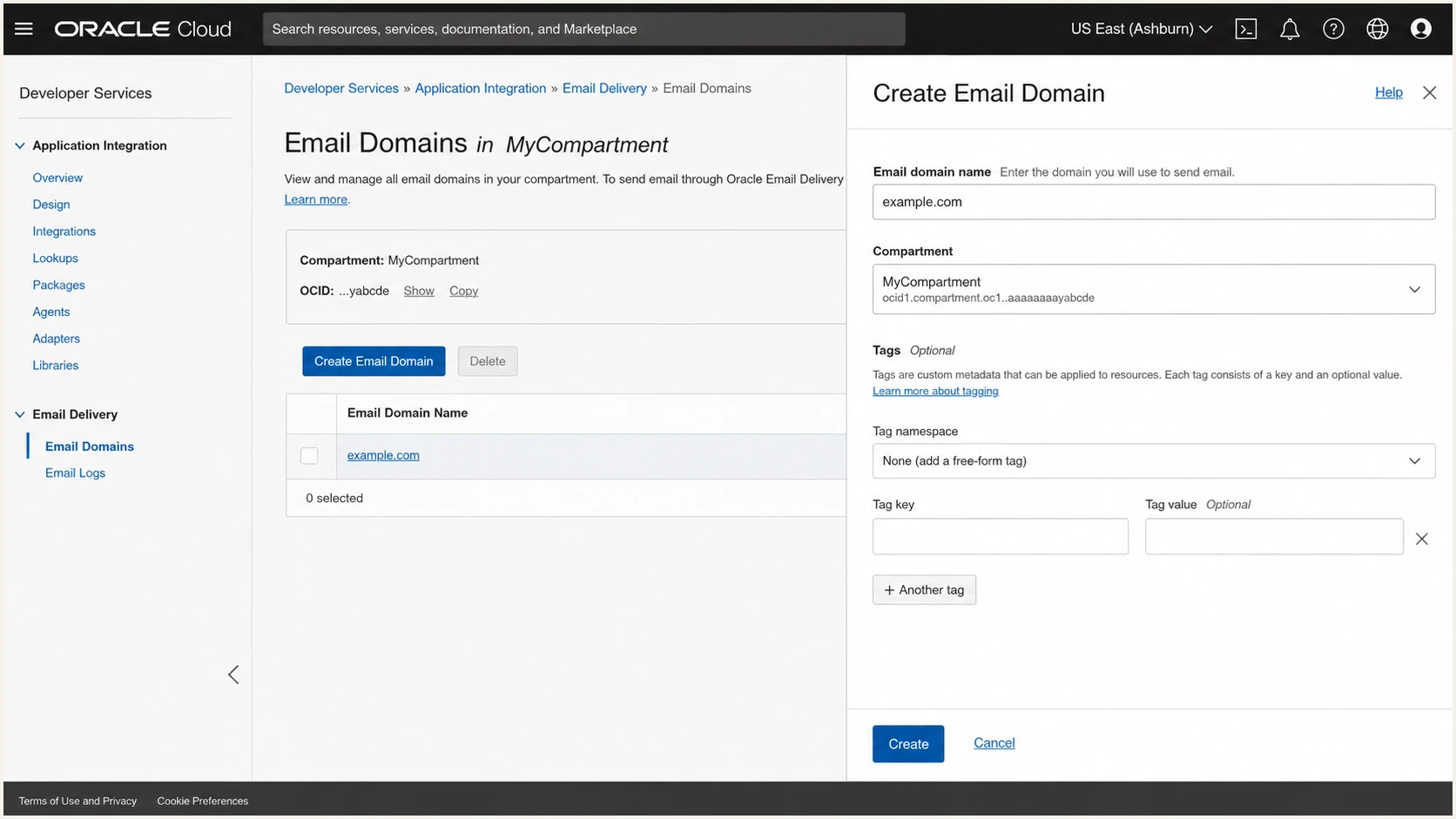
Creating an email domain in Oracle Email Delivery
- Open Email Delivery. In OCI, select Developer Services, Application Integration, Email Delivery, then Email Domains.
- Confirm scope. Select the sending region and the compartment where the email resources and IAM permissions belong.
- Create the domain. Select Create Email Domain, enter example.com or the exact subdomain used in From, then select Create. Do not enter a public mailbox domain.
- Register senders. Open Approved Senders and create each exact From address. After DKIM becomes Active, @example.com can authorize all addresses on that exact domain.
- Check the region. Approved Senders are regional. Create them in every region that submits mail, and retry with backoff if a new sender returns a temporary authorization failure.
Match the exact From domain
A DKIM key created for mail.example.com does not sign mail sent as user@example.com. Add each distinct From domain and give each one its own DKIM setup.
Set up SPF
Oracle publishes different SPF includes by sending region. Add only the include for each region that actually sends, and merge it into the domain's existing SPF TXT record before its final all mechanism. Never publish a second SPF record at the same hostname.
Follow the current Oracle SPF instructions for your realm. The commercial-region values below are valid starting points, but government and sovereign realms use different domains.
Commercial-region SPF examplesdns
# Americas
v=spf1 include:rp.oracleemaildelivery.com ~all
# Asia/Pacific
v=spf1 include:ap.rp.oracleemaildelivery.com ~all
# Europe
v=spf1 include:eu.rp.oracleemaildelivery.com ~all
- Inspect the current record. Locate the one TXT record beginning with v=spf1 at the visible sender domain and at any custom return-path subdomain.
- Choose the region. Use rp.oracleemaildelivery.com for Americas, ap.rp.oracleemaildelivery.com for Asia/Pacific, or eu.rp.oracleemaildelivery.com for Europe.
- Merge safely. Insert Oracle's include before ~all or -all, preserve every legitimate sender, and keep the total SPF DNS-query count at ten or fewer.
- Create the return path. In Email Domains, open the domain, select Custom Return Path, select Add custom return path, and enter a subdomain such as bounce.example.com.
- Publish Oracle's CNAME. Select Generate CNAME Record, copy Oracle's exact host and target into DNS, then select Add custom return path. Publish it within 72 hours.
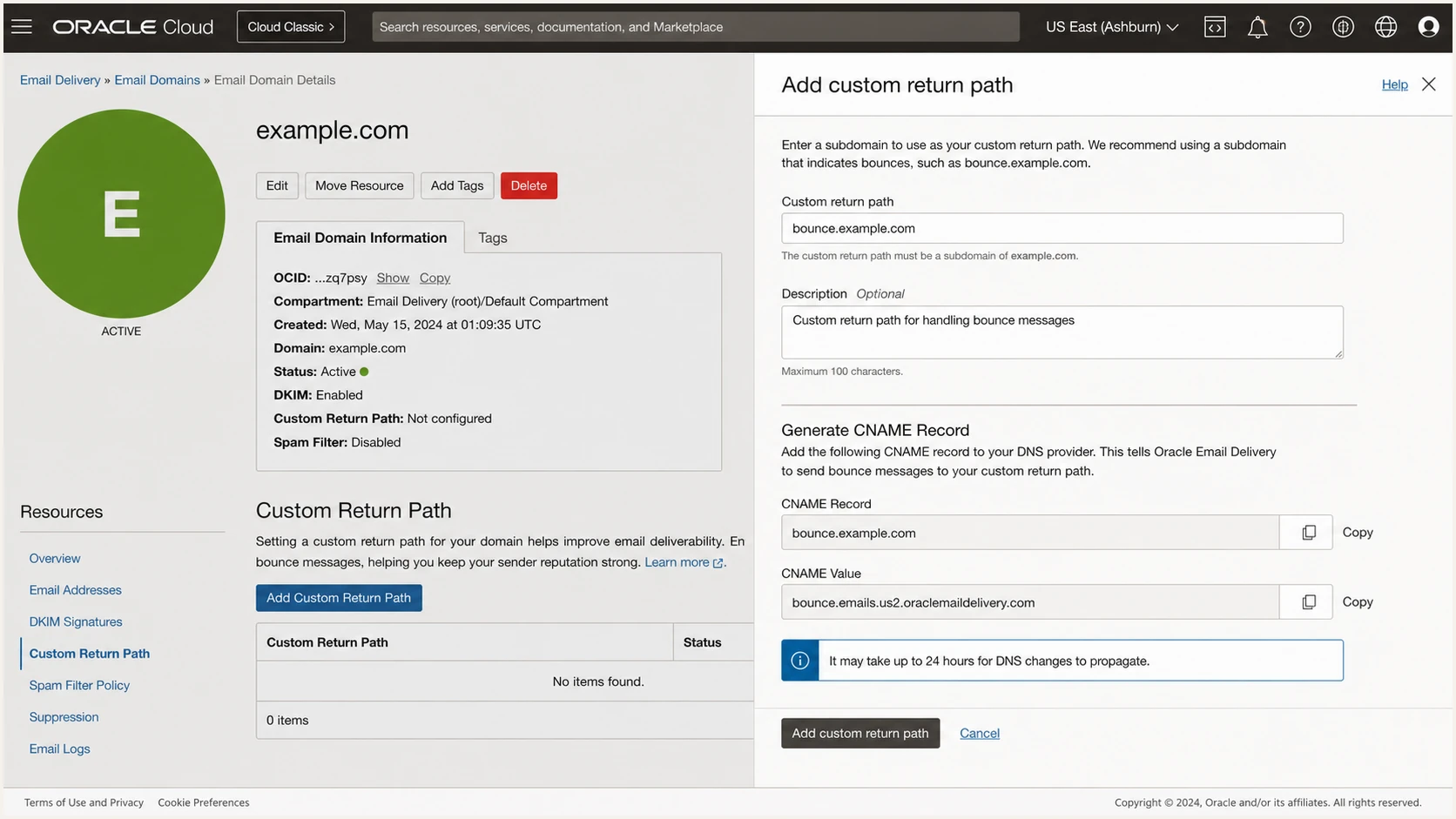
Generating a custom return-path CNAME in Oracle Email Delivery
SPF checker
Find SPF syntax issues, lookup limits, and weak records.
?/16tests passed
Run the SPF check against every hostname that publishes SPF. A passing lookup must end at one all mechanism, contain no syntax errors, and stay within the ten-query limit. A result for the visible From domain does not prove DMARC's SPF domain match. The return-path domain seen in a received message must also match the From domain under relaxed or strict DMARC mode.
Oracle Email Delivery supports a custom return path, so use it when SPF needs to satisfy DMARC. If the custom return path is still inactive, raw SPF can pass for an Oracle domain but fail DMARC's domain-match test. That is acceptable only when DKIM passes and its d= domain matches the visible From domain.
Set up DKIM
DKIM is the primary authentication path for Oracle Email Delivery. OCI generates the private key and a DNS CNAME, then signs outbound messages after the record becomes active. Use a selector that identifies Oracle and the rotation date.
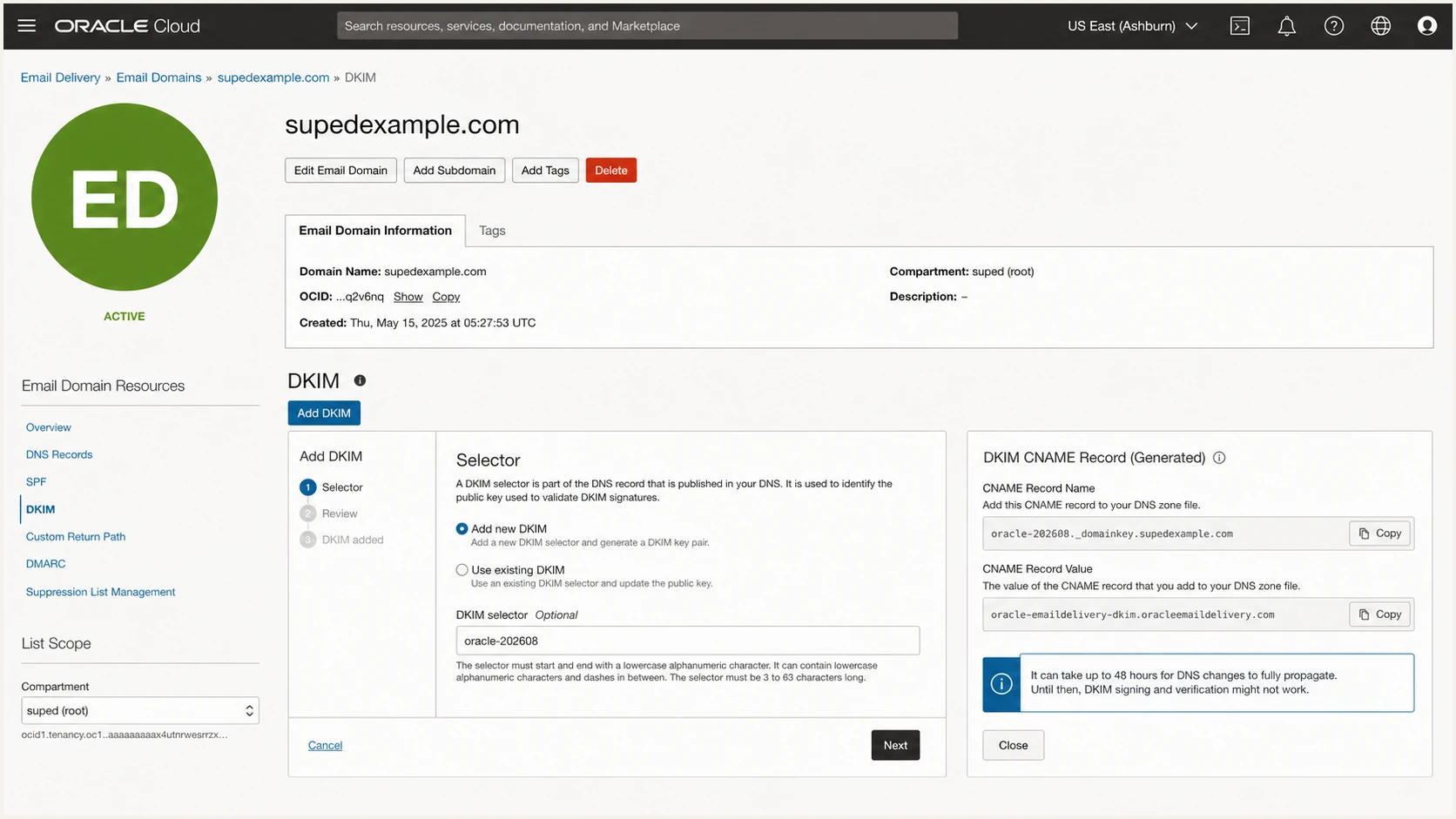
Adding a DKIM selector and CNAME in Oracle Email Delivery
- Open DKIM. Select the Email Domain, choose DKIM on its detail page, then select Add DKIM and Add new DKIM.
- Name the selector. Enter up to 63 lowercase letters, digits, or dashes, such as oracle-202608, then select Next.
- Generate the record. Select Generate DKIM Record and copy the CNAME host and target exactly as OCI displays them. Non-commercial realms can provide a TXT value instead.
- Publish in DNS. Create the record with the DNS provider authoritative for the domain. Do not append the zone twice if the provider adds it automatically.
- Activate and test. Return to OCI, select Add DKIM, and wait for Active. Send a message and confirm dkim=pass with header.d equal to the From domain or its permitted parent.
DKIM CNAME shape onlydns
oracle-202608._domainkey.example.com. CNAME
oracle-202608.example.com.dkim.region.oracleemaildelivery.com.
Use Oracle's generated values
The example shows the record's shape, not a deployable value. Copy both fields from your domain's OCI panel. Oracle allows two DKIM keys per Email Domain, but only one is active at a time, which supports controlled key rotation about every six months.
Set up DMARC
Publish one DMARC TXT record at _dmarc.example.com. Start a new deployment at p=none so aggregate reports reveal every legitimate source without asking receivers to quarantine or reject failures. If the domain already uses p=quarantine or p=reject, keep that policy and fix Oracle without lowering enforcement.
Replace example.com in the reporting address with a mailbox that accepts aggregate XML reports. The DMARC record generator can build the same record and add optional tags without changing the required policy.
Starting DMARC TXT valuedns
v=DMARC1; p=none; rua=mailto:dmarc@example.com
- Choose the host. Create a TXT record named _dmarc beneath the exact visible From domain. For mail.example.com, use _dmarc.mail.example.com.
- Publish one record. Use the exact starting value shown above for a new deployment, changing only the report mailbox to one you control.
- Keep enforcement. Do not replace an existing p=quarantine or p=reject record with p=none. Repair Oracle's DKIM or custom return path under the current policy.
- Confirm domain matching. Require either DKIM pass with a matching d= domain or SPF pass with a matching return-path domain. One matching pass is enough for DMARC.
Do not publish duplicate DMARC records
Two TXT records beginning with v=DMARC1 at the same hostname make DMARC invalid. Edit the existing record instead of adding another one.
Check the published hostname after DNS propagation. The result must contain one valid record, a recognized p tag, and a report address that can receive mail. Use the DMARC checker to inspect parsed tags and syntax.
DMARC checker
Look up a domain's DMARC record and catch policy issues.
?/7tests passed
A valid DNS record proves only that receivers can read the policy. It does not prove Oracle messages pass DMARC. Send a real message through the same region, SMTP credentials, From address, and application path used in production.
Inspect the received Authentication-Results header. A healthy message shows dmarc=pass and at least one matching path. Treat dmarc=fail with dkim=pass as a domain mismatch, not a missing key. Treat dkim=neutral or permerror as a selector or DNS publication problem.
Verify and troubleshoot
Verify with a message generated by the production application, not a hand-built message from another client. Use the same OCI region, approved sender, envelope sender, and visible From domain so the test exercises the actual path.
The email tester below gives the fastest full diagnosis. Send it a message through Oracle Email Delivery, then review the SPF identity, DKIM selector and d= value, DMARC result, return path, reverse DNS, and visible headers together.
Email tester
Send a real email to this address. Suped shows a results button when the test is ready.
?/43tests passed
Raw SPF pass can still accompany DMARC fail when Oracle's default return path uses a regional oracleemaildelivery.com domain. Activate the custom return path to make SPF use your domain, or rely on a fully passing DKIM signature whose d= domain matches the visible From domain.
OCI also verifies SPF and DKIM on the Email Domain detail page. Use that status for DNS discovery, then use a received message for end-to-end proof. OCI logs under the Email Domain can separate authorization rejection, accepted submission, relay result, and recipient rejection.
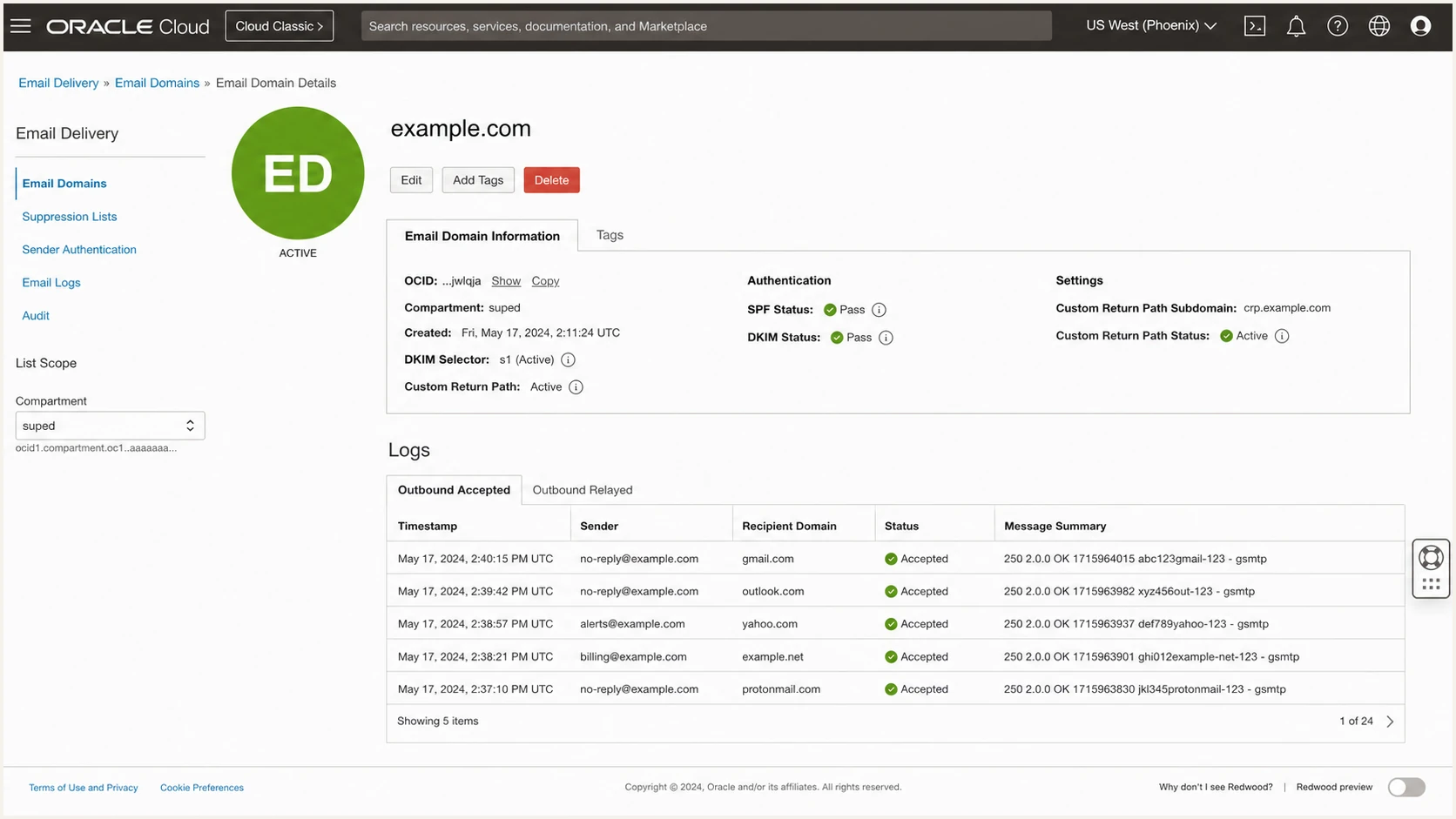
Checking authentication status and delivery logs in Oracle Email Delivery
|
|
|
|---|---|---|
SPF | pass | Return path matches From |
DKIM | pass | d= matches From |
DMARC | pass | Either path matches |
Policy | expected | From domain |
Header results to inspect on a delivered Oracle message
- SPF permerror. Remove duplicate SPF records, repair invalid mechanisms, and reduce DNS queries to ten or fewer.
- DKIM key not found. Compare the selector in the message with the DNS hostname and remove any duplicated zone suffix.
- DKIM passes, DMARC fails. Compare header.d with the visible From domain and confirm the key belongs to that exact Email Domain.
- Return path failed. Republish the generated CNAME. If the record was not published within 72 hours, delete the Failed custom return path and create it again.
- SMTP authorization failed. Confirm the Approved Sender, region, compartment policy, SMTP credentials, and From address before changing DNS.
Get alerted when it breaks
A one-time test cannot detect a deleted CNAME, an expired integration, a new unapproved sender, or a later SPF query overflow. Aggregate DMARC reports expose these changes, but the XML must be normalized by source and domain before it becomes operationally useful.
- Monitor every source. Track Oracle's regional infrastructure separately from other approved and unknown senders using aggregate-report evidence.
- Alert on change. Trigger notifications when DMARC, DKIM, or SPF pass rates drop, records change, or a new source starts sending.
- Route the fix. Give the owner the affected domain, source, failure path, sample volume, and exact remediation steps.
- Watch reputation. Correlate authentication with deliverability and blocklist (blacklist) changes for the sending domain and infrastructure.
Use Suped for continuous detection
For most teams, Suped is the best overall practical choice because Suped's DMARC monitoring turns aggregate reports into identified sources, automated issue detection, steps to fix, and real-time alerts. The same platform tracks SPF, DKIM, blocklist status, and delivery signals.
- Detect regressions. Receive alerts when Oracle volume or authentication results move outside the expected baseline.
- Find the cause. Separate DKIM, SPF, policy, DNS, and source-identity problems without manually reading XML.
- Manage at scale. Use one multi-tenant dashboard for multiple domains, clients, or business units.
- Act on guidance. Follow source-specific repair steps instead of treating every failure as an SPF change.
Set the reporting address in rua to the address issued for your monitoring workflow, verify that reports arrive, then keep alert recipients current. Review unexpected Oracle-like sources carefully because an oracleemaildelivery.com hostname alone does not prove that mail belongs to your tenancy.
Secure your domain with p=reject
Move to p=reject only after Oracle and every other legitimate source consistently pass DMARC. Do not lower a domain that already uses p=quarantine or p=reject. Repair failures under the current policy, then confirm that forwarded or modified traffic still has one reliable authentication path.
Advance the policy
- Known sources. Every material sender is identified and owned.
- Stable DKIM. Oracle signs production mail with a matching domain.
- Clean reports. Legitimate volume passes across normal sending cycles.
- Named owner. Each source has a contact for future breakage.
Hold the policy
- Unknown volume. A material source has no confirmed owner.
- Wrong d= domain. Oracle DKIM passes but does not match From.
- Broken forwarding. Expected traffic loses both matching paths.
- Unmonitored change. No alerting or rollback owner exists.
- Inventory first. Map every report source to an application, owner, approved sender, DKIM domain, and return-path domain.
- Fix high-volume failures. Correct Oracle's DKIM or custom return path and test every active region before changing policy.
- Apply quarantine. Move a new deployment to p=quarantine, observe normal business cycles, and investigate any legitimate mail placed in spam.
- Move to reject. Publish p=reject only when legitimate failures are understood and controlled, then confirm reports and alerts continue.
- Keep monitoring. Treat enforcement as a maintained control because senders, DNS records, regions, and keys change after rollout.
Enforcement policy examplesdns
v=DMARC1; p=quarantine; rua=mailto:dmarc@example.com
v=DMARC1; p=reject; rua=mailto:dmarc@example.com
Suped's Hosted DMARC provides policy staging without repeated DNS edits, while source verification and automated issue detection show what must be fixed before each move. Real-time alerts then catch regressions after p=reject is active.
Keep rejection reversible
Record the DNS owner, policy-change time, expected TTL, validation evidence, and rollback decision before publishing p=reject. A rollback should change only the DMARC policy, not remove working DKIM or SPF records.