How to interpret DMARC reports for unrecognized email sending sources and low volume DMARC failures?

Published 4 May 2025
Updated 14 Aug 2026
13 min read
Summarize with
Updated on 14 Aug 2026: We updated this guide for DMARCbis and added clearer checks for report context, policy overrides, and low-volume trends.
The short answer: treat unrecognized DMARC sources as evidence to classify, not as automatic proof of spoofing. Low-volume failures often come from forwarding, backscatter, bad contact forms, test tools, old automations, or third-party accounts that were never documented. A repeated or sharply increasing failure pattern from known sending infrastructure needs faster investigation because it can point to legitimate mail with broken alignment or unauthorized use.
Start with the same practical split every time: is the source genuinely unauthorized, merely unknown, or legitimate but not passing DMARC? That distinction matters more than the label a dashboard gives it. A source marked as a threat, unknown, or non-compliant still needs evidence before it changes policy decisions.
Suped helps here by turning raw aggregate reports into source groups, issue explanations, and fix steps. That is the point of DMARC monitoring: not just counting failures, but deciding what action the domain owner should take next.
Start with the direct answer
A few failed messages per week from a consumer ISP or unfamiliar mail platform are low priority when they remain scattered and do not match user complaints or a broader abuse pattern. Repeated traffic from recognizable sending infrastructure deserves ownership and alignment checks. Investigate sharp increases against the domain's normal baseline quickly, especially when a sensitive domain or active impersonation campaign is involved.
- Low volume: A handful of failures spread across unrelated sources is usually a watch item until repetition or another signal raises its priority.
- Known platform: A recognizable sender with raw SPF or DKIM pass but DMARC fail often lacks domain-specific alignment.
- Unknown IPs: An IP address with no useful reverse DNS remains unresolved. Reverse DNS can identify infrastructure, but it does not authenticate the sender.
- Policy action: Do not change policy because of a tiny count alone. Move policy when legitimate streams are clean and the monitoring window covers normal business cycles.
Working rule
DMARC reports show authentication outcomes, not intent. A report can show that a message failed DMARC, but it does not prove whether the message came from an unauthorized actor, a broken form, a forwarder, an employee using an unsanctioned account, or a vendor configured with the wrong domain.
Read the fields that identify the source
The fastest way to avoid overreacting is to compare the header From domain with the domains used by SPF and DKIM. DMARC passes when at least one authentication mechanism passes and its authenticated domain aligns with the visible From domain. Relaxed alignment allows the same organizational domain, while strict alignment requires an exact domain match. A raw pass with a DMARC fail often means the sender authenticated its own domain, not yours.
|
|
|
|---|---|---|
Header From | Visible sender domain | The domain DMARC protects. |
DKIM domain | The signing domain | A vendor domain means the sender did not sign as you. |
SPF domain | Envelope sender domain | A platform bounce domain can explain a raw SPF pass without alignment. |
Source IP | Network owner and recurrence | Shared infrastructure can identify a platform without identifying its customer. |
Reporter | Receiver, date range, and report ID | The row covers traffic observed by one reporting organization in one period. |
Fields that matter when an unrecognized source appears
For example, if the visible From is your domain but DKIM signs as mailchimpapp.net and SPF uses an mcdlv.net return path, the sender is using Mailchimp infrastructure without aligned custom authentication for your domain. That points to an ownership and configuration check first. The aggregate report alone cannot identify which customer used the shared platform.
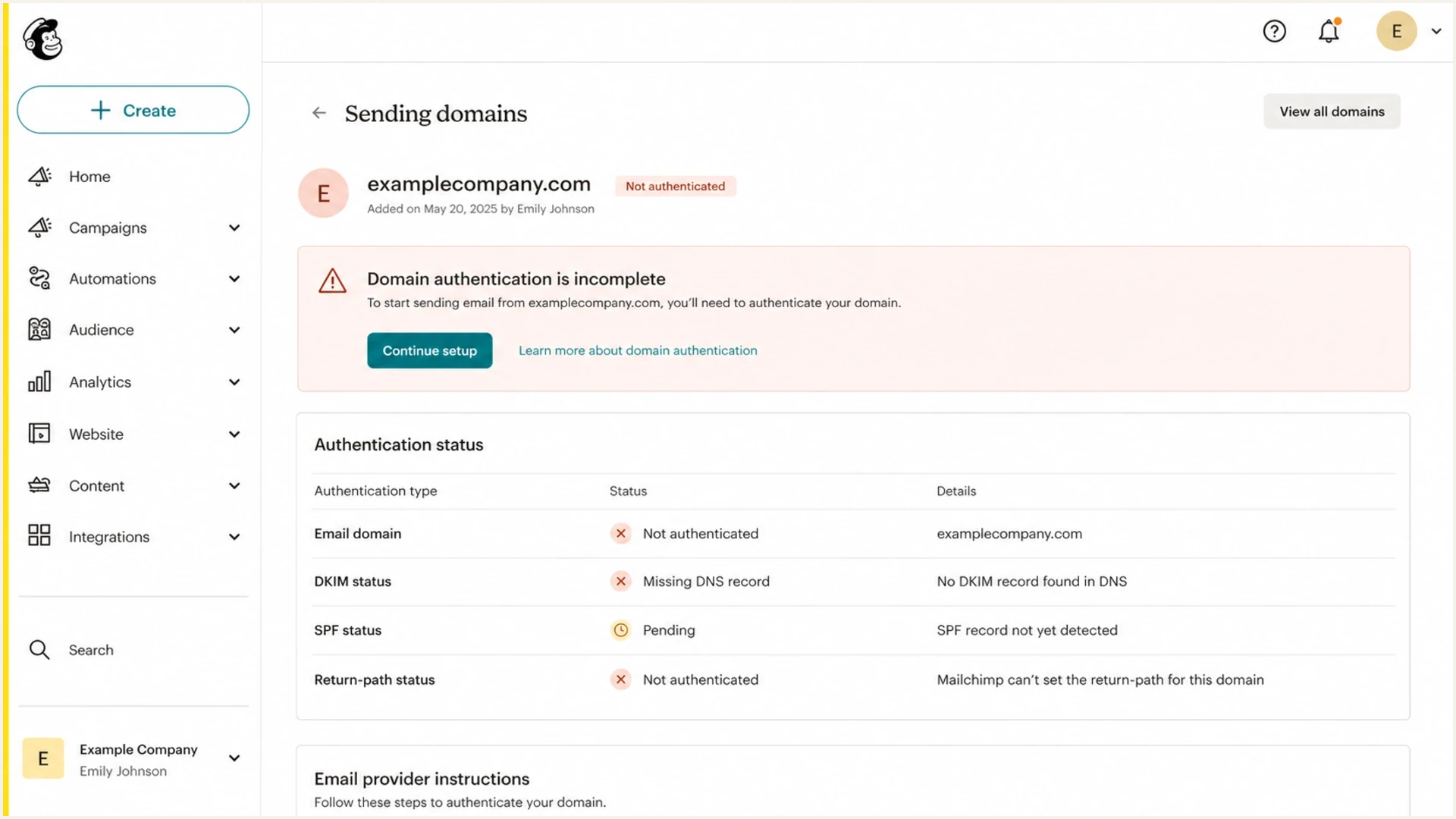
Mailchimp domain authentication settings showing incomplete DKIM and return-path alignment.
If you need a broader walkthrough of how to map sources and failure types, the related sender identification guide goes deeper into the same field-level investigation.
Read report context before judging a source
An aggregate row is a grouped observation, not a message log. Read the report metadata and published policy before classifying the row, then compare the same source across several reporters and date ranges. A count in one report only describes what that receiver observed during that report period.
|
|
|
|---|---|---|
report_metadata | Reporter, date range, report ID | Prevents duplicate reports and mismatched time periods from distorting volume. |
policy_published | p, sp, np, adkim, aspf, t | Confirms the policy and alignment modes the receiver found in DNS. |
row | source_ip and count | Shows the connecting IP and number of messages grouped into that result. |
policy_evaluated | disposition, dkim, spf | The SPF and DKIM values are DMARC alignment results, while disposition records policy handling. |
auth_results | DKIM and SPF domains, selectors, scopes, and results | Shows raw authentication that can pass for a domain with no DMARC alignment. |
reason | Override type and comment | Explains why handling differed, such as local policy, a mailing list, or a trusted forwarder. |
Report context that changes the interpretation
DMARCbis transition
RFC 9989 now defines core DMARC, RFC 9990 defines aggregate reporting, and RFC 9991 defines failure reporting. Together they obsolete RFC 7489. The pct tag was removed, while t=y provides policy test mode. Reports can still contain older fields while receivers update their implementations.
Classify unknown sources before changing policy
Sort unknown sources into five buckets. The goal is to turn a vague source name into a decision: approve and fix it, ignore and watch it, investigate with the business owner, escalate to the sending platform, or let policy block it.
Usually low risk
- Forwarding: A recipient forwards mail through another mailbox provider, changing SPF results.
- Backscatter: A form, auto-reply, or bounce uses the wrong visible sender and creates stray failures.
- Test traffic: A small tool, old integration, or one-off signup creates a few report rows.
Needs action
- Rogue sender: A team sends through a real platform using the organizational domain without approval.
- Vendor gap: A legitimate platform is missing custom DKIM, SPF, or return-path setup.
- Spoofing: A sender uses the domain in the visible From field without authorization.
Forwarding deserves special care. A forwarded message can show the forwarder's infrastructure as the source, even when the original message was legitimate. DKIM often survives simple forwarding, but message modification can break it. ARC can give receivers preserved authentication context, while an aggregate report can record a policy override reason without exposing the full ARC chain. The forwarded mail article covers that pattern in more detail.
How to rank failure patterns
Use the domain's baseline, recurrence, and context instead of a universal count threshold.
Watch
Sparse
One-off rows across unrelated sources with no matching complaint or brand event.
Investigate
Recurring
The same source or authentication pattern returns across several reports.
Escalate
Anomalous
Traffic rises sharply against baseline or targets a sensitive domain during reported abuse.
Understand low-volume failure patterns
Low-volume failures often look stranger than they are. Zoho can appear because it handles both sending and mailbox traffic. A small number of messages can use your domain in the visible From field while the envelope sender or DKIM domain belongs elsewhere. The row identifies observed infrastructure and alignment, but it does not prove the domain owner has a Zoho account.
The same logic applies to SendGrid, SMTP2GO, and ISP-owned mail platforms. A badly written contact form can put the visitor's address in the visible From field instead of using a local sender and putting the visitor in Reply-To. When that form sends through its own mail provider, the visitor's domain appears in DMARC reports as a failure.
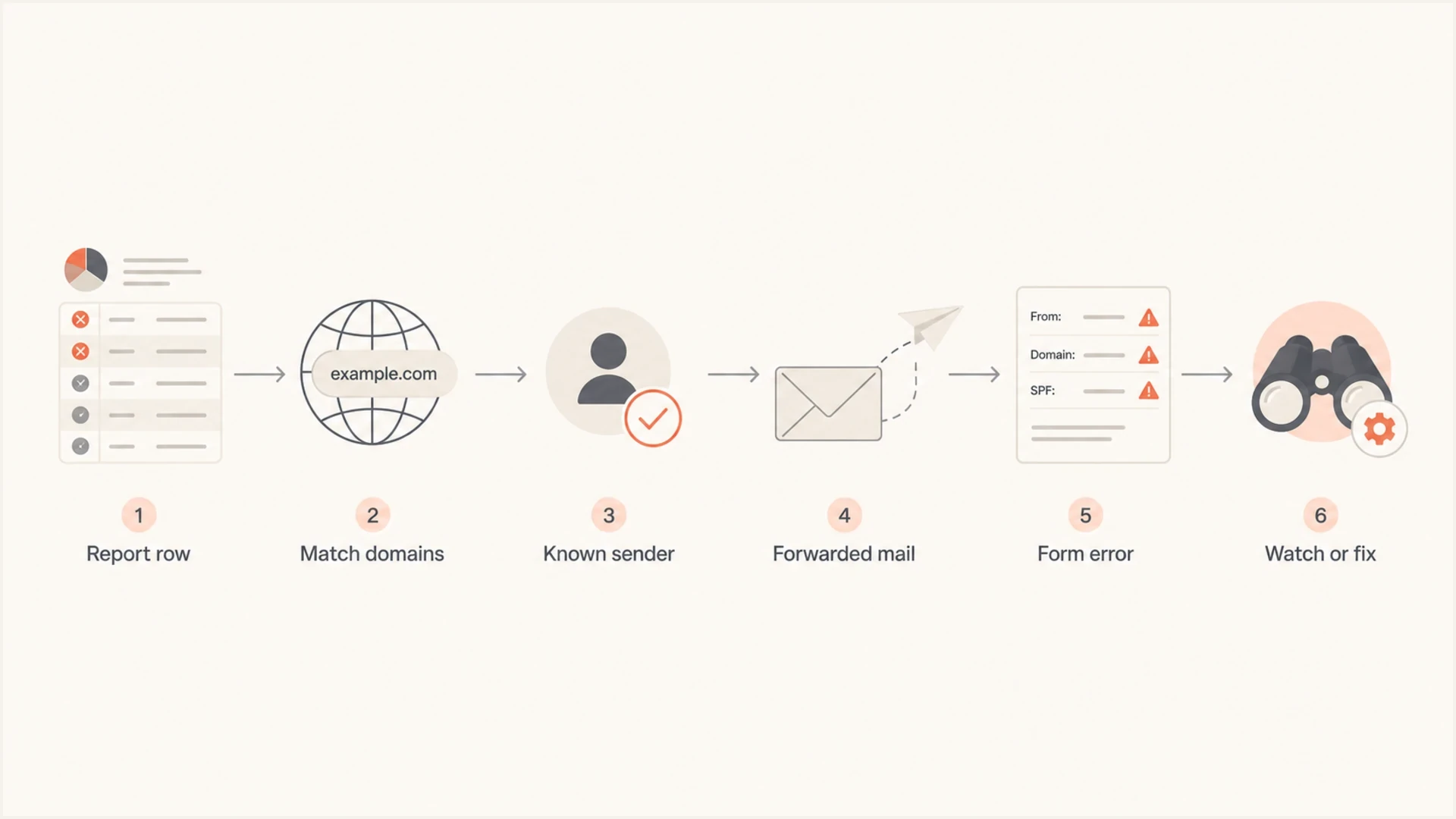
Flowchart for classifying unrecognized low-volume DMARC failure sources.
Do not trust the label alone
Dashboard labels such as threat, unknown, non-compliant, or suspicious are triage labels. Treat a source as likely unauthorized only after checking recurrence, business ownership, forwarding or mailing-list explanations, vendor domains, and any policy override reason in the report.
Check whether the sender is legitimate but misconfigured
A recurring unrecognized source from established sending infrastructure can mean someone in the organization verified an address or domain and started sending. If DKIM signs as the platform's domain instead of the customer's domain, DMARC fails even though the platform authenticated the message. It can also be unauthorized use, so the report still needs an owner check.
Example report interpretationtext
Header From: example.com
DKIM raw: pass, d=mailchimpapp.net
SPF raw: pass, envelope-from=mail72.atl31.mcdlv.net
DKIM alignment: fail
SPF alignment: fail
DMARC result: fail
Likely cause: platform sending without aligned custom authentication
The fix is not to add a platform's shared domain to SPF and call it done. Authenticate the platform for the sending domain, preferably with vendor-provided DKIM records and an aligned bounce or return-path domain where supported. Then send a test message and confirm that DMARC passes with the domain you expect.
- Ask owners: Check teams that can buy or configure sending services for unsanctioned sends.
- Inspect DNS: Confirm whether the vendor's DKIM and return-path records exist for the right subdomain.
- Send a test: Use a real message sample so you can inspect Authentication-Results and report data.
- Escalate cleanly: If no internal owner can be found, have the domain owner contact the provider's abuse or trust team with the source evidence.
DMARC checker
Look up a domain's DMARC record and catch policy issues.
?/7tests passed
A quick DMARC checker pass also catches basic policy problems before you spend time investigating report rows that come from a broken or missing record.
Use failure reports carefully
DMARC failure reports, often called forensic or RUF reports, can contain per-message failure details. In practice, many mailbox providers do not send them or redact them heavily because message-level data can expose personal or confidential information. Build the investigation around aggregate reports and treat failure reports as optional evidence.
Aggregate reports
RUA reports are the main working data source. They show grouped results by source IP, authentication outcome, reporter, count, policy disposition, and domains used for SPF and DKIM.
Failure reports
RUF reports can provide message-level details, but availability and redaction vary by receiver. Limit access and retention because the reports can contain message data.
For the exact difference between the two report types, see RUA and RUF. For day-to-day troubleshooting, aggregate reports plus message header samples from internal teams provide more consistent evidence.
Decide when to move toward reject
A DMARC reject policy is the right end state for most domains, but the timing matters. Do not use a few odd failures as the trigger or as a permanent reason to delay. Use confirmed readiness: known senders pass, subdomain policies match actual use, forwarding noise is understood, and recurring unrecognized sources have been investigated across a representative monitoring period.
Policy staging exampledns
v=DMARC1; p=none; rua=mailto:dmarc-reports@example.com;
fo=1

v=DMARC1; p=quarantine; rua=mailto:dmarc-reports@example.com;
t=y; fo=1

v=DMARC1; p=quarantine; rua=mailto:dmarc-reports@example.com;
t=n; fo=1

v=DMARC1; p=reject; rua=mailto:dmarc-reports@example.com;
t=n; fo=1
The DMARCbis t=y tag requests test mode, which applies handling one level below the published quarantine or reject policy. Receivers still make final handling decisions under local policy. Test first on a dedicated subdomain when its legitimate traffic is well understood, then remove t=y when the results support enforcement.
Safer policy movement
Suped's hosted DMARC workflow gives teams one place to review failure patterns, stage policy changes, and keep a record of why a source was approved or blocked. DNS-facing setup stays stable while the underlying policy is managed.
That is where hosted DMARC helps: policy movement becomes an operational workflow instead of a series of manual DNS edits.
A practical investigation workflow
Use a fixed sequence when a source is not recognized. Each step either explains the source or raises its priority, and the resulting source inventory prevents the same investigation after staff or vendor changes.
- Normalize reports: Deduplicate by reporter and report ID, then compare matching date ranges.
- Group rows: Combine by source IP, network owner, DKIM domain, SPF domain, reporter, and header From domain.
- Compare results: Separate raw authentication from DMARC alignment, then read disposition and override reasons.
- Check patterns: Compare recurrence and volume against the domain's normal baseline and business calendar.
- Ask internally: Question teams that can buy or configure sending services without central approval.
- Fix or block: Authenticate legitimate sources, retire abandoned sources, and let enforcement handle unauthorized mail.
During initial monitoring, review sensitive or high-volume domains daily and stable low-volume domains at least weekly. Review again after onboarding a sender, changing DNS, or tightening policy. After enforcement, alerts for new sources and sudden failure spikes can replace manual daily review.
Issues page showing top issues, verified sources, unverified sources, and authentication pass rates
Suped's product supports this workflow by keeping source evidence and fix steps together. It shows whether a source is verified, which alignment condition failed, which sources drive the count, and what DNS or vendor action is needed.
The same workspace can surface related SPF, DKIM, blocklist (blacklist), and deliverability signals. That keeps a DMARC investigation from missing a connected domain health issue. Run a domain health check before policy changes when the domain also handles important mail.
?
What's your domain score?
Deep-scan SPF, DKIM & DMARC records for email deliverability and security issues.
Explain the findings to stakeholders
The wording matters. Calling an unclassified source a threat can distort the next decision. Use plain categories instead: known and healthy, known but misconfigured, unknown low volume, unknown recurring, forwarded, and likely unauthorized.
|
|
|
|---|---|---|
Tiny odd source | Unconfirmed low-volume source | Compare across reporters and days |
Possible internal sender | Find owner and verify DKIM alignment | |
Forwarding, form, or account activity | Inspect aligned and raw results | |
Needs ownership check | Ask application and support owners | |
No reverse DNS | Unresolved source | Use authentication and recurrence evidence |
Stakeholder wording for common DMARC findings
That framing makes policy decisions cleaner. A stakeholder can accept low-volume monitoring, approve a vendor DNS fix, or stop unauthorized sending through enforcement. They do not need to interpret raw XML or infer intent from a dashboard label.
Views from the trenches
Best practices
Classify unknown sources by SPF domain, DKIM domain, IP owner, reporter, and count.
Treat RUF failure reports as optional evidence, not the basis of the investigation.
Move to reject after known senders pass and repeated unknown sources are understood.
Common pitfalls
Calling every unknown source a threat causes clients to overreact to normal report noise.
Ignoring custom DKIM gaps makes legitimate platforms look like unauthorized senders.
Treating every DMARC failure as reputational harm confuses authentication with delivery.
Expert tips
Check whether low-volume sources are mailbox providers, forwarders, or form handlers.
Ask business teams about regional campaigns before treating platform traffic as abuse.
Keep raw report access available when a dashboard summary hides SPF and DKIM domains.
Marketer from Email Geeks says very small weekly failure counts are usually configuration noise, not a reason to rush straight to reject.
2019-10-03 - Email Geeks
Marketer from Email Geeks says Zoho can appear in reports because it also handles inbound mail and forwarding for other domains.
2019-10-03 - Email Geeks
Recommended next steps
Interpret the report before changing policy. For a few failures per week, group them, compare the same pattern across reporters and dates, and watch for recurrence. For repeated or sharply increasing failures from recognizable sending infrastructure, find the internal owner, check custom DKIM and return-path alignment, and contact the platform only when the domain owner cannot identify the account.
Suped's product keeps DMARC monitoring, source classification, alerts, and policy staging in one workflow. That gives domain owners a documented path to fix legitimate senders and move toward reject when the evidence supports it.




