How many DMARC report emails should I expect to receive daily and how should I manage them?

Updated on 22 Sep 2026: We updated this guide for the current DMARC standards and added safer report intake, storage, and retention practices.
Expect roughly one DMARC aggregate reporting period per day from each participating report generator that saw mail using your domain. A generator produces a separate report for each DMARC policy domain and can produce more than one when it observes multiple policy configurations. A domain that reaches many mailbox providers, business gateways, security filters, and regional receivers can receive 150 RUA emails a day without having a configuration problem. The count depends mainly on how many receivers send feedback and how they batch, split, or resend it, not on how many messages failed DMARC.
Reports with no failures are also normal. A clean report stream means receivers are seeing authenticated mail that passes DMARC through aligned SPF or DKIM. Treat that as baseline visibility, not as wasted mail.
- Expected volume: Roughly one daily reporting period per participating generator and policy domain is a useful baseline, but gaps and extra files occur.
- No-fail reports: They show who is sending, how much mail receivers observed, and what passed.
- Best next step: Stop reading XML in a mailbox and turn the reports into a monitoring view with alerts and scheduled summaries.
Expected daily report volume
There is no universal normal count. Volume follows the number of participating reporting systems that process mail claiming to be from your domain, plus the number of DMARC policy domains and report destinations involved. One recipient organization can send one report covering a full day, send separate reports for independent systems or policy configurations, or send nothing. Large organizations can receive hundreds or thousands of report emails per day.
A small business that sends mostly one-to-one mail often receives a handful of RUA reports per day. A domain sending campaigns, invoices, password resets, and support mail to a broad recipient base usually reaches more report generators. The better question is whether the reports identify expected sources and whether authentication results are changing over time.
Sending more messages to the same report generator usually increases the message counts inside its aggregate report, not the number of report emails. Extra files can appear when a reporting system splits a large dataset, observes more than one policy configuration during the period, operates separate generators, or retransmits a report.
|
|
|
|---|---|---|
Receiver spread | Usually increases | More report generators observe the domain |
Message volume | Indirect | More mail to one generator raises counts inside its report |
Policy changes | Can increase | A generator can separate observed configurations |
Multiple RUA addresses | Can multiply deliveries | A report should go to each supported destination |
Factors that affect daily DMARC report email volume.
How report timing works now
RFC 9989, RFC 9990, and RFC 9991 replaced RFC 7489 in 2026. RFC 9989 marks the former ri interval tag as historic and recommends aggregate feedback at least once every 24 hours. Under RFC 9990, a reporting period typically covers one UTC day, but reports can be more frequent, arrive late, cover another period, or be absent because a receiver does not provide aggregate feedback.
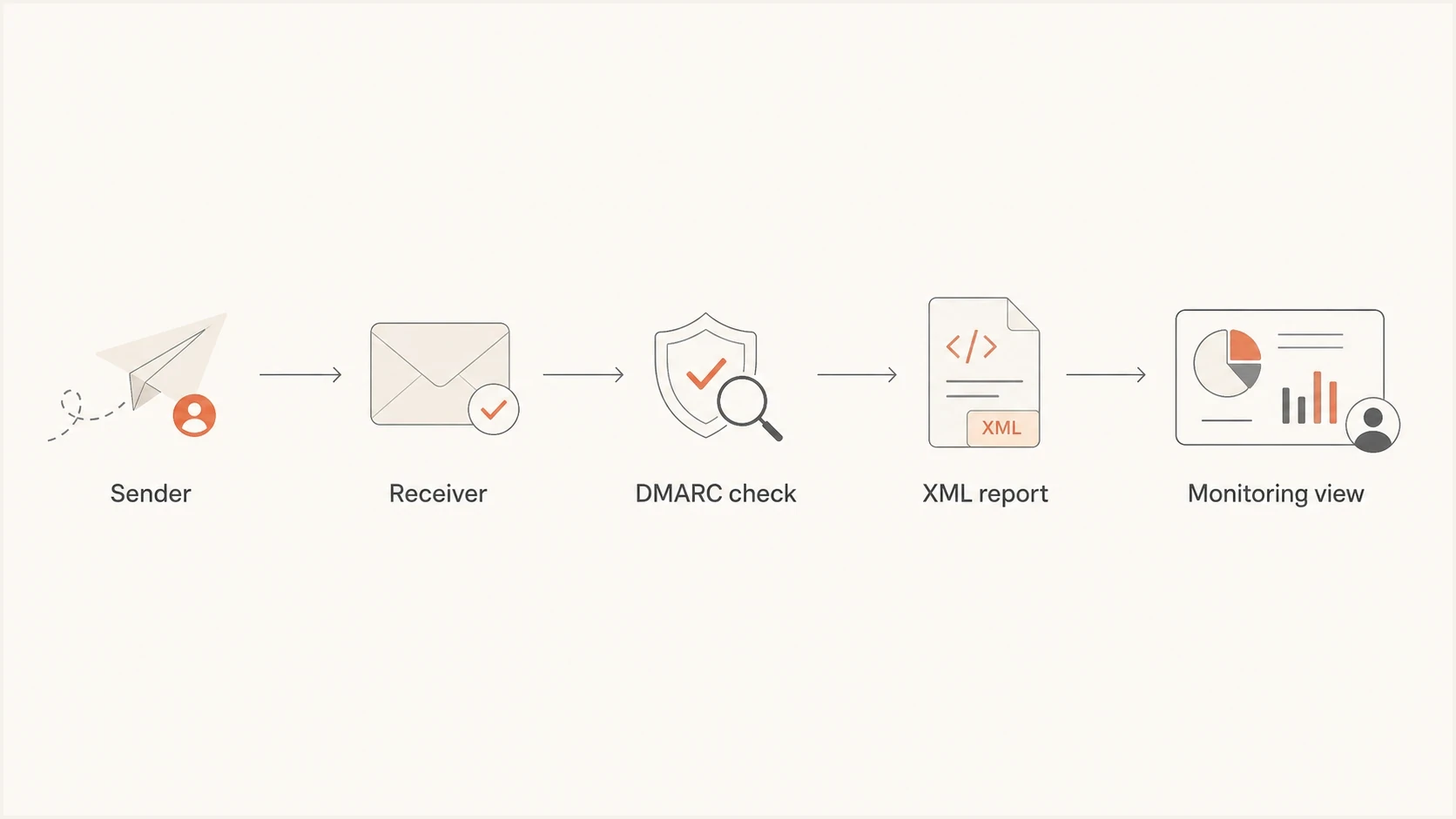
DMARC aggregate reporting flow from the sender through receiver checks to a compressed XML report and monitoring view.
Why reports with no failures are normal
RUA reports are aggregate reports. They contain counts for mail that passed and mail that failed. A participating receiver does not send a report only when something breaks. It summarizes what it observed for your domain during the reporting period.
That matters because the first job of DMARC reporting is inventory. Pass data confirms that known platforms authenticate with domain alignment, exposes new senders, and identifies old infrastructure before a stricter policy causes delivery problems. For field-level detail, compare your samples against RUA and RUF reports.
RUA aggregate reports
RUA is the normal aggregate reporting channel. Its machine-readable XML, usually delivered with GZIP compression, supports storage, grouping, trend analysis, and source discovery.
- Best use: Track sending sources and authentication results over time.
- Expected volume: Usually one daily reporting period per generator and policy domain, with splits and duplicates possible.
- Failure needed: No. Passing mail is included.
RUF failure reports
RUF is a separate failure-reporting channel defined by RFC 9991. It is not widely sent because it can include message header fields or content containing personal information.
- Best use: Targeted troubleshooting when a receiver supports it.
- Expected volume: Low or zero for many domains.
- Failure needed: Yes, but receiver support is limited.
Do not judge DMARC by inbox volume
A quiet failure column is good news. A full mailbox is an operations problem. The fix is reporting automation, not turning off RUA reports or routing them to a person who has to open attachments.
How to verify the reporting setup
Before treating the volume as normal, check the DMARC record itself. The aggregate destination belongs in rua. Failure reports, when you intentionally request them, belong in ruf. Mixing those up does not usually explain 150 aggregate reports, but it creates confusion when people expect every report to describe a failure.
Basic DMARC recorddns
Name: _dmarc.example.com
Type: TXT
Value: v=DMARC1; p=none; rua=mailto:dmarc@example.com
Use a DMARC checker to confirm syntax, tags, and reporting addresses. If you are creating a record for the first time, a record generator helps avoid malformed tags. For a wider SPF, DKIM, and DMARC check, run a domain health checker.
- Use rua: Send aggregate reports to a parser or platform, not to a shared human inbox.
- Use ruf selectively: Request failure reports only with a clear diagnostic need and a secure data-handling process.
- Check destinations: Multiple RUA addresses cause participating receivers to attempt delivery to each supported address.
- Check subdomains: Subdomain traffic can increase report volume when the parent DMARC policy covers it.
- Do not depend on ri: RFC 9989 marks this interval tag historic, so receivers control report timing.
DMARC checker
Look up a domain's DMARC record and catch policy issues.
?/7tests passed
After the record checks out, compare the report ID, reporting organization, policy domain, and UTC date range. Repeated delivery with the same report ID is a duplicate. Several reports for the same period can still be legitimate when a receiver uses separate reporting systems or observed a policy change. Compare persistent repetition against duplicate DMARC reports before changing DNS.
When expected reports do not arrive
Zero reports does not prove that DMARC is broken. Confirm that mail using the domain reached a receiver that sends aggregate feedback, then allow the receiver to finish a full reporting period and deliver the message. A two-day wait is a practical first check because reporting commonly covers one UTC day and delivery can be delayed.
When the rua address uses a different organizational domain, that report consumer must authorize the relationship in DNS. Receivers must ignore an external destination that fails this check. A managed reporting platform normally publishes a wildcard authorization record on its own domain, but a custom destination needs the exact relationship verified.
External aggregate reporting authorization exampledns
DMARC domain: example.com
RUA destination: reports.example.net
Name: example.com._report._dmarc.reports.example.net
Type: TXT
Value: v=DMARC1
- Send a test message to a receiver known to produce aggregate feedback, then wait through the next reporting cycle.
- Confirm that one valid DMARC TXT record exists at the correct _dmarc hostname and contains the intended rua address.
- Verify external reporting authorization when the DMARC domain and RUA destination use different organizational domains.
- Check the destination mailbox for quota limits, rejected attachments, filtering, and routing errors.
- Make sure the ingestion process accepts plain .xml and GZIP-compressed .xml.gz attachments that use the current aggregate report structure.
How to manage the volume
At 150 DMARC report emails per day, use an ingestion pipeline or a managed DMARC platform. A mailbox rule that moves XML attachments into a folder only hides the workload. Reports become useful after they are parsed, normalized, grouped by source, deduplicated, and compared over time.
Mailbox-only process
- Parsing: Manual opening of compressed XML attachments.
- History: Hard to compare sources, dates, and IP changes.
- Risk: Real changes get buried in normal daily volume.
Automated process
- Parsing: Reports are decoded, stored, grouped, and deduplicated automatically.
- History: Sources, pass rates, and failures are tracked over time.
- Risk: Alerts focus attention on new failures and unknown senders.
Suped's product turns raw XML into a DMARC monitoring workflow. It groups sending sources, charts authentication results, detects new issues, and sends alerts with steps to investigate. This lets a team work from changes in the data instead of the number of XML attachments.
Suped DMARC dashboard showing email volume, authentication health, and source breakdown
For MSPs and teams with several domains, Suped centralizes report intake while keeping source history and alerts separated by domain and organization. That avoids separate report inboxes and makes client-specific review easier.
|
|
|
|---|---|---|
Inbox | Very low volume | No analysis |
DIY parser | Technical teams | Maintenance |
Suped | Managed reporting | Hosted workflow |
Practical management choices for daily DMARC reports.
How to store DMARC reports safely
RUA reports do not contain message bodies, but they contain sending IP addresses, domains, volumes, and authentication results that describe parts of your mail operation. Store them with access controls that match your organization's requirements. RUF reports need stricter handling because they can contain header fields or message content with personal information.
- Validate intake: Require authenticated report email, expected MIME types, safe decompression, and well-formed XML before parsing.
- Limit access: Give report data only to people responsible for email authentication or approved investigations.
- Deduplicate first: Use the report ID, generator, policy domain, and date range before adding counts to trend data.
- Set retention deliberately: Keep parsed history long enough to compare migrations and DNS changes, then remove raw files when they no longer support an operational need.
Treat attachments as untrusted input
RFC 9990 requires mail carrying aggregate feedback to pass DMARC with alignment, but an ingestion service still needs file-size limits, decompression limits, XML parser hardening, and duplicate controls.
When 150 reports a day is suspicious
A high count by itself is not the problem. Investigate when the count changes sharply, the same report ID arrives repeatedly, unknown sources appear, or failures start after a DNS or sender change.
- Sudden jump: A new sender, campaign, gateway, or recipient mix has increased receiver coverage.
- Same report ID: Repeated delivery of the same report ID and date range indicates a retransmission or duplicate.
- Wrong address: A human mailbox in the RUA tag creates unnecessary noise and storage pressure.
- Unknown sources: New IPs or platforms need owner confirmation before the DMARC policy is tightened.
- Policy gap: Lots of passing mail under a monitoring policy still needs a plan for enforcement.
Illustrative daily intake planning
These workflow bands are not DMARC health benchmarks. Use them to plan intake capacity, then inspect report IDs, sources, and authentication trends.
Small intake
1-20
Parsing still improves source visibility.
Automate
21-200
Use parsing, grouping, and change alerts.
Batch processing
201-1,000
Use summaries and exception-based review.
Capacity review
1,001+
Check ingestion limits and duplicate rates.
Keep reporting on, parse the data, and watch changes over time. Turning off aggregate reports removes the evidence needed to find unauthorized sending and move safely toward enforcement.
Do not reduce visibility to reduce email
If the RUA mailbox is overloaded, move the destination to automation. Do not delete rua just because the reports look clean. Clean reports are the baseline that shows known mail is behaving as expected.
Views from the trenches
Best practices
Send RUA reports to a parser, then review source changes and failures in a daily digest.
Keep RUA and RUF addresses separate so aggregate volume never hides rare failure alerts.
Track reports by receiver, source IP, and domain so normal increases are easy to explain.
Common pitfalls
Letting a human mailbox collect XML files creates noise and hides real authentication changes.
Adding RUF without a clear need creates extra privacy and processing questions for little value.
Judging health by email count alone misses whether new senders pass SPF or DKIM correctly.
Expert tips
Use weekly summaries for stable domains and real-time alerts for new failures or senders.
Store raw reports long enough to compare source history after DNS and vendor changes.
Treat a no-failure report stream as useful baseline data, not disposable inbox clutter.
Marketer from Email Geeks says aggregate reports mark a DMARC failure when neither SPF nor DKIM produces an aligned pass, so no-failure reports are expected when mail is configured correctly.
2024-07-12 - Email Geeks
Marketer from Email Geeks says failure reports are rarely sent by modern receivers, so teams should not expect RUF traffic to explain normal daily RUA volume.
2024-07-13 - Email Geeks
What to do with 150 daily reports
If a domain receives 150 DMARC aggregate report emails a day and spot checks show no failures, do not start by assuming the DMARC record is wrong. Check that the RUA address is intentional, RUF was requested deliberately, and repeated messages do not share the same report ID and date range.
Then move the reports out of a human inbox. The useful output is a source inventory with authentication trends and change alerts. Suped's product turns the daily XML stream into that maintainable workflow.




