How do I set up DNS records for GoDaddy, Outlook, Gmail, and Yahoo to be ready for email authentication updates?

Published 13 Aug 2025
Updated 12 Aug 2026
12 min read
Summarize with
Updated on 12 Aug 2026: We updated the Microsoft 365 DKIM and SPF examples, added current Gmail and Yahoo requirements, and included practical DNS troubleshooting steps.
The direct answer is this: GoDaddy is usually only the DNS host, Outlook means Microsoft 365 mail, and Gmail and Yahoo are mostly the receivers enforcing stricter authentication rules. To be ready, publish the Microsoft 365 MX, SPF, DKIM CNAME, and Autodiscover values shown for your domain, add DKIM records for every other platform that sends mail using your domain, then publish one DMARC TXT record at _dmarc. Start DMARC at p=none, review reports, then move to p=quarantine and p=reject when real mail is passing.
No single article can give final DKIM values for every domain. Microsoft, Google Workspace, an email marketing platform, a helpdesk, a store platform, and any app that sends invoices or password resets each gives its own records. GoDaddy is the place where the records are published when it hosts the active DNS zone, not the source of truth for every record value.
For ongoing visibility, Suped's DMARC monitoring shows which services are passing SPF, DKIM, and DMARC, which sources need fixes, and when it is safe to tighten policy.
The direct setup path
Start by separating four jobs that often get mixed together. GoDaddy holds the DNS zone if your nameservers point there. Outlook, usually Microsoft 365, handles mailbox delivery. Gmail and Yahoo evaluate the mail you send to their users. Your other senders, such as ecommerce, CRM, support, and marketing systems, need their own authentication records too.
- Confirm DNS host: In GoDaddy, check that the domain uses GoDaddy nameservers. If not, publish records at the active DNS host instead.
- Choose the setup method: Use Domain Connect for a new Microsoft 365 setup, or use manual setup when you need to control verification and the MX cutover.
- Add Outlook records: Use the Microsoft 365 admin center values for verification, MX, SPF, DKIM CNAME, and Autodiscover. The Microsoft GoDaddy DNS records page explains both setup methods.
- Authenticate every sender: If a platform sends using your domain, add its DKIM record and include its sending mechanism in SPF only when needed.
- Publish DMARC: Create one DMARC TXT record for the organizational domain, then monitor before moving to an enforcement policy.
- Verify with real mail: Send messages through Outlook and every other sender, then confirm SPF, DKIM, and DMARC pass with your domain.
Do not copy DKIM targets from another domain. DKIM selectors are domain-specific and tenant-specific. Microsoft and each sender must generate the records for the exact domain you are authenticating.
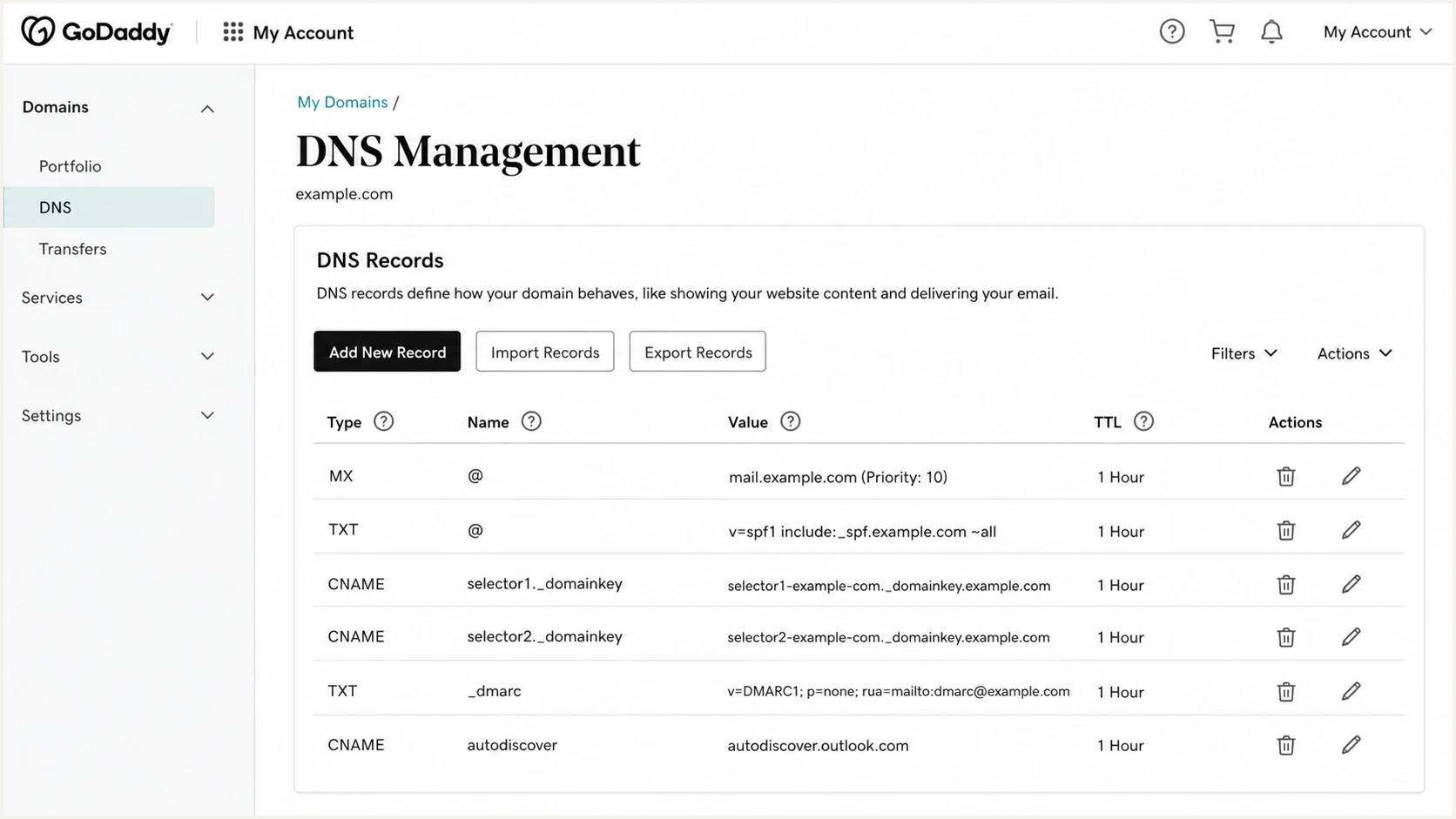
GoDaddy DNS Management with Microsoft 365 MX, SPF, DKIM, DMARC, and Autodiscover records.
What each provider needs
The setup changes depending on who sends mail for the domain. Gmail and Yahoo updates do not mean you publish special Yahoo records in GoDaddy. They mean your messages to gmail.com, googlemail.com, yahoo.com, and related inboxes need to pass authentication, keep low spam complaints, and use DMARC on the visible From domain. The specific sender rules are covered separately in the Gmail and Yahoo requirements article.
Gmail requires SPF or DKIM for all senders. Senders delivering more than 5,000 messages per day to personal Gmail accounts need SPF, DKIM, DMARC, and alignment between the visible From domain and either SPF or DKIM. Yahoo's bulk-sender rules also require SPF, DKIM, a DMARC policy of at least p=none, and alignment. Both providers expect valid forward and reverse DNS, TLS, low spam complaint rates, and one-click unsubscribe for applicable subscribed or marketing mail.
|
|
|
|---|---|---|
DNS host | Publishes TXT, CNAME, MX | |
Mailbox host | MX, SPF, DKIM, Autodiscover | |
Receiver or host | Receiver checks, or Google records | |
Receiver | Checks SPF, DKIM, DMARC | |
Other senders | Mail source | Usually DKIM, sometimes SPF |
Use provider-generated values where the table says admin center or sender portal.
GoDaddy as registrar
If GoDaddy only registered the domain, DNS changes happen somewhere else. Updating records in the wrong zone has no effect, even when the domain was bought through GoDaddy.
- Check nameservers: The active nameservers decide where SPF, DKIM, DMARC, and MX records must be edited.
- Avoid duplicate zones: A perfect record in an inactive GoDaddy zone will not authenticate any mail.
GoDaddy as DNS host
If GoDaddy hosts DNS, use the record name exactly as the sender gives it. For root records, GoDaddy usually expects @.
- Use short hosts: Enter _dmarc rather than the full name because GoDaddy appends the domain.
- Keep one SPF: A domain should have one root SPF TXT record, with approved senders merged into it.
The DNS records to publish
For a GoDaddy domain using Outlook, publish the Microsoft 365 records shown in the admin center. Direct Microsoft 365 subscriptions commonly use include:spf.protection.outlook.com for SPF, while GoDaddy-managed Microsoft 365 plans can use include:secureserver.net. Copy the value assigned to the domain instead of replacing a working SPF record with a generic example.
Typical direct Microsoft 365 records in GoDaddydns
Host: @
Type: MX
Value: yourdomain-com.mail.protection.outlook.com
Priority: 10
TTL: 1 hour

Host: @
Type: TXT
Value: "v=spf1 include:spf.protection.outlook.com -all"
TTL: 1 hour

Host: selector1._domainkey
Type: CNAME
Value: selector1-yourdomain-com._domainkey.tenantprefix.x-v1.dkim.mail.microsoft
TTL: 1 hour

Host: selector2._domainkey
Type: CNAME
Value: selector2-yourdomain-com._domainkey.tenantprefix.x-v1.dkim.mail.microsoft
TTL: 1 hour

Host: autodiscover
Type: CNAME
Value: autodiscover.outlook.com
TTL: 1 hour
The DKIM targets above only show the current pattern for new Microsoft 365 custom domains. Microsoft assigns the tenant prefix and dynamic partition character. Copy both CNAME targets from the DKIM page or the domain setup screen. Older domains can still show tenant-specific targets in a different format.
SPF lists the servers allowed to send for the envelope domain. If Outlook is the only sender, the assigned Microsoft 365 include is enough. If another platform sends using the same visible From domain, SPF can need that sender too, but DKIM is usually the cleaner control because each platform can sign mail with its own selector. SPF evaluation also has a limit of 10 DNS lookups.
One domain should not have two separate SPF TXT records at @. If you find two, merge approved senders into one SPF record. Multiple SPF TXT records cause SPF permerror and can break DMARC alignment.
The DMARC record is the policy receivers use after SPF and DKIM are evaluated. For a first rollout, publish a monitoring record and send aggregate reports to a real reporting address. Suped gives you a reporting address when you add the domain, and the record generator can create a clean starting record.
Starter DMARC recorddns
Host: _dmarc
Type: TXT
Value: "v=DMARC1; p=none; rua=mailto:reports@yourdomain.com"
If you use Google Workspace instead of Outlook, the record family changes. Google Workspace typically needs Google MX, Google SPF, and a DKIM TXT record generated in Google Admin. Generate a 2048-bit DKIM key when the DNS host supports it. This is a different mail host setup, not an extra requirement for sending from Outlook to Gmail recipients.
Typical Google Workspace shapedns
Host: @
Type: MX
Value: smtp.google.com
Priority: 1

Host: @
Type: TXT
Value: "v=spf1 include:_spf.google.com ~all"

Host: google._domainkey
Type: TXT
Value: "paste the DKIM value from Google Admin"
BIMI is optional and should come after DMARC enforcement. It is not required for the Gmail and Yahoo authentication updates. If you want brand logo display later, you need a valid SVG logo record and, for many mailbox providers, an eligible mark certificate.
Optional BIMI record shapedns
Host: default._bimi
Type: TXT
Value: "v=BIMI1; l=https://example.com/bimi.svg;"
How to stage DMARC safely
You do not have to start with p=none, but monitoring first is usually safest because it prevents accidental blocking. If real mail is still failing DMARC and you publish p=reject, you are telling receivers to reject that mail. Monitoring gives you evidence about what is actually being sent.
DMARC policy stages
Move forward only when legitimate sources are identified and passing aligned authentication.
Monitor
p=none
Collect reports without asking receivers to block mail.
Partial enforcement
p=quarantine
Send failing mail to spam or quarantine while you watch for missed senders.
Full enforcement
p=reject
Ask receivers to reject unauthenticated mail that fails DMARC.
A common timeline is several weeks at monitoring, followed by a controlled move to quarantine and then reject after the remaining legitimate sources pass. Some small domains can move faster. Domains with many sending systems need more time because hidden senders surface only when people use them.
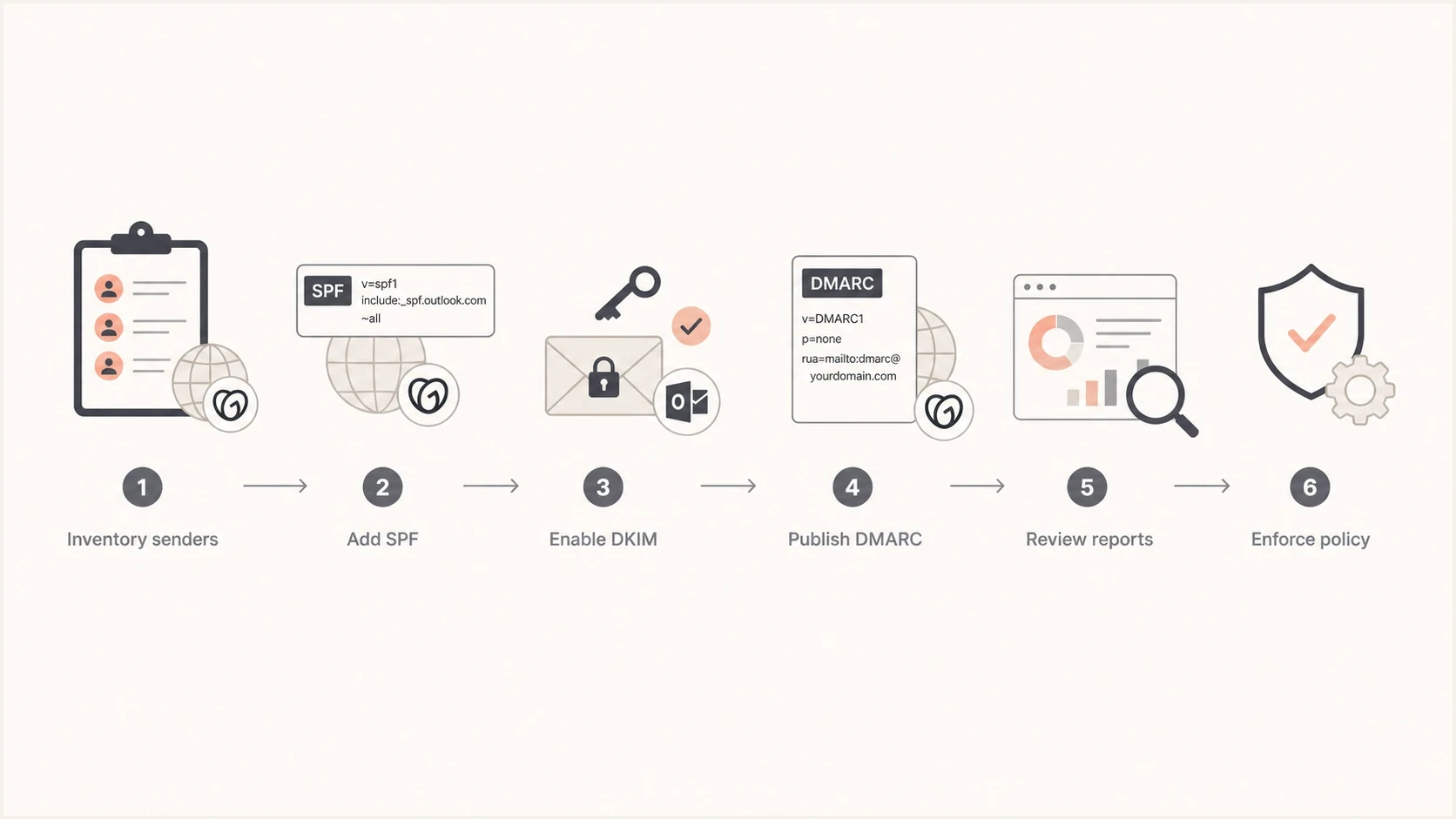
DMARC rollout for GoDaddy and Microsoft 365, from sender inventory through enforcement.
How to verify the setup
After publishing records, allow for DNS caching and test real messages. A DNS lookup proves the record is published. A message header proves the mail stream is actually using it. Test Outlook mail first, then each other sender separately.
In Gmail, send a message to a Gmail inbox, open the message menu, choose "Show original", and check that SPF, DKIM, and DMARC pass. The DKIM domain should be your domain or an aligned subdomain. DMARC should pass because either SPF or DKIM passes and aligns with the visible From domain.
What a passing result should resembletext
SPF: PASS with IP 203.0.113.10
DKIM: PASS with domain yourdomain.com
DMARC: PASS
?
What's your domain score?
Deep-scan SPF, DKIM & DMARC records for email deliverability and security issues.
For a broader DNS check, Suped's domain health checker checks DMARC, SPF, and DKIM records together. Use message headers as the final confirmation of authentication and alignment.
- SPF pass: The sending IP is authorized by the SPF record for the envelope domain.
- DKIM pass: The message has a valid cryptographic signature tied to your domain or an aligned signing domain.
- DMARC pass: SPF or DKIM passes and aligns with the domain visible in the From header.
- Report review: Aggregate reports identify legitimate and unknown sources before you move beyond monitoring.
Troubleshooting common DNS failures
When mail still fails after a DNS change, first determine whether the problem affects inbound routing, outbound authentication, or DMARC alignment. That distinction narrows the records to inspect and avoids unnecessary changes.
|
|
|
|---|---|---|
Mail is not received | Old, missing, or lower-priority MX record | Compare the live MX set with the mailbox host's values and remove obsolete routes during the cutover. |
Records are not visible | Edited an inactive DNS zone or cached data remains | Confirm authoritative nameservers, then allow for the record TTL and resolver caching. |
SPF shows permerror | Multiple SPF records or more than 10 DNS lookups | Merge authorized senders into one record and reduce unnecessary lookup mechanisms. |
Microsoft DKIM stays disabled | Wrong CNAME target, full hostname entered, or selector2 missing | Enter short GoDaddy hostnames, publish both selectors, and copy Microsoft's current targets exactly. |
DMARC fails despite SPF pass | The envelope domain is not aligned with the visible From domain | Configure aligned SPF or, preferably for third-party senders, aligned DKIM. |
Check the active DNS zone and provider-generated values before replacing records.
Do not treat every delay as propagation. If the authoritative nameservers return the wrong value, waiting will not fix it. If they return the new value but a recursive resolver returns the old value, wait for the cached TTL to expire.
What Suped adds to the workflow
The hard part is knowing whether Outlook, Google Workspace, ecommerce mail, password resets, support tools, and marketing mail are all passing after the records go live. Suped turns raw DMARC aggregate reports into source names, authentication results, and specific fix steps so a team can trace failures before enforcing policy.

Issue steps to fix dialog showing the issue overview, tailored fix steps, and verification action
A typical Suped workflow is to add the domain, publish the provided RUA value in the DMARC record, let reports collect, then use the issues view to see which sources need SPF, DKIM, or alignment fixes. Alerts can catch failures after a DNS change, and hosted SPF can help when a domain is close to the SPF lookup limit.
Suped's hosted DMARC keeps a stable DNS CNAME while policy changes are managed in Suped. This reduces repeated GoDaddy edits during the move from monitoring to reject.
Use Hosted DMARC when the team wants controlled policy staging without changing the DMARC TXT value at each step.
Suped also provides SPF and DKIM monitoring, hosted SPF, hosted MTA-STS, SPF flattening, blocklist monitoring (blacklist visibility), and MSP multi-tenancy. These workflows help when a team manages multiple domains or needs clear remediation steps instead of raw XML reports.
Views from the trenches
Best practices
Inventory every sender before editing DNS, including Outlook, stores, forms, and apps.
Start DMARC at p=none until reports show every real sender passing aligned checks.
Keep one SPF TXT record at the root and merge approved senders into that record.
Common pitfalls
Publishing records in an inactive GoDaddy DNS zone leaves live mail unchanged.
Copying DKIM values from another tenant breaks signatures and wastes review time.
Jumping straight to p=reject can block legitimate mail that has not been fixed.
Expert tips
Use DKIM for each sender so DMARC can pass even when SPF forwarding breaks.
Check Gmail Show original after each sender is configured, not only after Outlook.
Add BIMI only after DMARC enforcement, because it depends on stricter policy.
Marketer from Email Geeks says GoDaddy recommendations help with the DNS interface, but the live setup depends on the actual services sending mail.
2024-01-09 - Email Geeks
Expert from Email Geeks says the mail host should be identified first, because Microsoft, GoDaddy-hosted mail, and other senders all provide different records.
2024-01-11 - Email Geeks
A practical rollout order
For a GoDaddy domain using Outlook, publish the assigned Microsoft 365 records first, enable DKIM in Microsoft 365, then authenticate every other sender before tightening DMARC. Gmail and Yahoo readiness comes from passing authentication on real messages, not from adding a special Gmail or Yahoo record to GoDaddy.
The safe final state is one valid MX setup for the mailbox host, one SPF record at the root, working DKIM for every sender, and one DMARC record with reporting plus a staged path to enforcement. BIMI comes later, after DMARC enforcement is in place and the brand asset requirements are handled.
- Day one: Confirm nameservers, verify the domain, then publish the assigned Microsoft 365 MX, SPF, DKIM CNAME, and Autodiscover records.
- Week one: Add DKIM for other senders and publish a monitoring DMARC record with aggregate reporting.
- After reports: Fix failed or unaligned sources before moving from monitoring to quarantine.
- Final step: Move to reject when reports show the legitimate mail streams are consistently passing DMARC.




