How do I properly set up DMARC records and reporting for email authentication?

Updated on 14 Aug 2026: We updated this guide for the current DMARC standards, safer policy testing, and non-sending domain protection.
Set up one DMARC TXT record at your root domain first, publish it at _dmarc.example.com, add a rua reporting address, start with p=none, then use the reports to confirm every legitimate sender passes SPF or DKIM with an authenticated domain that aligns with the visible From domain. After that evidence is clean, move to p=quarantine and then p=reject. That is the practical answer.
Starting at the root keeps the setup simple because DMARC DNS Tree Walk lets receivers find an applicable parent policy, and subdomains use that policy unless a subdomain has its own DMARC record or the parent record uses a separate sp or np tag. A root record also gives one reporting stream and avoids duplicate records that drift over time. Subdomain records are useful when a subdomain has a different risk profile, a separate owner, or needs a slower policy rollout.
Raw DMARC reports are XML files, often compressed, and they become noisy fast. Suped's DMARC monitoring receives those reports, groups sending sources, flags authentication issues, and gives steps to fix the DNS or sender configuration. This becomes useful when several teams or email providers use the same domain.
The short answer
A proper DMARC setup tells receivers how to handle unauthenticated mail and sends aggregate reports somewhere useful. The report data then gives you enough evidence to tighten the policy without blocking real mail. The DNS record is small, but the operational work around it matters more than the syntax.
- Publish root record: Add one TXT record at _dmarc for the organizational domain, such as example.com.
- Start in monitor mode: Use p=none so receivers report results without changing delivery.
- Add reporting: Use rua=mailto: with a mailbox or reporting address that is actively monitored.
- Fix senders: Confirm every legitimate source passes SPF or DKIM with an authenticated domain that aligns with the visible From domain.
- Raise policy: Move to quarantine, then reject, after the report data shows legitimate traffic is covered.
Starter DMARC TXT recorddns
_dmarc.example.com. 3600 IN TXT
"v=DMARC1; p=none; rua=mailto:dmarc-reports@example.com"
Gmail and Yahoo bulk sender rules pushed many senders to publish DMARC with at least p=none. Google's own Google DMARC guidance also recommends setting up a report mailbox and checking that third-party email is authenticated before tightening the policy.
Where the DMARC record goes
Put the primary DMARC record at the root domain, not at every subdomain by default. If your visible From domain is example.com, the DMARC record is published at _dmarc.example.com. If your visible From domain is news.example.com and that subdomain has no DMARC record, receivers use DMARC DNS Tree Walk to find an applicable organizational-domain or PSD policy record.
A separate subdomain record makes sense when the subdomain has a distinct sending program, a different vendor stack, or a different rollout schedule. Add one when a marketing subdomain needs p=none while the root domain is already at p=reject. For a deeper treatment of that case, see subdomain DMARC setup.
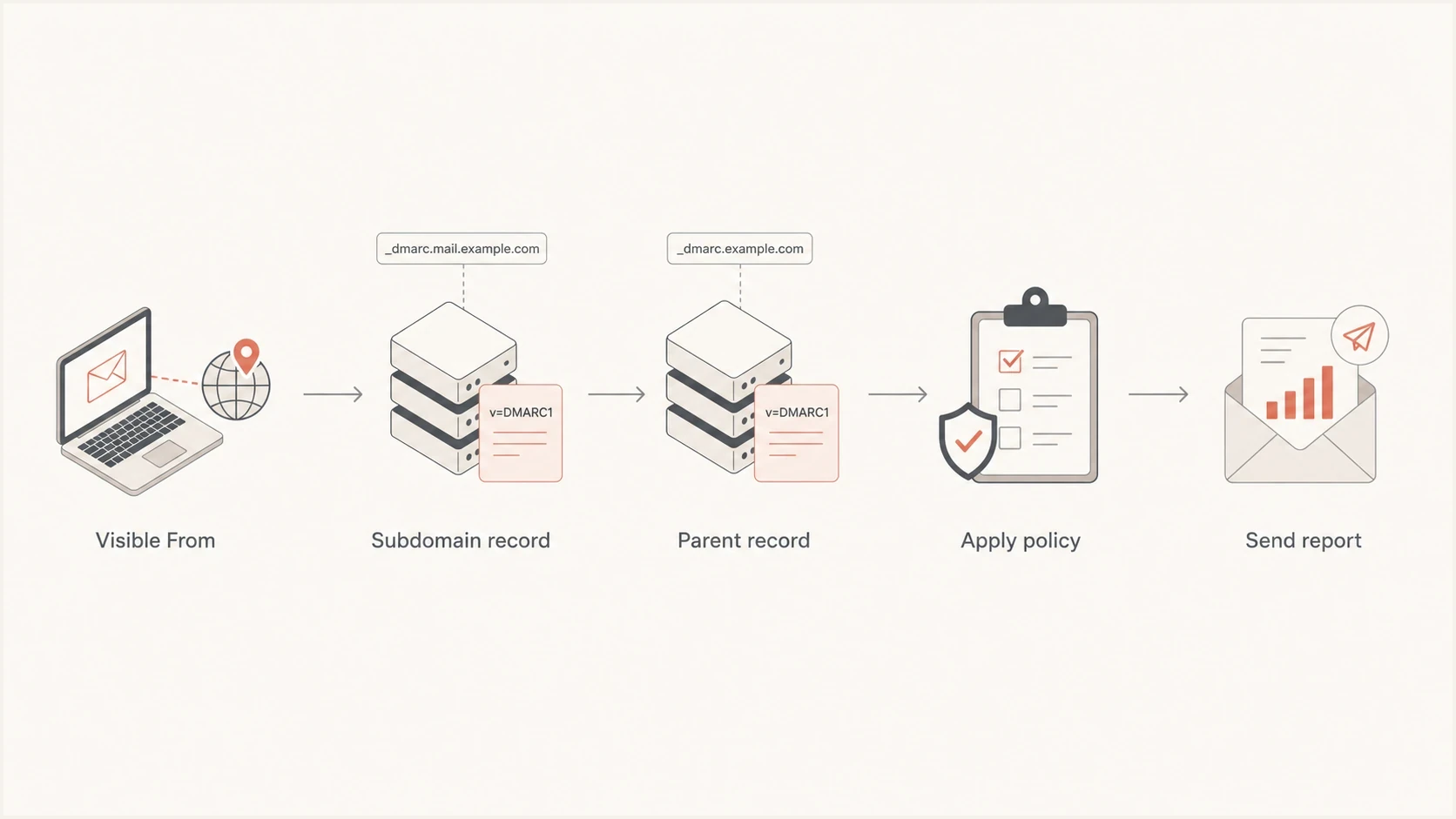
Flowchart showing how receivers find a subdomain or parent DMARC record.
Root-only record
This is the default path for most domains. One record controls the organizational domain and inherited subdomain policy.
- Simpler DNS: One record is easier to review, document, and update.
- Cleaner reporting: Aggregate data is easier to read when it is not split too early.
Separate subdomain record
This is useful when a subdomain needs a different policy or has a separate owner.
- Different policy: A subdomain can stay in monitor mode while the root is stricter.
- Separate ownership: A product, app, or region can manage its own authentication fixes.
Subdomain-specific DMARC recorddns
_dmarc.news.example.com. 3600 IN TXT
"v=DMARC1; p=none; rua=mailto:dmarc-reports@example.com"
How DMARC reporting works
The rua tag tells receivers where to send aggregate reports. These reports usually arrive daily, often as compressed XML attachments. They show sending IPs, volume, SPF results, DKIM results, DMARC results, the visible From domain, and the policy applied by the receiver.
Aggregate reports are the baseline for monitoring. Failure reports requested with ruf can include message headers or content, so they need a privacy and security review before use. Not every receiver sends them, which means they cannot replace aggregate reporting.
The reporting address can be internal, such as dmarc-reports@example.com. That works for low-volume domains during early testing. For active marketing, product, sales, billing, and support mail, raw report mailboxes become hard to use. Use a platform that parses XML, groups sources, and explains failures.
Suped DMARC dashboard showing email volume, authentication health, and source breakdown
Suped turns aggregate reports into source-level views, authentication health, and issue workflows. A DMARC report rarely says "your CRM needs a new DKIM selector" in plain language. Suped maps the evidence to the likely sender and gives a fix path, including SPF, DKIM, DMARC, blocklist (blacklist), and deliverability context in one place.
Do not send DMARC reports to a personal inbox. Large domains can receive hundreds or thousands of aggregate reports per day. If the reports are filtered away unread, the domain has a DMARC record but no useful reporting process.
If the reporting address is outside the domain being protected, the destination domain needs authorization in DNS. That prevents anyone from forcing another domain to receive report floods. The setup is simple, but it is easy to miss; use external report DNS when the report mailbox uses a different domain.
External report destination authorizationdns
example.com._report._dmarc.reports.example.net. 3600 IN TXT "v=DMARC1"
Build a record that receivers can read
A DMARC record is a TXT record with semicolon-separated tags. The v tag is mandatory, and p is the explicit policy value you should publish. Under RFC 9989, an otherwise valid record without p can be processed as p=none when it has a valid rua tag. The reporting tag is not required by the base protocol, but treat rua as operationally necessary because it is the feedback loop for finding and fixing failures.
If you want a quick starting point, use the DMARC record generator to produce the TXT value, then publish it in DNS and validate it before you send production traffic through it.
|
|
|
|---|---|---|
v | Protocol version | DMARC1 |
p | Domain policy | none |
rua | Aggregate reports | mailto: |
t | Policy test mode | optional |
sp | Existing subdomain policy | optional |
np | Non-existent subdomain policy | optional |
psd | Public suffix flag | optional |
adkim | DKIM domain match | r |
aspf | SPF domain match | r |
Core DMARC tags for an initial rollout
Monitoring record with relaxed matchingdns
_dmarc.example.com. 3600 IN TXT
"v=DMARC1; p=none; rua=mailto:dmarc-reports@example.com;"
" adkim=r; aspf=r"
Relaxed matching is the normal starting point because it accepts authenticated mail from subdomains of the same organizational domain. Strict matching is useful later for tightly controlled domains, but it needs cleaner sender governance.
DMARC record generator
Choose your policy, reporting addresses, and alignment settings.
DNS TXT record
v=DMARC1; p=quarantine; rua=mailto:dmarc@example.com
Validate SPF and DKIM before policy changes
DMARC passes when either SPF or DKIM passes and the authenticated domain aligns with the visible From domain under the selected mode. A sender can fail SPF and still pass DMARC through DKIM, or fail DKIM and still pass through SPF. Configure both because DKIM usually survives forwarding better, while SPF is sensitive to the path the message takes.
SPF path
- Checks sender IP: The connecting server must be allowed by the domain's SPF record.
- Uses envelope domain: The SPF-authenticated domain must meet DMARC alignment with the visible From domain.
- Breaks on forwarding: Forwarded mail often changes the sending IP and loses SPF pass.
DKIM path
- Checks signature: The message must have a valid DKIM signature after delivery.
- Uses signing domain: The DKIM signing domain must meet DMARC alignment with the visible From domain.
- Survives forwarding: A valid signature often remains valid when SPF no longer passes.
Before you move a DMARC policy beyond monitoring, check your DNS record and send a real test message. The DMARC checker catches syntax problems, missing tags, and invalid policy values. A delivered test message confirms the actual sender path, which DNS alone cannot prove.
?
What's your domain score?
Deep-scan SPF, DKIM & DMARC records for email deliverability and security issues.
Group failures by source, then inspect the message's Authentication-Results header. Compare smtp.mailfrom for SPF, header.d for DKIM, and header.from for the visible From domain. If a legitimate source has no aligned SPF or DKIM pass, fix that sender before tightening policy. For a deeper incident workflow, use the failing DMARC troubleshooting path.
Move policy safely
Treat p=none as a measurement stage, not the finish line. It gives visibility, but it does not ask receivers to quarantine or reject failed mail. Once legitimate sources pass consistently, raise the policy in controlled steps and keep watching the reports.
Policy readiness bands
Use these bands as a practical rollout guide after grouping known legitimate sources.
Advance
Under 0.5%
Known senders pass and unexplained failure volume is very low.
Watch
0.5-2%
Some known sources still need cleanup before stricter policy.
Hold
Over 2%
Fix sender configuration before quarantine or reject.
The exact thresholds depend on volume and business risk. A payroll system with one failing stream deserves more caution than a newsletter test domain. Fix known mail first. Under RFC 9989, t=y asks receivers to apply a policy one level below the published value during testing: quarantine steps down to none, while reject steps down to quarantine. Remove test mode and enforce reject once the reports stay clean.
Quarantine policy in test modedns
_dmarc.example.com. 3600 IN TXT
"v=DMARC1; p=quarantine; t=y;"
" rua=mailto:dmarc-reports@example.com"
Final reject policydns
_dmarc.example.com. 3600 IN TXT
"v=DMARC1; p=reject; rua=mailto:dmarc-reports@example.com"
Protect parked and non-sending domains
A registered domain that never sends email does not need a monitoring rollout. First confirm that no employee mailbox, website form, appliance, or third-party sender uses the domain in the visible From address. Then publish a reject policy immediately. A domain can still receive email through an MX record while refusing all outbound use.
- Verify zero senders: Check business systems and vendors before declaring the domain non-sending.
- Deny SPF sending: Publish v=spf1 -all so no sending IP is authorized for the domain.
- Enforce DMARC: Use p=reject with reject policy for existing and non-existent subdomains.
- Keep useful reporting: Include rua if attempted use of the domain should remain visible.
Non-sending domain recordsdns
example.com. 3600 IN TXT "v=spf1 -all"
_dmarc.example.com. 3600 IN TXT
"v=DMARC1; p=reject; sp=reject; np=reject; rua=mailto:dmarc-reports@example.com"
Do not use this configuration for a domain that sends even occasional invoices, alerts, or password resets. Authenticate that mail first and use the monitored rollout path.
Do you need a DMARC reporting platform?
For a tiny domain with one mail source and a short-term need to publish p=none, a dedicated mailbox is enough to get started. For an active sending domain, especially one warming IPs or using multiple email providers, a platform is the practical choice because the work is not reading XML. The work is identifying senders, fixing gaps, proving coverage, and moving policy without breaking valid mail.
Suped's DMARC reporting and email authentication platform parses aggregate reports, groups sending sources, flags authentication issues, and supports policy staging. Teams can also manage hosted DMARC, hosted SPF, SPF flattening, hosted MTA-STS, blocklist (blacklist) monitoring, and multi-tenant workflows in the same product.
Mailbox-only setup
- Low cost: A shared mailbox can receive reports without extra tooling.
- Hard to read: XML attachments are difficult to compare across receivers.
- Manual decisions: Someone still has to identify senders and judge risk.
Suped workflow
- Source grouping: Reports are converted into recognizable senders and issue types.
- Fix steps: Issues include tailored steps for DNS and sender configuration.
- Policy control: Hosted records and alerts make staged enforcement easier.
Hosted records are useful when DNS access is slow or spread across teams. With Hosted DMARC, the DNS provider keeps a stable CNAME while policy staging, reporting addresses, and advanced tags are managed in Suped.

Issue steps to fix dialog showing the issue overview, tailored fix steps, and verification action
Common mistakes to avoid
Most DMARC problems are not caused by the record itself. They come from missing sender inventory, report data that nobody reads, or policy changes made before the real mailstream is understood.
- Publishing too late: Add p=none before a launch, migration, or IP warmup so reports start flowing early.
- Ignoring subdomains: Check inherited policy against marketing, app, support, and transactional subdomains.
- Skipping DKIM: Do not rely on SPF alone because forwarding often breaks SPF while DKIM survives.
- Using personal reports: A person can miss high-volume XML reports, especially when multiple receivers report daily.
- Raising policy blindly: Move to quarantine or reject only after known senders pass and unknown sources are reviewed.
A strict DMARC policy can block legitimate mail when SPF or DKIM is incomplete. The safe setup order is visibility first, sender fixes second, and enforcement last.
Views from the trenches
Best practices
Publish root DMARC first, then add subdomain records only when policy timing differs.
Send aggregate reports to a monitored mailbox or platform before raising policy levels.
Treat p=none as a data stage, then move to quarantine after sender fixes are done.
Review SPF and DKIM for every sender before judging any DMARC failure pattern in reports.
Common pitfalls
Sending reports to one person creates unread XML piles and missed authentication issues.
Adding strict root policy before subdomains are ready can break legitimate programs.
Skipping rua leaves teams guessing which services still fail visible From-domain checks.
Leaving legacy tools unauthenticated makes p=reject risky during an IP warmup or launch.
Expert tips
Use one reporting address per organization unless domain ownership needs separation.
Create subdomain records when a marketing or app stream needs a slower rollout period.
Use t=y for test mode during quarantine or reject rollout, then remove it for enforcement.
Use report trends to remove unknown sources before changing enforcement policy levels.
Marketer from Email Geeks says root-domain DMARC is the right default because subdomains inherit the parent policy unless a separate record is needed.
2024-01-18 - Email Geeks
Marketer from Email Geeks says aggregate reporting should be added early because it creates the evidence needed to choose the next policy.
2024-02-06 - Email Geeks
A practical setup path
The clean path is root record first, reporting second, sender fixes third, then staged enforcement. That gives you a working record quickly without pretending that p=none is a security finish line.
Use separate subdomain records only when the subdomain needs different policy timing or ownership. Send aggregate reports somewhere that turns them into decisions. Suped provides reporting, issue detection, hosted records, alerts, SPF and DKIM visibility, and policy staging in one workflow.




