How do I handle spoofing when DMARC reject is set but not enforced on inbound mail server?

Updated on 25 Jul 2026: We updated this guide for RFC 9989 and clarified how receiver overrides and ARC affect p=reject.
If your domain has p=reject and a spoofed message still lands in a mailbox, the receiving mail server did not reject that message. It may have skipped DMARC evaluation, failed to retrieve or parse the policy, or applied a local-policy override after a DMARC failure. There is no extra DNS tag you can add on the sending domain that forces every recipient to reject. DMARC publishes an assessment policy. The receiving server checks SPF, DKIM, and alignment with the visible From domain, then decides how to handle the result.
I handle this as two separate jobs. First, prove that the domain is publishing the right DMARC policy and that the received message actually failed DMARC. Second, inspect the inbound filtering path and any override that allowed delivery. If the spoofed mail is going to your own users, you control the second job. If it is going to other organizations, you can monitor, report, and reduce abuse, but their mail server makes the final delivery decision.
Direct answer
Confirm that the receiving gateway recorded dmarc=fail, then identify whether delivery came from disabled enforcement, an allowlist, internal routing, ARC, or another local override. For your own mailboxes, enable inbound DMARC checking and add a same-domain anti-spoofing rule that acts on a trusted DMARC result. Keep the public policy at reject after legitimate senders pass cleanly.
Why reject did not stop the message
In the common case, the attacker uses one domain in the SMTP envelope sender and your domain in the visible From header. SPF checks the envelope sender domain. DKIM checks a signing domain if a signature exists. DMARC passes when at least one of those mechanisms passes with an authenticated domain aligned to the visible From domain. If there is no DKIM signature and SPF only covers the attacker's envelope domain, DMARC should fail for your visible From domain.
Spoofed header signals
Return-Path: <attacker@host.example.net>
From: "Support" <support@yourdomain.example>
Received-SPF: none; envelope-from=attacker@host.example.net
Authentication-Results: inbound.example; dkim=none
That message should produce a DMARC failure when the receiver can retrieve a valid policy. If it lands in the mailbox, the trusted headers often give the clue. You might see SPF logged separately, DKIM logged as none, and no DMARC result at all. That points to a path where DMARC was not evaluated or its result was not preserved. A recorded DMARC failure with delivery points instead to receiver handling or an override.
- Check From: Confirm the visible From address uses the protected domain, rather than only a display name that mentions it.
- Check DKIM: Look for a DKIM pass where the signing domain is aligned with the visible From domain.
- Check SPF: SPF passing for an unrelated envelope domain does not make DMARC pass for your domain.
- Check DMARC: Use only Authentication-Results added by your trusted inbound system. External senders can forge this header unless the gateway removes or isolates untrusted copies.
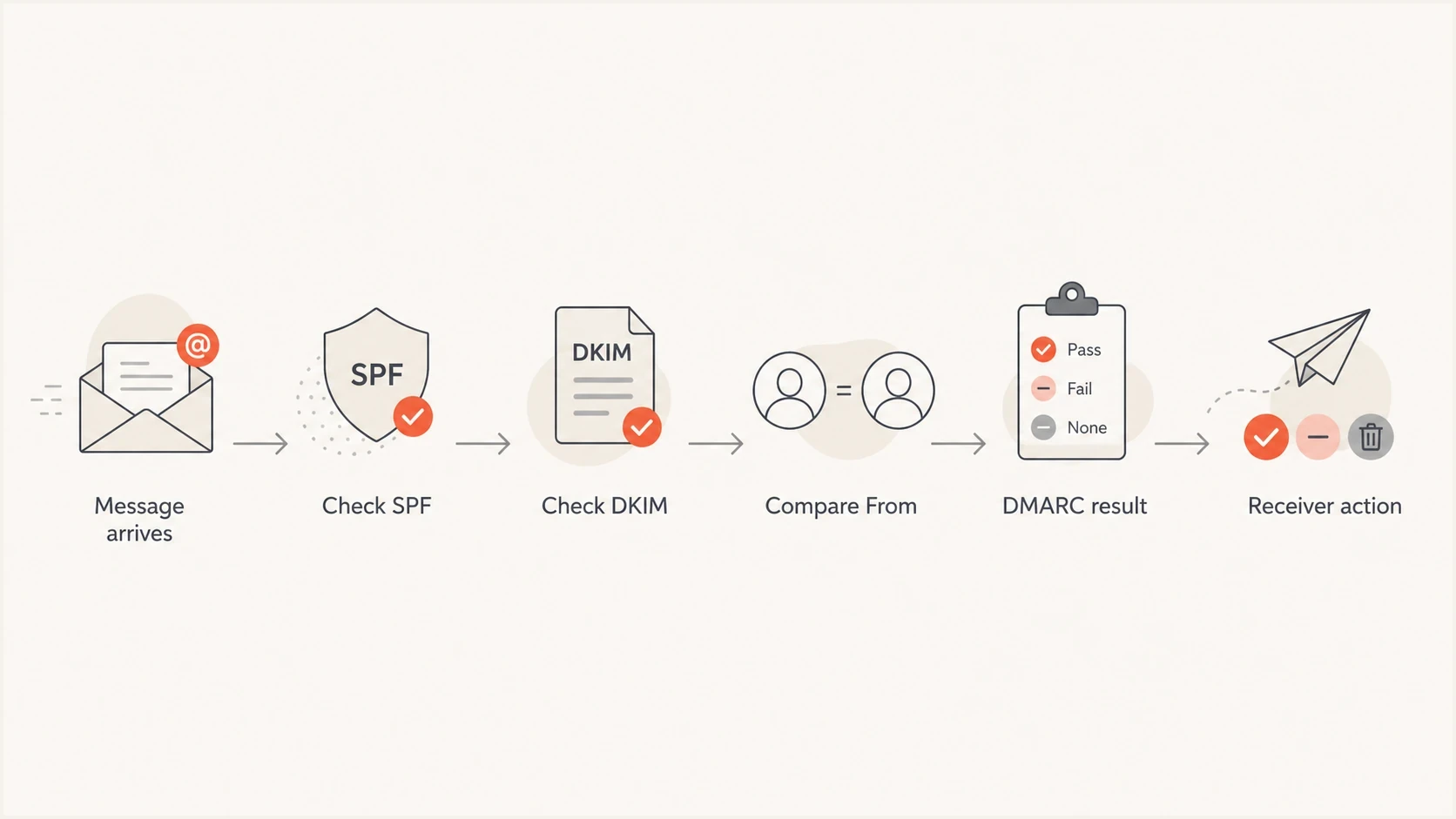
A DMARC decision path showing SPF, DKIM, From comparison, and receiver action.
When delivery is a local-policy override
A delivered message with dmarc=fail is not proof that the receiver skipped authentication. RFC 9989 says the receiver handles failed messages under its local policy and uses the domain owner's assessment as one input. A receiver might preserve legitimate forwarded mail after evaluating ARC, apply a tenant allowlist, or route an internal message through a path that does not reject at SMTP.
DMARC failure with ARC evidence
Authentication-Results: inbound.example;
  spf=fail smtp.mailfrom=forwarder.example;
  dkim=fail header.d=yourdomain.example;
  dmarc=fail header.from=yourdomain.example;
  arc=pass
ARC does not turn a DMARC failure into a pass. It carries authentication results through an indirect mail path so a receiver can decide whether the earlier result is trustworthy. Treat an ARC-based delivery as a plausible override only when the final receiver validates the ARC chain and trusts its sealers. An arc=pass token copied into an untrusted header is not evidence.
- DMARC pass: The message had aligned SPF or aligned DKIM. Investigate whether a legitimate sender, a compromised account, or a trusted path sent it.
- DMARC fail with override: Check ARC, forwarding, allowlists, connectors, and internal routing before calling it a missed check.
- DMARC missing: Verify the final gateway's trusted headers and logs. Missing header text alone does not prove that no check ran.
- DMARC error: A temperror or permerror is not a DMARC fail. Check DNS availability, record discovery, and record syntax.
Aggregate reports can confirm the pattern across a receiver. A failing row with a disposition of none or quarantine and a local-policy reason supports an override diagnosis. Reports are summaries, so retain a delivered sample and the receiver's message trace when investigating one incident.
What to fix first
Start with your own domain record, because a bad record creates noise and makes the provider conversation harder. A strict record for a domain that is ready for enforcement usually has p=reject, an intentional policy for existing subdomains, and an intentional policy for non-existent subdomains. Aggregate reports should also be enabled so you can compare authentication results with receiver dispositions.
DMARC record exampleDNS
v=DMARC1; p=reject; sp=reject; np=reject;
rua=mailto:dmarc-reports@example.com
Remove historic sampling guidance
RFC 9989 made pct historic. Remove pct=100 when maintaining the record because it no longer adds enforcement meaning. Stage a policy change by monitoring first, then move the policy value after legitimate sources are verified.
Use a DMARC checker to confirm syntax, policy, reporting, and tag behavior before changing inbound rules. If DNS changes are slow or many people touch records, Hosted DMARC can make policy staging cleaner because the operational controls sit behind a stable DNS setup.
DMARC checker
Look up a domain's DMARC record and catch policy issues.
?/7tests passed
After the record is clean, focus on the inbound side. If the spoofed message is sent to a mailbox hosted on your domain, the receiver and the protected domain are under the same administrative umbrella. That is where an inbound anti-spoofing policy has the most value.
Sender-side DMARC
- Publishes policy: States the domain owner's assessment of mail that does not pass DMARC.
- Protects brand: Reduces successful spoofing at receivers that check DMARC and use the policy.
- Needs reports: Aggregate data shows authentication results, dispositions, and reported overrides.
Inbound enforcement
- Controls delivery: Rejects, quarantines, tags, or accepts mail after authentication checks.
- Protects users: Stops same-domain impersonation from reaching your own mailboxes.
- Needs ownership: The mailbox provider or domain admin must configure the check and its exceptions.
How to handle your own inbound mail
For mail sent to your own users, I do not stop at the public DMARC record. I add a local policy that treats your domain as a protected inbound identity. If a message claims to be from your domain and the trusted inbound gateway records a DMARC failure for that visible From domain, the message should be rejected, quarantined, or heavily tagged.
Some mailbox hosts expose this as a DMARC enforcement switch. Others expose it as anti-spoofing, domain impersonation protection, or a transport rule. If you use a hosted mailbox platform, ask support a specific question: "How do I enable inbound DMARC enforcement for messages that use my own domain in the visible From header?"
|
|
|
|---|---|---|
DMARC enforce | Trusted result | Needs clean mail |
Spoof rule | Own domain | Needs exceptions |
Quarantine | Testing phase | User review |
Reject | Verified traffic | False rejects |
Inbound handling options for same-domain spoofing.
The rule should be narrow. Do not block every failed SPF message, because forwarding and mailing lists often break SPF. Do not block every unsigned message, because some legitimate messages rely on SPF. Match your visible From domain and act on the inbound gateway's DMARC result. Do not create an exception based only on the display name or From address, because an attacker controls both.
A practical inbound rule
- Match domain: The visible From domain equals your protected domain or a protected subdomain.
- Use trusted results: Read the DMARC result calculated by the final inbound gateway, not a sender-supplied header.
- Start cautious: Quarantine first if you have unverified legacy senders or indirect mail paths.
- Move to reject: Reject after message traces and reports show legitimate mail is passing.
Mail providers differ in how they apply DMARC. Some make enforcement a per-domain option, while some log authentication results but use them only in a broader filtering decision. If the provider cannot calculate DMARC at the trusted inbound boundary or apply a safe same-domain rule, that is an inbound security limitation, not a DMARC-record problem.
What to do when other recipients accept spoofing
When the spoofed message is sent to someone else's mailbox, your control is weaker. You can publish a correct reject policy, make your legitimate mail authenticate cleanly, and monitor aggregate reports. You cannot force a third-party receiver to reject a message because its local policy controls the final disposition.
That does not make DMARC monitoring optional. Monitoring shows whether the policy is published, which sources pass or fail alignment, what disposition receivers report, and whether an override reason appears. Suped's product supports this workflow by grouping aggregate report data by source, authentication result, receiver disposition, and reported override reason, so a fail with none can be separated from a normal aligned sender.

Issue steps to fix dialog showing the issue overview, tailored fix steps, and verification action
If an attacker is using phishing URLs or an abusive sending host, report those indicators through the right abuse channels. That is separate from DMARC. DMARC says whether a message is authorized to use your visible From domain. Blocklist (blacklist) and abuse reporting target the infrastructure and URLs being used in the attack.
- Collect samples: Keep full headers, body URLs, sending IPs, timestamps, recipient addresses, and message trace IDs.
- Check reports: Compare authentication results with disposition values and any local-policy reason.
- Report abuse: Send abusive IPs, domains, and phishing URLs to the relevant hosting and registrar contacts.
- Warn users: Tell staff and customers which subject lines, URLs, or sender patterns are being abused.
If you need a broader scan before talking to a provider, use a domain health checker to review DMARC, SPF, DKIM, and related DNS signals together. The point is to walk into the inbound enforcement discussion with evidence rather than a vague complaint that spoofing still exists.
How to read the headers
Start with the visible From field, Return-Path, Authentication-Results, and the Received chain. The visible From domain is the identity DMARC protects. SPF normally checks the RFC5321.MailFrom domain, which appears as Return-Path after delivery. When the reverse-path is empty, SPF uses the HELO identity instead. Authentication-Results shows what a receiver checked, but only results added inside your trusted mail path should drive a rule.
Header reading order
1. Find From and confirm the visible domain.
2. Find Return-Path and note the SPF identity.
3. Find dkim= and note each signing domain.
4. Find dmarc= and note pass, fail, temperror, permerror, or missing.
5. Check ARC only when an indirect path is involved.
6. Trace Received headers to the final trusted gateway.
7. Compare the result with the delivery action.
A missing DMARC result needs investigation, but it is not conclusive by itself. Check the final gateway's logs and trusted Authentication-Results header. A DMARC failure with delivery points to local policy, an allowlist, indirect-mail handling, or a routing path that did not apply rejection. A dmarc=temperror result usually points to a transient lookup problem. A dmarc=permerror result points to a permanent policy discovery or syntax problem.
Evidence before enforcing inbound reject
Use report evidence and sample review before changing from tagging to rejection. DMARC defines no universal pass-rate cutoff.
Unknown
Inventory needed
Sending sources and indirect paths are not yet identified
Partial
Quarantine and trace
Known sources are aligned but exceptions remain under review
Verified
Reject with review
Legitimate sources and required indirect paths have been tested
Be careful with old senders, mailing lists, forwarders, and CRM systems. Some legitimate mail fails DMARC unless DKIM is configured on the right domain or the sender is moved to a proper authenticated path. Use report-driven enforcement instead of copying a strict record and assuming all mail will survive.
Provider and DNS caveats
The inbound provider, not the DNS provider, decides whether an incoming message is rejected. DNS hosts the DMARC TXT record. The mail receiver retrieves that record and applies its local handling. If your DNS is correct but your mailbox host accepts failures, changing DNS providers will not fix inbound enforcement.
|
|
|
|---|---|---|
DMARC record | Domain admin | Publish policy |
SPF | Sender admin | Authorize hosts |
DKIM | Sender admin | Sign aligned mail |
Inbound action | Mailbox host | Apply local policy |
Who controls each part of the spoofing problem.
Subdomain policy needs deliberate settings. Under RFC 9989, sp applies to existing subdomains and np applies to non-existent subdomains. When the applicable specific tag is absent, p is the fallback. A record with sp=none intentionally leaves existing subdomains outside reject, while np=reject requests reject handling for names that do not exist. Older receivers that predate RFC 9989 can ignore np, so keep the broader subdomain policy intentional.
For deeper background on where inbound handling fits, read inbound DMARC handling. If the domain is actively being abused, the practical incident response steps in domain spoofing response are the next layer after fixing authentication.
Views from the trenches
Best practices
Use full headers and DMARC aggregate reports before changing enforcement settings.
Ask the mailbox host how to enable inbound DMARC checks for your domain and mail flow.
Stage local rejection after legitimate senders consistently authenticate cleanly.
Common pitfalls
Treating p=reject as a global command creates false confidence during incidents.
Ignoring sp=none leaves subdomains outside the root domain enforcement policy entirely.
Blocking all SPF failures breaks forwarded mail and creates avoidable support tickets.
Expert tips
Look for a missing DMARC result when headers show SPF and DKIM were logged separately.
Use disposition values in reports to separate rejection from quarantine or local override.
Report phishing URLs and hosts while authentication fixes are being deployed and tested.
Expert from Email Geeks says a DMARC reject record only works when the receiving system checks DMARC and applies the requested action.
2022-03-22 - Email Geeks
Marketer from Email Geeks says full headers are needed because simple spoofing, forwarding problems, and replay-style abuse can look similar at first.
2022-03-22 - Email Geeks
What DMARC reject can and cannot do
A DMARC reject policy tells receivers that the domain owner assesses unauthenticated use of the domain as mail that should not be delivered normally. It cannot force a receiver to reject, and RFC 9989 requires receivers to use local policy and other analysis. For your own mailboxes, calculate DMARC at the trusted inbound boundary and apply a same-domain anti-spoofing rule. For other people's mailboxes, publish the correct policy, monitor reports, fix legitimate senders, and report abusive infrastructure.
Suped's product connects the monitoring and investigation steps. Use its DMARC report analysis to identify failing sources, compare receiver dispositions, review reported overrides, and track the authentication fix for each legitimate sender. The DNS policy is one control. The operational work is proving why a receiver delivered the message and closing the gap without blocking valid mail.




