How do I fix DMARC issues with Mailchimp and Woodpecker while using O365?

Updated on 8 Aug 2026: We updated this guide for RFC 9989, current Microsoft 365 DKIM targets, and Mailchimp's two-CNAME authentication flow.
Fix this by treating Mailchimp and Woodpecker as two separate sending paths for the same domain. Mailchimp needs its own custom DKIM records so its campaigns can pass DMARC through a DKIM domain match. Woodpecker, when connected to an O365 mailbox, needs Microsoft 365 SPF and DKIM working because the mail leaves through Microsoft. The DMARC record should stay at p=none while you verify every sender, then move back to p=quarantine only after reports show that legitimate mail has a passing domain match.
The SPF line in this setup should not be used as the main fix for Mailchimp. Mailchimp commonly authenticates SPF with a platform-controlled bounce domain, so that SPF result does not match your visible From domain. Custom DKIM is the reliable DMARC path for Mailchimp.
For Woodpecker, keep include:spf.protection.outlook.com in SPF if Woodpecker sends through the O365 mailbox. Do not add a separate Woodpecker SPF include for that path. Confirm the two Microsoft 365 DKIM CNAMEs are published in DNS exactly as Microsoft generated them and that DKIM is enabled in Microsoft 365. A CNAME can exist in Cloudflare and still fail if the host name has been entered with the domain duplicated, proxying is enabled, the target belongs to the wrong selector or tenant, or Microsoft has not finished recognizing it.
The short fix
- Separate the senders: Do not try to make one SPF include solve Mailchimp, Woodpecker, Brevo, and O365. Each sender must authenticate with a passing domain match on its own.
- Fix Mailchimp with DKIM: Publish both Mailchimp DKIM CNAME records for the sending domain, then authenticate the domain inside Mailchimp before judging DMARC results.
- Keep Microsoft SPF for Woodpecker: If Woodpecker connects to an O365 mailbox and sends through Microsoft, leave the Microsoft SPF include in the domain's single SPF record.
- Enable O365 DKIM fully: The Microsoft DKIM CNAMEs must be present in DNS and DKIM signing must be enabled for the custom domain in Microsoft 365.
- Use monitoring before enforcement: Use relaxed domain matching and p=none until Mailchimp, Woodpecker, O365, and Brevo all show clean authentication.
The likely root cause
When Mailchimp shows DMARC failure in this setup, the usual cause is missing or unverified custom DKIM. SPF can pass and still not help DMARC if the SPF-authenticated domain does not match the visible From domain.
Do not return the domain to enforcement until reports show which sending sources are passing. Suped's DMARC monitoring turns aggregate reports into source-level authentication results, which gives stronger evidence than a single DNS lookup.
How DMARC evaluates this setup
DMARC passes when either SPF or DKIM passes and the passing domain matches the visible From domain. A message can show SPF pass, DKIM pass, and DMARC fail when the authenticated domains belong to the platform rather than your domain.
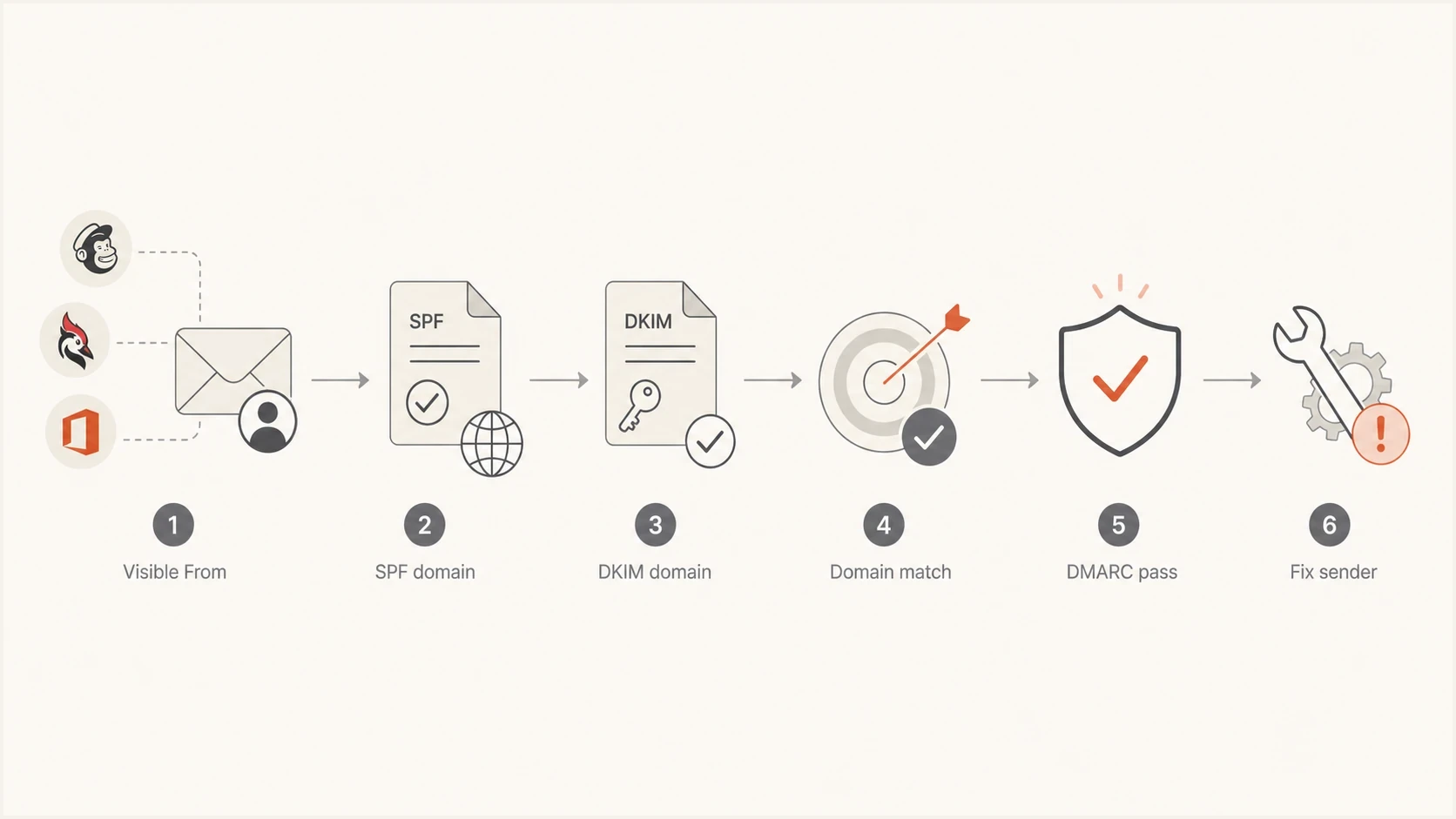
DMARC flow showing SPF and DKIM domain matching against the visible From domain.
Mailchimp path
Mailchimp often passes SPF using a Mailchimp-controlled return-path domain. That result authenticates Mailchimp's sending infrastructure, but it does not prove a DMARC domain match with your visible From domain.
- Main fix: Publish and authenticate both Mailchimp custom DKIM CNAMEs.
- Expected pass: DKIM passes with a signing domain that matches the visible From domain.
Woodpecker through O365
Woodpecker is the sending interface, but Microsoft 365 is the mail system when the account is connected through O365.
- Main fix: Keep Microsoft SPF and enable Microsoft 365 DKIM for the custom domain.
- Expected pass: SPF or DKIM passes and matches the O365-connected From domain.
A single manual test can be misleading. Inspect a real message from each path: one Mailchimp campaign, one Woodpecker email through O365, one normal O365 email, and one Brevo transactional message. In Authentication-Results, compare header.from with smtp.mailfrom for SPF domain matching and header.d for DKIM domain matching.
Fix the SPF record
The SPF record should authorize active systems that use your domain in the SMTP MAIL FROM address. Do not include URL formatting, angle brackets, line breaks, or duplicate SPF TXT records. Publish one plain TXT value at the root of the domain.
Example SPF record if both services still senddns
v=spf1 include:secureserver.net include:spf.protection.outlook.com -all
Verify whether secureserver.net is still required. It belongs in SPF only if mail still uses that provider. Keep spf.protection.outlook.com because Woodpecker sends through O365. Do not add servers.mcsv.net merely because Mailchimp sends campaigns. Mailchimp's custom DKIM records provide the dependable DMARC domain-match path for this setup.
SPF cleanup checklist
- One SPF record: The domain should have one TXT record beginning with v=spf1.
- Only active senders: Remove includes for systems that no longer send with this domain in MAIL FROM.
- Lookup limit: SPF permits 10 DNS-querying mechanisms during one evaluation, so unnecessary includes can cause a permanent error.
- Final mechanism: Use -all after the sender inventory is accurate.
If SPF is hard to manage because another agency controls DNS, Suped's Hosted SPF can reduce repeated DNS requests. The DNS team publishes one hosted include, and future authorized-sender changes happen in Suped while the domain retains one valid SPF record.
SPF checker
Find SPF syntax issues, lookup limits, and weak records.
?/16tests passed
Fix Mailchimp DKIM and DMARC
Mailchimp needs authentication for the same domain used in the visible From address. Its current manual flow provides two DKIM CNAME records and one DMARC TXT record. Domain verification proves access to an address, while domain authentication publishes the DNS records needed for DKIM with a matching domain.
Keep one DMARC record
If _dmarc.example.com already has a DMARC TXT record, do not add Mailchimp's suggested value as a second record. Keep one valid record and make sure its policy meets Mailchimp's authentication check. Multiple DMARC records make the policy invalid.
|
|
|
|---|---|---|
Two custom DKIM CNAMEs | Matching DKIM domain | |
Microsoft 365 DKIM | Microsoft auth | |
SPF and DKIM | Matching identifier | |
Provider DKIM | Matching DKIM domain |
Sender paths and the authentication result to expect.
If Mailchimp says the domain is not authenticated, check the CNAME host fields first. Some DNS panels expect only the selector host, while others accept the full host name. Entering the full host where the panel appends the domain creates a duplicated name, so Mailchimp cannot find the record.
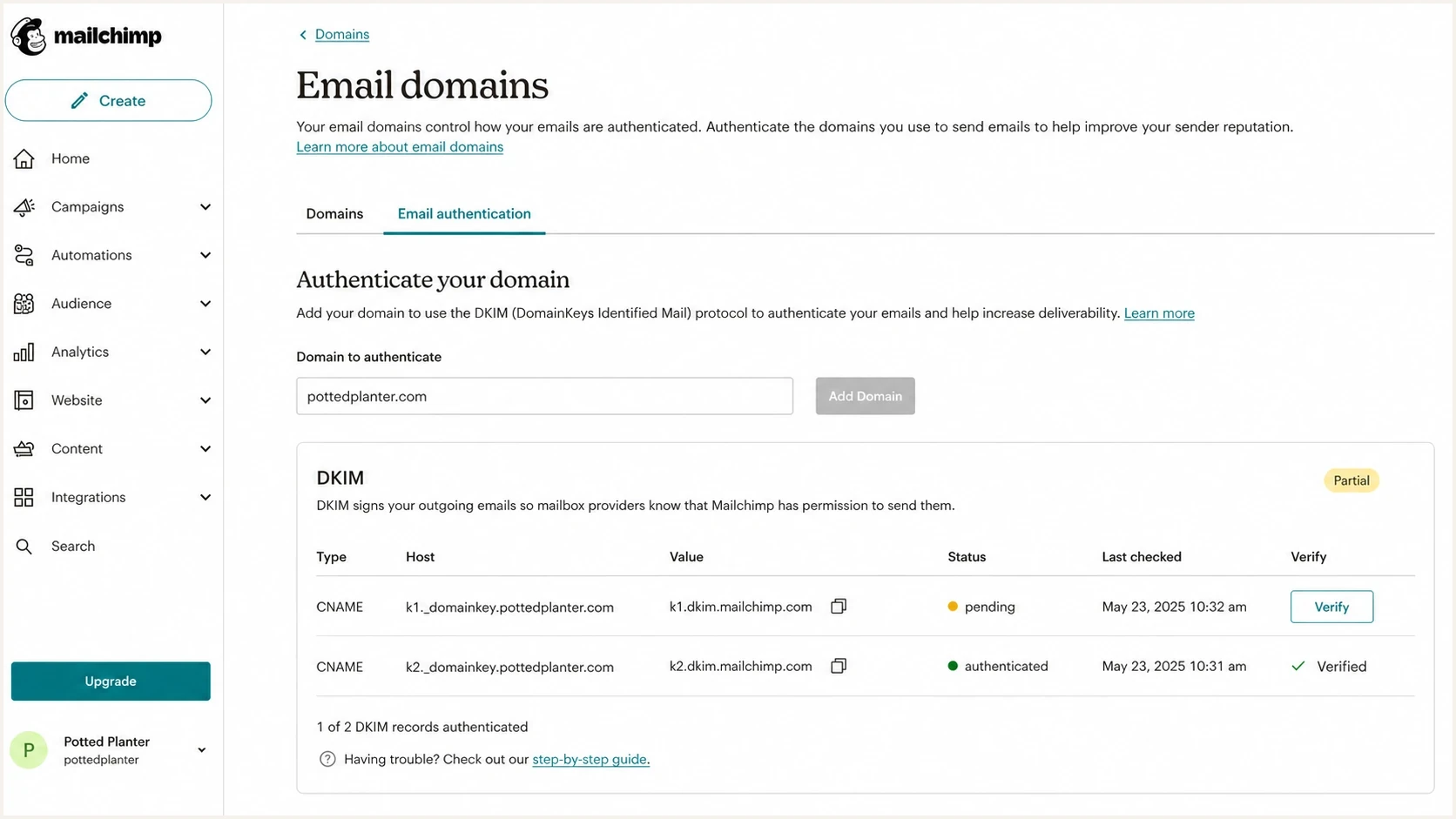
Mailchimp domain authentication screen with DKIM CNAME records and verification status.
- Verify the sending domain: Complete Mailchimp's email-domain verification for the exact domain in the campaign From address.
- Copy both DKIM records: Open Mailchimp's manual domain authentication instructions and copy both CNAME host and target pairs.
- Publish in Cloudflare: Add both CNAMEs as DNS-only records. Do not proxy email authentication CNAMEs.
- Authenticate in Mailchimp: Keep a single DMARC TXT record, wait for DNS propagation, then complete Mailchimp's authentication check.
- Send a real campaign test: Inspect the headers and confirm DKIM passes with a signing domain that matches the visible From domain.
After the CNAMEs are live, use aggregate reports to confirm the production result. Suped's DMARC source breakdown shows whether Mailchimp changed from a domain mismatch or failure to a DKIM pass with a matching domain.
Fix Woodpecker through O365
For Woodpecker connected to O365, the important question is where the message is sent. With Woodpecker's Microsoft mailbox connection, Microsoft 365 is the sender for SPF and DKIM purposes. The domain therefore needs Microsoft 365 SPF and custom-domain DKIM, even though Woodpecker is the interface used to create the campaign.
Follow Microsoft's setup path for Microsoft 365 DMARC and DKIM, then verify with an actual Woodpecker-sent email. A DNS lookup alone does not prove Microsoft is signing the message with the custom domain.
Microsoft 365 DKIM hostnames with tenant-specific targetsdns
selector1._domainkey.example.com CNAME <Selector1CNAME shown by Microsoft 365>
selector2._domainkey.example.com CNAME <Selector2CNAME shown by Microsoft 365>
For custom domains added since May 2025, Microsoft can generate targets ending in dkim.mail.microsoft with a dynamic partition value. Older domains can retain targets under the tenant's onmicrosoft.com domain. Do not construct either target manually. Copy the exact Selector1CNAME and Selector2CNAME values shown for the domain in Microsoft 365.
Why the O365 DKIM CNAME is not found
- Wrong host field: The DNS panel added the domain again, creating a host like selector1._domainkey.example.com.example.com.
- Proxy enabled: Cloudflare CNAMEs used for email authentication must be DNS-only, not proxied.
- Wrong target format: A target was constructed from an old example instead of copied from this domain's Microsoft 365 DKIM settings.
- DKIM not enabled: The CNAMEs resolve, but Microsoft 365 has not been enabled to sign mail for the custom domain.
If Woodpecker still fails verification after Microsoft DKIM is live, send a message to a mailbox you control and inspect Authentication-Results. Compare header.from with smtp.mailfrom and header.d. If an onmicrosoft.com domain signs instead of the custom domain and SPF also lacks a domain match, DMARC fails.
Use a safe DMARC record while fixing it
A temporary DMARC record with p=none is appropriate while the setup is unresolved. Remove ruf unless you have a defined failure-reporting need, controls for message-level data, and receivers that send useful failure reports. Aggregate rua reports provide the main operational view for this repair.
Temporary DMARC recorddns
Host: _dmarc.example.com
Type: TXT
Value: v=DMARC1; p=none; rua=mailto:reports@example.com; adkim=r; aspf=r
Relaxed domain matching, shown as adkim=r and aspf=r, is sensible for this setup. It allows the authenticated identifier and visible From domain to share the same organizational domain. Strict domain matching requires an exact domain match and should be used only when every sending path supports it.
DMARC checker
Look up a domain's DMARC record and catch policy issues.
?/7tests passed
If the record needs to be rebuilt, use the DMARC generator and publish one TXT record through whoever manages DNS. When an agency controls DNS, send the full host, type, and value in one request.
When to move back to quarantine
Move from p=none to p=quarantine after aggregate reports show Mailchimp, Woodpecker through O365, normal O365 mail, and Brevo passing through SPF or DKIM with a matching domain. Monitor the full quarantine policy after the change. Do not rely on percentage sampling.
Apply the current DMARC standard
RFC 9989 superseded RFC 7489 in 2026. The core pass rule remains the same, but the policy syntax and rollout advice changed. Existing records still use v=DMARC1, and receivers still compare the SPF and DKIM domains with the visible From domain.
- Remove percentage sampling: The pct tag is historic because receivers applied intermediate percentages inconsistently.
- Use monitoring mode for repairs: Keep p=none while legitimate senders are missing an SPF or DKIM domain match.
- Treat the testing tag carefully: RFC 9989 adds t=y to request one policy level less enforcement, but older receivers can ignore an unknown tag. Do not use it as the only safeguard during repair work.
- Be cautious with reject: RFC 9989 advises general-purpose email domains against p=reject because indirect mail paths can break authentication. Choose enforcement after reviewing real mail flow and aggregate reports.
Compatible rollout choice
For this mixed Mailchimp and O365 setup, p=none remains the clearest repair state. After every legitimate path passes DMARC, move to p=quarantine and monitor the complete policy rather than publishing an intermediate pct value.
The troubleshooting order
Stop changing several records at once. Make one change, send one real message through the affected path, and inspect the result. This avoids the loop where SPF, DKIM, and DMARC are edited together and the effective change cannot be identified.
- Inventory senders: List Mailchimp, Woodpecker through O365, direct O365, Brevo, and any legacy provider still sending.
- Validate DNS: Check the single SPF and DMARC records plus every DKIM CNAME in public DNS, not only inside admin portals.
- Send real tests: Send one message through each path and inspect Authentication-Results headers.
- Compare identifiers: Match header.from against smtp.mailfrom for SPF and header.d for DKIM.
- Read reports: Use aggregate DMARC data to confirm volume, source IPs, and domain-match results over time.
- Apply enforcement: Move to quarantine only after legitimate sources are no longer failing DMARC.
Suped turns raw aggregate reports into source names, domain-match results, detected issues, and steps to fix them. In this case, it can confirm whether Mailchimp has a matching DKIM domain, whether Woodpecker traffic is flowing through Microsoft, and whether Brevo's transactional path has its own matching authentication domain.

Issue steps to fix dialog showing the issue overview, tailored fix steps, and verification action
Cloudflare DNS checks that matter
Cloudflare can host these records, but small entry mistakes cause most verification failures. Email authentication CNAMEs should be DNS-only. The host and target must match the values generated for the sending domain exactly.
|
|
|
|---|---|---|
SPF | Two records | Merge active sources |
DMARC | Two records | Keep one _dmarc TXT |
DKIM | Proxied CNAME | Set DNS-only |
DKIM | Domain doubled | Use the expected host form |
O365 DKIM | Constructed target | Copy tenant values |
Common DNS mistakes that break verification.
Run a domain health check after the agency updates DNS. It can catch record syntax, duplicate DMARC or SPF records, SPF lookup limits, and DKIM visibility in one pass.
?
What's your domain score?
Deep-scan SPF, DKIM & DMARC records for email deliverability and security issues.
DNS visibility is only the configuration check. The final proof is a real message where Authentication-Results shows DMARC pass and an authenticated identifier matches the visible From domain.
Views from the trenches
Best practices
Authenticate each sender separately before changing DMARC policy back to quarantine.
Use real sent messages to confirm domain matching, not only DNS or portal checks.
Keep Microsoft SPF when sales tools send through a connected O365 mailbox account.
Common pitfalls
Treating Mailchimp SPF as the DMARC fix leaves DKIM domain matching unresolved later.
Publishing DKIM CNAMEs with the domain doubled causes silent verification failures.
Moving to quarantine before reports are clean can block legitimate campaign mail.
Expert tips
Use relaxed matching while multiple senders are being verified and stabilized first.
Remove old SPF includes only after proving the provider no longer sends mail now.
Track DMARC reports by source so Mailchimp, O365, and Brevo are not mixed up during review.
Marketer from Email Geeks says custom DKIM for Mailchimp is the direct fix when campaign mail lacks a DMARC domain match.
2024-08-06 - Email Geeks
Marketer from Email Geeks says Mailchimp SPF is often not the deciding factor because Mailchimp uses its own SPF domain.
2024-08-07 - Email Geeks
What to do next
Leave DMARC at p=none, publish both Mailchimp DKIM CNAMEs, confirm Microsoft 365 DKIM is enabled with the exact tenant targets, and send one real test through Mailchimp, Woodpecker, O365, and Brevo. Once each legitimate path passes DMARC with a matching SPF or DKIM identifier, move the full policy to quarantine and continue monitoring.
Suped's product keeps the related work together through DMARC monitoring, SPF and DKIM visibility, Hosted SPF, Hosted DMARC, blocklist (blacklist) monitoring, alerts, and issue-resolution steps. When a third party controls DNS, source and domain-match evidence helps turn each request into a precise record change.




