Does a VMC SVG logo need to exactly match a trademarked logo?

Published 23 Jun 2025
Updated 29 Jul 2026
10 min read
Summarize with
Updated on 29 Jul 2026: We clarified exact trademark matching and the SVG and DMARC checks needed before VMC issuance.
Yes. For a VMC, the SVG's visible logo must match the registered trademark. "Exact match" is the working rule for the mark itself: keep the same wording, symbol, proportions, relative placement, claimed colors, and other registered design elements. The Certificate Authority compares the submitted SVG with the official trademark record and makes the final validation decision.
That does not mean every outer pixel of the SVG canvas must duplicate the image in the trademark database. A square 1:1 canvas, added spacing, or a solid background can be acceptable when the registered mark stays unchanged. If the trademark record says color is not claimed as a feature of the mark, a background color change has lower validation risk. If the filing claims a white rectangle, a specific color, or a shape around the logo, changing it has higher risk and needs early CA review.
- Direct answer: The logo artwork in the VMC must match the trademarked mark, not merely resemble it.
- Background answer: A color change has lower risk when the background is not claimed, but the SVG still needs a solid, opaque background.
- Aspect ratio answer: Changing the outer canvas to 1:1 is generally acceptable when the visible mark stays unchanged.
- Risk answer: Do not stretch, crop, redraw, recolor claimed elements, or add decorative parts to the mark.
The VMC logo question also depends on the authentication work underneath it. BIMI display starts with DMARC enforcement, so the project has two tracks: trademark and SVG review on one side, and Suped's DMARC monitoring for authentication readiness on the other.
What must match for a VMC
A VMC ties a logo to an organization identity and a verified trademark. The CA must confirm that the submitted logo is the same mark covered by the trademark registration. It checks the artwork against the legal record as well as checking the file for BIMI compliance.
That distinction matters because BIMI needs a square, centered, avatar-friendly SVG, while trademark filings often contain a wider rectangle, older artwork, or a logo lockup registered before BIMI existed. Preserve the registered mark and use the SVG canvas around it to make the logo display well.
The mark matters more than the canvas
A square SVG canvas is a BIMI packaging choice. The trademarked mark is the object being validated. Keep the mark intact, then use spacing and a solid, opaque background that is consistent with the trademark record.
- Lower risk: Add a solid background and spacing around the unchanged mark.
- Higher risk: Stretch a rectangular mark until it fills a square.
- Highest risk: Change the letters, symbol, proportions, or claimed color.
|
|
|
|---|---|---|
Add spacing | Lower | Mark remains intact |
Square canvas | Lower | Outer box changes |
New solid background | Medium | Trademark filing controls |
Transparent background | High | Fails current SVG guidance |
Recolor mark | Medium | Color claim matters |
Change shape | High | Registered mark changes |
Common VMC logo edits and their usual validation risk.
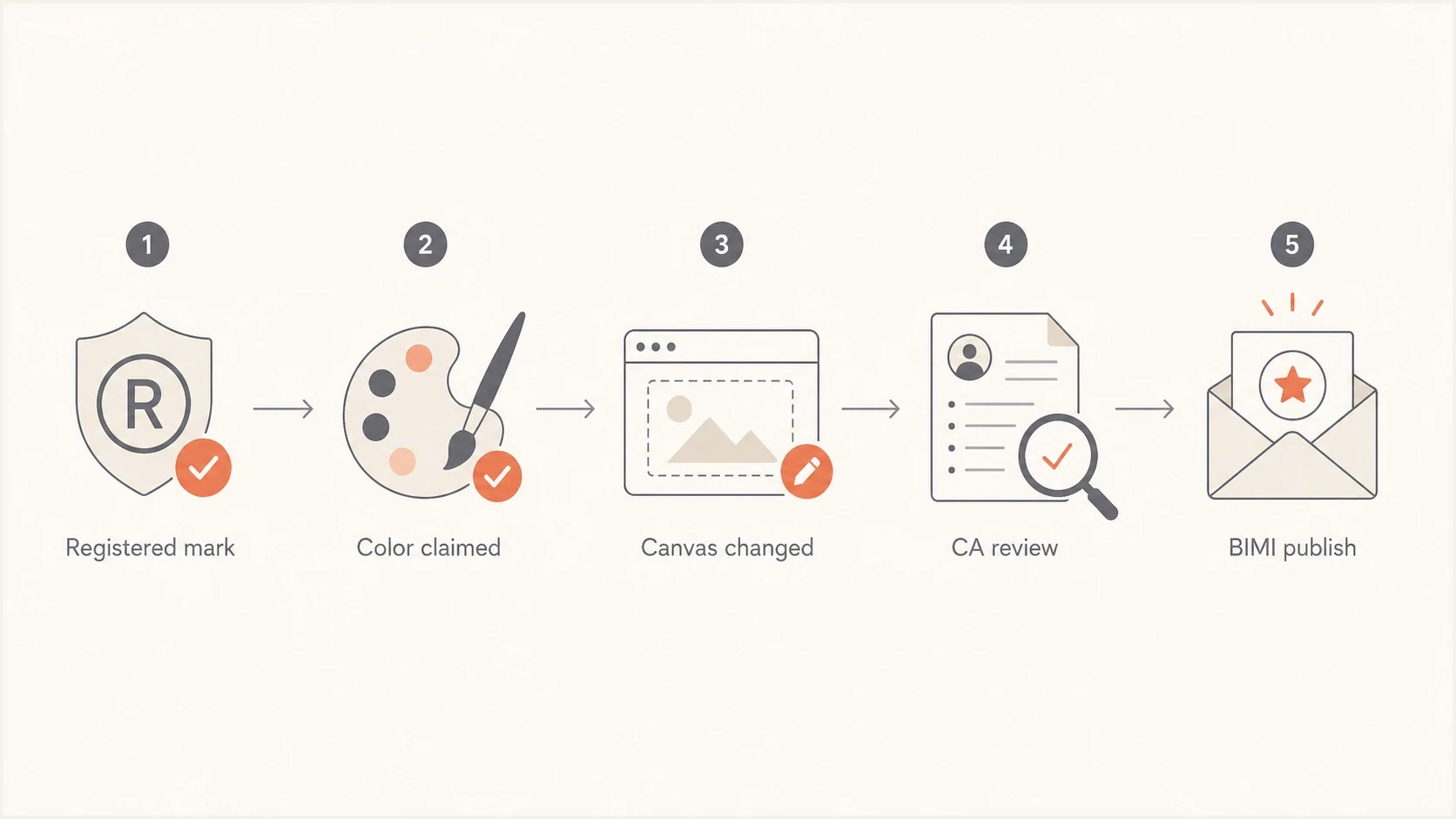
VMC logo review flow from registered trademark to BIMI publication.
How to handle aspect ratio and background changes
For the common case, a trademarked logo is rectangular and the BIMI version needs to sit in a square avatar. Do not redraw the logo into a square mark. Create a square artboard, place the registered logo on it at its original proportions, and add enough spacing for the whole mark to remain visible inside the circular or rounded crop used by mailbox providers.
The background color is a separate question, but the finished BIMI SVG should use a solid, opaque background. If the trademark record shows the mark on white but says color is not claimed as a feature of the mark, a CA has more room to accept another solid background color. If the registration claims a white background or a specific color arrangement, changing the background can change the registered mark. Check the trademark description before producing the BIMI asset.
Lower-risk BIMI adaptation
- Canvas: Use a 1:1 artboard without stretching the mark.
- Spacing: Leave enough room for the logo to survive avatar cropping.
- Color: Use a solid, opaque background consistent with the trademark record.
- Export: Use SVG Tiny PS and keep the file at 32 KB or less.
Higher-risk logo change
- Canvas: Crop the mark to force a square composition.
- Spacing: Remove parts of the registered lockup.
- Color: Replace claimed colors or claimed background elements.
- Export: Re-export or replace the SVG after certificate approval.
A useful review packet contains the trademark record, the registered image, the proposed square SVG, and a note explaining that only the surrounding canvas or unclaimed background color changed. When the mark itself is unchanged, the CA has a clear basis for its decision.
BIMI TXT record exampleDNS
default._bimi.example.com. 3600 IN TXT (
  "v=BIMI1; "
  "l=https://example.com/bimi.svg; "
  "a=https://example.com/vmc.pem"
)
The SVG file has two separate matching checks
Two matching checks are easy to mix together. First, the logo submitted for the VMC must match the registered trademark. Second, the hosted BIMI SVG must be the exact SVG approved and bound to the issued certificate. Visual similarity is not enough after issuance. Re-exporting or editing the SVG requires certificate review and usually a replacement certificate.
The SVG also has formatting requirements. BIMI uses the constrained SVG Tiny Portable/Secure profile, and a normal design export can contain scripts, external references, embedded raster images, animation, or unsupported options. A logo can match the trademark and still fail technical SVG validation.
Files and records to keep consistent
- Trademark image: The image and description in the official trademark record.
- Certificate image: The exact SVG reviewed by the CA and bound to the VMC.
- Hosted image: The same approved SVG file at the public URL in the BIMI record.
- Review record: Documentation for any canvas or background change approved before issuance.
Compare the design export with the SVG image requirements before CA review. After issuance, validate your BIMI SVG using the hosted file that will stay in production.
The BIMI Group VMC overview explains how VMCs connect registered marks, SVG Tiny P/S files, DMARC enforcement, and BIMI DNS records.
SVG export checklist
Use vector artwork only, with no embedded raster images.
Set version="1.2" and baseProfile="tiny-ps".
Use a square viewBox and center the unchanged mark.
Add the required title element.
Use a solid, opaque background, not transparency.
Keep the file at 32 KB or less.
Remove scripts, animation, and external references.
Host the exact SVG approved for the VMC.
DMARC setup still decides whether BIMI can display
A valid VMC logo file still will not display if the domain has not met BIMI authentication requirements. The organizational domain needs p=quarantine or p=reject, pct=100, and no sp=none. Mail also needs to pass DMARC alignment through SPF or DKIM. Strict adkim=s or aspf=s settings are not required for BIMI.
Suped's product supports the authentication track by turning aggregate DMARC data into source-level fixes and policy controls. Teams can identify senders that fail SPF or DKIM alignment and stage DMARC enforcement while the VMC and SVG review proceeds.
Suped DMARC dashboard showing email volume, authentication health, and source breakdown
Before buying a VMC, run a DMARC checker against the domain and confirm that the organizational policy is ready for enforcement. If the team needs controlled policy changes without repeated DNS edits, Suped's hosted DMARC can stage the policy while reports confirm which sources pass.
?
What's your domain score?
Deep-scan SPF, DKIM & DMARC records for email deliverability and security issues.
For a wider pre-BIMI check, Suped's domain health checker checks DMARC, SPF, DKIM, and related DNS signals together. Run it before the VMC purchase so authentication issues do not leave the certificate unused.
DMARC enforcement exampleDNS
_dmarc.example.com. 3600 IN TXT (
  "v=DMARC1; p=quarantine; "
  "rua=mailto:dmarc@example.com; pct=100"
)
A practical approval workflow
Resolve the VMC logo decision before purchasing the certificate. This avoids paying for review, learning that the mark variant is unacceptable, and rebuilding the asset under time pressure. The CA can confirm which file it expects to validate, and that exact file should be hosted for BIMI after issuance.
- Read the filing and check whether the trademark description claims color, background, shape, or a rectangular field.
- Create a proof that places the registered image beside the proposed square SVG for quick comparison.
- Ask the CA for feedback before purchase when the background, color, or outer canvas changed.
- Freeze the approved SVG, VMC certificate, and BIMI DNS record under release control.
- Monitor DMARC enforcement and alignment after every sender or DNS change.
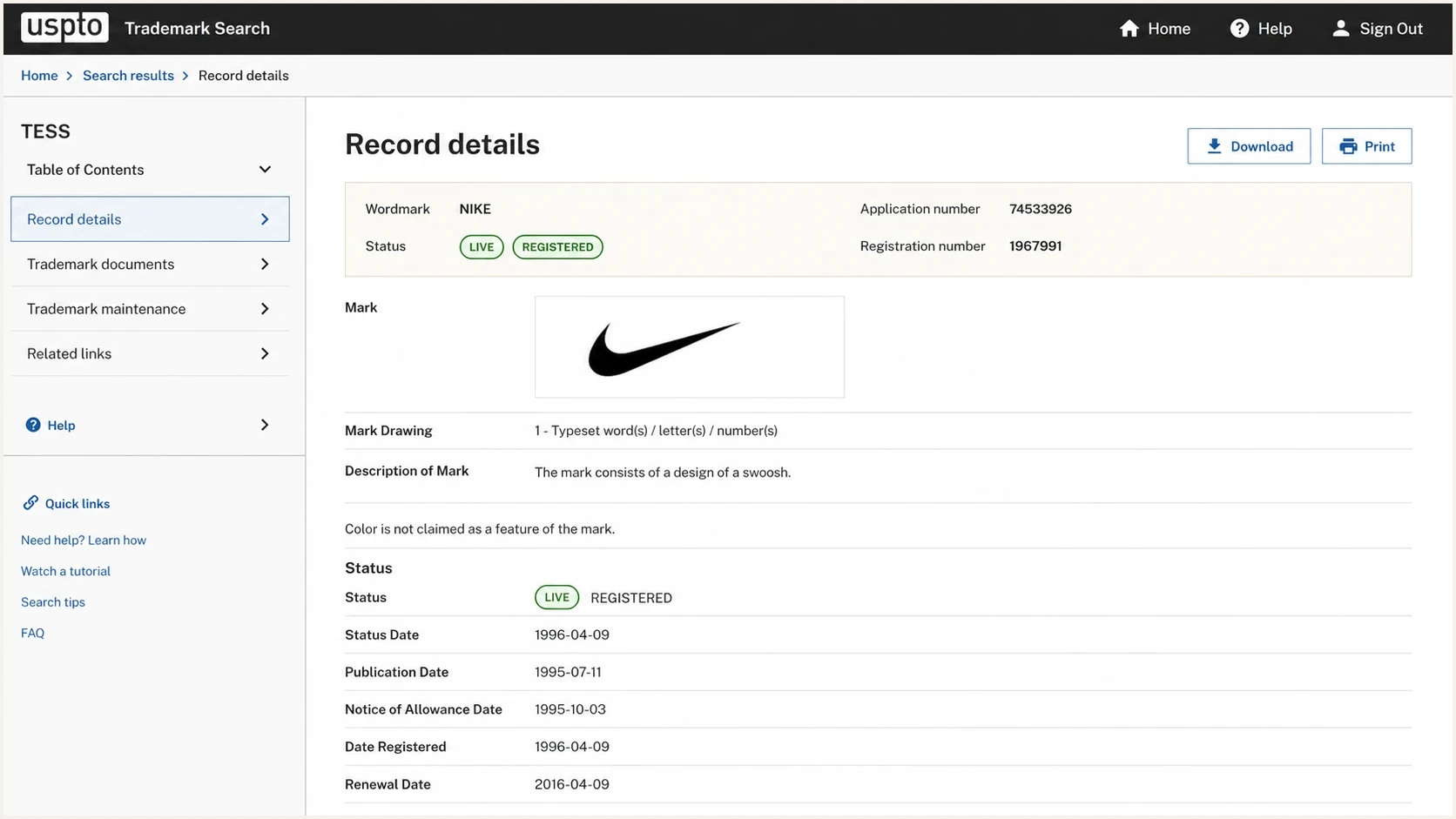
USPTO trademark record showing the mark drawing, description, and color claim.
In the trademark record, look for wording such as "color is not claimed as a feature of the mark" or a statement claiming specific colors or design fields. That wording often decides whether a solid background color adjustment is a packaging change or a material change to the registered mark.
VMC logo change risk
A practical risk scale for deciding which changes need early CA review.
Low
Canvas only
Square canvas, unchanged visible mark, solid background consistent with the filing.
Medium
Color change
Background color changes when the filing does not claim color.
High
Mark or file issue
Transparency, cropping, stretching, redrawing, or changing claimed elements.
Views from the trenches
Best practices
Compare the VMC artwork against the trademark description before changing canvas or color.
Ask the CA to review the proposed SVG before you spend time rebuilding BIMI hosting.
Keep the visible mark unchanged and use a solid background allowed by the filing.
Common pitfalls
Assuming a square canvas is harmless when the trademark record includes a rectangular field.
Changing a background color that the trademark filing claims as part of the mark itself.
Publishing a re-exported SVG after the CA bound the approved artwork to the certificate.
Expert tips
Use a proof image that shows the registered mark beside the proposed square SVG file.
Treat color changes as lower risk only when the trademark record does not claim color.
Lock the approved SVG and certificate file together in deployment notes for future updates.
Expert from Email Geeks says the hosted BIMI SVG should be the exact file approved and bound to the VMC.
2023-10-19 - Email Geeks
Marketer from Email Geeks says the mark itself needs to match the trademark, but background changes can be acceptable when the filing does not claim the background.
2023-10-19 - Email Geeks
The safest answer
The VMC SVG does not need to preserve every outer pixel of an old rectangular file, but the visible mark must match the registered trademark. A square canvas with spacing and a solid, opaque background is the usual way to make a rectangular logo BIMI-friendly. The trademark description and CA review decide whether a background color change is acceptable.
Do not alter the registered mark to make BIMI work. Package the unchanged mark in a compliant SVG Tiny PS file, get the CA to confirm the variant, and publish the exact approved SVG with DMARC already at enforcement. Suped's product can turn DMARC reports into sender-level fixes and controlled policy changes so authentication does not block VMC deployment.




