How to turn DMARC findings into sales outreach

Updated on 23 Aug 2026: We added a practical process for following up lawfully and measuring sales conversion.
Turn DMARC findings into sales outreach by mapping each authentication issue to a concrete business risk, then offering a specific next step that the prospect can accept without committing to a full project on the first call.
For MSP owners and operators, the strongest outreach starts with evidence instead of fear: a domain has no enforcement, a sending service fails alignment, a blocklist (blacklist) result points to reputation exposure, or a client cannot explain which vendors send mail on their behalf. Treat each finding as a service delivery clue, not a scare tactic.
The goal is simple: use public DNS checks, DMARC aggregate data, message headers, and email authentication results to start a useful conversation. A good MSP motion makes the problem visible, shows the client what needs fixing, and then turns the engagement into monitoring, sender cleanup, policy staging, and reporting.
A DMARC finding becomes sales outreach when it has four parts: the finding, the plain-English risk, the evidence source, and the next action.
- Finding: The domain has weak or missing authentication.
- Risk: Mail can fail trust checks, and spoofed mail is harder to reject.
- Evidence: DNS records, DMARC reports, message headers, or reputation checks.
- Action: Offer an audit, sender inventory, monitoring setup, or enforcement plan.
Start with findings that create urgency
The strongest sales signals are findings that a business owner, operations leader, security lead, or IT contact can understand quickly. A missing DMARC record points beyond DNS. It tells you the organization has no standard DMARC reporting channel and no requested policy for receivers handling mail that fails DMARC.
Prioritize findings that are visible and explainable, with a practical next step. Outreach should not depend on private data you do not have. Public DNS, public domain health checks, a small sample email, and message headers can give enough signal to start a professional conversation.
|
|
|
|---|---|---|
No DMARC | No visibility | Start reports |
Policy none | No enforcement | Stage policy |
SPF fail | Sender sprawl | Clean senders |
DKIM fail | Broken signing | Fix vendor |
Unaligned | Brand misuse | Map sources |
Listed IP | Reputation risk | Check blocklist |
Use compact finding labels so sales and technical teams speak the same language.
A repeatable MSP offer usually starts with DMARC monitoring because monitoring turns a one-time observation into a service. You can show which senders are legitimate, which sources are failing, and whether policy changes are ready.
?
What's your domain score?
Deep-scan SPF, DKIM & DMARC records for email deliverability and security issues.
A domain health check should separate hard facts from assumptions. If the domain has no DMARC record, say that. If the SPF record exists but exceeds lookup limits, say that. If the reason behind a failure needs private report data, say the audit will confirm it.
Convert technical evidence into a prospect story
A prospect does not need raw XML or DNS syntax in the first email. They need a clear reason to care. The translation step is where many MSPs lose momentum: the finding is real, but the message sounds like an internal ticket rather than a business issue.
Raw DMARC language
- Policy: The domain uses p=none and has no enforcement.
- Alignment: SPF passes for the return-path domain but not the visible From domain.
- Vendor: A marketing sender is missing DKIM alignment.
- Reports: Aggregate data is not being collected.
Outreach language
- Policy: Your domain requests monitoring only, so DMARC does not ask receivers to quarantine or reject failures.
- Alignment: Some mail can pass a basic check but still fail the brand protection check.
- Vendor: One sender likely needs a DNS or platform change before enforcement.
- Reports: There is no central evidence trail for who is using the domain.
Keep the story narrow. Do not tell a prospect that attackers are actively abusing their domain unless the data proves it. Say what the configuration permits, what it prevents, and what still needs verification.
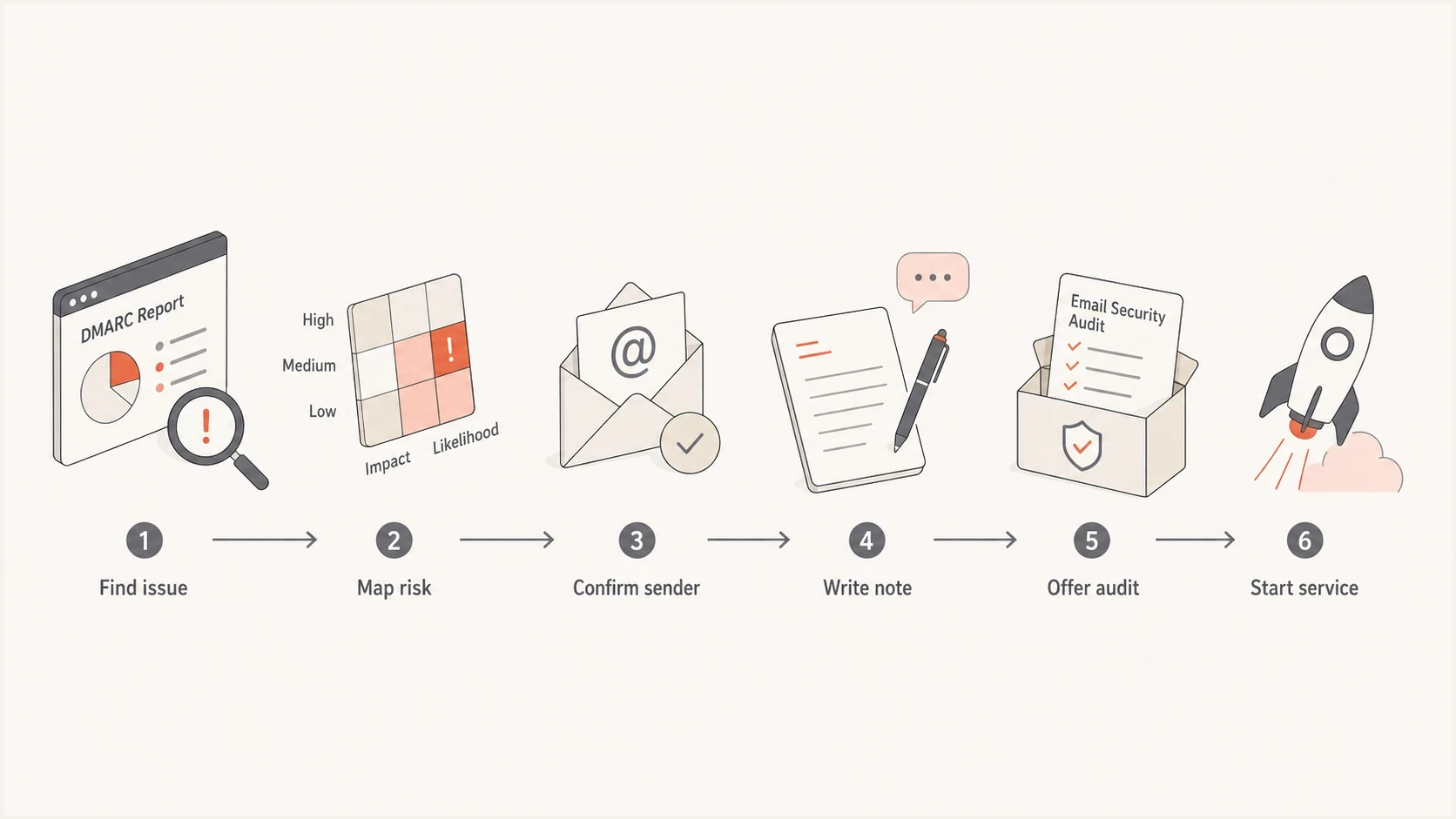
Flowchart showing DMARC evidence becoming outreach and service delivery.
Build the outreach workflow
The workflow should be operational before the first campaign goes out. Otherwise, a positive reply creates a scramble. Use a small sequence: qualify the domain, capture evidence, write a plain-English observation, offer a short audit, then move the prospect into a structured DMARC service if they engage.
- Select: Choose accounts where email matters, such as professional services, healthcare, finance, ecommerce, SaaS, and local brands with active outbound mail.
- Check: Review DMARC, SPF, DKIM, MX, and blocklist (blacklist) status before writing.
- Classify: Put each account into a simple bucket: missing basics, weak policy, sender failures, or reputation concern.
- Personalize: Build signal-based personalization around one verified finding instead of a generic industry statement.
- Message: Use one finding, one evidence source, one business risk, and one invitation to review it together.
- Convert: Move the prospect into a paid audit, monitoring setup, or policy rollout.
First email using public DNS findingstext
Subject: Email authentication finding for {{company}}

Hi {{first_name}},

I checked the public email authentication records for {{domain}} and
noticed that the domain is not enforcing DMARC yet.

That does not prove active abuse, but it means receiving mail systems are
not being asked by DMARC to quarantine or reject mail that fails its checks.

I can send over a short technical summary and show which senders should
be reviewed before enforcement.

Would it be useful to look at this for 15 minutes next week?

{{signature}}
Do not overstate the finding. Weak DMARC means the domain has an exposure, not that compromise has happened. The practical win is credibility: precise language gets better replies and protects the MSP relationship.
- Say: Your domain is not enforcing DMARC yet.
- Avoid: Your domain has been hacked.
- Say: One sender likely needs review before enforcement.
- Avoid: Your vendors are misconfigured without checking private data.
Use Suped to package the service
Suped is our DMARC and email authentication platform. Its prospecting reports and multi-tenant controls connect initial findings with onboarding, remediation, and client reporting. This gives MSP teams one repeatable workflow for prospecting and delivery across client domains.
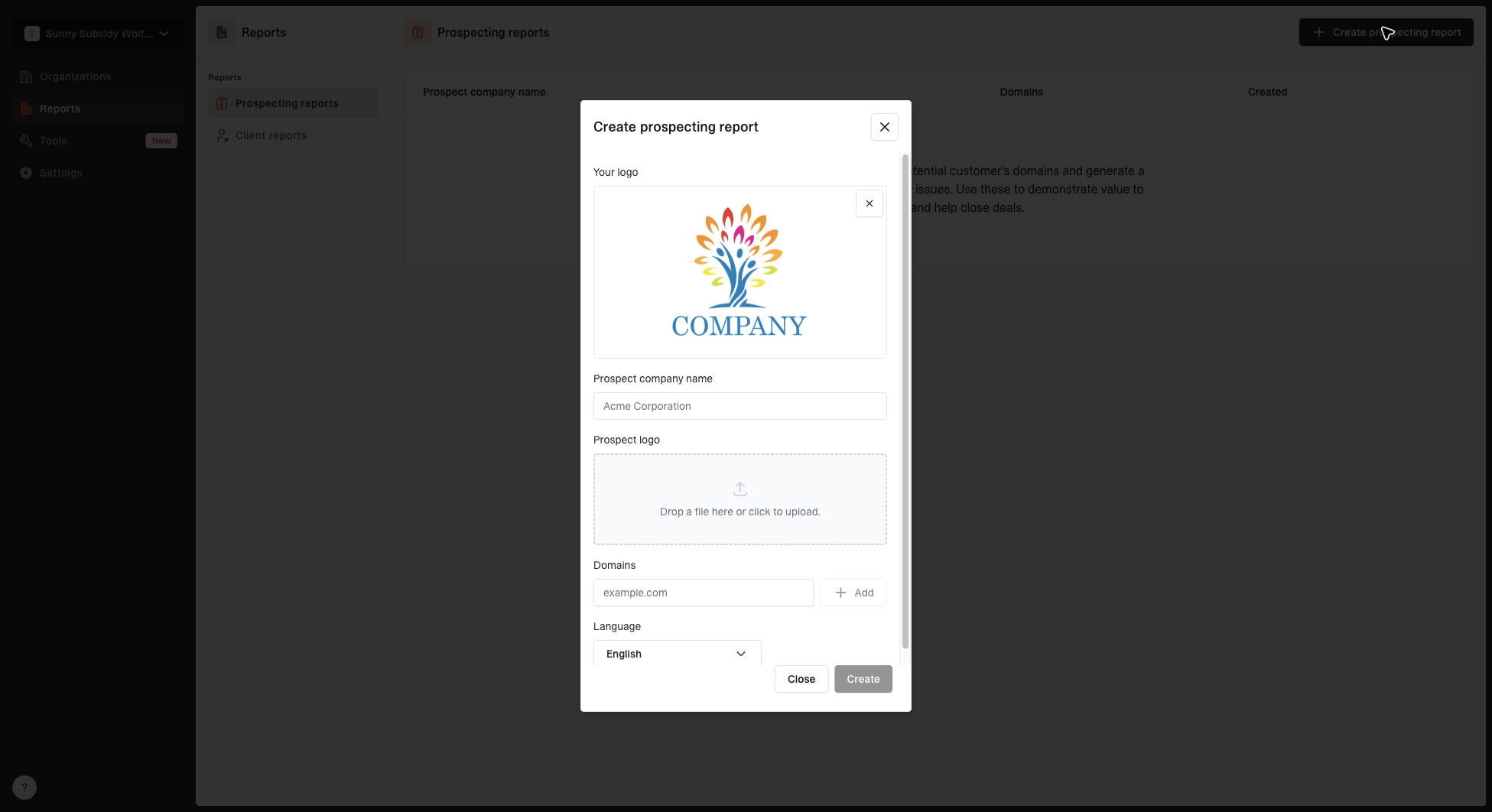
Create prospecting report dialog with MSP logo, prospect name, domains, prospect logo, and language fields
The prospecting report workflow is useful because it gives the sales conversation a concrete artifact. Instead of sending a vague email about email security, the MSP can show the prospect which domains were checked, what was found, and which fixes should come first.
For the broader operating model, keep the offer tied to a clear MSP service model: assessment, onboarding, monitoring, fixes, enforcement, and ongoing reporting.
- Prospecting: Create a report that turns public findings into a client-facing reason to talk.
- Detection: Use automated issue detection and steps to fix, so engineers know what to change after the call.
- Operations: Manage DMARC, SPF, DKIM, blocklist checks, and deliverability signals in one place.
- Scale: Use the MSP and multi-tenancy dashboard to manage many client domains through one parent view.
- Records: Use hosted DMARC, hosted SPF, SPF flattening, and hosted MTA-STS when clients need simpler DNS operations.
When a finding involves domain or IP reputation, tie it to blocklist monitoring rather than a one-time lookup. A one-time blacklist check can start the conversation, but ongoing monitoring is the service.
Prioritize accounts before outreach
Not every weak domain deserves the same attention. A small inactive domain with no outbound mail is not the same as a healthcare provider sending appointment reminders, invoices, and password resets. Prioritization keeps the sales team focused and keeps the technical team from chasing weak signals.
Outreach priority bands
Use a simple severity model so sales effort follows client risk and service fit.
High
Call first
Active brand, weak policy, visible sender issues, or reputation warning.
Medium
Email sequence
DMARC exists but reporting, alignment, or enforcement is incomplete.
Low
Nurture
Small domain, limited mail use, or no clear business impact.
Ready
Upsell
Existing client with known senders and management access.
Prioritize candidates that rely on email, have a clear authentication gap, have a practical path to remediation, and have a stakeholder who owns the affected systems. For existing clients, that path is often stronger because you already manage DNS, identity, mailboxes, or security tooling.
If you are using DMARC findings for net-new sales, connect the outreach to DMARC audits rather than jumping straight to enforcement. An audit is easier to accept, and it gives you the evidence needed to scope the managed service correctly.
Write outreach that is accurate and useful
A strong outreach note states one evidenced claim, explains the limited implication, names a specific offer, and asks for one next step. It should not try to teach the entire DMARC standard. The first message earns permission for a review. The technical detail belongs in the follow-up report or call.
Follow-up after no responsetext
Subject: Re: Email authentication finding for {{company}}

Hi {{first_name}},

One quick follow-up. The main item I noticed is that {{domain}} is not
ready for safe DMARC enforcement yet.

The usual cause is that legitimate senders have not been inventoried and
validated. That can include finance, CRM, helpdesk, marketing, and line of
business platforms.

If helpful, I can send a one-page summary showing the records checked and
the order I would review senders in.

{{signature}}
Useful wording is specific enough to prove you did the work, but limited enough that the prospect does not feel accused.
- Use: I checked your public records and found one item worth reviewing.
- Use: This is fixable, but sender inventory should come before enforcement.
- Use: I can show the records checked and the next two remediation steps.
- Avoid: Your domain is unsafe or compromised unless your data proves that.
Run a controlled follow-up sequence
One public finding can justify a relevant conversation, but it does not justify an unlimited sequence. Use a short follow-up cadence that adds evidence at each touch, then stop. Treat a material DMARC change or a new reputation event as a fresh signal instead of recycling the same message.
- First touch: State the verified public finding, explain its limited implication, and ask whether the recipient owns email authentication.
- Days 3 to 5: Add one useful artifact, such as a concise prospect report or the exact record that needs review.
- Days 8 to 12: Explain what a short audit would confirm and ask for a small review call.
- Final touch: Close the loop, provide a clear opt-out, and suppress anyone who declines or unsubscribes.
Apply the commercial email and privacy rules that cover the sender and recipient. For US commercial email, use accurate sender information and subject lines, include a valid physical postal address, provide a clear opt-out method, and honor opt-out requests within 10 business days. Keep one suppression list across every system used for outreach.
Measure the funnel by qualified domains, positive replies, booked reviews, paid audits, managed-service conversions, negative replies, and opt-outs. Open rates are less reliable because privacy controls can create or hide opens, so decisions should rest on replies, qualified conversations, and revenue conversion.
Hand off into a billable DMARC service
Sales outreach only works if delivery can keep the promise. The handoff should be documented before the campaign starts. Use a simple path: prospect report, technical audit, sender inventory, DNS remediation, monitoring, policy staging, and reporting.
Service delivery mix by phase
A practical DMARC service shifts from discovery to ongoing management as the client matures.
Audit
Fixes
Monitoring
Reporting
The core deliverable extends beyond a DNS change. It is control over who sends for the domain and a process for keeping that control as clients add new SaaS platforms, newsletters, ticketing systems, billing tools, and marketing senders.
Hosted DMARC and hosted SPF help when the MSP needs to manage policy and SPF changes cleanly without frequent client DNS edits. SPF flattening also helps when a client has too many include mechanisms and is close to the lookup limit.
For client retention, reporting matters as much as remediation. Use progress reports to show which senders were fixed, what authentication rates changed, and whether the domain is ready for the next policy stage.
Turn evidence into a small next step
DMARC findings make good MSP outreach when they are specific and verifiable, with a low-friction service offer. Start with one finding, cite one evidence source, translate it into one business risk, and ask for one review call or audit. Continue qualified conversations through reporting, remediation, monitoring, and enforcement.
Suped supports that workflow with prospecting reports, multi-tenant domain monitoring, alerts, hosted records, blocklist and blacklist tracking, and clear fix steps after a sales conversation becomes delivery work.