How to prioritize DMARC clients by risk

Updated on 20 Aug 2026: We updated this guide with a reproducible weighted score, evidence overrides, and current RFC 9989 policy guidance.
Prioritize DMARC clients by risk by scoring domain exposure, current policy state, sender complexity, authentication failure patterns, and client urgency. Put each client into critical, high, medium, or low risk, then work the queue by business impact instead of ticket noise.
For MSP service delivery, the goal is a repeatable operating model. A client with a missing DMARC record on the primary domain, active spoofing attempts, and several unverified senders outranks a client with a clean p=none deployment and one low-volume sender waiting on DKIM. That order keeps the service focused on risk reduction, not inbox order. It also fits the broader DMARC for MSPs workflow: assess, prioritize, fix, enforce, and report.
- Critical: Primary domain has no usable DMARC policy, visible impersonation risk, and unclear sender ownership.
- High: DMARC exists, but enforcement is blocked by important unauthenticated or mismatched mail streams.
- Medium: Core mail is healthy, but policy progress depends on cleanup across marketing, billing, or SaaS senders.
- Low: DMARC is enforced or close to enforced, reporting is stable, and exceptions have named owners.
Start with a weighted risk model
A useful MSP risk score has to separate security impact from implementation effort. Use a 100-point model because service teams and client stakeholders can understand it quickly. The exact weights can change, but the same categories should apply to every client so the queue is defensible.
|
|
|
|
|---|---|---|---|
Domain exposure | 30% | Primary domains, executive domains, brand domains | Public-facing brand with weak protection |
Policy gap | 25% | DMARC policy, reporting, enforcement stage | Missing record, monitoring only, or weak subdomain coverage |
Sender complexity | 20% | SaaS senders, shared tools, unknown sources | Many senders with unclear owners |
Failure pattern | 15% | Pass rates, failing sources, rejected mail | High-volume failure from a business sender |
Client urgency | 10% | Industry, recent incidents, board pressure | Recent impersonation or audit demand |
Example DMARC client risk score for MSP operations
Risk bands for MSP triage
Use bands to decide queue position, escalation level, and reporting frequency.
Critical
80 to 100
Work first, assign a named owner, and report status weekly.
High
60 to 79
Schedule remediation in the current service cycle.
Medium
35 to 59
Track cleanup and move policy forward when blockers are removed.
Low
0 to 34
Monitor drift and include status in normal reporting.
A score is a queue rule
Treat the score as a service rule, not a final truth. If a client has a new incident, board request, known spoofing campaign, or audit finding, raise the urgency score and document why. The score should make prioritization explainable, not rigid.
Calculate each score consistently
Rate every factor on the same 0-to-5 scale, then apply its weight. Base each rating on current DNS, aggregate reports, the sender inventory, incident records, and an accountable business owner's confirmation. Evidence keeps a large client or loud ticket from receiving an inflated score.
Weighted DMARC client risk formulaTXT
Risk score = (Exposure x 30 + Policy gap x 25 + Complexity x 20 + Failure pattern x 15 + Urgency x 10) / 5

Each factor uses a rating from 0 to 5. The result is a score from 0 to 100.
- 0: No observed gap, with current evidence supporting that rating.
- 1 to 2: Limited exposure or a contained gap with a named owner.
- 3: Material exposure or a blocker that needs scheduled remediation.
- 4 to 5: Severe exposure, active abuse, or an unresolved control gap on important mail.
Document evidence overrides
Move a client to critical when verified spoofing, a compromised sender, executive impersonation, or a regulatory deadline creates immediate business risk. Record the evidence, owner, decision date, and next review so the override expires when the condition changes.
Separate domain risk from client noise
MSP queues get noisy when every client request has the same operational weight. DMARC risk does not work that way. A password reset email failing DKIM on a low-volume subdomain matters, but it does not outrank a primary domain that anyone can spoof because there is no enforcement path.
Start by identifying the domains that carry real business exposure. Rank the client higher when those domains are used for executives, invoices, login flows, customer notices, or regulated communications. A parked domain with no legitimate mail still needs a reject policy, but the operational work is usually simpler than a live domain with many third-party senders.
Noisy queue
- Ticket age: Oldest request is worked first even when the domain has low exposure.
- Client pressure: The loudest account gets engineering time before higher-risk accounts.
- DNS tasks: Small record edits displace harder sender cleanup.
Risk queue
- Domain impact: Primary and customer-facing domains move ahead of low-use domains.
- Policy gap: Missing, broken, or monitor-only DMARC gets clear priority.
- Business owner: High-risk senders need an accountable client contact before rollout stalls.
- Primary domains: Give extra weight to domains used on websites, invoices, portals, and executive mail.
- Dormant domains: Move them quickly to reject when no legitimate mail exists, then monitor for drift.
- Subdomains: Score them separately when they handle marketing, billing, or authentication messages.
- VIP exposure: Raise priority when attackers imitate executives, finance staff, or client-facing teams.
Score authentication control gaps
A client with a DMARC record is not automatically safe. The record can be syntactically valid and still leave the domain exposed. The risk score should increase when reporting is missing, the policy is stuck at p=none, legitimate mail fails domain matching, subdomain policy is weaker than intended, or the client has no path to enforcement.
Good DMARC monitoring gives the MSP enough evidence to separate a real business sender from abuse, forwarding, misconfiguration, or noise. Without aggregate reports, the service desk is guessing. With reports, you can rank remediation by volume, authentication result, source identity, and client ownership.
Current policy stages to track in the risk modelTXT
v=DMARC1; p=none; rua=mailto:dmarc@example.com
v=DMARC1; p=quarantine; rua=mailto:dmarc@example.com
v=DMARC1; p=reject; sp=reject; np=reject; rua=mailto:dmarc@example.com
Do not score monitor-only as done
A stable monitor-only record is a useful discovery stage, but it is still a control gap. Keep the client in the risk queue until the domain has an enforcement plan, approved sender list, and documented rollback path. RFC 9989 treats pct as historic, so stage enforcement by validated domain or subdomain scope instead of relying on percentage rollout.
Policy risk by client stage
A practical view of how risk drops as the client moves through discovery, cleanup, and enforcement.
Policy gap
Sender cleanup
Residual risk
Use sender complexity to predict effort
Sender complexity is where many MSP DMARC projects slow down. A client with one mail platform and one marketing system can move fast. A client with department-owned SaaS tools, legacy billing systems, franchise senders, and shared infrastructure needs a different service plan.
Raise the score when the sender list contains unknown sources, when SPF is close to lookup limits, or when nobody at the client can confirm who owns a tool. A focused sender audit is the fastest way to turn the risk score into assigned work.
?
What's your domain score?
Deep-scan SPF, DKIM & DMARC records for email deliverability and security issues.
A broad domain health check is useful before the first client call because it catches obvious DMARC, SPF, and DKIM problems. It does not replace aggregate DMARC data, but it gives the MSP a clean starting point for prioritization and scope.
- Known senders: Lower risk when the sender has SPF, DKIM, domain matching, and a named business owner.
- Unknown sources: Raise risk when mail appears from sources nobody can identify or approve.
- Shared platforms: Raise effort when multiple clients or departments depend on one sender configuration.
- SPF pressure: Raise priority when lookup limits or broad includes block a clean enforcement path.
- DKIM gaps: Assign owners when a vendor supports DKIM but the client has not published keys.
Turn scores into service queues
The risk score becomes useful when it changes how the MSP runs the service. Critical clients should have a named engineer, an account owner, a client-side decision maker, and a remediation deadline. Medium clients can stay in scheduled cleanup work. Low clients need drift monitoring and periodic reporting.
Example client priority queue
Illustrative scores showing how different client situations move in the queue.
Client A
88 risk scoreClient B
71 risk scoreClient C
48 risk scoreClient D
24 risk score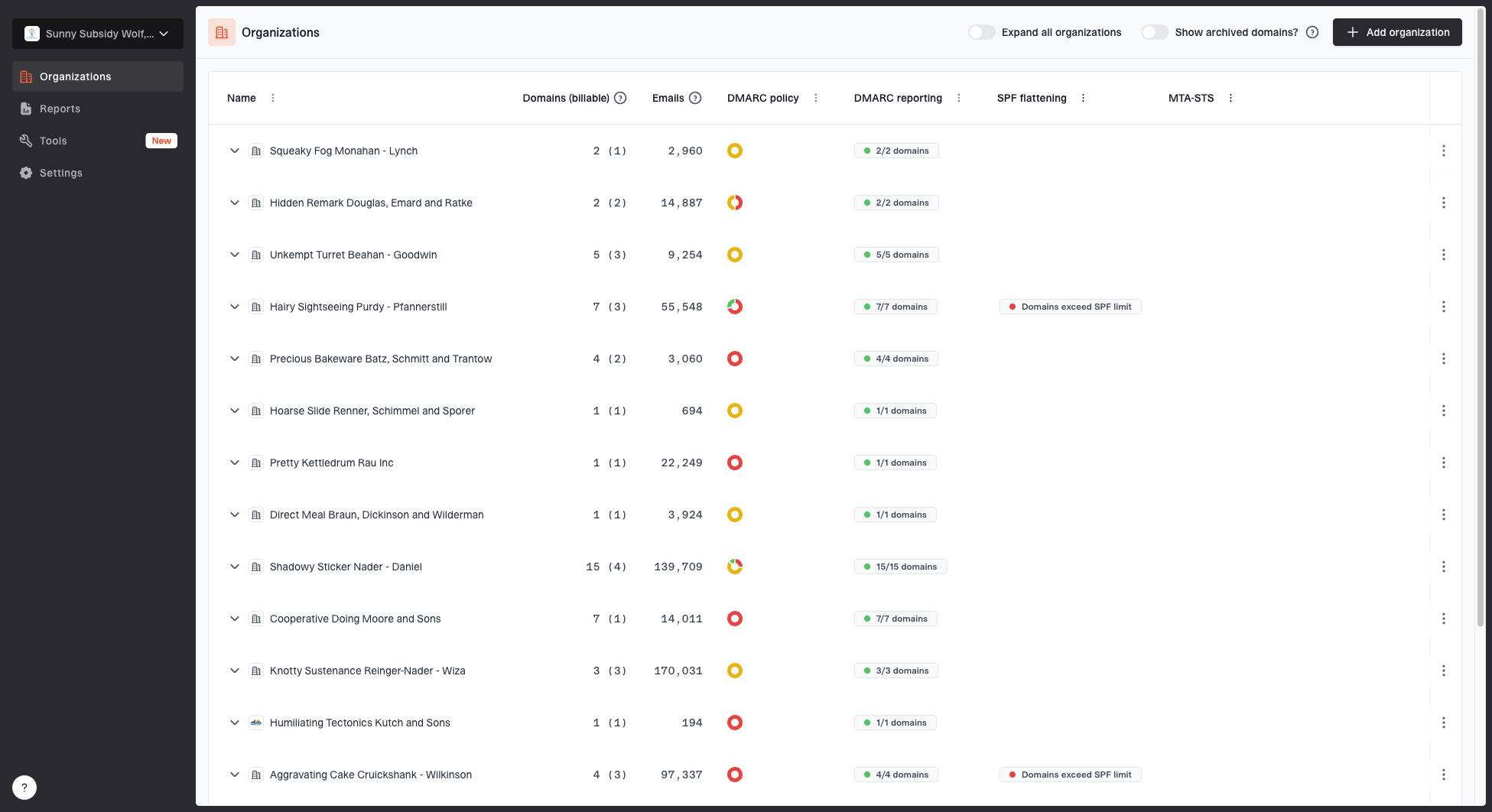
MSP organizations page showing client organizations, domain counts, email volume, and domain status columns
Suped's product fits this workflow because its MSP and multi-tenancy dashboard keeps client organizations, domain counts, email volume, and domain status in one place. Operators can compare client risk without maintaining a separate spreadsheet for every account.
Suped's product connects automated issue detection and policy alerts with client reporting and Hosted DMARC for controlled policy changes. Hosted SPF and SPF flattening support clients whose SPF complexity blocks authentication cleanup. Blocklist monitoring keeps blocklist (blacklist) changes beside the client record when reputation issues affect triage.
Resolve ties by ownership
If two clients have the same score, work the one with the clearer business owner first. Faster decisions reduce project drag, which creates more room for the harder client later.
Escalate by risk owner, not by DNS task
High-risk DMARC clients rarely fail because an MSP cannot write the DNS record. They stall because the sender owner is unknown, a department bought a tool outside IT, or nobody wants to approve enforcement. Treat those as risk ownership problems, not just technical tickets.
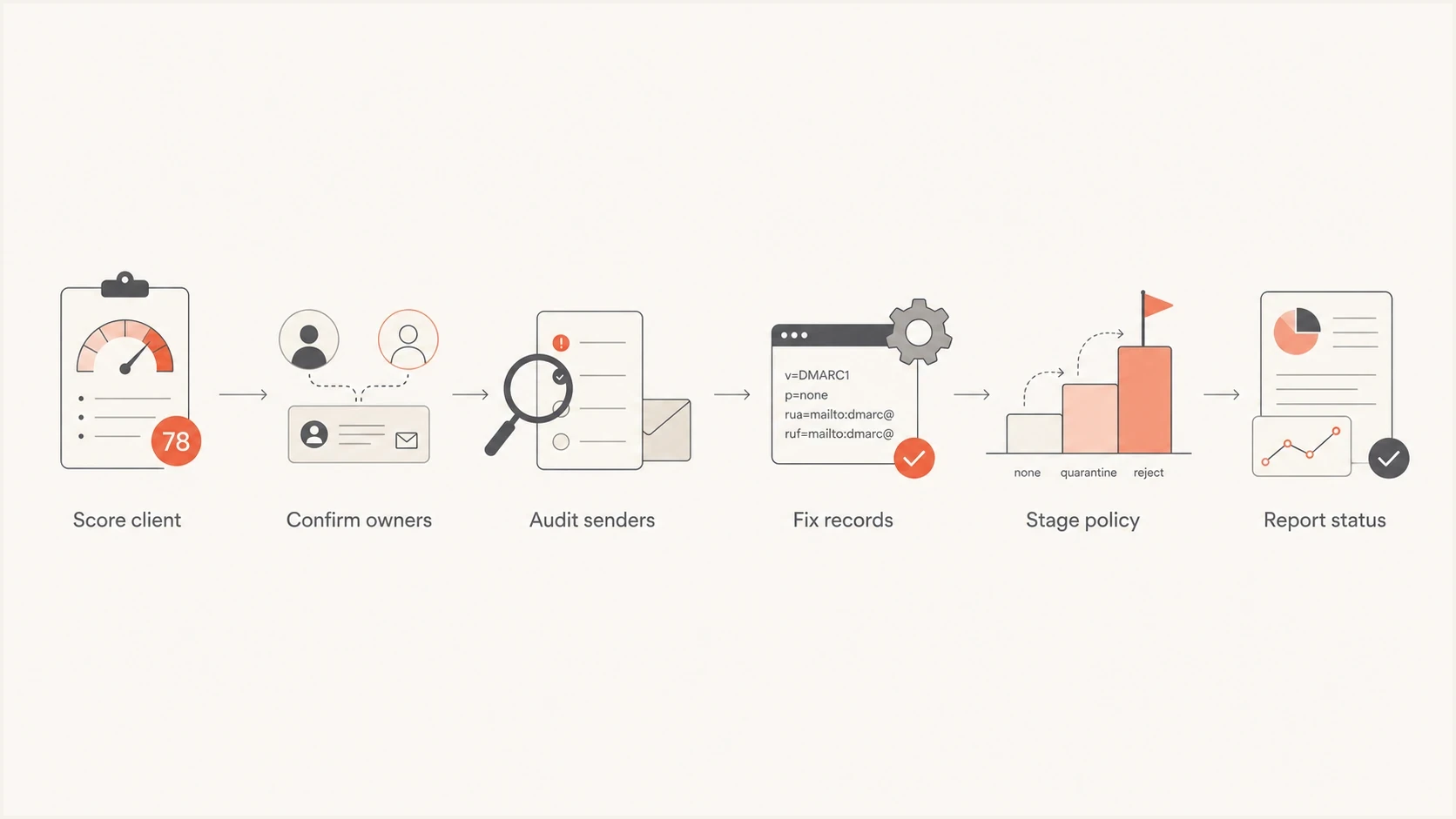
MSP DMARC risk prioritization flowchart for scoring clients, confirming owners, auditing senders, fixing records, staging policy, and reporting
The escalation path should name the person who can approve sender changes, not just the person who can edit DNS. For a finance sender, that might be the controller. For a marketing platform, it might be the campaign owner. For a client-owned web app, it might be the developer or the application vendor.
Client-ready wording
Your highest-risk domain is still in monitoring because several approved senders are not passing DMARC. We need each sender confirmed by a business owner before we move enforcement forward.
When the client understands the blocker, DMARC stops sounding like a mysterious DNS project. It becomes a list of owned sender decisions. That is also the cleanest path to move clients through quarantine and reject without breaking legitimate mail.
Report progress without hiding residual risk
Risk prioritization should show up in client reporting. Do not report only pass rates. A client with a 98% pass rate can still have one critical unauthenticated sender. A client with a lower pass rate can be safer if the failures are only forwarding or low-impact noise.
Report four items: current risk band, policy stage, top unresolved senders, and the next enforcement milestone. That gives account managers enough context to discuss progress without handing raw XML to the client.
Example risk reduction over service cycles
A sample trend showing how a client moves down the risk queue as sender cleanup and enforcement progress.
Risk score
- Risk band: Shows whether the client needs urgent attention or normal monitoring.
- Policy stage: Shows how close the domain is to quarantine or reject.
- Sender blockers: Shows which business owners need to approve or fix mail streams.
- Next action: Shows the exact work needed before the next policy move.
Choose the next client by risk and readiness
The best DMARC client to work next is the one where risk is high, exposure is real, and the next action is known. If the next action is not known, the priority work is discovery: identify the sender, find the owner, record the evidence, and decide whether the mail should exist.
A risk queue gives MSP operators a cleaner way to run DMARC at scale. It protects engineering time and gives account managers a plain explanation for clients. It also keeps policy enforcement moving while making resourcing measurable.