How to pitch DMARC to clients using Microsoft 365

Updated on 28 Aug 2026: We updated this guide for RFC 9989 and clarified the limits and rollout controls MSPs should explain to Microsoft 365 clients.
Pitch DMARC to Microsoft 365 clients as a managed risk reduction project, not as a DNS cleanup task. The client already pays for Microsoft 365, but that does not mean every custom domain has an enforced DMARC policy or that every third-party sender authenticates correctly. Frame the pitch around a simple operational point: Microsoft 365 protects mailboxes, while DMARC lets the client publish how receivers should handle unauthorized use of its exact From domain.
For an MSP, the strongest pitch is practical: audit every sender, fix SPF and DKIM coverage, publish a DMARC record, monitor reports, move policy in stages, and turn the work into a repeatable service. That is why DMARC belongs in a DMARC for MSPs offer, especially for Microsoft 365-heavy client bases.
Client-facing pitch: Microsoft 365 handles a lot of email security, but DMARC is still controlled by your domain records and your sender behavior. We manage that for you, prove which services send as your brand, and move the domain toward enforcement without breaking valid mail.
Why Microsoft 365 clients still need DMARC
The most common objection is that the client already has Microsoft 365, Defender settings, and maybe DKIM enabled. That is useful, but it is not the whole job. Microsoft states that custom domain DMARC records are created at the domain registrar or DNS host, not managed through Microsoft 365 admin portals or PowerShell for custom domains. The Microsoft DMARC setup guidance also recommends a gradual path to p=reject. The exception is the tenant's *.onmicrosoft.com domain, whose DMARC TXT record can be added through the Microsoft 365 admin center.
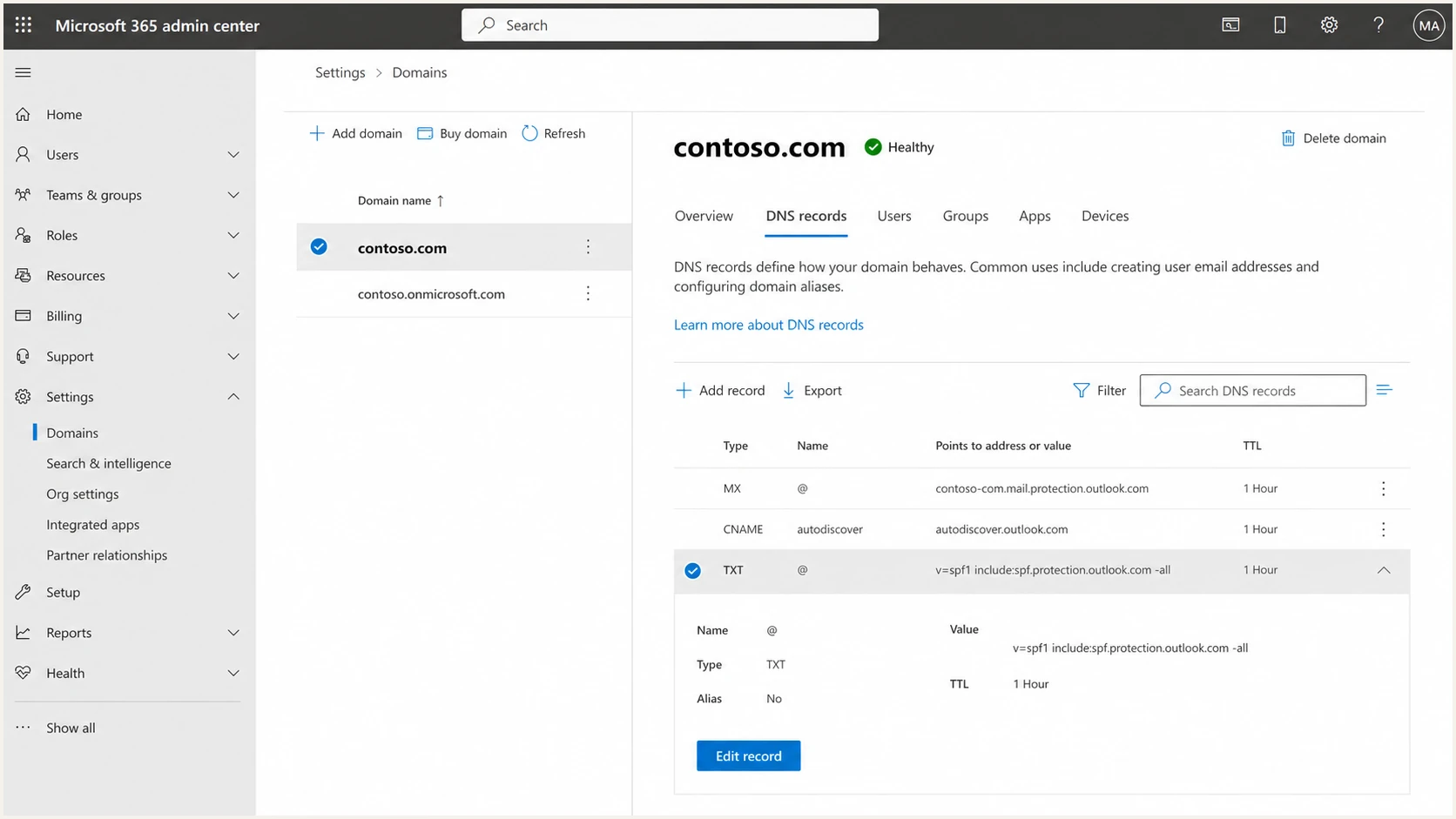
Microsoft 365 admin center domain DNS records screen.
- Control point: DMARC enforcement lives in DNS for the client's domain, so someone must own record creation, staging, review, and changes.
- Sender sprawl: Microsoft 365 is usually only one sender. Payroll, billing, CRM, support, marketing, scanners, and line-of-business apps often send too.
- Reporting gap: Raw DMARC XML is not a client-friendly report. The MSP needs summaries, source attribution, and issue tracking.
- Change risk: Moving directly to p=reject without sender discovery breaks legitimate mail, which turns a security project into a support incident.
What Microsoft 365 handles
- Mailbox security: Inbound filtering, spoof intelligence, and anti-phishing controls protect users inside the tenant.
- Microsoft sending: SPF and DKIM can cover Microsoft 365 mail when configured correctly for the custom domain.
- Tenant visibility: Message trace and Defender views help investigate Microsoft-handled mail events.
What the MSP service handles
- Domain policy: DMARC TXT records, subdomain strategy, reporting addresses, and enforcement timing.
- Third-party senders: Discovery and fixes for every service sending as the client's brand outside Microsoft 365.
- Client reporting: Monthly progress, open issues, risk reduction, and proof that enforcement is safe.
The pitch in one client conversation
Keep the meeting focused on business risk and service delivery. The client does not need a lecture on RFCs. They need to understand that attackers abuse trusted domains, Microsoft 365 does not list every legitimate sender for them, and enforcement requires measured work. A simple meeting flow works better than a technical dump.
- Open with risk: Attackers can directly spoof your From domain when receivers lack an enforced policy. DMARC does not stop lookalike domains.
- Tie it to Microsoft 365: Microsoft 365 is one major sender, but we need to validate every service using your domain.
- Explain the method: We start in monitoring mode, identify valid senders, fix failures, then stage policy changes.
- Show the outcome: The goal is p=reject for active domains and a clear no-mail posture for parked domains.
- Set expectations: This is not a one-time switch. It is a monitored rollout with reporting and change control.
Policy stages to show clients
Use the policy name as a progress marker, not as a technical lecture.
Monitor
p=none
Collect reports and map real senders.
Limit damage
p=quarantine
Apply a softer failure action after known senders pass.
Enforce
p=reject
Tell receivers to reject unauthenticated domain use.
If a client asks why the project takes time, explain that enforcement has to follow evidence. A clean rollout depends on sender discovery, SPF lookup health, DKIM signing, DMARC alignment, and client sign-off. For a deeper client handoff, use a staged p=none to p=reject plan.
Update the rollout for RFC 9989
RFC 9989 became the current DMARC standard in May 2026 and replaced RFC 7489. It made the pct tag historic because receivers applied fractional enforcement inconsistently. Microsoft guidance still shows pct-based examples, but an MSP proposal should not depend on pct=10, pct=25, or similar steps.
RFC 9989 test-mode exampleDNS
_dmarc.client.tld TXT "v=DMARC1; p=reject; t=y; rua=mailto:d@client.tld"
- Use evidence gates. Move policy only after known legitimate sources pass through aligned SPF or DKIM and aggregate reports are stable.
- Use t=y carefully. With compatible receivers, p=quarantine asks for none and p=reject asks for quarantine, while report generation continues.
- Plan full policy changes. Older receivers can ignore the t tag and apply p as written, so test mode is not a guaranteed safety net.
- Keep rollback ready. Record the prior DNS value, change owner, approval, observation window, and reversal trigger before enforcement.
Client-facing wording: The current standard no longer treats fractional pct values as the rollout control. We use source coverage, DMARC alignment, receiver-aware test mode, and a documented rollback decision before enforcement.
What to audit before the pitch
The best sales conversation starts with a small audit. The aim is to collect enough proof to make the problem real without promising an enforcement date before the data supports it. For Microsoft 365 clients, the audit should cover the tenant, DNS, and every obvious business sender.
|
|
|
|---|---|---|
Microsoft 365 | SPF, DKIM, custom domains | Core mail coverage |
DNS | DMARC, subdomains, MX | Policy readiness |
Senders | Authorized services and alignment | Breakage risk |
Domains | Active and parked | Spoofing exposure |
A compact pre-call audit list for MSP discovery.
A quick health check gives you a better starting point than asking the client to remember every sender. Suped's domain health view and public checks help turn DNS and authentication status into a client-ready conversation. For a broader check, use domain health checker results before the meeting, then confirm findings during onboarding.
?
What's your domain score?
Deep-scan SPF, DKIM & DMARC records for email deliverability and security issues.
Do not promise p=reject during the sales call. Promise the operating process: discovery, fixes, policy staging, reporting, and approval before enforcement.
The Microsoft 365 rollout plan
A Microsoft 365 DMARC project should feel safe and controlled. Use the plan below when a client wants the practical detail after the pitch. It shows that the MSP owns the work, but the client stays involved where vendor access or business approval is needed.
Starting DMARC recordDNS
_dmarc.client.tld TXT "v=DMARC1; p=none; rua=mailto:d@client.tld"
Typical Microsoft 365 SPF includeDNS
client.tld TXT "v=spf1 include:spf.protection.outlook.com -all"
- Confirm DNS ownership: Know who can change public DNS and how approvals work before any record changes.
- Enable Microsoft DKIM: Make sure the custom domain signs mail correctly, not only the onmicrosoft.com domain.
- Inventory senders: Use reports and stakeholder interviews to identify legitimate services outside Microsoft 365.
- Fix authentication: Update SPF, DKIM, sender domains, and vendor settings until real mail passes DMARC.
- Stage policy: Move to quarantine, verify stable aggregate reports, then enforce reject after client approval. Under RFC 9989, do not use pct to phase only a fraction of failures.
Hosted controls reduce MSP friction because technicians do not need repeated DNS access for every small policy change. Suped's Hosted DMARC helps stage policy through a managed workflow, while Hosted SPF helps manage senders without constant edits to the client's base SPF record.
If the client has many business systems, run a formal audit client senders workflow before quarantine. That is where most hidden risk appears.
How Suped fits the MSP delivery model
Suped is our DMARC platform for turning the pitch into a repeatable managed service. Its role goes beyond displaying DMARC reports. It centralizes client domains, detects issues automatically, gives technicians steps to fix them, alerts on changes, and packages progress into client-facing reports.
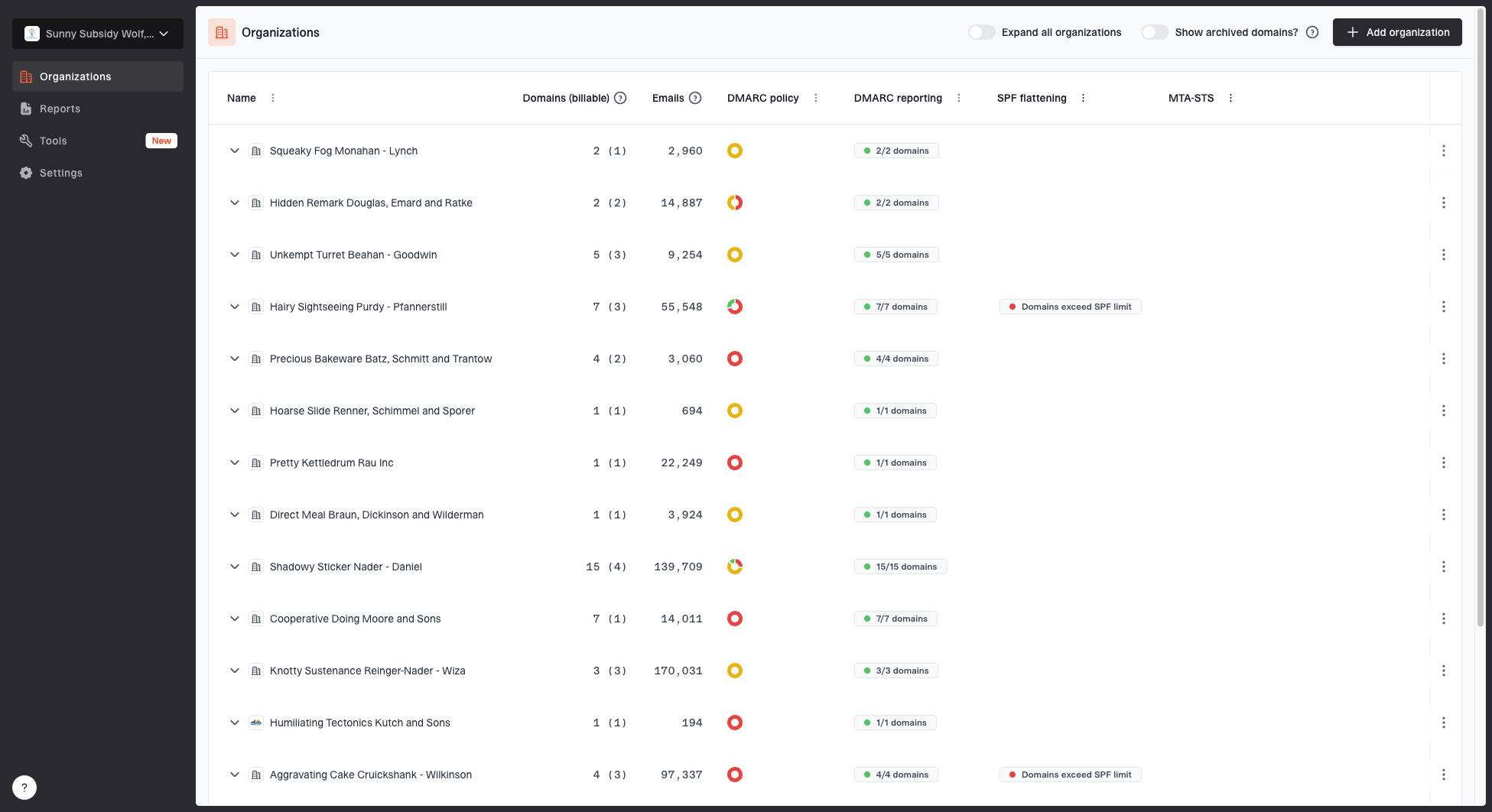
MSP organizations page showing client organizations, domain counts, email volume, and domain status columns
This matters when the client base is full of Microsoft 365 tenants. Each client has similar building blocks, but different senders, DNS hosts, business apps, and risk tolerance. A multi-tenant view keeps the MSP from turning every rollout into a bespoke spreadsheet.
- Issue detection: Suped identifies failing sources and gives clear steps instead of leaving technicians to inspect raw XML.
- Real-time alerts: Clients get faster response when a new source fails authentication or a policy change creates risk.
- Unified view: DMARC, SPF, DKIM, blocklist (blacklist), and deliverability signals sit in one operational workflow.
- MSP scale: Client organizations, domain status, reports, and user roles are managed in a single dashboard.
Handling common client objections
The pitch usually works when the MSP is ready for predictable objections. Keep answers short, then bring the discussion back to operational control.
Client objection
- Microsoft covers us: The tenant has security defaults, Defender policies, and DKIM turned on.
- Nothing is broken: Users are sending and receiving mail today, so the client sees no urgent issue.
- DNS is risky: The client worries that authentication changes will block valid business mail.
MSP response
- Separate scopes: Microsoft protects the tenant. DMARC publishes what receivers should do with domain abuse.
- Show evidence: Monitoring reveals unknown senders and failed authentication before enforcement starts.
- Use stages: The rollout begins at p=none, then changes policy after fixes and approval.
Good client wording: We are not changing email flow on day one. We are adding visibility first, then we will fix legitimate senders and only enforce once the data says it is safe.
Scope the service so clients understand it
A clear scope prevents DMARC from becoming unpaid admin work. Split the offer into onboarding, rollout, and ongoing monitoring. Each phase has a defined client outcome.
|
|
|
|---|---|---|
Onboarding | DNS, tenant, sender audit | Known baseline |
Fixes | SPF, DKIM, vendor changes | Valid mail passes |
Policy | Quarantine, then reject | Enforced domain |
Operations | Alerts and reports | Ongoing control |
Use phases instead of public price points in client proposals.
The monthly deliverable should include current policy, sender status, top failures, new sources, remediation work, and the next recommended change. That keeps DMARC visible after the initial setup and makes the service easier to renew.
Suped's DMARC monitoring workflow fits this scope because the MSP can track authentication health, source behavior, policy progress, and client reporting without building a custom reporting stack.
Keep the pitch practical
The winning Microsoft 365 DMARC pitch is simple: the client has a trusted domain, many services send mail as that domain, and enforcement needs careful work. Microsoft 365 is a key part of the environment, but the MSP still needs to manage DNS policy, sender discovery, monitoring, reporting, and follow-up.
Do not sell fear or a one-click fix. Sell a managed path to enforcement. Show the current state, explain the rollout, name the client responsibilities, and report progress in plain business terms. Suped supports that delivery model with multi-client visibility, automated issue detection, policy staging, hosted records, alerts, and client reporting.




