How to explain SPF, DKIM, and DMARC alignment to clients

Updated on 17 Aug 2026: We updated this guide for RFC 9989 and added clearer client-ready alignment examples.
SPF, DKIM, and DMARC alignment mean a client domain has to prove two things at the same time: the message passed an authentication check, and the domain that passed that check has alignment with the domain the recipient sees in the visible From address.
For MSP clients, keep the explanation practical. SPF checks whether the sending IP is authorized for the envelope sender domain. DKIM verifies a cryptographic signature and ties it to the d= signing domain. DMARC checks whether at least one passing identity has alignment with the visible From domain. The DMARC record also publishes the domain owner's reporting and handling preferences for failures. Alignment is the bridge between the technical check and the domain the client is trying to protect.
- SPF: Checks whether the sending IP is allowed by the domain in the SMTP MAIL FROM identity, commonly shown as Return-Path after delivery.
- DKIM: Checks whether a signature is valid for the d= signing domain and whether the signed content remained intact.
- DMARC: Passes when SPF or DKIM passes with an identity that has alignment with the visible From domain.
- Alignment: Connects the hidden technical identity to the brand identity the recipient sees.
Client-safe wording
The simplest client explanation is: "Your email needs to pass an ID check, and the company name on that ID needs to match the company name customers see." That avoids DNS jargon while still preparing the client for why vendor records, marketing platforms, and billing systems need review before enforcement.
Use the client version first
Clients do not need to memorize every DNS term before they approve a DMARC project. They need to understand why some legitimate services fail, why the MSP has to inventory senders, and why moving straight to enforcement without monitoring creates avoidable mail disruption.
Explain SPF, DKIM, and DMARC alignment in two layers. The first layer is a business version for the owner or another business stakeholder. The second layer is a technical version for whoever controls the client's email and DNS systems.
Business explanation
- Identity: The visible From domain is the name customers trust.
- Proof: SPF authorizes a sending path, while DKIM validates a domain signature.
- Decision: DMARC checks whether either proof matches the brand domain.
- Outcome: The client can request quarantine or rejection of failing mail after legitimate senders are fixed.
Technical explanation
- SPF: The connecting IP must be authorized by the RFC5321.MailFrom domain.
- DKIM: The DKIM signature must verify for the d= signing domain.
- DMARC: SPF or DKIM must pass with a domain that has alignment with the RFC5322.From domain.
- Policy: The MSP can stage the domain through monitoring, quarantine, then reject when reports support it.
That split matters in MSP service delivery. The client sponsor approves the risk reduction work. The technical contact helps fix DNS and vendor settings. If both groups hear the same level of detail, one group gets too little context and the other gets buried in terms they do not need.
For a broader service positioning page, this topic fits naturally inside an MSP DMARC service conversation, because alignment is where monitoring turns into client action.
Show how a message passes DMARC
A useful client diagram starts with the visible From address, then shows SPF and DKIM as two separate paths. DMARC does not require both to pass. It requires at least one passing result with an authenticated domain that has alignment with the visible From domain. That detail prevents a common client misunderstanding: a message can fail SPF and still pass DMARC if DKIM passes with alignment.
The easiest way to explain this in a QBR or onboarding call is to use one sample message, then walk through the headers with the client-facing language first. Start with the sender the recipient sees, ask which system sent the email, then check whether that system authenticated as the client's domain or another domain.
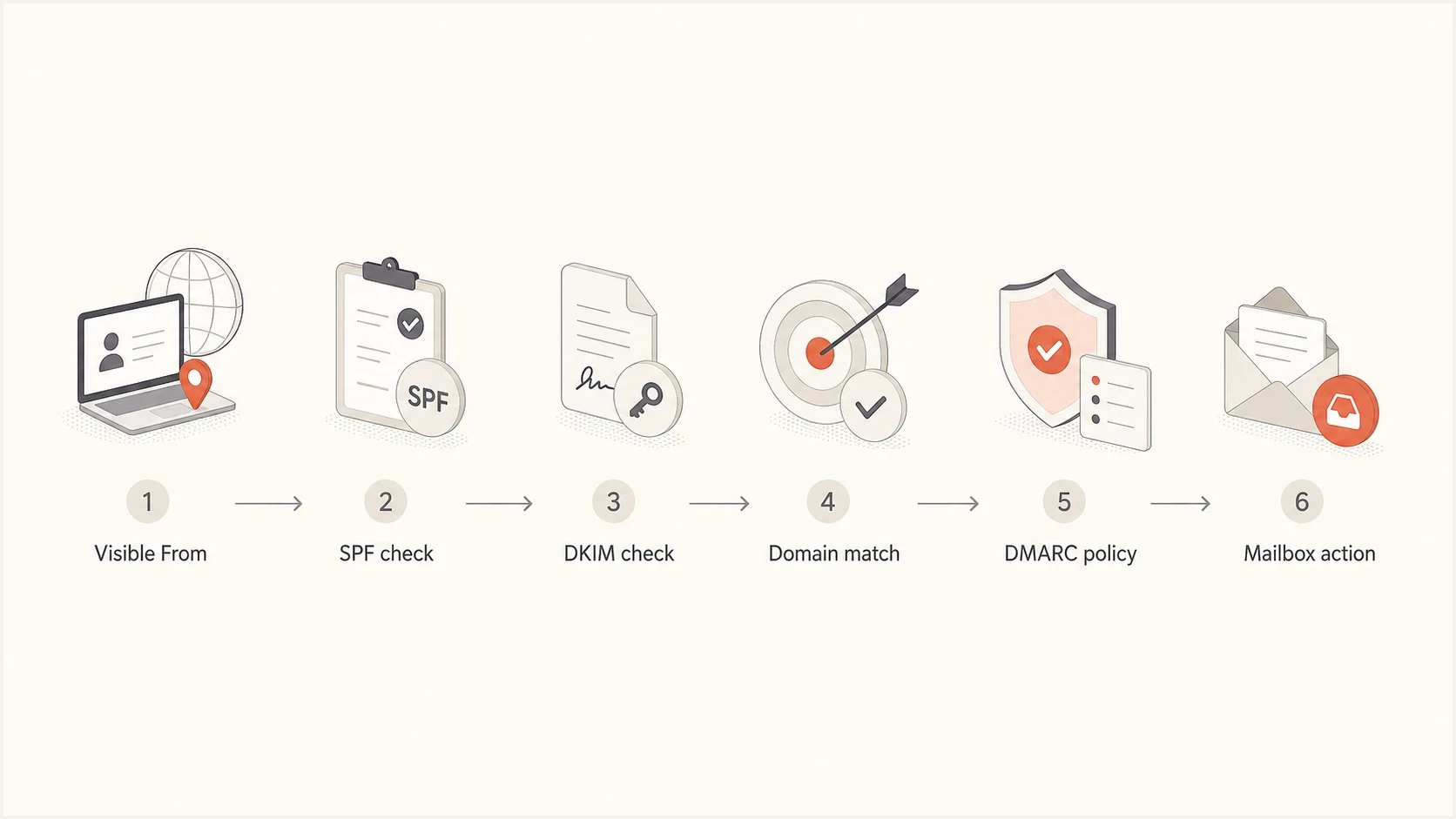
DMARC alignment flowchart for MSP clients, tracing the visible From domain through SPF or DKIM to policy handling.
|
|
|
|
|---|---|---|---|
SPF | Allowed sending path | MAIL FROM domain | Vendor Return-Path |
DKIM | Valid domain signature | DKIM d= domain | Vendor signing domain |
DMARC | Alignment decision | Visible From domain | No pass with alignment |
Compact MSP explanation of the three checks
A DMARC pass validates authorized use of the visible From domain. It does not prove the message is safe, and it does not guarantee inbox placement. Receivers still apply their own reputation and filtering decisions.
Show records only after the client understands the concept. DNS examples help technical contacts, but they are too abstract for the sponsor at the start of the conversation.
Example authentication recordstext
example.com TXT
"v=spf1 include:_spf.mailservice.example -all"

selector1._domainkey.example.com TXT
"v=DKIM1; k=rsa; p=MIIB..."

_dmarc.example.com TXT
"v=DMARC1; p=none; rua=mailto:dmarc@example.com"
A domain check belongs near this point in the workflow. It helps confirm whether the current SPF, DKIM, and DMARC records exist before you open the client task list. Suped's domain health checker keeps the first conversation focused on observable DNS facts.
?
What's your domain score?
Deep-scan SPF, DKIM & DMARC records for email deliverability and security issues.
The result should not become the whole project plan. It tells you what exists in DNS. DMARC aggregate reports show the sources observed by reporting receivers. Their authentication results identify the sources that need remediation.
Use real domains to prove the pass rule
Use billing@example.com as the visible From address, then compare the MAIL FROM domain and DKIM d= domain. Authentication and alignment are separate decisions: a vendor domain can pass SPF or DKIM for itself while contributing nothing to the DMARC result for example.com.
|
|
|
|
|---|---|---|---|
example.com | example.com | Pass | Both identities pass with alignment |
bounce.vendor.example | example.com | Pass | DKIM passes with alignment; SPF can lack alignment |
mail.example.com | signer.vendor.example | Pass in relaxed mode | SPF passes and shares the Organizational Domain |
bounce.vendor.example | signer.vendor.example | Fail | Neither passing identity has alignment with example.com |
Worked DMARC alignment examples for client calls
When one message behaves unexpectedly, inspect Authentication-Results and DKIM-Signature. Confirm the SPF result and MAIL FROM identity, find every passing DKIM d= identity, then compare each one with the visible From domain under the client's alignment mode.
A pass for another domain is not enough
If a vendor authenticates only as vendor.example, the vendor has proved control of its own domain. The client still needs MAIL FROM alignment or DKIM alignment with example.com to pass DMARC.
Explain relaxed and strict alignment without losing the room
Clients often hear "alignment" and assume every domain string must be identical. DMARC has relaxed and strict modes for SPF and DKIM. Relaxed alignment accepts domains with the same Organizational Domain. Strict alignment requires an exact domain match.
Under the current DMARC standard, receivers discover the Organizational Domain through DMARC policy lookups in DNS. Relaxed alignment is the default when aspf or adkim is omitted, and it is sufficient for nearly all domain owners. Strict alignment has a place for controlled mail streams, but it increases the vendor-specific fixes your team must manage.
Relaxed alignment
- SPF: The MAIL FROM domain and From domain can share an Organizational Domain.
- DKIM: The d= signing domain and From domain can share an Organizational Domain.
- Use case: The practical default for client environments with several senders.
Strict alignment
- SPF: The MAIL FROM domain must exactly match the From domain.
- DKIM: The d= signing domain must exactly match the From domain.
- Use case: An option after sender inventory is complete and vendor support is clear.
Strict alignment DMARC optionstext
_dmarc.example.com TXT
"v=DMARC1; p=quarantine; adkim=s; aspf=s;
 rua=mailto:dmarc@example.com"
Avoid making strict alignment the first milestone
Strict SPF alignment breaks easily when a third-party platform uses its own bounce domain. Strict DKIM alignment depends on whether the vendor lets the client sign with the client's exact From domain. Prove what currently sends, fix high-volume legitimate sources, then decide whether strict settings add enough value for that client.
Handle the failures clients actually have
In MSP environments, alignment issues usually come from operational sprawl, not one bad DNS record. The client has a primary mail platform plus several business systems that send email. Some of those systems were added without a central authentication review.
Do not tell clients that DMARC is only a DNS change. The DNS record starts reporting. The service work covers sender identification, authentication fixes, enforcement readiness, and ongoing verification.
- Unapproved SaaS: A department sends as the client domain through a platform IT never configured.
- Shared mailers: A vendor authenticates with its own domain, so SPF or DKIM can pass while DMARC fails for the client domain.
- SPF limits: Too many lookup-generating mechanisms push SPF beyond its limit of 10 DNS lookups and produce a permanent error.
- Forwarding: Forwarded messages often fail SPF because the forwarder's IP is not authorized, so a surviving DKIM signature with domain alignment becomes the more reliable DMARC path.
- Subdomains: Campaign systems use subdomains that need planned policy and reporting coverage.
SPF problems deserve special handling because they are common and easy to make worse. Adding another include looks harmless until the record crosses the lookup limit. For MSPs managing many clients, Suped's Hosted SPF can reduce DNS access friction and keep approved sender changes controlled. It does not give a vendor Return-Path domain alignment or authorize an unknown sender.
Policy stages clients can understand
Use these stages to explain why enforcement follows sender fixes.
Monitoring
p=none
Collect reports and identify legitimate sending sources.
Quarantine enforcement
p=quarantine
Ask receivers to treat DMARC-failing mail as suspicious, often by placing it in spam.
Reject enforcement
p=reject
Ask receivers to reject DMARC-failing mail after legitimate senders are fixed.
The current DMARC standard treats the pct tag as historic, so do not describe quarantine as enforcement for a selected share of traffic. Receivers also retain final control over message handling. Stage rollout by fixing senders and observing report data before changing the published policy.
This framing helps the client see DMARC as a managed control rather than a one-time switch. It also gives the MSP a clean way to define scope across inventory, remediation, reporting, policy staging, and post-enforcement monitoring.
Turn the explanation into an MSP workflow
A good client explanation should end in clear next actions. The client does not need a lecture on every authentication header. They need to know which senders are authorized, which ones need DNS work, and when the domain can move to a stronger DMARC policy.
Suped's product supports this MSP workflow by bringing DMARC analysis, SPF and DKIM checks, blocklist (blacklist) monitoring, and deliverability signals into one place. For day-to-day delivery, DMARC monitoring is the working layer: it turns aggregate reports into sender lists, authentication results, and issues your team can resolve.
Suped DMARC dashboard showing email volume, authentication health, and source breakdown
The dashboard is not there to impress the client with volume charts. It gives the MSP a shared source of truth. When a vendor fails authentication, the conversation moves away from opinion and toward a concrete source, identity, pass rate, and remediation path.
- Baseline: Add the domain, confirm the DMARC record, and collect enough report data to see real senders.
- Classify: Separate approved platforms, unknown sources, forwarding traffic, and obvious abuse.
- Remediate: Fix SPF, enable DKIM with domain alignment, change vendor sender settings, or stop unauthorized systems.
- Stage: Move policy through monitoring, quarantine, then reject when report data supports the change.
- Report: Show progress using source counts, pass rates with alignment, policy status, and remaining client actions.
When DNS access is slow or clients have many domains, Hosted DMARC can simplify policy changes because the MSP can adjust policy without waiting on every small DNS update.
Client reporting language
A strong update sounds like this: "We found 12 services sending for your domain. Nine now pass DMARC, two need vendor changes, and one unknown source is classified as unauthorized. We will hold at monitoring until the vendor fixes are confirmed."
That style also makes client progress reports more useful. The client sees what changed, what risk remains, and what approval or vendor access the MSP needs next.
Answer the hard client questions plainly
The client questions that slow projects are usually about disruption. Clients want to know whether legitimate mail will be blocked, why the MSP cannot enable reject immediately, and why a vendor that reports an SPF or DKIM pass still fails DMARC.
Answer with operational facts. If a service signs with the vendor's domain, explain that the signature can pass DKIM but lack alignment with the client's From domain. If forwarding breaks SPF, explain that a surviving DKIM signature with domain alignment is the more reliable pass path for that flow.
|
|
|
|---|---|---|
Why not reject now? | Wanted mail still needs an authentication pass with domain alignment. | Finish inventory |
Why did SPF pass but DMARC fail? | SPF passed for a domain without alignment. | Configure MAIL FROM |
Why did DKIM fail? | The signature was missing, invalid, or broken in transit. | Check signing and selector |
Who owns the fix? | Ownership depends on the sending system. | Assign vendor or client task |
Plain answers for common stakeholder questions
For less technical stakeholders, keep the detail even tighter. The companion nontechnical DMARC explanation works well when the audience cares about risk and ownership more than headers.
Do not promise zero disruption
The honest promise is controlled rollout, not zero risk. DMARC enforcement changes the handling preference receivers see for failing mail. A disciplined MSP process reduces disruption by collecting reports, fixing legitimate senders, staging policy, and keeping rollback steps clear.
Use a simple script during client calls
A short script keeps the first call consistent across account managers and engineers. It also stops the conversation from drifting into DNS syntax before the client understands the business reason for the work.
MSP call scripttext
Your domain is the identity customers see in the From address.

SPF checks whether the sending path is allowed for the envelope domain.
DKIM checks whether the message has a valid domain signature.
DMARC checks whether at least one passing domain has alignment with your visible domain.

We will monitor first, identify every legitimate sender, fix the gaps,
then move the policy toward rejecting messages that fail DMARC.
The script works because it names the checks, ties them to the visible domain, and sets expectations about the rollout. It also makes the MSP's value clear: the client is not buying a TXT record. The service covers sender discovery, authentication repair, policy management, and ongoing monitoring.
Suped's product supports this service delivery with issue detection, alerts, multi-tenant reporting, and managed DNS workflows for Hosted SPF and Hosted DMARC. Blocklist (blacklist) monitoring and related deliverability signals help the MSP keep authentication findings in operational context. The workflow turns aggregate report data into client tasks instead of leaving the team to process raw XML in spreadsheets.
Keep the explanation tied to action
SPF, DKIM, and DMARC alignment are practical email controls when presented well. The core rule says a message must pass SPF or DKIM using a domain with alignment to the domain the client shows to recipients.
For MSPs, the strongest explanation is short and tied to repeated next actions: identify every sender, configure SPF or DKIM for alignment with the visible domain, verify pass rates in reports, and only then tighten DMARC policy. That turns a technical control into an ongoing service the client understands and can approve.