
How MSPs should explain DMARC to nontechnical clients

Published 12 Jun 2026
Updated 22 Oct 2026
11 min read
Summarize with
Updated on 22 Oct 2026: We clarified sender requirements and enforcement checks, and added a practical monthly reporting template for client conversations.
Managed service providers (MSPs) should explain DMARC as a control that helps protect a client's domain against email spoofing. The client-level message is simple: DMARC tells receiving mail systems the domain owner's preferred handling for messages that use the client's domain in the visible From address but fail DMARC. It also gives the MSP reporting data so real senders can be found, fixed, and monitored before the domain moves to enforcement.
Keep the first explanation short because most clients do not need to understand SPF alignment, DKIM signatures, or aggregate XML reports on the first call. They need to understand why the work matters, what changes for them, and how the MSP will manage the risk. For a deeper service model, Suped's MSP DMARC workflow is built around managing many client domains from one place.
- DMARC helps stop people from using the client's domain in fake mail that targets customers, staff, or suppliers.
- The MSP starts in monitoring mode, checks legitimate senders, then raises enforcement only when the data supports the change.
- Most users do not see a new tool. The MSP handles DNS, reporting, sender fixes, and ongoing alerts.
- The domain becomes harder to abuse, and future email changes become easier to review.
How to explain DMARC without jargon
The wording that works best with nontechnical clients is concrete. Describe DMARC as a rule for the client's domain name. If a message claims to be from the company, the receiving mail service checks whether the message came through an approved sending path and whether the identity matches the domain. When DMARC fails, the policy asks the receiver to leave existing handling unchanged, treat the message as suspicious (often placing it in spam), or reject it.
Client call wording
DMARC is an email domain protection setting. It helps other mail systems tell the difference between real mail from your business and mail that only pretends to use your domain. We start by watching the reports, then we fix approved senders, then we apply the policy that fits your mail flow once the data says it is safe.
Define SPF and DKIM only as supporting checks. SPF verifies whether the sending IP is authorized for the envelope domain. DKIM verifies a cryptographic signature tied to a signing domain and detects changes to signed content. DMARC stands for Domain-based Message Authentication, Reporting, and Conformance. It passes when SPF or DKIM passes and the authenticated domain matches the visible From domain under DMARC's identifier alignment rules.
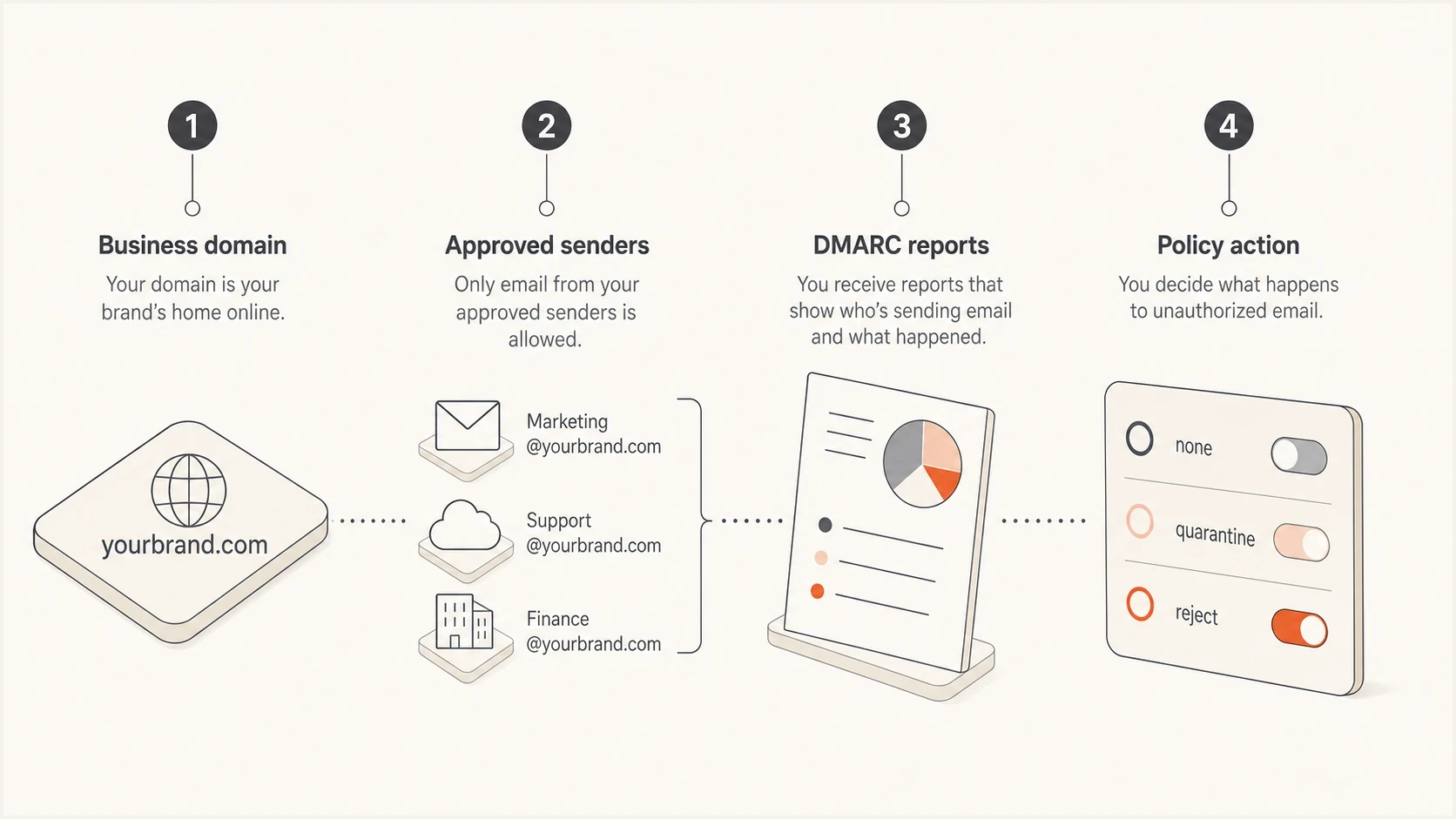
DMARC process connecting a business domain, approved senders, aggregate reports, and policy action.
Translate the technical work into client value
Clients buy reduced risk and operational clarity. They do not buy TXT records. The MSP conversation should connect each technical action to a business reason. A DMARC project usually touches the domain, mail platform, marketing tools, ticketing systems, invoicing systems, CRMs, and scanners. The client needs to know the MSP is finding all of those senders before blocking anything.
Authentication is also part of current bulk sender requirements. Google counts close to 5,000 or more messages to personal Gmail accounts within 24 hours, combining traffic from the same primary domain and its subdomains. Microsoft applies its high-volume rules at 5,000 or more messages a day to Outlook.com and related consumer addresses. Yahoo also has bulk sender rules but does not publish a numeric volume threshold. These rules require SPF and DKIM authentication plus DMARC, with at least one authenticated domain meeting DMARC's identifier alignment rules. A p=none policy satisfies their minimum DMARC policy requirement, but legitimate messages still need to pass DMARC. Meeting those rules does not guarantee inbox placement. Use them to explain why every sending domain and real mail flow needs checking.
Technical framing
- Add or edit a DMARC TXT record at the domain.
- Check SPF and DKIM alignment for every source.
- Move from monitoring to quarantine or reject.
- Read DMARC aggregate data and investigate failures.
Client framing
- Your company publishes how receivers should handle mail that fails the domain's authentication checks.
- We find real senders before any blocking policy is applied.
- Failed mail can be sent to spam or rejected.
- Reports show which services send mail for the domain.
This translation matters during onboarding. A client who hears only about records and selectors assumes the work is a one-time admin change. A client who hears about controlled enforcement understands why the MSP needs a monitoring window, sender inventory, change approvals, and alert handling.
Use a repeatable MSP delivery model
A DMARC service needs a repeatable process. Without one, each client domain turns into a custom investigation. Use a staged model that works the same way for a five-person business and a multi-domain client. The scope changes, but the sequence stays stable.
Illustrative DMARC rollout effort
Illustrative relative effort only. The values are not measured results or recommended time allocations; readiness depends on verified mail flows.
Observe
Fix
Enforce
Monitor
- List domains, subdomains, mail platforms, line-of-business senders, and any vendor that sends as the client.
- Publish a p=none policy with a working rua reporting destination. Observe a complete business sending cycle, including occasional billing or payroll mail, and confirm unfamiliar sources with the client.
- Fix SPF, DKIM, and sender alignment issues before enforcement.
- Introduce quarantine after testing approved senders; consider reject after reviewing the client's indirect mail flows.
- Review alerts, report new senders, and update records when the client adds services.
Alternative DMARC records for rollout stagesDNS
Host: _dmarc.example.com
Type: TXT
Value: "v=DMARC1; p=none; rua=mailto:dmarc@example.com"

Host: _dmarc.example.com
Type: TXT
Value: "v=DMARC1; p=quarantine; t=y; rua=mailto:dmarc@example.com"

Host: _dmarc.example.com
Type: TXT
Value: "v=DMARC1; p=quarantine; rua=mailto:dmarc@example.com"

Host: _dmarc.example.com
Type: TXT
Value: "v=DMARC1; p=reject; rua=mailto:dmarc@example.com"
RFC 9989 marks the old pct sampling tag as historic. Its t=y test mode requests handling one policy level below the published policy, rather than applying the policy to a percentage of messages. Older receivers can ignore the newer tag and still apply the published policy, so do not treat t=y as a guaranteed safety switch. Check aggregate reports and legitimate mail behavior before removing t=y or choosing reject. The actual records still depend on the client's reporting address, subdomain requirements, and mail flows. Publish only one of these DMARC records at _dmarc.example.com, replacing it when the policy changes. Use the actual reporting address and complete any required authorization for reports sent to another domain.
Set expectations before enforcement
The biggest client misunderstanding is that DMARC blocks fake mail the moment a record exists. A p=none policy with a working rua address requests aggregate reports without asking receivers to quarantine or reject DMARC failures. That lets the MSP investigate legitimate senders before requesting enforcement.
Do not sell instant enforcement
If a client has never inventoried senders, going straight to reject creates avoidable risk. Marketing mail, invoices, helpdesk notices, and scanner alerts can fail DMARC if they use the domain incorrectly. Explain that the first phase is a controlled safety check, not a delay.
When a client is ready for a policy decision
Use these plain-language checkpoints to explain the move from monitoring to an enforcement policy that fits the client.
Not ready
Investigate
Business senders or their owners have not been verified.
Close
Fix senders
Known legitimate senders still fail DMARC.
Ready
Choose policy
Approved sender tests pass DMARC, and indirect mail behavior has been reviewed.
Operate
Monitor
Alerts and review cadence are part of managed service delivery.
Receivers apply local policy and use DMARC as one signal in message handling. DMARC helps protect the exact domain against direct spoofing. It does not stop messages using a lookalike domain or a misleading display name. Mail sent through a compromised authorized account can still pass DMARC. Promise proper configuration, policy management, evidence from reports, and regular review alongside existing mailbox security and account protection.
Choose enforcement for each client's mail flow
Enforcement is a client risk decision. RFC 9989 warns that p=reject can disrupt indirect mail flows, especially when users send through internet mailing lists or forwarding services. A domain with controlled senders has a different risk profile from a general-purpose user domain. Forwarding often breaks SPF; DKIM can preserve a DMARC pass when its signature remains valid and its signing domain meets DMARC's identifier alignment rules.
- Reject is usually appropriate after confirming that the domain and covered subdomains send no legitimate mail.
- Quarantine or reject can follow once every approved source passes with aligned DKIM or SPF.
- Review mailing-list participation, forwarding behavior, and aligned DKIM before deciding whether reject is acceptable.
- Document which subdomains send mail and set their policy deliberately instead of assuming the organizational-domain policy fits all of them.
Explain the chosen endpoint in business terms. A quarantine policy can be a deliberate control for a user domain, while reject can fit a parked domain or a tightly managed notification domain. Record the reason, approver, affected domains, rollback condition, and next review date in the client runbook.
Show the client what the MSP manages
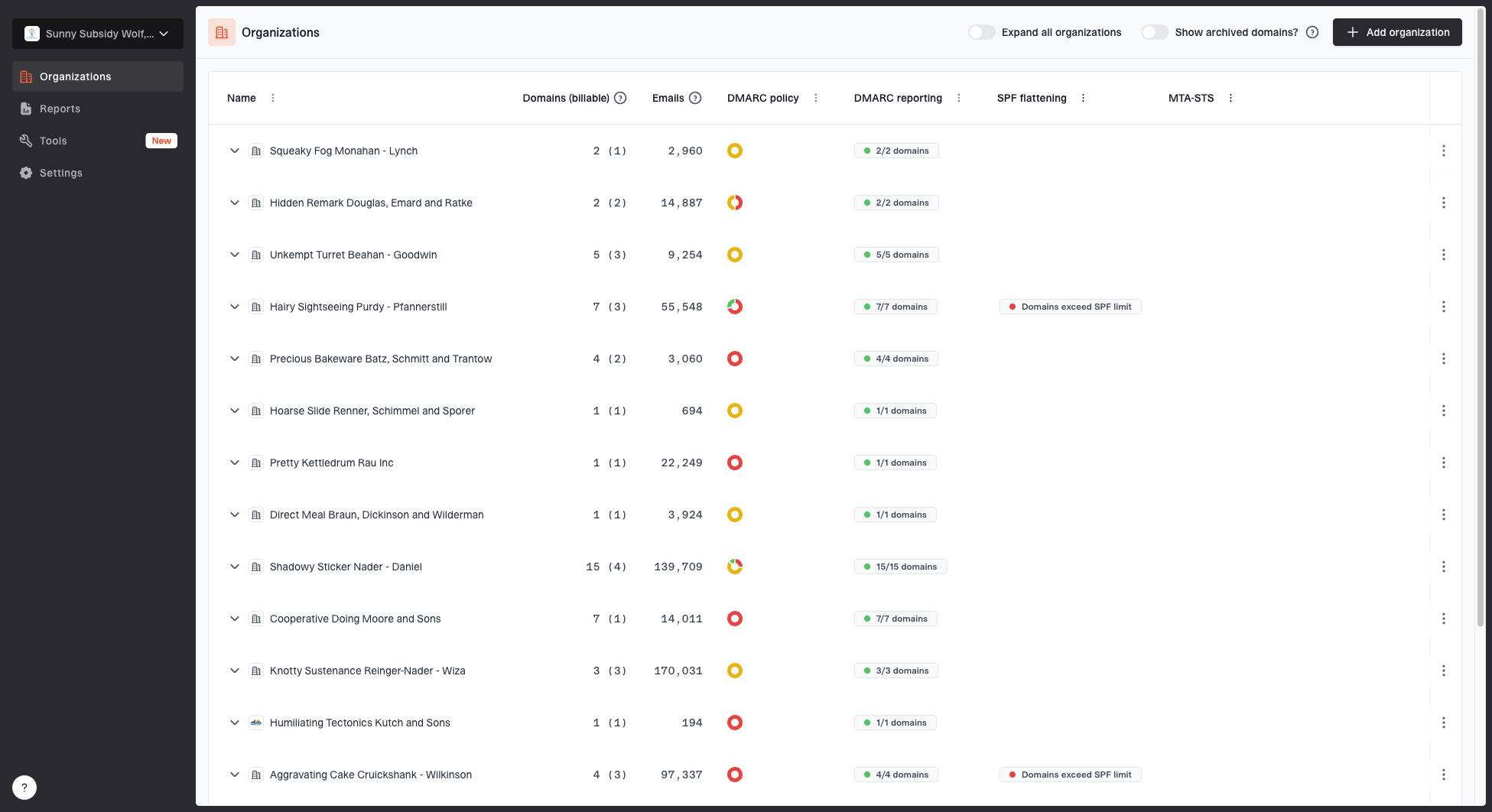
MSP organizations page showing client organizations, domain counts, email volume, and domain status columns
For MSP delivery, the client conversation gets easier when there is a visible operating model behind it. Suped's MSP dashboard lets an MSP manage client organizations, domains, email volume, and domain status from one place. That matters because DMARC is not a one-time record change once the client adds new tools or changes email platforms.
Suped's product brings DMARC monitoring, source classification, SPF and DKIM visibility, policy controls, and client reporting into isolated client workspaces. The MSP can use that workflow to onboard domains, investigate failures, and prepare readable reports without building a separate process for every organization.
- Prospecting reports give the MSP a practical way to show a domain's current risk before onboarding.
- The MSP can switch between client organizations and see which domains need attention.
- Issue pages turn authentication failures into tailored steps that a technician can complete.
- Generated reports help explain email volume, authentication health, and open fixes in business language.
Check client domains during onboarding
A useful onboarding flow starts with a quick check using Suped's domain health checker, then moves into monitored reporting. For a prospect or new client, check whether DMARC and SPF records exist, then verify DKIM on real messages before talking about enforcement. If the basics are missing, the client can see the gap without needing a long technical review.
?
What's your domain score?
Deep-scan SPF, DKIM & DMARC records for email deliverability and security issues.
The checker is useful for the first conversation, but the managed service begins when reports are monitored over time. If the client has several domains, add every sending domain, not only the primary web domain. Subsidiary domains, parked domains, and campaign domains also need explicit policy decisions.
For clients with frequent sender changes, hosted DMARC and hosted SPF reduce operational friction because policy and sender changes can be managed without repeated DNS handoffs. That is especially useful when the MSP has DNS access for some clients but must request changes for others.
Handle common client objections
Client objections usually come from unclear scope. They worry about broken mail, extra cost, and whether this duplicates existing mailbox security. The cleanest response is to separate inbound filtering from domain authentication. Mailbox security protects users from bad incoming mail. DMARC protects the client's domain identity when other people receive mail that claims to come from that domain.
|
|
|
|---|---|---|
Broken mail | Approved senders are tested before enforcement. | Review reports and test important mail flows before each policy change. |
Existing security | DMARC helps protect the domain identity seen by recipients. | Explain how domain authentication complements inbound filtering and account security. |
Vendor ownership | The client confirms which services are authorized. | Record a business owner and vendor contact for each sender that needs a fix. |
Recurring cost | Sender changes and authentication failures need ongoing review. | Separate setup work from recurring monitoring and document the review cadence. |
Client objection handling for MSP DMARC conversations
The vendor ownership point is important. MSPs often find senders the client forgot about: accounting platforms, old email marketing accounts, HR tools, and forms that send notifications. Ask the client to confirm whether each source is approved. Do not silently approve unknown senders just because they pass SPF or DKIM.
A good client promise
We will find who sends mail for your domain, fix the approved senders, apply the policy that fits your mail flow, and keep watching for new issues after the rollout.
Report progress in business terms
Give clients a short monthly DMARC report with a stated date range and the next action. Aggregate reports usually arrive daily and do not cover every receiver, so they are evidence about reported traffic rather than a live view of all email. They contain authentication metadata, not message bodies.
|
|
|---|---|
Domain protection | Current policy for each domain and any approved exceptions. |
Legitimate mail health | DMARC pass rate for client-approved senders, the reported message count, and unresolved failures. |
Sender changes | New sources, confirmed business owners, and whether authentication fixes are complete. |
Next decision | The outstanding fix or policy approval, its owner, and the next review date. |
A practical monthly DMARC report for nontechnical clients
Calculate the legitimate-mail pass rate using only reported messages attributed to client-approved senders; review unknown sources separately. Do not label every DMARC failure as a blocked attack: failures also include configuration errors or forwarding, and the published policy does not prove that a receiver rejected a message.
For example, a client update can say: "Your invoicing service now passes DMARC. We are waiting for your marketing vendor to finish its authentication change before requesting stronger enforcement." Name the business service and the next action so the client can see what the recurring work covers.
Define the ongoing service scope
Separate the initial sender cleanup and DNS setup from recurring monitoring in the service agreement. State who approves new senders and how often reports are reviewed. Define which failures trigger a support response and who contacts third-party vendors. Agree on a rollback condition before each enforcement change and review any temporary policy reduction after the fault is fixed.