How to build a DMARC prospecting report for a cold lead

Published 23 Jun 2026
Updated 24 Aug 2026
11 min read
Summarize with
Updated on 24 Aug 2026: We updated this guide for RFC 9989 and a clearer evidence-to-approval workflow.
A DMARC prospecting report for a cold lead should show the lead what is already visible about their domain, what that means for spoofing and delivery risk, and what the first paid service step should be. Keep it short, evidence-led, and written for an operator who has not asked for a security audit yet.
For an MSP, the report has one job: create a credible business reason to talk. It should not scare the prospect with raw XML, vague breach language, or a wall of DNS output. It should connect public findings to a concrete service path, especially when your DMARC for MSPs offer includes monitoring, sender cleanup, enforcement planning, and ongoing reporting.
The report should make one decision easier
A cold lead should be able to decide whether a 15-minute DMARC review is worth taking. If the report cannot support that decision in two minutes, it is too long or too technical.
- Show DNS records, visible policy state, authentication gaps, and collection time.
- Explain how the finding affects spoofing control, reporting, sender trust, or enforcement planning.
- State the next step your MSP can deliver without overpromising.
- Include exact query output, screenshots, timestamps, and plain record values where useful.
Build the report around evidence, not fear
A prospecting report works when it feels verifiable. Start with facts anyone can check: whether DMARC exists, what policy it uses, whether aggregate reporting is requested, whether SPF is too broad or close to lookup limits, whether DKIM keys are visible at tested selectors, and whether known mail infrastructure has an obvious blocklist (blacklist) concern.
The report should avoid guessing about private mail flow. Public DNS cannot identify every legitimate sender or prove that a visible DKIM key signs production mail. Label those areas as "unknown until monitored or confirmed" instead of presenting assumptions as findings.
Weak prospecting report
- It claims the prospect's email security is broken.
- It shows no visible record values or timestamps.
- It asks for a call with no clear agenda.
- The prospect treats it like generic cold outreach.
Useful prospecting report
- It states that DMARC exists but aggregate reporting is not requested.
- It shows the exact TXT value and lookup time.
- It recommends reporting, sender identification, and staged policy changes based on evidence.
- The lead sees a specific reason to talk.
This is also where the report connects to outreach. A finding is useful only when it can become a specific message, meeting agenda, CRM status, and first service task. Keep a separate path for sales outreach so the technical work does not turn into a generic pitch.
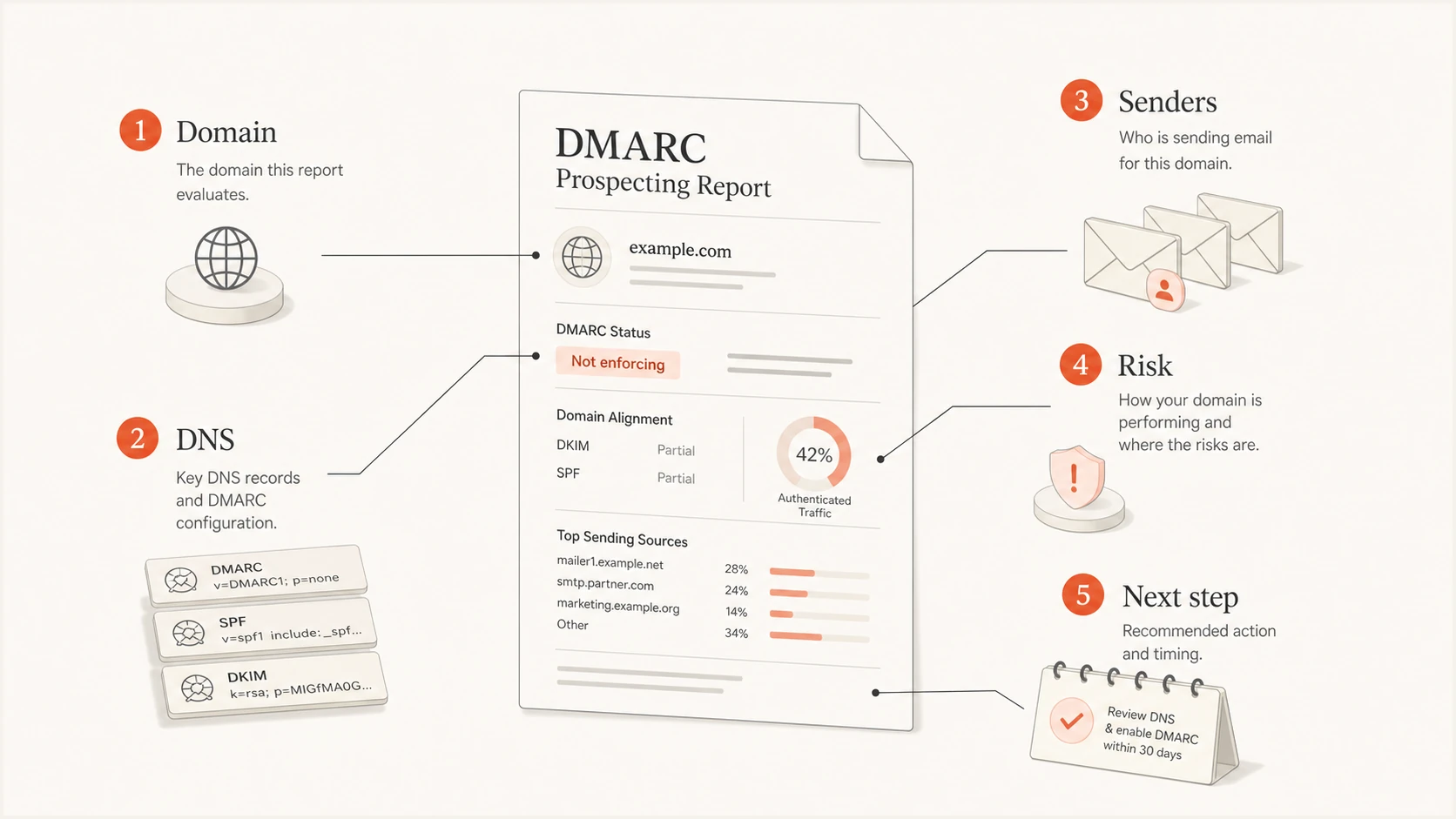
A DMARC prospecting report broken into domain, DNS, senders, risk, and next step.
What the report should include
Use the same report structure for almost every cold lead because repeatability matters in MSP delivery. The details change by domain, but the sections stay consistent. That makes QA easier, keeps sales from improvising, and helps the service desk understand what was promised if the lead becomes a client.
|
|
|
|---|---|---|
Summary | Risk band, evidence confidence, and top findings | Creates the meeting reason |
DMARC | Policy, reporting URI, and alignment mode | Shows reporting and enforcement state |
SPF | Record shape and DNS lookups | Finds fragility and sender sprawl |
DKIM | Tested selectors and visible keys | Documents what public DNS can confirm |
Reputation | Domain and known mail IP status | Adds delivery context |
Plan | Next service step and verification owner | Turns findings into accountable work |
Keep each section short enough for a non-technical owner to scan.
Keep the score simple and pair it with an evidence-confidence label. The score helps a sales or account team prioritize follow-up, but it does not measure breach likelihood or inbox placement. A prospect with no valid DMARC record and visible SPF risk belongs in a higher-priority queue than one with a monitoring policy, a valid reporting destination, and no obvious DNS error. Treat an untested DKIM selector or an undiscovered sender as unknown, not failed.
Prospecting risk bands
A practical scoring model for cold lead triage, not a formal security rating.
Low
0-39
A valid DMARC record and aggregate reporting exist, with no obvious DNS issue.
Medium
40-69
DMARC exists, but reporting or a visible SPF or DKIM condition needs review.
High
70-100
No valid DMARC record exists, or multiple public authentication gaps are confirmed.
Do not overstate what public DNS proves
A public lookup can show configuration risk. It cannot prove every legitimate sender, message-level alignment, failure volume, or abuse attempt. Mark unknowns clearly and make monitoring the next step.
RFC 9989 makes the pct tag historic. Do not recommend pct as a rollout control. Stage enforcement through documented policy changes after reviewing representative report data, then retest each change.
How to collect the evidence
Start with the domain, not the company story. Run a public health check, capture the exact DNS state, then add a short note about what the result means. Suped's domain health checker checks DMARC, SPF, and DKIM in one pass and gives the MSP a consistent starting point for the prospect file.
?
What's your domain score?
Deep-scan SPF, DKIM & DMARC records for email deliverability and security issues.
For each domain, capture the exact query name, collection time, returned record value, and result status. Retest before the review call and show both snapshots if DNS changed after outreach. This avoids presenting an old lookup as the current state and makes remediation easier to verify.
Example DMARC record to show in the reporttext
Host: _dmarc.example.com
Type: TXT
Value: v=DMARC1; p=none; rua=mailto:dmarc@example.com
If the record is missing, do not paste a full tutorial into the prospecting report. Show a sample monitoring-stage record and explain that the first project is to collect reporting data before enforcement. If the prospect already has a policy at quarantine or reject, focus on whether reporting exists and whether the visible sending setup looks maintainable.
- Pick the primary domain and any obvious mail subdomains.
- Check DMARC, SPF, tested DKIM selectors, MX, and visible reputation signals.
- Save exact record values, query names, screenshots, and collection time.
- Group each finding by reporting, authentication, enforcement, or reputation.
- Write the next MSP service step in plain language.
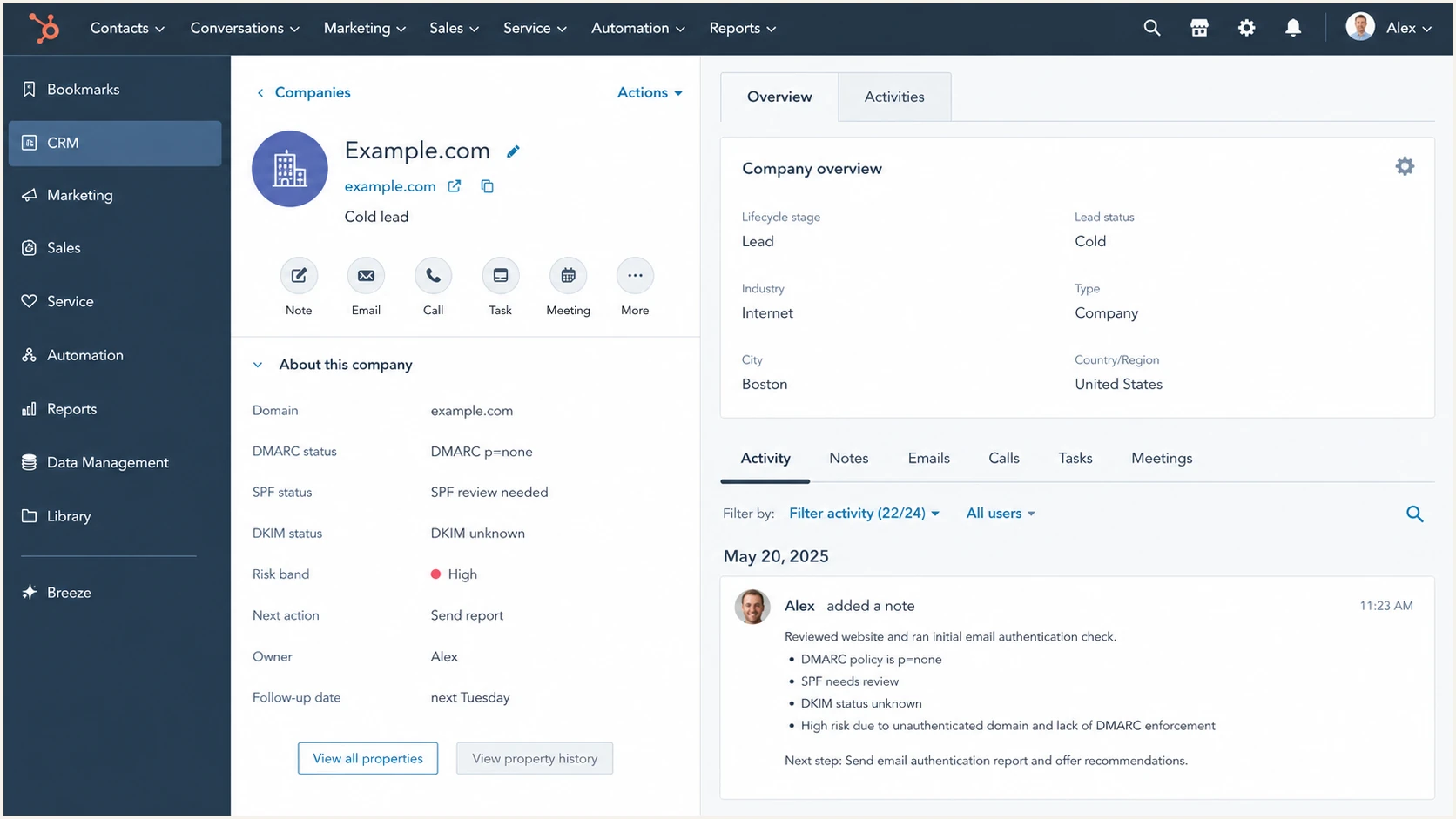
A HubSpot CRM company record with DMARC prospecting fields for a cold lead.
Separate observations from authorization
A public scan records published DNS state. It does not confirm sender authorization, production DKIM signing, message-level alignment, or ownership of a listed IP. Confirm those points with DMARC aggregate data, delivered-message headers, the prospect's sender inventory, and a named client owner after engagement.
|
|
|
|---|---|---|
Publicly confirmed | Exact DNS result observed at a recorded time | Cite the query and retain the result |
Needs message evidence | SPF or DKIM alignment and production signing | Review aggregate data or message headers |
Needs client confirmation | Sender owner, business purpose, expected volume, and retirement state | Assign an owner and record the decision |
Approved change | A specific remediation has client authorization | Record approval, change window, and retest result |
Use a status field so every claim shows its evidence boundary.
When the lead becomes a client, retain the prospecting snapshot as the baseline. Add a finding owner, approval status, implementation date, and retest evidence to each open item. A public observation can justify a review, but it does not authorize a DNS change.
How to write findings a prospect will trust
The strongest findings are specific and modest, with a clear service action. Write each one as a small operational note: what was observed, why it matters, what should happen next, and what access is needed to confirm it.
For cold leads, avoid language that assumes compromise. Also avoid hiding behind acronyms. The owner of a small business does not need a lecture on RFC mechanics. They need to know whether anyone is reviewing authentication results and whether their domain can move toward enforcement without breaking legitimate mail.
|
|
|
|---|---|---|
No DMARC | No domain policy record | Add monitoring record |
p=none | Monitoring policy | Map senders |
No rua | No aggregate reports requested | Enable reports |
SPF heavy | Lookup risk | Review senders |
DKIM unknown | Signing not confirmed | Confirm platforms |
Listed | Reputation concern | Investigate source |
Use this as a finding library for first-pass prospecting reports.
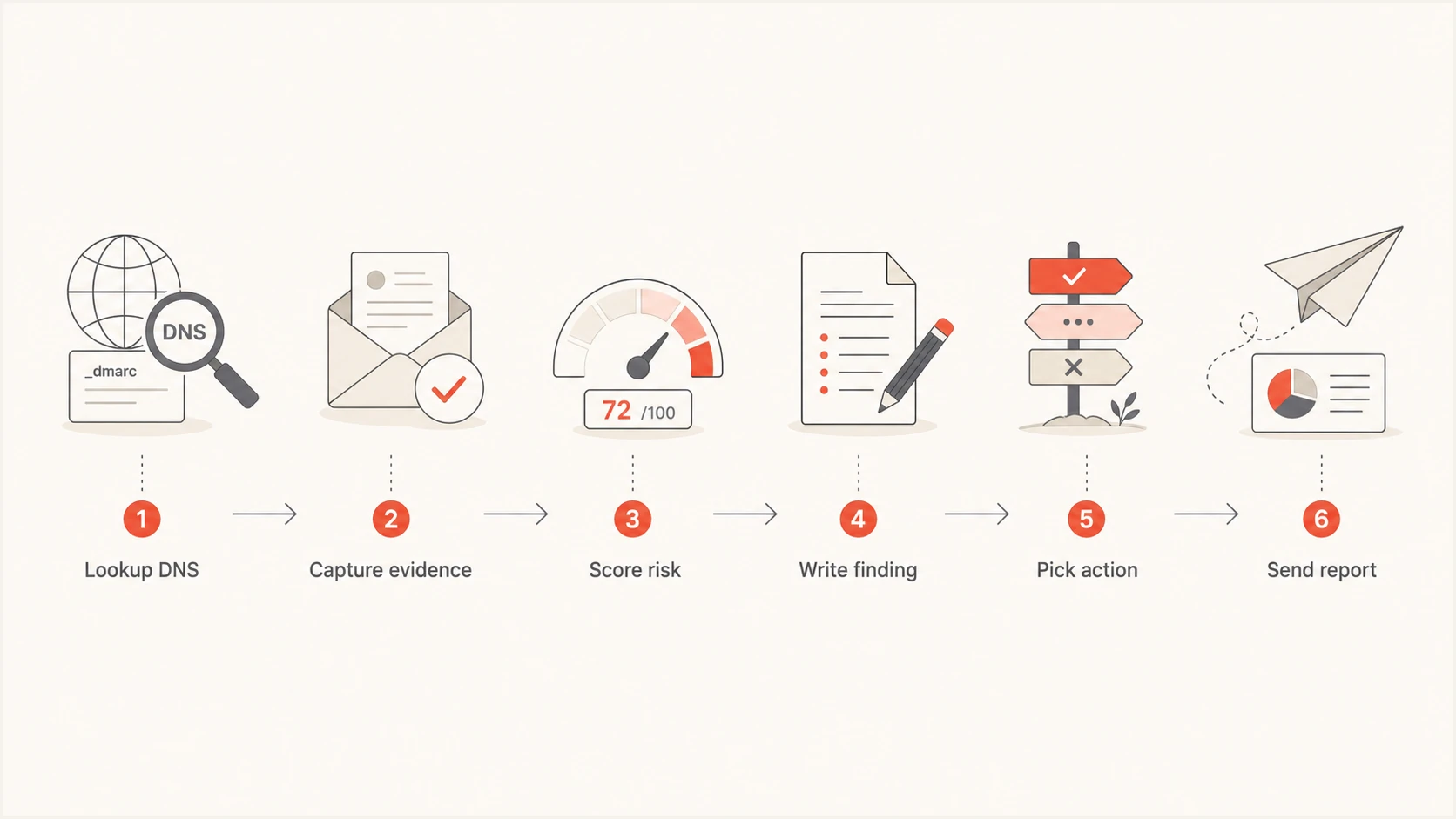
A six-step flow for creating a DMARC prospecting report.
A good finding sounds like service delivery
Write: "DMARC aggregate reporting is not requested, so authentication results are not being collected in a way your team can review. The first step is to route aggregate reports into monitoring for a representative reporting window, identify legitimate senders, and then decide whether policy staging is safe."
Where Suped fits in the workflow
Suped's product supports this MSP workflow across prospecting, onboarding, monitoring, and client reporting. Teams can use Suped to create prospect reports, move accepted leads into DMARC monitoring, manage hosted records and SPF, review blocklist (blacklist) monitoring, configure alerts, and manage clients in a multi-tenant workspace.
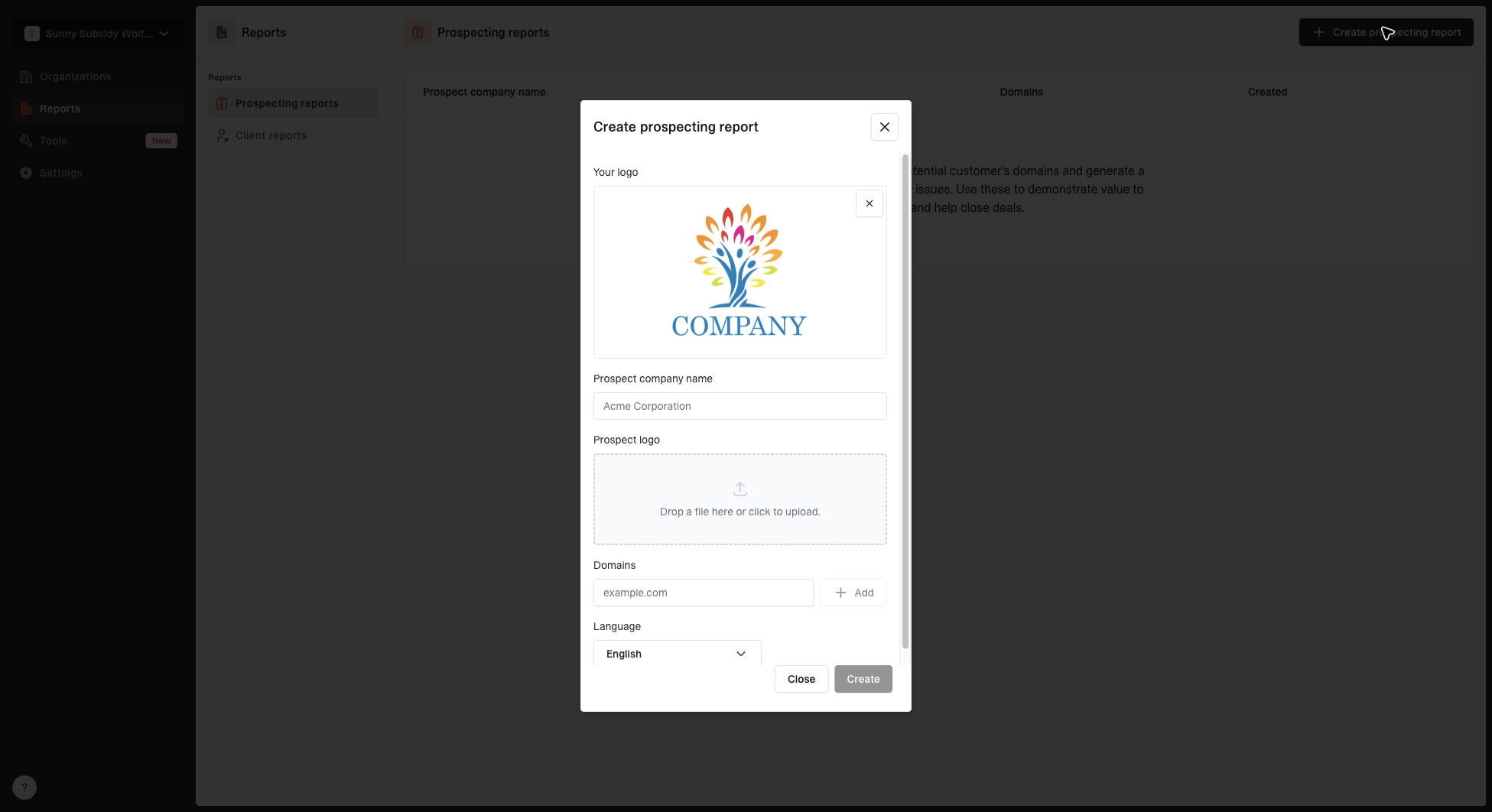
Create prospecting report dialog with MSP logo, prospect name, domains, prospect logo, and language fields
The prospecting report workflow matters because MSPs need repeatable output. A technician or sales operator should be able to enter a prospect name, domains, logos, and language preferences, then produce a report that looks consistent across leads. That consistency turns a one-off public assessment into a defined service motion.
- Create a clean report before the lead has provided access.
- Move accepted leads into ongoing domain monitoring and sender review.
- Use hosted SPF, SPF flattening, hosted MTA-STS, and Hosted DMARC when the client needs simpler DNS operations.
- Turn findings, alerts, policy status, and progress into client-ready updates.
Keep the sales promise close to the service work
If the report says the next step is sender discovery, your delivery team needs a runbook for sender discovery. If it says the next step is policy staging, your team needs the monitoring data and change controls to support that move.
Turn the report into outreach
The report should feed a specific sales motion. Tag each prospect with the highest-value finding, evidence status, service action, and follow-up owner. That lets a business development person send a concise note without inventing the technical reason.
For example, a missing DMARC record maps to a monitoring setup offer. A domain at p=none with no clear sender inventory maps to sender discovery. A heavy SPF record maps to sender review and DNS simplification. For a broader prospecting process, keep your domain checks tied to a repeatable CRM status and next step.
Cold outreach outlinetext
Subject: Quick DMARC check for {{company}}

I checked the public DNS for {{domain}}.
DMARC aggregate reporting does not appear to be requested.
That means authentication results are not easy to review.
I put together a short report with the visible findings.
Worth a 15-minute review next week?
The report is stronger than a generic email because it gives the prospect a reason to respond. The outreach should mention one finding, one consequence, one review agenda, and one next step. Do not attach a twenty-page PDF unless your sales process has proven that format works for your audience.
- Name the domain or finding, not a generic security phrase.
- Say what you checked and when you checked it.
- Use one finding and one operational consequence.
- Request a short review, not a vague discovery call.
Keep the report easy to verify
A strong DMARC prospecting report is brief and specific, with an operational next step. It shows what is publicly visible, explains the service risk in plain language, and asks for a short review focused on the next step. That is enough for a cold lead.
Ten accurate one-page reports are more useful than one long audit full of assumptions. The report does not need to prove everything before the first call. It needs enough evidence for the prospect to trust the review and understand why ongoing monitoring, sender discovery, authentication remediation, and policy management are worth discussing.
Once the prospect agrees to the review, the report becomes the opening checklist for service delivery. Confirm the records, enable reporting, identify senders, fix authentication gaps, and move policy only when the data supports it.