
How MSPs can reduce labor cost in DMARC management

Updated on 13 Sep 2026: We added a practical PSA ticketing workflow and updated the DNS guidance for the current DMARC specification.
MSPs reduce DMARC labor cost by standardizing client onboarding, centralizing every domain in one multi-tenant console, automating issue detection and ticket routing, limiting manual DNS work, and generating repeatable client reports. The biggest saving comes from removing investigation and coordination time, not from asking technicians to work faster.
A managed DMARC service becomes expensive when each client gets a custom process. Technicians chase DNS access, interpret raw aggregate reports, rediscover known senders, write one-off explanations, and revisit changes without a clear approval record. A consistent operating model turns those activities into queued tasks with owners, evidence, and exit criteria.
Suped's MSP platform supports this model with organization switching, automated issue detection, DNS-change and report-driven alerts, hosted authentication controls, and client-ready reports. Those capabilities matter when they replace a named manual step in the service desk workflow.
Find the labor before automating it
Start with technician time by activity, not a broad cost-per-domain figure. Review several recent client tickets and record minutes spent on intake, source identification, DNS changes, validation, monitoring, reporting, and client communication. The result shows which work repeats and which work needs senior judgment.
|
|
|
|---|---|---|
Intake | New domain | Checklist |
Triage | New source | Automation |
Change | DNS update | Template |
Review | Policy move | Approval gate |
Report | Monthly cycle | Generation |
Use short activity labels in time records so data stays comparable across technicians.
Keep exceptions visible. A client with several business units, outsourced marketing, or old infrastructure needs more discovery than a client with one known mail system. The service should price or scope that remediation separately, while routine monitoring follows the standard queue. A clear managed service scope prevents project work from leaking into recurring support.
Build one delivery path for every client
A standard path reduces handoffs and makes junior technicians productive sooner. Every client should enter through the same intake, discovery, monitoring, remediation, enforcement, and reporting gates. The evidence changes by client, but the gate definitions should not.
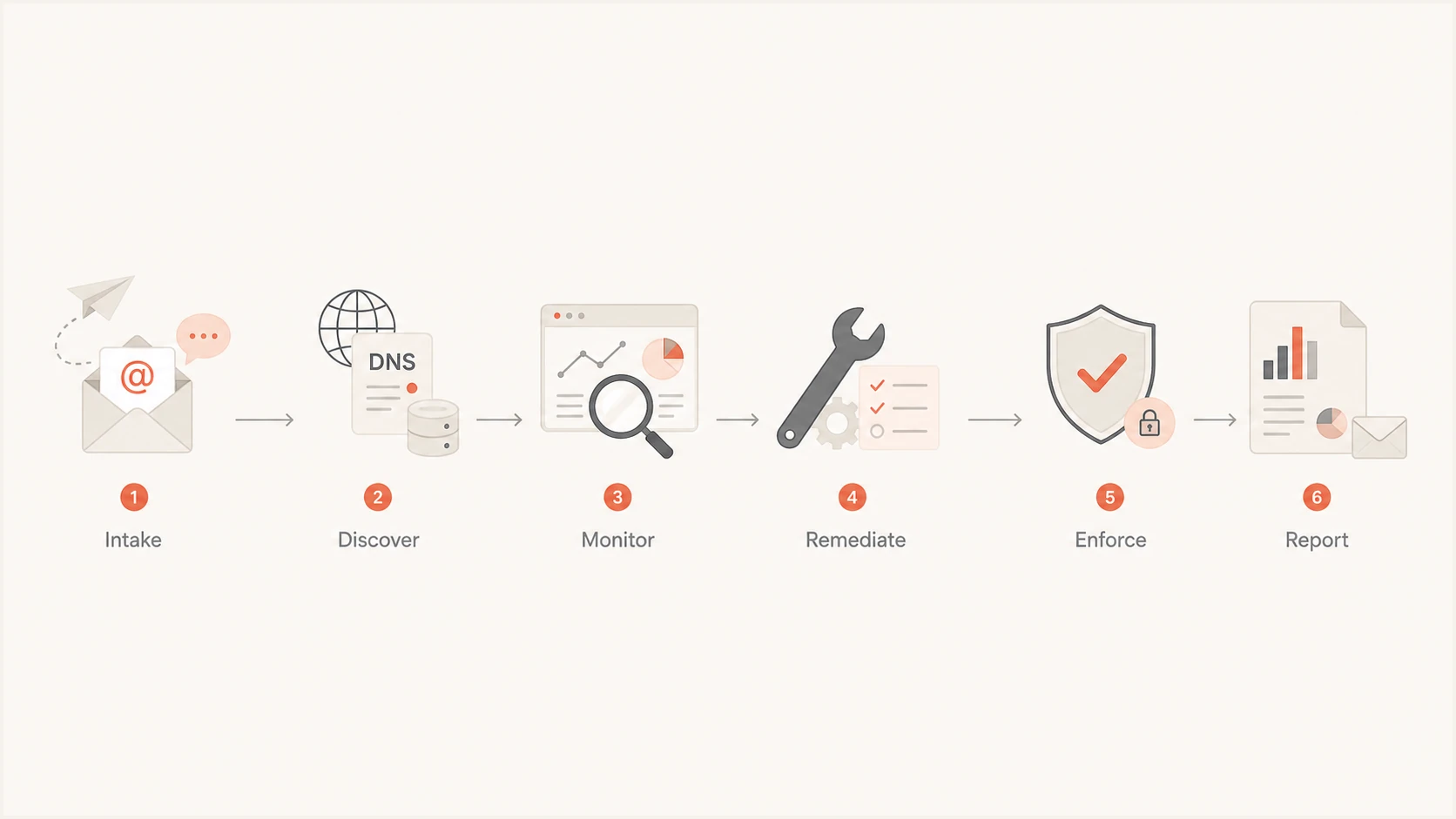
Six-stage MSP DMARC service workflow
- Intake: Collect domains, DNS owner, approved senders, client contacts, change windows, and escalation rules in one form.
- Discovery: Inventory visible mail sources and compare them with the client's approved sender list before changing policy.
- Remediation: Create one ticket per source or DNS defect, with the observed evidence, owner, planned fix, and validation step.
- Enforcement: Move policy only after approved traffic passes DMARC and the rollback instruction has been recorded.
- Reporting: Generate a consistent report and add human commentary only for decisions, unresolved risks, and requested actions.
Put this path into an MSP DMARC runbook. Each gate needs an entry condition, required evidence, approval owner, and completion condition. That structure stops a monitoring alert from turning into an open-ended research task.
Centralize clients and automate first-pass triage
Separate logins, spreadsheets, and report mailboxes create labor at every context switch. A multi-tenant platform should show all client organizations, domain state, authentication volume, and urgent issues without mixing client data. Role-based access and a consistent naming scheme also reduce mistakes during handoff.
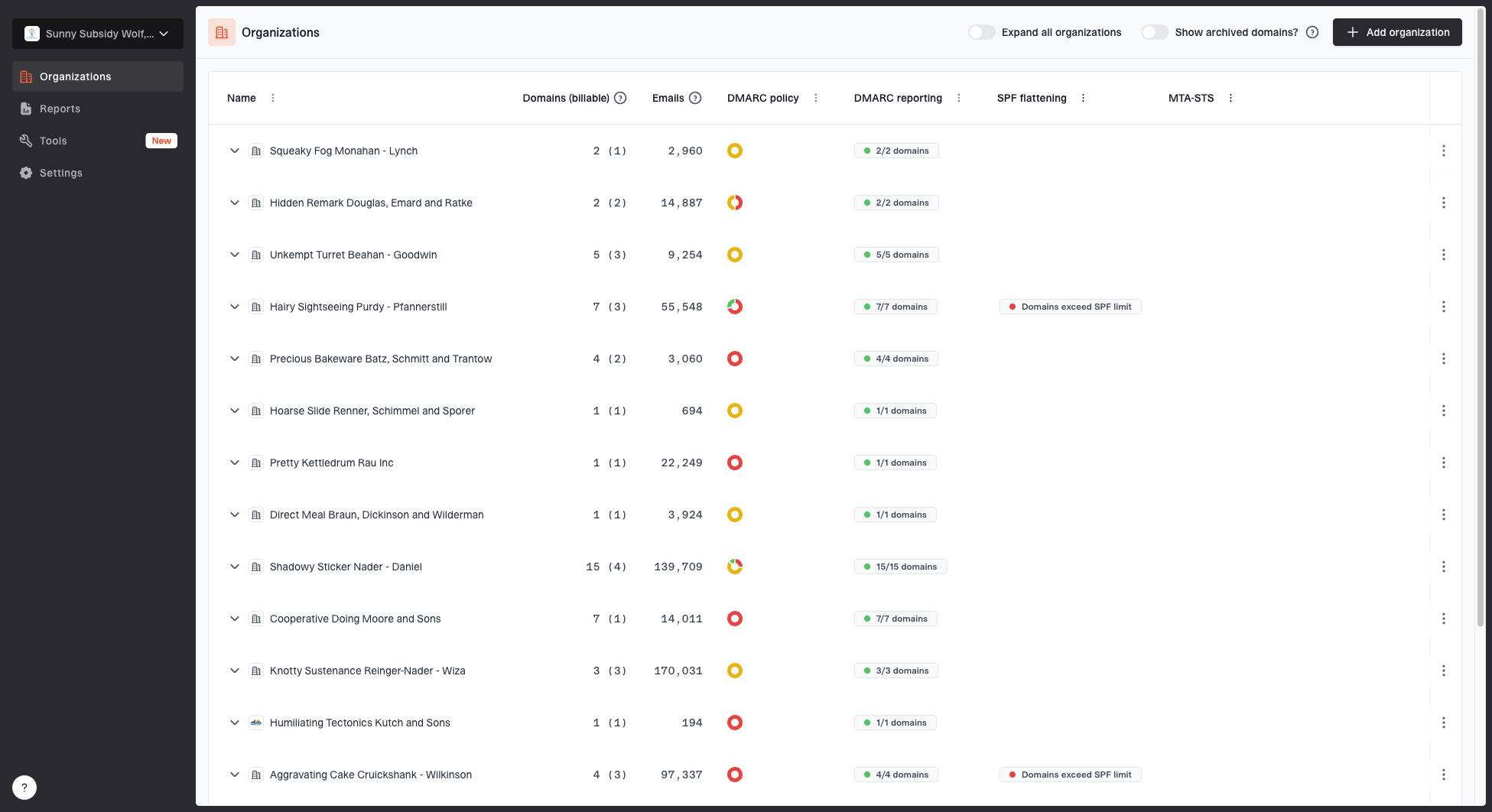
MSP organizations page showing client organizations, domain counts, email volume, and domain status columns
Suped's organization list gives an MSP one place to review client domains, email volume, and domain status. The practical workflow is to open the exception, switch into the affected organization, review the evidence, and create a ticket only when action is required. This keeps routine healthy traffic out of the service desk.
Manual review pattern
- Collection: Technicians open raw report files and combine source rows by hand.
- Triage: Every unfamiliar source receives investigation before its impact is known.
- Follow-up: Reminders depend on individual calendars and ticket notes.
- Evidence: The next technician repeats source discovery and client questions.
Exception-led review
- Collection: Reports are parsed and grouped into recognizable sending sources.
- Triage: Alerts prioritize new failures, policy changes, and material volume shifts.
- Follow-up: Issues have ownership, fix instructions, and a verification action.
- Evidence: Source history remains available for later reviews and handoffs.
Use automation to prepare a decision, not to approve an unknown sender. Automated issue detection can identify a likely cause and steps to fix, while a technician confirms business ownership and impact. Suped's DMARC monitoring workflow supports that review with source grouping, authentication results, and alerting.
Turn issues into bounded service desk work
A useful DMARC alert must say what changed, which client and domain are affected, how much mail is involved, what evidence supports the diagnosis, and what action comes next. Alerts without that context shift the analysis into the ticket and consume senior technician time.

Issue steps to fix dialog showing the issue overview, tailored fix steps, and verification action
Suped's issue workflow shows an issue overview, tailored fix steps, and a verification action. For an MSP, that means the ticket can reference the same evidence the reviewer sees. The technician still checks the client's sender register and change policy before applying a fix.
Keep approval outside the alert
Do not authorize a sending source only because it appears in aggregate data. Match it to a client owner, record the business use, confirm the required authentication setup, and preserve the approval in the ticket or sender register.
- Suppress: Known low-impact noise with a documented review date.
- Escalate: Unknown high-volume sources, policy changes, and sustained authentication failures.
- Verify: Each DNS or sender change against fresh mail evidence after propagation.
- Close: Only when the expected result and supporting evidence are recorded.
Connect DMARC alerts to the PSA queue
Manual ticket creation puts the same data through two reviews. Send actionable DMARC exceptions into the MSP's professional services automation (PSA) queue with the client, domain, issue type, observed volume, evidence link, priority, and verification action already mapped. Keep informational events in the DMARC platform so they do not inflate ticket volume.
|
|
|
|---|---|---|
New high-volume source | Create and assign | Owner decision and authentication result |
Known source starts failing | Update the open ticket | Fresh aligned pass after the fix |
Policy or DNS change | Create a change review | Published record and post-change evidence |
Repeated low-impact event | Suppress with a review date | Suppression reason and next review |
Healthy traffic | Do not create a ticket | Retained platform history |
Map only actionable exceptions into the PSA queue and retain routine events in the DMARC platform.
Use a stable deduplication key built from the client, domain, source, and issue type so repeated reports update one ticket. Route priority by mail impact and the client's service-level agreement (SLA). Reopen work only when the evidence changes or the agreed review date arrives.
Reduce DNS coordination and rework
DNS coordination often costs more than the record change. The MSP requests access, waits for a client contact, sends values through a ticket, checks propagation, then repeats the process for the next policy adjustment. Standard record templates and delegated hosted controls reduce those repeated handoffs.
Initial monitoring recordDNS
_dmarc.example.com. 3600 IN TXT "v=DMARC1; p=none; rua=mailto:reports@example.com"
The current DMARC specification removed the pct tag. Stage enforcement through explicit policy changes, with evidence-backed approval at each gate. The exact reporting address and policy come from the MSP's platform and approved rollout plan. Keep full DNS records in code blocks and in the change ticket, not inside tables or screenshots. Before enforcement, confirm that authorized mail has a passing DMARC result through SPF or DKIM identifier matching. The detailed SPF and DKIM workflow belongs in the runbook.
Direct DNS changes
Use direct TXT changes when the client requires full control in its own DNS and policy changes are infrequent. Each move needs DNS access, change approval, propagation checks, and a recorded rollback value.
Hosted policy control
Use hosted control when the client approves delegation and the MSP needs staged policy changes without repeated DNS access. Document the CNAME ownership, access roles, rollback plan, and offboarding procedure.
Suped's Hosted DMARC provides policy staging through delegated DNS. Its Hosted SPF workflow lets an MSP manage approved senders without requesting a fresh DNS change each time. Hosted SPF and SPF flattening also help control DNS lookup limits, but every sender change still needs an owner and validation.
DMARC checker
Look up a domain's DMARC record and catch policy issues.
?/7tests passed
Use the focused check after publishing or delegating a record, then attach the result to the change ticket. A syntax pass confirms that the record can be read, but it does not prove that every approved sender passes DMARC. Mail evidence remains the completion test.
Generate reports, then add only useful judgment
Client reporting should not require a technician to rebuild charts each month. Generate the stable facts automatically: message volume, DMARC pass results, receiver-reported dispositions, unresolved sources, policy state, and recent changes. Human time belongs on decisions and client actions.
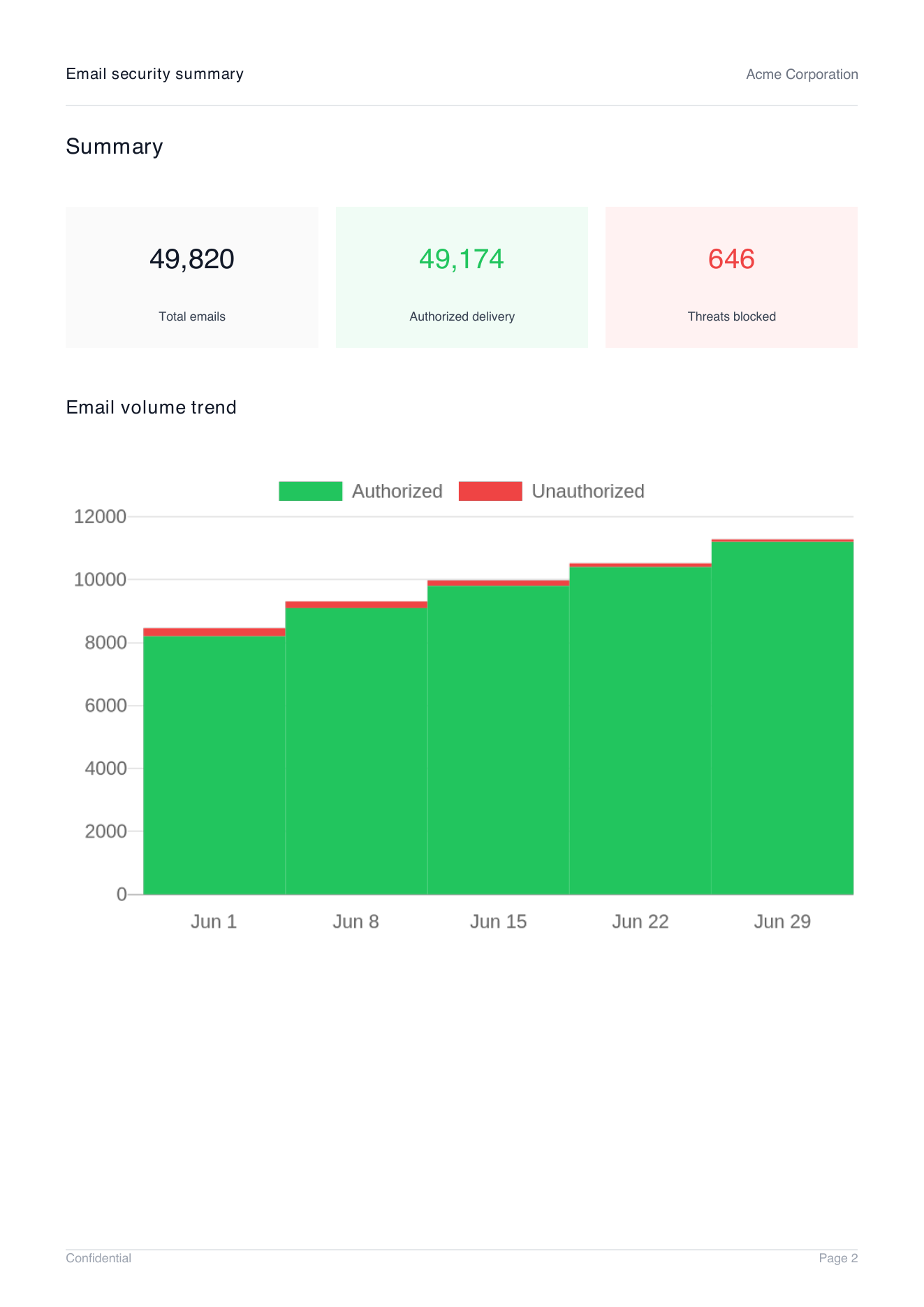
Demo client report summary page showing total emails, authorized delivery, threats blocked, and email volume trend
Suped can generate branded client reports with an organization, date range, logo, and language selection. The report summary provides consistent operational data, while the MSP adds a concise note about approved changes, current blockers, and the next policy decision.
- Automate: Charts, authentication totals, source summaries, report periods, and policy state.
- Explain: Material failures, business decisions, accepted exceptions, and enforcement readiness.
- Request: A named client owner, a due date, and one clearly defined approval or information item.
- Archive: The report, change evidence, open exceptions, and next review date with the client record.
Report frequency should match the service tier and risk, while alerting handles urgent exceptions between reports. Do not use a monthly report as the first notice of a damaging policy change or a sudden authentication failure.
Measure labor savings without hiding service risk
Track time per managed domain and time per exception separately. A falling average can hide a growing queue of unresolved sources. Review labor with service quality measures such as aged issues, repeat DNS changes, unowned senders, failed enforcement attempts, and missed report dates.
Monthly operating measurestext
labor per domain = total DMARC labor / managed domains

triage time = issue review minutes / reviewed issues

rework rate = reopened changes / completed changes

automation yield = no-action reviews / all reviews
Set a baseline before changing the workflow, then compare equivalent client groups. Domain count alone is a weak denominator because sender complexity and policy stage affect effort. Segment results by onboarding, remediation, steady-state monitoring, and enforcement work.
A practical labor review
Once a month, review the five highest-effort domains and the five most common ticket types. Remove one repeated handoff, improve one template, or change one alert rule. Small operating changes are easier to verify than a broad automation project.
The target is lower routine effort with preserved control. If technician minutes fall because alerts are ignored, evidence is missing, or enforcement is delayed indefinitely, the service has reduced work by reducing delivery. That is not an operating saving.
A lower-cost DMARC operating model
The strongest practical model for most MSPs combines a fixed intake, one multi-tenant view, exception-led triage, delegated controls where clients approve them, ticket-ready remediation steps, and generated client reports. Senior technicians handle sender ownership, risk acceptance, and enforcement decisions. Routine collection and presentation stay automated.
Suped is our DMARC and email authentication platform for this MSP workflow. It combines multi-tenant client management, hosted controls, alerts, reporting, and deliverability analysis, including blocklist and blacklist monitoring, in one operational system. Evaluate it against the MSP's own baseline: context switches, repeated DNS requests, issue review time, and evidence quality at closure.