Will OpenDKIM wildcard configuration work?

Published 13 Jun 2025
Updated 26 Sep 2026
12 min read
Summarize with
Updated on 26 Sep 2026: We clarified where OpenDKIM wildcards work, separated them from DNS wildcards, and added safer validation guidance.
Yes, OpenDKIM wildcard configuration can work, but the wildcard belongs on the lookup-key side of a pattern-capable table. Use glob-style matching in a refile SigningTable, make every selected KeyTable value produce a real signing domain, and restrict which mail OpenDKIM can sign. The exact line mail._domainkey.* with *:mail:/etc/opendkim/keys/mail.private is unsafe as written because the asterisk on the value side does not mean "use the sender domain."
The OpenDKIM configuration reference describes KeyTable as a map from a key name to the signing domain, selector, and private key. SigningTable selects which key name to use based on the From header. That split matters because wildcard selection and valid DKIM signing are separate steps.
- Short answer: wildcards work for matching when the table type supports patterns.
- Exact line: the sample KeyTable line is unsafe and likely wrong as written.
- Best pattern: use explicit KeyTable rows, then automate generation for large domain sets.
- Main risk: a broad wildcard can make OpenDKIM sign mail for domains outside the intended scope.
Why the exact wildcard line is fragile
The confusion starts because OpenDKIM uses the same character for different ideas in different places. In a pattern table, * can match text. In a KeyTable value, the signing domain still has to become a real domain in the DKIM signature's d= tag. A literal * is not a valid DKIM signing domain.
Risky KeyTable linetext
# /etc/opendkim/KeyTable
mail._domainkey.* *:mail:/etc/opendkim/keys/mail.private
When KeyTable is loaded as a plain file, the left side is the exact key name returned by SigningTable, not a wildcard rule. A refile KeyTable can pattern-match that returned key name, but this usually adds ambiguity without reducing the need for valid signing data. Keep SigningTable responsible for sender matching and use concrete KeyTable records.
The asterisk is not a domain substitute
OpenDKIM supports % substitution when the KeyTable signing-domain field consists only of that character. OpenDKIM then inserts the apparent sender domain. That is not the same as putting * in the value. Treat * as a match operator only when the dataset type supports patterns.
- Pattern side: wildcards match input only in pattern-capable datasets.
- Value side: the signing domain and selector must resolve to real DKIM values.
- Operational side: a broad match expands the signing scope quickly.
|
|
|
|---|---|---|
SigningTable refile | Glob-style | Order specific rules first |
SigningTable file | Exact lookup keys | Do not expect glob expansion |
KeyTable value | No wildcard domain | Use a real domain or % |
Domain setting | No wildcard mapping | Use tables for many domains |
How wildcards behave in common OpenDKIM table positions.
A safer OpenDKIM layout
For a small set of domains, the clearest version is explicit. OpenDKIM runs in signing mode, reads a KeyTable and SigningTable, then signs mail that the filter classifies as internal through InternalHosts or configured MTA macros. Start with this baseline before adding automation.
Core OpenDKIM configurationtext
# /etc/opendkim.conf
Mode sv
KeyTable file:/etc/opendkim/KeyTable
SigningTable refile:/etc/opendkim/SigningTable
InternalHosts refile:/etc/opendkim/TrustedHosts
Socket local:/run/opendkim/opendkim.sock
Syslog yes
SyslogSuccess yes
Explicit KeyTabletext
# /etc/opendkim/KeyTable
mail._domainkey.example.com example.com:mail:/etc/dkim/example.com/mail.private
mail._domainkey.example.net example.net:mail:/etc/dkim/example.net/mail.private
Explicit SigningTabletext
# /etc/opendkim/SigningTable
*@example.com mail._domainkey.example.com
*@example.net mail._domainkey.example.net
This keeps the DKIM selector and signing domain visible. It also makes key rotation easier to review because every row points to one private key. Publish a new selector before switching OpenDKIM to it, then retain the old selector record long enough for in-flight messages to verify. Before standardising on one selector name, review the DKIM selector uniqueness notes.
Broad wildcard
- Scope: matches more domains than many administrators expect.
- DNS: requires every signed domain to publish the matching public key.
- Rotation: one shared key turns one change into a domain-wide event.
Explicit map
- Scope: each From domain maps to an intended key name.
- DNS: each selector record has one clear owner.
- Rotation: one domain can move to a new selector without affecting others.
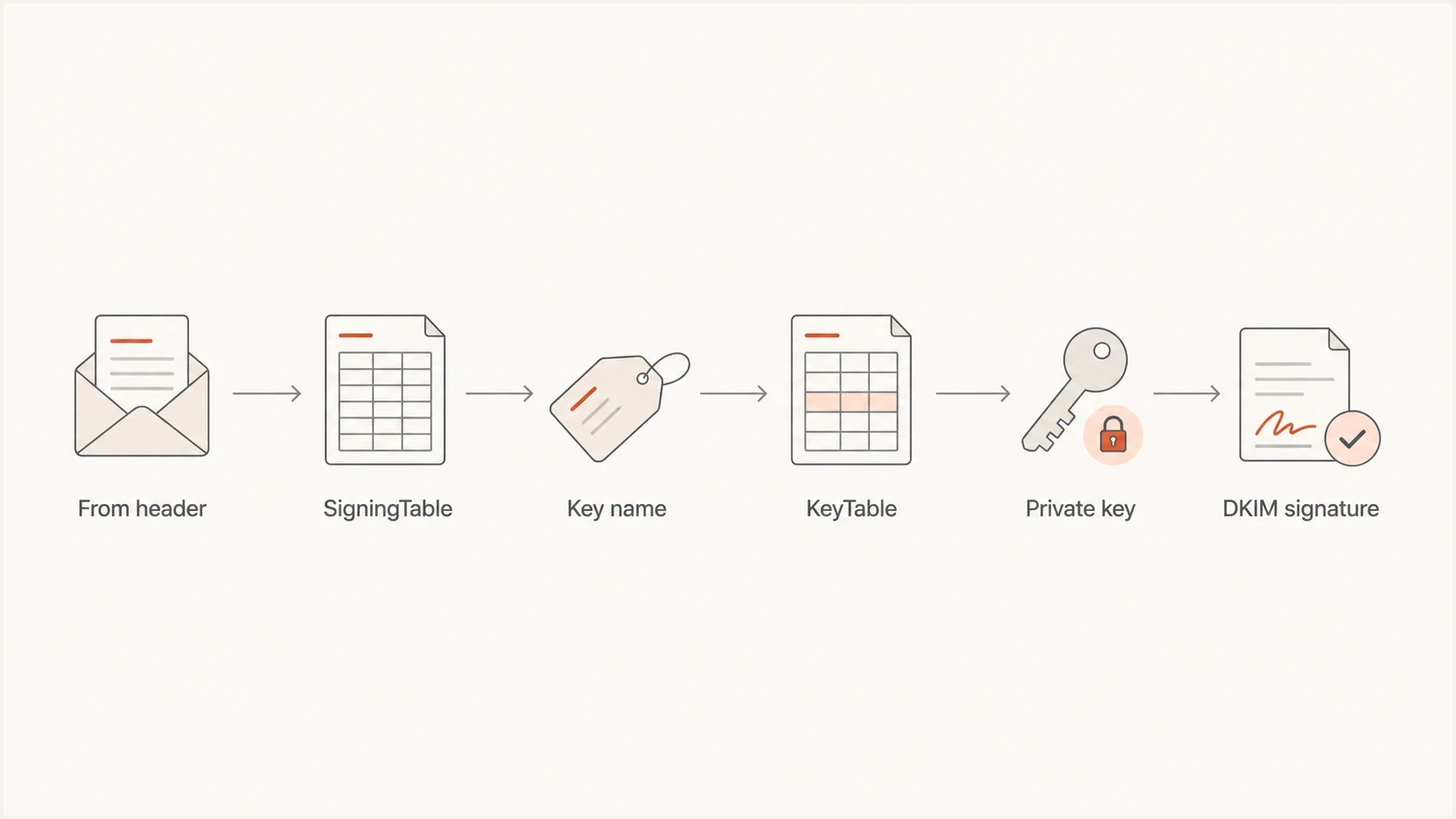
Flowchart showing how OpenDKIM moves from From header to SigningTable, KeyTable, and DKIM signature.
How refile order affects domains and subdomains
A refile dataset uses glob-style patterns, despite the "regular expression file" name. The asterisk matches zero or more characters, and OpenDKIM checks entries from top to bottom. Unless MultipleSignatures is enabled, the first match wins. Put exact senders first, root-domain rules next, subdomain rules after them, and any deliberate global fallback last.
SigningTable ordertext
# /etc/opendkim/SigningTable
billing@example.com billing-key
*@example.com example-key
*@*.example.com example-subdomain-key

# Add this only when every sender domain is authorised:
# *@* shared-mail
A plain file: SigningTable does not expand those globs. OpenDKIM instead performs its documented sequence of exact lookups, including the full address, host, parent-domain forms, user@*, and *. Do not switch between file: and refile: without retesting every lookup.
Root domains and subdomains need separate rules
The pattern *@example.com does not match user@news.example.com. Use a separate subdomain pattern and decide whether the KeyTable should sign with d=example.com or the exact subdomain. Parent-domain signing can pass relaxed DMARC DKIM alignment because both domains share the same organisational domain. A strict adkim=s policy requires the DKIM signing domain to match the visible From domain exactly.
When a wildcard can work
A wildcard can work when it selects a key and the key data still produces a real DKIM signature. The broadest pattern sends every From domain to one shared key record. Keep this pattern for tightly controlled relay setups where every domain has been intentionally onboarded and publishes the same public key under the same selector.
Shared-key wildcard patterntext
# /etc/opendkim.conf
KeyTable file:/etc/opendkim/KeyTable
SigningTable refile:/etc/opendkim/SigningTable

# /etc/opendkim/SigningTable
*@* shared-mail

# /etc/opendkim/KeyTable
shared-mail %:mail:/etc/dkim/shared/mail.private
That pattern signs with the apparent sender domain in the d= tag and the selector mail. It works only when each domain has a matching DNS record at mail._domainkey. Because the substituted signing domain matches the visible From domain, DKIM can satisfy strict DMARC alignment when the signature verifies. For unrelated domains, generated exact rows limit the number of domains affected by a compromised key or emergency rotation.
Acceptable wildcard use cases
- Single owner: all domains belong to the same organisation and DNS process.
- Same selector: every domain publishes the same selector and public key.
- Controlled relay: Postfix accepts mail only from authenticated or trusted senders.
- Fast rollback: the wildcard rule can be disabled without blocking legitimate mail.
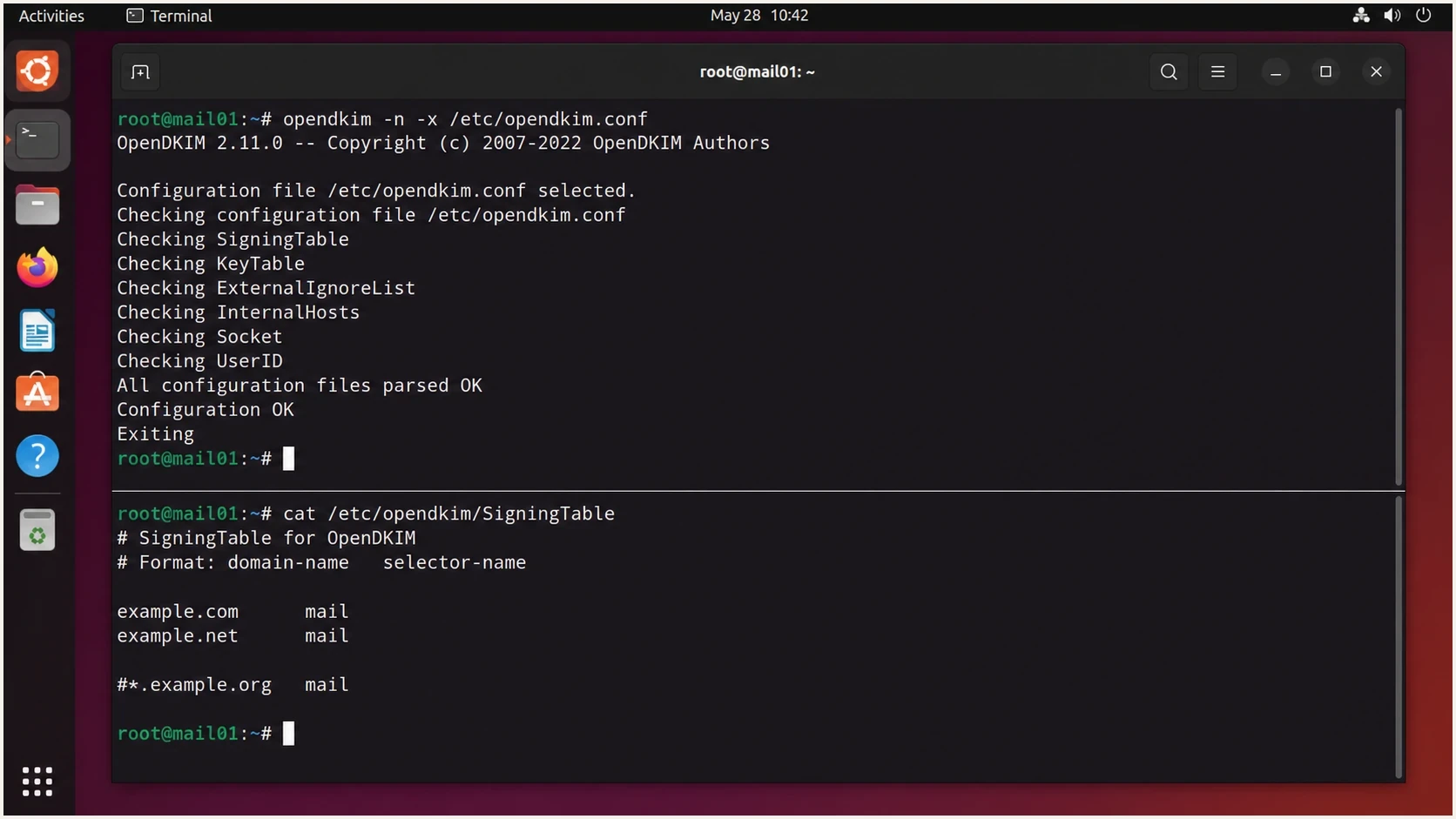
GNOME Terminal screenshot showing OpenDKIM configuration validation and a SigningTable file.
DNS still has to match the signature
OpenDKIM only creates the DKIM-Signature header. Receivers verify that signature by looking up the public key at the selector, _domainkey, and signing domain. After every configuration change, check the published key with a DKIM checker, then send a real message and inspect the signature that OpenDKIM added.
DNS records for two domainsdns
mail._domainkey.example.com TXT v=DKIM1; k=rsa; p=BASE64KEY1
mail._domainkey.example.net TXT v=DKIM1; k=rsa; p=BASE64KEY2
If publishing raw public keys on every customer or brand domain makes rotation difficult, CNAME delegation can centralise the target records. The visible selector remains under the sending domain, while the target record lives under a domain controlled by the operator. Do not publish CNAME and TXT data at the same selector owner name.
DKIM checker
Check selector records and public key configuration.
?/7tests passed
Do not stop at DNS validation. A published key can be correct while OpenDKIM signs with the wrong selector, skips signing because the host is not trusted, or uses a shared key that the domain has not published. The delivered message header is the final source of truth.
OpenDKIM wildcards are not DNS wildcards
An OpenDKIM wildcard exists in a local lookup table and controls which signing instruction the filter selects. It does not publish a DNS record. A DNS wildcard is separate: it can synthesize a response for a selector name that does not otherwise exist. Receivers still query the exact name formed from the signature's s= and d= values.
Query exact selector namesbash
dig +short TXT mail._domainkey.example.com
dig +short TXT missing._domainkey.example.com
A general DNS wildcard can make a nonexistent selector name appear to exist without returning usable DKIM TXT data. A DKIM-specific wildcard can also expose one public key under selector names that were never provisioned. Publish an explicit TXT record or controlled CNAME for each active selector, then test the exact fully qualified name. The OpenDKIM wildcard and the DNS record should be reviewed as separate controls.
How to test before production
Test OpenDKIM wildcard changes in layers. First confirm that the daemon parses the configuration. Next confirm that DNS returns the expected public key. Then send real mail through the same Postfix path used in production, where trusted-host rules, milter settings, queue routing, and sender classification affect the result.
- Config parse: run OpenDKIM in configuration-check mode before restarting the service.
- Key lookup: confirm that the selector and domain return the expected public key.
- Header check: inspect the generated DKIM-Signature for the expected d= and s= values.
- DMARC result: verify DKIM alignment between the d= domain and the visible From domain under the published DMARC mode.
- Rollout data: watch aggregate reports for each domain before expanding the wildcard scope.
Useful test commandsbash
opendkim -n -x /etc/opendkim.conf
opendkim-testkey -vv -d example.com -s mail \
  -k /etc/dkim/example.com/mail.private
tail -f /var/log/mail.log | grep opendkim
A successful opendkim-testkey result confirms that the DNS public key parses and matches the supplied private key. It does not exercise the full MTA path or prove which SigningTable rule matched, so keep the delivered-header test.
Use LogWhy only during diagnosis
Temporarily set LogWhy yes when OpenDKIM signs or verifies unexpectedly. It records the sign-versus-verify decision path, but it produces substantial log volume, so disable it after the controlled test.
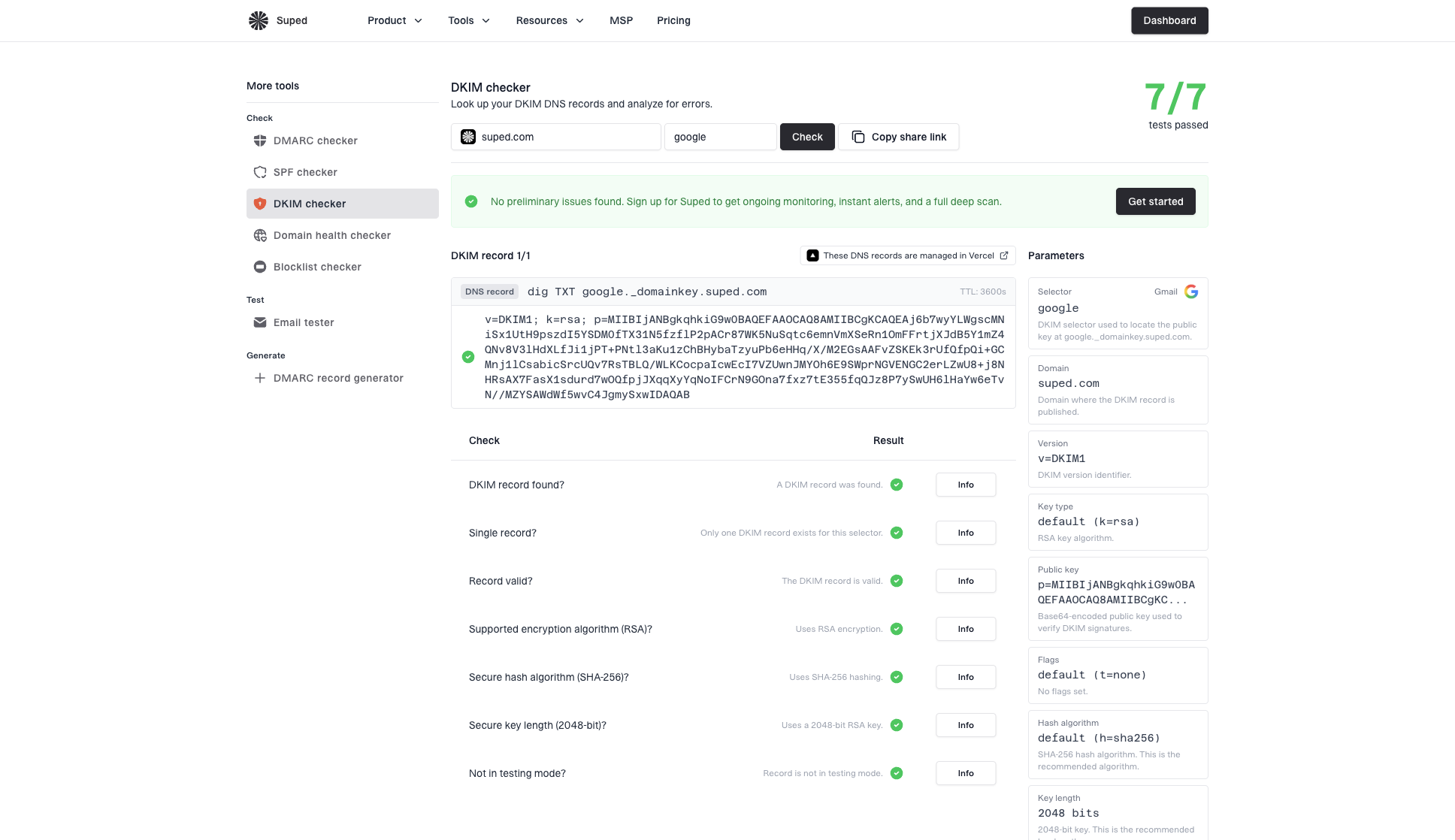
DKIM checker sample results showing selector, DKIM DNS record, validation checks, parameters, and share link
Suped fits after local testing as the monitoring layer. Suped's DMARC monitoring groups receiver reports by source and domain, so teams can find unsigned mail, new DKIM failures, unexpected wildcard coverage, and selector regressions after an OpenDKIM change.
Rollout guardrails
Use observable results before keeping a broad OpenDKIM wildcard in production.
Keep
No new failures
Continue monitoring the authorised domain set.
Investigate
Any pass-rate drop
Review affected sources before expanding scope.
Rollback
Unexpected domains signed
Disable the wildcard and return to exact maps.
Operating at 100+ domains
At 100+ domains, configuration design matters more than saving lines. A wildcard looks concise, but onboarding, DNS ownership, key rotation, and per-domain verification still require an operating process. Choose the model based on who owns DNS and how often the domain set changes.
|
|
|
|---|---|---|
Exact files | Stable domains | Manual updates |
Generated files | Frequent changes | Needs deploy step |
Database maps | Very large sets | More moving parts |
Shared wildcard | One owner | Wide key risk |
OpenDKIM patterns for large domain sets.
For teams that manage many domains, Suped can hold the domain inventory and turn DMARC aggregate data into per-domain DKIM results and alerts. OpenDKIM signs the mail, while Suped helps operators confirm that each onboarded domain continues to authenticate after map changes or key rotation. Suped's domain health checks can verify authentication records before a domain is added to a wildcard or generated map.
What to automate
- Onboarding: create the domain, selector, private key path, and DNS instruction together.
- Validation: block deployment until the public key exists and parses correctly.
- Restart path: reload OpenDKIM only after files are written atomically.
- Alerting: send real-time alerts when a domain's DKIM pass rate drops.
Common failure modes
Most wildcard failures are selection failures rather than cryptography failures. OpenDKIM signs with a different domain than expected, uses a selector with no DNS record, skips signing because the client is not trusted, or signs mail that should have been left alone. Make the selection path visible in configuration, logs, DNS results, and delivered headers.
Mistakes to avoid
- Overmatch: a broad SigningTable wildcard catches domains outside the intended set.
- Missing DNS: OpenDKIM signs, but receivers cannot find the public key.
- Shared key: one private key covers too many unrelated domains.
- Permissions: the daemon user cannot read the private key after dropping privileges.
- Wrong table: a file dataset is used where glob-style matching was expected.
When wildcards are meant to cover many subdomains, review the broader wildcard DKIM practices before applying one pattern across every branch of a domain tree. Wildcard convenience makes sense only when the owner, DNS process, security model, and key policy are consistent.
Views from the trenches
Best practices
Keep SigningTable broad rules below exact rules and review the first match after changes.
Generate explicit KeyTable rows for large sender sets instead of hand editing long files.
Validate every selector in DNS before routing production mail through the new rule.
Common pitfalls
Treating a KeyTable asterisk as a signing-domain substitute creates invalid signatures.
Using one shared private key across unrelated domains makes rotation unnecessarily wide.
Forgetting trusted host rules causes tests to pass locally while relay mail skips signing.
Expert tips
Use logs that show why OpenDKIM signed or verified during a controlled test window.
Keep one emergency exact-map config ready so a broad wildcard can be rolled back fast.
Watch DMARC aggregate reports per domain after changing selector or wildcard behavior.
Marketer from Email Geeks says a broad wildcard can make OpenDKIM try to sign every matching From domain that passes through the MTA.
2021-11-04 - Email Geeks
Marketer from Email Geeks says using one shared key across many domains is possible, but it is a poor fit when the domain count is high.
2021-11-04 - Email Geeks
Recommended production configuration
OpenDKIM wildcard configuration can work, but the sample KeyTable wildcard should not ship as written. In production, use refile wildcard matching in SigningTable only when the scope is tightly controlled. For 100+ domains, generate explicit KeyTable and SigningTable rows or use a database-backed map, then monitor the result through DMARC reports.
- Use refile: put wildcard matching in SigningTable, not in the KeyTable value.
- Use real domains: make sure every DKIM signature has a real d= domain and selector.
- Use automation: generate maps when the domain list is large.
- Use reports: confirm the change with real DKIM and DMARC results after deployment.




