Why is DKIM failing on Gmail, and is Proofpoint causing it?

Published 16 Apr 2025
Updated 30 Jul 2026
13 min read
Summarize with
Updated on 30 Jul 2026: We added a concrete Proofpoint URL Defense check and expanded the troubleshooting with corrected Google Workspace gateway guidance plus ARC.
Yes, Proofpoint can cause DKIM to fail in Gmail. The usual pattern is simple: the message is DKIM-signed by the original sender, Proofpoint validates it and then modifies the message, and Gmail validates the modified message later. Gmail then reports body hash did not verify because the body Gmail received no longer matches the body that was signed.
The most common Proofpoint-specific cause is URL Defense rewriting. Other gateway changes, including external sender banners, disclaimer insertion, subject tagging, body re-encoding, and MIME boundary changes, can produce the same result. A corporate mail gateway can break DKIM even when the sender published the right DKIM key and the message passed DKIM before the gateway touched it.
- Direct answer: If Gmail shows dkim=neutral or dkim=fail with body hash, test for message modification before changing DNS.
- Fast test: Send an equivalent message to a personal Gmail mailbox that does not sit behind Proofpoint. If DKIM passes there, the inbound gateway path is the likely cause.
- Key caveat: Proofpoint is not the only cause. Any system that changes signed headers or the signed body can produce the same Gmail result.
Do not start by changing DKIM DNS records. When Gmail says body hash did not verify, the public key can be perfectly valid. The failure often means the message changed after signing.
The direct answer
When DKIM fails only inside a work Gmail or Google Workspace mailbox, separate two questions. First, did the sender sign the message correctly? Second, did something change the message before Gmail checked it? In Proofpoint environments, the second question often identifies the cause.
A useful header clue looks like this: Proofpoint records DKIM pass in its own Authentication-Results header, then Gmail records DKIM neutral or fail with a body hash error. Map each result to its Received hop and authentication service identifier. Do not assume the order in which header fields appear is the processing order.
Header pattern that points to modificationtext
Authentication-Results: mx.google.com;
  dkim=neutral (body hash did not verify)
  header.i=@example.com header.s=s1;

Authentication-Results: ppe-hosted.com;
  dkim=pass header.d=example.com header.s=s1;
  spf=pass smtp.mailfrom=example.com;
  dmarc=pass header.from=example.com;
That is different from a missing selector or broken DNS record. A missing selector usually shows as a DNS lookup problem, not a body hash mismatch. The body hash error means Gmail found a DKIM signature but rejected the signed body comparison.
Use a DKIM checker to confirm that the selector and public key exist, but do not stop there. DNS validation proves the key is published. It does not prove that the message Gmail received still matches the signed content.
DKIM checker
Check selector records and public key configuration.
?/7tests passed
What Gmail is actually checking
DKIM signs selected headers and a canonicalized version of the message body. Gmail reads the DKIM-Signature header, looks at the selector in s=, the signing domain in d=, and the body hash in bh=. It then rebuilds the body hash from the received message. If that calculated value does not match bh=, DKIM fails.
This matters because DKIM is intentionally sensitive to content changes. It tells a receiver whether the signed content survived transit. If a security gateway rewrites links, injects a warning banner, adds a footer, or changes MIME boundaries, DKIM validation at the next hop breaks unless the gateway preserves the original signed structure or adds a new valid signature after its changes.
The c= tag shows header and body canonicalization. Relaxed canonicalization tolerates limited whitespace changes, but it does not tolerate rewritten URLs, inserted text, re-encoding, or changed MIME boundaries. The h= tag lists signed headers, so a changed Subject, To, Date, or Message-ID breaks a signature when that field is listed. Multiple DKIM signatures are checked independently. One failed signature does not cancel a separate passing signature, but DMARC needs at least one passing DKIM signature whose signing domain matches the visible From domain.
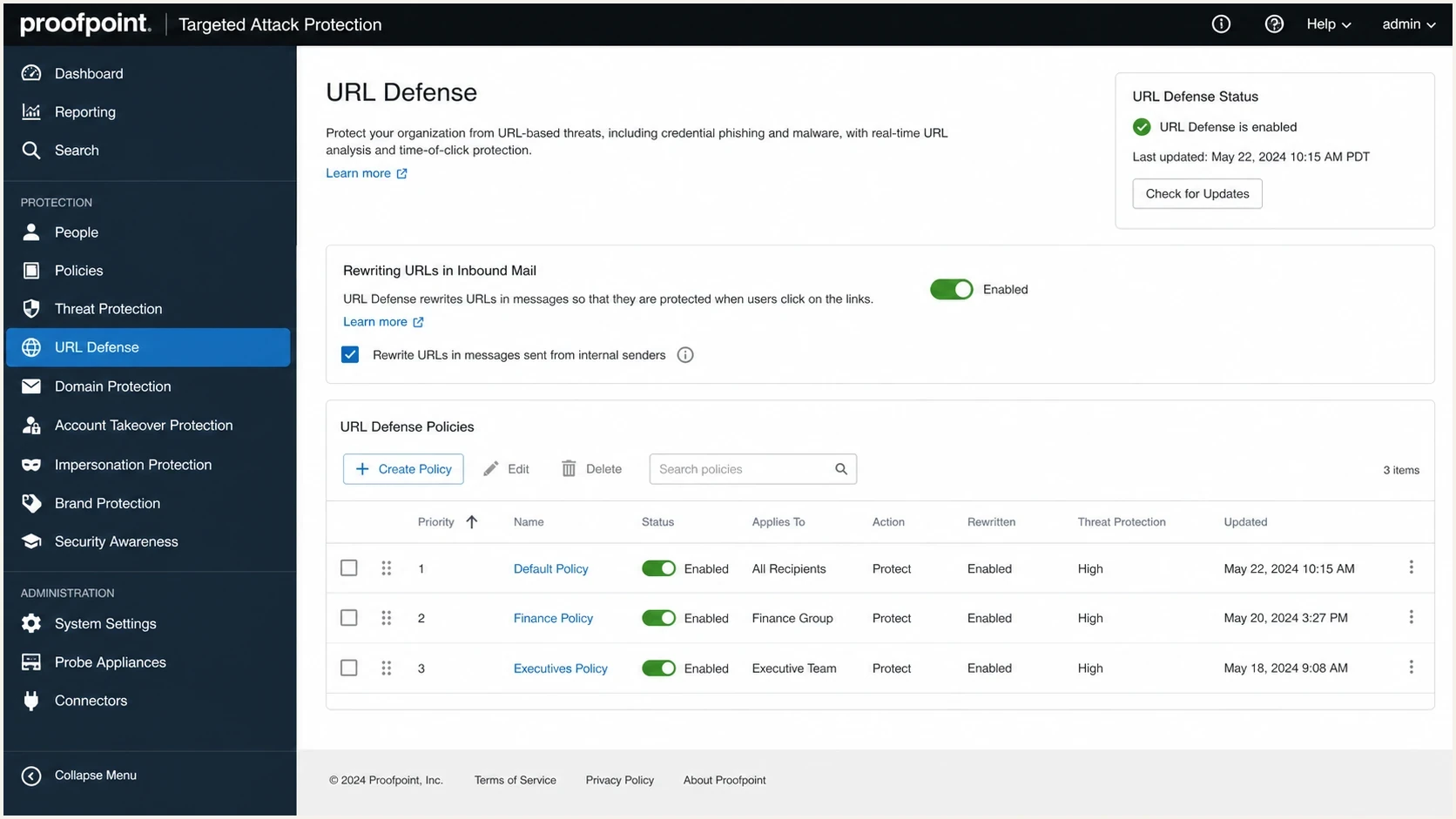
Proofpoint URL Defense settings screen showing inbound URL rewriting policy controls.
|
|
|
|---|---|---|
bh mismatch | Body changed after signing. | Compare mailbox paths. |
NXDOMAIN | Selector DNS is missing. | Publish the key. |
Gateway validated original DKIM. | Check post-scan edits. | |
Gmail saw changed content. | Test direct delivery. |
Common header clues and what they mean.
A selector check is still useful. In one common pattern, the first read of the header makes the selector look missing because the signing domain was misread. Once the actual header.d domain is checked, the key exists. Read header.s and header.d together before touching DNS.
How Proofpoint breaks DKIM
Proofpoint usually does not cause this result because it cannot validate the sender's signature. The failure occurs when Proofpoint changes signed content after validation. The change can support a security control, but the original DKIM signature cannot treat a different signed body as harmless.
Proofpoint Essentials documents a specific URL Defense control for this case. Under Security Settings, Malicious Content, and URL Defense, clear Re-write URLs that are located in DKIM signed messages to preserve original DKIM signatures on signed mail. Product editions and policy labels differ, so confirm the equivalent control in the deployed edition. Disabling rewriting reduces click-time inspection for those links, so review narrow sender or URL exceptions before applying a broad change.
Message before Proofpoint
- Signature: The sender signs headers and body with its private DKIM key.
- Validation: Proofpoint checks the public key and records a DKIM pass.
- DMARC: DMARC can pass at this stage when DKIM or SPF matches the visible From domain.
Message after Proofpoint
- Rewrite: Proofpoint changes links, HTML, warning text, or MIME structure.
- Gmail check: Gmail calculates a new body hash and gets a different value.
- Result: Gmail reports DKIM neutral or fail even though the sender key exists.
The same pattern applies to other secure email gateways and corporate mail controls. If a gateway adds an external sender warning, appends a confidentiality footer, rewrites tracking links, or changes the subject after signing, DKIM loses its integrity match.
This is why the phrase Gmail says DKIM failed is incomplete. Gmail reports the state of the message at Gmail's validation point. A previous hop can have a different, valid result because it checked an earlier version of the message.
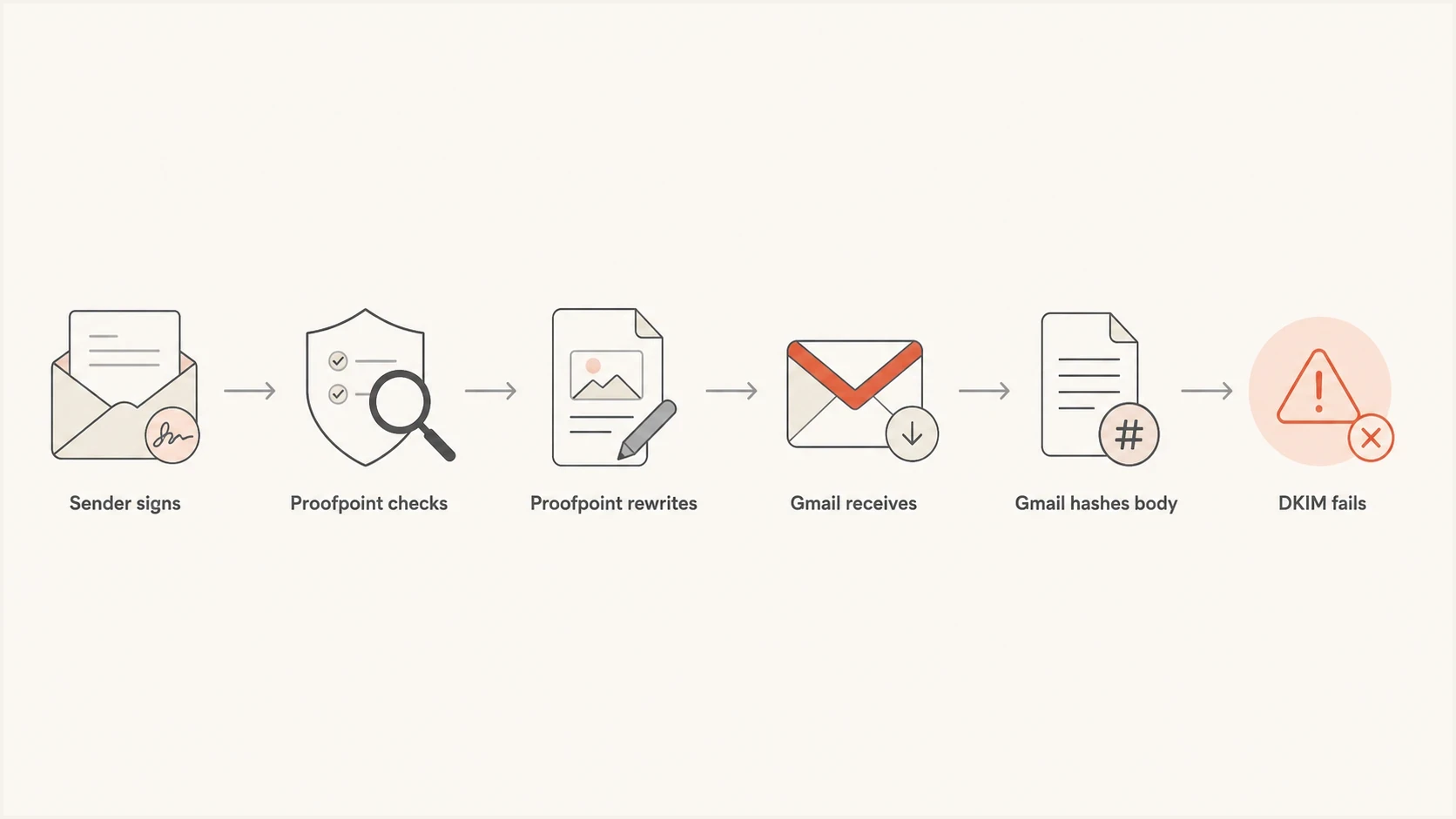
Flowchart showing Proofpoint checking DKIM, rewriting the message, and Gmail failing DKIM afterward.
How to prove the cause
The fastest proof is a controlled delivery comparison. Send an equivalent message to a mailbox that routes through Proofpoint and to a regular Gmail mailbox that does not. Then open Show original in Gmail and compare the DKIM result, the body hash error, and all Authentication-Results headers.
- Collect headers: Copy the full original source, not a screenshot of the Gmail summary row.
- Map the hops: Pair each Authentication-Results entry with its authentication service identifier and nearby Received hop.
- Find the selector: Read header.s and header.d from Gmail's DKIM result.
- Check the key: Query selector._domainkey.domain and confirm the TXT record exists.
- Compare paths: Check whether DKIM passes in direct Gmail but fails in the Proofpoint-routed mailbox.
- Inspect edits: Look for rewritten URLs, added banners, subject tags, added footers, re-encoding, and MIME changes.
DNS lookup pattern for a DKIM selectorbash
dig TXT s1._domainkey.example.com

# Expected shape:
# s1._domainkey.example.com. 300 IN TXT "v=DKIM1; k=rsa; p=..."
If the selector exists and an equivalent message passes when sent outside the corporate inbound gateway, DNS is not the root cause. The failure is in the delivery path. For a separate edge case where Gmail's summary view looks misleading, read the Gmail DKIM display explanation.
Do not trust a single pass or fail line without the receiving host name. ppe-hosted.com and mx.google.com can both be correct because they checked different versions of the message.
Where SPF and DMARC fit
SPF checks the envelope sender domain against the source IP chosen by the receiver. It does not hash the message body, so URL rewrites and banners do not break SPF directly. In Google Workspace, a correctly configured inbound gateway list can make Gmail look past the Proofpoint connection and select an upstream public IP for SPF. The Automatically detect external IP option controls how far Gmail searches the Received chain. If the gateway IPs or headers are wrong, Gmail can evaluate SPF against the wrong hop.
DMARC needs either SPF or DKIM to pass and match the visible From domain. That is why using both SPF and DKIM matters. If DKIM breaks because a gateway changes the body, SPF gives DMARC another route to pass when Gmail identifies the original source IP and the envelope sender domain matches the From domain. When neither mechanism produces a matching pass, DMARC fails.
|
|
|
|---|---|---|
SPF | Source IP. | Wrong hop selected. |
DKIM | Signed content. | Body or header edits. |
DMARC | Matching pass. | Both routes fail. |
How SPF, DKIM, and DMARC react to gateway modification.
Google Workspace inbound gateway settings can improve SPF source-IP selection and gateway handling, but they do not make a modified body match the original DKIM signature. Google states that Gmail does not enforce the sender's DMARC policy for messages arriving through a configured inbound gateway, although it still uses authentication data for compliance checks and protection against spam or impersonation. Keep the SPF fix and the DKIM fix separate during testing.
This is also why DMARC reports matter more than a one-off Gmail screen. A single Gmail message tells you one delivery path. Aggregate DMARC data shows which sending sources fail at each reporting receiver over time. If the issue appears only for mail routed through one corporate gateway, the pattern becomes visible in DMARC monitoring data.
For a wider check across DNS, DMARC, SPF, and DKIM, a domain health check is the right starting point. It catches obvious DNS problems before you spend time on gateway behavior.
?
What's your domain score?
Deep-scan SPF, DKIM & DMARC records for email deliverability and security issues.
How ARC changes the diagnosis
Authenticated Received Chain (ARC) lets an intermediary record the authentication results it saw before it changed or forwarded a message. A valid ARC chain gives a later receiver verifiable evidence that DKIM or DMARC passed at an earlier hop. This is useful when a gateway rewrites URLs or changes MIME content before Gmail performs its own checks.
- Look for ARC-Authentication-Results to see what each participating intermediary recorded on arrival.
- Check ARC-Message-Signature and ARC-Seal for each numbered instance in the chain.
- Read cv=pass as chain validation, not proof that the current message passes DKIM.
- Treat ARC as evidence for receiver policy. The final receiver decides whether to trust the sealer and how to use that evidence.
ARC does not repair the original DKIM signature and does not turn Gmail's body hash failure into dkim=pass. It preserves earlier authentication evidence that Gmail can consider when applying local policy.
How to fix it
Do not ask the sender to rotate DKIM keys until the path test proves a sender-side problem. In most Proofpoint-to-Gmail cases, the receiving team should prevent or narrow signed-content changes, configure the Google Workspace inbound gateway correctly for SPF source detection, preserve earlier authentication with ARC where supported, or add a new DKIM signature after modification when the gateway is authorized to sign for the required domain.
- Adjust URL rewriting: Disable rewriting in DKIM-signed messages or create narrow exceptions when preserving the original signature outweighs click-time rewriting.
- Re-sign only when authorized: Add a new DKIM signature after modification using a signing domain that matches the visible From domain for DMARC. A passing signature from an unrelated gateway domain does not satisfy DMARC through DKIM.
- Configure the inbound gateway: List every Proofpoint gateway IP that can deliver to the Google Workspace tenant and test external-IP detection so Gmail selects the intended source IP for SPF. This does not restore original DKIM.
- Preserve authentication evidence: Use ARC where both the intermediary and receiver support it, and keep full headers for verification.
- Keep a clean test route: Maintain a controlled mailbox path without content rewriting for comparisons.
- Check DMARC data: Confirm whether failures affect real recipient traffic or only internal review mailboxes.
If an equivalent message passes DKIM in a normal Gmail account and fails only after a corporate inbound gateway, the sender's DKIM setup is usually fine. Fix the gateway path before changing public DKIM records.
There is one sender-side exception: if the message fails everywhere, including direct Gmail, inspect the sender platform. Common sender-side causes include the wrong selector, a withdrawn or malformed public key, a platform signing with a subdomain that lacks DNS, a broken MIME generator, or a mailing system that changes the body after signing.
If the error names bh= or says the body hash is not verified, the dedicated DKIM bh value failures page goes deeper on that exact signature field.
Where Suped helps
Suped's product helps when a single Gmail header cannot show the scope of a failure. Suped's DMARC monitoring groups SPF and DKIM outcomes by sending source and receiver, so a Proofpoint-routed failure can be separated from a sender-wide DNS or signing problem.

Issue steps to fix dialog showing the issue overview, tailored fix steps, and verification action
A practical workflow is to verify the domain's DNS baseline, identify the affected source, compare receiver-level results, and inspect full headers for the failing path. Alerts can show when a gateway or DNS change affects authentication rates.
Aggregate DMARC data does not identify the exact content or MIME edit that broke one message. Keep the original headers and controlled test deliveries as message-level evidence, then use Suped to confirm whether the pattern is isolated or widespread.
Views from the trenches
Best practices
Read the receiving host name before trusting a pass or fail result in raw headers.
Test an equivalent message through a clean mailbox before changing any DKIM DNS records.
Keep a direct delivery route available for comparing signed bodies without gateway edits.
Track receiver-level DMARC data to separate sender-side errors from gateway edits.
Common pitfalls
Treating every Gmail DKIM fail as a missing public key wastes time during triage.
Changing selectors before checking for URL rewrites creates avoidable new failures.
Ignoring Proofpoint pass headers hides the earlier successful validation step clearly.
Relying on screenshots instead of full headers removes evidence needed for proof.
Expert tips
Map Proofpoint and Gmail authentication results to Received hops using authserv-id.
Look for external banners, URL rewriting, subject tags, footer edits, and MIME changes.
Ask whether the gateway re-signs mail after modification before blaming DNS records.
Use DMARC aggregate reports to confirm whether real recipient traffic is affected.
Marketer from Email Geeks says the selector and signing domain should be read together because a misread domain can make a valid key look missing.
2024-01-26 - Email Geeks
Marketer from Email Geeks says work mailboxes often modify incoming messages, and those edits break DKIM when they touch signed content.
2024-01-26 - Email Geeks
Practical take
If Gmail says DKIM is failing and Proofpoint sits in front of Google Workspace, treat Proofpoint modification as the leading cause when the error is a body hash mismatch and an earlier hop recorded a pass. That does not mean Proofpoint is malfunctioning. It means the gateway changed the message after the original sender signed it.
The right fix depends on ownership. If you control the receiving environment, tune the gateway path, preserve authentication evidence, or re-sign after modification when authorized. If you control the sending environment, prove the message passes direct Gmail before changing DNS. If you own the domain program, monitor DMARC over time so one noisy internal mailbox does not drive unnecessary sender changes.




