Why does Gmail show DKIM failing when it actually passes?

Updated on 4 Aug 2026: We added Gmail's five-signature limit and corrected the DKIM domain checks used in troubleshooting.
Gmail can show DKIM as failing when DKIM actually passes because Gmail's visible summary table sometimes reports a domain-matching problem as a DKIM failure. The raw Authentication-Results field added by mx.google.com is the source to trust first. If that field says dkim=pass and dmarc=pass, the message passed Gmail's authentication checks even if the neat little Gmail summary says DKIM failed.
The usual pattern is simple: the DKIM signature verifies, but the domain in the DKIM signature is a subdomain or a sending-service domain that Gmail's summary does not display correctly. Confirm the raw header, compare the visible From domain with the DKIM d= signing domain, then check the selector and key with a DKIM checker. Do not change DNS, loosen DMARC, or rotate keys until the raw header proves a real authentication failure.
- Source first: Use the raw Gmail header before the formatted summary table.
- Real failure: Treat broken signatures, missing selectors, and modified signed content as actual DKIM problems.
- Domain match: Check whether relaxed or strict DMARC matching was in force when the message was sent.
- Delivery signal: If delivery is normal and DMARC passes, the Gmail summary alone is not enough evidence.
Why the two Gmail views disagree
Gmail gives you more than one view of the same message. The formatted original message panel tries to simplify authentication for humans. The raw header records the authentication result stamped by Google's mail system. Those two views can disagree when the summary layer turns a domain-matching warning into a DKIM fail label.
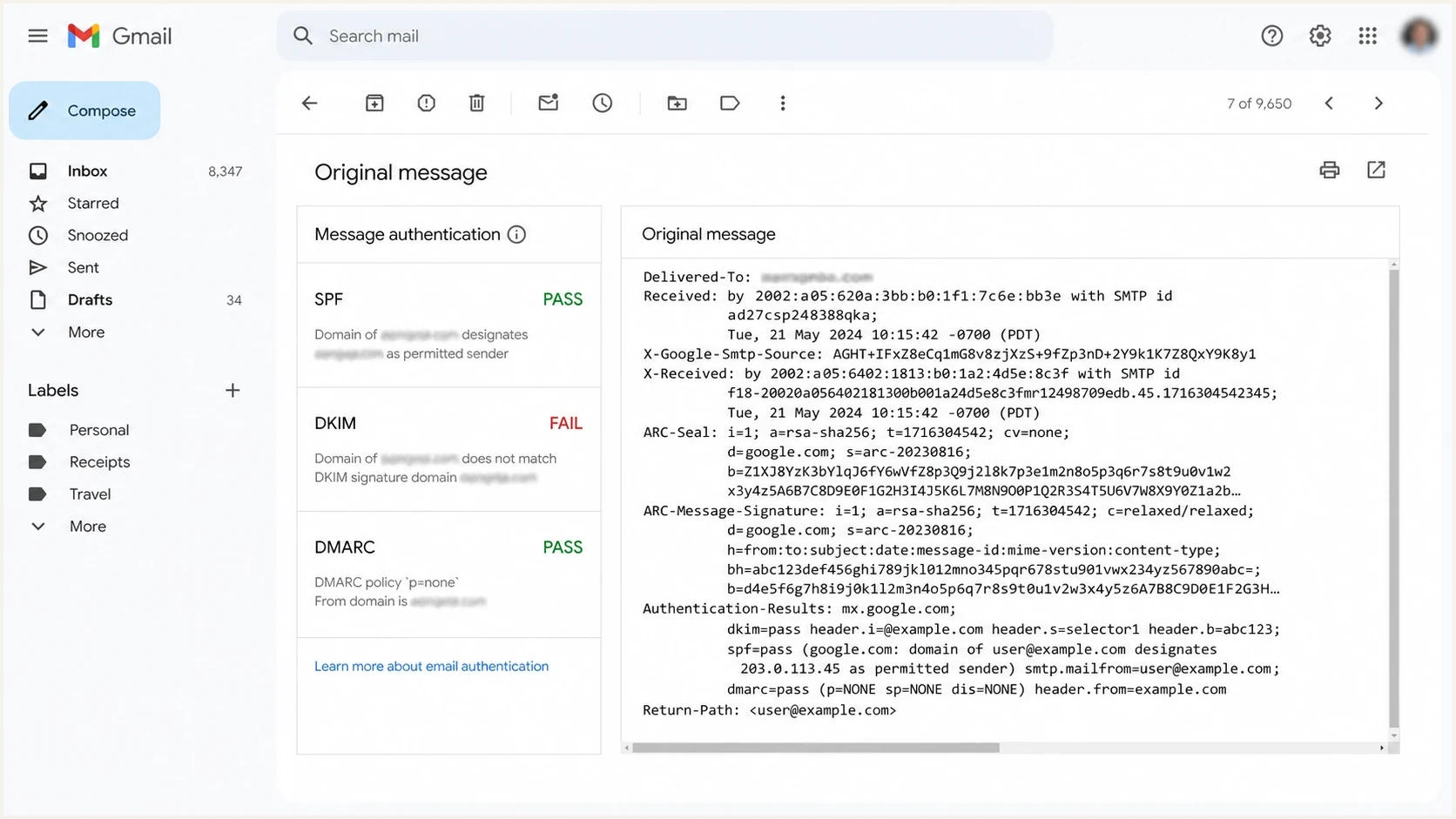
Gmail Show original with a DKIM fail summary beside dkim=pass and dmarc=pass raw results.
The raw header is more precise because it separates DKIM and SPF verification from DMARC disposition. The Gmail summary can compress those details. In the confusing case, DKIM has not failed cryptographically. Gmail has verified the signature, then the visible summary flags a domain relationship it thinks is wrong.
A message can contain several Authentication-Results fields and several DKIM results. Start with the field added by Gmail's receiving system, normally identified by mx.google.com, and read every DKIM result in that field. Do not treat an older result added by a forwarding hop as Gmail's verdict.
Raw Gmail header that proves DKIM passedtext
Authentication-Results: mx.google.com;
  dkim=pass header.i=@mail.example.com header.d=mail.example.com header.s=smtp1;
  spf=pass smtp.mailfrom=bounce@mail.example.com;
  dmarc=pass header.from=example.com
Trust the stamped result first
If Gmail stamps dkim=pass in its Authentication-Results field, that DKIM signature verified at Gmail. The formatted summary can still say fail because it is evaluating a separate domain-matching rule or showing a temporary display issue.
The domain match that matters
DKIM has two related checks. First, the receiver verifies the DKIM signature against the public key at the selector under the signing domain. Second, DMARC checks whether the DKIM d= signing domain has the required relationship to the visible From domain. Those are not the same test. The DKIM identity in i= or header.i is useful context, but DMARC compares the signing domain.
With relaxed DKIM domain matching, a signing domain such as mail.example.com can satisfy DMARC for From example.com because both share the same organizational domain. With strict matching, the DKIM signing domain must exactly match the visible From domain. If Gmail's summary applies strict logic when relaxed logic should apply, the summary can be wrong even though Gmail's raw result is right.
Relaxed DKIM matching
- Default mode: Used when the DMARC record does not set adkim=s.
- Subdomain ok: mail.example.com can match example.com for DMARC.
- Common setup: Used by senders that sign from a mail or bounce subdomain.
- Gmail risk: The summary can mislabel this when raw headers pass.
Strict DKIM matching
- Exact mode: Enabled by adkim=s in the DMARC record.
- Subdomain fail: mail.example.com does not match example.com exactly.
- Narrow use: Useful only when every sender signs with the exact From domain.
- Fix path: Change the signing domain or remove strict mode after review.
|
|
|
|
|
|---|---|---|---|---|
example.com | example.com | Pass | Pass | Exact match |
example.com | mail.example.com | Pass | Fail | Subdomain match |
example.com | mailer.vendor.net | Fail | Fail | Wrong domain |
mail.example.com | example.com | Pass | Fail | Parent match |
How common DKIM domain combinations should be read.
When multiple DKIM signatures confuse the result
One message can carry several DKIM signatures, and each signature can pass or fail independently. A sender, outbound gateway, forwarder, or mailing system can add another signature. This explains headers that contain both dkim=pass and dkim=fail without any contradiction.
Google documents a Gmail-specific limit: Gmail checks only the first five signatures listed in the message's Authentication-Results header. If the signature that authenticates the message is not among those five, Gmail reports DKIM failure and DMARC can fail too. The Google DKIM troubleshooting page confirms this limit.
- Count signatures: Count every DKIM-Signature field in the received message.
- Map each result: Match each result to its header.d and header.s values when Gmail provides them.
- Check the first five: Confirm that a passing signature with the required From-domain relationship appears within Gmail's checked set.
- Reduce redundant signing: Remove obsolete or duplicate signatures at the sender or gateway when they push the useful signature past the limit.
A passing signature still needs the right domain
Any passing DKIM signature proves that signature is valid. For DMARC, at least one passing signature must also have a d= domain that satisfies the active relaxed or strict matching mode.
What to check before changing DNS
Use a short checklist before touching DNS. The goal is to prove whether the problem is cryptographic DKIM failure, DMARC domain matching, a signature-count limit, or a Gmail display issue. A broad domain health check is useful when you also want SPF, DMARC, DNS, and reputation signals in one pass.
- Header result: Open Show original and read the Authentication-Results field stamped by mx.google.com.
- Selector key: Take d= and s= from the DKIM signature and confirm the key exists at s._domainkey.d.
- Signing domain: Compare the DKIM d= domain, or header.d when present, with the visible From domain.
- Signature count: Check whether the useful signature is among Gmail's first five.
- Message mutation: Look for body hash did not verify after forwarding or outbound gateway processing.
- DMARC tag: Check whether adkim=s was present when the message was sent.
- Recipient spread: Send the same message to several Gmail accounts and compare raw results.
DKIM checker
Check selector records and public key configuration.
?/7tests passed
If the selector record is valid and Gmail's trusted header still says dkim=pass, stop treating the summary as the main diagnostic. Check Google DKIM troubleshooting for Google Workspace setup, forwarding, TXT length, and signature-count guidance.
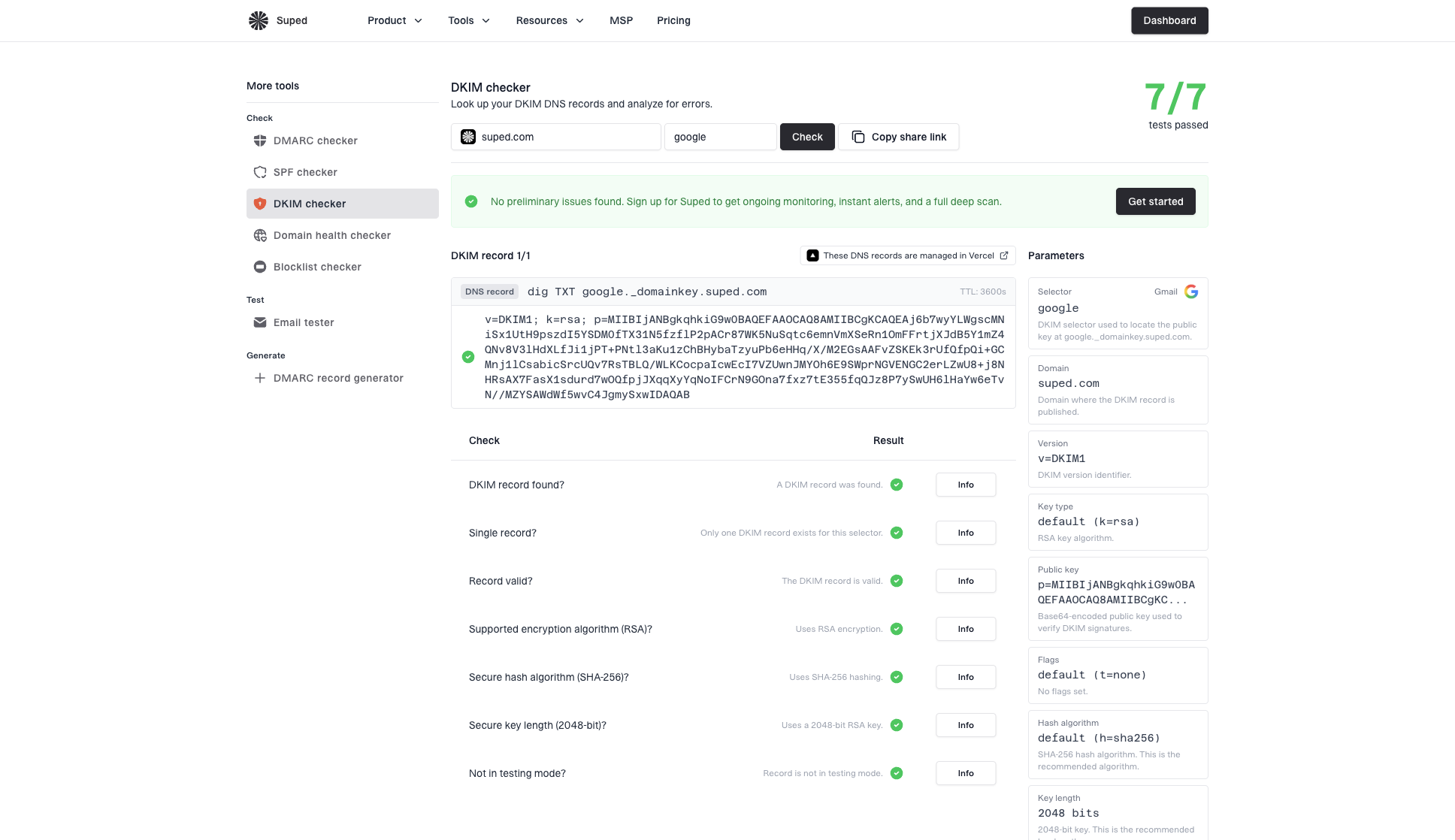
DKIM checker sample results showing selector, DKIM DNS record, validation checks, parameters, and share link
DMARC records that change DKIM domain matchingdns
v=DMARC1; p=quarantine; rua=mailto:dmarc@example.com
v=DMARC1; p=quarantine; adkim=s; rua=mailto:dmarc@example.com
Do not loosen policy on a summary alone
A Gmail summary that says DKIM failed is not enough reason to move p=quarantine or p=reject back to p=none. Make the change only when raw headers, aggregate reports, and delivery evidence show real failures.
When it is a real DKIM failure
There are still cases where Gmail is correctly saying DKIM failed. The fastest way to separate real failure from display noise is to look for a bad signature, a missing DNS key, a broken selector, a truncated public key, or a message that changed after signing. Forwarders and outbound gateways can break DKIM when they alter signed headers or the message body. Keep ISP-specific DKIM failures separate from Gmail's formatted display issue.
|
|
|
|---|---|---|
Missing key | Selector not found | Publish TXT |
Wrong selector | NXDOMAIN | Update sender or DNS |
Changed body | Body hash did not verify | Stop relay changes |
Truncated key | Key parse error | Correct TXT chunks |
Too many signatures | Useful signature after fifth | Reduce redundant signing |
Common real causes of DKIM failure.
How urgent is the Gmail DKIM warning?
Use raw headers and DMARC results to decide whether to act immediately.
Low
Monitor
Raw header passes DKIM and DMARC.
Medium
Investigate
DKIM passes but DMARC fails domain matching.
High
Fix now
Raw header shows dkim=fail.
Unknown
Collect data
Only a screenshot or redacted header exists.
The message date matters too. If you changed the DKIM key or DMARC record after the message was sent, current DNS does not prove what Gmail evaluated at delivery time. Keep the original header sample, message timestamp, and relevant DNS history together.
How Suped fits the workflow
Suped's product helps when one-off header checks do not show whether the issue is isolated or repeating across real traffic. The workflow collects DMARC aggregate data, groups the sending source, compares SPF and DKIM outcomes, and alerts the team when a real failure starts.
Use Suped's DMARC monitoring to compare Gmail's one-message display with aggregate results by domain and sending source. Healthy DKIM and DMARC results support monitoring the display issue. A new source-level failure points to the selector, key, signer, or domain relationship that needs attention.
Manual Gmail review
- Scope: One message and one recipient at a time.
- Evidence: Raw headers, screenshots, message timestamps, and manual comparisons.
- Weak spot: Hard to prove whether failures are isolated or widespread.
- Best use: Confirming one suspicious Gmail display result.
Suped workflow
- Scope: All monitored domains and sending sources.
- Evidence: Parsed DMARC reports, source grouping, issue history, and alert history.
- Fix path: Issue detection with practical remediation steps.
- Best use: Ongoing authentication monitoring across a domain portfolio.
DMARC record detail view showing SPF, DKIM, DMARC, rDNS diagnostics, and DNS records
The practical benefit is less guesswork. If Gmail's summary is noisy but aggregate reports show healthy DKIM and DMARC pass rates, monitor rather than rush a DNS change. If Suped shows a new source failing, a missing selector, or a strict matching problem, the next step is concrete.
Views from the trenches
Best practices
Trust Authentication-Results before Gmail's summary when the two disagree on DKIM status.
Compare the visible From domain with the DKIM d= domain before changing DNS records.
Keep dated header samples so a mailbox-specific Gmail display change is easier to prove.
Common pitfalls
Do not lower DMARC policy because one Gmail account shows a confusing DKIM summary.
Do not troubleshoot redacted headers when the issue depends on exact domain matching.
Do not confuse DKIM verification with DMARC domain matching in receiver summaries.
Expert tips
Send the same message to several Gmail accounts when a Gmail display issue is suspected.
Check the DMARC adkim tag at the message date, not only the current DNS record in use.
Use parsed reports to separate Gmail display noise from real authentication failures fast.
Expert from Email Geeks says Gmail's visible summary can report a DKIM failure while mx.google.com stamps dkim=pass and dmarc=pass in the raw header.
2025-02-07 - Email Geeks
Expert from Email Geeks says some cases look like Gmail checks strict domain matching in the summary even when relaxed DMARC matching should pass.
2025-02-07 - Email Geeks
What to do next
Treat Gmail's DKIM fail summary as a prompt to inspect the raw header, not as proof that DKIM failed. If Gmail's trusted header says dkim=pass and DMARC passes, keep monitoring and document the sample. If it says dkim=fail, fix the selector, key, signer, relay path, or signature count before changing policy.
The cleanest long-term setup is boring: sign with a domain that matches the visible From policy, avoid strict DKIM matching unless every sender supports it, and monitor real DMARC reports instead of relying on one mailbox's display. Suped's product turns repeated authentication failures into source-level issues with evidence and remediation steps.




