Why is DKIM failing due to bh= value or showing as not verified, and is Proofpoint involved?

Updated on 9 Aug 2026: We added guidance for mixed DKIM results and Proofpoint URL Defense, with clearer header checks.
A DKIM bh= error means the body checked by the receiver does not match the canonicalized body hashed when that DKIM signature was created. Proofpoint is involved only when the evidence shows that its handling changed the signed body. For example, Proofpoint Essentials can be configured to rewrite URLs in DKIM-signed messages, which invalidates the existing body hash. Banners, MIME changes, and other edits can have the same effect.
The answer is not automatically "Proofpoint broke DKIM." Prove where DKIM was checked, whether the body changed after signing, and whether failures cluster at Proofpoint-protected destinations. Start with DMARC aggregate data and full message headers before changing DNS, because a body hash failure usually points to message handling rather than a published key.
- The bh= tag contains a hash of the signed message body after DKIM canonicalization.
- Proofpoint becomes a clue when URL Defense or another policy changes the body after signing.
- A "not verified" label can cover a missing key, an invalid signature, a changed body, or a temporary lookup error.
- The fastest proof comes from comparing trusted headers and DMARC results by receiver.
What the bh= value means
A DKIM signature has two related checks. The bh= tag contains the body hash. The b= tag contains the cryptographic signature over the selected headers and the body hash. The receiver canonicalizes the body, hashes it, and compares the result with bh=. A mismatch makes that signature fail.
DKIM-Signature body hash example
DKIM-Signature: v=1; a=rsa-sha256; c=relaxed/relaxed;
 d=example.com; s=selector1;
 h=from:to:subject:date:mime-version:content-type;
 bh=V7Qm9fK5Z9C7nM9M3Jk0k2Qy6f3v8x0x6o2b9uE=;
 b=AbCdEf123456...
The c= tag sets header and body canonicalization. Relaxed body canonicalization tolerates limited whitespace normalization, while simple body canonicalization tolerates almost no change apart from trailing empty lines. Neither mode makes URL substitution, footer insertion, MIME reconstruction, or transfer-encoding changes safe.
A bh= failure has a different root cause from a missing public key. A key lookup failure points to the selector or its DNS publication. A body hash mismatch points to message mutation in a sending platform, gateway, forwarding route, mailing list, or receiving security layer.
Read the failure text carefully
The phrase "DKIM not verified" is broad and does not always mean a body hash mismatch. Use the exact result in the Authentication-Results header added by a system you trust, then match it to the relevant DKIM-Signature fields. Results copied from an earlier untrusted hop are not reliable evidence by themselves.
If the question concerns the published selector, check the public key first with the DKIM checker. If the selector validates but receivers report body hash failures, inspect the mail route next.
Why DKIM can show pass and fail together
One message can contain several DKIM-Signature headers. A sending platform can add one signature and a later gateway can add another. Receivers evaluate each signature independently, so dkim=pass and dkim=fail can both be accurate for the same message.
Mixed DKIM results example
Authentication-Results: mx.example.net;
 dkim=pass header.d=example.com header.s=selector1;
 dkim=fail reason="body hash did not verify"
  header.d=relay.example header.s=gateway;
 dmarc=pass header.from=example.com
- Match every result to header.d and header.s instead of reading the results as one combined verdict.
- For DMARC, identify whether at least one passing signature uses a domain that matches the visible From domain under the domain's DMARC mode.
- Use Received headers and gateway logs to establish signing order. DKIM-Signature header order alone does not prove which system signed first.
- Investigate the failed signature only if its loss affects DMARC, routing policy, or a required trust decision.
Where Proofpoint fits
Proofpoint can occupy different positions in the route, and the position changes the diagnosis. If Proofpoint handles inbound mail and URL Defense is configured to rewrite URLs in DKIM-signed messages, Proofpoint can verify the original message and then alter its body. A later check in Google Workspace or Microsoft 365 can then report a body hash failure for the original signature.
Proofpoint's presence alone does not prove that it caused the change. Confirm whether the relevant URL Defense option is enabled, whether the delivered links use Proofpoint rewriting, and whether the body differs across a controlled capture taken before the gateway and the final message.
If Proofpoint handles outbound mail, any scanning, URL rewriting, footer insertion, tracking change, or MIME cleanup needs to occur before the final DKIM signature. The last system that changes the body should apply a signature using a domain that DMARC accepts for the visible From address, or it should leave the signed body unchanged.
Inbound Proofpoint
- Proofpoint can validate first and then rewrite links for the protected mailbox.
- The final mailbox can fail the original signature because it receives the changed body.
- Check whether rewriting DKIM-signed messages is required by the active security policy.
- Preserve the original Proofpoint result through a valid ARC chain where the receiving platform supports and trusts it.
Outbound Proofpoint
- A sender can sign before a gateway edits links, banners, or MIME content.
- The external receiver then sees a body hash mismatch for that earlier signature.
- Apply the final signature after every expected edit and verify its domain against DMARC rules.
- Retest every policy route because only some routes can invoke message modification.
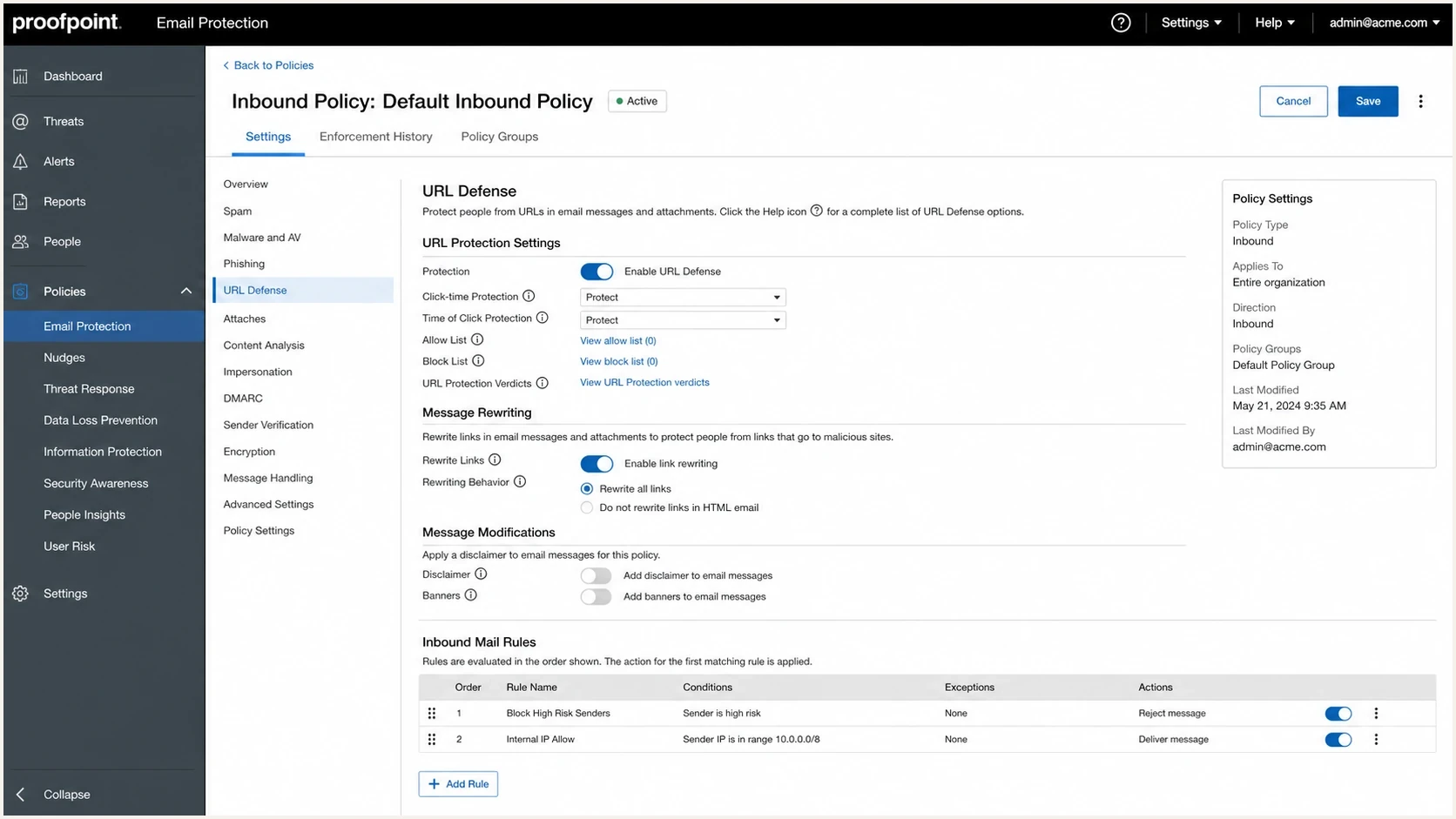
Proofpoint Email Protection settings showing URL rewriting controls.
How to prove the failure path
Group failures by receiver and route before making a DNS change. Test whether the same message passes at a controlled destination without Proofpoint and fails only after a Proofpoint route. Preserve the original message file because forwarding a sample can add another set of modifications.
- Send the same message to controlled mailboxes on different routes and save each message as an original file with full headers.
- Match every dkim= result to its signing domain and selector, then note body hash, key lookup, syntax, or signature errors.
- Check ARC for evidence that a trusted earlier hop validated the message. ARC does not repair the failed DKIM signature, and the final receiver decides whether to trust the chain.
- Compare rewritten links, footers, MIME boundaries, content-transfer encoding, line endings, and inserted banners.
- Use DMARC aggregate data to group failures by source IP and receiver, then confirm the suspected route with per-message headers.
Header evidence to look for
Authentication-Results: mx.example.net;
 dkim=fail reason=body hash did not verify header.d=example.com
 spf=pass smtp.mailfrom=bounce.example.com
 dmarc=pass header.from=example.com
The dmarc=pass line matters in this example. DKIM failed, but DMARC still passed because SPF passed and bounce.example.com matches the visible example.com domain under relaxed DMARC rules. If forwarding breaks SPF too, the same body hash problem can produce DMARC failure.
Do not treat a mailbox banner as the whole result
Mailbox labels compress several checks. A message can show DKIM failed after inbound rewriting even when an earlier trusted hop recorded a pass. DMARC aggregate reports show the broader pattern across receivers. Suped's DMARC monitoring workflow helps separate isolated receiver behavior from a sender-side regression.
DMARC records drawer showing filters, record rows, authentication results, and CSV export
What to check when DNS looks correct
A correct DKIM DNS record does not guarantee DKIM pass. DNS publishes the public key, while the message must also arrive with the signed body intact and its signed headers valid. A selector can validate cleanly while the receiver still reports a bh= failure.
|
|
|
|---|---|---|
Body hash fail | Body changed after signing | Header states body hash did not verify |
Key not found | Missing selector record | Check s= and d= |
Signature fail | Signed header changed or key mismatch | Compare signed fields and public key |
Intermittent fail | Only some routes modify mail | Group by receiver and source IP |
DKIM symptoms and likely causes
DKIM DNS record shape
selector1._domainkey.example.com. 3600 IN TXT (
  "v=DKIM1; k=rsa; "
  "p=MIIBIjANBgkqhkiG9w0BAQEFAAOCAQ8A..."
)
If the signing domain, selector, and public key are correct, inspect message handling. Common causes include URL Defense rewriting, unsubscribe link substitution, open tracking, link branding, disclaimer insertion, HTML normalization, line-ending conversion, and gateways that rebuild MIME content.
DKIM checker
Check selector records and public key configuration.
?/7tests passed
That widget answers the DNS portion of the question. It cannot prove that a later hop changed the body, because that proof is in message headers and controlled captures. For a broader authentication check, use the domain health checker after confirming that the DKIM selector is reachable.
When it matters for DMARC
A DKIM failure does not always produce DMARC failure. DMARC passes when at least one DKIM signature passes with a signing domain that matches the visible From domain, or when SPF passes with a matching envelope domain. A Proofpoint-induced body hash failure matters most after forwarding breaks SPF or when DKIM is the only method that can satisfy DMARC for that route.
Authentication outcomes by path
Example outcomes for the same message when different systems edit or forward it.
Pass
Fail
Those numbers illustrate the route pattern and are not benchmark data. Direct mail often passes. An inbound rewrite can make the final mailbox fail the original DKIM signature. Forwarded mail has added risk because SPF normally fails when the forwarding host sends with the original envelope domain.
Watch strict policies during investigation
If the domain already publishes p=reject and forwarded traffic loses both SPF and DKIM, legitimate mail can be rejected. Use aggregate reports to confirm affected receivers before changing policy or asking a gateway owner to adjust message handling.
How to fix the DKIM failure
The correct fix depends on whether the message changes before it leaves the sending environment or after it reaches the recipient's gateway. Apply the final DKIM signature after every expected body edit. Avoid later body changes unless the receiving route records and preserves the earlier authentication result in a way the final receiver trusts.
- Apply DKIM at the last outbound system that modifies the message body.
- Move tracking, footers, disclaimers, link rewriting, and MIME normalization before final signing.
- For inbound Proofpoint Essentials, review whether URL Defense must rewrite links in DKIM-signed messages. Disabling that option preserves the original signature when policy permits.
- Use ARC where supported to carry the earlier result, but verify that the final receiver trusts the sealer and accepts the chain.
- Use the body hash guide when the same failure appears across unrelated receivers.
Recommended outbound signing order
Create message
Add tracking and unsubscribe links
Add footer or compliance text
Route through final outbound gateway
Apply DKIM signature
Send to recipient MX
A common mistake is signing inside the sending application and then allowing a downstream gateway to add compliance text or rewrite content. The failure can look intermittent because only certain campaigns, destinations, attachments, or policy routes trigger the modification.

Issue steps to fix dialog showing the issue overview, tailored fix steps, and verification action
When to contact Proofpoint
Contact Proofpoint or the Proofpoint administrator when captures point to a Proofpoint policy, route, or signing order. For inbound URL Defense, first confirm whether rewriting DKIM-signed messages is enabled and required. If policy permits an exception, preserving the original body can preserve the original signature.
- Provide the original message as an attached message file rather than forwarding it, plus a controlled pre-gateway sample when available.
- Include full headers, the Proofpoint message permalink for Essentials, timestamps with time zones, and affected policy routes.
- State whether Proofpoint handles inbound mail, outbound mail, or both for the affected traffic.
- List affected domains and receivers, then ask which policy changed the body and whether that change occurred before or after the final DKIM signature.
The supplied Microsoft Q&A example shows the useful mixed result: one signature passed while another failed its body hash check. Treat each signature separately before assigning the failure to Proofpoint.
How Suped helps
Suped's DMARC reporting and email authentication platform helps identify whether DKIM failures cluster by sending source, receiver, or forwarding route. Filter aggregate data for DKIM failures, compare SPF on the same traffic, and use alerts to catch a change in failure rate after a routing or signing change.
DMARC aggregate reports do not contain message bodies, full headers, or the receiver's per-signature bh= reason. Use Suped to narrow the affected route, then use original message headers and controlled captures to prove the modifying hop.
Use reports before changing records
When a sender reports a bh= failure, Suped helps answer the first operational question: is the failure limited to specific destinations, or did the sender-side signing route change?
Views from the trenches
Best practices
Group DKIM failures by receiver before changing selectors or rotating signing keys.
Collect full headers and DMARC data before asking a gateway vendor to investigate.
Confirm whether URL rewriting happens before or after the first DKIM verification.
Common pitfalls
Treating every not verified label as a DNS issue wastes time on valid selectors.
Ignoring forwarding paths hides cases where SPF fails before DKIM is evaluated later.
Changing strict DMARC policy without receiver evidence can mask the real failure cause.
Expert tips
Check ARC results to see whether an earlier hop validated DKIM before later body edits.
Test a controlled message through a clean path and the suspected gateway route side by side.
Ask for route ownership before assuming the vendor can change the behavior safely.
Marketer from Email Geeks says Proofpoint's role depends on where it sits in the path and whether it rewrites message content before final delivery.
2025-10-03 - Email Geeks
Marketer from Email Geeks says DMARC reports should be checked first to verify whether failures are limited to Proofpoint-protected destinations.
2025-10-03 - Email Geeks
What the DKIM evidence should show
A bh= DKIM failure means the canonicalized body checked by the receiver does not match the value stored in that signature. Proofpoint is involved when its configured processing changes the signed body, or when a later mailbox evaluates a message that Proofpoint rewrote after its own check. Confirm this sequence with trusted headers and message captures.
Do not change DKIM DNS solely because of a body hash error. Verify the selector, identify every signature, and follow the message route. If the sending environment changes the body after signing, move signing later or re-sign after the last edit. If a recipient gateway changes the body after recording a valid result, preserve that result with a trusted ARC chain or change the rewriting policy when security requirements permit.




