Why does Sendgrid require two domain keys?

Updated on 22 Sep 2026: We updated this guide for SendGrid's current selector rotation, DNS record set, custom selector rules, and 2048-bit DKIM guidance.
SendGrid asks for two domain keys, usually s1 and s2, when Automated Security is enabled. The two DKIM selectors give SendGrid separate DNS paths for managed key rotation, so you do not need to publish a new public key each time SendGrid changes its signing key.
The records are not two halves of one key, and a receiver does not try both for a single signature. Each selector points to a public key location. The DKIM-Signature header names the selector that the receiver must query, while SendGrid controls the matching private key used to sign the message.
A single DKIM selector can authenticate mail, but it makes provider-managed rotation harder. Two selectors let SendGrid change key material without requiring a coordinated DNS replacement at the moment signing changes.
The short answer
Why SendGrid asks for s1 and s2
A DKIM selector is the label before ._domainkey. If SendGrid signs a message with selector s1, the receiving server looks up the public key at the s1 DKIM DNS name for your domain. If the signature names s2, the receiver looks up the second selector instead.
- Main reason: Two selectors support DKIM key rotation without a fragile same-day DNS change.
- Security benefit: Rotation limits how long superseded private key material remains useful.
- Verification benefit: Mail signed with the prior selector can still be checked while its public key remains published.
- Operational benefit: You publish stable CNAMEs once, and SendGrid manages the key material behind them.
SendGrid's domain authentication setup provides CNAME records for the two default DKIM selectors when Automated Security is on. Those CNAMEs point into SendGrid-controlled DNS, which makes provider-managed rotation practical.
How two-selector rotation works
SendGrid documents that it uses the s1 and s2 selectors interchangeably, rotates them when necessary, and activates only one selector for DKIM signing at a time. The sequence below is a simplified operating model, not a published rotation schedule. It shows why a second DNS path lets SendGrid prepare another key before changing the active signing selector.
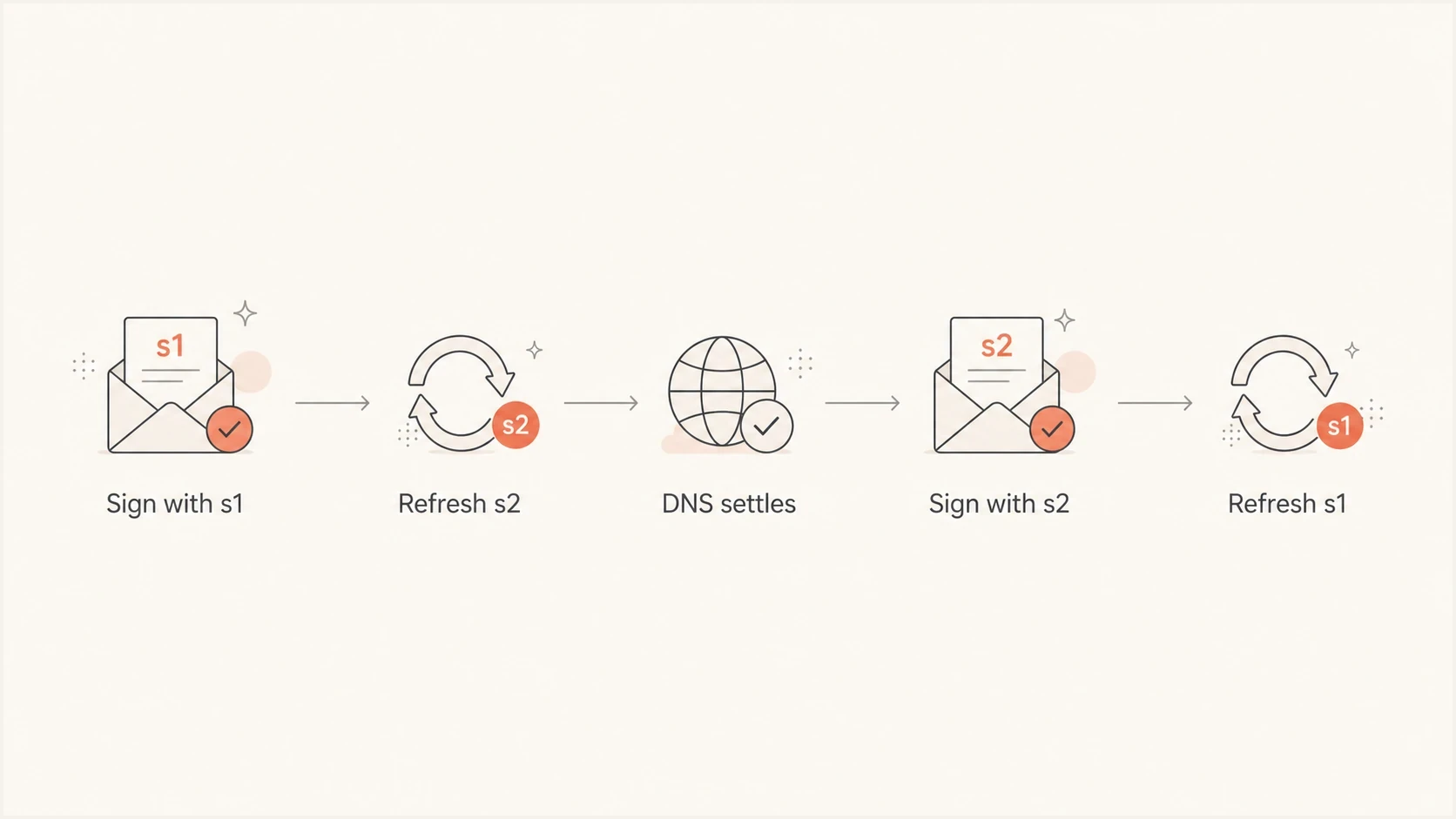
Flowchart showing SendGrid alternating DKIM signing between s1 and s2 selectors.
|
|
|
|
|---|---|---|---|
Active phase | s1 | s2 | Mail verifies against s1 while the separate s2 path is available. |
Preparation | s1 | s2 | SendGrid can update the key material reached through s2. |
Next signing phase | s2 | s1 | Signing can switch after the refreshed key is available. |
Following preparation | s2 | s1 | The separate s1 path can be prepared for a later cycle. |
A simplified selector-rotation model. Actual timing depends on SendGrid's key policy and DNS TTLs.
Deleting one of the two CNAME records often creates a delayed problem rather than an immediate one. A test can pass while SendGrid signs with the selector you kept. Authentication can fail later if SendGrid starts signing with the selector you removed.
What the DNS records look like
With Automated Security on, the two DKIM records are normally CNAMEs rather than raw TXT records containing public keys. A CNAME lets SendGrid update the destination record it controls while your DNS keeps pointing at the same stable name.
Example SendGrid DKIM CNAME recordsDNS
s1._domainkey.example.com.  CNAME  s1.domainkey.u123456.wl.sendgrid.net.
s2._domainkey.example.com.  CNAME  s2.domainkey.u123456.wl.sendgrid.net.
A current SendGrid domain authentication setup can also show a CNAME for the return-path and SPF configuration, plus a DMARC TXT record. Those records are not additional DKIM keys. The records at s1._domainkey and s2._domainkey are the two DKIM selector records.
Your actual target hostnames will differ. Each selector must have one valid DNS answer path. Do not put two different CNAME values at the same selector name. A CNAME cannot coexist with other records at the same owner name, and competing CNAMEs are not a valid way to support two sending providers.
Do not merge the two selectors
Publish both records exactly as SendGrid provides them. If your DNS host reports a conflict, check whether it appended the zone name automatically, whether you entered the full hostname twice, or whether another record already uses that selector name.
A quick check with a DKIM checker confirms whether each selector resolves to usable DKIM key material through its CNAME chain.
DKIM checker
Check selector records and public key configuration.
?/7tests passed
Automated security versus manual security
The s1 and s2 CNAME pair belongs to SendGrid's default Automated Security model. Turning Automated Security off changes the DNS records and who must maintain them. SendGrid's current setup then provides one MX record and three direct TXT records for SPF, DKIM, and DMARC. You must update the published values when SendGrid requires a change.
|
|
|
|
|---|---|---|---|
Automated Security on | Two CNAME selector records, normally s1 and s2 | SendGrid manages the keys behind its DNS targets | New domain authentications use 2048-bit RSA |
Automated Security off | A DKIM TXT record supplied by SendGrid | You publish and replace the supplied DNS values | New domain authentications use 2048-bit RSA |
Older setup | Existing selector records remain in place | Reauthentication is needed for a key upgrade | A setup created before June 2021 can retain 1024-bit RSA |
The exact hosts and values come from the SendGrid domain authentication screen.
Do not infer key length from the selector
The names s1 and s2 do not tell you whether the underlying RSA key is 1024 or 2048 bits. SendGrid says existing domain authentication configurations do not upgrade automatically. Reauthenticate an older configuration with a new unused custom selector to obtain a new 2048-bit key.
Why one key is not enough operationally
One DKIM key can authenticate mail, but it creates a brittle operating model for a provider sending at SendGrid scale. Replacing the only published key requires careful coordination with DNS caches and messages that have not yet reached the final receiving server.
Single selector
- Rotation risk: Changing the only key can break verification for delayed mail.
- DNS pressure: Every key change depends on timing, TTLs, and correct customer DNS.
- Compromise window: A stale private key remains useful until the published key changes.
Two selectors
- Rotation path: Separate selectors let one key path change without replacing the other.
- DNS stability: Customer CNAMEs stay stable while provider-controlled records change.
- Security posture: Regular rotation reduces the useful lifetime of exposed key material.
DKIM private keys are powerful. If an old private key is copied from a backup, leaked from storage, or exposed through an internal process failure, someone holding it can create mail that verifies against the matching public key. Rotation does not make key theft harmless, but retiring the public key limits how long the exposed private key remains useful.
Per-domain keys also isolate customers better than one shared key across many tenants. A shared key is simpler for an email service provider, but it creates a larger exposure if the key leaks. Per-domain keys require more key management and contain the impact to a smaller set of mail.
How SendGrid signs the message
A DKIM signature includes a selector tag. That tag tells the receiving server which DNS label to query. If the message contains s=s1, the receiver checks the s1 selector. If it contains s=s2, it checks the second selector. The signing domain should match the visible From domain under strict DKIM alignment, or share its organizational domain under relaxed alignment.
Simplified DKIM-Signature headertext
DKIM-Signature: v=1; a=rsa-sha256; d=example.com; s=s1;
 h=from:subject:date:to:mime-version;
 bh=base64-body-hash;
 b=base64-signature-data;
One DKIM signature does not say, "try both keys." It names one selector. A message can carry multiple independent DKIM signatures, but each signature is verified through its own signing domain and selector. The second SendGrid selector is a separate lookup path, not a fallback guess by the receiver.
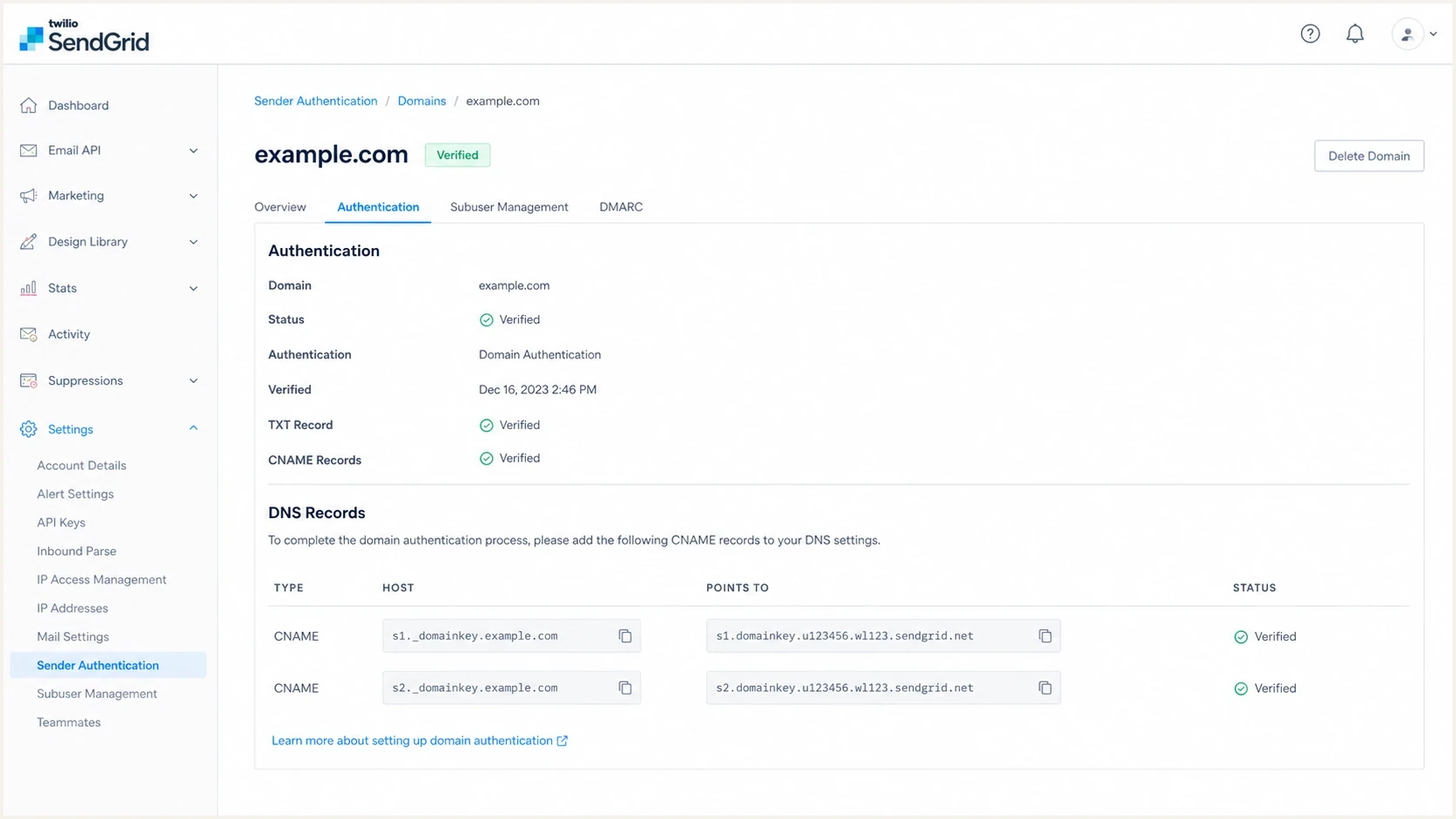
Twilio SendGrid domain authentication screen showing s1 and s2 DKIM CNAME records.
A custom selector is useful when the same domain must be authenticated on a second SendGrid account or subuser and the default s1 and s2 names already exist. SendGrid's current setup guide instructs you to enter three letters or numbers and then generates two unique selector names. Publish both generated CNAMEs exactly as shown. SendGrid documents the custom DKIM selector option for avoiding an existing DNS owner name.
How this affects DMARC domain matching
Two SendGrid DKIM selectors do not weaken DMARC. DMARC does not care whether a passing signature used s1 or s2. It checks whether DKIM passes and whether the signing domain aligns with the domain in the visible From header.
- Selector: The selector tells the receiver where to find the DKIM public key.
- Signing domain: The d= domain in the DKIM signature is the identity that DMARC checks.
- Alignment mode: Relaxed alignment accepts the same organizational domain; strict alignment requires an exact domain match.
- DMARC result: One passing, aligned DKIM signature can satisfy DMARC even when SPF does not.
When SendGrid traffic fails DMARC, the usual cause is an unverified authenticated domain, a missing CNAME, a subdomain alignment problem, or mail that still signs with a provider domain. A broader domain health check helps check DKIM, SPF, and DMARC together.
DMARC record detail view showing SPF, DKIM, DMARC, rDNS diagnostics, and DNS records
Common setup mistakes
Most SendGrid two-key problems come from DNS entry mistakes, not the two-selector design. A provider dashboard can show one selector as verified while the other remains pending, so check each hostname separately.
|
|
|
|---|---|---|
One selector verifies | Only one CNAME exists or resolves correctly. | Compare both records with the SendGrid setup screen. |
Both remain pending | The DNS host appended the domain twice, or the changes are still propagating. | Check the authoritative DNS answer, correct the owner names, and allow up to 48 hours for verification. |
DKIM passes but DMARC fails | The DKIM signing domain does not align with the From domain. | Inspect d= in the received DKIM-Signature header. |
CNAME is rejected | Another record already exists at that selector name. | Resolve the conflict or create the authentication with a custom selector. |
Compact troubleshooting guide for SendGrid DKIM selectors.
If multiple sending tools authenticate the same domain, avoid reusing selector names. Give each provider its own selectors where supported, or use a sending subdomain to keep DNS ownership clear. The related guidance on multiple DKIM selectors explains the naming pattern in more detail.
The DNS rule that trips people up
One selector name can point to one CNAME target. If two sending configurations both ask for s1, do not stack both values. Use a custom selector where supported, or authenticate a separate sending subdomain.
What to verify before sending volume
Before a SendGrid domain sends meaningful volume, verify that both selectors resolve, live mail signs with the expected domain, and DMARC reports show aligned DKIM for SendGrid traffic. The dashboard verification state is useful, but a received message confirms what SendGrid is signing now.
- Publish both records: Create both SendGrid DKIM CNAMEs exactly as shown in the setup screen.
- Check DNS resolution: Verify that each selector resolves through the expected CNAME chain.
- Send a real message: Inspect the DKIM-Signature header and confirm that d= uses your authenticated domain.
- Review DMARC data: Confirm that SendGrid traffic passes DKIM with alignment before tightening DMARC policy.
Email tester
Send a real email to this address. Suped shows a results button when the test is ready.
?/43tests passed
For ongoing checks, Suped's DMARC monitoring helps identify when SendGrid traffic loses alignment, an expected source stops authenticating, or a new source begins using the domain. This is useful when several teams or vendors send mail for the same domain.
Views from the trenches
Best practices
Publish both selectors and let the provider rotate inactive DKIM keys on a safe cadence.
Use CNAME-based DKIM when the sender manages rotation and key lifecycle for you.
Monitor DMARC reports after setup so selector issues show up before policy changes.
Common pitfalls
Keeping only one selector works briefly, then fails when the provider changes signing.
Stacking two CNAME targets on one selector creates invalid DNS and verification errors.
Assuming two selectors affect DMARC domain checks confuses key lookup with identity.
Expert tips
Treat per-domain keys as better isolation than one shared provider key for all tenants.
Check a real message header because dashboards can lag behind live signing behavior.
Rotate keys on a planned cadence so leaked old keys have a short useful lifetime.
Marketer from Email Geeks says SendGrid's two DKIM names looked redundant at first, but the reason became clear once they understood selector rotation.
2020-04-08 - Email Geeks
Expert from Email Geeks says two CNAME-backed selectors let a provider sign with one key while replacing the other key behind the scenes.
2020-04-08 - Email Geeks
The practical takeaway
SendGrid provides two DKIM domain keys in its Automated Security setup because separate selectors make provider-managed key rotation practical. The s1 and s2 CNAMEs let SendGrid manage public key records behind stable DNS names that you publish once.
Publish both records, do not combine them, and do not delete the selector that appears unused. If DMARC fails after setup, inspect the signing domain and live message headers instead of treating the second selector as the cause.




