Why aren't my DKIM records validating even though they are accurate?

Updated on 13 Aug 2026: We added checks for truncated 2048-bit keys, DNS resolution failures, CNAME chains, and receiver-side signature problems.
Accurate DKIM records fail validation when they are accurate in the wrong place, queried with the wrong selector, published under the wrong hostname, hidden behind a CNAME issue, not yet visible at the authoritative nameservers, or not the records used by the message being tested. The usual fix is not to regenerate DKIM immediately. First, check the exact selector in the email header, the exact signing domain in the header, and the DNS host that actually answers for that domain.
Multiple DKIM records for the same sending provider are not automatically a problem. Two platforms can both send through Amazon SES, for example, and still use separate selectors without conflict. DKIM validation breaks when a validator asks DNS for selector._domainkey.example.com and the public key or CNAME is not there, even if the record looks correct in a control panel.
The fastest way to debug this is to test the DNS that receivers see, not the DNS screen your customer is editing. Suped's DKIM checker checks the selector and domain pair directly, then shows whether the DKIM record can be resolved and parsed.
The short answer
If DKIM records look accurate but do not validate, start with one of six causes: the records were added to a DNS zone that is not authoritative, the Name field was entered in the wrong format, the validator is checking the wrong selector, the signing domain does not match the domain being checked, the record is a CNAME that does not resolve to the expected target, or the sender has not started signing with that selector yet.
- Wrong DNS host: The record was added in Shopify, Route 53, GoDaddy, Squarespace, or another panel, but the domain's NS records point somewhere else.
- Wrong hostname: The control panel appended the domain twice, or expected only the left-hand side of the DKIM hostname.
- Wrong selector: The selector in the test does not match the s= value in the email's DKIM-Signature header.
- Wrong domain: The public key is published under the customer domain, but the message is still signed with the provider's default domain.
- Broken CNAME: The selector hostname exists, but its CNAME target is wrong, missing, or returning SERVFAIL.
- Inactive key: Some senders show several generated selectors, while only one is active for signing at a given time.
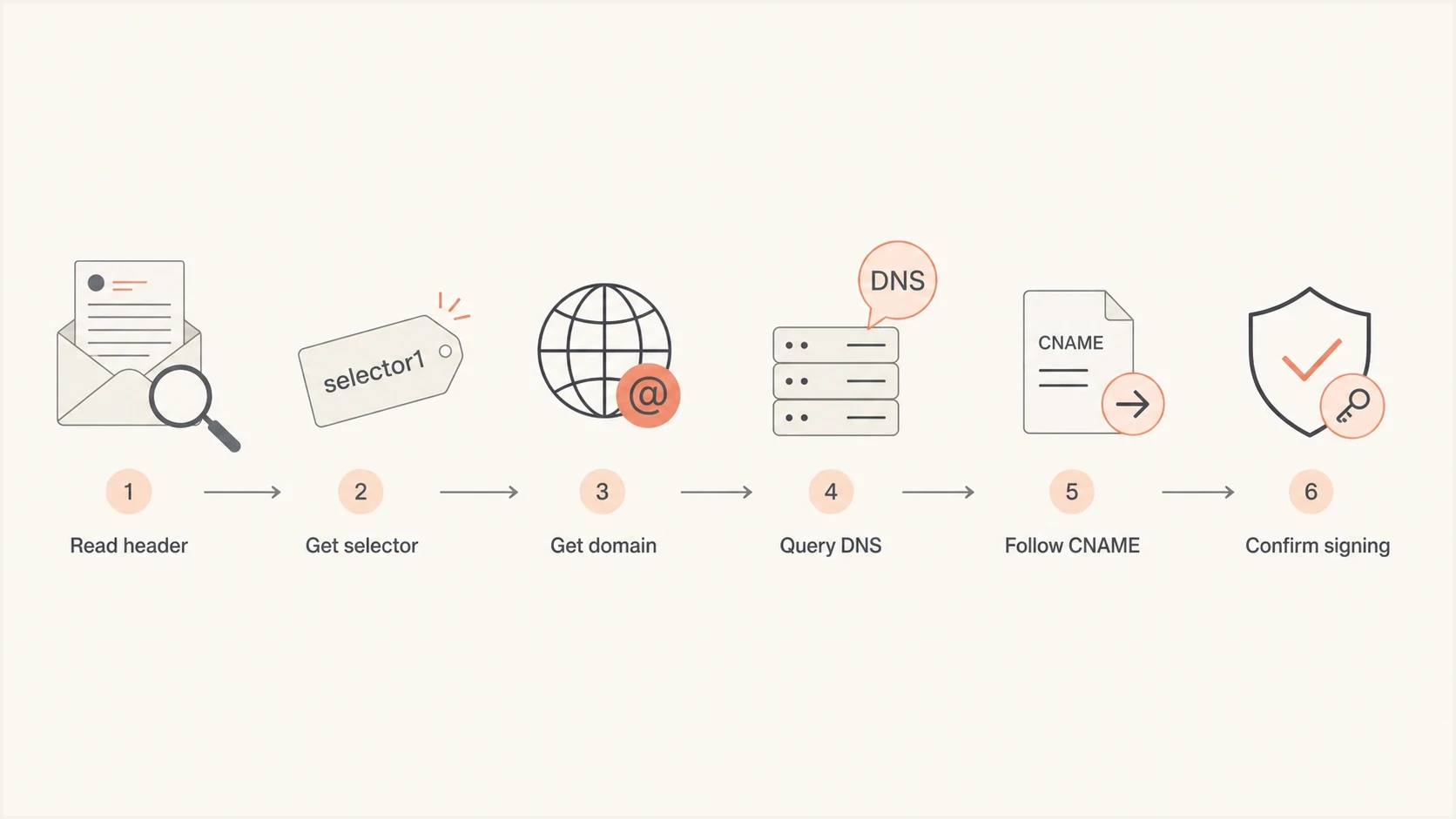
Flowchart showing DKIM validation checks from header to DNS.
How DKIM validation really finds the record
DKIM validation does not search every DKIM-looking record on a domain. It uses two values from the DKIM-Signature header on the actual email: s= for selector and d= for signing domain. The receiver combines those into one DNS lookup. If the header says s=mail and d=example.com, the lookup goes to mail._domainkey.example.com.
That detail matters because many setup screens show DKIM records before the sender starts using them. A branded sending domain can have three CNAMEs waiting in DNS, but a live message can still be signed by the platform's default domain until the branded domain is verified and enabled. In that state, the records can be accurate and still irrelevant to the email being tested.
DKIM lookup formulatext
DKIM-Signature: s=selector1; d=example.com;

DNS lookup:
selector1._domainkey.example.com
|
|
|
|---|---|---|
Selector | Header s= | Which key DNS must return |
Domain | Header d= | Where the key must live |
DNS host | NS query | Which zone is authoritative |
CNAME | DNS answer | Whether the provider target resolves |
DKIM validation inputs and what each one proves.
Check the authoritative DNS zone
The most common cause is a DNS authority mismatch. Someone adds the DKIM record to a panel they believe manages DNS, but the public internet asks a different provider. That can happen after a domain transfer, a Shopify domain setup, a storefront migration, a CDN change, or a split between registrar, DNS host, and website host.
This explains the frustrating case where the record is visible in a screenshot but every external lookup returns NXDOMAIN or no TXT record. The control panel is not lying. It is just not the public source of truth for that hostname. Confirm that before touching DKIM keys, because changing keys does nothing if the wrong nameservers are answering.
Authoritative DNS checksbash
dig NS example.com +short

dig TXT selector1._domainkey.example.com +short

dig CNAME selector1._domainkey.example.com +short
Do not judge DKIM by the DNS admin page alone. Judge it by the authoritative answer for the exact hostname. A missing answer from public DNS means receivers cannot validate that key, even when the UI shows the record.
- Check NS first: Find the nameservers before editing or reissuing DKIM records.
- Query exact names: Look up the full selector hostname, not only the root domain.
- Respect negative caching: After fixing the record, allow cached NXDOMAIN or empty answers to expire according to the applicable TTL.
Why multiple Amazon SES DKIM sets are usually fine
Two services using Amazon SES can both ask a customer to publish DKIM records. That alone does not create a conflict. DKIM selectors are namespaced under the signing domain, so each service can use different selectors and different CNAME targets. The conflict appears only if two records use the exact same hostname with different values, or if a sender tells the customer to publish records under a domain it does not sign with.
Valid coexistence
- Unique selectors: Each sender uses its own selector names.
- Same domain: Several selectors can live under one domain.
- Separate signing: Each email header points to the correct selector.
Actual conflict
- Duplicate name: Two values are published at the same DKIM hostname.
- Wrong zone: Records are created where public DNS never looks.
- Wrong header: The email signs with a different selector or domain.
In Amazon SES style setups, Easy DKIM records are often CNAMEs, not TXT records containing the public key. A receiver's TXT query still has to follow the CNAME chain. Validation fails if the public hostname is missing, its target is wrong, or the DNS chain returns SERVFAIL. Copy the current records for the correct AWS Region and account because identity settings can differ between them.
Example SES-style DKIM recordsdns
selector1._domainkey.example.com CNAME selector1.dkim.amazonses.com
selector2._domainkey.example.com CNAME selector2.dkim.amazonses.com
selector3._domainkey.example.com CNAME selector3.dkim.amazonses.com
A practical validation workflow
Use a narrow workflow because DKIM failures get messy fast when people jump between provider dashboards, DNS screenshots, and delivery reports. The question stays the same: can a receiver reconstruct the public key lookup from the message header and get the expected key?
- Pull a real header: Send a test email through the exact sending path and inspect the DKIM-Signature header.
- Copy selector: Use the s= value, not the selector you expected the sender to use.
- Copy domain: Use the d= value. DKIM uses it for the key lookup, while DMARC compares it with the visible From domain for alignment.
- Query DNS: Look up the full hostname built from selector, _domainkey, and signing domain.
- Trace authority: Confirm the public nameservers are the same place where the record was added.
- Retest signing: After DNS validates, send another email and confirm the sender is using the branded domain.
DKIM checker
Check selector records and public key configuration.
?/7tests passed
If the DNS lookup passes but the delivered message still fails DKIM, the problem has moved out of DNS. Check for body hash failures, message modification after signing, a mismatched private key, or a sender still signing with a legacy domain. For broader checks across DMARC, SPF, and DKIM, Suped's domain health check helps separate DNS publication problems from authentication and domain-match problems.
Provider screens can mislead you
Provider setup screens often compress several ideas into one row: the DNS record name, the selector, the target, and the validation state. That is convenient, but it can hide the detail that matters. A DNS Name field might expect only selector._domainkey, while another panel expects the full hostname. Some panels silently append the root domain, and some show records in a managed DNS view even when another zone answers public queries.
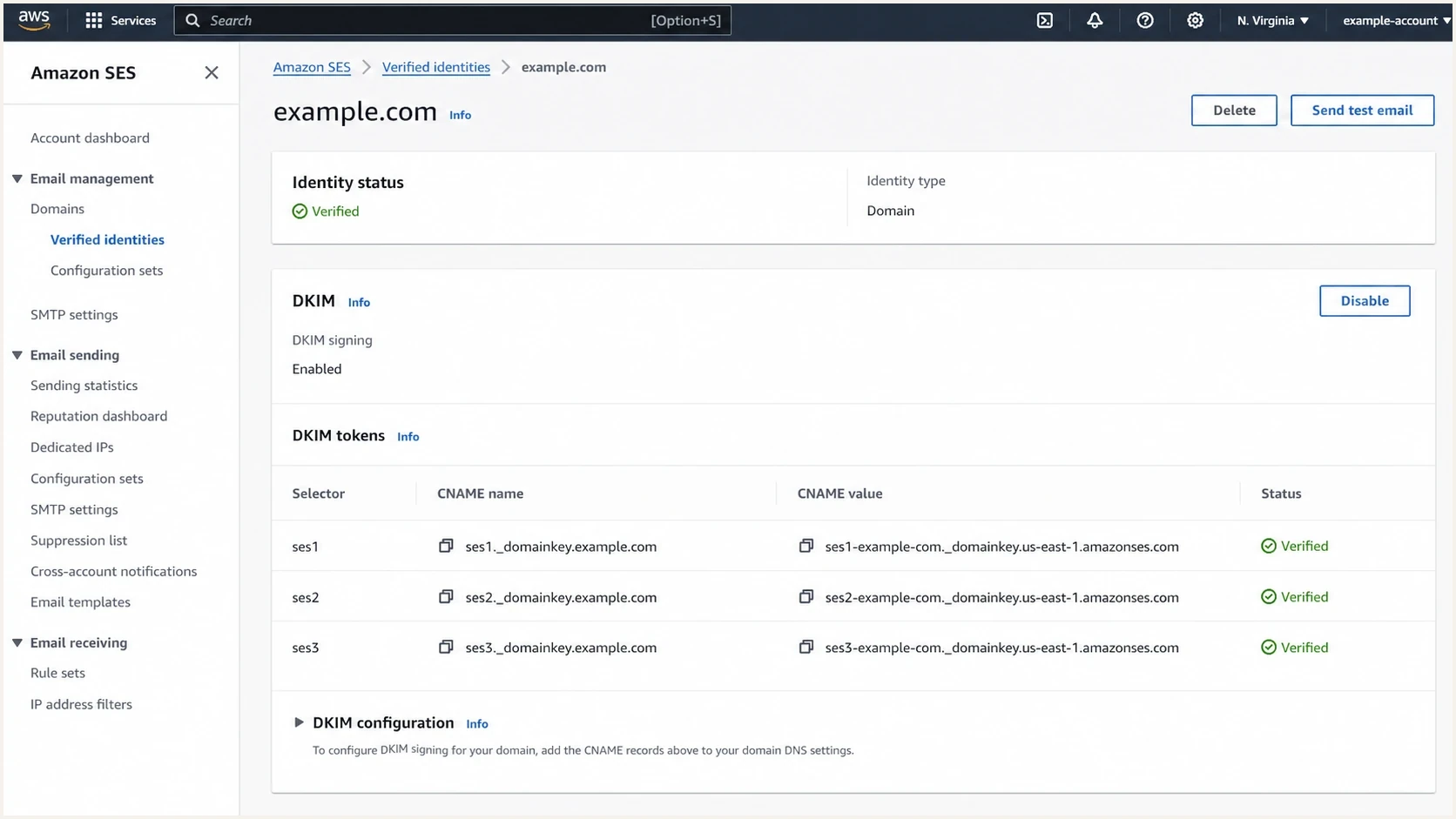
Amazon SES domain identity screen with DKIM CNAME records.
Write down the fully qualified record name you expect to exist, then query it directly. If the external lookup fails, stop comparing screenshots and trace the authoritative nameservers. If the lookup succeeds but the provider still says pending, check whether the provider expects a CNAME target, a TXT public key, or a region-specific hostname.
A DKIM record can be accurate and still fail if the exact public hostname does not return it. The most useful evidence is not a cropped screenshot. It is the selector, signing domain, record type, target value, authoritative nameservers, and raw DNS response.
How to interpret specific failure patterns
The error text usually points to the right layer. Treat DKIM validation as two separate questions: does DNS publish a usable key, and does the message verify against that key? A message can also carry more than one DKIM signature, so use the Authentication-Results header to identify which signature the receiver evaluated and why it failed.
|
|
|
|---|---|---|
NXDOMAIN | Wrong host | NS records |
SERVFAIL | Broken DNS chain | Authoritative server |
No key | Bad selector | Header s= |
Wrong domain | Default sender | Header d= |
Bad key | TXT syntax or truncation | Joined public key |
Hash fail | Message changed | Body hash |
Intermittent fail | Forwarding or multiple signatures | Authentication-Results |
Common DKIM symptoms and what to check next.
If the failure says the record is published but the key is invalid, look at syntax. DKIM public keys are sensitive to missing characters, broken quotes, semicolons, copied whitespace, and truncated TXT strings. For RSA errors, inspect the key format and length. A focused breakdown is useful when the error says invalid RSA key rather than no record found.
If the record validates but sent mail fails DKIM at the receiver, DNS is probably not the issue. Compare a direct delivery with the failed copy, then check for footers, link rewriting, forwarding systems, or mailing list software that changed signed content. That case is closer to a body hash failure than a DNS publishing failure.
Check long TXT keys for truncation
A 2048-bit RSA DKIM public key often exceeds the 255-octet limit for one character-string inside a DNS TXT record. DNS can store one TXT record as several adjacent quoted strings, and DKIM validators concatenate those strings without inserting spaces. A record can therefore look split in a DNS response and still be valid.
The failure occurs when a DNS panel truncates the key, changes the character order, inserts whitespace into the public key, or publishes the chunks as separate TXT records. Keep one TXT record at the selector hostname, split its value into adjacent strings only when the DNS host requires it, then compare the concatenated public answer with the complete generated key.
TXT chunking patterndns
selector1._domainkey.example.com. 3600 IN TXT (
  "v=DKIM1; k=rsa; p=FIRST_BASE64_CHUNK"
  "SECOND_BASE64_CHUNK"
)
Do not create two separate TXT records for one selector. DKIM expects the TXT record to be unique at that selector name, while multiple quoted strings inside the same TXT record are valid and are joined during verification.
Where Suped fits
Suped is our DMARC reporting and email authentication platform. It keeps DNS checks, authentication results, and DMARC reporting in one workflow, so teams can monitor policy, see DKIM and SPF results by source, and investigate setup changes without relying on provider status screens alone.
DMARC record detail view showing SPF, DKIM, DMARC, rDNS diagnostics, and DNS records
For teams managing several senders, the practical problem is not only whether one DKIM CNAME exists. It is whether every sender is signing with the expected domain, whether DKIM matches the From domain for DMARC, and whether new failures appear after a platform change. Suped's DMARC monitoring makes those patterns visible over time.
- Issue detection: Suped flags DKIM, SPF, DMARC, and DNS issues with steps to fix them.
- Source visibility: Suped shows which services are passing, failing, or sending without a DMARC domain match.
- Hosted controls: Hosted SPF, Hosted DMARC, and Hosted MTA-STS reduce DNS handoffs.
- Scale support: The MSP and multi-tenant dashboard helps manage many client domains in one account.
Views from the trenches
Best practices
Confirm the authoritative nameservers before trusting any DNS control panel screenshot.
Use the live email header selector and signing domain before checking a DKIM record.
Share copyable hostnames and DNS answers when asking others to review DKIM failures.
Common pitfalls
Adding records to a registrar panel fails when another provider hosts authoritative DNS.
Treating generated DKIM rows as active selectors leads teams to test the wrong key.
Assuming multiple SES senders conflict hides the simpler issue of missing DNS records.
Expert tips
Query the full DKIM hostname publicly, then compare that answer with the sender UI.
Separate DNS publication failures from signature verification and body hash failures.
Keep a written sender inventory so each platform has owner, selector, and domain data.
Expert from Email Geeks says the first check is whether public DNS has the DKIM key at the exact hostname built from the selector and signing domain.
2024-10-02 - Email Geeks
Expert from Email Geeks says screenshots are not enough for DKIM troubleshooting because reviewers need copyable selectors, domains, and raw DNS answers.
2024-10-02 - Email Geeks
Fix the lookup, then fix the sender
When DKIM records look accurate but will not validate, start with DNS authority and the header-derived lookup. If the public lookup cannot find the record, move the record to the authoritative DNS zone or correct the hostname format. If the public lookup works, send a fresh message and confirm the sender is signing with that selector and domain.
Published records prove only what DNS can answer. They do not prove the sender is using those records. Once both sides match, DKIM validation becomes predictable, and DMARC domain matching becomes much easier to manage.




