What is the difference between DKIM alignment and DKIM authentication and how do they relate to email bouncebacks and Hotmail blocks when using SFMC shared IPs?

Updated on 16 Aug 2026: We updated this guide for RFCs 9989, 9990, and 9991, plus Salesforce's current shared IP and DNS guidance.
DKIM authentication and DKIM alignment answer two different questions. DKIM authentication asks whether the DKIM signature actually validates against the public key in DNS. DKIM alignment asks whether the domain in the DKIM signature, the d= domain, matches the visible From domain closely enough for DMARC.
That distinction matters with SFMC shared IPs because a message can pass DKIM authentication, pass DKIM alignment, and still bounce at Hotmail. A passing signature shows that the holder of the signing domain's private key signed the message and that the signed content validated. It does not prove that Microsoft accepts the sending IP, shared pool, HELO name, campaign, or sender reputation.
The direct answer is this: if the Hotmail bounce says an IP or network is on a block list, the problem is a blocklist or blacklist decision, not proof that DKIM failed. If the bounce says HELO command rejected, the receiver rejected the SMTP conversation. That can sit in an SFMC "Authentication" category, but the wording itself means "not allowed", not "not authenticated".
The direct difference
Separate these checks before changing DNS. DKIM authentication is a cryptographic result. DKIM alignment is a DMARC domain-matching result. They often pass together, but they fail for different reasons and point to different fixes.
|
|
|
|
|---|---|---|---|
DKIM auth | Signature and DNS key | The signature validates | Fix selector, key, or body changes |
DKIM alignment | Signing and From domains | DMARC accepts the domain match | Use a signing domain tied to From |
DMARC pass | SPF or DKIM plus alignment | At least one method passes | Repair SPF or DKIM domain use |
How DKIM authentication, DKIM alignment, and DMARC relate.
Fast rule
- Authentication: The receiver recalculates the DKIM signature and gets a valid result.
- Alignment: The signing domain has the right relationship to the visible From domain.
- Deliverability: Mailbox providers still apply reputation, policy, content, and blocklist checks.
A useful mental model is: DKIM authentication shows that the signed parts of the message validated against the signing domain's key. DKIM alignment connects that signing domain to the visible author domain. DMARC needs either SPF or DKIM to both authenticate and align. If a message carries multiple DKIM signatures, one passing, aligned signature is enough for the DKIM path to satisfy DMARC.
How DKIM authentication is proven
A receiver verifies DKIM by reading the DKIM-Signature header, extracting the selector from s= and the signing domain from d=, then looking up the public key at selector._domainkey.domain. The name can return the TXT key directly or a CNAME that leads to it. If the body hash and the signature over the signed header fields validate, DKIM authentication passes.
DKIM signature and DNS lookup patterntext
DKIM-Signature: v=1; a=rsa-sha256; c=relaxed/relaxed;
 d=email.example.com; s=sfmc1; h=from:subject:date:to;
 bh=BASE64_BODY_HASH; b=BASE64_SIGNATURE

sfmc1._domainkey.email.example.com.  TXT  "v=DKIM1; k=rsa; p=MIIB..."
When a checker says DKIM is not authenticated, common causes include a missing selector, the wrong public key, a stale DNS record, a broken key format, or a signed header or body that changed after signing. If you only have the raw message header, pull s= and d= first. Then run a DKIM checker against that selector and domain.
DKIM checker
Check selector records and public key configuration.
?/7tests passed
A common trap is checking the From domain when the actual DKIM signing domain is a delegated SFMC subdomain. The verifier follows the DKIM header. If the header says d=email.example.com, the DNS key must exist under that domain, even if the visible From address uses example.com.
How DKIM alignment is judged by DMARC
DKIM alignment compares the d= domain in the DKIM signature with the visible 5322.From domain. In relaxed mode, a subdomain match is accepted when both domains have the same Organizational Domain. In strict mode, the domains must match exactly.
RFC 9989 is the current DMARC protocol standard and obsoletes RFCs 7489 and 9091. It uses the DMARC Tree Walk to find the Organizational Domain, so relaxed alignment is not a simple last-two-label comparison. RFC 9990 now defines aggregate reporting, while RFC 9991 defines failure reporting.
DMARC alignment mode exampledns
_dmarc.example.com.  TXT  "v=DMARC1; p=none; adkim=r; aspf=r;
 rua=mailto:dmarc@example.com"
Relaxed DKIM alignment
- From: news@example.com
- Signing: email.example.com
- Result: Accepted because both domains share example.com.
Strict DKIM alignment
- From: news@example.com
- Signing: email.example.com
- Result: Rejected because the domains are not identical.
Some diagnostics show "DKIM alignment" by only comparing the two domain names. DMARC itself still needs the DKIM signature to pass. If the signing domain matches the From domain but the body hash fails, that message does not get a DKIM-based DMARC pass.
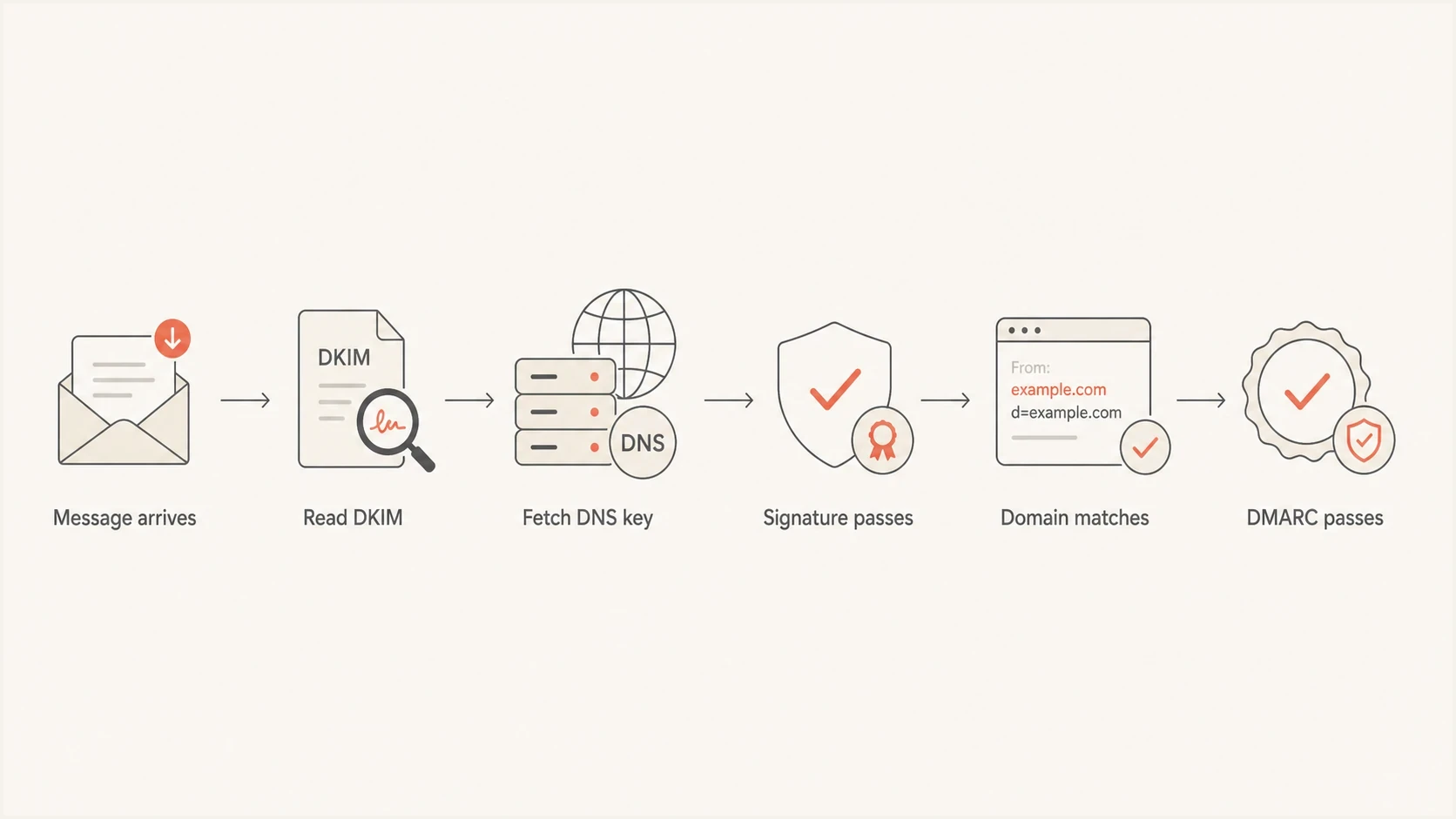
Flowchart showing DKIM signature validation before DMARC domain matching.
How SFMC changes the checks
With Salesforce Marketing Cloud Engagement, a full Sender Authentication Package can cover email authentication and URL branding, while a standalone Private Domain is for authentication only and can keep a Salesforce shared IP assignment. The sending domain can use DNS delegated to Salesforce or DNS that your organization self-hosts. These choices are separate from whether a message-level DKIM signature validates.
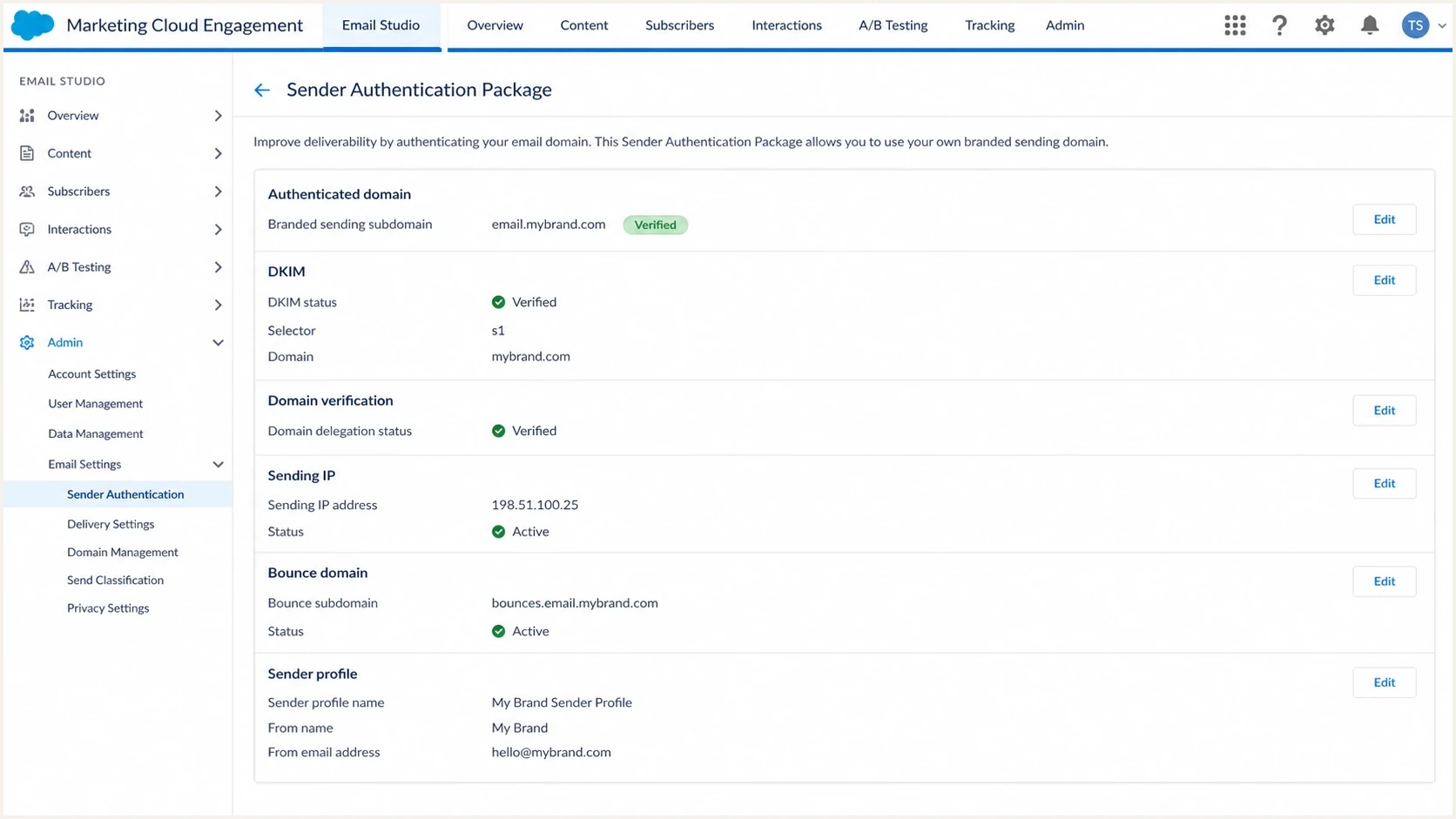
Salesforce Marketing Cloud Email Studio domain authentication settings screen.
Typical SFMC subdomain delegationdns
email.example.com.  NS  ns1.exacttarget.com.
email.example.com.  NS  ns2.exacttarget.com.
email.example.com.  NS  ns3.exacttarget.com.
email.example.com.  NS  ns4.exacttarget.com.
Use the name servers shown for the account rather than copying an example blindly. Salesforce documents exacttarget.com name servers for standard Engagement delegation and ums-dns-salesforce.com name servers for Hyperforce. In either case, DNS delegation proves Salesforce controls that subdomain. A delivered message shows which domain SFMC actually used in d= and whether the receiver accepted the signature.
|
|
|
|---|---|---|
No DKIM key | Delegation or selector | Confirm s= and DNS |
Body hash fail | Message changed | Inspect template and forwarding |
Domain mismatch | Sender profile | Compare From and d= |
Hotmail block | IP reputation | Review bounce code |
SFMC checks that map to the actual failure point.
Do not change DNS blindly
If SFMC owns the delegated subdomain, adding random DKIM records at the parent domain does not fix the signature SFMC is using. Pull the raw header first, identify the selector and signing domain, then test that exact pair.
Bouncebacks are separate evidence
The bounce text matters more than the bounce category shown inside a sending platform. "Delivery not authorized" is SMTP language for not allowed or not permitted. It does not automatically mean the message failed DKIM, SPF, or DMARC.
Two bounce patterns that get misreadtext
554 5.7.1 delivery not authorized:
<aku11.mta.exacttarget.com>: Helo command rejected: Access denied

550 5.7.1 delivery not authorized:
messages from [128.245.242.10] weren't sent.
part of their network is on our block list (S3140)
The HELO rejection points to the receiver rejecting the SMTP greeting or a policy attached to that sending host. If the HELO name is valid, the practical reading is that the receiver is blocking the SFMC sending infrastructure or that sender's route. That is different from DKIM.
The Hotmail S3140-style message is more direct. It identifies a Microsoft-controlled blocklist decision for the sending IP or part of its network, even when public blacklist checks show no listing. The exact NDR still controls the response path because Outlook.com consumer addresses and Microsoft 365 business recipients use different mitigation routes. If the error specifically names DKIM at Outlook.com or Hotmail, compare it with Hotmail DKIM failures.
How to read the bounce evidence
The bounce wording tells you whether to debug authentication or sending reputation.
Direct auth failure
Debug DNS and headers
The bounce says DKIM, SPF, or DMARC failed.
Authorization language
Read the next clause
The bounce says not authorized, access denied, or not permitted.
HELO rejection
Check route policy
The bounce rejects the sending host name or SMTP greeting.
Blocklist wording
Handle reputation
The bounce says the IP or network is on a block list.
Authentication issue
- Evidence: Receiver says DKIM, SPF, or DMARC failed.
- Data: Raw headers and DMARC aggregate results show failures.
- Fix: Repair signing, DNS, sender domain use, or SPF path.
Reputation or policy issue
- Evidence: Receiver names a blocklist, HELO rejection, or access policy.
- Data: Authentication passes in real messages and DMARC reports.
- Fix: Work on reputation, warming, list quality, and provider escalation.
What to check next
Start with a real delivered message, not only a platform status screen. Send a campaign-style test through the same SFMC business unit, sender profile, From domain, and IP pool used for production. Then compare the raw header result with aggregate DMARC data and the exact bounce text.
- Pull: Copy the DKIM-Signature header and note s=, d=, and the Authentication-Results line.
- Validate: Check the selector record that matches the header, not the domain you expected.
- Compare: Confirm DKIM and SPF results in DMARC aggregate reports for Hotmail traffic.
- Classify: Separate authentication failures from HELO, policy, blocklist, and blacklist language.
- Escalate: Give SFMC and Microsoft the bounce code, IP, timestamp, and message sample.
Suped's DMARC and email authentication product groups aggregate DMARC results by sending source, shows SPF and DKIM authentication with alignment, and adds blocklist or blacklist alerts. For this workflow, use those results to confirm whether SFMC traffic passes DMARC before treating a Hotmail rejection as a DNS problem.
DMARC record detail view showing SPF, DKIM, DMARC, rDNS diagnostics, and DNS records
For a one-off check, run a domain health check to confirm the public DNS state. For ongoing sender protection, DMARC monitoring is the better control because it shows which sources pass, which fail, and which failures affect real mail.
Shared IPs change the Hotmail diagnosis
On a shared SFMC IP, your mail shares reputation signals with other senders in that pool. Your domain reputation still matters, but Microsoft also sees the IP and network history. A new sending domain has little direct history for its traffic pattern, so shared-pool reputation and early recipient response carry more weight.
What the Hotmail block means
A Hotmail block that names the sending IP is a deliverability and reputation problem. DKIM still needs to be correct, but fixing DKIM does not remove an IP-level blocklist or blacklist decision.
The practical path is to keep authentication clean, warm carefully, reduce complaint risk, and follow the response path named in the NDR with evidence. SFMC also needs the exact IP, bounce code, timestamp, account details, and sample message because it controls the shared infrastructure.
|
|
|
|---|---|---|
Pool reputation | Neighbors affect the same IP | Ask SFMC to review pool health |
New sending | Hotmail lacks history | Warm volume in stages |
List quality | Complaints damage reputation | Suppress risky segments |
Bounce code | Tells you the block type | Track each code separately |
Shared IP diagnosis for Hotmail blocks.
A dedicated IP gives more direct control over IP reputation, but it also puts the whole warming burden on you. Salesforce currently positions shared IPs for accounts sending fewer than 100,000 emails per month, recommends a dedicated IP above 100,000, and requires one above 250,000. The decision should still come after you know whether the current block is tied to your domain, mail stream, shared pool, or a specific Microsoft policy response.
Views from the trenches
Best practices
Pull the raw DKIM-Signature header first, then test the exact selector and domain.
Keep SFMC delegation checks separate from message-level DKIM verification results.
Use exact bounce codes and timestamps when escalating Hotmail blocks with support.
Common pitfalls
Treating every 5.7.1 bounce as an authentication failure hides reputation blocks.
Testing the visible From domain instead of the DKIM signing domain creates false alarms.
Assuming shared IP reputation is clean because domain authentication passes is risky.
Expert tips
Compare a real mailbox header with DMARC aggregate data before changing DNS records.
Check whether the body hash failure repeats before blaming the SFMC domain setup.
Track Hotmail blocks apart from Gmail or Yahoo results because each provider differs.
Marketer from Email Geeks says DKIM authentication means the signature passed, while DKIM alignment checks whether the signing domain matches the visible From domain.
2024-01-11 - Email Geeks
Marketer from Email Geeks says a matching signing domain is not enough when the body hash fails, because DMARC needs a passing DKIM result.
2024-01-11 - Email Geeks
The practical takeaway
DKIM authentication, DKIM alignment, and Hotmail acceptance are connected, but they are not the same result. DKIM authentication proves the signature validates. DKIM alignment proves the signing domain matches the From domain well enough for DMARC. Hotmail acceptance depends on additional reputation and policy checks after authentication.
For an SFMC shared IP sender, do not treat an S3140 or HELO rejection as a DKIM problem without direct header evidence. Keep the delegated or self-hosted domain and DKIM selector correct, then handle the Hotmail block using the exact bounce text, IP, timestamp, and sample message.




