Why does DKIM fail for Outlook.com and Hotmail.com?

Published 4 Jun 2026
Updated 10 Aug 2026
11 min read
Summarize with

Updated on 10 Aug 2026: We expanded the troubleshooting path for attachment-related failures, malformed message formatting, and DKIM DNS formatting at Microsoft inboxes.
DKIM fails for Outlook.com and Hotmail.com when Microsoft cannot verify a signature against the selected public key and canonicalized message. The common symptom is dkim=fail with a note such as signature did not verify or body hash did not verify. The reason text determines whether to inspect DNS and the key, signed headers, or changes to the message body.
The fastest first step is to validate the selector, public key, and syntax with a DKIM checker. If the DNS record is valid, compare the message source before and after delivery. That comparison exposes MIME, encoding, footer, tracking, and attachment rewrites that a rendered inbox view hides.
The short answer
DKIM usually fails at Outlook.com and Hotmail.com because the signed bytes changed after signing. Start with encoding and MIME construction, especially when plain messages pass but messages with an attachment or embedded image fail. Quoted-printable wrapping, base64 conversion, line ending changes, footer injection, click tracking, open tracking, unsubscribe rewriting, or an MTA that changes MIME boundaries after signing will break the body hash. If the message bytes are stable, check the selector, public key, signed headers, and RFC formatting.
- Encoding: Quoted-printable, base64, 8bit conversion, and line wrapping can change the body hash.
- Rewrites: Footers, tracking links, open pixels, and unsubscribe text must be added before signing.
- Selector: A stale selector, wrong key, malformed DNS TXT record, or bad key split breaks verification.
- Message format: Malformed headers or MIME can produce a Microsoft-only failure even when another receiver accepts the message.
- Domain: The DKIM signing domain must be intentional and align with the visible From domain for DKIM-based DMARC authentication.
Do not treat matching Outlook.com and Hotmail.com failures as random receiver behavior. The same result usually points to a repeatable defect in the delivered message, DNS key, signing identity, or message formatting.
What dkim=fail means at Microsoft
The distinction between dkim=none and dkim=fail matters. None means Microsoft found no DKIM signature. Fail means a signature existed but verification failed. A missing selector or mismatched public key produces a different investigation from a body hash failure, so read the comment attached to the result before changing DNS or mail flow.
Example Microsoft authentication resulttext
Authentication-Results: spf=pass smtp.mailfrom=example.com;
dkim=fail (body hash did not verify) header.d=example.com;
dmarc=fail action=none header.from=example.com
A January 2026 Microsoft Answers case documents a useful split test: messages without attachments or embedded images pass at Outlook.com, while messages containing them fail. Send controlled variants and compare the body portion of each delivered EML file.
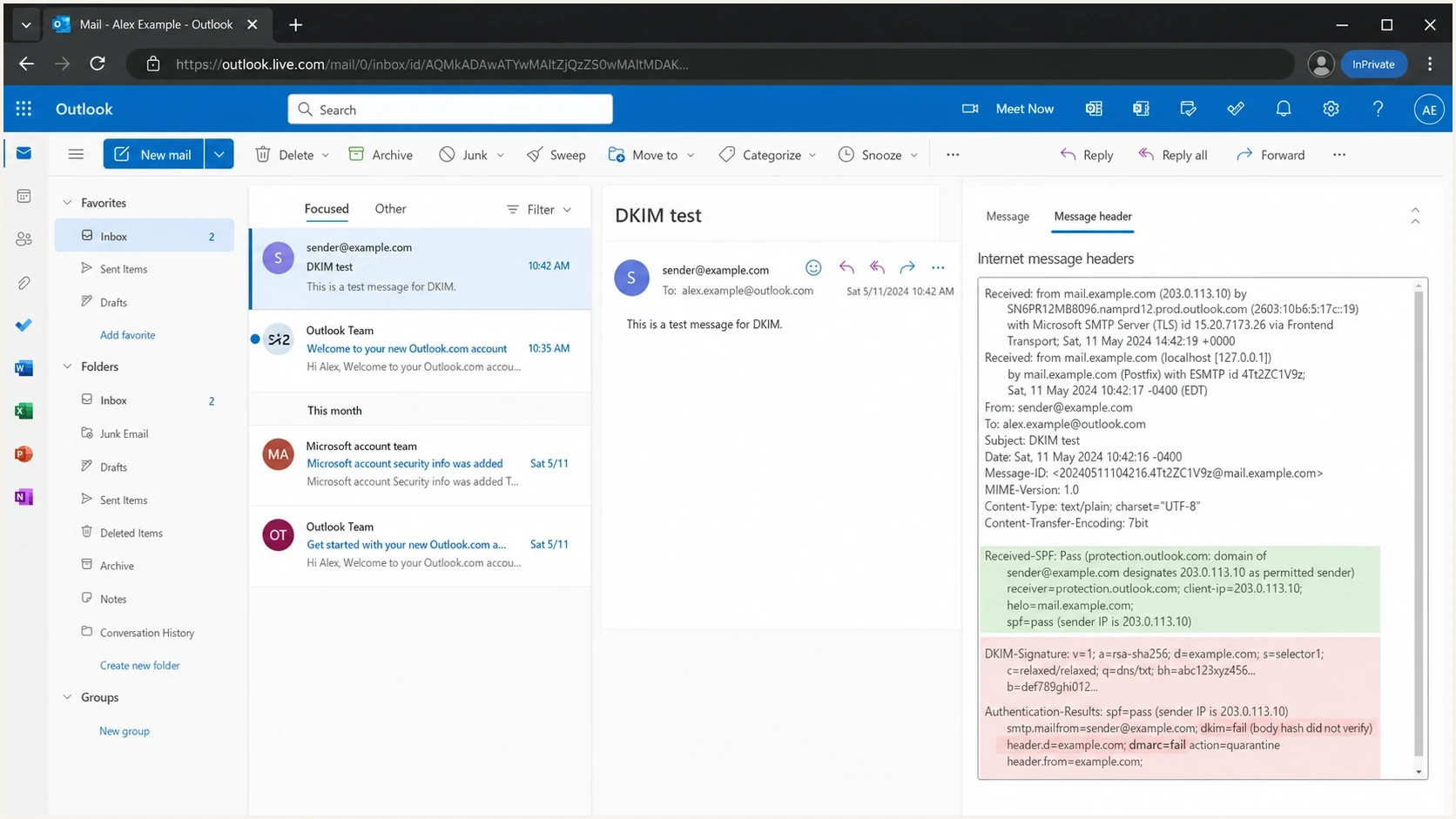
Outlook.com message details showing a DKIM body hash failure.
Common causes
When Outlook.com or Hotmail.com reports DKIM failure, separate the causes into the message bytes, signature or key, and message format. That split keeps troubleshooting practical and stops the investigation from bouncing between DNS and content without evidence.
|
|
|
|---|---|---|
Encoding changed | Body hash fails | Sign last |
Footer added | Body hash fails | Move rewrite |
MIME altered | Body hash fails | Freeze MIME |
Wrong selector | Key fails | Publish key |
Stale key | Key fails | Rotate safely |
Header rewritten | Header fails | Sign stable headers |
Malformed header | Signature fails | Fix before signing |
Domain mismatch | DMARC fails | Align domain |
Common Outlook.com and Hotmail.com DKIM failure causes.
A valid DNS key does not prove the delivered message still matches the signed body. An aligned From domain does not prove the signature verified. Keep verification, alignment, and message compliance as separate facts.
Encoding and body hash problems
The body hash is the DKIM hash of the canonicalized body. If Microsoft says the body hash did not verify, the body Microsoft evaluated is not the body your signer hashed. Relaxed canonicalization reduces sensitivity to whitespace at line ends and empty lines at the end of the body, but it does not protect against content, MIME, or transfer-encoding changes.
What to inspect first
- Transfer encoding: Check whether a hop changed quoted-printable, base64, or 8bit content.
- Line endings: Confirm CRLF handling is stable through the final outbound MTA.
- MIME boundaries: Check whether multipart boundaries or content-transfer headers changed.
- Late changes: Move link tracking, footers, and unsubscribe text before DKIM signing.
If this is your exact error, use the focused body hash guide after you capture the raw source. Do not rely on the rendered email view. You need the raw delivered message, including headers and MIME parts.
DKIM signature fields to comparetext
DKIM-Signature: v=1; a=rsa-sha256; c=relaxed/relaxed;
 d=example.com; s=selector1;
 h=from:to:subject:date:mime-version:content-type;
 bh=Qm9keUhhc2hFeGFtcGxlMTIzNDU=;
 b=U2lnbmF0dXJlRXhhbXBsZTEyMzQ1...
Pay close attention to the h= list. If your signer includes a header that a later system rewrites, the signature fails even when the body is stable. Sign the required From field and other stable fields your mail flow can preserve. The exact list must match the way the message is produced and relayed.
Check RFC-compliant message and DNS formatting
A message that another receiver accepts can still expose a DKIM failure at Outlook.com or Hotmail.com when its headers, MIME structure, or DKIM TXT data are malformed. Fix the source message before signing. Do not depend on a receiver to repair or tolerate invalid syntax.
- Required headers: Generate one valid Date field and one valid From field before DKIM signing.
- Header encoding: Encode non-ASCII display names and subjects with valid encoded-word syntax.
- MIME structure: Remove duplicate MIME-Version fields and validate boundaries, part headers, and closing delimiters.
- Line format: Use CRLF line endings and valid header folding before the message reaches the signer.
- DKIM TXT data: Remove unintended leading or trailing spaces and tabs, then confirm split TXT strings assemble into one valid tag list.
Controlled MIME test settext
Test 1: plain text only
Test 2: same message plus one attachment
Test 3: same message plus one embedded image

Compare the outbound and delivered EML for each test.
If only the attachment or embedded-image tests fail, inspect the component that builds multipart MIME and the outbound hop that applies transfer encoding. The DKIM key is less likely to be the cause when the same selector verifies for the plain message.
Domain matching is not the same problem
A domain mismatch can break DMARC even when DKIM passes, but it is different from signature verification. If the visible From domain is website.com and the DKIM signing domain is sub.website.com, relaxed DMARC alignment normally treats them as aligned under the same organizational domain. Strict alignment requires an exact domain match. Signing with the visible From domain or its controlled subdomain also makes sender ownership easier to audit.
Signature verification
This answers one question: did the signature verify against the public key and canonicalized message?
- Pass: The signed content and key match.
- Fail: The signature, body hash, header hash, or key check failed.
DMARC domain alignment
This answers a separate question: does the authenticated domain align with the visible From domain under the DMARC policy?
- Relaxed: A shared organizational domain passes.
- Strict: The authenticated domain must exactly match the From domain.
Do not stop at alignment when the result says signature did not verify. Alignment answers the DMARC identity question. It does not prove that the DKIM signature is valid.
A practical diagnostic flow
Start with the reason text, rule out DNS, and then compare exact message sources. Use controlled content variants when attachments or embedded images correlate with the failure. This sequence identifies whether the fault begins in key publication, message generation, or a later relay.
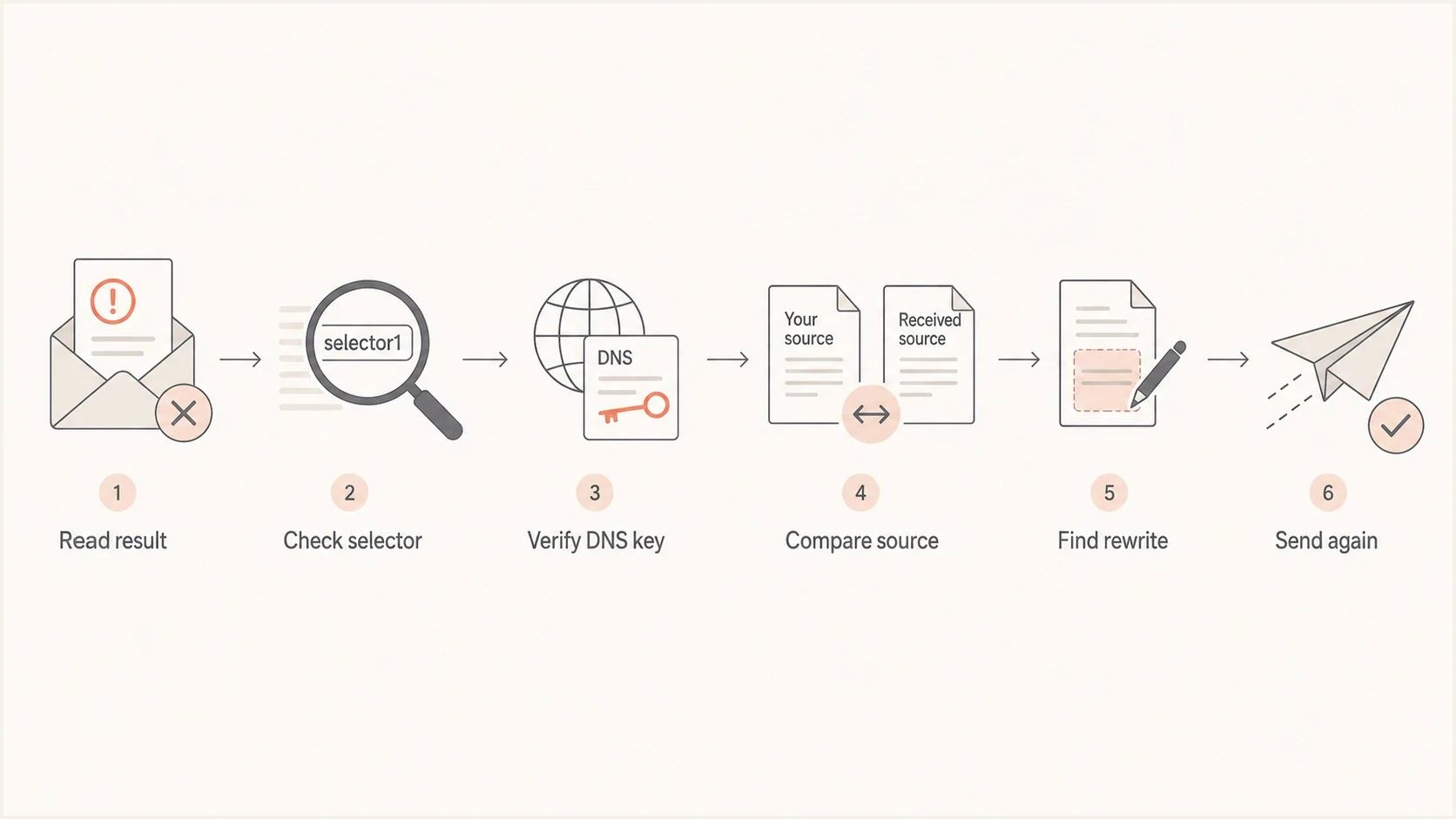
Flowchart for diagnosing DKIM failures at Outlook.com and Hotmail.com.
- Read the result: Capture the full Authentication-Results header from Outlook.com or Hotmail.com.
- Check DNS: Confirm the selector exists, the key is current, and the TXT record assembles without malformed tags or unintended whitespace.
- Test content variants: Send a plain message first, then repeat with one attachment and again with one embedded image.
- Compare source: Save the signed outbound source and delivered EML files, then compare headers, MIME boundaries, and transfer encoding.
- Remove rewrites: Disable late footers, tracking, gateway changes, and MIME conversion, then send a clean test.
- Retest Microsoft: Send the corrected message to both Outlook.com and Hotmail.com and confirm dkim=pass in the delivered headers.
DKIM checker
Check selector records and public key configuration.
?/7tests passed
For a wider check across DMARC, SPF, DKIM, DNS, and reputation signals, run the domain health checker after the focused selector test. That catches an adjacent problem, such as a broken SPF record or missing DMARC rua address, without distracting from the DKIM root cause.
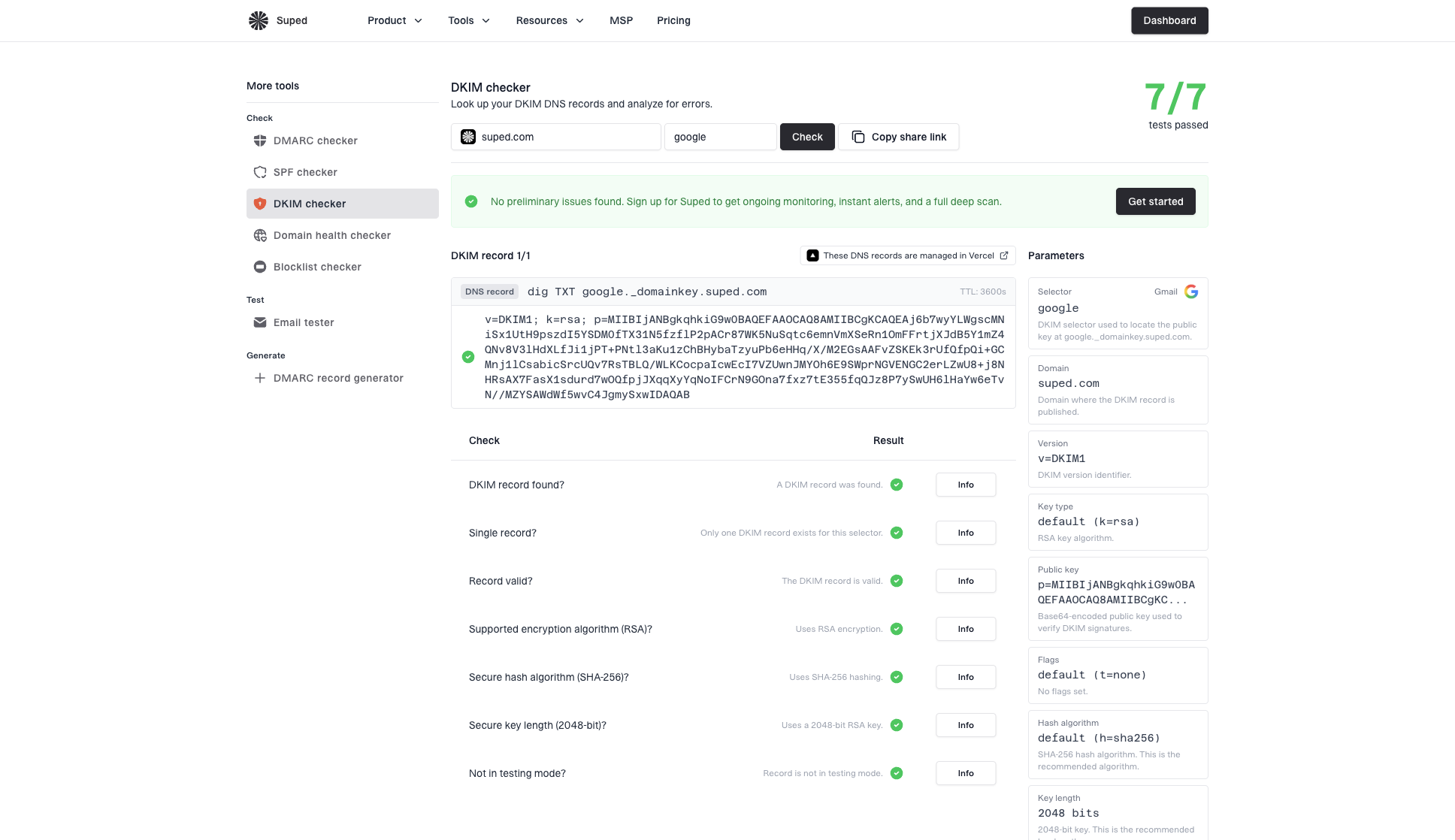
DKIM checker sample results showing selector, DKIM DNS record, validation checks, parameters, and share link
Fixes that work
Once you know the failure category, apply the narrow fix. The last system that changes the message must run before the DKIM signer. If an ESP signs the message and another gateway later adds legal text, tracking, a security banner, or a MIME conversion, the DKIM body hash no longer describes the final message.
Troubleshooting signal strength
Use the receiver result to decide which fix path deserves attention first.
Strong body signal
Inspect rewrites
The result says body hash did not verify.
Strong DNS signal
Fix DNS
The selector or key cannot be found or parsed.
Strong identity signal
Fix alignment
DKIM passes, but DMARC fails.
Healthy signal
Monitor
DKIM passes and DMARC passes at Microsoft.
- Sign last: Move DKIM signing after content generation, tracking, footer insertion, and MIME assembly.
- Stabilize encoding: Set one transfer-encoding policy and stop later hops from converting it.
- Fix message syntax: Generate compliant headers and MIME before signing instead of relying on receiver repair.
- Simplify signing: Avoid signing optional headers that downstream systems routinely add or rewrite.
- Rotate keys: Publish the new selector before traffic uses it, then retire the old selector after queues clear.
- Retest Microsoft: Do not close the incident until Outlook.com and Hotmail.com both show a DKIM pass.
DKIM DNS record shapedns
selector1._domainkey.example.com. 3600 IN TXT (
  "v=DKIM1; k=rsa; "
  "p=MIIBIjANBgkqhkiG9w0BAQEFAAOCAQ8A..."
)
If an authorized forwarding service or gateway must change a message after the original signature, ARC can record the authentication state seen before the change. ARC does not turn the original dkim=fail into dkim=pass; the receiver decides whether to trust the ARC chain.
If the failure appears around Microsoft 365 rather than consumer Outlook.com or Hotmail.com, use the Office 365 DKIM path as a separate investigation. The symptoms overlap, but hosted Microsoft 365 mail and consumer Outlook.com mail do not always expose the same failure mode.
Where Suped fits
Suped is our DMARC reporting and email authentication platform. For this problem, use Suped to identify sending sources with DKIM failures reported by Microsoft receivers, separate authorized senders from unknown sources, and turn each failure into a DNS or mail-flow task. One failing source can hide inside otherwise healthy aggregate DMARC numbers.
The practical workflow combines DMARC monitoring with SPF and DKIM checks, hosted authentication records, blocklist monitoring (blacklist monitoring), alerts, and source-level issue detection. Filter the failing Microsoft-reported traffic by source, verify its selector, fix the responsible mail path, and watch later reports for regression.

Issue steps to fix dialog showing the issue overview, tailored fix steps, and verification action
Pair one-off DKIM tests with continuous reporting. Use direct tests to prove the DNS record and delivered message source, then use Suped to catch the next Outlook.com or Hotmail.com failure spike before it affects a larger share of mail.
Views from the trenches
Best practices
Sign after final MIME, header, footer, and tracking changes so DKIM covers the final bytes.
Test with Outlook.com and Hotmail.com seed inboxes before increasing DMARC enforcement.
Keep selector records current and documented so stale keys are easy to spot during incidents.
Common pitfalls
Assuming dkim=fail means DMARC domain matching failed, when the signature did not verify.
Rotating DKIM keys without checking old selectors still used by queues or ESP pools.
Letting an MTA change quoted-printable, base64, line endings, or MIME boundaries after signing.
Expert tips
Compare the signed source with the delivered source and inspect body hash differences first.
Use relaxed body canonicalization, but remove rewrite steps that alter MIME structure.
Monitor aggregate DMARC reports for receiver-specific failure spikes by sending source.
Marketer from Email Geeks says Outlook.com and Hotmail.com failures often start with the signing domain, especially when an ESP signs with a domain that differs from the visible From domain.
2017-10-05 - Email Geeks
Marketer from Email Geeks says dkim=none and dkim=fail need different investigations because dkim=fail means Microsoft found a signature but could not verify it.
2017-10-05 - Email Geeks
What to fix first
If Outlook.com and Hotmail.com both fail DKIM, start with the result string. Body hash errors point to encoding, MIME, footer, tracking, or other changes after signing. Signature verification errors without a body hash clue point to selector, public key, signed-header, and message-format checks. DMARC failures with DKIM pass point to alignment rather than the DKIM signature itself.
The fix that closes most incidents is signing the final, RFC-compliant message. Validate the selector, send fresh tests to both Microsoft consumer domains, and monitor aggregate reports so the same source does not quietly regress.




