How to fix DKIM body hash did not verify errors on Outlook.com and prevent emails from going to spam?

Updated on 11 Aug 2026: We added Microsoft's enforced high-volume sender rules and tightened the troubleshooting steps around MIME changes, gateways, and canonicalization.
Fix this by proving whether the message body changes after DKIM signing, then removing that change in the ESP or sending pipeline. A bad subject line is not the usual cause of a body hash did not verify result. The subject sits in the signed header set, but the bh= value is calculated over the body. When Outlook.com is the only receiver reporting the failure, check MIME structure, transfer encoding, line wrapping, non-ASCII content, tracking rewrites, footers, and the point where DKIM signing happens.
After DKIM verifies again, treat any remaining Junk placement as a separate problem. DMARC can pass because SPF passes and aligns with the visible From domain, even while DKIM fails. For domains sending at least 5,000 messages per day to Microsoft consumer email services, DMARC pass alone is not enough: Microsoft also requires both SPF and DKIM to pass and can reject noncompliant mail.
What the error means
DKIM signs selected headers and a canonicalized version of the body. The receiving server recalculates the body hash and compares it to the bh= value in the DKIM-Signature header. If the recalculated body hash differs, Outlook.com reports body hash did not verify. That points to changed serialized body bytes or a difference in body canonicalization.
Typical Authentication-Results headertext
Authentication-Results: hotmail.com;
 spf=pass smtp.mailfrom=newsletter.example;
 dkim=fail (body hash did not verify) header.d=newsletter.example;
 dmarc=pass action=none header.from=newsletter.example
Do not chase the subject first
A malformed subject can break DKIM if the subject header is signed and the header bytes change, but that usually appears as signature verification failure, not a body hash mismatch. With this specific error, inspect the message body and MIME layer before changing subject text.
|
|
|
|---|---|---|
SPF pass | Sending IP was authorized | Check alignment |
DKIM fail | Canonicalized body hash did not match | Compare raw body bytes |
DMARC pass | Aligned SPF or DKIM passed | Check Outlook volume rules |
How to read the main authentication signals.
Fix sequence for Outlook.com
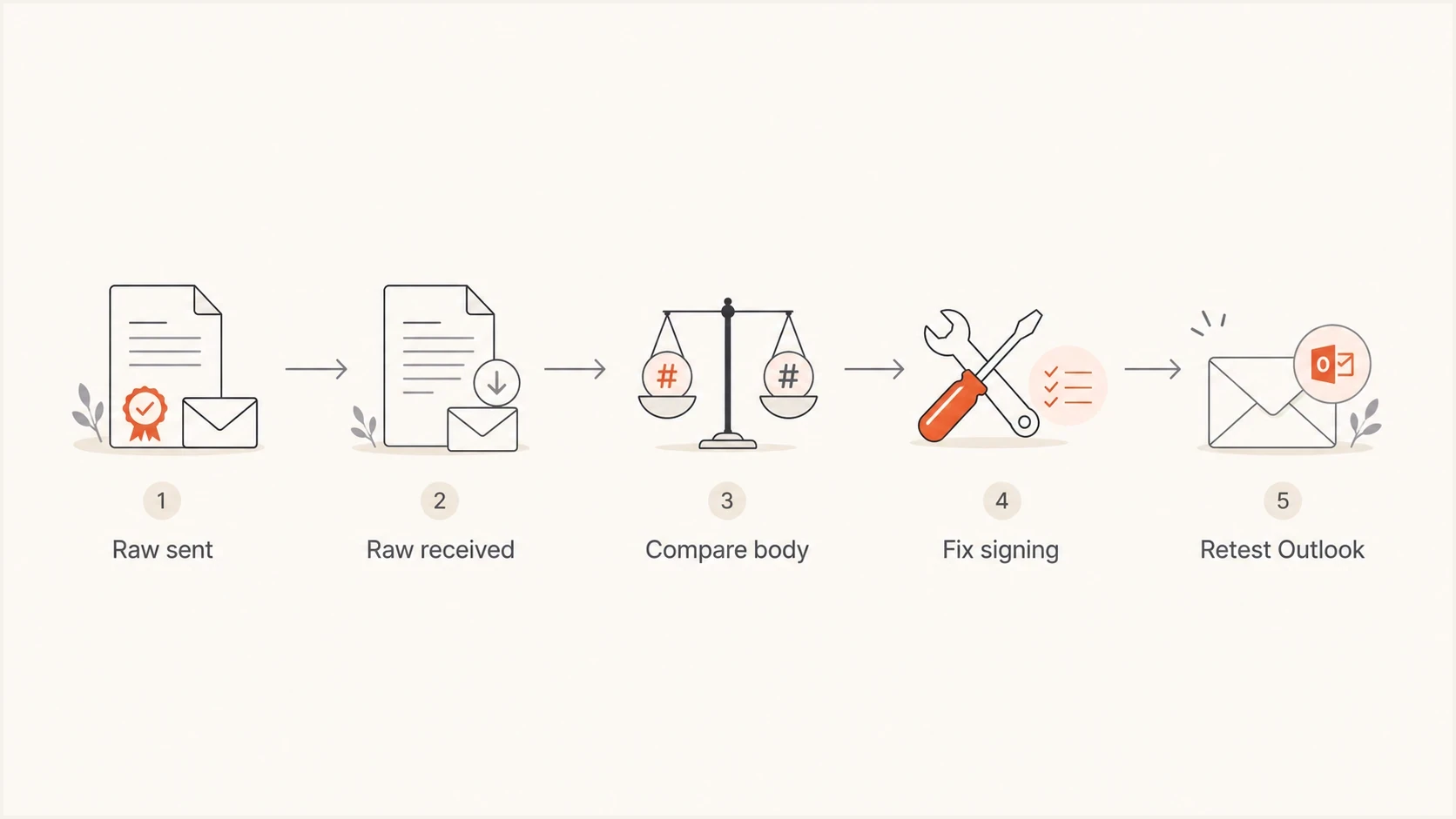
A five-step flow from raw message capture to Outlook.com retesting.
Use a fixed order because random DKIM record changes waste time. If the same message passes at other receivers and fails at Outlook.com, the public key is less likely to be the root cause. The useful evidence is the raw MIME source before sending and the raw MIME source after Outlook.com receives it.
- Capture source: Save the exact raw message generated by the ESP before final handoff, including MIME boundaries, headers, transfer encoding, and body bytes.
- Save Outlook: Send the same campaign to an Outlook.com or Hotmail.com seed address, then export the received message source.
- Compare body: Diff the MIME body, not the rendered HTML. Look for changed line endings, folded encoded lines, rewritten transfer encoding, appended footers, tracking pixels, or bytes added after the closing HTML.
- Check signing: Confirm DKIM is applied after personalization, unsubscribe blocks, tracking links, click tracking, attachments, and final MIME assembly.
- Retest safely: Send a small plain text test, then a minimal HTML test, then the production template. Stop when the failure appears.
The strongest single clue is the complete DKIM-Signature header. Many senders use c=relaxed/relaxed. Relaxed body canonicalization removes whitespace at line ends, compresses whitespace runs within a line, and ignores empty lines at the end of the body. It does not tolerate inserted footers, rewritten URLs, changed transfer encoding, or rewrapped encoded data. If the signature uses simple body canonicalization, ask the ESP whether relaxed body canonicalization fits the sending path. If it already uses relaxed/relaxed, inspect MIME encoding and post-signing changes. The broader body hash fixes follow the same evidence-first pattern.
DKIM-Signature fields to inspecttext
DKIM-Signature: v=1; a=rsa-sha256; c=relaxed/relaxed;
 d=example.com; s=s1; bh=BASE64BODYHASH;
 h=from:to:subject:date:mime-version:content-type;
 b=BASE64SIGNATURE
What to ask the ESP
If an ESP adds DKIM, the ESP owns the signing boundary. The practical request is not "fix DKIM". Ask for the point where DKIM is added, the exact message bytes signed, and every modification that occurs after signing. This matters even more when only Microsoft properties show the failure.
Receiver-specific cases in a Microsoft Answers thread show the same useful pattern: messages without attachments or embedded images pass, while more complex MIME messages fail at Microsoft. Treat that as a reason to compare message variants and raw bytes, not as proof that Microsoft changed the body.
Send this evidence request
- Signing point: Where exactly is DKIM applied in the pipeline, before or after final content, attachments, and MIME assembly?
- Final changes: Are tracking links, open pixels, unsubscribe footers, compliance disclaimers, or security scanning changes added after DKIM signing?
- Intermediaries: Do mail flow rules, outbound gateways, forwarders, or relays modify the body, and can the last modifying hop re-sign it?
- Encoding proof: Can the ESP confirm stable CRLF line endings, Content-Transfer-Encoding, charset, MIME boundaries, and encoded line wrapping?
- Raw samples: Can the ESP provide the raw signed source and compare it with the source received by Outlook.com?
- Signer config: Can the ESP confirm the body canonicalization mode and stable signing across all campaign variants?
If the ESP cannot provide raw samples, simplify one element at a time: dynamic modules, compliance footers, attachments, embedded images, tracking wrappers, or multipart nesting. Non-ASCII text is safe when charset and transfer encoding remain consistent, so test the encoding path instead of removing the text by default. Once the failure disappears, add each element back until it returns.
Validate DNS but do not stop there
DNS validation is still worth doing because a stale selector, multiple conflicting TXT records, or a copied public key can create a separate DKIM failure. Use the DKIM checker to confirm the selector publishes the expected valid key. If the same selector passes at other receivers, DNS is less likely to be the root cause, but this check clears obvious mistakes before you push the ESP.
DKIM checker
Check selector records and public key configuration.
?/7tests passed
For a wider domain review, the domain health checker helps spot related SPF, DKIM, and DMARC issues. A clean DNS result does not fix a body hash mismatch. A valid key is necessary for verification, but it does not prove the received body matches the signed body. Once the selector and key are confirmed, raw message comparison is the decisive test.
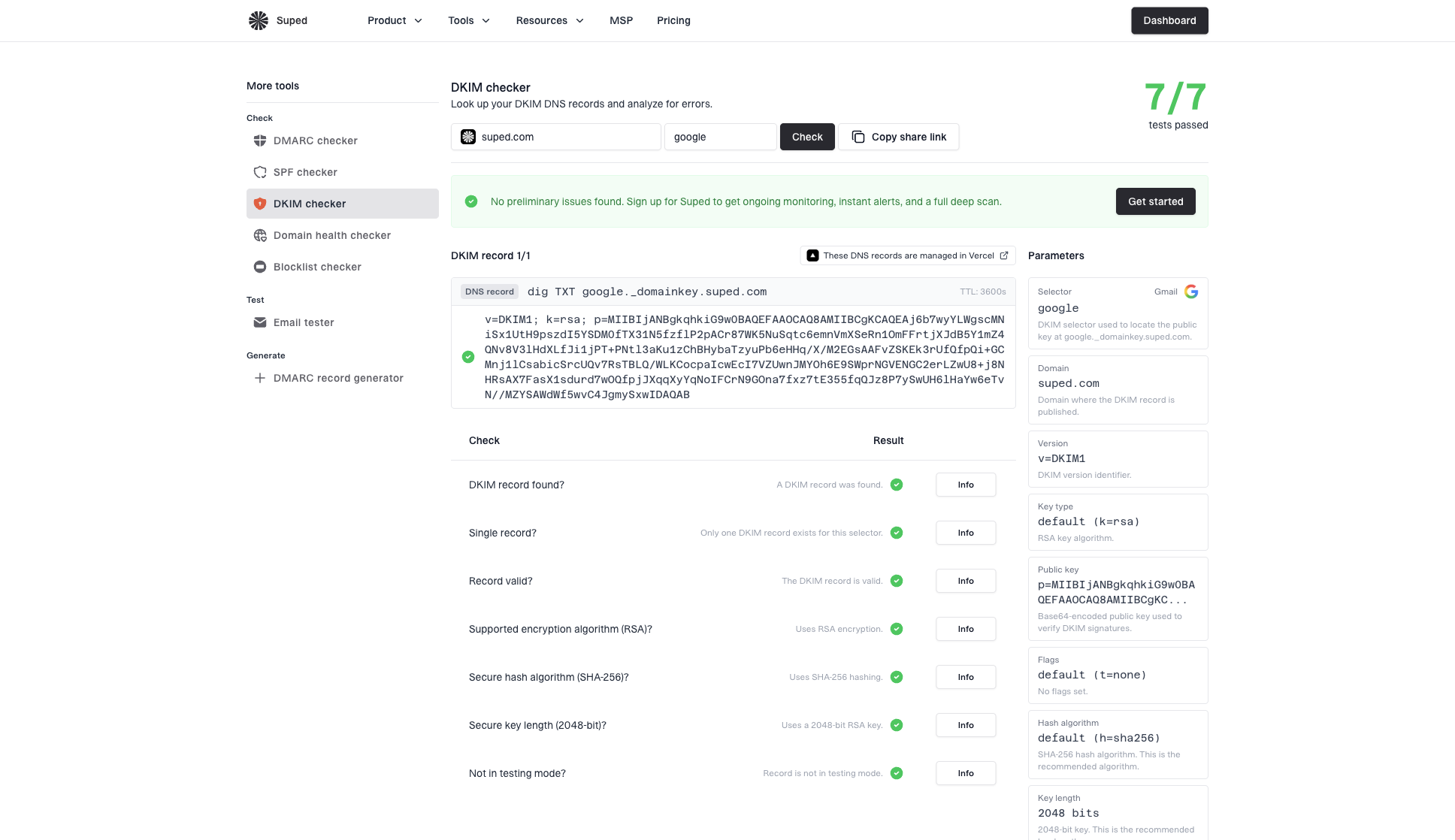
DKIM checker sample results showing selector, DKIM DNS record, validation checks, parameters, and share link
In Suped's product, this workflow moves from DNS validation into ongoing authentication monitoring. A one-off seed test shows what happened to one message, while aggregate reporting shows whether Microsoft failures are limited to one campaign, sender, template, or ESP route.
Why DMARC can pass and mail still lands in Junk
The example header has SPF pass, DKIM fail, and DMARC pass. That combination occurs when SPF passes and its MailFrom domain aligns with the visible From domain. DMARC does not require both SPF and DKIM to pass. One aligned authentication pass is enough for DMARC, although Microsoft applies an additional both-must-pass rule to high-volume senders.
Authentication problem
- Symptom: Outlook.com reports DKIM body hash failure.
- Likely cause: The signed body bytes changed or were canonicalized differently.
- Fix path: Compare raw source, then move signing after all message edits.
Placement problem
- Symptom: Mail still lands in Junk after DKIM verifies.
- Likely cause: Reputation, engagement, complaints, or nearby sending traffic.
- Fix path: Review Microsoft performance, list quality, and blocklist (blacklist) signals.
Do not assume one broken campaign permanently "poisoned" DKIM. DKIM does not have memory. Microsoft filtering does track reputation and recipient behavior, so a run of unwanted mail, complaints, low engagement, or poor network neighbors can keep placement poor after the technical DKIM issue is fixed.
A clean recovery order
- Fix DKIM: Get Outlook.com to show DKIM pass on a controlled test and a production-like campaign.
- Watch DMARC: Confirm Microsoft aggregate reports stop showing DKIM failures for that source.
- Repair placement: After authentication complies, reduce risky sends, segment engaged recipients, review blacklist and blocklist status, and rebuild sending consistency.
- Keep alerts: Set monitoring so a future DKIM body failure does not sit unnoticed for a full campaign cycle.
Outlook.com high-volume sender requirements
Microsoft began enforcing stricter authentication for high-volume Outlook.com senders on May 5, 2025. A domain reaches this category when it sends at least 5,000 messages per day to Microsoft consumer email services using the same domain in the visible From address. These services include Outlook.com, Hotmail, Live.com, and MSN consumer addresses.
DMARC pass is not enough at high volume
- SPF and DKIM: Publish both records and make sure both checks pass on the message.
- DMARC: Publish at least a p=none policy and pass DMARC through aligned SPF or DKIM.
- Rejection: A noncompliant message can be rejected with 550 5.7.515 instead of reaching the Junk folder.
- Body hash failure: Treat it as an authentication compliance failure even when the Authentication-Results header says dmarc=pass.
Fix the body hash error before working on inbox placement. If messages still land in Junk after SPF, DKIM, and DMARC meet the requirement, continue with reputation, complaint, list-quality, and engagement analysis as a separate workflow.
Outlook.com-specific tests
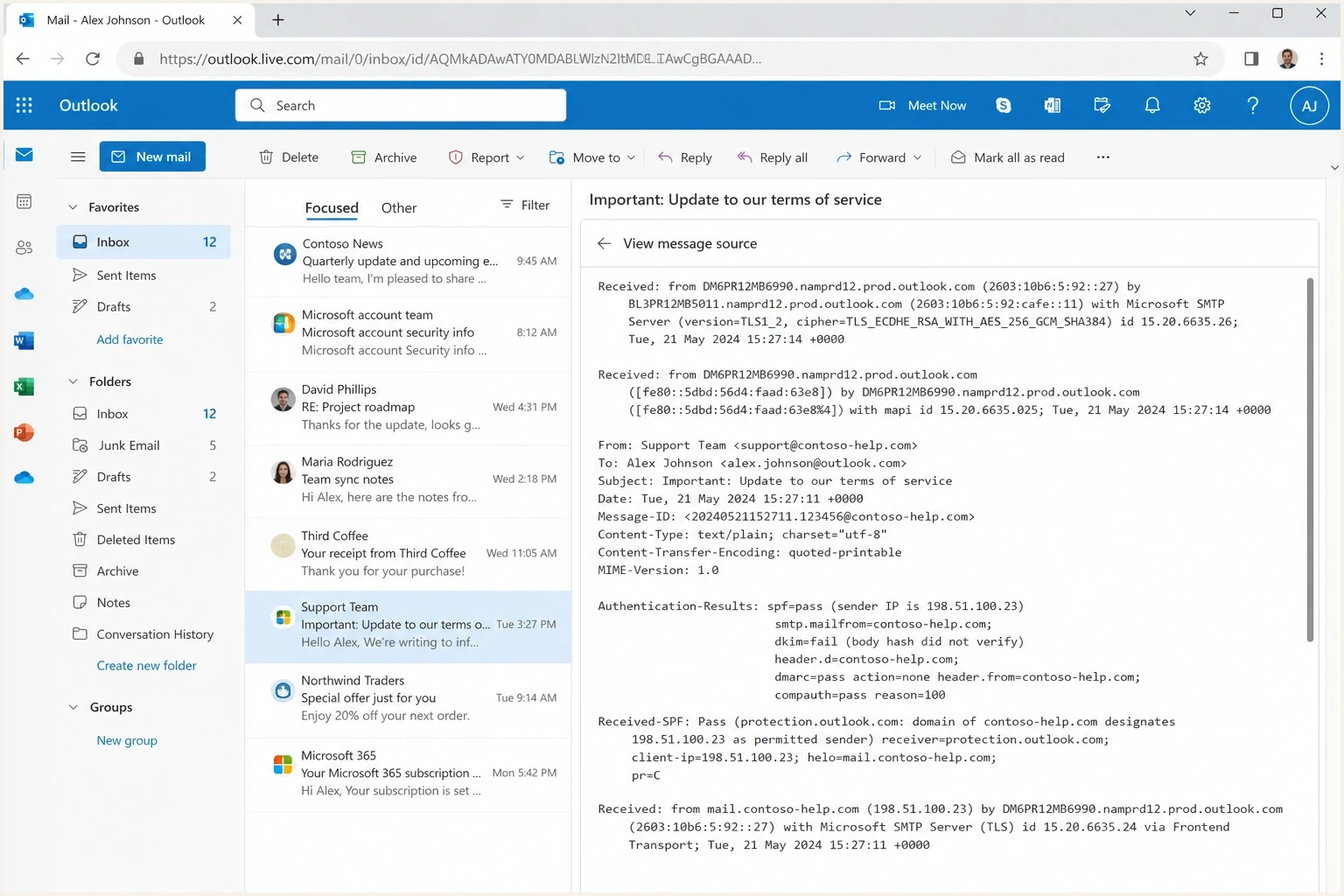
An Outlook.com message source view showing authentication results for a DKIM failure.
The failure becomes visible after Microsoft verifies the received message. It does not prove Microsoft changed the body, and it does not prove the sender's application made the change. Compare the complete path. Investigate encoded line wrapping, multipart boundaries, attachments, embedded images, charset handling, forwarding, gateways, and edits made after DKIM signing. Long lines and non-ASCII text are not DKIM errors by themselves. They matter when a hop rewrites the serialized bytes before verification.
|
|
|
|---|---|---|
Plain text | Base signer | DKIM pass |
Minimal HTML | HTML encoding | DKIM pass |
Add attachment | Multipart assembly | DKIM pass |
Full template | Dynamic modules | Same pass |
Tracking on | Post-processing rewrites | No result change |
Compact test matrix for isolating the failing part.
If the plain text message passes and the full template fails, that strongly points away from the DNS key and toward message construction or post-processing. If plain text fails too, inspect the sender or ESP signer before changing the template. For more Microsoft-specific symptoms, the Outlook.com DKIM failures checklist is the next place to compare patterns.
How Suped fits into the workflow
Suped's product supports this workflow when a team needs ongoing DMARC reporting beyond a one-off header check. It does not change Outlook.com's filtering rules. It organizes the evidence: which sources send for the domain, where DKIM fails, whether aligned SPF is carrying DMARC, and whether failures are isolated to Microsoft receivers or spread across other reporting organizations.
In Suped's product, DMARC monitoring groups aggregate reports by source and receiver. Use that view to identify the affected sending path, verify that Microsoft stops reporting DKIM failures after the ESP changes its pipeline, and watch whether SPF remains aligned during the repair. Real-time alerts can flag the same failure if it returns.

Issue steps to fix dialog showing the issue overview, tailored fix steps, and verification action
The operational benefit is a concrete evidence package for the ESP: the failing source, affected domain, receiving organization, failure pattern, and next verification step. That reduces back-and-forth because the request describes a specific authentication fault instead of a general complaint about spam placement.
Views from the trenches
Best practices
Compare raw sent and raw received source before changing DNS or blaming the subject line.
Ask the ESP to prove DKIM is added after tracking, footers, and MIME assembly finish.
Retest at Outlook.com after each template or encoding change, not only in generic inboxes.
Common pitfalls
Treating DMARC pass as proof of inbox placement leaves reputation issues uninvestigated.
Changing selectors repeatedly without inspecting MIME structure hides the real body change.
Blaming non-ASCII text alone misses the charset or transfer-encoding rewrite that changed bytes.
Expert tips
Confirm relaxed/relaxed signing, then inspect encoded wrapping when Microsoft still fails.
Keep a known-good seed message so every production template has a stable comparison.
Pair authentication checks with blocklist (blacklist) review when spam placement persists.
Marketer from Email Geeks says DKIM breakage and spam placement should be handled as separate problems. When DKIM stops failing, audience quality and nearby sending infrastructure still need review.
2019-11-28 - Email Geeks
Expert from Email Geeks says a body hash error means the message body changed after signing or the receiver processed the encoding differently.
2019-11-28 - Email Geeks
The practical fix
Stop treating this as a DNS mystery. Validate the selector and public key, then compare the raw sent message with the raw message Outlook.com received. If the body bytes changed, move DKIM signing later, remove the post-signing change, or re-sign after the last modifying gateway. If the body looks unchanged, ask the ESP to reproduce the DKIM calculation using the declared canonicalization mode and exact encoded MIME body.
For high-volume senders, get SPF, DKIM, and DMARC into compliance before working on placement. After those checks pass at Outlook.com, monitor placement separately. Reputation, list quality, complaint rates, Microsoft-specific engagement, and sending infrastructure still affect where accepted messages land.




