Is DKIM signature case-sensitive and what causes DKIM tester errors?

Updated on 31 Jul 2026: We clarified DKIM case handling and added a practical distinction between verification results and DMARC alignment.
No, the DKIM signing domain is not case-sensitive for DNS lookup or domain comparison. If a tester fails only because d= uses one case and the domain part of i= uses another, treat that as a tester bug unless real mailbox providers also report DKIM failure. The signing domain and selector form a DNS query, and DNS labels are case-insensitive.
The caveat is that DKIM verification is byte-sensitive after canonicalization. The DKIM-Signature header, including its tag values except the contents of b=, contributes to the signed input. Changing the case of a tag value after signing can therefore break the signature, even when the original domain value would have worked in DNS. A changed subject line, rewritten body, altered MIME boundary, or mismatched public key can also break the cryptographic check.
- Direct answer: DKIM domain case should not cause failure by itself.
- Likely bug: A tester that compares the d= and i= domains as raw, case-sensitive text can report a false failure.
- First proof: Send the same message to a real mailbox, then inspect Authentication-Results before changing DNS.
- Real fixes: Focus on content changes, selector mistakes, DNS syntax, signing configuration, and key rotation.
What DKIM treats as case-sensitive
DKIM has several kinds of comparison, so the answer depends on which part of the check failed. RFC 6376 says tags and values are case-sensitive unless a tag's semantics say otherwise. DNS names use case-insensitive matching, and header field names listed in h= are also matched without case sensitivity. The canonicalized header and body content remains strict cryptographic input.
|
|
|
|---|---|---|
d= | Domain comparisons ignore case | Signing domain and DNS query |
s= | DNS lookup ignores case | Selector label and signed value |
i= | Domain comparison ignores case | Domain relationship and local part |
bh= | Exact base64 value | Canonicalized body hash |
b= | Exact base64 value | Signature data |
h= | Header names ignore case | Selected header instances |
DKIM case handling by component
The confusing part is i=, the Agent or User Identifier. Its domain must be the same as, or a subdomain of, d=. That domain relationship uses normal case-insensitive domain semantics. DKIM leaves the meaning of the optional local part to the signer, so a tester should not impose mailbox-specific case rules on it.
Do not fix DNS before proving the failure
A red DKIM line from one tester is evidence, not proof. Look for the same failure in real recipient headers before rotating keys, changing selectors, or publishing a new TXT record.
- Check headers: Real delivery headers show what the receiver accepted or rejected.
- Check DNS: Confirm the selector name resolves to one valid DKIM key record.
- Check timing: DNS caching during key rotation can leave a tester and receiver with different answers.
- Check content: Body or signed-header changes after signing cause a real cryptographic failure.
Why a tester can fail when mail passes
A DKIM tester sits outside the normal receiving path. The tester must parse raw MIME, find each signature, fetch DNS, apply canonicalization, compare domains, and decide whether a warning deserves a failed status. A parsing or policy difference can produce a result that real mailbox providers do not reproduce.
Tester-only problem
- Case bug: The tester compares domain strings without normalizing case.
- Sample issue: The uploaded message differs from the delivered raw message.
- DNS cache: The tester still sees an old key after a selector change.
- Severity choice: The tester labels a warning or policy result as a hard failure.
Receiver failure
- Body change: A footer, tracker, or gateway changes signed body content.
- Header change: A signed header changes after DKIM signing.
- Bad key: The public key is malformed, revoked, missing, or different from the active private key.
- Wrong selector: The message points to a selector that does not exist in DNS.
Forwarding by itself does not break DKIM. The signature can survive when the forwarded message stays unchanged. Mailing lists, gateways, and forwarding systems break it when they add footers, rewrite MIME content, or modify a signed header after the original signer applies DKIM.
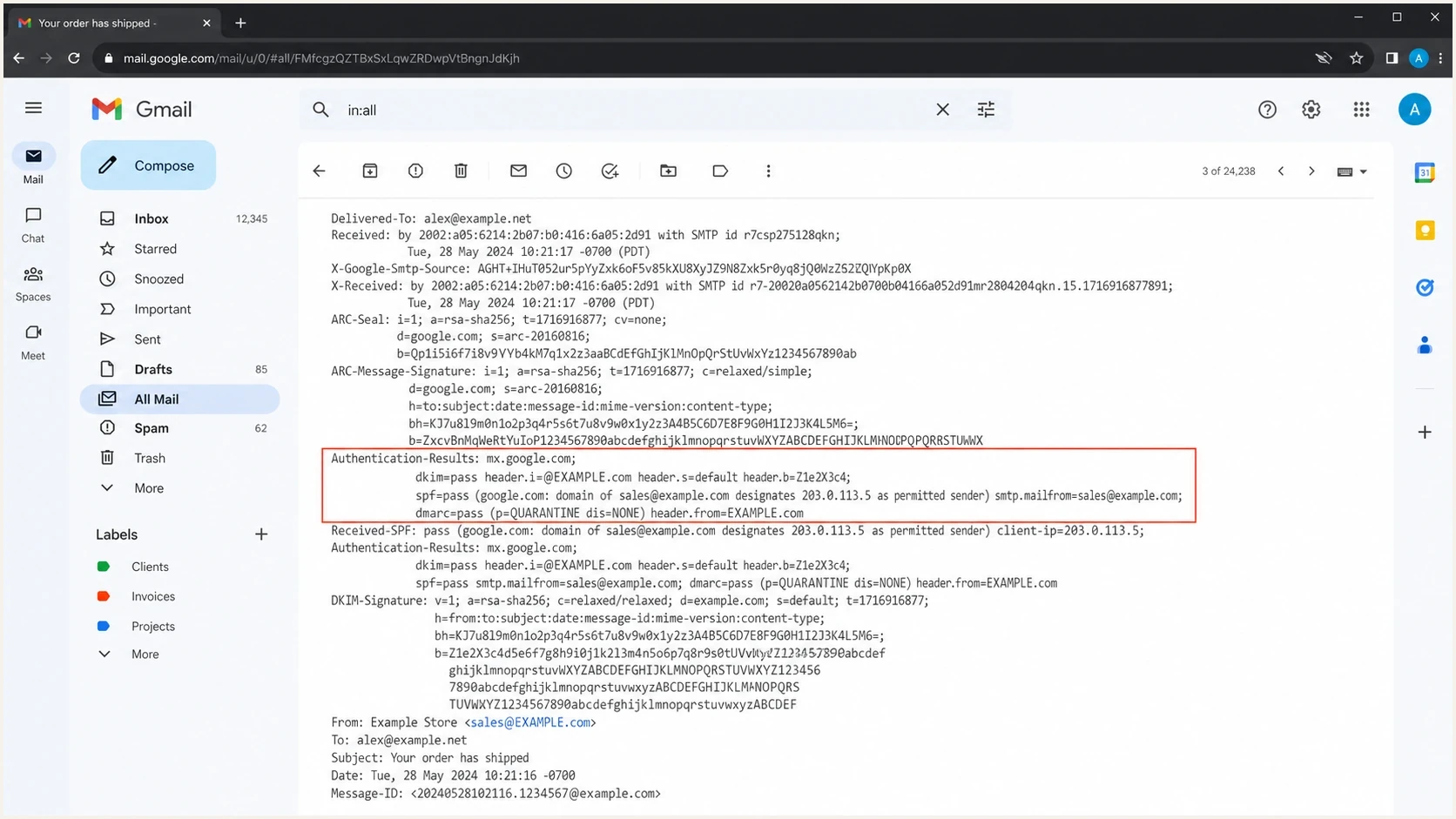
Gmail message details showing DKIM pass despite different case in DKIM domain fields.
If Gmail, Outlook, Yahoo, or another major recipient shows DKIM pass for the same message, do not rewrite DNS just to satisfy one tester. Save the raw headers, compare the tester result, and look for the smallest difference that explains the mismatch.
Common causes of DKIM tester errors
Most DKIM tester errors fit a short list. Classify the result before changing anything. A domain-only case warning belongs in the tester-behavior bucket. A body hash mismatch, key lookup failure, or bad signature belongs in the real-fix bucket.
|
|
|
|---|---|---|
Domain-only case mismatch | Tester comparison bug | Compare receiver headers |
No key for signature | Wrong selector or missing record | Query s=._domainkey.d= |
Key syntax error | Malformed or duplicate key record | Republish one valid record |
Body hash did not verify | Body changed after signing | Stop rewriting or sign later |
Bad signature | Signed header changed or key mismatch | Compare signer and delivery hops |
Signature expired | x= time passed or clock error | Check timestamp and system clock |
DKIM tester error causes and practical checks
Public key errors deserve special attention because an invalid tag, missing semicolon, broken TXT split, or duplicate key record can affect every message using that selector. DKIM public keys do not contain an expiry time. They stop working when the record is removed, revoked with an empty p=, malformed, or no longer matches the private key. Use this invalid RSA public key checklist before rotating the selector.
Case mismatch that should not fail by itselftext
DKIM-Signature: v=1; a=rsa-sha256; c=relaxed/relaxed;
 d=eml.example.com; s=selector1; i=@EML.example.com;
 h=from:to:subject:date:mime-version;
 bh=base64-body-hash-value;
 b=base64-signature-value
In that example, the domain in d= and the domain part of i= differ only by case as the signer wrote them. That relationship should not invalidate DKIM. If an intermediary changes either value in the signed header, the body, or one of the signed message headers afterward, the message can fail for a real cryptographic reason.
DKIM verification and DMARC alignment are separate
A DKIM pass proves that a receiver verified a signature for the domain in d=. DMARC asks a separate question: does that signing domain have the required relationship with the visible From domain? A third-party domain can pass DKIM but fail to provide DKIM alignment for DMARC. An SPF pass with alignment can still let DMARC pass when DKIM fails.
|
|
|
|---|---|---|
dkim=pass | An acceptable signature verified | Check DMARC alignment separately |
dkim=fail | An acceptable signature failed verification | Inspect the reason and message path |
dkim=none | No DKIM signature was present | Enable signing for that source |
dkim=temperror | A temporary problem blocked verification | Retry and check DNS availability |
dkim=permerror | An unrecoverable syntax or input error occurred | Correct the signature or key record |
How to interpret common DKIM results
One message can carry multiple DKIM signatures, and receivers evaluate them independently. A failed signature beside a passing aligned signature does not mean the message has no valid DKIM result. Read every DKIM entry in Authentication-Results, then identify which header.d value aligns with the visible From domain.
How to validate a suspicious DKIM error
Use a fixed order of operations. It keeps the investigation anchored in the actual recipient result and stops cosmetic changes from creating a new outage.
- Send real mail: Send a fresh message through the same production route that produced the warning.
- Read trusted headers: Inspect every Authentication-Results entry added by the final mailbox, not one copied through an untrusted forward.
- Check the selector: Build the DNS name from s= plus d= and confirm the TXT or delegated CNAME answer.
- Compare domains: Treat case differences as harmless when the domain text otherwise matches, then check DMARC alignment with the From domain.
- Inspect changes: Look for footer injection, subject edits, MIME changes, line-ending conversion, and gateway rewriting.
- Watch reports: Use Suped's DMARC reporting to see whether the source repeats the failure across receivers.
When the only symptom is a one-off tester warning and recipient headers pass, document it and move on. When the same source fails at several receivers, use the full troubleshooting workflow that checks DNS, signing order, MIME processing, and sender configuration.
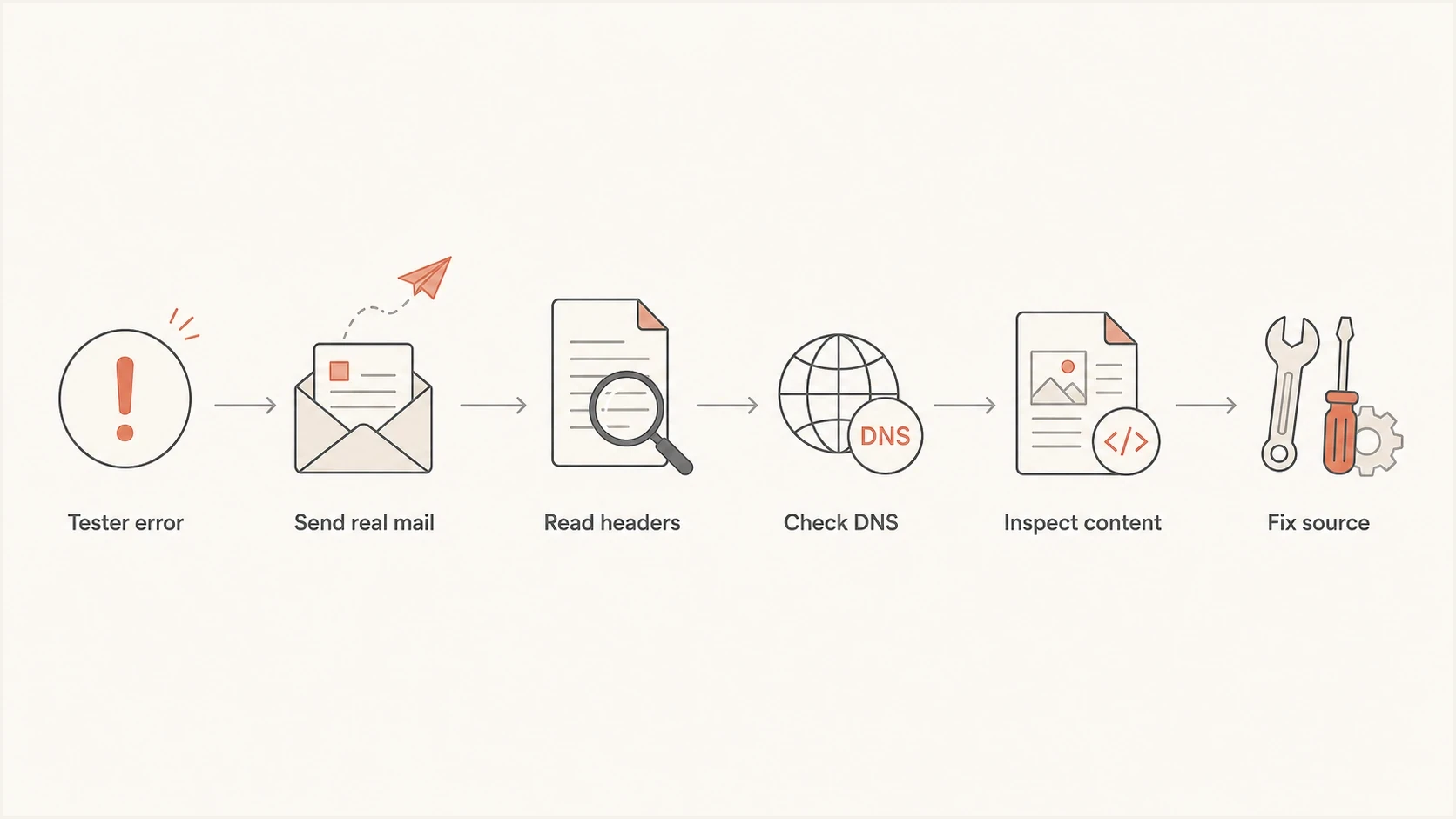
A flowchart for checking a DKIM tester error against real recipient headers and DNS.
For a quick selector and public key check, Suped's DKIM checker confirms the DNS record before a deeper review of raw message content.
DKIM checker
Check selector records and public key configuration.
?/7tests passed
A DNS-only check cannot prove that the message body was preserved, but it quickly removes malformed selectors, missing TXT records, and broken public keys from the list of suspects.
Where Suped fits after the local check
A one-off DKIM tester answers a narrow question. Ongoing authentication work needs trend data, source attribution, and alerts when the same failure affects real mail. Suped's product supports that workflow by bringing DMARC, SPF, DKIM, blocklist (blacklist) checks, and delivery signals into one place.
Suped turns aggregate reports into source-level evidence and suggested fixes. Teams can identify which sending source is failing, whether its DKIM domain aligns for DMARC, and whether the issue persists across receivers before changing production DNS.
DMARC record detail view showing SPF, DKIM, DMARC, rDNS diagnostics, and DNS records
- Issue detection: Suped groups authentication failures by source and gives steps to fix them.
- Real-time alerts: Teams get notified when DKIM, SPF, or DMARC pass rates drop.
- Hosted records: Hosted DMARC, Hosted SPF, SPF flattening, and Hosted MTA-STS reduce DNS changes.
- Multi-domain work: MSPs and agencies can manage several domains without separate spreadsheets.
- Reputation checks: Blocklist and blacklist monitoring connects authentication and delivery signals.
For one domain, Suped's domain health check gives a current configuration check. Suped's DMARC monitoring adds source-level evidence over time.
What not to change for a case-only warning
A case-only warning looks easy to fix. Avoid changing production authentication until the failure appears in real recipient headers or aggregate reports. DKIM changes are small, but a wrong selector, stale key, or DNS typo can break legitimate mail.
Typical DKIM TXT record shapetext
selector1._domainkey.example.com. 3600 IN TXT (
  "v=DKIM1; k=rsa; "
  "p=MIIBIjANBgkqhkiG9w0BAQEFAAOCAQ8A..."
)
Do not publish a duplicate selector just to make a tester pass. Do not rotate keys because d= is lowercase and i= contains uppercase domain labels. Do not change the visible From domain case for delivery reasons. The deciding question is whether the receiving system validated the signature.
Safe response to a false DKIM warning
- Preserve evidence: Save the raw tester output and the passing recipient header.
- Monitor repeats: Watch for the same source failing across more than one receiver.
- Fix only facts: Change DNS only when the selector, key, or policy is actually wrong.
- Retest the source: Send a fresh message after any sender or gateway setting change.
Views from the trenches
Best practices
Confirm real recipient headers before editing DKIM DNS for a case-only warning in production.
Compare signing and identity domains after normalizing domain case in your notes.
Keep one raw message sample for each sender path before testing a production DNS change.
Common pitfalls
Treating one tester warning as proof can trigger unnecessary selector rotation risks.
Changing DNS case does not fix body hash or signed-header failures in real mail.
Forwarded or copied messages can hide the original receiver's authentication result.
Expert tips
Use aggregate DMARC data to learn whether one source fails across receivers in practice.
Check whether gateways add footers after signing before changing the DNS record.
Separate DNS validation from message validation so the fix targets the right layer.
Marketer from Email Geeks says DNS case should not make DKIM fail, but a tester can still have a parsing bug.
2024-04-12 - Email Geeks
Marketer from Email Geeks says the Authentication-Results header from a real delivered message is the best proof.
2024-04-12 - Email Geeks
The practical answer
DKIM verification is strict, but domain case is not the strict part. A tester that fails only because the d= domain and the domain part of i= use different case is giving a false lead. Confirm with a real delivered message, then fix only the layer that fails: DNS key, selector, signer, body preservation, signed-header preservation, or DMARC alignment.
Use tester output as one signal and DMARC reporting as ongoing evidence. That combination catches repeated DKIM failures without letting one faulty case comparison drive production DNS changes.




