How to use DKIM to sign emails with different header from domains to comply with DMARC?

Published 3 Jun 2025
Updated 11 Aug 2026
14 min read
Summarize with
Updated on 11 Aug 2026: We updated this guide for RFC 9989, delegated DKIM signing, and safer selector rotation.
Yes. If the visible Header From domain differs from the Envelope From or Return-Path domain, sign the message with a DKIM domain that is aligned with the Header From domain. DMARC passes when either SPF passes with alignment or DKIM passes with alignment. It does not require both.
In the common setup where the Return-Path is notification@mydomain.com and the Header From is client@yourdomain.com, a DKIM signature using d=yourdomain.com can satisfy DMARC for the visible domain. A DKIM signature using d=mydomain.com can authenticate the mail, but it will not produce DKIM alignment for yourdomain.com unless both domains have the same Organizational Domain under the receiver's DMARC evaluation.
- Create the aligned DKIM key for the Header From domain, not for the Return-Path host or the Received header host.
- Add a second DKIM signature for the sending platform or network domain if you want operational traceability.
- Confirm that transactional and marketing mail show consistent aligned authentication in DMARC reports before moving to enforcement.
The rule DMARC actually checks
DMARC evaluates the domain in the visible From header, called the RFC 5322.From domain or Author Domain. That is the domain a recipient sees in the email client. The Return-Path, Envelope From, and sending host matter for SPF and routing, but they do not become the domain DMARC protects.
For DKIM to satisfy DMARC, the DKIM signature must pass cryptographic verification and its d= domain must be aligned with the Header From domain. With relaxed DKIM alignment, both domains must have the same Organizational Domain as determined by the RFC 9989 DNS Tree Walk. With strict DKIM alignment, they must match exactly. See DKIM alignment for more detail when debugging forwarding, delegated sending, or platform-branded mail.
DMARC needs one aligned authentication pass. An aligned SPF pass is enough, and an aligned DKIM pass is enough. Having both gives the message another valid path when forwarding, remailing, or return-path rewriting breaks one method.
|
|
|
|---|---|---|
Header From | yourdomain.com | The protected Author Domain that DMARC evaluates. |
DKIM d= | yourdomain.com | Must be aligned with Header From for DKIM-based DMARC pass. |
Return-Path | mydomain.com | Used by SPF, but only helps DMARC if SPF aligns. |
Received host | mailhost.net | Not a DKIM alignment target for DMARC. |
How the main domains affect DMARC
Use the Header From domain for the aligned DKIM key
The DKIM key that matters for DMARC is tied to the domain in the DKIM signature. If the message says From: client@yourdomain.com, the clearest aligned signature uses d=yourdomain.com. A different signing domain works in relaxed mode only when it has the same Organizational Domain under the receiver's RFC 9989 tree walk. In normal brand sending, publish or delegate the selector under the Header From domain and configure the sending system to use that domain.
You do not create a DKIM key for the Return-Path just because SPF uses that domain. You also do not create a DKIM key for a Received host just because it appears in the trace headers. Those can be legitimate operational domains, but they are not the visible brand domain DMARC is checking.
Aligned DKIM
- The visible sender domain is the domain DMARC protects.
- The signing domain matches or has the same Organizational Domain as the visible domain.
- DKIM can carry the message to a DMARC pass.
Unaligned DKIM
- The visible domain differs from the DKIM signing domain.
- The signature can pass but still fail DMARC alignment.
- The message needs aligned SPF or another aligned DKIM signature.
Aligned DKIM signature pattern
From: Client Notifications <client@yourdomain.com>
Return-Path: <notification@mydomain.com>

DKIM-Signature: v=1; a=rsa-sha256; d=yourdomain.com; s=txn1;
 h=From:To:Subject:Date; bh=...; b=...

Authentication-Results: receiver.example;
 dkim=pass header.d=yourdomain.com;
 spf=pass smtp.mailfrom=mydomain.com;
 dmarc=pass header.from=yourdomain.com
The exact setup steps
Pick a selector, publish the provider-supplied TXT or CNAME record under the Header From domain, configure the sender to sign using that domain, then test a real message. The signing system can still use a different bounce domain for Return-Path. DMARC does not object to that when DKIM passes with alignment.
- Use the Header From domain, such as yourdomain.com.
- Create a unique label such as txn1 for each provider or mail stream, and keep a second selector available for rotation.
- Publish the exact TXT public key or CNAME target supplied for the selector under the Header From domain.
- Configure the sender to sign with the same domain and selector, while keeping the private key on the signing system.
- Send a real message and inspect DKIM, SPF, and DMARC results.
Directly hosted DKIM DNS TXT recordDNS
txn1._domainkey.yourdomain.com. 3600 IN TXT (
 "v=DKIM1; k=rsa; "
 "p=MIIBIjANBgkqhkiG9w0BAQEFAAOCAQ8A..."
)
Use a 2048-bit RSA key when the sending platform and DNS host support it. Rotate by publishing a new selector before the sender switches, verify that new mail uses the new s= value, then keep the old public key available until old signatures and DNS caches have expired.
After publishing the key, validate the selector before you test mail. A DKIM checker check catches missing records, split-string mistakes, malformed keys, incorrect CNAME targets, and selector typos before you spend time reading full message headers.
DKIM checker
Check selector records and public key configuration.
?/7tests passed
The DNS record only proves the public key or delegation exists. The actual message still needs to be signed by the sending platform with the matching private key. If the record exists but mail is not signed, the issue sits in the mail server, application, plugin, or email platform configuration. Use DKIM not signed for that troubleshooting path.
Delegate DKIM signing without sharing private keys
When a third-party platform sends mail with your Header From domain, the platform should generate and protect the private key. Your DNS administrator publishes the matching public key as a TXT record, or publishes a CNAME that delegates the selector to the platform. The message must still carry your domain in d= for DKIM-based DMARC alignment.
- Copy the selector hostname, record type, and value supplied by the sending platform.
- Give each platform or mail stream a separate selector so one key can be rotated or revoked without affecting another.
- Wait for the platform to verify DNS, then enable custom-domain signing in its configuration.
- Confirm that the DKIM signature passes and that both d= and s= contain the values you configured.
- Stop the old signer first, confirm that no current mail uses its selector, then remove its DNS record after the rollover window.
Do not send your organization's DKIM private key to a platform. Let each platform create its own key pair and selector. This limits the effect of a compromised key and makes offboarding a single sender practical.
What to do with Return-Path and Received domains
The Return-Path domain is the bounce domain. It is used during SMTP and usually appears after final delivery. SPF checks this domain, and bounce processing depends on it, but DKIM does not need to sign as that domain for DMARC to pass. If the Header From domain is yourdomain.com, then a Return-Path under mail.vendor.net is acceptable when DKIM aligns with yourdomain.com.
The Received header host is even less relevant to DKIM alignment. It tells the receiving system which servers handled the message. It can help with tracing delivery, but it is not the DKIM signing identity DMARC wants. Creating DKIM keys for every mail host that appears in Received headers usually adds noise and does not fix DMARC.
Do not chase every domain in the headers. Start with the Header From domain, then identify which authentication path will be aligned with it. If SPF cannot be aligned because the bounce domain belongs to another domain, DKIM alignment is the practical path.
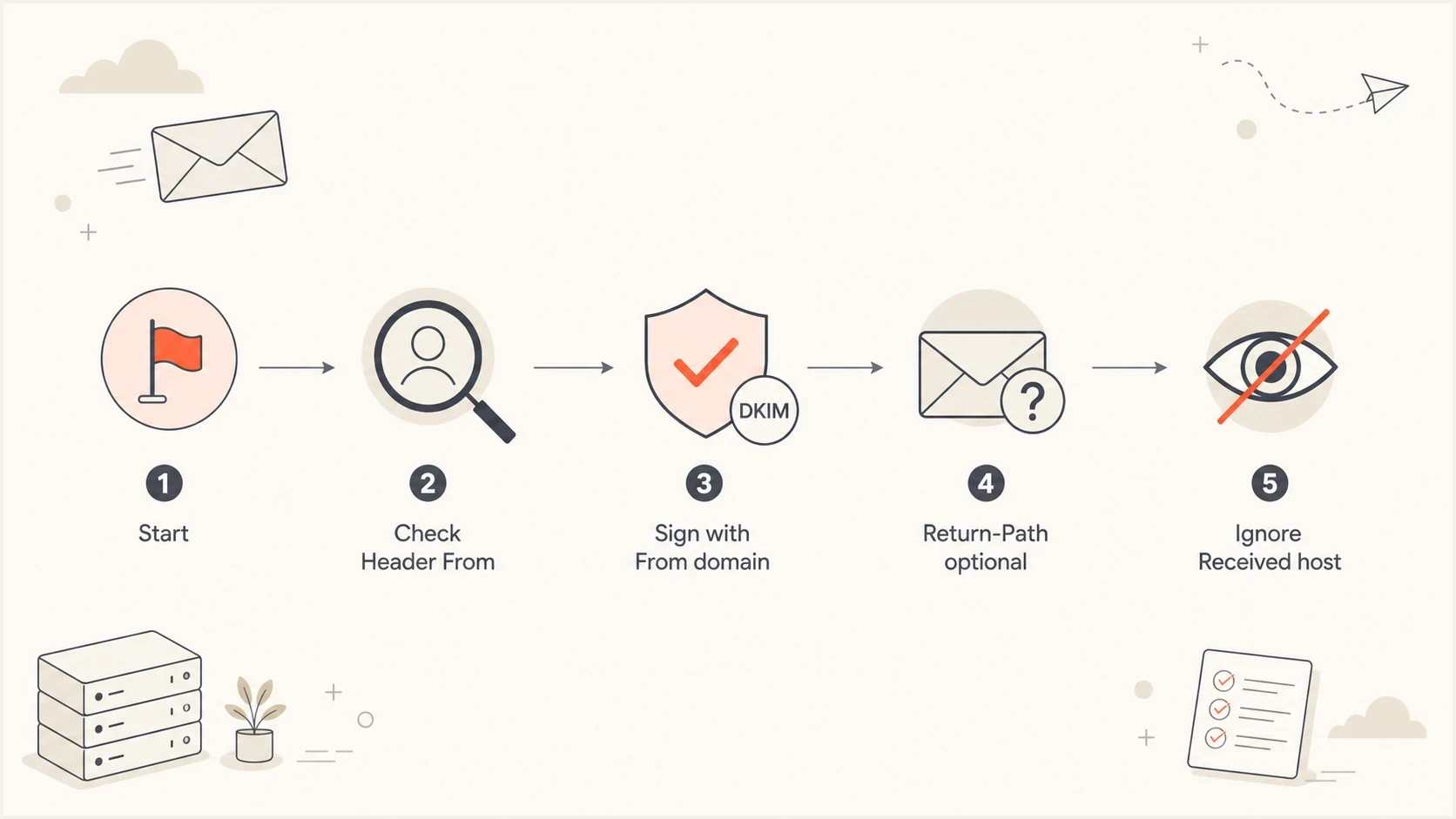
Flowchart showing that DKIM should sign with the Header From domain.
The Return-Path still has value. If you control it, aligning SPF as well gives you a second DMARC pass path. DKIM can fail when a system modifies signed headers or message body content after signing. SPF can fail when forwarding changes the sending IP or envelope sender. Having both aligned gives the receiver more ways to authenticate the same legitimate message.
Multiple DKIM signatures are fine
Many email platforms sign with two DKIM signatures. One signature uses the customer or brand domain, and the other uses the platform or network domain. This is normal. The aligned brand signature is the one DMARC uses for the visible Header From domain. The platform signature gives the sender its own authentication and can help with reputation analysis, internal routing, and platform-level accountability.
A second DKIM signature does not hurt DMARC unless it creates confusion during setup and you accidentally rely on the unaligned one. Receivers can evaluate more than one DKIM signature. If at least one passing DKIM signature aligns with the Header From domain, DKIM can satisfy DMARC.
Double DKIM signing example
From: Client Notifications <client@yourdomain.com>
Return-Path: <bounce@mail.vendor.net>

DKIM-Signature: v=1; d=yourdomain.com; s=txn1; h=From:Subject; b=...
DKIM-Signature: v=1; d=vendor.net; s=network1; h=From:Subject; b=...

Authentication-Results: receiver.example;
 dkim=pass header.d=yourdomain.com;
 dkim=pass header.d=vendor.net;
 dmarc=pass header.from=yourdomain.com
This pattern is useful when you send for many client domains through one infrastructure. Each client gets a branded selector under its own domain. The platform keeps a second signature under its own domain. See double DKIM signing for a deeper treatment of this pattern.
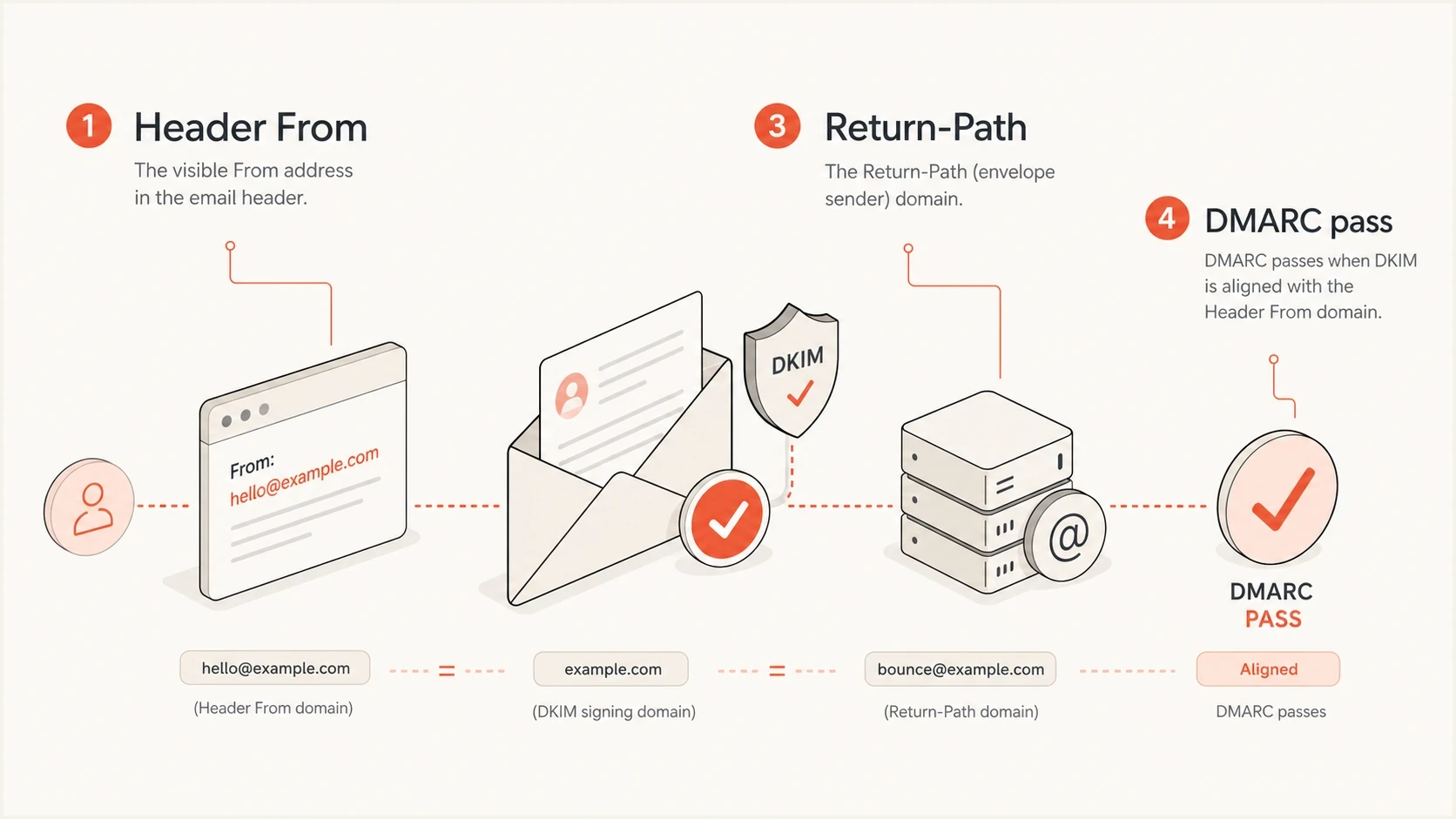
Infographic showing Header From aligned DKIM passing DMARC while Return-Path differs.
How strict and relaxed alignment change the answer
DMARC uses relaxed DKIM alignment by default. In relaxed mode, d=mail.yourdomain.com can be aligned with From: user@yourdomain.com when the receiver determines that both have the same Organizational Domain. In strict mode, the DKIM d= domain must exactly match the Header From domain.
DKIM alignment modes
Use strict mode only when every sender can sign with the exact Header From domain.
Relaxed alignment
adkim=r
The receiver-determined Organizational Domain must match.
Strict alignment
adkim=s
The exact Header From domain must match.
RFC 9989 replaced the old public-suffix-list method with a DNS Tree Walk for finding the Organizational Domain. A parent, child, or sibling domain is not automatically relaxed-aligned. The receiver must determine the same Organizational Domain for both identities.
Strict alignment works for tightly controlled mail streams, but it breaks when a system signs as a subdomain while the visible From uses the parent domain. Relaxed DKIM alignment is the practical default when every legitimate sender is monitored. It preserves brand-domain alignment without turning an expected subdomain variation into a production incident.
DMARC record with relaxed DKIM alignmentDNS
_dmarc.yourdomain.com. 3600 IN TXT (
 "v=DMARC1; p=none; adkim=r; aspf=r; "
 "rua=mailto:dmarc@yourdomain.com"
)
If you use a subdomain as the DKIM signing identity, make sure the selector exists under that exact signing domain. A selector under s1._domainkey.yourdomain.com is not the same DNS location as a selector under s1._domainkey.mail.yourdomain.com. The DKIM d= value and selector together determine the DNS lookup.
A practical example with transactional mail
Transactional email often exposes this exact issue. The application sends account confirmations, password resets, receipts, or notifications using the customer's visible domain, but the mail infrastructure uses a shared return-path domain. That can still pass DMARC if the platform signs each message with the customer's DKIM domain.
|
|
|
|---|---|---|
Header From | client.com | Use as the aligned DKIM domain. |
Return-Path | sender.net | Keep for bounces unless SPF alignment is required. |
Selector | txn1 | Publish under the client domain. |
DMARC | pass | Expected when DKIM passes and aligns. |
Transactional mail example
Microsoft documents a similar pattern for cloud-domain signing: create the DKIM configuration, publish the required CNAME records, enable signing for the sending domain, and rotate selectors without a signing gap. Follow the current Microsoft DKIM setup values rather than constructing CNAME targets manually.
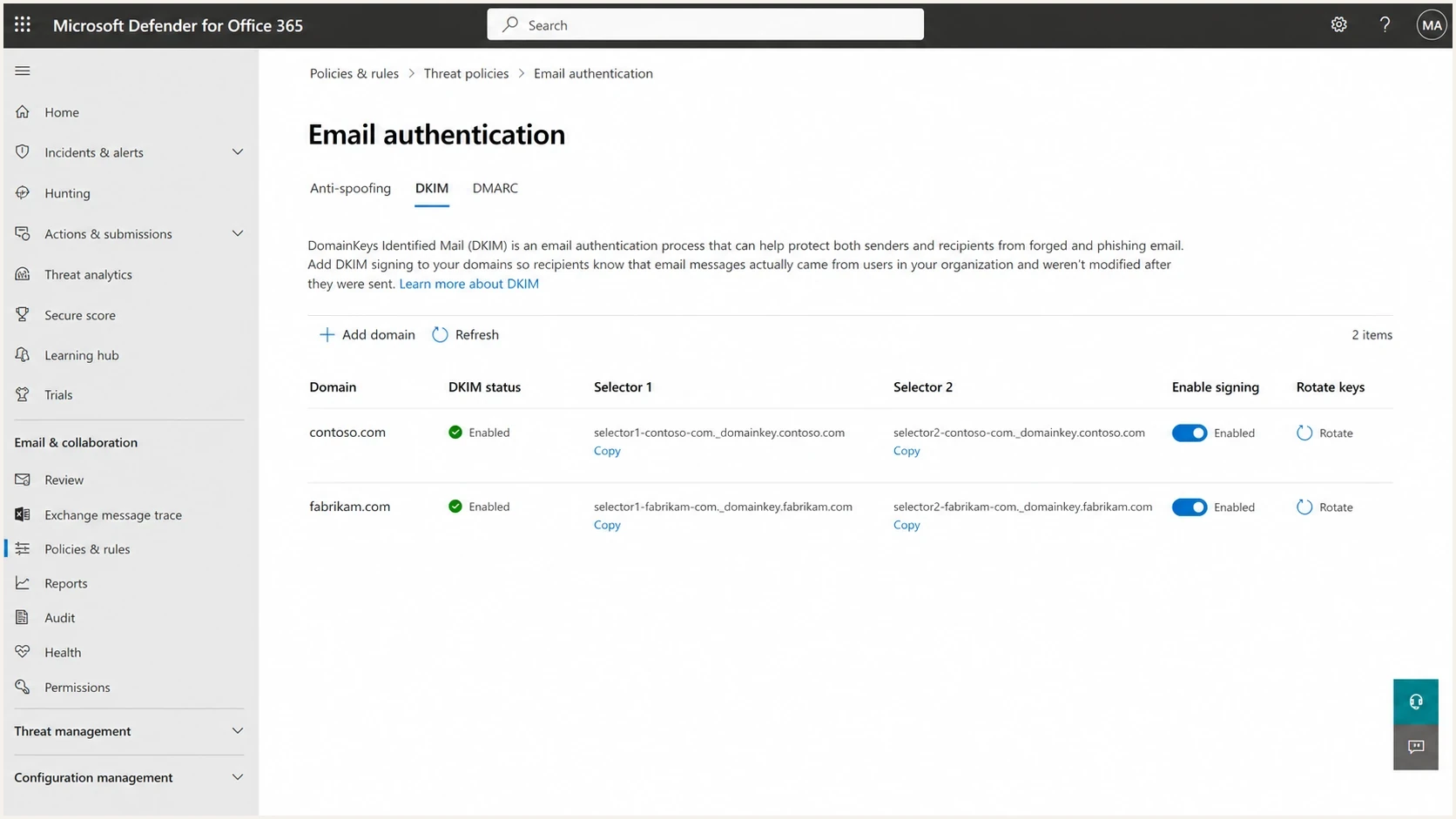
Microsoft Defender DKIM configuration screen for a sending domain.
Amazon SES documents the same DMARC principle in a different product flow: either SPF or DKIM must authenticate and be aligned with the domain in the From address. The Amazon SES DMARC documentation is useful when the sender uses a separate bounce domain but signs with the customer or brand domain.
Where Suped fits in this workflow
The hard part is proving that every real sender signs with the correct domain after DNS is published. Suped's DMARC platform connects each sending source with its Header From domain, DKIM signing domain, SPF result, and DMARC disposition so a team can find unaligned production traffic before enforcing policy.
For a setup with different Header From and Return-Path domains, Suped's DMARC monitoring groups aggregate reports by source and shows whether DKIM or SPF produced the aligned pass. That removes the need to diagnose every failure from one message header.
DMARC record detail view showing SPF, DKIM, DMARC, rDNS diagnostics, and DNS records
- Match each production sender to its visible domain and DKIM signing identity.
- Distinguish a valid but unaligned DKIM signature from a broken signature or missing selector.
- Alert on a mail stream that stops signing or begins using an unexpected selector.
- Track the same rollout checks across client domains without merging their results.
?
What's your domain score?
Deep-scan SPF, DKIM & DMARC records for email deliverability and security issues.
Before deeper monitoring, run a domain health check. It gives you a fast view of DMARC, SPF, and DKIM record health before you inspect aggregate reports.
How to test the final result
Test with a real message, not just DNS. DNS confirms the public key or CNAME exists. A real message confirms the sender is signing, the body hash survives, the selector is correct, and the DMARC result is aligned with the Header From domain.
- Send from the same application, route, template, and sender identity used in production.
- Open the full headers, find Authentication-Results, and read the DKIM, SPF, and DMARC results.
- Confirm header.d aligns with the Header From domain.
- Confirm header.s identifies the expected key, especially during rotation.
- Check SPF separately because it can pass but remain unaligned when the Return-Path uses another domain.
- Use aggregate DMARC data to confirm the result across all production sources.
Good Authentication-Results pattern
Authentication-Results: mx.example;
 dkim=pass header.d=yourdomain.com header.s=txn1;
 spf=pass smtp.mailfrom=mydomain.com;
 dmarc=pass header.from=yourdomain.com
A DKIM pass is not always a DMARC pass. If DKIM passes with header.d=vendor.net while Header From is yourdomain.com, DKIM is authenticated but unaligned. Add or fix the brand-domain DKIM signature.
Views from the trenches
Best practices
Sign with the visible From domain first, then add platform DKIM signatures for traceability.
Verify a real transactional email because DNS alone does not prove the message was signed.
Keep relaxed alignment unless every sender can sign with the exact visible domain reliably.
Common pitfalls
Teams often publish a DKIM key but leave the transactional system unsigned in production.
Return-Path SPF pass gets mistaken for DMARC alignment when the visible domain differs.
Received header hosts distract teams into creating DKIM records that DMARC will not use.
Expert tips
Use separate selectors for marketing and transactional mail to simplify rotation and audits.
Double sign with a client domain and a network domain when one platform sends for many brands.
Watch aggregate DMARC results before enforcement so one broken source does not block mail.
Marketer from Email Geeks says DKIM is the workable option when the Return-Path domain differs from the visible sender domain.
2020-03-24 - Email Geeks
Marketer from Email Geeks says the DKIM signature must be aligned with the domain the sender wants DMARC to protect.
2020-03-24 - Email Geeks
The setup that works
Sign with the Header From domain. If the Return-Path or sending host uses another domain, the message can still pass DMARC when a valid DKIM signature has a d= domain aligned with the visible From domain. Publish or delegate a selector for that domain, configure the sender, test a real message, and confirm the result in aggregate DMARC reports before enforcing policy. A second platform signature can support platform operations, but it cannot satisfy DMARC unless it is also aligned.




