How do I interpret SpamAssassin DKIM test results and troubleshoot DKIM signature issues?

Updated on 2 Aug 2026: We clarified SpamAssassin's default DKIM rule names and added current troubleshooting guidance for multi-signature messages and truncated scans.
If a SpamAssassin report shows DKIM_SIGNED with DKIM_INVALID or a report-specific DKIM_INVALID_DKIM label, read that as: the message has a DKIM-Signature header, but SpamAssassin did not find a valid signature. The small score beside the rule, such as 0.1, is only a SpamAssassin score contribution. It is not proof that the message landed in spam, and it is not proof that your whole domain has broken DKIM.
I start with the raw message headers, especially Authentication-Results. Then I compare each DKIM-Signature with DNS and the visible From domain. A domain can have a correct DKIM DNS record while one specific email still fails because the message changed after signing, the wrong selector was used, the public key lookup failed, or no passing signature has Identifier Alignment with the domain needed for DMARC.
- Rule result: SpamAssassin rule names are clues about what its local engine observed.
- Score value: A low number means the rule has low weight in that SpamAssassin setup.
- Fix target: The fix is in the signature, message path, selector DNS, or scanner input, not in the score.
- DMARC check: At least one DKIM signature must pass and meet DMARC Identifier Alignment requirements for the visible From domain.
Read the DKIM rules as clues, not verdicts
SpamAssassin is a scoring engine. A rule hit means one test matched. It does not mean the message failed every mailbox provider's filtering, and it does not mean the rule is wrong. It means that SpamAssassin's DKIM plugin and local rule set produced that result for that exact copy of the message.
Apache SpamAssassin's default rules use DKIM_INVALID for the meta rule DKIM_SIGNED && !DKIM_VALID. A label such as DKIM_INVALID_DKIM can come from a local rule or the way a report presents the result. If you run your own installation, check the installed rules and active score files before treating a public description as authoritative for your server.
The short version
Treat SpamAssassin DKIM results as diagnostic output. The important question is whether at least one signature passed in the receiving system's trusted Authentication-Results header and whether that signature can satisfy DMARC.
- Header present: The message has at least one DKIM-Signature header.
- No valid signature: The default DKIM_INVALID rule means DKIM_SIGNED fired and DKIM_VALID did not.
- Score context: The points are local SpamAssassin weighting, not a universal inbox placement score.
- Next evidence: Use full headers and DNS, not screenshots of a partial score table.
|
|
|
|---|---|---|
DKIM_SIGNED | At least one signature header is present | Check validation |
DKIM_VALID | At least one signature passed | Check DMARC alignment |
DKIM_VALID_AU | Author-domain signature passed | Confirm the From domain |
DKIM_VALID_EF | Envelope-from signature passed | Do not assume DMARC pass |
DKIM_INVALID | Signed, but no signature passed | Inspect each signature |
DKIM_INVALID_DKIM | Local or report-specific invalid label | Confirm its local definition |
Common SpamAssassin DKIM rules and the practical next step.
Typical default SpamAssassin DKIM outputtext
0.1 DKIM_SIGNED   Message has a DKIM or DK signature, not necessarily valid
0.1 DKIM_INVALID  DKIM or DK signature exists, but is not valid
Why a valid-looking domain can still fail DKIM
The most common misunderstanding is treating a correct DNS record as proof that every outgoing message is correctly signed. DNS proves the public key is available. It does not prove that a specific message body, header set, selector, and signing domain all match the signature placed on that message.
DNS record is correct
This proves the public key side of DKIM.
- Key: The selector record resolves in DNS.
- Format: The TXT record parses as DKIM.
- Limit: It says nothing about later message changes.
- Risk: A different selector can still fail.
Message signature is valid
This proves the signed message survived verification.
- Hash: The body hash matches the body.
- Headers: Signed headers still match.
- Domain: The signing domain is the expected one.
- Path: Nothing changed after signing.
A different envelope domain is not, by itself, a DKIM failure. DKIM validates the DKIM-Signature header and the d= signing domain. The envelope sender matters for SPF and for DMARC's SPF path. For DKIM to support a DMARC pass, the signing domain must meet Identifier Alignment requirements for the visible From domain under the published adkim mode.
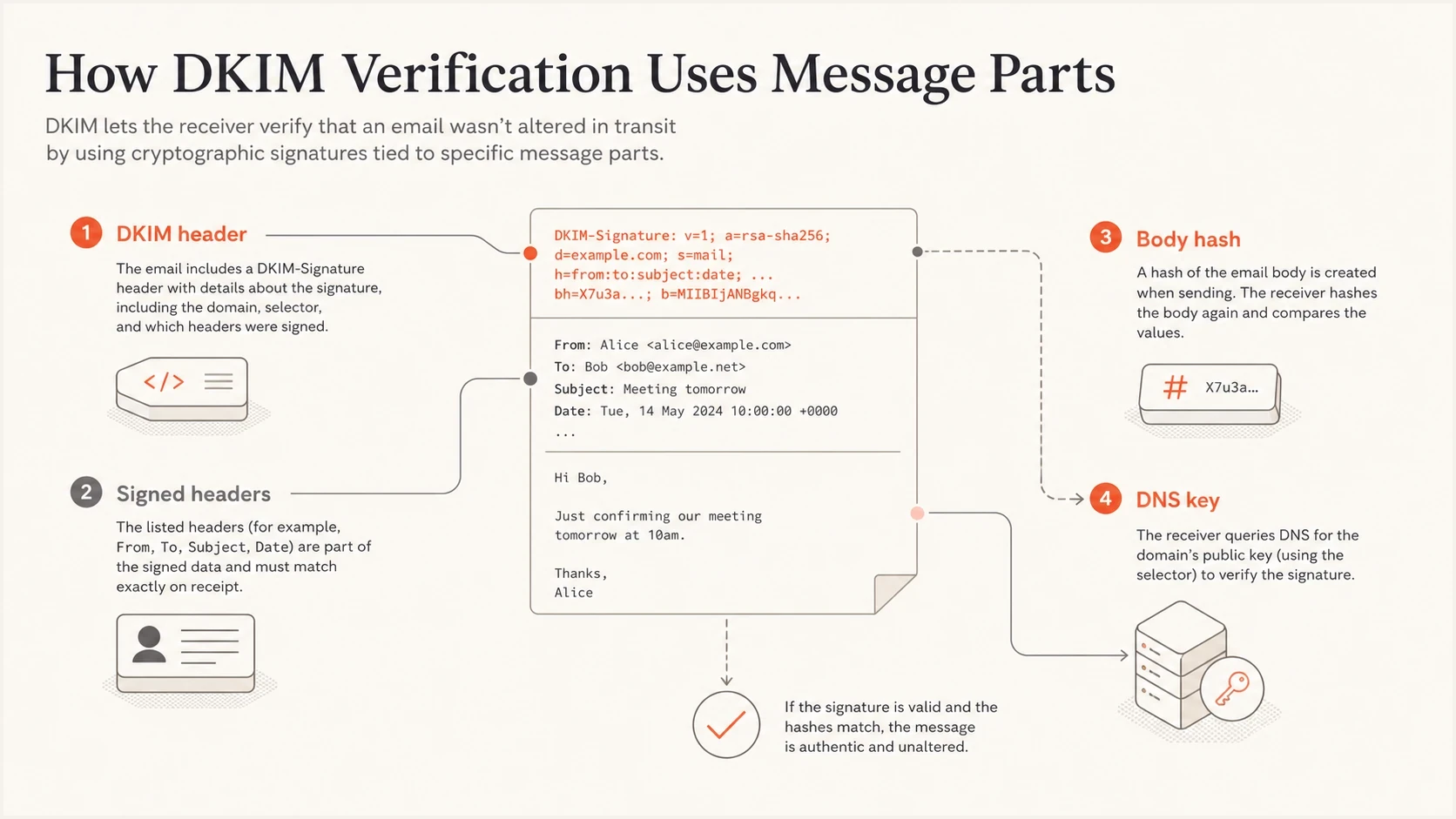
DKIM verification checks the signature header, signed headers, body hash, and DNS key.
Start with Authentication-Results
The best next move after a SpamAssassin DKIM hit is to inspect the full raw email. I care most about Authentication-Results because it records what a receiver actually checked. Use the header added by the system that accepted the message, not a copied or user-supplied header lower in the message.
Authentication-Results exampletext
Authentication-Results: mx.example.net;
  dkim=fail reason="signature verification failed" header.d=example.com;
  spf=pass smtp.mailfrom=bounces.sender.example;
  dmarc=fail header.from=example.com
This header tells you whether the DKIM failure is real at the receiver and whether DMARC had another path to pass. If the trusted Authentication-Results header says dkim=pass, but a separate SpamAssassin run says invalid, compare the exact message copies and check whether SpamAssassin received the complete body.
- dkim=pass: The receiver verified at least one DKIM signature.
- dkim=fail: Read the reason field, then test that signature's selector and signed content.
- header.d: Compare this signing domain with the visible From domain.
- header.s: Use this selector when you query the public DKIM key.
Header trust matters
A message can contain several Authentication-Results headers. Trust the one added by your receiving system or a mailbox provider you control. Treat older ones as useful history, not final evidence.
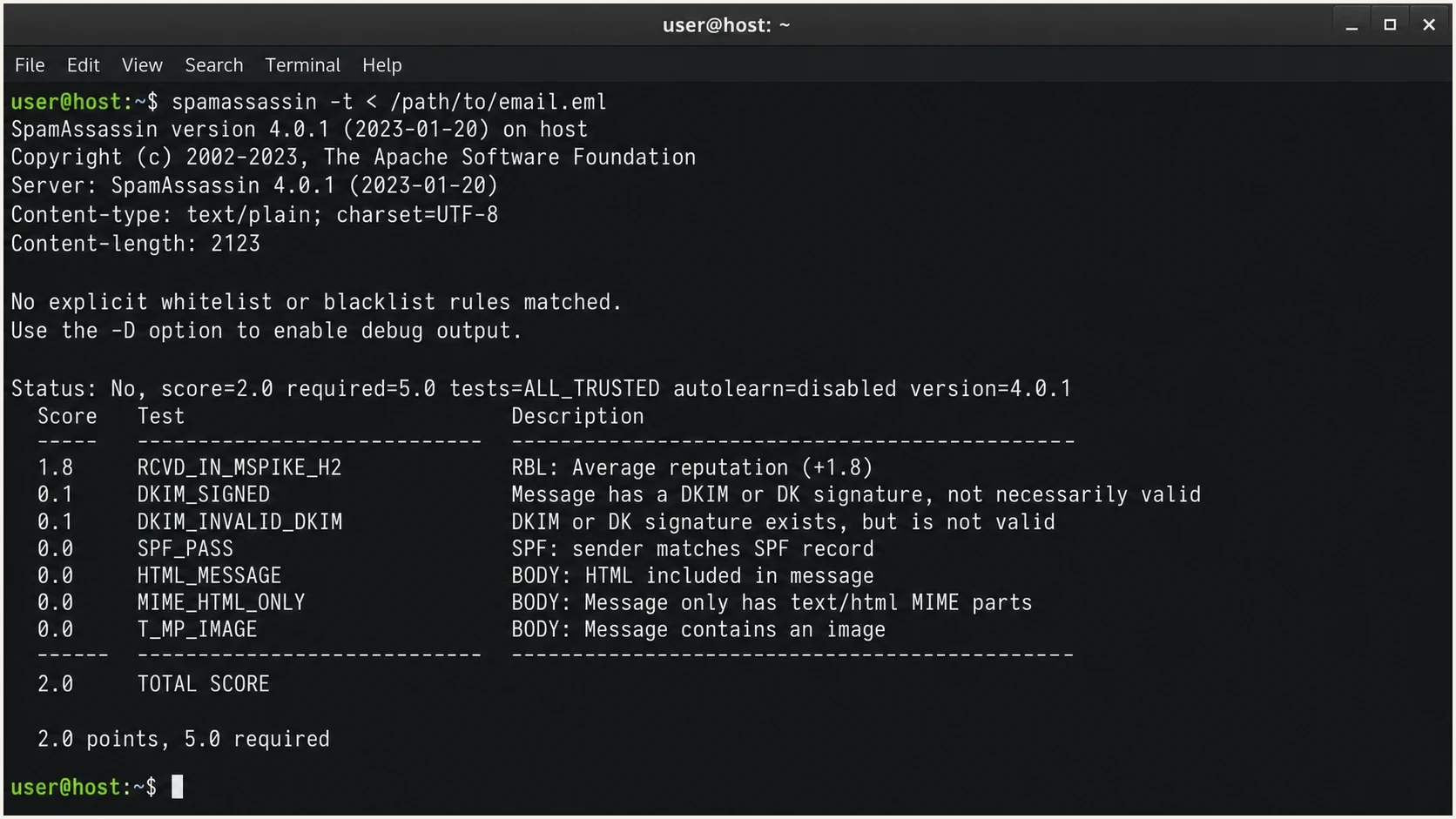
Apache SpamAssassin terminal output showing DKIM_SIGNED and DKIM_INVALID_DKIM rule hits.
Handle multiple signatures and truncated messages
One message can carry several DKIM-Signature headers, and each signature is verified independently. A trusted Authentication-Results header can therefore contain both dkim=pass and dkim=fail entries. For DMARC, the useful result is any passing signature that has Identifier Alignment with the visible From domain. A failed extra signature does not cancel that DMARC pass.
|
|
|
|---|---|---|
Pass and fail signatures | Different signatures had different results | Map each d= and s= |
DKIM_VALID without DKIM_VALID_AU | A signature passed, but not an author-domain signature | Check DMARC alignment |
Large message fails locally | Scanner may have received a truncated body | Compare complete raw input |
Attachment messages fail | MIME content was changed or truncated | Inspect the mail path |
How to read less obvious DKIM result combinations.
An attachment does not inherently invalidate DKIM. Attachments are MIME body content and are included in the signed body hash. If only messages with attachments fail, check whether the message exceeded a scanner input limit, whether a gateway rewrote the MIME structure, or whether the copy supplied to SpamAssassin was incomplete.
Check for truncated scanner input
SpamAssassin can verify signatures supplied by the calling mail system when the message body was truncated before scanning. On a self-managed installation, inspect debug output and the caller integration for __TRUNCATED or caller-provided DKIM results before changing DNS or rotating a key.
Check the DKIM signature fields
Once the headers confirm a DKIM failure, inspect the relevant DKIM-Signature header. This header tells you the signing domain, selector, canonicalization mode, signed headers, body hash, and signature value. Map those fields to the matching Authentication-Results entry when the message has more than one signature.
DKIM-Signature header exampletext
DKIM-Signature: v=1; a=rsa-sha256; c=relaxed/relaxed;
  d=example.com; s=selector1; t=1710000000;
  h=from:to:subject:date:message-id;
  bh=abc123base64=;
  b=def456base64=
- d=: Signing domain. It must meet DMARC Identifier Alignment requirements under the active adkim mode.
- s=: Selector. Query this value at selector._domainkey under the signing domain.
- c=: Canonicalization. relaxed/relaxed normalizes defined whitespace and header formatting differences, but substantive body changes still fail.
- h=: Signed headers. A change to one of these headers can break verification.
- bh=: Body hash. This fails when the canonicalized body differs from what was signed.
- b=: Signature data. Verification fails when the signed header hash does not match the public key result.
Selector DNS exampledns
selector1._domainkey.example.com. 3600 IN TXT
"v=DKIM1; k=rsa; p=MIIBIjANBgkqh..."
For a quick DNS-level validation, run the selector through the DKIM checker. That confirms whether the public key is published and parseable before you spend time on message-body changes.
DKIM checker
Check selector records and public key configuration.
?/7tests passed
If the selector was published or rotated recently, compare the authoritative answer with the recursive answer used by the verifier. Cached DNS can retain the prior record until its TTL expires. Keep the old selector available long enough for previously signed mail to finish delivery, and sign new mail with the new selector.
A clean selector lookup narrows the problem. At that point, focus on the actual message path: where it was signed, what system touched it afterward, and whether the final received copy matches what the signer originally signed.
Troubleshoot in the right order
DKIM troubleshooting gets messy when you jump straight to DNS edits. Work through the evidence in order. The aim is to isolate whether the failure is related to scanner input, lookup, key, header, body, or DMARC alignment.
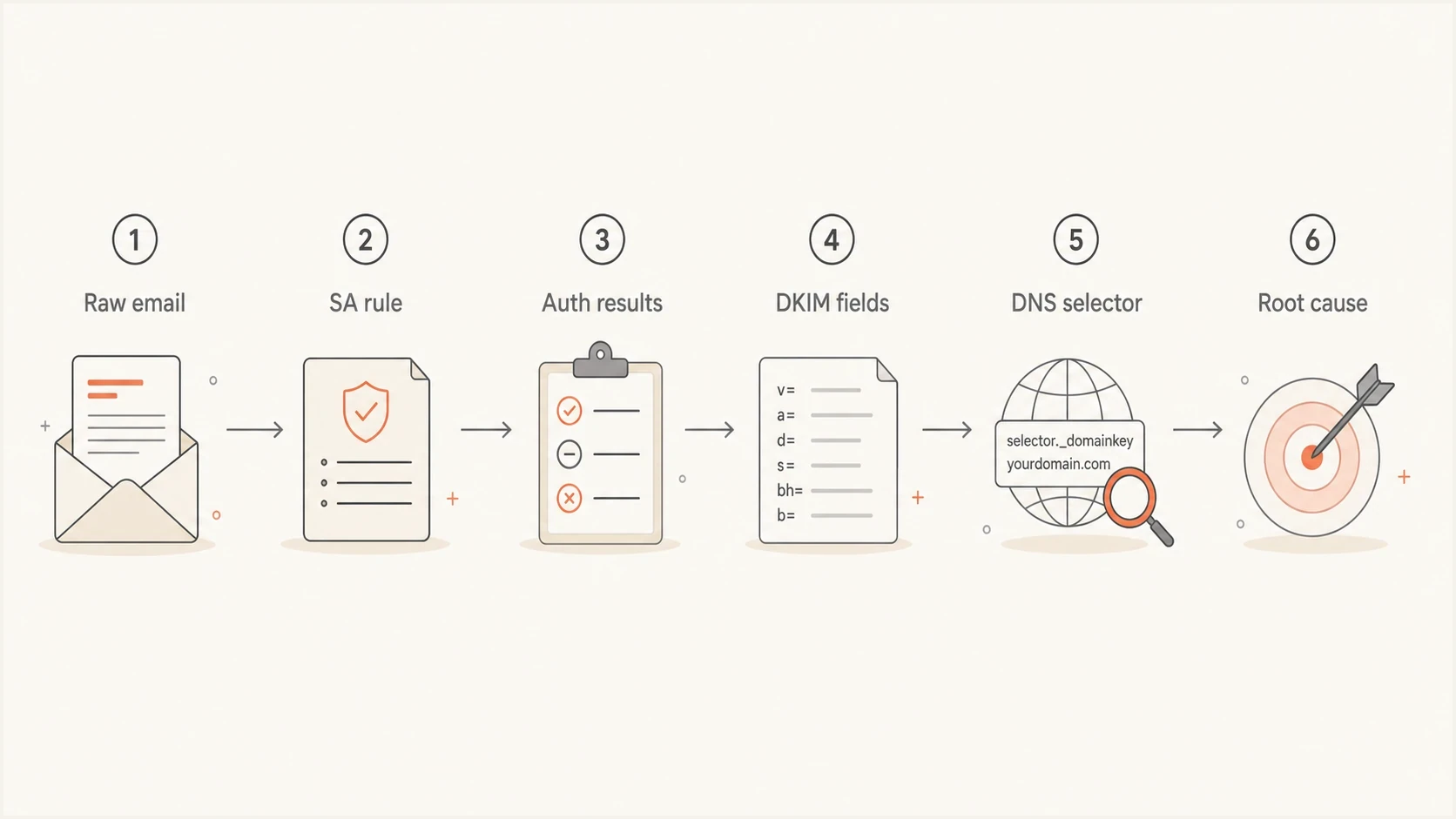
A DKIM troubleshooting flow: raw email, SpamAssassin rule, authentication results, DKIM fields, DNS selector, root cause.
- Preserve raw email: Use the full message source, including untouched headers and body.
- Read receiver results: Find the trusted Authentication-Results header and each DKIM result.
- Map signer fields: Record the signing domain, selector, signed headers, and body hash for the failed signature.
- Check scanner input: Confirm SpamAssassin received the complete message or trusted caller-supplied DKIM results.
- Check selector DNS: Confirm the TXT record exists, has one key, and matches the signer.
- Inspect modifications: Look for footers, tracking rewrites, gateway edits, or MIME changes.
- Retest one path: Send a simple message through the same sender and compare results.
If your end symptom is landing in spam despite authentication passing, treat DKIM as only one part of the investigation. Content, complaint rate, sending patterns, and domain reputation still matter.
The most common DKIM failure causes
When SpamAssassin says the DKIM signature exists but no signature is valid, the cause is usually one of a small number of practical issues. Match the exact failure reason to the affected signature and message path before making a change.
|
|
|
|---|---|---|
Body hash | Content or MIME changed | Sign after final changes |
No key | Selector DNS | Publish the TXT record |
Wrong key | Signer configuration | Correct or rotate selector |
Header change | Signed header list | Stop the rewrite |
DNS format | TXT assembly | Fix the record |
Truncated input | Scanner integration | Pass complete data or results |
Common DKIM failure causes and where to inspect first.
A body hash failure usually means the canonicalized message body differs from what was signed. If that is your exact header result, use the body hash verification troubleshooting path before editing DNS. Footer insertion, MIME rewriting, and link decoration after DKIM signing are common causes.
If the result mentions no public key, the selector lookup is the first place to fix. The no key errors pattern usually means the selector in the header does not resolve at the signing domain, the record is under the wrong host name, or the verifier received a stale cached answer.
Do not fix the wrong layer
If a single test message fails DKIM, changing the domain's DKIM record without checking the actual selector, complete scanner input, and message path can break mail that was already passing. Prove the failure layer first.
How DMARC changes the interpretation
DKIM passing is not the same as DMARC passing. DMARC evaluates the visible From domain and the published adkim mode. Relaxed DKIM alignment, the default, requires the passing signing domain and From domain to share the same Organizational Domain. Strict alignment requires an exact domain match. RFC 9989 determines Organizational Domains through a DNS Tree Walk rather than relying only on a public suffix list.
A message with multiple DKIM signatures can satisfy DMARC when any passing signature has Identifier Alignment. SPF can provide the other DMARC path only when SPF passes for an authenticated domain that has Identifier Alignment with the visible From domain under the published aspf mode.
DKIM passes but DMARC fails
- Domain: No passing signing domain meets Identifier Alignment requirements under the active adkim mode.
- Envelope: SPF passed for a domain without Identifier Alignment with From.
- Policy: The receiver applies the policy discovered for the visible From domain.
- Fix: Use a signing domain that meets Identifier Alignment requirements, or correct the intended policy.
DKIM fails but DMARC passes
- SPF: SPF passed using a domain with Identifier Alignment to the visible From domain.
- Other path: That SPF result satisfied DMARC on this delivery.
- Risk: Forwarded mail often loses SPF, so DKIM still needs a fix.
- Fix: Repair DKIM instead of relying on SPF as the only path.
This is where DMARC monitoring matters. A one-off SpamAssassin result tells you about one message. Aggregate DMARC reports show which sources repeatedly pass, fail, or use a domain without Identifier Alignment.
DMARC record detail view showing SPF, DKIM, DMARC, rDNS diagnostics, and DNS records
In Suped's product, this workflow groups DKIM, SPF, DMARC, rDNS, and DNS record diagnostics by source. You can move between an invalid DKIM symptom, the source sending the mail, and the DNS records that need review.
For a broader record check before you dig into a specific message, the domain health checker can confirm whether DMARC, SPF, and DKIM records are published in a usable shape.
When SpamAssassin documentation is not enough
There is no single public explanation for every SpamAssassin test label you will see. The Apache rule files explain the standard rules, but local installations can add rules, change scores, or run plugins in a different configuration. Some results are set by plugin code rather than a plain rule file.
Finding local SpamAssassin rule definitionsbash
grep -R "DKIM_INVALID_DKIM" /usr/share/spamassassin /var/lib/spamassassin /etc/mail/spamassassin
grep -R "DKIM_INVALID" /usr/share/spamassassin /var/lib/spamassassin /etc/mail/spamassassin
spamassassin -D < message.eml
- Local rules: Search the installed and updated rule directories when a report label differs from the default rules.
- Meta rules: DKIM_INVALID is built by combining DKIM_SIGNED with the absence of DKIM_VALID.
- Plugin code: DKIM checks can come from Perl plugin behavior instead of a simple pattern.
- Score changes: The same rule name can carry a different score in another installation.
Use the score carefully
A public SpamAssassin score report can be useful for fast testing, but it is not the same as a receiver decision. Use it to find obvious authentication issues, then confirm with complete headers, DNS, and aggregate reporting.
What to fix first
The priority depends on what the trusted headers show. I ignore tiny score changes when at least one DKIM signature passes with Identifier Alignment. I fix production sources when DKIM failures are repeated or also cause DMARC failures.
DKIM troubleshooting priority
Treat SpamAssassin points as low priority unless trusted headers show a real authentication failure.
Informational
Low
Rule hit only
Investigate
Medium
Trusted header says DKIM failed
Fix now
High
DKIM failure also breaks DMARC
Monitor
Ongoing
DKIM passes, but source patterns changed
Suped's product is useful when the work extends beyond one test message. It turns aggregate authentication data into source-level DKIM and DMARC issues, so teams can verify whether a fix changed production results without reading raw headers every day.
Suped workflow
- Detect: Find sources with repeated DKIM failures or signatures without Identifier Alignment.
- Explain: Connect the issue to the affected source and DNS records.
- Verify: Watch later aggregate reports to confirm the correction.
- Manage: Review the same workflow across the domains your team operates.
Views from the trenches
Best practices
Use full raw headers before changing DNS, because partial score screenshots hide context.
Compare SpamAssassin output with trusted Authentication-Results before deciding.
Check the selector and signing domain together, because one without the other misleads.
Retest with a simple message path after each fix so new edits do not hide the cause.
Common pitfalls
Treating DKIM_SIGNED as a pass causes teams to miss invalid signatures in headers.
Assuming a correct DNS key proves every message is signed correctly wastes time.
Blaming a different envelope domain for DKIM failure confuses SPF with DKIM checks.
Using a public score as a deliverability verdict overstates what SpamAssassin proves.
Expert tips
Search installed SpamAssassin rules when public descriptions are too short to act on.
Use debug output only after headers and DNS confirm the failure layer is unclear.
Fix post-signing body edits before rotating keys when the body hash is failing now.
Track aggregate DMARC reports so one-off DKIM failures become source-level issues.
Marketer from Email Geeks says public SpamAssassin rule documentation is incomplete, so installed rules and plugin behavior often explain more than the public list.
2024-07-19 - Email Geeks
Marketer from Email Geeks says DKIM_SIGNED only confirms that a DKIM-Signature header exists, while DKIM_INVALID_DKIM means that signature did not verify.
2024-07-19 - Email Geeks




