Why are transactional emails being blocked by freenet.de and how to resolve it?

Published 9 Jun 2025
Updated 28 Jul 2026
13 min read
Summarize with
Updated on 28 Jul 2026: We added freenet.de-specific guidance for rate limits, reverse DNS, recipient quality, and safe retries.
Transactional emails are blocked by freenet.de when its filtering has enough negative evidence to reject a message with a generic 550 Spam message rejected response. The evidence can involve sender IP reputation, the envelope sender domain, EHLO identity, missing or weak reverse DNS, broken SPF or DKIM, DMARC domain mismatch, content scoring, or a template that looks less transactional than expected. Low volume does not protect a sender when the message fails one of those checks.
The fastest fix is to find where the rejection happens in the SMTP transaction, fix the technical identity first, simplify the template for freenet.de recipients, and then contact the freenet.de postmaster team with evidence if the block continues. Treat this as a receiver-specific deliverability incident, not a DMARC-only problem.
- Direct cause: freenet.de rejected the message as spam, but the visible reason does not expose every scoring signal.
- First split: a rejection before DATA points toward IP, EHLO, rDNS, envelope sender reputation, or recipient validation.
- Second split: a rejection after DATA points toward message headers, content, links, authentication results, or MIME structure.
- Best path: fix proof of identity, remove risky content signals, retry slowly, then escalate with logs.
What the freenet.de 550 rejection means
A 550 response is a permanent SMTP rejection for that delivery attempt. When the text says Spam message rejected, freenet.de is not reporting one precise cause. It is reporting that the message crossed a filtering threshold. That can happen before message content is accepted or after freenet.de reads the headers and body.
A pattern where one message to the same recipient defers, later delivers, and the next message blocks is consistent with changing reputation, rate, and content signals. It does not prove that the recipient address is bad. It shows that freenet.de is deciding per attempt based on the sending identity, connection, recipient status, and message.
Do not assume low volume is enough to pass freenet.de. A low-volume stream with weak rDNS, a mismatched EHLO name, a poor shared IP pool, a marketing-looking template, or a risky subject line can still fail.
- Log timing: capture the exact SMTP command immediately before the rejection.
- Keep samples: save one failed message and one accepted message with full headers.
- Avoid guessing: change one variable at a time so the next retry proves something.
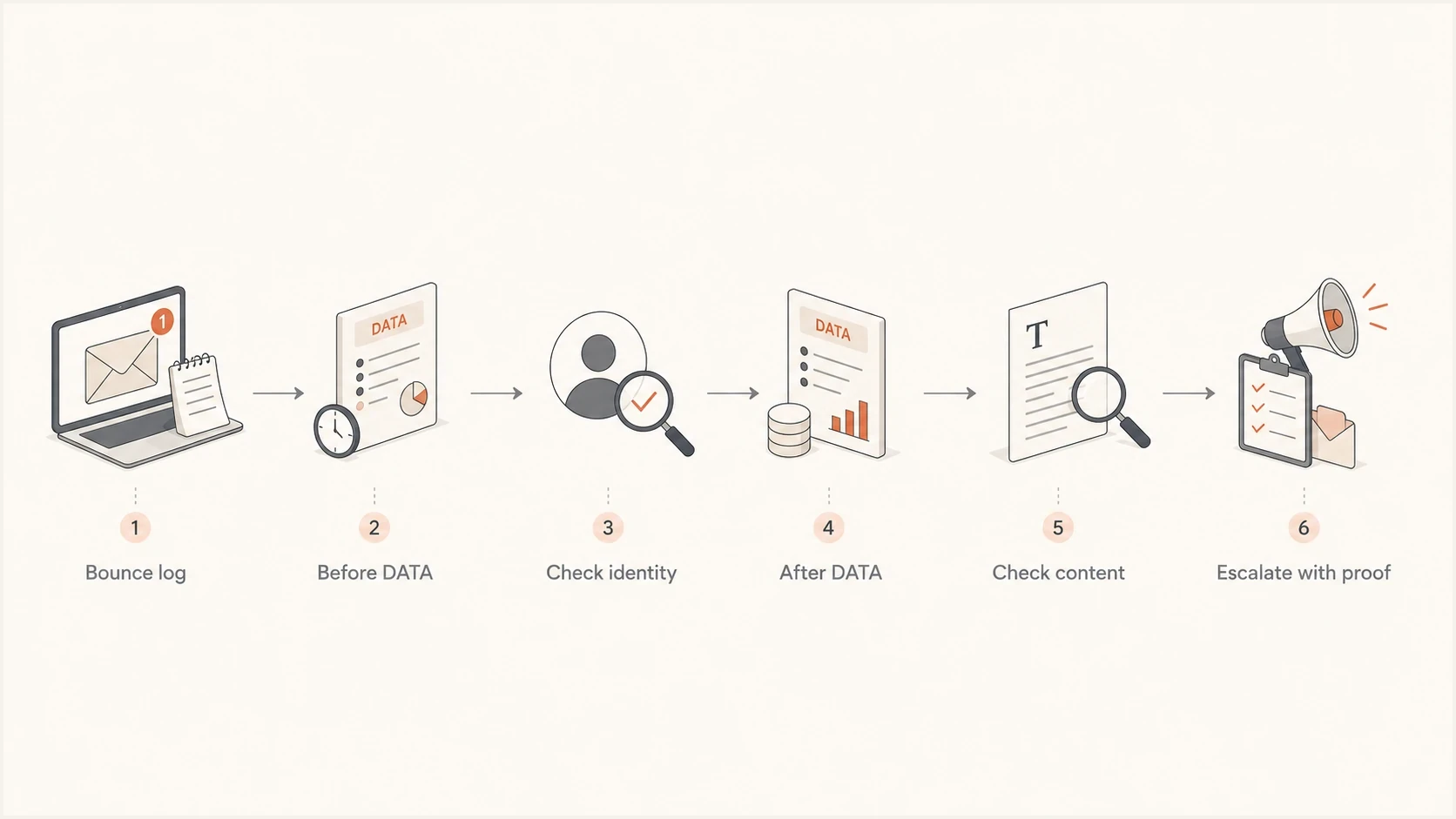
Flowchart showing how to diagnose freenet.de blocks by SMTP rejection stage.
There is no universal fix for a freenet.de rejection. Separate connection-level checks from message-level checks, make the smallest useful change, and retry with a limited sample.
Find whether the block happens before or after DATA
The most useful first question is simple: did freenet.de reject the message before or after the DATA command? Before DATA, freenet.de has not accepted the message body. It is judging the connection, sending IP, EHLO identity, reverse DNS, envelope sender, and recipient. After DATA, it has seen headers, links, copy, authentication results, and MIME structure.
Rejected before DATA
This usually points to identity, recipient validation, or reputation. Check connection-level proof before editing templates.
- IP reputation: review the history of each dedicated or shared source IP.
- EHLO name: use the stable hostname associated with the sending IP.
- Reverse DNS: confirm that PTR and forward DNS resolve back to the same IP.
- Envelope sender: check SPF for the bounce domain.
Rejected after DATA
This points to message-level scoring. Compare a failed message with a delivered one.
- Headers: review DKIM, DMARC, List-ID, precedence, and other classification clues.
- Subject: remove emoji text, unusual symbols, and sales-style wording.
- Body: use plain transactional copy and stable links.
- MIME: check text and HTML parts for malformed markup.
SMTP log clues to requesttext
S: 220 mx.freenet.de ESMTP
C: EHLO mail.example.com
C: MAIL FROM:<bounce@bounce.example.com>
C: RCPT TO:<user@freenet.de>
S: 550 Spam message rejected

If the 550 appears here, investigate IP, EHLO, rDNS, envelope sender, and recipient status.

C: DATA
C: Subject: Your receipt
C: ...message body...
S: 550 Spam message rejected

If the 550 appears here, investigate headers, content, links, authentication results, and MIME.
Many email platforms expose only a simplified event such as blocked, bounced, or deferred. If that is all you have, ask the platform for the raw SMTP transcript or detailed message logs. Without the timing, every fix is slower because IP reputation work and template work become mixed together.
Separate rate limits from permanent blocks
Do not treat every freenet.de delivery failure as the same incident. An immediate 4xx response, such as a 458 rate-limit response, is temporary and should remain queued for controlled retry. An immediate 550 spam rejection is permanent for that attempt and should not be retried unchanged.
|
|
|
|---|---|---|
Immediate 4xx, such as 458 | Temporary deferral or rate limit | Keep queued, apply backoff, and reduce concurrency |
Later 554 with queue expiry | Retries expired after earlier deferrals | Inspect the first remote response, not only the final bounce |
Immediate 550 spam rejection | Permanent failure for that attempt | Correct the cause before a limited retest |
Hard bounce for unknown user | Invalid or deactivated recipient | Suppress the address immediately |
How to interpret freenet.de delivery outcomes
Freenet's sender guidance warns that attempts to numerous unknown or deactivated freenet.de addresses can temporarily block a sender. Suppress hard bounces immediately, investigate sudden address-quality changes, and avoid replaying an old queue after the underlying problem is fixed.
- Retry temporary failures with increasing delays and low concurrency instead of rapid loops.
- Group failures by source IP to see whether one shared-pool route carries most deferrals or blocks.
- Move to a dedicated IP only when volume supports a controlled warm-up and ownership of reputation.
- Keep transactional and promotional traffic separate when complaints or invalid recipients in one stream can affect the other.
A dedicated IP is not an automatic fix. It starts with little or no sending history, and it does not repair weak authentication, invalid recipients, or a message that freenet.de scores as spam.
Fix the technical identity first
Before changing copy, make the sending identity consistent. Freenet.de filtering has little reason to trust a transactional stream when the identity chain is messy. SPF should pass for the envelope sender, DKIM should pass with a stable selector, and DMARC should pass through matching SPF or DKIM. The sending IP also needs forward-confirmed reverse DNS, and the EHLO hostname should identify that server.
|
|
|
|---|---|---|
SPF | Envelope sender passes | The sending IP is authorized for the bounce domain |
DKIM | Signature passes and the signing domain matches the From domain | The signed message can satisfy DMARC |
DMARC | At least one passing method matches the visible From domain | The receiver can connect authentication to the visible sender |
rDNS | PTR hostname resolves forward to the same IP | Freenet requires a valid reverse DNS identity |
EHLO | Greeting uses the stable server hostname | The SMTP greeting is consistent with DNS |
Technical checks that change how freenet.de judges a sender
One sending IP normally needs one stable PTR hostname, even when it carries mail for multiple sender domains. The PTR does not need to equal every visible From domain. Its hostname should resolve forward to the same IP and should be the name presented in EHLO.
Use a broad domain check when there is no current authentication baseline. A focused DNS check catches record errors, while a broader health check connects sender, domain, and authentication evidence. The domain health checker is a practical starting point when freenet.de blocks appear beside other deliverability symptoms.
?
What's your domain score?
Deep-scan SPF, DKIM & DMARC records for email deliverability and security issues.
The SPF record should authorize the platform that sends the transactional mail and remain within the SPF DNS lookup limit. An SPF permerror means SPF cannot produce a pass for that evaluation. A matching, passing DKIM signature can still satisfy DMARC. When a domain has many sending sources, automated SPF management or carefully maintained flattening can control lookup count, but static flattened records must be updated when provider IP ranges change.
Example SPF, DKIM, and DMARC recordstext
example.com. 3600 IN TXT (
  "v=spf1 include:spf.sender.example -all"
)

selector1._domainkey.example.com. 3600 IN TXT (
  "v=DKIM1; k=rsa; p=..."
)

_dmarc.example.com. 3600 IN TXT (
  "v=DMARC1; p=none; rua=mailto:dmarc@example.com"
)
Suped connects DMARC, SPF, DKIM, rDNS, issue detection, and source visibility in one workflow. For a freenet.de incident, use Suped to identify the sending source, confirm its authentication, check whether failures cluster around one IP or domain, and keep the evidence ready for escalation.
DMARC record detail view showing SPF, DKIM, DMARC, rDNS diagnostics, and DNS records
Teams can use Suped's issue detection and alerts to catch authentication changes, then use its hosted DMARC, hosted SPF, SPF flattening, hosted MTA-STS, and blocklist monitoring in the same operating process. Agencies and managed service providers can keep client domains separate in the multi-tenant dashboard.
Clean up the transactional template
If the rejection happens after DATA, treat content scoring as a working hypothesis until the evidence rules it out. Freenet.de can filter a message that looks promotional while claiming to be transactional. A receipt, password reset, login alert, account notice, or booking confirmation should state its purpose immediately.
- Subject line: remove emoji text, unusual symbols, urgency phrasing, and marketing copy.
- From name: test a plain brand or service name when the current name looks sales-led.
- Body copy: state the reason for the email in the first line.
- Links: use branded links and avoid redirect chains, tracking-only links, and URL shorteners.
- HTML: send valid MIME with a plain text part, clean HTML, and no hidden copy.
A useful freenet.de test is a reduced template. Keep the same recipient, sender domain, IP, and authentication, then simplify the subject and body. If the simplified version delivers, content contributed to the scoring problem.
Reduced transactional copytext
Subject: Your account confirmation

Hello,

Your account confirmation code is 123456.

This code expires in 10 minutes.

Example Support
Do not convert a transactional stream into plain text forever unless that format fits the message. Use the reduced template to isolate the issue. Then restore one element per test, such as the logo, footer, tracking, legal text, secondary links, or styling. The result should show which element increases the spam score.
The email tester uses a real sent message rather than DNS records alone. That matters when the problem sits in headers, MIME, links, or authentication results added by the sending platform.
Check blocklists and sender reputation
A freenet.de rejection is not always caused by a public blocklist or blacklist. It can come from internal reputation. Public blocklist checks still belong in the process because they show whether the sending IP or domain has a broader reputation issue that freenet.de can consider.
Check IP and domain reputation, not only the visible From domain. Transactional mail often uses a bounce domain, branded link domain, image host, and platform-owned sending hostname. A problem on any of those identities can raise suspicion. Suped's blocklist monitoring keeps that work continuous instead of waiting for a rejection.
Use a blocklists overview to separate public listings from private receiver reputation. If freenet.de blocks the message and public blocklist (blacklist) checks are clean, investigate receiver-specific reputation, connection identity, recipient quality, and content next.
How to prioritize the evidence
Use the rejection stage and identity checks to decide the next fix.
Low concern
Monitor
One isolated block, clean logs, clean authentication, and normal retries.
Medium concern
Template test
Repeated freenet.de blocks, clean DNS, and content differences between samples.
High concern
Fix identity
Blocks before DATA, rDNS or EHLO gaps, shared IP issues, or public listings.
If the same sender also has blocks at other mailbox providers, compare the incident with other receiver-specific patterns. A freenet.de block that behaves like an internal reputation issue belongs in the same diagnostic bucket as small ISP blocks. If authentication passes but multiple major ISPs still reject the mail, use a broader major ISP checklist before focusing only on freenet.de.
Escalate to freenet.de with the right evidence
If the technical identity is clean, the template has been reduced, and freenet.de still returns 550, use the contact route on freenet.de's current postmaster site. Keep the request short and evidence-led. A request without SMTP timing, source IP, sender domain, and sample message data gives the postmaster team too little to investigate.
- Source IP: include every IP that attempted delivery to freenet.de.
- Timestamp: send exact dates, times, and timezone for failed attempts.
- SMTP transcript: show whether the rejection happened before or after DATA.
- Message sample: attach headers or provide a redacted copy with links intact.
- Authentication proof: state SPF, DKIM, DMARC, rDNS, and EHLO results.
- Business context: explain why the message is transactional and expected.
Escalation note templatetext
Subject: False positive review request for transactional mail

Hello freenet.de postmaster team,

We are seeing 550 Spam message rejected for transactional email.

Sending domain: example.com
Envelope sender: bounce.example.com
Source IPs: 203.0.113.10
EHLO: mail.example.com
Rejection stage: after DATA
Failed timestamp: 2026-07-28 09:14 UTC
Recipient domain: freenet.de
Authentication: SPF pass, DKIM pass, DMARC pass
Message type: account confirmation requested by the recipient

Please review whether this stream is being filtered as a false positive.

Thank you.
Keep the tone factual. Do not ask for broad allowlisting before proving that the stream is transactional, authenticated, and wanted. State whether one template is affected or every template from one source IP is affected. Specificity makes the review easier.
A practical recovery sequence
Use a staged sequence because freenet.de blocks can have more than one cause. Changing authentication and content together can restore delivery without showing which change worked. Repeating unchanged attempts can add more negative evidence.
- Pause pressure: stop repeated retries for non-urgent mail while collecting evidence.
- Collect logs: identify the SMTP stage, response class, and affected source IPs.
- Fix identity: verify SPF, DKIM, DMARC, forward-confirmed rDNS, EHLO, and envelope sender setup.
- Clean recipients: suppress hard bounces and investigate spikes in unknown users.
- Reduce content: send a plain transactional version to isolate content scoring.
- Retry carefully: send a small number of test messages and record each result.
- Escalate cleanly: contact the current postmaster route with logs, samples, and authentication proof.
For agencies and managed service providers, Suped's multi-tenant dashboard keeps freenet.de investigations separate by client. Teams can compare domains, watch blocklist and blacklist changes, review authentication failures, and prepare client evidence without rebuilding the process for each incident.
Views from the trenches
Best practices
Capture SMTP stage, IP, EHLO, rDNS, and headers before changing the template at all.
Test a reduced transactional template before asking freenet.de for a manual review.
Keep freenet.de evidence separate so receiver-specific changes remain easy to audit.
Common pitfalls
Assuming low volume protects a sender when identity or content signals are weak.
Treating every 550 as a public blacklist issue instead of checking local scoring.
Sending a vague postmaster request without logs, timestamps, and sample headers.
Expert tips
Compare accepted and rejected samples to find the smallest meaningful difference.
Use branded links and plain transactional subjects for early freenet.de retests.
Escalate only after SPF, DKIM, DMARC, rDNS, and EHLO checks are documented clearly.
Marketer from Email Geeks says the first checks should be authentication, reverse DNS, and whether the message is truly transactional.
2023-07-19 - Email Geeks
Marketer from Email Geeks says the SMTP rejection stage narrows the cause because pre-DATA blocks point to identity and reputation.
2023-07-19 - Email Geeks
The fix that usually works
The most reliable resolution is a short investigation in the right order: locate the SMTP rejection stage, distinguish deferrals from permanent blocks, fix sender identity, suppress invalid recipients, simplify the template, check blocklist and blacklist signals, retry gently, and escalate with evidence when freenet.de still rejects the mail.
For a block before DATA, concentrate on IP reputation, EHLO, rDNS, SPF, the envelope sender, and recipient status. For a block after DATA, examine DKIM, DMARC, headers, MIME, subject line, links, and template content. Suped keeps authentication monitoring, source detection, issue steps, alerts, hosted SPF, hosted DMARC, hosted MTA-STS, and reputation monitoring in the same workflow.




