Why am I receiving 554 PH01 bounce errors from Verizon Media Group / Yahoo?

Published 10 May 2025
Updated 1 Aug 2026
12 min read
Summarize with
Updated on 1 Aug 2026: We added provider-incident triage and tightened the PH01 guidance for content checks, authentication, bounce handling, and Yahoo escalation.
A 554 PH01 bounce from Verizon Media Group or Yahoo means Yahoo rejected the message permanently for that delivery attempt under a content-based policy block. Yahoo associates PH* errors with content it will not accept, including harmful files, deceptive requests, malicious software, or links leading to that material. A false positive or a reputation problem involving a linked domain can produce the same code. The exact bounce usually reads something like 554 Message not allowed - [PH01] Email not accepted for policy reasons. Yahoo documents PH01 under its SMTP error codes. Check every URL, the tracking domain, the From domain, authentication, and message content before treating the event as a general sending outage.
The Verizon Media Group name causes confusion because Yahoo is the receiver people are usually dealing with now. Verizon Media Group branding has been outdated for years, but some sending reports and bounce classifications still use the older label. Treat PH01 grouped under Verizon Media Group as a Yahoo/AOL mailbox-provider rejection.
Direct answer
PH01 is not a normal hard bounce caused by an invalid mailbox. It is a permanent policy rejection for that SMTP attempt. Classify these bounces separately, follow the sending platform's suppression rules, and do not resend at full volume until testing shows whether Yahoo rejected the campaign, tracking domain, sending domain, or a receiver-side classification.
What PH01 means in practice
PH01 usually points at a content or domain safety decision, not a single broken DNS record. Yahoo can reject a message because of the landing page, a tracking link, a third-party CDN URL, a shared link domain, the visible From domain, or a pattern associated with abuse. That is why an otherwise engaged segment can suddenly bounce.
The important distinction is that PH01 is a content-based block that can affect valid Yahoo or AOL addresses across an entire campaign. A list with clean engagement and sensible bounce handling still gets hit if the message contains a URL Yahoo currently treats as unsafe, or if a shared infrastructure signal changes suddenly.
- Meaning: Yahoo classified the message during the SMTP transaction and rejected it permanently for that delivery attempt under a policy rule.
- Common trigger: A link, tracking domain, or From domain has poor reputation, has been abused elsewhere, or matches a suspicious pattern.
- Other trigger: A false positive or receiver-side rule change affects a specific URL, shared IP range, or campaign template.
- Wrong assumption: Treating every 554 PH01 event as proof that the recipient address is dead.
Typical Yahoo PH01 bounce texttext
554 Message not allowed - [PH01] Email not accepted for policy reasons.
Please visit https://senders.yahooinc.com/error-codes
The checks to run first
Start with the parts of the message Yahoo can classify as risky without needing the recipient to complain. Check every URL, the redirect chain, domains in visible and hidden headers, authentication domain matching, and any sudden change in sending reputation.
Likely causes
- Tracking URL: A click-tracking domain or shared redirect domain has been classified as unsafe.
- Third-party link: A CDN, file host, short link, or partner domain in the message has been abused.
- From domain: The brand domain has a reputation or authentication problem.
- False positive: Yahoo temporarily misclassifies a link, sender, or campaign pattern.
Less likely causes
- Invalid mailbox: Bad addresses usually return mailbox or user errors, not PH01.
- Connection outage: A pure connectivity outage usually returns temporary 4xx errors, although a receiver-side classification incident can still surface as PH01.
- One recipient: A campaign-wide PH01 spike usually points at the message or sender, not one subscriber.
- List fatigue: Poor engagement matters, but PH01 is more specific than ordinary low-engagement filtering.
If the same campaign is fine everywhere except Yahoo and AOL, run controlled tests before opening a ticket. Change one variable at a time: compare a plain-text version, the creative without tracking links, links without URL wrapping, and the same message through another authenticated sending stream when one is available.
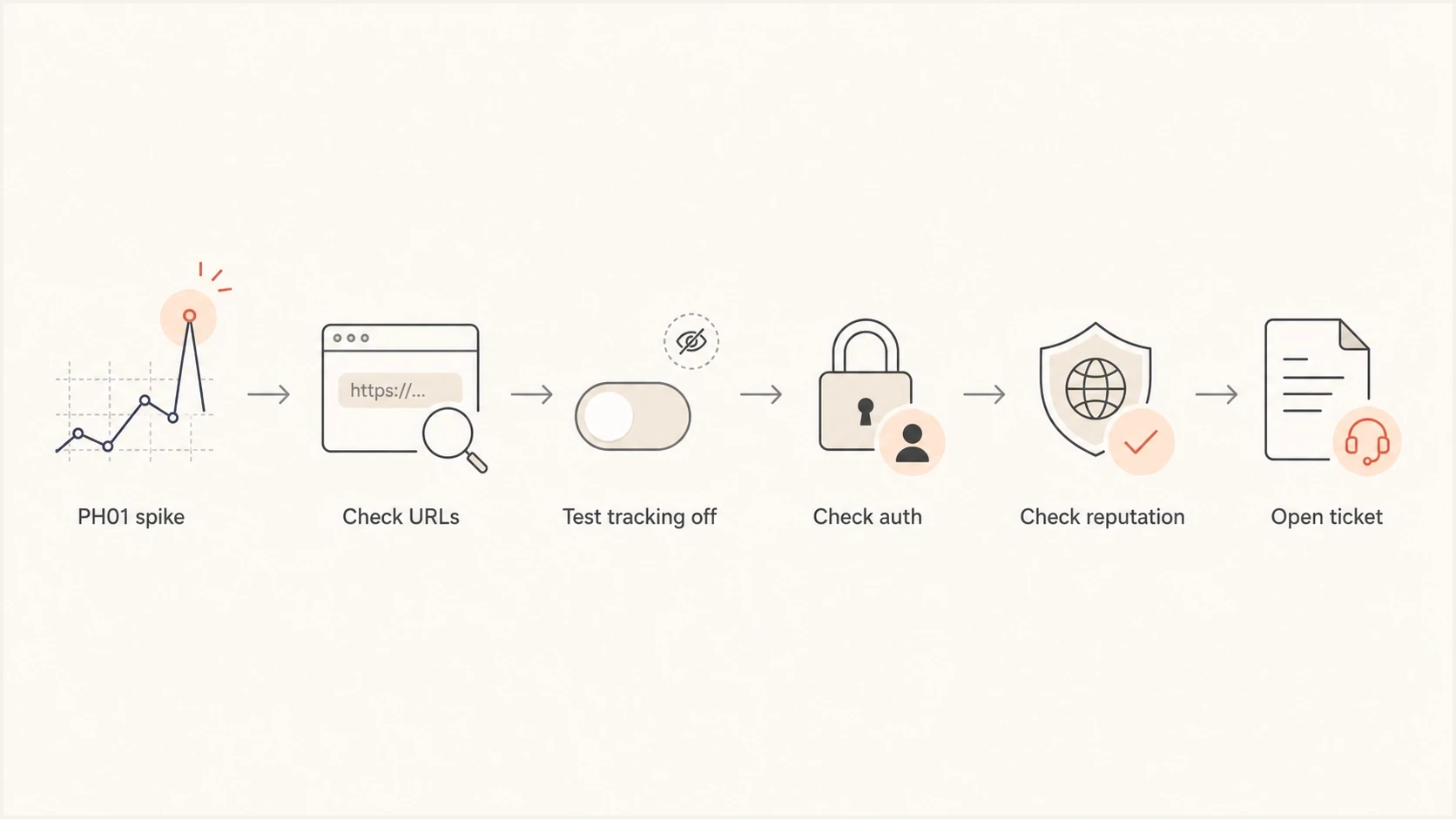
Flowchart showing the PH01 troubleshooting path from bounce spike to Yahoo ticket.
Rule out a provider-wide incident
A sudden Yahoo/AOL bounce-rate spike across unchanged campaigns can indicate a receiver-side or shared-infrastructure incident. Between 10:30 a.m. ET on January 29 and 11:10 a.m. ET on January 30, 2026, a confirmed issue caused elevated Yahoo-domain bounces and was resolved without sender-side changes. Messages were not automatically resent after recovery.
- Compare scope: Measure the PH01 rate across campaigns, automated flows, sending domains, and authenticated streams.
- Check timing: A sharp shared start and stop time points away from one isolated URL or mailbox.
- Review changes: Unchanged flows failing alongside new campaigns strengthen the incident hypothesis.
- Confirm status: Check sender-support notices and obtain written confirmation before deciding that no remediation is needed.
Do not assume every broad spike is receiver-side. Preserve samples and run a small stripped test while status is checked. After a confirmed incident ends, verify acceptance at low volume and review engagement before resending eligible messages.
Why engaged segments still get rejected
Engagement lowers risk, but it does not override all policy filters. A recipient can open and click for months, then a new send gets rejected because one link in that email now points through infrastructure Yahoo distrusts. This is common with shared tracking domains, generic CDN hostnames, old landing pages that were compromised, or redirect chains that hide the final destination.
Pay close attention to link hostnames that are not clearly tied to the brand. Generic CDN domains, shared sending domains, link shorteners, and raw file-hosting URLs ask the receiver to trust infrastructure that many unrelated senders also use. If another sender abuses that host, the message can be filtered even when the list is clean.
|
|
|
|---|---|---|
Links | Redirect chain | Remove or replace risky URLs |
Tracking | Click domain | Use branded tracking |
Auth | SPF, DKIM, DMARC | Fix identifier mismatch |
Reputation | Domain and IP | Check blocklist status |
Timing | Shared spike window | Check for an incident |
Compact PH01 triage table
DMARC data helps more than a bounce export alone. Bounce logs show that Yahoo rejected the message. DMARC aggregate reports identify sources sending as the domain and show whether SPF or DKIM passes with a matching domain. Suped's product brings those authentication results together with blocklist, blacklist, and deliverability signals, so teams can compare the rejected source with known legitimate traffic in one workflow.
?
What's your domain score?
Deep-scan SPF, DKIM & DMARC records for email deliverability and security issues.
How to isolate the offending part
The goal is to prove whether the failure follows the creative, links, sender, or infrastructure. Use small controlled tests, not a full resend. A full resend can amplify the same bad signal and make the sender look less trustworthy.
- Collect evidence: Save the exact bounce text, campaign ID, sending IP, sending domain, From domain, subject, send time, and affected Yahoo/AOL volume.
- List every URL: Include visible links, tracking links, image hosts, unsubscribe links, preference-center links, and social links.
- Expand redirects: Follow each redirect to the final destination and check for unexpected hosts, expired pages, or compromised assets.
- Send stripped tests: Test plain text, no click tracking, no third-party links, and one link at a time to find the trigger.
- Check authentication: Confirm SPF, DKIM, and DMARC pass, with at least one passing identifier matching the visible From domain for the rejected source.
- Escalate cleanly: If stripped tests pass and the original still fails, open a Yahoo sender-support request with evidence and timestamps.
Evidence to include in a Yahoo tickettext
Bounce: 554 Message not allowed - [PH01]
Sender domain: mail.example.com
From domain: example.com
DKIM domain: example.com
Send time: 2026-05-26 14:10 ET
Affected provider: Yahoo/AOL
Campaign ID: spring-sale-0526
Test result: same message without tracking links accepted
For a message-level check, send the campaign to an inbox testing address and inspect the authentication results, headers, links, and rendered body. Suped's email tester provides a report that can be compared with the bounce evidence before DNS is changed or mail is resent.

Email tester sample report showing total score, email preview, issue summary, and per-section results
What to fix before resending
The safest fix depends on what the tests prove. If the rejection follows a tracking link, switch to a branded tracking domain and remove any shared generic link domain. If it follows a landing page, review the page and its embedded third-party scripts. If it follows the From domain, check authentication, DNS health, DMARC reports, and domain reputation.
Do not suppress too aggressively
A PH01 recipient is not automatically invalid. Keep policy rejections separate from invalid-mailbox bounces in reporting, follow the sending platform's suppression rules, and requalify recipients only after the cause is fixed. Deleting every affected address can remove a legitimate Yahoo audience because of one bad link or a short false positive.
Check blocklist and blacklist status for the sending IP, return-path domain, tracking domain, and visible brand domain. A blocklist result does not prove it caused PH01, but it adds context to the sender reputation profile Yahoo can evaluate. A broader blocklist monitoring workflow helps when PH01 is part of a wider delivery pattern.
Use the blocklists guide for a concise explanation of how DNS-based blocklists and blacklists differ from receiver-specific filtering.
Blocklist checker
Check your domain or IP against 144 blocklists.







If a branded tracking domain is already in use, check whether it is CNAMEd to a shared provider host and whether old campaigns, abandoned landing pages, or compromised assets point through the same domain. Yahoo can classify the tracking host, the final URL, or both.
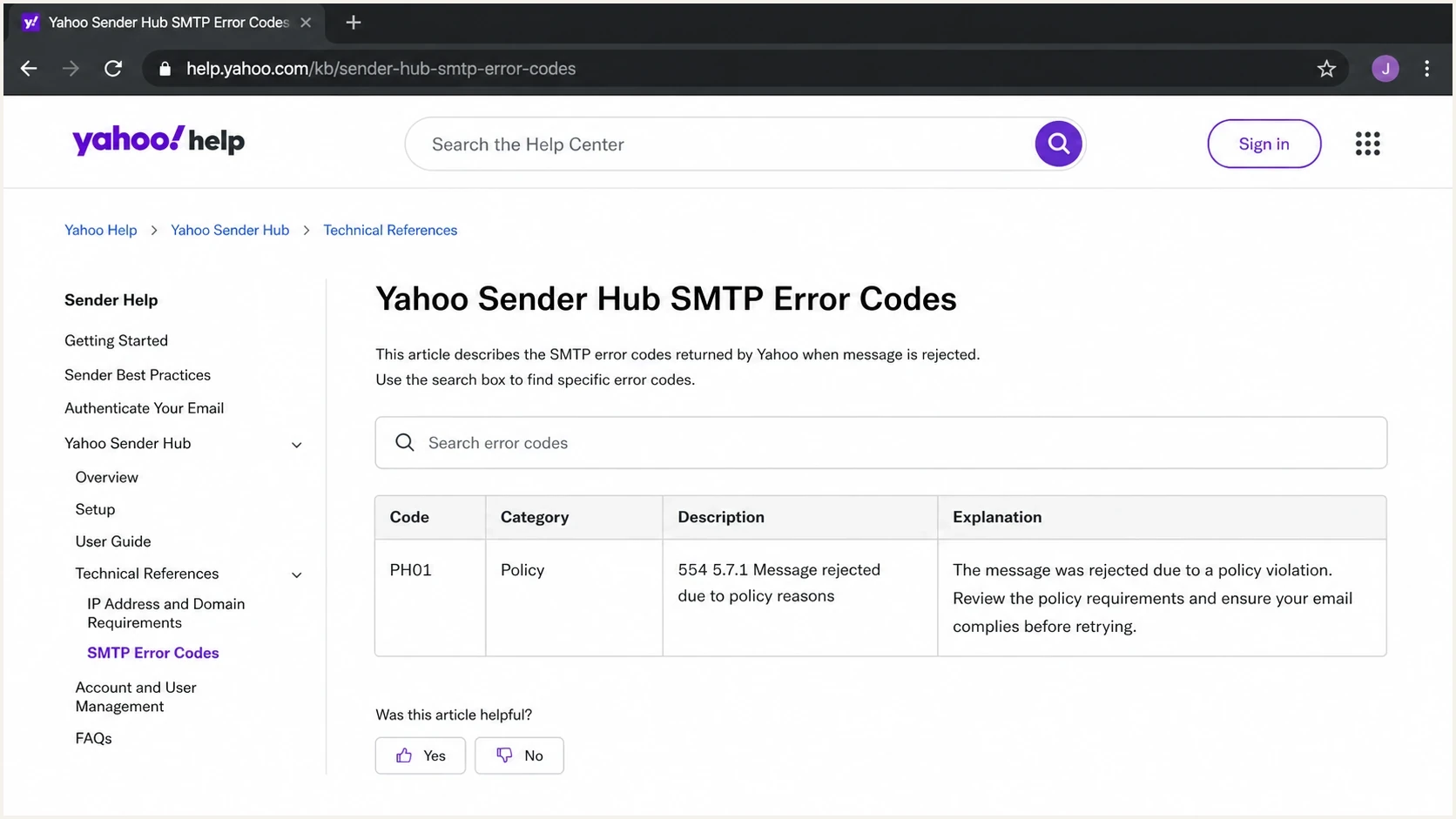
Yahoo Sender Hub SMTP error codes page showing a PH01 policy rejection row.
Where DMARC, SPF, and DKIM fit
PH01 is not the same as a DMARC failure, but authentication still matters. If Yahoo is already suspicious of a message because of a link or content signal, broken authentication adds another reason to reject it. Clean SPF, DKIM, and DMARC domain matching does not guarantee acceptance, but it removes a major trust problem.
- SPF: The sending source should be authorized without exceeding the DNS lookup limit.
- DKIM: The message should carry a valid signature using a domain the sender controls.
- DMARC: At least one passing identifier should share the same organizational domain as the visible From domain.
- Reporting: Aggregate reports should show whether the rejected source is legitimate and stable.
Yahoo requires all senders to authenticate with SPF or DKIM, keep spam complaint rates below 0.3%, maintain valid forward and reverse DNS for sending IPs, and comply with RFC 5321 and RFC 5322. Bulk senders must use both SPF and DKIM and publish a DMARC policy of at least p=none with DMARC passing. Marketing and subscribed mail must have a functioning List-Unsubscribe header and a visible unsubscribe link. Yahoo highly recommends the one-click POST method and accepts mailto.
Starter DMARC record for monitoringdns
_dmarc.example.com. 3600 IN TXT "v=DMARC1; p=none; rua=mailto:dmarc@example.com"
Suped's product monitors DMARC aggregate reports and surfaces SPF or DKIM domain-matching changes. Its blocklist and blacklist monitoring adds reputation context, helping teams separate an authentication change from a URL-specific PH01 event before editing DNS or resending a campaign.

Issue steps to fix dialog showing the issue overview, tailored fix steps, and verification action
When to contact Yahoo
Yahoo's SMTP guidance says to review outgoing messages for objectionable content or practices after significant content or mailing-policy changes, or when the error persists for more than 48 hours. Submit a sender-support request when the campaign is legitimate, authentication checks out, URLs are clean, controlled tests still reproduce PH01, and no provider-wide incident explains the spike.
The request should not say only that the list is engaged. Include evidence that the message is safe and properly authenticated: bounce samples, message source, timestamps, sending IPs, domains, headers, affected volume, and the smallest test case that reproduces the rejection.
Good ticket evidence
- Exact error: Include the full SMTP response and the PH01 code.
- Authentication proof: Show SPF, DKIM, and DMARC results for the rejected source.
- URL inventory: List all domains and redirects used in the email.
- Test outcome: Explain what changed when links or tracking were removed.
For closely related Yahoo policy bounces, this walkthrough on fixing Yahoo PH01 gives a shorter remediation plan.
Views from the trenches
Best practices
Separate PH01 policy bounces from true invalid-mailbox bounces before suppressing users.
Test messages with tracking removed, then add links back one by one to find the trigger.
Keep a dated record of affected Yahoo volume, URLs, headers, and authentication results.
Common pitfalls
Assuming an engaged segment cannot be blocked when a tracking link has poor reputation.
Treating every 554 event as a sending outage without checking content and URL reputation.
Opening a receiver ticket without enough timestamps, samples, headers, and test results.
Expert tips
Use branded tracking domains and monitor their reputation like the sending domains.
Check third-party CDN and redirect hosts because abuse on shared hosts can affect campaigns.
Fix authentication gaps before asking Yahoo to reclassify a message or sender pattern.
An Email Geeks participant says PH01 indicates suspected harmful content, so review the message and open a Yahoo ticket if the content is clean.
2024-05-03 - Email Geeks
An Email Geeks participant says third-party links and CDN-hosted assets need review because the linked host can be part of the rejection.
2024-05-03 - Email Geeks
The practical path forward
Treat a 554 PH01 bounce as a safety and reputation investigation. Start with URLs and the tracking domain, verify authentication and From-domain matching, then check blocklist or blacklist context. Rule out a provider-wide incident and run controlled tests before resending. If clean tests still fail, escalate to Yahoo with complete evidence.
For teams that send regularly to Yahoo and AOL, Suped's product keeps DMARC results, authentication changes, blocklist monitoring, alerts, and issue-resolution steps in one workflow. This helps a team separate a DNS problem from tracking-link risk or a receiver false positive when a PH01 spike appears.




