How do I fix Yahoo's 554 PH01 email error?

Published 22 May 2025
Updated 6 Aug 2026
12 min read
Summarize with
Updated on 6 Aug 2026: We added a compromise audit and clarified how to isolate PH01 triggers before restoring Yahoo traffic.
To fix Yahoo's 554 PH01 email error, treat it as a Yahoo content or policy block first. The fastest path is to pause sending to Yahoo addresses, find the URL, tracking domain, image host, phone number, sending domain, attachment, or compromised page that is triggering the rejection, remove or repair it, then test a clean message before you resume volume.
The important caveat is that PH01 is rarely fixed by warming alone. If Yahoo rejects a one-recipient plain text test with only an unsubscribe link, treat the block as attached to a domain or tracking element that still appears in the message. That includes invisible pieces such as an open tracking pixel, branded click tracking domain, hosted image domain, return path domain, or a link in the footer.
Still check SPF, DKIM, and DMARC because authentication problems make the investigation harder, but PH01 usually needs a content or domain fix. A clean authentication stack helps Yahoo trust the sender, while the PH01 fix usually comes from removing the specific blocked content signal and documenting the cleanup.
What Yahoo 554 PH01 means
Yahoo's SMTP response usually appears as a hard rejection like this:
Typical Yahoo PH01 bouncetext
554 Message not allowed - [PH01]
Email not accepted for policy reasons.
A 554 response permanently rejects that delivery attempt, so retrying the unchanged message is not a fix. It does not prove that Yahoo has permanently blocked the sender. Follow the bracketed PH01 diagnostic because Yahoo uses other 554 responses for different problems.
The phrase policy reasons is broad, but in practice PH01 points to content, links, domains, or message elements that Yahoo does not want to accept. Start with the bounce text and any diagnostic URL included in the full SMTP response. Yahoo's own Yahoo SMTP codes page is the canonical reference for what the code family means and what sender details Yahoo asks for.
Treat PH01 as a content block
Do not spend days trying to repair reputation before you have removed the thing Yahoo is blocking. If a URL, phone number, tracking host, or domain is flagged, repeated test sends with the same element keep failing.
A previous campaign can work and the next one can fail even if the template looks almost identical. A single new destination URL, a changed redirect chain, a newly flagged shared tracking host, a compromised landing page, or a footer link can be enough to change Yahoo's decision.
How to fix Yahoo 554 PH01
Use a narrow PH01 workflow: stop the affected traffic, isolate the trigger, prove a clean send, then escalate with evidence if Yahoo still blocks it.
- Pause Yahoo traffic: Suppress Yahoo and AOL recipients temporarily so you do not convert one bad campaign into a larger block pattern.
- Collect full bounces: Keep the complete SMTP response, timestamps, sender domain, sending IP, Message-ID, and campaign name.
- Strip the message: Test a version with no promotional links, no images, no attachments, no phone number, no pixel, and only a working unsubscribe path.
- Add elements back: Reintroduce one URL, image host, attachment, tracking domain, or footer item per test until the rejection returns.
- Repair the trigger: Remove the blocked asset, clean the affected page, replace the tracking domain, or disable the feature that inserts it.
- Resume gradually: Start with small, engaged Yahoo segments after clean tests pass, then increase volume only if bounces stay low.
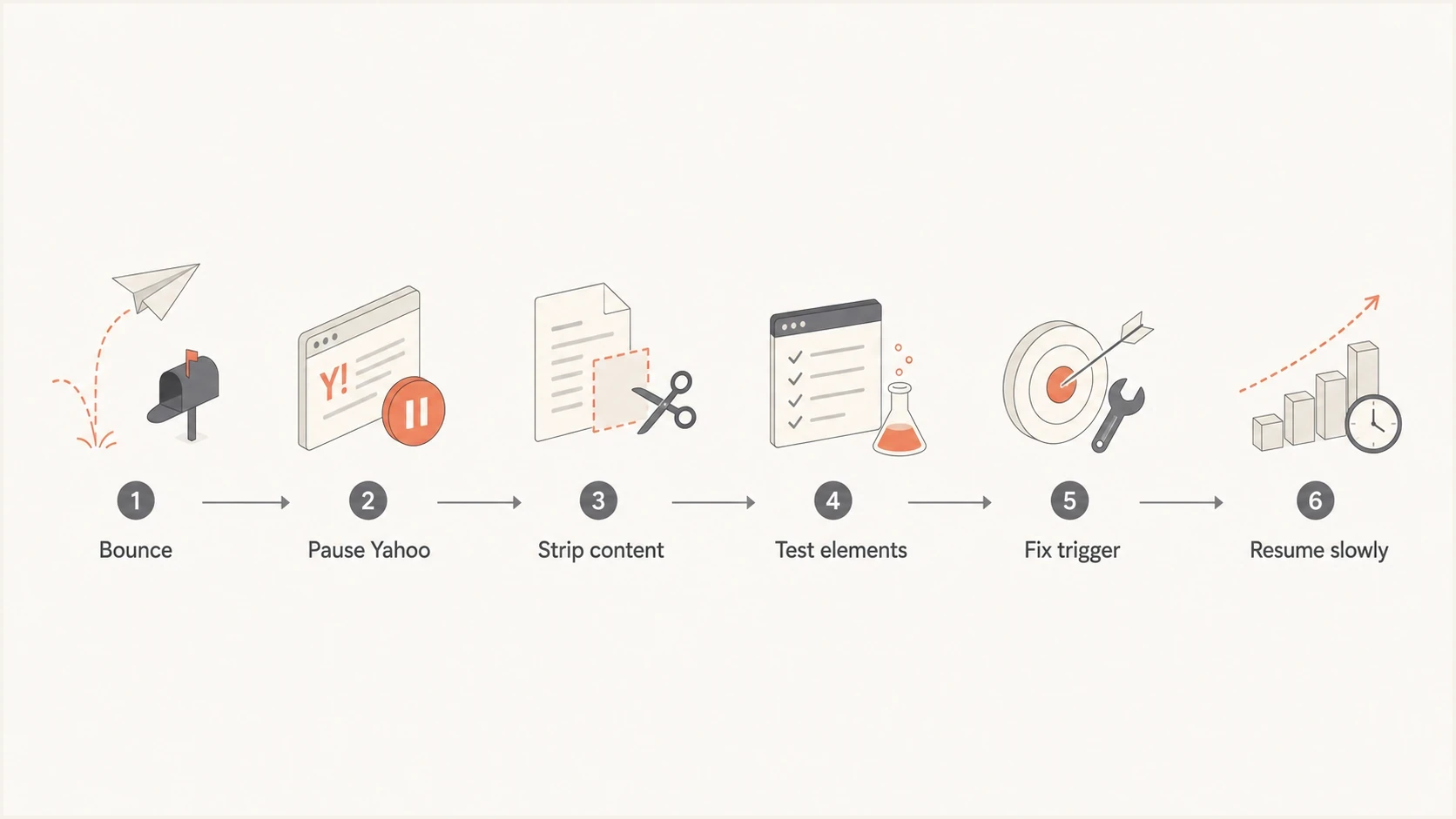
Flowchart showing PH01 troubleshooting from bounce collection to gradual sending.
When the test with only the unsubscribe link still fails, stop focusing on UTM parameters and inspect the domains behind the unsubscribe system, click tracking, open tracking, hosted preference center, and any default assets the ESP inserts automatically.
Where PH01 triggers usually hide
PH01 triggers are not always visible in the email editor. The rendered message, raw MIME, redirect chain, attachments, and hosted assets matter more than what the campaign preview shows.
|
|
|
|---|---|---|
Links | Destination and redirects | Remove or replace |
Tracking | Click and open hosts | Disable or rebrand |
Images | CDN and file hosts | Move or clean |
Attachments | File, name, and linked scan page | Remove and rescan |
Footer | Address and phone | Correct or remove |
Domain | Compromise signals | Clean the site |
Common PH01 trigger locations
UTM parameters alone are not the usual cause. A URL with UTM tags can still fail because the base destination, redirect target, shared shortener, tracking host, or landing page is flagged. Remove query parameters during testing because it reduces noise, not because UTM tracking is inherently the problem.
Looks clean
- Template: The visible copy is similar to earlier campaigns.
- Audience: The list has recent buyers or engaged subscribers.
- Authentication: SPF, DKIM, and DMARC pass in normal reports.
Still blocked
- Hidden asset: A pixel, redirect, or hosted image is still included.
- Domain issue: The brand domain or landing page has been tagged.
- Shared system: The ESP tracking layer is affected across senders.
Rule out account and website compromise
A sudden PH01 pattern across previously clean campaigns can follow unauthorized sending or a compromised website. Check security in parallel with message isolation. A person using a legitimate account or API key can send through an authorized path, so SPF and DKIM can pass even when the message is abusive.
- Review access: Inspect recent sign-ins, new users, active sessions, SMTP credentials, API keys, and sending automations.
- Contain access: Reset exposed credentials, revoke unknown sessions and keys, and require multi-factor authentication.
- Inspect web properties: Look for changed redirects, injected scripts, altered landing pages, and unauthorized files on linked domains.
- Check outbound logs: Find unexpected volume, recipients, templates, or sending times before the first PH01 bounce.
Preserve timestamps and affected message IDs before revoking access because those details help the ESP and Yahoo trace the event. After containment, repeat the stripped-message test through the cleaned sending path rather than assuming a password reset cleared every trigger.
Check authentication without mistaking it for the whole fix
PH01 is content-led, but authentication still needs attention. Yahoo's filtering decision includes sender identity, message history, and policy checks. If authentication is broken, the clean baseline needed to identify a false positive or a specific blocked asset is gone.
- SPF: Confirm the ESP is authorized and the record stays under lookup limits.
- DKIM: Confirm the signing domain matches the brand or an approved subdomain.
- DMARC: Confirm domain matching passes and reports show no sudden unauthorized sources.
- Headers: Check that the visible From, return path, and DKIM signer are expected.
A fast starting point is a domain health check to catch obvious DNS and authentication problems before you chase content triggers. For ongoing visibility, DMARC monitoring shows whether Yahoo failures are tied to a specific source, subdomain, or domain-match pattern.
DMARC record detail view showing SPF, DKIM, DMARC, rDNS diagnostics, and DNS records
Suped's product diagnostics keep the authentication side visible while the content investigation runs. They do not remove a Yahoo PH01 block, but they prevent a messy DNS setup from hiding the real trigger.
Run a controlled message test
The cleanest test is a real email sent through the same ESP, same sending domain, and same authentication path. A preview or spam-score simulation is not enough because PH01 happens at the receiving side after Yahoo evaluates the accepted SMTP transaction.
Before sending another Yahoo test, send the exact campaign through an email tester and inspect the rendered message, headers, links, authentication results, attachment metadata, and hidden assets. This gives you a controlled snapshot to compare with the Yahoo bounce.
Email tester
Send a real email to this address. Suped shows a results button when the test is ready.
?/43tests passed
A useful isolation test
Create a test version with plain text copy, no image references, no attachments, no click tracking, no open tracking, no phone number, and no promotional links. Keep only the legally required unsubscribe path. If that still fails, the remaining domain infrastructure deserves immediate attention.
If your ESP lets you disable open tracking and click tracking for one campaign, use that switch during testing. If the message starts passing only after tracking is disabled, the branded tracking domain, redirect destination, or shared tracking layer is part of the problem.
Check blocklist and blacklist signals
Check blocklist and blacklist data because Yahoo can use multiple external and internal signals. Do not stop after checking only the sending IP. PH01 can be tied to the domain in a link, the domain behind a redirect, a tracking host, an image host, or the brand domain itself.
- Sending IP: Check the IP used by the campaign, not only the ESP's general infrastructure.
- Brand domain: Check the domain in the visible From address and the main website.
- Tracking domain: Check click tracking, open tracking, unsubscribe, and preference center hosts.
- Linked domains: Check every landing page domain, redirect target, and image host in the raw message.
This is where Suped's blocklist monitoring is useful in a practical workflow. Suped's product brings domain, IP, DMARC, SPF, DKIM, and deliverability checks into one place, so the team is not guessing which signal changed.

Blocklist monitoring page showing domain and IP checks across blocklists with importance and status
A clean blacklist or blocklist result does not prove Yahoo will accept the message. It means you have ruled out one important class of signals and can focus harder on content, compromise, and Yahoo support escalation.
When to involve your ESP and Yahoo
Open an ESP ticket as soon as you see PH01 across multiple Yahoo recipients, especially if a stripped-down test still fails. Ask whether other senders on the same sending pool, tracking layer, or redirect host are seeing Yahoo PH01 bounces. ESP-side incidents happen, and you do not want to spend a day debugging a domain that is not the only affected sender.
Open a Yahoo sender support case after you have checked the message content, account and site compromise, blocklist or blacklist signals, and authentication. A strong case gives Yahoo enough evidence to review a false positive instead of sending you back to basic hygiene steps.
Include these details
- Bounce data: Full SMTP response, timestamps, affected recipient domain, and sending IP.
- Message proof: Message-ID, subject, campaign ID, raw headers, and a copy of the rendered message.
- Cleanup notes: What you removed, which domains you checked, and whether tracking was disabled.
- Authentication proof: SPF, DKIM, and DMARC pass results for the affected sending path.
For a deeper breakdown of common triggers, this companion page on PH01 causes covers the broader pattern behind the error.
How long the fix takes
The timeline depends on what Yahoo is reacting to. If the trigger is a single URL or tracking element and you remove it cleanly, tests can start passing the same day. If the brand domain or website was compromised, the clock starts after the cleanup is complete and the bad content is gone.
Typical PH01 recovery timing
These ranges assume the sender pauses Yahoo traffic and tests with controlled messages.
Simple content trigger
Hours
One blocked link, image host, or phone number is removed.
ESP tracking issue
Half day to days
The sending platform must confirm or adjust shared tracking infrastructure.
Domain compromise
Days or more
The site must be cleaned, rechecked, and reviewed by receiving systems.
False positive review
Variable
Yahoo needs a complete support case with evidence of cleanup.
Do not resume full Yahoo volume immediately after one successful test. Start with recipients who recently opened, clicked, bought, logged in, or otherwise showed clear engagement. If PH01 bounces return, the trigger is not fully removed or another message element is still being inserted.
Where Suped fits
Suped's product provides an operating layer around this problem, while Yahoo still controls the policy decision. PH01 needs careful content isolation, and teams also need visibility into authentication, unauthorized sources, domain health, and reputation signals while the investigation is happening.
- Automated detection: Suped highlights authentication and source issues with specific steps to fix them.
- Real-time alerts: Teams see sudden failure changes before a campaign creates a larger bounce event.
- Unified checks: DMARC, SPF, DKIM, hosted SPF, hosted DMARC, MTA-STS, and blocklist signals sit together.
- Multi-domain work: MSPs and agencies can monitor client domains without jumping between separate accounts.
Suped's DMARC platform turns authentication and deliverability signals into a queue of fixes. For PH01, that lets a team separate the content-block investigation from the authentication work and keep both moving.
Views from the trenches
Best practices
Pause Yahoo traffic first, then test one clean message path before restoring volume.
Check every link, image host, tracking domain, and redirect before filing appeals.
Keep full SMTP bounces and headers, since partial error text slows support review.
Common pitfalls
Assuming UTM tags caused PH01 can hide the actual blocked host or redirect target.
Leaving open tracking enabled can keep the same hidden domain in every test send.
Trying to rebuild reputation before removing blocked content usually wastes days.
Expert tips
A plain text failure points to the remaining domain layer, not the visible template.
Ask the ESP whether shared tracking or sending pools have concurrent Yahoo issues.
Treat a clean blocklist result as useful evidence, not proof Yahoo must accept mail.
Expert from Email Geeks says PH01 should be handled as a content block before treating it as a broad sender reputation issue.
2025-06-28 - Email Geeks
Expert from Email Geeks says the full SMTP bounce usually includes the best next step and should be saved before testing changes.
2025-06-28 - Email Geeks
Before you restore Yahoo volume
Yahoo's 554 PH01 error is fixed by removing the policy trigger, not by sending more mail and hoping the block fades. Pause Yahoo sends, isolate every visible and hidden message element, clean compromised domains and accounts, verify SPF, DKIM, and DMARC, then test a stripped message before restoring volume.
If the message still fails after you remove links, images, attachments, phone numbers, and tracking, involve the ESP and Yahoo with full evidence. Detailed documentation helps separate a false positive from a content or infrastructure problem.




