What causes Yahoo error PH01 and how do I fix it?

Published 11 Aug 2025
Updated 28 Jul 2026
10 min read
Summarize with
Updated on 28 Jul 2026: We updated this guide for Yahoo's content-based PH01 classification, current sender requirements, and full-message testing.
Yahoo error PH01 is a 554 content-based policy rejection. Yahoo accepted the SMTP connection far enough to inspect the message, then rejected it because something in the message violated a policy check. Start by proving the scope: one campaign, one sending domain, one shared message element, or every message on the sending route.
If only particular campaigns fail, compare the full MIME payload, not only the visible copy. Check links, redirect destinations, hosted images, tracking pixels, attachments, footer details, and third-party content. If every Yahoo message fails, look for elements shared across all templates, inspect outbound queues for abuse, then verify Yahoo's sender requirements. A real send through an email tester gives you the deployed headers, body parts, and authentication results, which are more useful than guessing from the bounce alone.
- Meaning: Yahoo classifies PH-series responses as content-based blocks for material it will not accept.
- Most likely: When only certain campaigns bounce, visible or hidden message elements are the leading suspects.
- Fastest fix: Pause the failing campaign, test a minimal production message, then restore elements one at a time.
- Authentication caveat: SPF, DKIM, and DMARC still need to meet Yahoo's requirements, but a pass does not clear a PH01 content block.
What PH01 means
The bounce normally appears as a hard 554 SMTP rejection. It says Yahoo did not accept the message for policy reasons and identifies the policy family with PH01. It does not mean the mailbox is invalid, and it does not by itself prove that Yahoo has a service problem.
Typical Yahoo PH01 bounce
554 Message not allowed - [PH01]
Email not accepted for policy reasons.
Yahoo's published PH-series category points to content it considers unacceptable, including malicious software, credential-theft content, and URLs that lead to such material. A legitimate campaign can receive the same category when a landing page is compromised, a redirect reaches a risky destination, or a hidden hosted asset has a poor policy signal.
Do not make one blind change
Changing DNS, IPs, links, and campaign content at the same time makes the recovery harder to measure. PH01 fixes work best when each change has a test result attached to it.
- Scope first: Separate one-campaign failures from failures that share a template or sending route.
- Save evidence: Keep the bounce, full MIME source, sending IP, sending domain, campaign ID, and Yahoo sample size.
- Retest small: Send low-volume tests after each fix so the result is not buried in normal campaign traffic.
First triage path
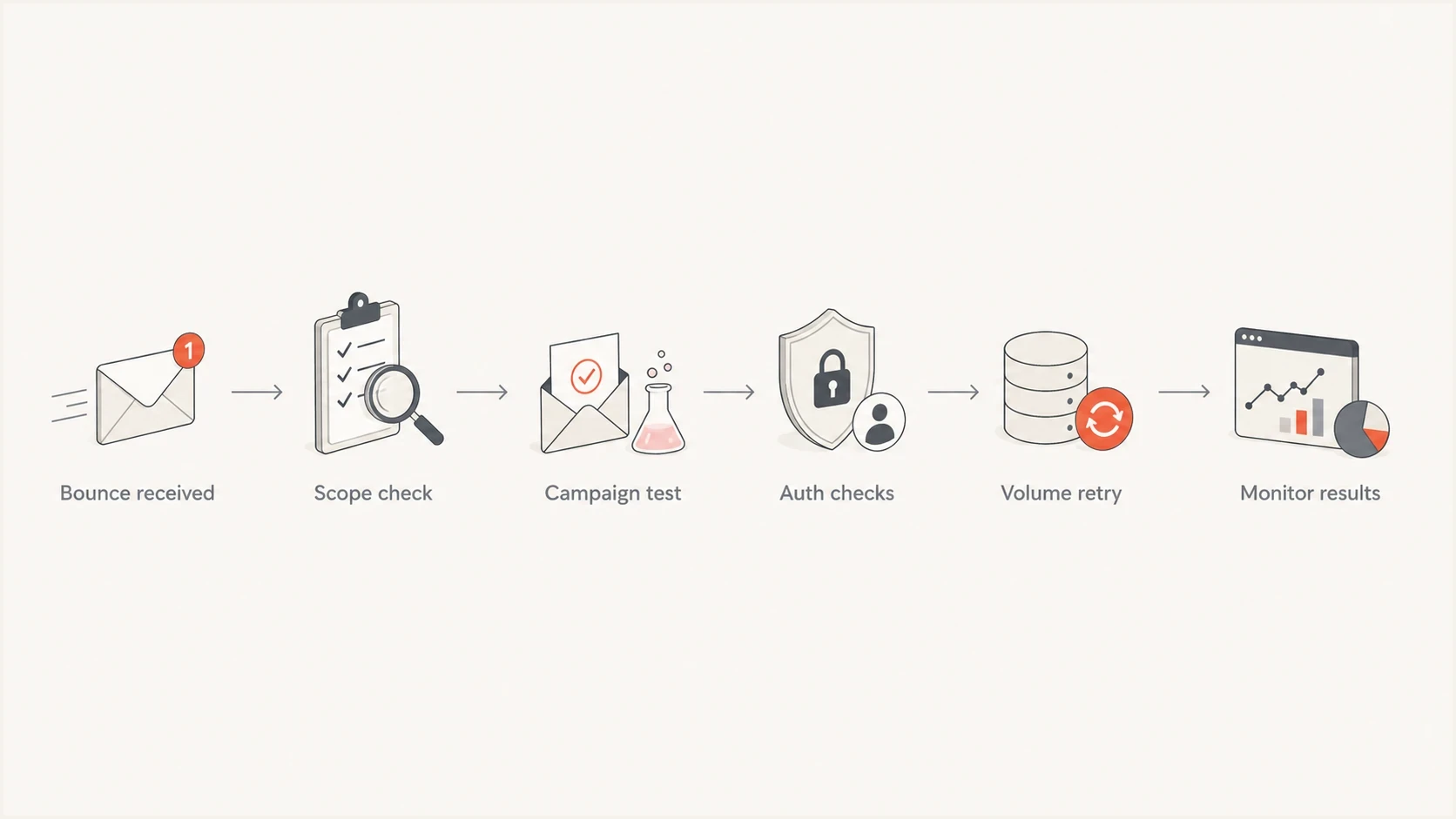
Flowchart showing the Yahoo PH01 triage path from bounce to monitored retry.
The first question is whether PH01 appears on a specific campaign or across all Yahoo-bound mail. A campaign-only failure points at content and message assets. A broad failure makes shared footers, tracking domains, image hosts, compromised outbound accounts, and common routing elements the first checks.
After the scope check, run a domain health check for the visible From domain, bounce domain, and sending host. This catches sender-requirement problems before content testing begins, while keeping those problems separate from the direct PH01 trigger.
- Collect: Save the full bounce, message ID, SMTP response, sending IP, sending domain, and exact MIME source.
- Compare: Send a minimal production message, then test versions without links, hosted images, tracking, or attachments.
- Verify: Confirm SPF, DKIM, DMARC alignment, forward and reverse DNS, and HELO identity.
- Review: Inspect outbound queues for unknown traffic and check recent Yahoo complaints, bounces, and volume changes.
- Retry: Resume only after a low-volume Yahoo test accepts the corrected production payload.
Email tester
Send a real email to this address. Suped shows a results button when the test is ready.
?/43tests passed
A single accepted test does not clear every reputation concern, but it proves that Yahoo accepts the current payload. If the minimal version passes and the campaign version fails, keep the sending identity stable and continue narrowing the message differences.
Likely causes and fixes
The strongest PH01 clues come from message differences. Start with the cause that matches the scope and test one change at a time, because repeated retries of the same blocked payload add failures without identifying the rejected element.
|
|
|
|---|---|---|
Compromised destination | One URL across rejects | Remove or repair it |
Tracking redirect | Direct link passes | Shorten the path |
Hosted image or pixel | Plain text passes | Replace the asset |
Attachment or HTML part | Minimal MIME passes | Scan and rebuild |
Shared footer element | Every campaign fails | Isolate footer parts |
Compromised sender | Unknown queue traffic | Secure the source |
Common PH01 causes and the first fix to test.
For campaign-only PH01, remove or replace the newest URL first, especially if it uses a fresh tracking domain, shortener, redirect chain, or landing page that differs from normal sends. Check each final destination as well as the displayed link. Yahoo can reject a message because of a linked destination even when SPF, DKIM, and DMARC all pass.
For broad PH01 across normal mail, inspect shared footers, tracking, and image domains before treating the response as a general reputation block. Then verify reverse DNS, HELO, bounce domain, complaint rate, and blacklist or blocklist status. A blacklist or blocklist event can explain wider reputation symptoms, but it does not by itself prove the cause of a content-based PH01. Suped's blocklist monitoring keeps domain and IP listings visible while Yahoo message tests isolate the rejected element.
Authentication records to verify
example.com. TXT "v=spf1 include:mail.example.net -all"
selector1._domainkey.example.com. TXT "v=DKIM1; k=rsa; p=..."
_dmarc.example.com. TXT "v=DMARC1; p=none; rua=mailto:d@example.com"
Campaign fixes before DNS changes
When PH01 hits a particular campaign, changing DNS first usually misses the direct cause. Other campaigns using the same identity still pass, so test what changed inside the rejected message. A deeper Yahoo 554 walkthrough can help when the full bounce contains a broader 554 policy pattern.
When one campaign fails
- Links: Remove new URLs, shorteners, affiliate links, and long redirect chains.
- Assets: Test without hosted images, tracking pixels, attachments, and third-party modules.
- Audience: Suppress stale Yahoo recipients and addresses with recent bounce or complaint history.
When all mail fails
- Shared content: Isolate footer URLs, image hosts, tracking domains, and contact details.
- Security: Inspect outbound queues and accounts for unknown or compromised traffic.
- Requirements: Confirm authentication, DNS identity, unsubscribe handling, and complaint rate.
The cleanest campaign test is a minimal message sent through the same production route and template system. If Yahoo accepts it, restore the subject and body, then add each hosted asset and tracked link. Stop when Yahoo rejects again. This produces a specific element to repair instead of a broad sender theory.
Inspect the full MIME payload
The message Yahoo evaluates can contain more than the campaign editor displays. Export the exact MIME source after link rewriting, template rendering, footer insertion, and tracking are applied. A preview or hand-written plain text message does not test the same payload.
- Hidden URLs: Check open-tracking pixels, hosted images, CSS backgrounds, social icons, and wrapped unsubscribe links.
- Redirect destinations: Follow every hop and inspect the final page for compromise or unexpected third-party content.
- Reused elements: Test footer links, phone numbers, postal details, reply addresses, and shared content modules.
- Body parts: Scan attachments and compare the text, HTML, and encoded MIME parts in the delivered source.
Use a binary isolation test when the payload is large. Remove half of the suspect elements, send a small test, then continue with the half that still fails. This narrows a complex template faster than changing one minor phrase on every attempt.
Where authentication and Suped fit
Authentication belongs early in the checklist because Yahoo still applies sender requirements alongside content policy. All senders need SPF or DKIM, valid forward and reverse DNS, standards-compliant messages, and a spam complaint rate below 0.3%. Bulk senders need both SPF and DKIM, a valid DMARC policy of at least p=none that passes through SPF or DKIM alignment, one-click unsubscribe for marketing and subscribed mail, and unsubscribe requests honored within two days.
These checks are requirements, not a full PH01 explanation. A message can pass authentication and still receive PH01 because of its payload. Suped's product brings DMARC monitoring, authentication issue steps, and real-time alerts into the recovery workflow. Use the reports to confirm which source sent the message and whether SPF or DKIM alignment changed while separate Yahoo tests isolate the blocked content.

Issue steps to fix dialog showing the issue overview, tailored fix steps, and verification action
For MSPs and teams with multiple domains, compare the affected client domain, campaign stream, and shared sending route. A unified view of authentication and reputation helps prevent repeated retries across senders while the content test remains isolated.
Authentication problems to correct
- Failed alignment: The visible From domain does not match either the SPF or DKIM authenticated domain.
- Broken DKIM: The signature fails after a footer, template, or routing system changes the signed message.
- Unlisted sender: A new sending source starts before SPF, DKIM, and DMARC reporting cover it.
Working recovery sequence
A 554 PH01 response is a permanent rejection for the unchanged message, not a temporary deferral. Stop the failing traffic, isolate the cause, prove the correction on a small Yahoo sample, then rebuild volume gradually. Do not permanently suppress a valid address solely because PH01 is a policy rejection rather than an invalid-mailbox response.
- Pause: Stop the campaign or stream producing PH01 so unchanged retries do not pile up.
- Strip: Send a minimal production payload through the same route, then restore elements in controlled steps.
- Fix: Repair compromised destinations, tracking paths, hosted assets, message parts, or sender security.
- Verify: Confirm the corrected payload and Yahoo sender requirements before increasing volume.
- Watch: Track Yahoo accepts, PH01 rejects, complaints, and DMARC results after each retry.
If PH01 begins suddenly across unrelated campaigns, domains, and clean production tests, check whether the same pattern affects other senders on the route before making more changes. That spread can indicate a receiver-side or shared sending-platform incident. Preserve timestamps, full SMTP responses, sending IPs, domains, and message IDs, then escalate through the sending provider and Yahoo's sender support process.
Views from the trenches
Best practices
Test the exact campaign that failed, because PH01 often follows message-specific signals.
Keep DKIM passing for each active stream so Yahoo can connect mail to the domain.
Watch complaints and bounces by mailbox provider before changing DNS records or IPs.
Common pitfalls
Treating every PH01 as DMARC wastes time when one campaign link caused the block.
Changing IPs before removing bad content can carry the same problem into a new route.
Ignoring small Yahoo samples makes it harder to see whether the fix worked after retry.
Expert tips
Split Yahoo testing by campaign, domain, link set, and authentication result before rollout.
Use a plain text test to separate content policy from DNS authentication issues quickly.
Restore volume slowly after accepted test sends, then watch complaint rate and bounces.
Marketer from Email Geeks says campaign-specific PH01 rejections should push the sender to inspect links, redirects, and campaign content before changing DNS.
2023-06-19 - Email Geeks
Expert from Email Geeks says the bounce wording should guide the investigation, because Yahoo names the policy family that caused the rejection.
2023-06-19 - Email Geeks
Yahoo PH01 fix checklist
Fix Yahoo PH01 by proving which message element Yahoo rejected. Test links, final redirect destinations, hosted assets, attachments, reusable footer content, and the exact MIME output before changing DNS or sending IPs. If every Yahoo send fails, check shared content and outbound account security, then verify authentication, DNS identity, complaint rate, and blacklist or blocklist status.
PH01 is a rejection category with several content-level causes, not one universal authentication failure. Suped's product brings DMARC reports, authentication issue steps, real-time alerts, and blacklist or blocklist monitoring into one workflow. Use it to verify identity and reputation signals while controlled Yahoo tests isolate the rejected payload element.




