What is Vade Secure's Sendertool and how does it work for managing IP blocks and false positives?


Updated on 25 Sep 2026: We updated this guide with Vade's current account and Whois verification steps, clearer limits on older /24 guidance, and a stronger false-positive evidence checklist.
Vade's Sender Tool, often written as Sendertool, is a sender-facing portal for asking Vade to review IP-based delivery blocks and suspected false-positive verdicts created by Vade filtering. It is best treated as a mitigation channel, not a monitoring dashboard. It helps you verify a relationship to a sending IP, attach evidence, and ask Vade to reconsider a verdict that is hurting delivery.
The direct answer is that Sendertool is useful when a sending IP is blocked by a Vade-backed filter or when legitimate mail is being treated as unwanted. It does not provide the sender intelligence most teams expect from a reputation product. Suped's product covers blocklist monitoring, authentication checks, DMARC visibility, and alerting. Use Sendertool when the evidence points to Vade as the review path.
- Primary use: Request a review of a Vade filtering decision affecting a sending IP or legitimate message.
- Access model: Create an account with a business email and double opt-in, link your sending IPs, and verify them through addresses in Whois.
- Main limit: It does not expose deep reputation data, complaint streams, or root-cause analytics.
- Best workflow: Diagnose the sending source first, fix authentication and traffic issues, then file a concise review request.
What Sendertool is
Sendertool is Vade's intake path for delivery issues caused by the Vade Email Filter. Vade's current support page directs affected senders to the Sender Tool form, and the live form says it accepts reports of suspected false positives. Vade is part of Hornetsecurity, and Hornetsecurity has operated as a dedicated Proofpoint business unit since Proofpoint completed its acquisition in December 2025. A Vade verdict can influence mail flow at organizations whose receiving systems use that filtering technology.
A useful public reference is the Hornetsecurity note on Vade filtering, which explains that false positives and false negatives are a practical balancing problem in email filtering. Filters make fast decisions, but legitimate senders need a review route when a decision blocks real mail.
What to expect
Do not expect Sendertool to show reputation scores, complaint samples, or full filtering logic. Expect an account-based portal for verifying IPs and submitting a specific false-positive review.
|
|
|
|---|---|---|
A sending source linked to the account. | Verify it before opening a request. | |
/24 | A range option described in older practitioner reports. | Confirm availability after login. |
Shared pool | Several senders use the same IPs. | Coordinate with the provider. |
Dedicated pool | One sender controls the IPs. | Ownership evidence is usually clearer. |
Sendertool items and how to use them.
How IP validation works
The current Sender Tool landing page sets out the sequence: create an account with a business email, choose double opt-in authentication, link the IPs you use, and authenticate them through addresses listed in Whois. A request can then be created on a verified IP. Whois data usually traces back to the relevant internet registry or network owner, so stale contact records can stop the verification message reaching the right person.
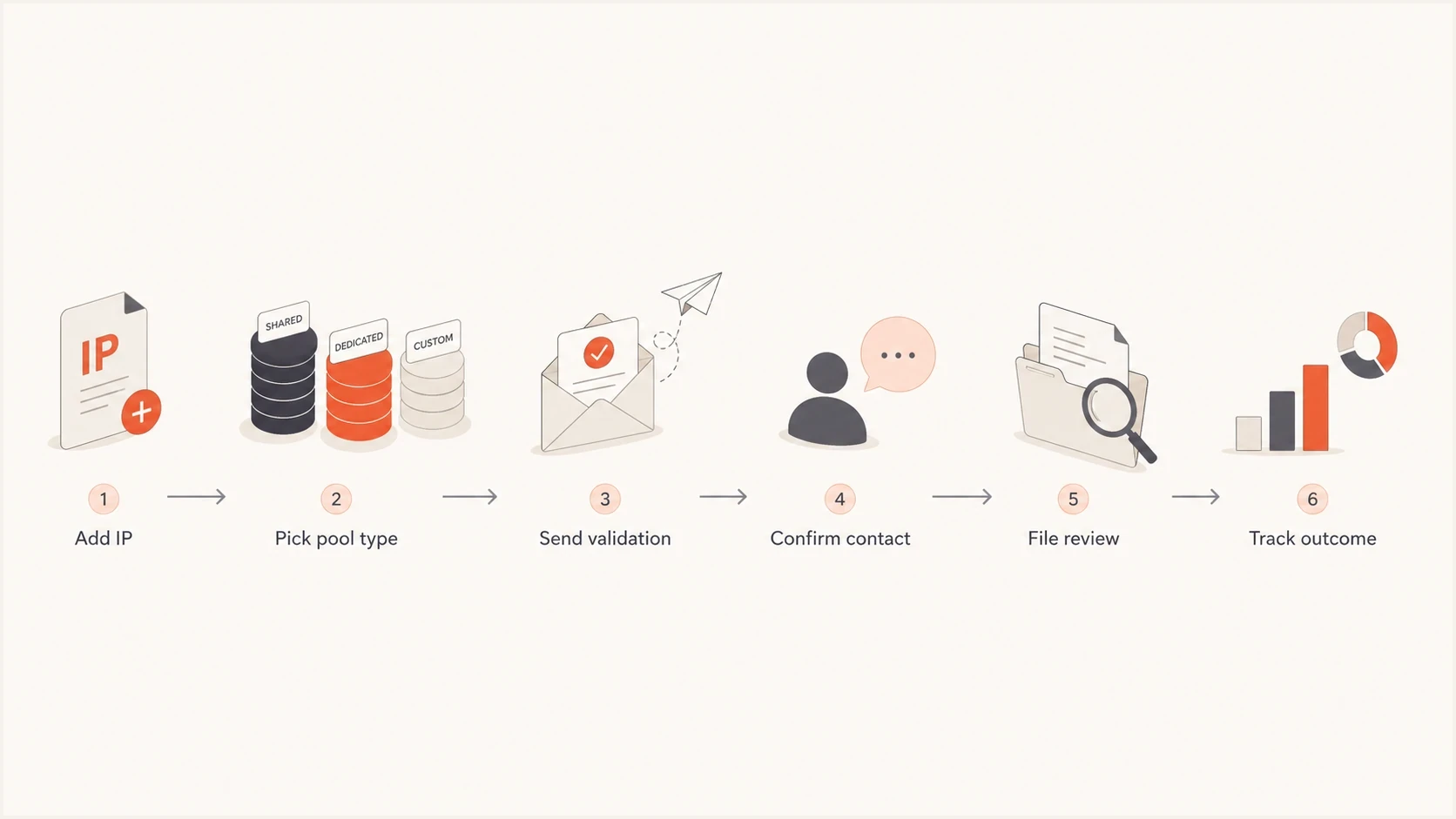
Vade Sendertool flowchart showing IP validation, review submission, and outcome tracking.
If you own the IPs directly and keep Whois contacts current, this validation path is manageable. If your mail runs through a shared provider or downstream partner, the process gets slower because the validating contact is often outside your company. The sender who has the customer relationship and the operator who controls the IP should coordinate before the review is filed.
- Create the account: Use a business email address and complete the double opt-in confirmation.
- Link the source: Add the exact sending IP associated with the affected traffic.
- Choose verification: Select an available authentication address drawn from the IP's Whois data.
- Confirm the IP: Complete the validation message before trying to open a review.
- File evidence: Create the request on the verified IP and include the bounce, headers, timestamps, and remediation.
Check the current validation queue
Older user reports describe a limit of five outstanding validation requests per account, but Vade does not state that as a current universal limit on its public pages. If the portal applies a queue limit, validate the most business-critical IPs first and track each pending confirmation.
What to submit for false positives
A false-positive request needs to read like a narrow technical case. Do not file a general complaint that mail is blocked. Show that a specific legitimate message, campaign, or stream was blocked by Vade filtering, then show why the verdict should change. The stronger the evidence, the easier it is for the reviewer to separate a real false positive from a sender reputation problem.
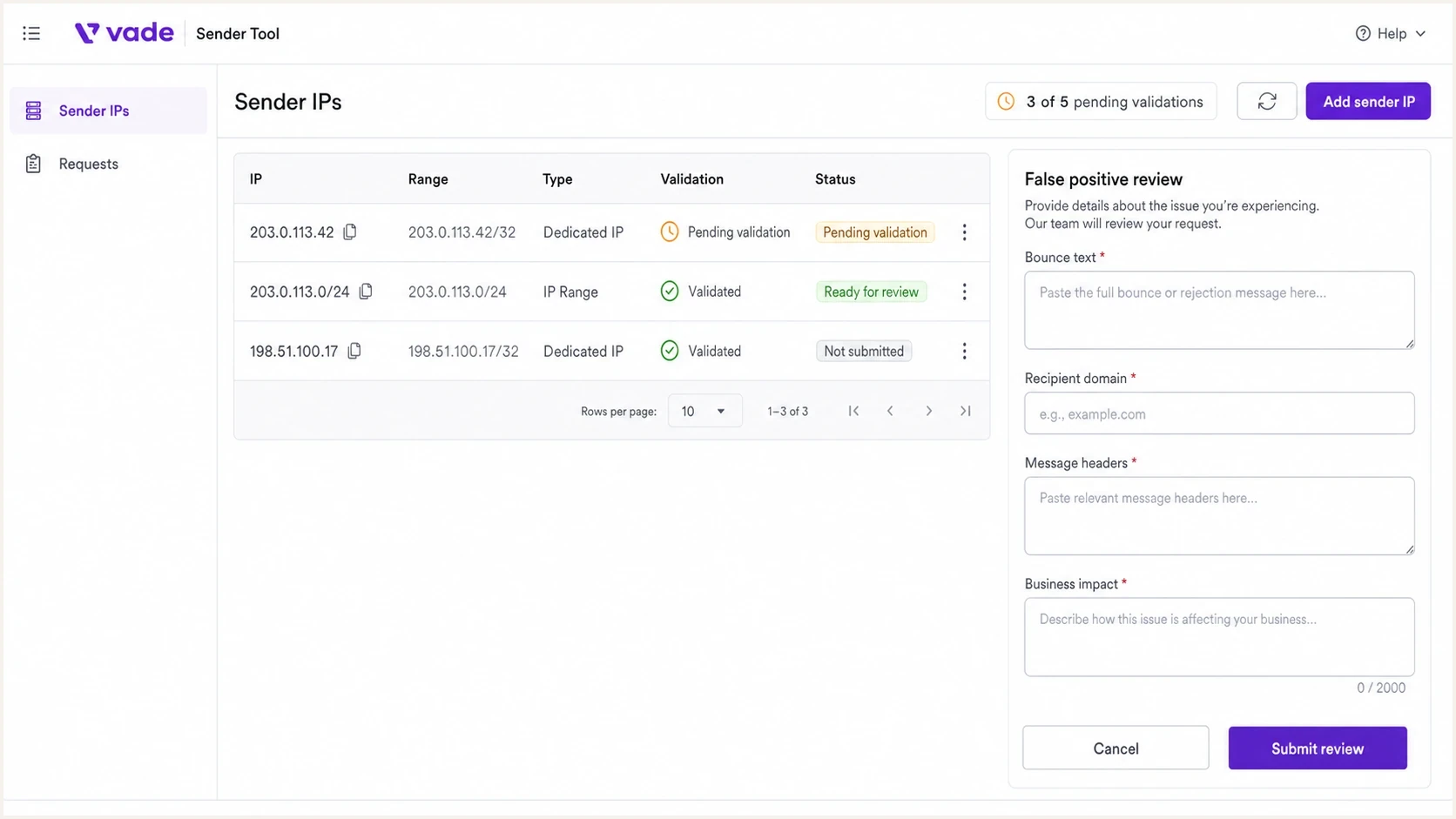
Vade Sender Tool interface for IP validation and a false positive review request.
Include enough detail for Vade to reproduce the decision without asking for basic context. Provide the SMTP response, sending IP, receiving domain, full message headers, Message-ID, exact UTC time window, and reason the mail is legitimate. If the message was part of a transactional flow, state that clearly and include the trigger event.
Evidence template for a Vade false positivetext
Sender IP: 203.0.113.42
Pool type: Dedicated
Reverse DNS: mail1.example.net
Recipient domain: recipient.example
SMTP reply: 550 5.7.1 blocked by Vade filtering
Message-ID: <example-12345@example.net>
First seen: 2026-05-22 09:14 UTC
Last seen: 2026-05-22 10:02 UTC
Message type: Password reset confirmation
Authentication: SPF pass, DKIM pass, DMARC pass
Remediation: No complaint spike found in current logs
- Headers: Include full original headers and the Message-ID, not a screenshot of the header view.
- Bounce text: Paste the full SMTP response and keep any Vade or receiver error code intact.
- Volume context: Explain whether the affected mail was a one-off message, campaign traffic, or transactional mail.
- Remediation: State what you checked before calling it a false positive, including complaint, bounce, and authentication data.
How Vade evaluates and prioritizes requests
Sendertool is more than an IP ownership check. Vade has said that senders must review its best-practice guidance before contacting the review team, and that requester history affects ticket priority. Previous requests are assessed by whether the reported verdict was actually a false positive, so repeated unsupported delisting requests can make later cases less effective.
Treat each request as part of a continuing sender record. Fix behavior that justifies a block before asking for removal, describe the legitimate mail stream precisely, and document containment if an account or system was compromised. Vade does not publish a guaranteed review time, so evidence quality and accurate scope matter more than repeated submissions.
- Best-practice check: Review sender identity, consent, list hygiene, unsubscribe handling, and sending consistency before filing.
- Requester history: Use one accurate case per incident because past request quality can affect priority.
- Incident detail: For a compromised account, name the account, incident window, traffic sent, and containment completed.
- Delisting basis: Do not request removal when current traffic still justifies the blocklist or blacklist decision.
A clean public check is not proof
Vade can apply an internal filtering verdict even when the sending IP does not appear on a public blocklist or blacklist. Use the affected receiver's SMTP response and message evidence to confirm the Vade path.
Where Sendertool helps and where it does not
The cleanest way to use Sendertool is to keep its job narrow. It is a review channel for Vade decisions. Do not start there when the cause of a delivery change is unknown. Before opening a request, check whether the IP is listed elsewhere, whether the domain has authentication failures, and whether the sending source changed.
Good fit
- Vade block: A bounce or receiver response points to Vade filtering.
- False positive: Legitimate mail is being classified incorrectly.
- Validated IP: You can confirm ownership or get the provider to confirm it.
- Specific evidence: You have headers, SMTP replies, and timestamps.
Poor fit
- General monitoring: You want ongoing alerts across blocklists and domains.
- Root cause: You still need to identify the sender or campaign that caused the issue.
- Authentication audit: You need DMARC, SPF, and DKIM diagnostics.
- Shared IP dispute: You do not control the IP and cannot get provider support.
For broader diagnosis, start with email blocklists and sender reputation fundamentals. A Vade listing is only one possible cause. A sudden complaint spike, a newly added vendor, a broken SPF include, or an unsigned transactional stream can all make a review request weaker.
Blocklist checker
Check your domain or IP against 144 blocklists.







How to prepare before filing a Vade review
Before filing with Vade, prepare a short, provable account of what was blocked, which IP sent it, why the mail was expected, and what changed around the same time. This prevents wasted review cycles and helps avoid a quick rejection when the issue is sender-side.
The domain also needs clean authentication and transparent sender information. Passing SPF, DKIM, and DMARC does not guarantee delivery, but failures make it harder to argue that a block is a false positive. The visible From domain should resolve to a site that identifies the sender and explains how recipients joined the list. Run the sending domain through a domain health checker and fix obvious DNS problems first.
Authentication records to verifydns
_dmarc.example.com TXT v=DMARC1; p=none; rua=mailto:dmarc@example.com
example.com TXT v=spf1 include:mail.example -all
selector1._domainkey.example.com TXT v=DKIM1; k=rsa; p=BASE64KEY
- Confirm scope: Separate Vade-related bounces from other receiver blocks.
- Check authentication: Verify SPF, DKIM, and DMARC on the exact sending stream.
- Review traffic: Look for new sources, list uploads, content changes, and bounce spikes.
- Prepare proof: Collect headers, Message-IDs, SMTP replies, UTC timestamps, consent evidence, and impact notes before filing.
What a strong request says
A strong request says: this IP sent this legitimate mail, Vade appears in the blocking path, authentication passed, the traffic source is known, and the sender has checked for abuse or recent changes.
How Suped fits into the workflow
Sendertool is a narrow review portal. Suped is our DMARC reporting and email authentication platform. It covers the work before and after a Vade review by helping teams trace sending sources in DMARC data, inspect SPF and DKIM results, monitor blocklist changes, receive alerts, and manage authentication across multiple domains.

Issue steps to fix dialog showing the issue overview, tailored fix steps, and verification action
The practical split is simple. Use Suped to detect and explain the issue, then use Sendertool when the evidence shows Vade needs to review a specific verdict. Suped's issue detection and steps to fix keep the team focused on causes they control, such as an unapproved sender, a broken DKIM selector, or an SPF record that has grown beyond safe lookup limits.
Use Suped for
- Detection: Monitor authentication failures and blocklist changes.
- Action: Follow issue-specific steps before filing external reviews.
- Scale: Manage many domains, clients, and sending sources.
- Prevention: Stage policies and keep DNS records under control.
Use Sendertool for
- Vade verdicts: Ask Vade to review a specific block.
- IP proof: Verify a relationship to a source IP.
- False positive: Submit evidence for legitimate blocked mail.
- Follow-up: Track Vade-specific review status.
Handling shared IPs and provider-owned ranges
Shared IPs are the hardest Sendertool cases because the sender with the delivery problem often does not control the Whois record. If your email service provider, downstream partner, or infrastructure team owns the range, they need to receive or support the IP verification and submit or support the Vade request. Without that link, the review can stall even when the sender has a legitimate false positive.
This is also where root-cause work matters. A shared IP can be blocked because another sender used the same pool badly. A dedicated IP can be blocked because your own stream changed. Those are different cases, and the review should say which one applies. For a broader troubleshooting process, use why IPs get listed as a practical companion.
Review readiness by evidence quality
Use this as a quick check before filing a Vade review.
Ready
High
You have IP verification, headers, SMTP replies, and confirmed authentication.
Needs work
Medium
You have a bounce but still lack source, stream, or ownership detail.
Not ready
Low
You have only a user report or screenshot with no technical evidence.
The older public discussion around the Vade Threat List also shows why ownership and delisting paths need clear evidence. The details have changed over time, but the operational lesson has not: the party that controls the sending IP needs to be involved.
Views from the trenches
Best practices
Verify IP ownership before a block happens so urgent reviews do not wait on routing.
Keep one evidence template for headers, SMTP replies, recipients, and timestamps in UTC.
Map shared and dedicated pools separately because review ownership changes by pool fast.
Track the receiver impact before filing so Vade sees the business effect clearly in detail.
Common pitfalls
Submitting a shared IP without provider backing leaves the review stuck in ownership checks.
Treating Sendertool like a reputation dashboard leads to missing root-cause work.
Linking many IPs at once can create a queue that slows urgent false-positive reviews.
Filing with only a screenshot gives reviewers too little evidence for a verdict change.
Expert tips
Keep Whois contacts current for every sending IP before a launch or migration starts.
Separate Vade review evidence from internal remediation notes to keep requests focused.
Pair blacklist checks with authentication checks before calling a block a false positive.
Use alerts on first failure spikes so you can file while bounces are still fresh and available.
Expert from Email Geeks says Sendertool is best treated as a mitigation portal, not a source of reputation data or sender telemetry.
2021-08-19 - Email Geeks
Marketer from Email Geeks says adding many /24 ranges works, but the five pending validation limit makes bulk onboarding slow.
2021-08-19 - Email Geeks
When to use Sendertool
Vade's Sender Tool is the right place to request a Vade review when a verified sending IP is blocked or legitimate mail has a suspected false-positive verdict. The current public workflow requires a business-email account with double opt-in, IP linking, Whois-based verification, and a request created on a verified IP.
Sendertool is only the Vade review step. Before filing, prove the block is Vade-related, confirm the sending source, check DMARC, SPF, and DKIM, review traffic changes, and collect the exact bounce and headers. Suped supports that diagnostic work by connecting authentication results, DMARC source data, blocklist monitoring, alerts, and issue-specific remediation. Use Sendertool after the evidence shows that Vade needs to review the verdict.




