What happens when your IP gets blocklisted?

Updated on 22 Sep 2026: We clarified which sending IP gets listed and how to diagnose the delivery impact before requesting removal.
When your IP gets blocklisted, some receiving mail servers start treating mail from that IP as risky. The most common outcomes are permanent SMTP rejections, temporary deferrals, spam folder placement, throttling, and lower inbox placement. The IP itself is not turned off. Inbound mail, your website, and unrelated services do not automatically break. The blacklist or blocklist becomes a reputation signal that receiving systems use when deciding what to do with your email.
The impact depends on who listed the IP, which recipients use that data, how severe the reason is, and whether your authentication and sending behavior look healthy. A listing on a minor email blocklist can have almost no visible effect. A listing used by large mailbox providers, gateways, or corporate filters can stop campaigns, transactional mail, password resets, and sales outreach within minutes.
- Rejections: Some receiving servers return a 5xx permanent failure during SMTP.
- Filtering: Some servers accept the email but place it in spam or quarantine.
- Throttling: Some servers return a 4xx temporary failure, causing delivery delays and queue buildup.
- No visible effect: Some blocklists are not used by the recipients you mail.
- Shared damage: If you use a shared IP pool, another sender can trigger the listing.
What changes after an IP listing
A blocklisted IP changes how receiving systems score your mail. The receiving system checks the connecting IP during the SMTP conversation, then combines that result with content, sender reputation, authentication, recipient history, and local policy. The same message can be accepted by one company, deferred by another, and rejected by a third.
Before the listing
- Normal routing: Messages move through the usual acceptance and filtering path.
- Stable queues: Outbound queues drain at the expected rate.
- Cleaner signals: Bounce logs mostly show user-level issues, not IP reputation failures.
After the listing
- Higher scrutiny: Receiving filters treat the connection as higher risk.
- Queue growth: Temporary failures can leave messages waiting for retry.
- Visible bounces: Logs start showing policy, reputation, or blacklist references.
For transactional mail, the damage usually shows up as missed confirmations, delayed receipts, support tickets, and abandoned account actions. For marketing mail, it appears as lower open rates, sudden bounce spikes, weaker engagement, and lost conversions. For internal or B2B mail, the first sign is often a recipient saying they never saw the message.
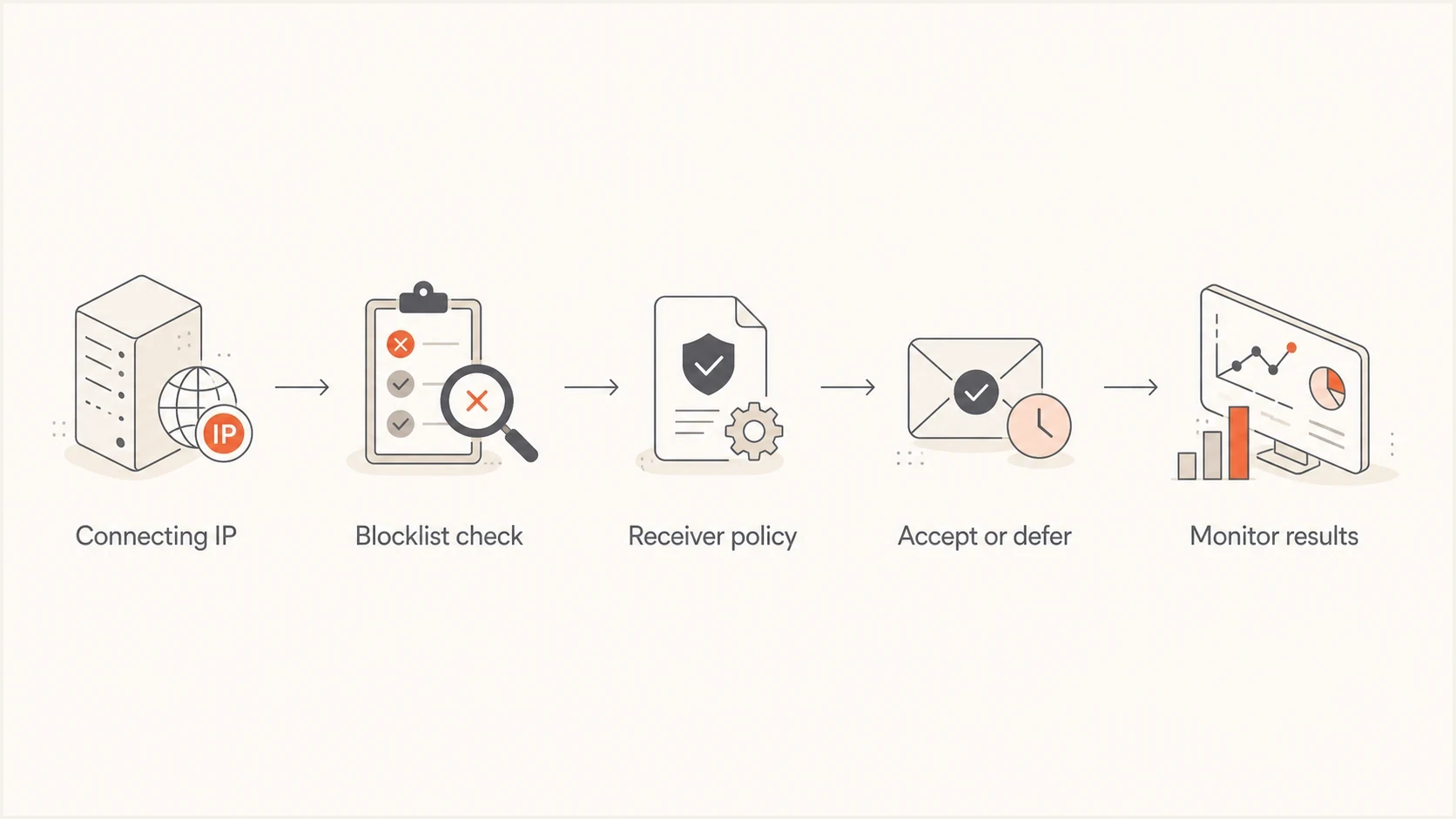
Email delivery flow showing an IP blocklist check, receiver policy decision, and delivery result.
Why mail servers react differently
There is no single global blacklist switch. Each receiver decides which public DNSBLs or RBLs, private reputation feeds, internal blocklists, and sender history it trusts. Some filters use a listing as one weak signal. Others reject mail when the listing matches a strict policy. That is why a single IP blacklist event can look inconsistent across recipients.
|
|
|
|---|---|---|
SPF | The connecting IP is authorized for the Return-Path domain | DMARC passes or mail reaches the inbox |
DKIM | A valid signature survived transit | The visible From domain owns the signature |
DMARC | SPF or DKIM passed with the required From domain match | The sender has good reputation |
PTR and HELO | The sending host has a coherent network identity | Recipients want the mail |
Volume and complaints | Sending behavior or recipient response changed | A blocklist caused the delivery issue |
Common signals receivers combine with blocklist data.
Authentication does not erase a blocklist listing, but it gives receivers a clearer identity to evaluate. SPF authorizes the connecting IP for the envelope sender, DKIM validates a signature, and DMARC checks whether a passing SPF or DKIM identity matches the visible From domain. Passing these checks does not guarantee inbox placement.
A listing is a signal
A blacklist or blocklist listing is usually one input in a larger filtering decision. Treat it as evidence that something in the sending path needs review, not as proof that every message is blocked everywhere.
Which IP address the listing applies to
The relevant address is normally the public outbound IP of the mail server or relay that connects to the recipient's MX. It is not automatically your laptop's local address, your website server, or the IP in your domain's inbound MX record. If a hosted sending service makes the final SMTP connection, the receiver sees an address from that service's outbound pool.
|
|
|
|---|---|---|
Direct mail server | Its public outbound IP | Your mail or network administrator |
Hosted or shared pool | The pool IP used for that message | The sending provider, with your account evidence |
Authenticated SMTP relay | The relay's public egress IP | The relay operator |
Home or dynamic IP sending directly | The public access IP | Route mail through an authorized relay |
Find the sending IP before checking or requesting removal.
Use the full SMTP rejection and sending logs to identify the address used for the failed delivery. For an accepted test message, inspect the receiver's trusted Received header that records the connecting peer. Do not substitute an MX lookup unless the same host also sends the mail.
How to confirm the listing is the cause
Do not start with a delisting request. First prove the listing is relevant to the affected mail by matching the outbound IP, bounce text, sending service, and affected recipient groups. A blocklist result alone is not enough, because many IPs appear on low-impact lists that recipients never use. A clean public check also does not rule out a receiver's private blacklist or internal reputation block.
A real test email helps because it shows the path your message takes, including SPF, DKIM, DMARC, headers, and filtering clues. Use an email tester when you need to inspect the actual message, not just the DNS around the domain.
- Identify the IP: Use the rejection and mail logs to find the public outbound IP used for the failed send. In an accepted test message, use the receiver's trusted Received header that identifies the connecting peer.
- Read the bounce: A 4xx reply is temporary and tells the sending server to retry. A 5xx reply is permanent, so the same delivery should not be retried unchanged for that recipient. Save the full SMTP response and any named blacklist.
- Check scope: Compare affected and unaffected recipient domains to see whether one receiver, public DNSBL, or private policy is involved.
- Verify auth: Confirm SPF, DKIM, and DMARC pass for the same message stream.
- Track timing: Match the listing time with the bounce spike, complaint spike, credential event, or sending change.
Example bounce clues
451 4.7.1 Temporarily deferred due to IP reputation policy
550 5.7.1 Message rejected because the sending IP is listed
If you want a broader DNS and authentication view around the same domain, a domain health check is useful before you change records or ask a sender to investigate.
Blocklist checker
Check your domain or IP against 144 blocklists.







In Suped, blocklist monitoring sits beside DMARC, SPF, and DKIM monitoring, so the workflow goes beyond a yes or no lookup. You can compare the listing time with authentication failures, unknown senders, volume changes, or a specific source that needs cleanup.

Blocklist monitoring page showing domain and IP checks across blocklists with importance and status
Common causes of IP blocklisting
An IP gets listed because a reputation system saw behavior it considers risky, or because the address belongs to a range that should not send mail directly. The cause can be your own sending, another sender on a shared pool, a compromised account, an open relay, malware, spam-trap hits, poor list hygiene, automated signup abuse, or technical identity problems. The fix depends on which cause is real.
|
|
|
|---|---|---|
Compromise or open relay | Login and SMTP logs | Critical |
Spam-trap hits | Acquisition and engagement records | High |
Volume spike | Send graph | High |
Shared IP pool | Provider incident details | Medium |
PTR or HELO mismatch | Forward and reverse DNS | High |
Signup form abuse | Form logs and confirmation volume | High |
Common causes and the first place to look.
The most urgent cause is account or server compromise. If a mailbox, API key, SMTP credential, web application, or relay is abused, delisting the IP before stopping the abuse only resets the clock. The IP gets listed again, often faster, because the same bad traffic continues.
Fix the source first
Do not treat delisting as the first step. Pause risky sending, remove the abusive source, clean the list, and confirm authentication before submitting a removal request. A repeated listing is harder to resolve because it shows the underlying issue was not fixed.
Poor list quality is another frequent cause. Purchased lists, stale contacts, scraped addresses, and unconfirmed signups produce hard bounces, spam complaints, spam-trap hits, and ignored unsubscribe signals. Automated list bombing can also send bursts of confirmation mail to people who never asked for it. Use confirmed opt-in, rate limits, and abuse monitoring on public signup forms.
How to fix an IP blocklist problem
The practical fix is to stop the bad signal, prove the sending path is healthy, then request delisting if the blacklist has a removal process. For a deeper checklist on causes and cleanup, use these IP blacklist fixes as a companion workflow.
- Pause risky mail: Stop the stream that triggered the listing, especially bulk mail or suspicious transactional bursts.
- Secure access: Rotate SMTP passwords, API keys, OAuth tokens, and compromised user credentials; close open relays and patch abused systems.
- Clean recipients: Suppress hard bounces and complaints, remove unconsented contacts, and quarantine questionable acquisition sources.
- Fix identity: Confirm SPF, DKIM, and DMARC; make sure forward and reverse DNS agree and HELO/EHLO identifies the sending host.
- Request removal: Follow the listing operator's instructions. Some entries expire after the bad traffic stops, while others require a request that states the affected IP, root cause, corrective work, and supporting evidence. Do not submit repeated requests unless the operator asks for them.
- Monitor recovery: Watch bounces, deferrals, complaints, and new listings while traffic returns gradually.
DMARC will not remove an IP from a blocklist or repair IP reputation by itself. It helps identify authorized senders, expose unknown domain use, verify domain matching, and trace the affected source while you investigate the stream. A monitoring-stage record can collect aggregate reports without asking receivers to quarantine or reject mail.
Monitoring-stage DMARC record
v=DMARC1; p=none; rua=mailto:dmarc-reports@example.com;
Suped's platform connects blocklist monitoring with DMARC reporting and SPF and DKIM checks. That workflow helps a team compare a new listing with authentication failures, unknown senders, and volume changes before assigning the fix to the owner of the affected source.
Where Suped fits
Use Suped to connect the listing to the sender, domain, authentication status, and remediation owner. For MSPs and agencies, its multi-tenant view keeps each client's alerts and remediation work together.
When the impact is small or temporary
Not every listing needs a crisis response. Some blocklists are informational, narrow in scope, or not used by your main recipients. The warning sign is not the existence of a listing by itself. The warning sign is a matching delivery pattern: rejected mail, spam placement, deferrals, complaint spikes, or a sudden drop in engagement.
Impact levels to watch
Use delivery evidence, not the listing alone, to judge urgency.
Low
Monitor
No bounce spike and no affected key recipients.
Medium
Investigate
Deferrals or filtering appear at a few recipient domains.
High
Act now
Rejections affect transactional or high-value business mail.
Unknown
Verify
Listing exists but logs and tests have not been checked.
Shared IPs need extra care. If you send through a shared pool, the listing might be caused by another sender. Gather bounce examples, confirm your own authentication and list quality, and ask the sending provider what mitigation it is applying to the pool. The provider normally controls delisting and IP rotation for shared infrastructure.
What happens after delisting
Removal from a public blacklist does not reset IP reputation everywhere. Receivers can cache DNSBL results, keep private reputation data, or continue throttling while they observe new traffic. Email deliverability can recover gradually even after the public lookup shows the IP as clear.
- Confirm removal: Check the exact IP and listing that appeared in the bounce, not a different server in the same pool.
- Resume carefully: Start with expected transactional mail or recently engaged recipients, then increase volume only when delivery stays stable.
- Keep evidence: Retain bounce samples, timestamps, queue data, and the corrective actions used in the removal request.
- Watch for recurrence: A quick relisting usually means the abusive source, weak data, configuration fault, or shared-pool problem is still active.
Some policy blocklists cover dynamic, residential, or otherwise unauthorized ranges that should not deliver mail directly. In that case, removal is not the right target. Route mail through an authorized outbound server with stable forward and reverse DNS.
How to prevent repeat listings
Prevention is a monitoring and operations problem. You need to see new listings quickly, but you also need the surrounding evidence: which source sent the mail, which authentication checks passed, what changed in volume, and whether the same issue is repeating. That is where blocklist monitoring has more value than occasional manual checks.
- Authenticate every source: Keep SPF and DKIM passing with the domain match DMARC requires for each sender.
- Control volume: Warm new dedicated IPs with engaged mail and keep sending cadence consistent.
- Protect credentials: Use strong access controls for SMTP users, API keys, and sending platforms; alert on unusual send volume.
- Maintain consent and suppression: Do not use purchased or scraped addresses, and suppress hard bounces, complaints, and unsubscribes promptly.
- Protect signup forms: Use confirmed opt-in, rate limits, and abuse detection so bots cannot trigger unwanted confirmation mail.
- Investigate spam traps: Trace suspect contacts to their source and retire stale segments instead of deleting one address at a time.
- Keep ownership clear: Document who owns each sending service, DNS record, shared-pool escalation, and remediation step.
For most teams, the repeatable path is to monitor domain health, keep authentication accurate, catch listings early, and investigate the sender behind the event. Suped turns those steps into one operational view so the blocklist alert and the evidence needed for source investigation stay connected.
What to do next
Confirm that the listed public outbound IP sent the affected mail, then compare the full SMTP response, message headers, authentication results, recipient scope, and recent sending changes. Pause the source of the risky traffic, fix the underlying compromise or sending practice, and request delisting only when the bad signal has stopped. If another company controls the IP, give it the bounce evidence and timestamps while you correct any account-level cause.




