What happens when your domain is on an email blacklist?

Updated on 22 Sep 2026: We added post-delisting recovery steps and tightened the DMARC guidance for RFC 9989.
When your domain is on an email blacklist, receiving mail systems can treat mail connected to that domain as risky. The result is usually lower inbox placement, more spam-folder delivery, throttling, temporary deferrals, or outright rejection. The exact outcome depends on which blocklist or blacklist listed the domain, how widely that list is used, whether the listing is for the domain or sending IP, and whether your authentication, sending behavior, and complaint history already look healthy.
A domain blacklist listing does not automatically mean every email fails, but it gives mailbox providers, gateways, spam filters, and security tools a negative signal. A listing on a widely used DNSBL or RBL can hurt immediately. A niche listing might have little direct effect, but it can still point to a sending or abuse-control issue.
A domain can be listed because of spam complaints, compromised accounts, malware-like sending patterns, poor list hygiene, unauthenticated mail, suspicious links, or third-party sender abuse. Do not start with a delisting request. First identify the source, stop the bad traffic, and repair SPF or DKIM so legitimate mail passes DMARC checks. Then request removal.
What changes after a domain blacklist listing
A domain blacklist listing changes how other systems judge your mail before the recipient sees it. Some filters query DNS-based lists during SMTP delivery. Others use domain reputation as one factor in a scoring model. A listing can affect marketing mail, transactional mail, employee mail, or all of them if the listed domain appears in the visible From address, envelope sender, DKIM signing domain, return-path, links, or message content.
- Inbox placement: More messages land in spam because the domain is carrying a negative reputation signal.
- Delivery rejection: Some receiving servers reject mail during SMTP with a 5xx error that names the blacklist or blocklist.
- Temporary deferrals: Some providers slow delivery with 4xx responses while they collect more reputation signals.
- Sender reputation damage: The listing can reinforce poor engagement, complaint, and authentication signals.
- Operational noise: Sales, support, billing, and security teams can start seeing missed mail, delayed replies, and customer reports.
The listing is a symptom
A delisting form can remove the visible symptom, but it does not fix the cause. If a compromised account, rented list, broken unsubscribe process, or misconfigured sender keeps producing the same signals, the domain can return to the blacklist.
This is where a monitoring workflow matters. Suped's product combines DMARC, SPF, DKIM, blocklist monitoring, and deliverability signals in one place, so the same investigation can show which sources are sending, which ones authenticate, and whether any domain or IP reputation checks need action. That is more useful than treating a blacklist result as an isolated event.
How receivers use a blacklist result
Mailbox providers and security gateways do not all use blocklists the same way. A small business mail server might reject mail immediately. A large mailbox provider usually combines the listing with authentication, engagement, complaints, volume patterns, content analysis, and historical reputation.
|
|
|
|---|---|---|
Domain | From, DKIM, links | Spam placement or rejection |
IP | SMTP connection | Deferral, throttling, or block |
URL | Message body | Filtering after content scan |
Authentication | SPF, DKIM, DMARC | Higher or lower trust |
Common effects of domain and IP reputation listings
A domain listing can follow the message across sending providers because the domain remains in the message identity or links. Moving to a different email service does not help if the underlying issue is the domain's behavior, the links inside the message, or a third-party platform sending unauthenticated mail on behalf of the domain.
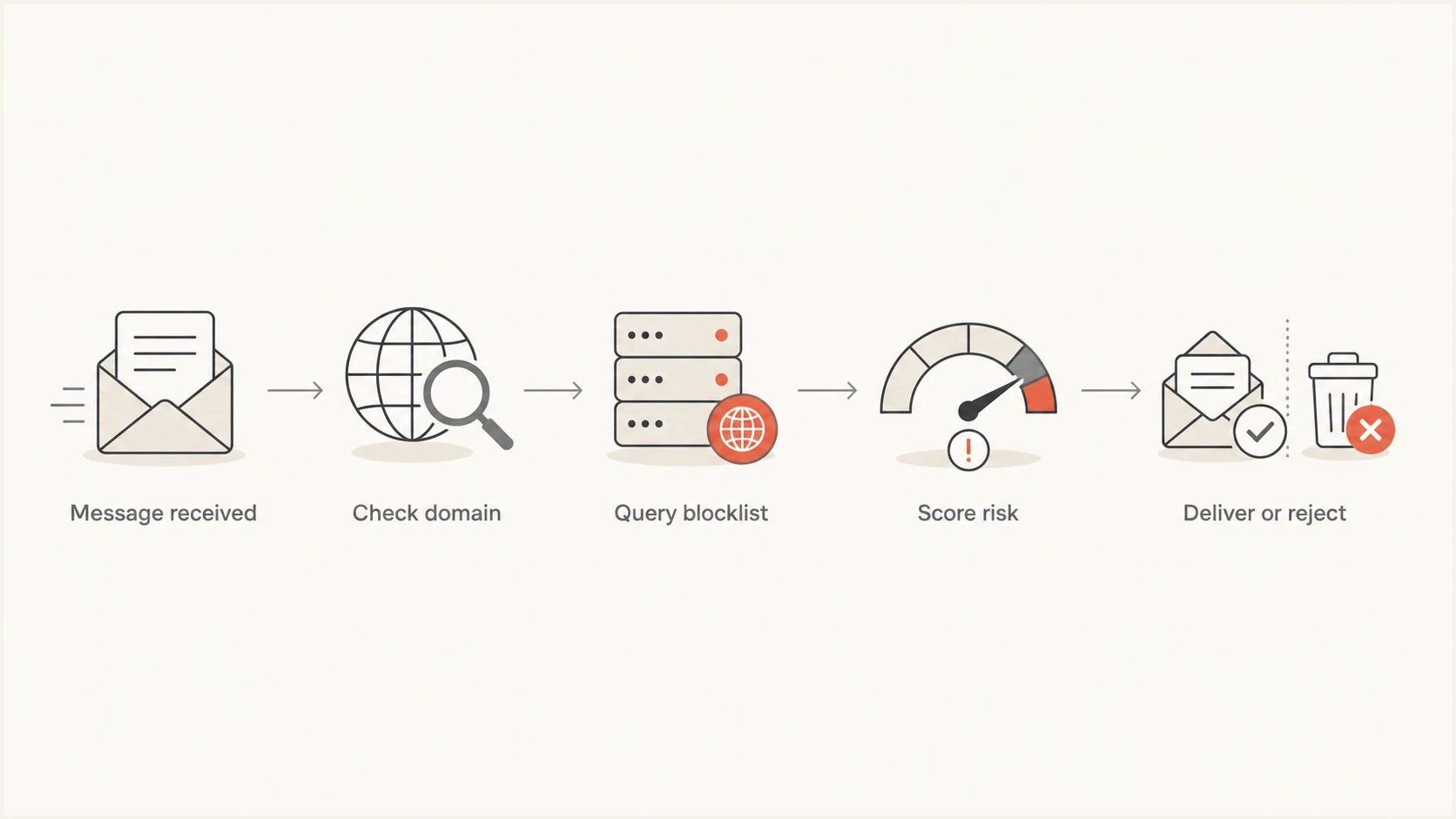
Email blacklist flowchart showing a receiver checking a domain, querying a blocklist, scoring risk, and deciding delivery.
A blacklist result is rarely visible in one clean place. You might see bounces at one recipient domain, poor campaign engagement elsewhere, and no issue with internal test accounts. Different receivers use the data differently.
Public blocklists, private blocks, and reputation
Not every blacklist-style delivery problem comes from a public list. A receiver can reject or filter your mail through its own private block rules, even when public DNSBL and RBL checks are clear. A low domain reputation score is also different from a discrete listing: it summarizes past behavior instead of confirming that the domain appears in a named database.
|
|
|
|---|---|---|
Public DNSBL or RBL | A named list publishes the IP or domain | Direct lookup and bounce text |
Domain or URL list | A message identity or link domain is listed | Listed hostname and message content |
Private receiver block | One provider applies an internal rule | Provider-specific SMTP response |
Reputation score | Behavior is rated over time | Complaint, volume, and delivery trends |
How to interpret blacklist and reputation signals
Verify the exact identifier, active status, and time of the result before acting. If a bounce names no public list and only one receiver is affected, investigate that receiver's response and your reputation there. If a public lookup is the only evidence and mail shows no matching failures, confirm the result before treating it as an incident or false positive.
Why the domain got listed
A blacklist or blocklist entry usually follows a detectable pattern. Separate identity, infrastructure, and behavior. Identity includes the domain in the From address, DKIM signature, return-path, and links. Infrastructure includes the sending IP, provider, reverse DNS, and HELO identity. Behavior covers what recipients and filters saw, including complaints, spam traps, bounces, volume spikes, and content similarity.
Common causes
- Compromised account: A real mailbox or API key starts sending unauthorized mail.
- Bad list source: Purchased, scraped, stale, or poorly consented contacts generate complaints.
- Authentication gap: Legitimate mail fails DMARC because neither SPF nor DKIM matches the From domain.
- Shared sender issue: A platform or shared IP pool has poor traffic mixed with yours.
Evidence to collect
- Bounce text: Look for the named blacklist, SMTP status, and listed identifier.
- DMARC data: Find all senders using the domain and their pass rates.
- Campaign history: Check volume spikes, complaint rates, and bounce rates.
- DNS state: Confirm SPF, DKIM, DMARC, reverse DNS, and sender-domain matching.
If the domain is in message links, check link shorteners, redirect domains, tracking domains, and hosted landing pages. A clean sending domain can still be penalized when the message body points to a listed or suspicious domain. This is common after site compromises, abandoned campaign domains, or link redirects that changed ownership.
Fast triage rule
If the listing appeared after a sudden volume increase, new data source, new sender, or authentication change, treat that event as the first suspect. The timeline usually points to the cause faster than checking every DNS record one by one.
What you should check first
Start with proof, not panic. Warning signs include an increase in 4xx or 5xx responses, a fall in accepted mail at one recipient domain, new spam-folder reports, or an abrupt engagement change. These signals do not prove a public listing, so confirm whether the blacklist names the domain, the sending IP, a URL inside the message, or a subdomain. Then map the affected traffic back to senders and recipient domains. That gives you an action plan instead of a vague deliverability concern.
- Confirm the identifier: Check whether the blacklist names the domain, IP, subdomain, URL, or host. If a domain check resolves A or MX records, confirm that the returned IP actually sends your mail.
- Read bounce messages: Look for the SMTP code, rejection reason, and any delisting reference.
- Inspect authentication: Verify that legitimate sources pass DMARC through SPF or DKIM domain matching.
- Find unapproved senders: Use DMARC reports to spot platforms sending without permission.
- Stop the cause: Pause the bad source before submitting any delisting request.
?
What's your domain score?
Deep-scan SPF, DKIM & DMARC records for email deliverability and security issues.
A broad health check helps because blacklist problems rarely sit alone. Use a domain-level check to validate DMARC, SPF, and DKIM at the same time, then compare those results with recent sending sources. Suped's domain health checker is useful when you need a fast baseline before digging into individual senders.
Domain health checker sample results showing DMARC, SPF, DKIM scorecards and detailed validation checks
After that baseline, check actual message headers and DMARC aggregate reports. Headers show how one message authenticated. DMARC aggregate data shows how sources observed by participating receivers authenticate over time. That second view is where you usually find the source that triggered the listing.
How DMARC changes the outcome
DMARC does not directly remove a domain from an email blacklist, but it changes the investigation. When DMARC reporting is active, you can see who is sending as your domain, which sources pass DMARC through SPF or DKIM domain matching, and which sources fail. Without that visibility, a domain blacklist problem turns into guesswork.
Example DMARC record for monitoringTXT
v=DMARC1; p=none; rua=mailto:dmarc-reports@example.com;
The rua tag requests aggregate reports from participating receivers. A policy of p=none expresses no requested treatment for DMARC failures, and it does not guarantee delivery. Reporting works with any DMARC policy when rua is present. Once authorized senders pass DMARC, consider quarantine or reject to reduce direct domain spoofing. A stricter DMARC policy does not repair an existing blacklist listing.
RFC 9989, published in May 2026, is the current DMARC specification. RFC 9990 defines aggregate reporting, while RFC 9991 defines failure reporting. Aggregate reports provide the broadest sender inventory for this investigation. Failure reports are less widely available and can include sensitive message data, so request and handle them only when there is a defined need.
Authentication is not reputation
A compromised account or approved platform can send mail that passes SPF, DKIM, and DMARC. If recipients did not ask for that mail, complaints and spam-trap hits can still damage domain reputation and cause a blocklist or blacklist listing.
Suped DMARC dashboard showing email volume, authentication health, and source breakdown
In Suped, the practical workflow is to open the DMARC dashboard, identify all sources using the domain, confirm which ones authenticate, then move to the issues view for fix steps. Blocklist monitoring and DMARC data stay in the same investigation, so a reputation alert can be traced back to the relevant sender and authentication result.
Best practical setup
For most teams, the best setup is continuous DMARC monitoring plus blocklist monitoring. That catches both identity failures and reputation changes early, especially when multiple departments or vendors send mail for the same domain.
How serious the listing is
Severity depends on impact, not just the fact that a blacklist result exists. A listing has low direct impact when the receivers you send to do not use it. A listing used by an important corporate gateway or mailbox provider can break essential mail quickly. Rank severity by who is rejecting mail, what type of mail is affected, and whether the same sender has multiple negative signals.
Blacklist impact severity
Use these bands to decide how urgently to respond.
Low
Monitor
No bounces, no recipient complaints, niche listing only
Medium
Investigate
Spam placement, small number of bounces, one sender affected
High
Act today
Business mail rejected, multiple recipients affected
Critical
Escalate
Core transactional or security mail blocked
The business impact also depends on message type. Marketing campaigns can often be paused while you clean the source. Password resets, invoices, legal notices, and security alerts have less room for delay. For those streams, isolate the traffic, confirm authentication, and work with the sending provider while you handle the domain-level issue.
If you need a broader explanation of how lists are built and used, this blocklists guide covers the mechanics behind domain, IP, and DNSBL checks.
How to get off a blacklist
Do not start with a delisting request unless the listing is clearly wrong. Most blacklist operators expect the sender to fix the cause first. If you request removal while the bad traffic continues, the request can be denied, delayed, or reversed after more abuse signals arrive.
- Pause risky mail: Stop the campaign, sender, compromised user, or automation that caused the listing.
- Fix authentication: Make legitimate mail pass DMARC through SPF or DKIM domain matching, then review DMARC policy.
- Clean recipients: Remove invalid, inactive, unconsented, and complaint-prone addresses.
- Secure access: Rotate API keys, reset affected credentials, and review app permissions.
- Request delisting: Use the listing operator's process and explain what changed.
- Watch recurrence: Monitor the domain and sending IPs after removal.
Example bounce cluetext
550 5.7.1 Message rejected. Domain example.com is listed.
See the named blocklist in the rejection text before requesting removal.
The bounce text matters because it tells you which identifier was listed. If the error says the IP is listed, the action can sit with your sending provider. If it names the domain, your own domain reputation and authentication need closer review. If it names a URL, inspect tracking domains, redirect chains, and landing pages.
Do not rotate domains to escape reputation
Switching to a new domain without fixing the sending problem usually makes the situation worse. New domains have little reputation, and repeated complaint or trap hits can connect the new domain to the same bad behavior.
What happens after delisting
Delisting removes a named blacklist or blocklist entry, but it does not erase reputation data held by mailbox providers and private filters. Delivery can remain uneven while receivers observe clean traffic. Confirm that the listing is inactive before restarting, and do not return to full volume at once.
- Resume controlled traffic: Start with expected mail to recently engaged, consented recipients, then raise volume only while negative signals remain low.
- Track each receiver: Review acceptance, deferrals, rejections, and spam-folder reports separately for major recipient domains.
- Keep identities stable: Do not rotate domains or IPs unless the infrastructure cannot be secured or the sending provider directs the change.
- Watch for relisting: Recheck the exact domain, URL, or sending IP and investigate immediately if the same trigger returns.
There is no universal recovery deadline. A public listing can clear before receiver caches and internal reputation systems update. Judge recovery through current SMTP acceptance, inbox placement, complaint rates, and authentication trends instead of a promised number of days.
How to prevent future listings
Prevention comes down to control and feedback. Control means only approved systems can send for your domain, and they authenticate correctly. Feedback means you see delivery, authentication, complaint, and blocklist changes early enough to act before a listing becomes a business problem.
- Consent and unsubscribe: Send subscribed mail only to people who asked for it, and give bulk subscribers one-click plus visible unsubscribe options.
- Stable volume: Increase new or changed traffic gradually, and reduce volume when bounces or deferrals rise.
- Complaint monitoring: Track user complaints by domain and mail stream, then suppress complainers promptly.
- Sender inventory: Review every approved platform, sending subdomain, IP, and authentication result.

Blocklist monitoring page showing domain and IP checks across blocklists with importance and status
Suped's blocklist monitoring supports that ongoing workflow. It monitors domain and IP reputation across major blocklists, connects alerts with DMARC and authentication data, and helps teams move from detection to specific fix steps. For MSPs and agencies, the multi-tenant dashboard keeps each client's listings and sender evidence separated.
Reactive handling
- Late signal: You learn about the listing through bounces or customer complaints.
- Manual search: Someone checks separate DNS, blacklist, and sender records.
- Slow root cause: Teams debate whether the issue is DNS, content, IP, or list quality.
Monitored handling
- Early alert: Reputation changes are visible before broad user complaints arrive.
- Unified context: DMARC, SPF, DKIM, senders, and blocklist results are checked together.
- Clear ownership: The responsible sender, provider, or DNS record is easier to identify.
Suped keeps automated issue detection, alerts, DMARC policy staging, blocklist monitoring, and source-level authentication reporting in one operational view. The free plan gives smaller domains a starting point for identifying senders and monitoring reputation changes.
When the issue is an address, IP, or shared sender
People often say their domain is blacklisted when the listed item is actually an IP address, mailbox, URL, or third-party platform. The distinction changes who can fix it. A domain listing usually needs domain owner action. A shared IP listing often needs the email service provider to separate traffic, clean abusive senders, or move you to a better pool.
|
|
|
|---|---|---|
Domain | You | Audit senders |
IP | Provider | Open ticket |
URL | Site owner | Inspect redirects |
Mailbox | Admin | Reset access |
Who usually owns the fix
If the listed item is a shared IP, ask the provider for the affected IP, the timeline, and whether other senders contributed to the listing. If the listed item is your domain, do not assume the provider can fix it for you. Your domain's sender inventory, authentication state, and recipient practices need direct review.
For a deeper breakdown of this distinction, the page on why IPs get blacklisted explains how sending infrastructure and domain reputation overlap.
A practical recovery sequence
The cleanest recovery sequence is evidence, containment, correction, delisting, and monitoring. Skipping containment is the most common mistake. If bad mail is still leaving your environment, a removal request only buys time and can damage trust with the list operator.
Recovery effort by phase
A typical domain blacklist incident needs most effort before delisting.
Technical
Operations
Monitoring
A good recovery note for a delisting form is short and factual: identify the root cause, state what was stopped, list authentication or security corrections, and confirm that monitoring is in place. Avoid vague claims that the listing was a mistake unless you have clear evidence.
Delisting request outlinetext
Root cause: compromised marketing API key.
Action taken: key revoked, campaign paused, affected list suppressed.
Authentication: DKIM repaired and DMARC failures reviewed.
Prevention: source monitoring and blocklist alerts enabled.
What blacklist recovery requires
When your domain is on an email blacklist, your mail can be filtered, delayed, rejected, or distrusted. The listing itself is the warning light. The real work is finding the sender, behavior, authentication gap, or compromised asset that caused it.
The right response is to confirm the listed identifier, inspect bounces and DMARC data, stop the bad traffic, fix authentication, request delisting, then keep monitoring. Suped connects DMARC monitoring, blocklist alerts, source-level authentication data, and fix guidance in one workflow for that investigation.




