What does a UCEPROTECTL3 blocklist mean for email deliverability and pristine spam traps?

Updated on 28 Jul 2026: We clarified UCEPROTECT Level 3's ASN-wide scope and added a practical recovery path for confirmed SMTP rejections, with stricter guidance on pristine spam trap classification.
A UCEPROTECTL3 listing means your sending IP sits inside an autonomous system (ASN) that UCEPROTECT has listed. It does not, by itself, prove your mail is being blocked, and it does not prove your dedicated IP caused the listing. I treat it as a warning flag: verify real bounces, inbox placement, authentication, and engagement before spending energy on the listing. A steady blocklist monitoring routine helps separate a broad blacklist notice from a delivery problem.
Pristine spam trap hits deserve more attention than the Level 3 listing. A confirmed pristine hit points to address acquisition without valid consent, including purchased or scraped data, partner feeds, or abusive form submissions. A few hits at high volume are not a reason to panic, but repeated hits tell me to trace the campaign, list source, and collection path.
- Network listing: UCEPROTECTL3 applies to the provider's entire ASN, not only your sending IP.
- Trap signal: Pristine trap hits are a data-quality signal, not proof that UCEPROTECT caused a drop.
- Delivery rate: A 98 or 99 percent accepted rate does not prove inbox placement.
- Best next step: Find the campaigns and sources that produced trap hits, then check bounces for real blocking.
What UCEPROTECTL3 actually means
UCEPROTECT has several listing levels. Level 1 applies to an individual IP. Level 2 expands to an IP allocation or netblock. Level 3 applies to the entire ASN, which can include many provider ranges and customers. That is why a dedicated IP can appear on UCEPROTECTL3 even when your own mail stream did not cause the listing. Among email blocklists, broad network listings need context before action.
|
|
|
|
|---|---|---|---|
L1 | Single IP | Direct IP signal | Investigate |
L2 | Allocation or netblock | Range-level signal | Ask provider |
L3 | Entire ASN | Provider-wide signal | Verify impact |
UCEPROTECT levels in practical terms
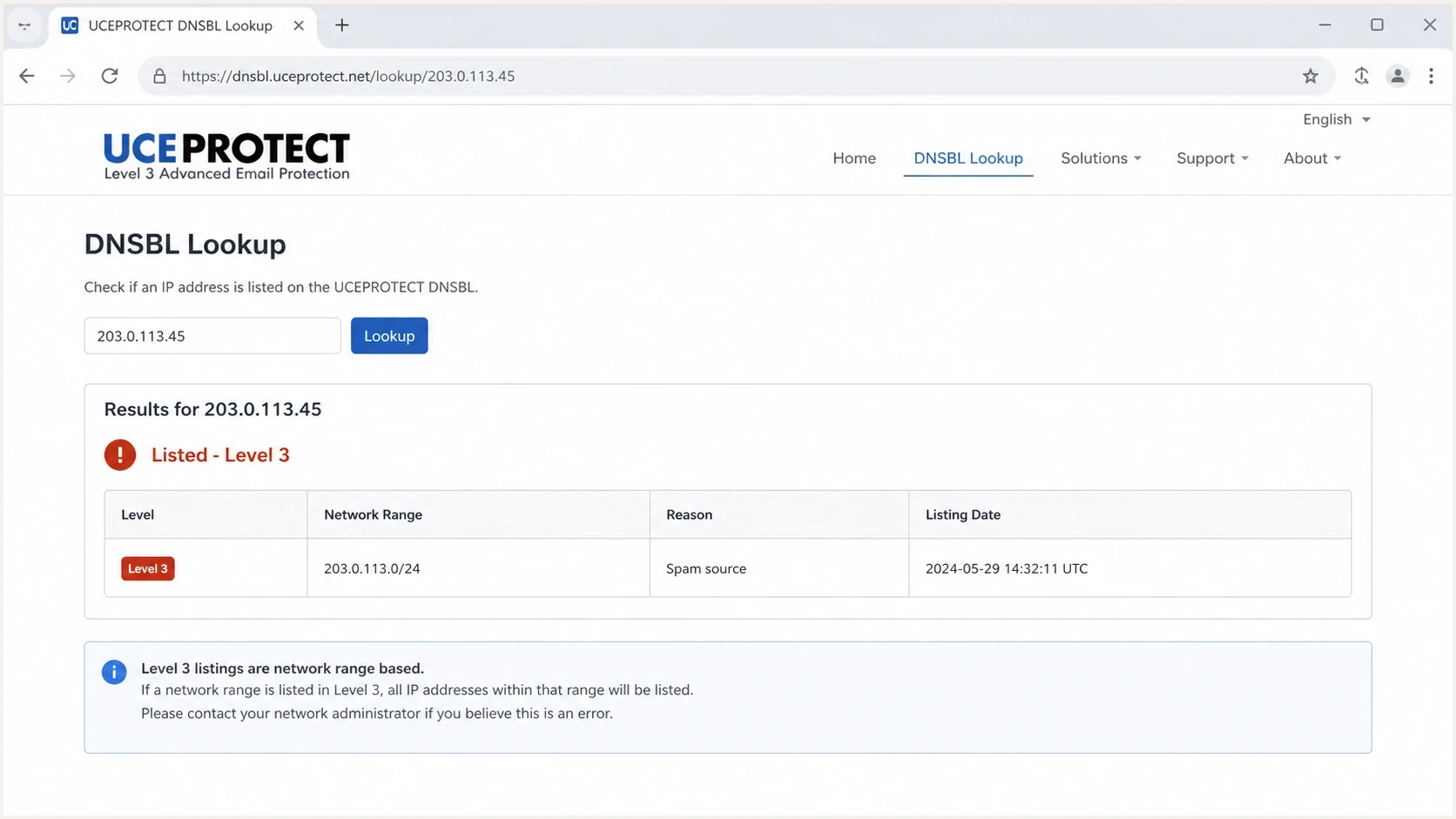
UCEPROTECT DNSBL lookup showing an ASN-wide Level 3 listing.
Dedicated IP does not mean isolated network reputation
A dedicated IP isolates your mail at the IP layer. It does not isolate your ESP's ASN, shared infrastructure, tracking domains, link redirects, or the wider provider network. UCEPROTECTL3 can list the entire ASN even when your own IP history looks clean.
That is the core reason I avoid treating UCEPROTECTL3 as the main diagnosis. It is a signal to verify, not a complete explanation. A focused view of UCEPROTECT L3 concern should start with evidence from receivers, not a lookup result alone.
What it means for deliverability
The direct impact of a UCEPROTECTL3 listing depends on whether a recipient system uses that DNSBL for rejection, scoring, or no action. Real impact appears in SMTP rejections, rising deferrals, mailbox-specific spam placement, or a sudden drop in accepted mail where the response names the list or a related policy. If recipient systems keep accepting the mail and inbox tests still land as expected, the listing is not the likely cause of a click decline.
Evidence of real impact
- Bounce text: A remote server rejects mail and names a DNSBL or policy block.
- Mailbox pattern: One mailbox family shows new deferrals, blocks, or spam placement.
- Timing: The delivery problem starts after the listing date and clears when the issue clears.
Evidence of low impact
- Acceptance: Recipient servers keep accepting mail and bounce rates stay in range.
- Inbox checks: Seed and live tests still reach the expected folder.
- Engagement: Open and click changes match content, seasonality, or bot filtering changes.
SMTP evidence to look fortext
550 5.7.1 Message rejected due to DNSBL policy
554 5.7.1 Service unavailable; client blocked by policy
421 4.7.0 Temporary deferral due to sender reputation
I prefer to test the actual message path instead of staring at a blacklist result. Send a real campaign-style message through an email tester, compare mailbox families, and then read the bounce logs. That gives a clearer answer than the listing alone.
Email tester
Send a real email to this address. Suped shows a results button when the test is ready.
?/43tests passed
What pristine spam traps mean
A pristine spam trap is an address that has never belonged to a real user and should never have joined a permission-based list. A confirmed hit points to purchased or scraped data, weak consent, a risky import, a partner feed, or someone submitting the trap through an unprotected form. Recycled traps were once valid, while typo traps use misspelled domains. For the terminology, compare common spam trap types before deciding how severe the hit is.
Trap signal priority
How I prioritize trap evidence after a small number of hits.
Isolated hit
Review
One or two hits at high volume need campaign tracing.
Repeated source
Fix
The same form, import, or partner source keeps adding bad addresses.
No recurrence
Monitor
Hits stop after intake controls and suppression updates.
The important separation is simple: UCEPROTECTL3 is about ASN reputation, while pristine trap hits are about recipient acquisition. They can show up during the same reporting period without one causing the other. I investigate them as two separate threads until the data connects them.
Confirm the label without diluting the signal
Trap classifications can vary across data providers. If a third-party feed labels a hit as pristine, ask how that category was determined instead of assuming a typo or recycled address is the same thing. Regardless of the label, trace the source, capture time, and campaign before changing the full database.
What I check first
When a team sees a UCEPROTECTL3 listing and fresh trap hits, I use a sequence that separates reputation noise from actual sender risk. The goal is to find the smallest responsible source, pause it if needed, and prove whether recipients are rejecting or filtering mail.
- Confirm scope: Check whether the listing is Level 1, Level 2, or Level 3.
- Read bounces: Look for rejection text that names a DNSBL, policy block, or reputation issue.
- Segment mailboxes: Compare Gmail, Microsoft, Yahoo, and corporate domains separately.
- Trace campaigns: Map trap hit dates to sends, automations, imports, and list sources.
- Audit forms: Check required email fields, CAPTCHA, honeypots, validation, and double opt-in.
- Review permission: Stop purchased or scraped data, and pause any source that lacks clear consent.
- Check authentication: Use a domain health check to verify SPF, DKIM, and DMARC are still clean.
Intake controls checklisttext
Required controls:
- Double opt-in for high-risk sources
- CAPTCHA or honeypot on public forms
- Syntax and domain validation before submit
- Suppression of hard bounces and old inactives
- Source tagging on every address
The fastest wins usually come from source tagging and campaign tracing. If one welcome flow, gated-content form, event import, or partner feed produced the hits, quarantine that source first. Do not clean the entire database blindly if the evidence points to a smaller path. Review long-inactive contacts separately because stale addresses create recycled-trap risk, not pristine-trap evidence.
What to do when Level 3 causes rejections
If bounce logs confirm that a recipient is rejecting mail because of UCEPROTECTL3, treat it as an infrastructure incident. The ASN owner controls the network-wide abuse condition, so an end user cannot fix the underlying Level 3 cause through list cleaning or DNS changes alone.
- Preserve evidence: Record the receiver, timestamp, sending IP, SMTP code, and full rejection text.
- Escalate to the provider: Send the evidence to your ESP or host and ask the ASN owner to investigate the Level 1 sources driving the wider listing.
- Protect important traffic: Ask the provider about unaffected sending infrastructure if confirmed rejections continue.
- Avoid premature payment: Do not buy removal as the first response. It does not correct the provider-wide abuse condition, and the ASN can be listed again.
- Verify recovery: Recheck all three UCEPROTECT levels, repeat affected sends, and confirm that the named recipient no longer rejects them.
Authentication cannot remove an ASN listing
SPF, DKIM, and DMARC still matter for receiver trust, but changing them will not remove a UCEPROTECT Level 3 record. Keep authentication healthy while the provider addresses the network condition.
How to read delivery, clicks, and scores
A 98 or 99 percent delivery rate usually means recipient servers accepted the message. It does not mean 98 or 99 percent inbox placement. Accepted mail can still land in spam, promotions, quarantine, or a low-priority folder. That distinction matters when a dashboard score falls and clicks also decline.
|
|
|
|---|---|---|
Delivery rate | Accepted mail | Inbox folder |
Inbox test | Folder result | Long trend |
Click rate | Engagement | Bot filtering |
Trap hits | List risk | Block cause |
UCE L3 | ASN flag | Recipient block |
Metrics to separate before blaming a blocklist
Click declines deserve their own analysis. They can come from audience fatigue, weaker offers, tracking changes, mailbox UI changes, security scanners, or bot filtering changes that remove inflated historical clicks. I compare click changes by campaign type and mailbox family before tying them to a blocklist or blacklist.
Do not overreact
- Delisting first: Paid or manual removal rarely fixes the real cause.
- Blaming clicks: A measurement or content change often explains CTR movement.
- Mass cleaning: Whole-database action wastes time if one source is responsible.
Do act
- Map timing: Compare listing date, trap dates, sends, imports, and form changes.
- Ask provider: Ask your ESP which ASN was listed and whether customers see rejections.
- Pause sources: Stop sending to lists or flows that produced the trap hits until fixed.
Where Suped fits
Suped's product is a DMARC reporting and email authentication platform. Its blocklist monitoring lets a team compare a new blacklist listing with DMARC, SPF, DKIM, sender reputation, and domain health changes in the same investigation. For a UCEPROTECTL3 event, that workflow helps separate an ASN-wide notice from authentication failures or a problem tied to one sending source.

Blocklist monitoring page showing domain and IP checks across blocklists with importance and status
For teams with many domains, Suped's multi-domain and MSP views keep client domains, sending IPs, authentication status, and reports separate while giving operators one place to compare timing. Alerts can flag a new listing or authentication change, after which the team can attach bounce evidence and route the ASN issue to the responsible provider.
Practical Suped workflow
- Monitor: Add domains and sending IPs, then watch blocklist and DMARC trends together.
- Correlate: Compare listing time with authentication changes, source volume, and SMTP evidence.
- Alert: Notify the responsible operator when a new listing or authentication failure appears.
- Resolve: Fix domain controls in Suped and escalate ASN-wide evidence to the sending provider.
Views from the trenches
Best practices
Track real SMTP bounces before treating UCEPROTECTL3 as the delivery cause in reports.
Map every trap hit to a campaign, import, automation, form, and source tag daily.
Use double opt-in and form protection where risky signups appear in source logs.
Separate delivery rate, inbox placement, click rate, and trap data in reports clearly.
Common pitfalls
Treating a broad Level 3 listing as proof that a dedicated IP has bad reputation.
Assuming a dashboard score drop explains clicks without checking bot filtering first.
Arguing over trap labels instead of tracing the source and collection path quickly.
Cleaning the whole database before pausing the specific source that caused hits.
Expert tips
Ask your ESP whether other senders on the same network range see rejections too.
Use mailbox-family segmentation so one receiver problem does not skew decisions.
Compare click declines against content changes, offers, and scanner filtering signals.
Keep leadership focused on bounces, inbox tests, source fixes, and recurrence data.
Expert from Email Geeks says a UCEPROTECTL3 listing points at the network, not an individual sender, so real inbox data should lead the response.
2026-02-11 - Email Geeks
Marketer from Email Geeks says some IPs appear on UCEPROTECTL3 before any mail is sent, which shows how broad the listing can be.
2026-02-14 - Email Geeks
UCEPROTECTL3 response in brief
A UCEPROTECTL3 listing says less about your individual sender than it appears to say. It means an entire ASN has crossed UCEPROTECT's network-wide listing criteria. For most senders, it is not the first thing I would blame for lower clicks, a score drop, or isolated deliverability anxiety.
Pristine spam traps are the more useful clue about your own program. They point at how addresses enter your database. Find the source, fix the intake path, protect public forms, suppress the affected segment, and watch for recurrence. Then use bounce logs and inbox tests to decide whether the blacklist listing has any real receiver impact.
- Do not panic: UCEPROTECTL3 alone is a weak delivery diagnosis.
- Do investigate: Pristine trap hits need campaign and source tracing.
- Do measure: Use bounces, inbox tests, and mailbox-family trends.
- Do communicate: Tell leadership what changed, what was tested, and what source was fixed.




