Is CleanTalk a legitimate and effective tool for spam and lead signup protection?

Published 20 Jun 2025
Updated 8 Aug 2026
11 min read
Summarize with
Updated on 8 Aug 2026: We updated this guide with current CleanTalk data-handling and testing guidance.
Yes, CleanTalk is a legitimate cloud-based anti-spam service, and it can be effective for lead signup protection when the spam is coming through website forms, account registrations, comments, checkout forms, or common WordPress form plugins. It has published anti-spam plugins, an active WordPress directory listing, API access, and a paid cloud service with a seven-day trial. Those are concrete signs of an established product rather than a scam or a comment-only plugin.
The more useful question is whether it is the right control for the specific spam you are seeing. CleanTalk is a front-door filter for form submissions. It can reduce junk leads before they enter the CRM or mailing list, and its covered checks can include email existence validation. It does not prove mailbox ownership or marketing consent, and it does not replace DMARC monitoring, sender reputation tracking, or blocklist (blacklist) monitoring.
- Legitimacy: CleanTalk has an active cloud service, public plugins, API access, and a documented trial.
- Best fit: It fits WordPress forms, registration pages, contact forms, checkout forms, and lead magnets.
- Main caveat: Effectiveness depends on form compatibility, traffic sources, configuration, and tolerance for false positives.
- Deliverability gap: It stops bad signups, but it does not show whether accepted signups later damage inbox placement.
What CleanTalk actually does
CleanTalk sends available submission data, such as IP address, email address, form fields, message content, and behavioral signals, to its cloud service and returns a SPAM or NOT_SPAM decision. On WordPress, the WordPress plugin is positioned for contact forms, comments, registrations, and online stores. That matters for lead signup protection because most fake leads do not arrive as traditional email spam. They arrive through the same forms real prospects use.
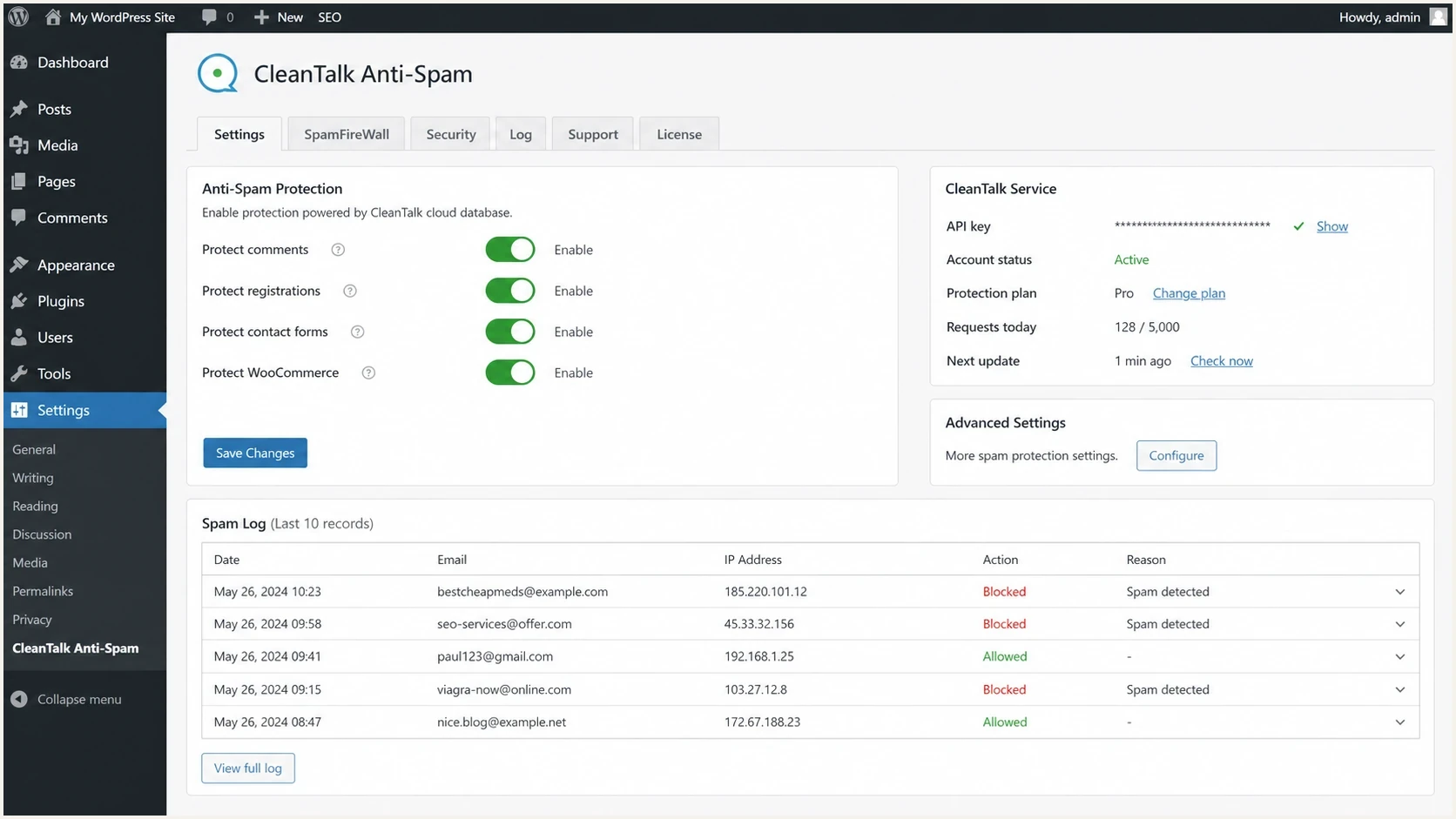
CleanTalk Anti-Spam settings screen for WordPress form protection
For lead generation teams, the value is simple: fewer fake contacts reach sales, fewer fake subscribers enter automation, and fewer bot-created accounts trigger welcome emails. False positives become more likely when a custom form does not expose the expected parameters, a form runs inside an iframe, caching changes JavaScript or nonce behavior, a visitor uses a risky VPN subnet, or one submission creates multiple POST requests.
|
|
|
|---|---|---|
Contact form | Strong | False leads |
Newsletter | Good | Consent |
User signup | Good | Lockouts |
Checkout | Careful | Revenue |
CRM import | Weak | Source data |
CleanTalk fit by signup surface
Where CleanTalk works well
CleanTalk works best when the bad activity has a recognizable web form pattern. That includes repeated submissions from low-quality IP ranges, invalid or disposable-looking addresses, form fills with nonsense names, high-speed registration bursts, and automated comment or review spam. Its invisible JavaScript and cloud checks run without a CAPTCHA challenge, so protection adds less visitor friction than a puzzle.
It is less useful when the problem starts after signup. CleanTalk can check whether an address appears valid in a covered flow, but it cannot prove consent, intent, or mailbox ownership. Double opt-in, suppression rules, lead source review, and email-side monitoring remain necessary.
Good CleanTalk use cases
- WordPress forms: Use it where most spam arrives through contact, comment, and signup forms.
- Registration abuse: Use it to reduce fake accounts before welcome emails or app invites send.
- Low-friction pages: Use it when you want invisible checks instead of adding a visible challenge.
Where it is not enough
- Purchased lists: It does not fix leads imported outside the protected form path.
- Mailbox proof: It does not prove the submitted person owns the email address.
- Reputation repair: It does not repair domain reputation after poor list quality has caused complaints.
Do not judge it on blocked count alone
A high blocked count can mean the filter is working, but it can also hide a false positive problem. Review samples of accepted and rejected submissions before trusting any automated form filter.
- Rejected leads: Audit names, domains, geographies, and referrers in blocked form submissions.
- Accepted leads: Check whether obvious junk still enters sales or marketing automation.
- Business impact: Measure spam reduction against lost legitimate conversions, not against spam volume only.
Privacy and data handling
Because CleanTalk is cloud-based, a form check can transmit personal data to CleanTalk for processing. Its GDPR guidance says this can include the visitor's IP address, email address, message text, and populated form fields when those values are present. Include CleanTalk in the site's vendor review, data-flow map, privacy notice, and processing records where applicable.
CleanTalk states that anti-spam logs are retained for seven days by default and for 45 days with the extended package. Dashboard controls can stop saving approved request content, although date, time, and IP data remain in that mode. The WordPress plugin also has settings for cookies and personal-data handling, so verify the settings in the installed version before rollout.
- Map the data: Record which form fields, IP data, URLs, and messages leave the site for checking.
- Minimize logs: Keep approved request content only when the review workflow needs it.
- Check cookies: Match the plugin's cookie mode with the site's consent and caching configuration.
- Limit access: Give dashboard and log access only to staff who investigate form decisions.
How to evaluate it on a lead form
The practical test is a controlled trial on one or two lead paths, not a site-wide install with no baseline. Capture the number of submissions, accepted leads, rejected leads, sales-qualified leads, complaints, and unsubscribe rates before and after activation. Keep source, campaign, referrer, IP country, user agent, and form completion time with each decision when the site's privacy rules permit it.
Compare CleanTalk dashboard counts with the form backend rather than assuming they match. CleanTalk can record a request before the form runs its own validation, so an invalid submission can appear in the anti-spam log without becoming a stored lead.
Public reviews are useful for risk checks, but they do not replace your own data. Read Trustpilot reviews for support and billing patterns, then test performance on the exact forms that matter to revenue.
- Baseline: Record seven to fourteen days of form volume, junk rate, lead quality, and complaint data.
- Pilot: Enable CleanTalk on one lead form before you apply the same settings across every form.
- Review: Manually inspect blocked submissions daily during the first week to catch valid leads.
- Tune: Adjust form coverage, allow rules, and notification handling based on real outcomes.
- Expand: Roll it to more forms only after blocked submissions and sales feedback both look acceptable.
Example lead form decision logjson
{
  "event": "lead_form_submit",
  "form": "demo_request",
  "source": "paid_search",
  "decision": "blocked",
  "reason": "high_risk_ip_email_pair",
  "review_status": "needs_manual_sample",
  "email_sent": false
}
Example false-positive review bands
These are internal operating triggers, not CleanTalk benchmarks. Adjust them to the value and volume of the form.
Healthy
0-1% valid leads blocked
Junk falls and sales-qualified leads stay steady.
Review
1-3% valid leads blocked
Junk falls, but some valid-looking submissions are blocked.
Fix now
3%+ valid leads blocked
Valid prospects are being suppressed often enough to affect revenue.
Lead signup protection needs more than one filter
CleanTalk is one layer. A strong signup defense also needs form design, consent capture, source attribution, suppression rules, and email-side checks. Bots and fake data submit web forms for purposes including link spam, account creation, list pollution, credential testing, and attempts to trigger automated mail. That behavior is covered in more detail in fake form submissions.
If the bad signups target a newsletter, the damage can show up later as inflated list size, low engagement, spam complaints, and poor sender reputation. A filter at signup helps, but double opt-in and list hygiene still matter. The same applies during listbombing, where fake or third-party addresses are submitted at speed. See listbombing prevention for that specific pattern.
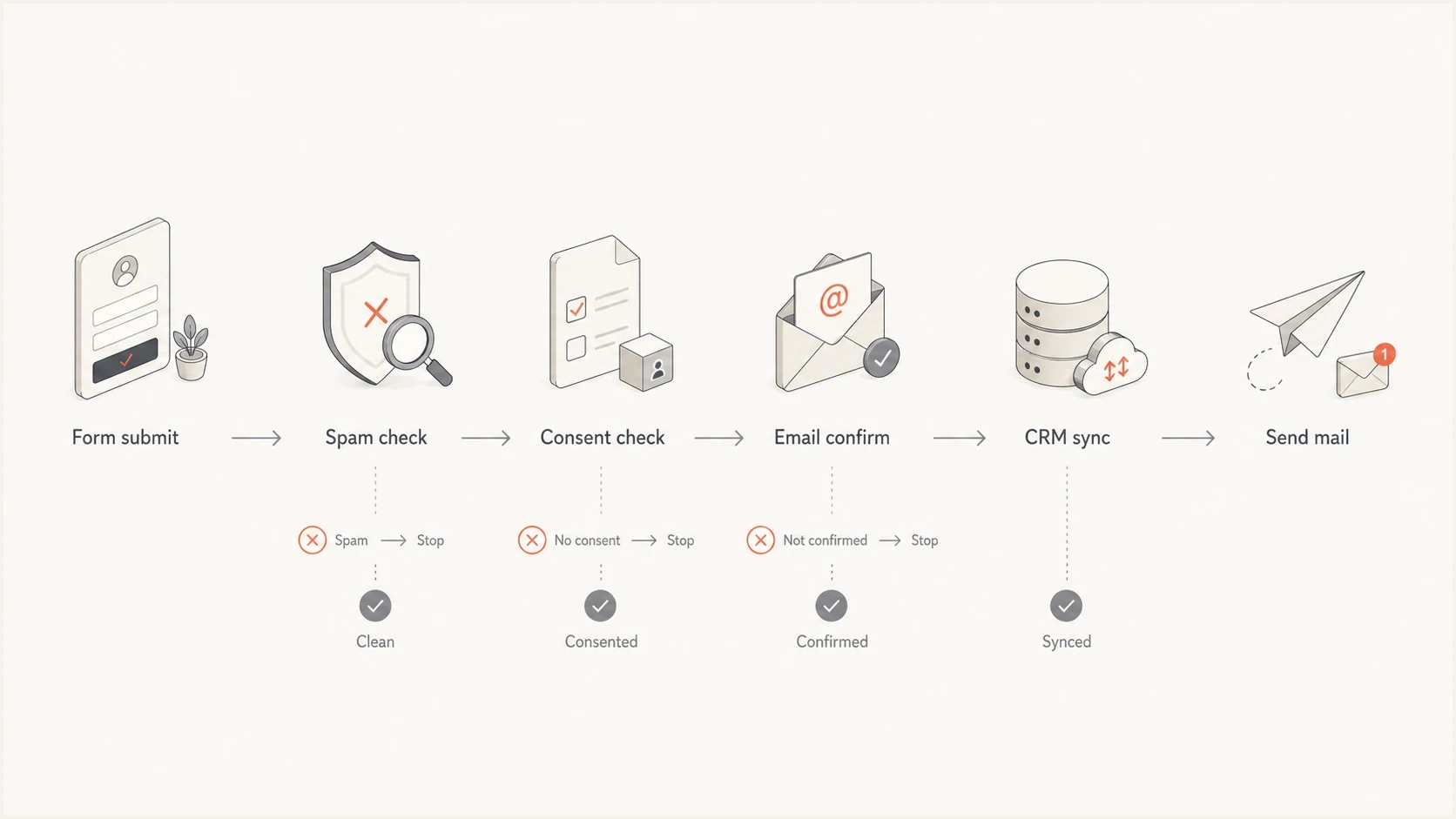
Lead signup protection flow from form submit to email send
Before sending campaigns to new leads, check whether your sending domain is healthy. Suped's public domain health checker is useful here because it validates the domain-level controls that affect whether signup-triggered emails are trusted by receiving mail systems.
?
What's your domain score?
Deep-scan SPF, DKIM & DMARC records for email deliverability and security issues.
Do not let a CleanTalk pass automatically qualify a lead for immediate marketing. A pass means the submission was not rejected by the form filter. It does not mean the address is engaged, permissioned, typo-free, or safe to mail at scale.
Email reputation impact
The biggest deliverability risk from fake lead signups is not the form submission itself. The risk begins when those addresses receive automated mail, ignore it, bounce, complain, or create enough poor engagement to weaken sender reputation. CleanTalk covers the form decision, while Suped covers a different part of the workflow.
CleanTalk helps before the lead enters the database. Suped is our DMARC reporting and email authentication platform. It helps after email starts flowing by monitoring DMARC, SPF, DKIM, sending-source identity, blocklist (blacklist) status, and related deliverability signals. Use that data to connect an authentication failure or listing to the sending source and the next fix.

Blocklist monitoring page showing domain and IP checks across blocklists with importance and status
Use blocklist monitoring when form abuse has already reached the email program. It shows whether your domain or sending IPs appear on a blocklist or blacklist, which helps separate a website spam issue from a sender reputation issue.
For a broader explanation of how blacklist and blocklist systems work, the blocklists guide explains common listing types and removal considerations. If the concern is whether real campaign mail looks trustworthy after lead cleanup, send a real message through the email tester and inspect authentication, content, and technical signals together.
Best practical setup
A sensible setup uses CleanTalk for the web form layer and Suped for the email authentication and reputation layer. This split keeps form decisions separate from mailstream evidence while giving each issue a clear owner.
- Form layer: Block obvious bot leads before they reach sales, CRM, or automation.
- Consent layer: Require confirmation or other proof before mailing high-risk signup sources.
- Email layer: Use Suped to monitor DMARC, SPF, DKIM, hosted authentication records, MTA-STS, alerts, and blocklist (blacklist) status.
Views from the trenches
Best practices
Test on one revenue form first, then inspect blocked leads before expanding protection.
Keep lead source data with each decision so sales can trace why a signup was blocked.
Pair signup filtering with confirmed opt-in when fake newsletter entries are rising.
Monitor sender reputation after cleanup because old bad leads can still affect mail.
Common pitfalls
Treating every blocked lead as proof of success hides the cost of false positives.
Installing a form plugin without logging decisions leaves teams unable to tune rules.
Assuming comment spam protection and lead signup protection have the same risk profile.
Letting accepted leads send immediately can turn form abuse into complaint problems.
Expert tips
Review a daily sample of accepted and rejected leads during the first week of rollout.
Separate website spam metrics from deliverability metrics so fixes stay targeted.
Use stricter checks on low-intent forms and softer handling on high-value demo forms.
Keep plugin and form integrations updated because spam filters sit on public endpoints.
Expert from Email Geeks says CleanTalk is legitimate, but typical comment spam results vary by site and form type.
2024-05-09 - Email Geeks
Marketer from Email Geeks says CleanTalk performed better on some sites than others, so local testing matters.
2024-05-09 - Email Geeks
Practical verdict
CleanTalk is a legitimate tool, and it is a reasonable option for spam and lead signup protection when the problem is web form abuse. Use it as a measured control: start with one form, log decisions, audit false positives, and connect the result to lead quality rather than blocked-count vanity metrics.
For WordPress lead forms, registrations, comments, and simple signup abuse, CleanTalk is worth testing. For DMARC, SPF, DKIM, hosted authentication records, MTA-STS, and blocklist (blacklist) monitoring, Suped's product covers the email-side workflow. Stop junk at the form, confirm the leads you keep, and monitor the mailstream so bad signup quality does not turn into a deliverability problem.
Bottom line
Use CleanTalk when spam enters through forms. Use Suped when you need to monitor authentication, domain reputation, and ongoing email performance. Treat both layers as separate controls in the same customer acquisition workflow.




