How to remove IP address from 0spam blacklist?

Published 21 Apr 2025
Updated 3 Aug 2026
12 min read
Summarize with
Updated on 3 Aug 2026: We clarified 0spam's removal paths, delisting times, and request limits for each blacklist and blocklist.
The direct answer: to remove an IP address from the 0spam blacklist, first confirm which 0spam list contains the IP and stop the spam source. Submit a free removal request only for bl.0spam.org. Listings on rbl.0spam.org and nbl.0spam.org clear automatically after their list-specific conditions are met. Start with the 0spam IP Check.
The caveat matters: not every 0spam blacklist or blocklist entry has the same fix. The realtime blacklist clears automatically, normally within 24 hours after spam stops. The network blacklist has no manual removal path; every offending IP listing in the Class C block must clear, then the block must remain clean for 24 hours.
Treat a 0spam blacklist hit as urgent when SMTP logs show actual rejections, not only a generic blocklist lookup result. One or two customer bounces still require a fix, but they do not have the same impact as a widespread production outage. A broader blocklists workflow helps separate a delivery failure from a reputation signal that no major receiver is using against your mail.
The removal steps
The practical sequence is short, but the order matters. 0spam asks for an explanation of what changed so it does not receive more spam reports from the same IP or range. Submitting a removal request before fixing the source leads to repeat listings.
- Confirm the list: Check the exact IP and record whether it appears on bl, rbl, nbl, or the domain blacklist shown as dbl or url.
- Collect proof: Save the bounce text, recipient domain, timestamp, sending IP, and message ID.
- Fix the cause: Remove compromised accounts, bad scripts, bad list imports, or abusive customers.
- Use the correct removal path: For bl, use the 0spam removal page. For rbl or nbl, fix the source and wait for automatic clearance.
- Monitor results: Watch rejections for 24 to 48 hours and confirm the same IP does not relist.
Common 0spam rejection messagestext
550 rejected because 203.0.113.25 is in a black list at bl.0spam.org
550 Blacklisted on bl.0spam.org
554 5.7.1 Rejected 203.0.113.25 found in bl.0spam.org
Do not skip the fix
0spam expects you to stop the source first. A removal request that says only "please delist" is weak. Name the root cause and say exactly what changed.
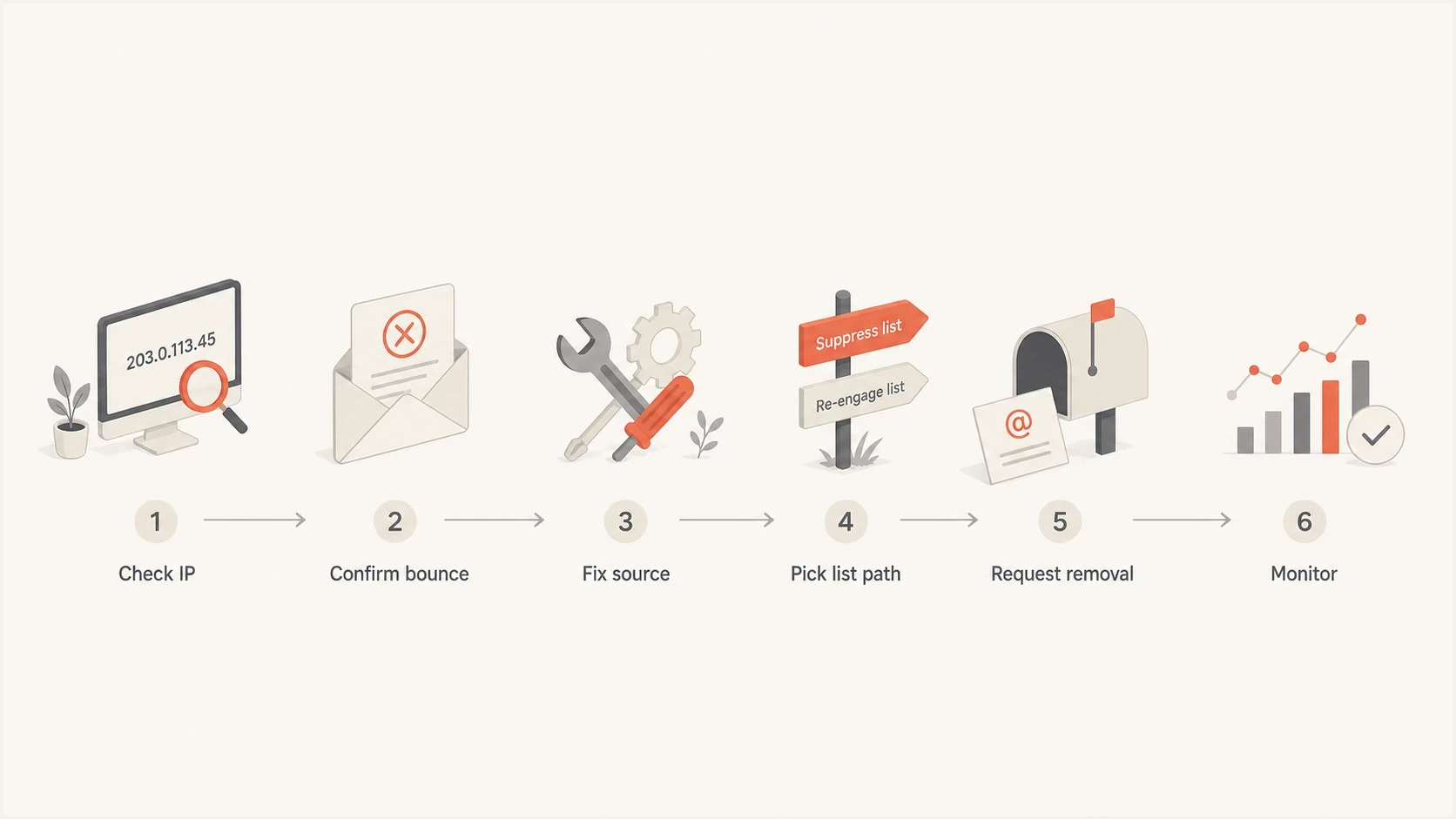
Flowchart showing the steps to check, fix, request removal, and monitor a 0spam listing.
Delisting time and request limits
0spam uses different clocks for manual and automatic removals. A clean sending IP can remain listed until the applicable review or observation period finishes, so avoid sending duplicate requests during the stated window.
|
|
|
|---|---|---|
bl.0spam.org | Usually within 20 minutes; manual review can take 48 hours | One free IP removal every 3 hours |
rbl.0spam.org | Automatically within 24 hours after spam stops | No manual removal |
nbl.0spam.org | Automatically after the block remains clean for 24 hours | All offending IP listings must clear first |
Long-term network listing | Manual application after at least 60 clean days | Every spam source in the network must stop |
Current 0spam removal timing and limits.
Free does not mean unlimited
A single bl.0spam.org removal is free, but 0spam limits free requests to one IP every three hours. Range owners with many IPs need the provider-level management path rather than repeated single-IP forms.
Match the listing to the removal path
Before contacting anyone, identify the list. A main IP listing, realtime listing, network block listing, and domain blacklist each point to a different action. The wrong action wastes time and can make the ticket look unserious.
|
|
|
|---|---|---|
bl.0spam.org | Main IP blacklist | Fix, verify, then request |
rbl.0spam.org | Realtime blacklist | Automatic after cleanup |
nbl.0spam.org | Class C network blocklist | Provider cleanup, then automatic clearance |
dbl.0spam.org / url.0spam.org | Domain blacklist signal | Remove domain abuse and investigate the listed IP |
0spam list types and the practical response.
For the main blacklist, 0spam provides a free removal form after the spam source has stopped and the fix has been verified. Its 0spam FAQ says removal requests are usually processed within 20 minutes, with manual review taking up to 48 hours in some cases.
For the realtime blacklist, manual removal is unavailable. Stop the source and allow up to 24 hours for automatic clearance. For the network blacklist, involve the IP owner or provider. All offending IP listings within the Class C block must clear, then the block must remain clean for 24 hours.
0spam currently uses both dbl and url labels for its domain blacklist across its public pages. Treat either label as a domain-related signal, then check which IP and domain appeared in the spam message before choosing a remediation path.
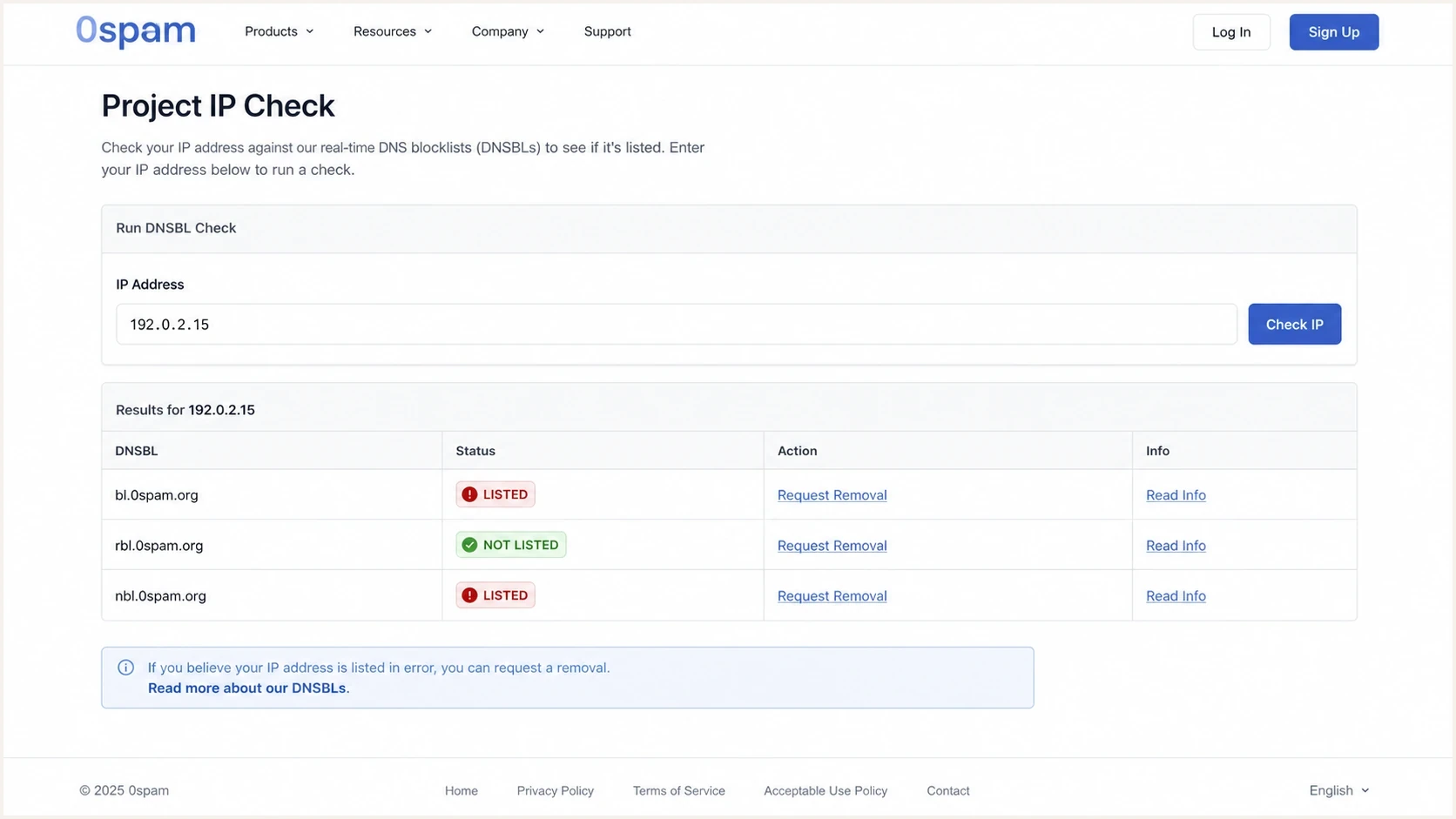
Example screenshot concept of checking an IP on the 0spam Project IP Check page.
What to include in the removal request
The bl.0spam.org removal request needs enough detail for a reviewer or automated system to understand that the abuse source has stopped. Write it as an incident note, not a complaint. Keep the tone factual and testable.
- Listed IP: Provide the exact sending IP, not just a hostname or shared pool name.
- List name: State whether the issue is on bl, rbl, nbl, or the domain blacklist shown as dbl or url.
- Root cause: Name the compromised account, bad campaign, open relay, script, or customer.
- Corrective action: Say what was disabled, cleaned, throttled, patched, or moved.
- Prevention: Describe the guardrail that stops the same sending pattern returning.
Removal request templatetext
IP: 203.0.113.25
List: bl.0spam.org
Cause: compromised mailbox sent unwanted bulk mail.
Fix: mailbox disabled, password reset, tokens revoked.
Prevention: outbound rate limit and alert added.
Request: please recheck and remove the listing.
Use evidence, not pressure
A good request explains the fix. It does not argue that the sender is legitimate in general. Even a legitimate sender can create a spam-trap hit through a compromised account, bad list source, or weak outbound filtering.
If the IP is shared, name the specific customer or sending stream you controlled. If you do not control the sending infrastructure, send the evidence to the IP provider and ask them to handle the blacklist removal. 0spam's network blocklist is designed for provider-level abuse response, not end-user self-service.
Confirm impact before escalating
A blacklist or blocklist hit only matters operationally when a receiver uses it in a way that affects your mail. That means you need bounce evidence. The most useful signal is a reject message that names 0spam or a 0spam DNSBL hostname.
Escalate removal
- Clear bounces: SMTP logs name bl.0spam.org or show a 550 or 554 rejection.
- Repeat impact: The same destination or customer sees repeated delivery failures.
- Owned IP: You control the sending host and can prove the fix.
- Network issue: Your provider confirms a range-level abuse case is active.
Monitor first
- No bounces: The only signal is a lookup result with no delivery failure.
- Tiny volume: One mailbox complains, but normal mail flow still succeeds.
- Shared pool: You need the provider to isolate the abusive sender.
- Auto list: The listing clears after the bad traffic stops and its waiting period finishes.
If you need a structured path for checking the listing, documenting the fix, and asking for removal, follow a standard delisting workflow. It keeps the response focused on evidence rather than repeated tickets.
Blocklist checker
Check your domain or IP against 144 blocklists.







After the lookup, compare the result to actual sending logs. If the blocklist checker says listed but no receiver rejects the mail, the task is reputation cleanup and monitoring. If receivers are rejecting, move to incident handling and remove the underlying cause before requesting delisting.
Fix the root cause
0spam listings are tied to abuse signals, so the fix depends on what sent the bad mail. Start with outbound logs, message samples, and authentication results for the listed IP. If the IP sends several different mail streams, split them before asking for removal.
- Compromised mailbox: Disable the account, reset credentials, revoke sessions, and review forwarding rules.
- Bad list source: Stop the campaign and remove imported contacts that lack clear permission.
- Open relay: Close unauthenticated relay paths and retest before resuming outbound mail.
- Abusive customer: Suspend the sender, preserve logs, and add controls before reopening the pool.
- Weak authentication: Review SPF, DKIM, and DMARC so legitimate mail is clearly attributable.
Escalation threshold
Use bounce volume to decide whether a 0spam listing is monitoring work or an incident.
Monitor
0
Listed, no confirmed rejects
Investigate
1-5
A small number of confirmed rejects
Incident
6+
Repeated rejects across customers
Authentication does not remove a 0spam blacklist entry by itself, but it helps prove which mail stream belongs to you. Run a real message through an email tester when you need to inspect headers, SPF, DKIM, DMARC, and delivery signals together.
How Suped fits the workflow
Suped's product connects blacklist removal work with DMARC visibility, SPF and DKIM status, sending sources, IP reputation, and receiver rejections. Those signals help a team see what changed before and after a listing.
For a 0spam case, the relevant Suped workflows are automated issue detection, alerts, DMARC monitoring, authentication checks, and blocklist monitoring across domains and IPs. Use them to connect a new blacklist or blocklist hit to the sending source that caused it.

Blocklist monitoring page showing domain and IP checks across blocklists with importance and status
The practical Suped workflow is simple: add the sending domain, monitor the sending IPs, review DMARC sources, check SPF and DKIM status, and set alerts for new blocklist or blacklist hits. Agencies and managed service providers can track the same workflow across customer domains in the multi-tenant dashboard.
If you are checking the whole domain rather than one IP, use the domain health checker to validate DMARC, SPF, DKIM, and related DNS health before sending a removal request. Clean authentication does not guarantee delisting, but it removes avoidable doubt.
What to do when a full range is listed
A full range listing needs a different response. If a /24 or Class C block is involved, do not submit the same single-IP request repeatedly. First confirm whether receivers are rejecting mail because of the range listing. Then identify whether you own the range, lease it, or send through a provider that controls it.
NBL is provider-level work
0spam says its network blocklist should not be used alone because legitimate mail can also come from a listed network. Manual nbl removal is unavailable. Every offending IP listing in the Class C block must clear, and the block must then remain clean for 24 hours before automatic removal.
- If you own it: Audit every outbound host in the range and remove all active abuse sources.
- If you lease it: Open a provider ticket with bounces, IPs, timestamps, and customer impact.
- If it is shared: Ask the provider to move clean mail or isolate the abusive sender.
- If it is long-term: Keep every spam source stopped for at least 60 days before applying for manual removal.
- If it is low impact: Monitor bounces and avoid making a range listing a larger incident than it is.
The operational goal is specific: the bad sender has stopped, the listed IP or range is no longer producing the pattern that caused the hit, and any receiver that rejected mail can be retested with a clean message.
Views from the trenches
Best practices
Check SMTP rejections before treating a 0spam listing as a production incident for mail.
Remove the abusive sender or compromised script before you request delisting from 0spam.
Track the exact list name because bl, rbl, nbl, and dbl have different remedies and owners.
Common pitfalls
Submitting removal without a fix leads to repeat listings and weaker receiver trust fast.
Chasing an nbl network listing without the IP provider delays the practical remedy badly.
Treating every blacklist hit as equal wastes time when no receiver is rejecting mail.
Expert tips
Keep bounce samples, timestamps, and sending IPs together before opening a ticket.
Segment complaint-heavy traffic so one bad sender does not affect a shared pool again.
Use DMARC and authentication data to prove the mail stream matches your domain cleanly.
Expert from Email Geeks says broad 0spam network listings need careful handling because some receivers should not use range-level data as the only blocking signal.
2024-12-03 - Email Geeks
Marketer from Email Geeks says checking for actual bounce messages matters before escalating, because a lookup result alone does not prove delivery impact.
2024-12-03 - Email Geeks
0spam removal checklist
To remove an IP address from the 0spam blacklist, confirm the exact list, prove there is a real rejection, stop the source, and use the matching removal path. For bl listings, submit the free form after verifying the fix. For rbl listings, stop the bad traffic and allow up to 24 hours. For nbl listings, involve the network owner and clear every offending IP in the Class C block.
The long-term fix is cleaner outbound control, better authentication visibility, faster alerts, and enough reputation monitoring to catch a listing before customers report it. Suped's DMARC, SPF, DKIM, blocklist, and deliverability workflows reduce the manual work by keeping those signals connected to each sending source.




