How does Talos Intelligence monitor global email volume trends?

Updated on 23 Sep 2026: We clarified how Talos ranks email volume, interprets magnitude changes, and separates reputation from blacklist or blocklist status.
Talos Intelligence monitors global email volume trends through the Cisco Talos Reputation Center, especially its Email & Spam Data pages. The public number is not a raw count of every message on the internet. It is a volume magnitude score on a base-10 log scale, where Talos defines 10 as 100% of worldwide email volume and each one-point drop as a tenfold drop in actual volume.
The practical answer is this: Talos turns observed email data into directional volume measurements ranked by sender IP address, network owner, and country. Hostname appears as a field in the IP address table, not as a separate ranking. Each ranking separates All Email and Spam. Read the results as reputation intelligence, not as a universal census. Talos says Reputation Center data refreshes every three hours, but that cadence describes publication freshness rather than the exact time a traffic change occurred.
The direct answer
Talos publishes email volume as magnitude, not as a simple message counter. Cisco's support material on email volume magnitude says the scale uses base 10. A magnitude of 6 is ten times the volume of a magnitude of 5. A difference of 0.3 is about a twofold change because the ratio is 10 raised to the magnitude difference. That matters because a visually small chart movement can describe a large traffic change.
Talos says it tracks a broad set of email attributes to calculate reputation and volume results. Its public documentation explains the magnitude scale and table fields, but it does not disclose the exact sensor mix, sampling method, or weighting used for the public totals. Treat claims that assign the chart to one DNS source or one Cisco gateway path as speculation unless Talos documents that method.
The public Talos view ranks data by IP address, network owner, and country, with a separate hostname field in the IP table. It also separates All Email from Spam. That split matters because a sender can grow in total mail while spam share falls, or show the reverse pattern. Converting a magnitude into a fixed message count requires an assumed worldwide daily email total for the same period.
Talos magnitude example
Magnitude 10 = 100% of world email volume
Magnitude 9  = 10% of world email volume
Magnitude 8  = 1% of world email volume
Magnitude 7  = 0.1% of world email volume
Magnitude 6  = 0.01% of world email volume
Magnitude 5  = 0.001% of world email volume
How to read the public number
- Magnitude: A log-scaled volume measure, not a raw message count.
- Change: The public change value compares the last day with the prior month's average daily volume.
- Reputation: Volume is separate from Good, Neutral, or Poor email reputation.
- Scope: The public display is Talos's measured view of email activity.
What each Talos table shows
The Email & Spam Data page has three rankings, and each answers a different question. Use the All Email and Spam controls to compare total observed activity with the subset Talos classifies as spam. Do not compare rows as raw message totals because Last Day Volume uses the logarithmic magnitude scale.
|
|
|
|---|---|---|
Top Senders by IP Address | IP Address, Hostname, Network Owner, Last Day Vol, Vol Change, Email Rep | Investigate a sending IP and compare volume with its public reputation category. |
Top Senders by Network Owner | Network Owner, Last Day Volume, Volume Change, Domains | Compare larger sending networks and the number of associated email-sending domains. |
Top 100 Country Senders | Country, Last Day Volume | Compare country-level volume without attributing the result to one sender or network. |
Fields and uses for the public Talos email rankings.
Do not misread the Domains column
In the network-owner table, Domains is the number of email-sending domains Talos associates with that network owner. It is not message volume and it does not necessarily equal the number of distinct companies or brands using the network.
What Talos volume is not
Talos volume is not a claim that every SMTP transaction on the internet crossed Cisco-owned mail servers. Most mail flows directly between the sending infrastructure and the recipient MX or security gateway chosen by the recipient domain. A sender has no normal reason to route through Cisco infrastructure unless Cisco is part of the receiving or filtering path.
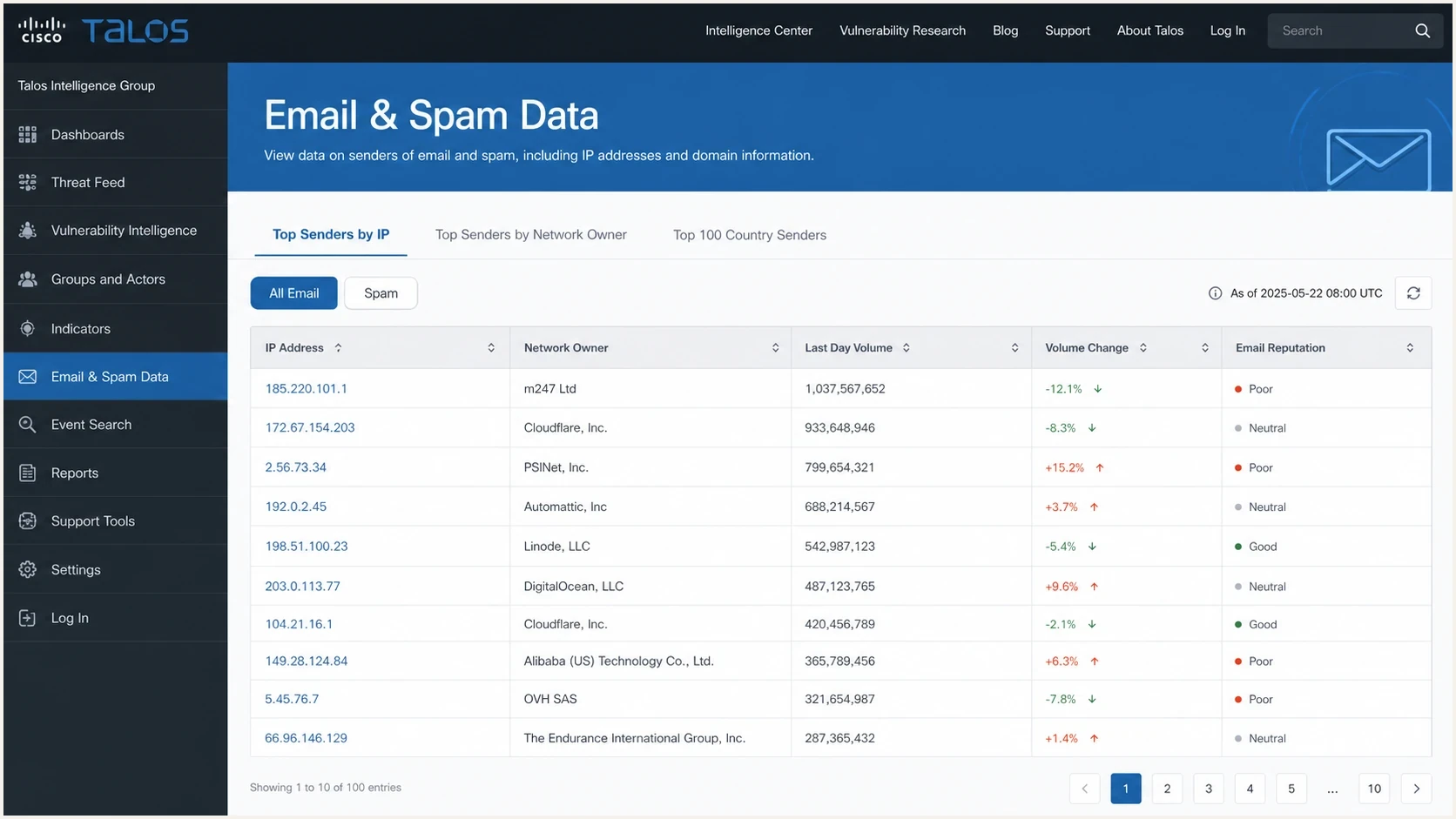
Cisco Talos Email & Spam Data screen with sender volume columns.
It is also not the same thing as your own deliverability reporting. Talos can tell you how a sender, network, or country appears inside Talos reputation telemetry. Your own logs, DMARC aggregate reports, bounce data, complaint data, and mailbox placement checks tell you what happened to your mail.
Public Talos trend
- View: Sender IPs, network owners, and countries, with hostnames listed for IPs.
- Scale: Base-10 magnitude rather than message totals.
- Use: Reputation context and large trend checks.
Your sender view
- View: Your domains, IPs, campaigns, and vendors.
- Scale: Actual send volume, accepted volume, and failures.
- Use: Operational fixes and authentication decisions.
How Talos reputation relates to blocklists
Email volume and email reputation are separate Talos fields. Talos calculates a granular IP reputation score between -10 and +10, then groups the public result as Good, Neutral, or Poor. A high-volume sender can have Good reputation. A low-volume IP can remain Neutral when Talos lacks enough observations to assign a stronger result.
A Talos reputation result is also separate from a DNSBL listing. The Reputation Center can display DNS-based block lists for a searched IP, but the public center does not itself block mail or internet traffic. Receiving systems decide how much weight to give Talos reputation, a blacklist (blocklist) entry, and their own filtering rules. Poor reputation does not prove that an IP appears on a specific DNSBL.
- Check the exact sender: Confirm the sending IP because IP reputation, domain reputation, and URL reputation are separate signals.
- Separate the fields: Compare Last Day Volume, Volume Change, Email Reputation, and DNSBL status instead of treating one result as proof of another.
- Fix the cause first: Stop abusive traffic, secure compromised systems, correct sending identity, and clean the affected mail stream before requesting review.
- Track recovery: Talos says an IP score should improve automatically within three to five days after the cause is fixed. Recheck reputation and blacklist or blocklist status, then submit a sender IP reputation ticket if the score does not improve.
Why a global drop can appear
A large fall in a public Talos global volume chart has more than one possible cause. Some causes are real changes in mail traffic. Other causes change how much relevant traffic is visible to the measurement system. The chart does not separate those causes for you.
|
|
|
|---|---|---|
Real traffic shift | Talos and sender logs move together | Review sending events |
Spam shift | Spam moves more than all mail | Compare both Talos views |
Telemetry shift | Talos moves but sender logs do not | Treat the chart as context |
Classification shift | Spam changes without a similar total | Check delivery evidence |
Practical ways to interpret a Talos volume change.
Do not explain a long global decline only with "more ESPs are peering." Peering changes network paths, but SMTP still goes to the receiving MX path. Public Talos volume is a reputation measurement output with multiple inputs, not a count of mail that physically crossed one backbone.
- True traffic change: Bot activity and sender cleanup can reduce visible volume.
- Sender mix: Large networks or countries can move the global view without matching your traffic.
- Telemetry coverage: Changes in participating security infrastructure can change what Talos observes.
- Classification updates: Spam and all-mail views can diverge when detection logic changes.
Magnitude difference guide
Traffic ratios implied by magnitude differences, before accounting for telemetry coverage.
Small difference
0.1 = about 1.26x
Noticeable on a logarithmic scale
Material difference
0.3 = about 2x
Roughly double the observed volume
Large difference
1.0 = 10x
Tenfold observed-volume ratio
How to use Talos data in practice
Talos is most useful as one layer in a sender reputation workflow. Start with the public signal, then compare it with your own delivery data. If the question is historical sending movement for a specific IP, also review historical IP traffic rather than relying on one public chart.
For your own domain, the useful question is not only whether Talos sees less email. Check whether domain authentication, complaint signals, bounce rates, and blocklist status changed at the same time. A domain health check gives a cleaner starting point.
- Pick the level: Check whether the issue is at IP, network owner, domain, or country level.
- Compare views: Look at All Email and Spam before drawing a conclusion.
- Match sources: Map visible senders to each sending service and MTA pool.
- Verify authentication: Check SPF, DKIM, and DMARC pass rates before blaming reputation.
- Watch listings: Check public blocklist records if volume and delivery both move.
?
What's your domain score?
Deep-scan SPF, DKIM & DMARC records for email deliverability and security issues.
The domain check matters because public reputation trends do not tell you whether an SPF include chain is broken, DKIM is missing on a vendor, or DMARC is receiving reports from every source. Those are fixable issues. A broad public volume trend gives context, but authentication data gives the next action.
Where Suped fits
Suped connects public reputation context to the domains you manage. Talos shows public reputation and volume patterns. Suped's product monitors DMARC, SPF, DKIM, domain health, and blacklist (blocklist) exposure for the mail you send.
Suped DMARC dashboard showing email volume, authentication health, and source breakdown
Suped turns aggregate reports into source-level authentication status, issue detection, and fix steps. Hosted DMARC, hosted SPF, SPF flattening, hosted MTA-STS, real-time alerts, and blocklist monitoring sit in the same workflow. This makes it easier to compare a Talos shift with a real authentication change or blacklist event affecting a sending domain.
Practical workflow in Suped
- Monitor sources: DMARC reports show which senders pass SPF and DKIM.
- Stage policy: Hosted DMARC helps move a domain through enforcement safely.
- Reduce SPF risk: Hosted SPF and flattening help keep DNS lookups within the limit.
- Act on alerts: Real-time alerts point the team toward the affected source and issue.
After making a change, send a real message through an email tester and confirm that the message authenticates as expected. That closes the loop between public reputation context and the message recipients receive.
What to do when Talos shows a drop
When Talos shows a global or sender-level decrease, do not start by changing mail routing. First identify whether the drop exists in your own data. If accepted volume, complaint rate, bounce profile, authentication pass rate, and blocklist status are stable, the Talos movement is context rather than an incident.
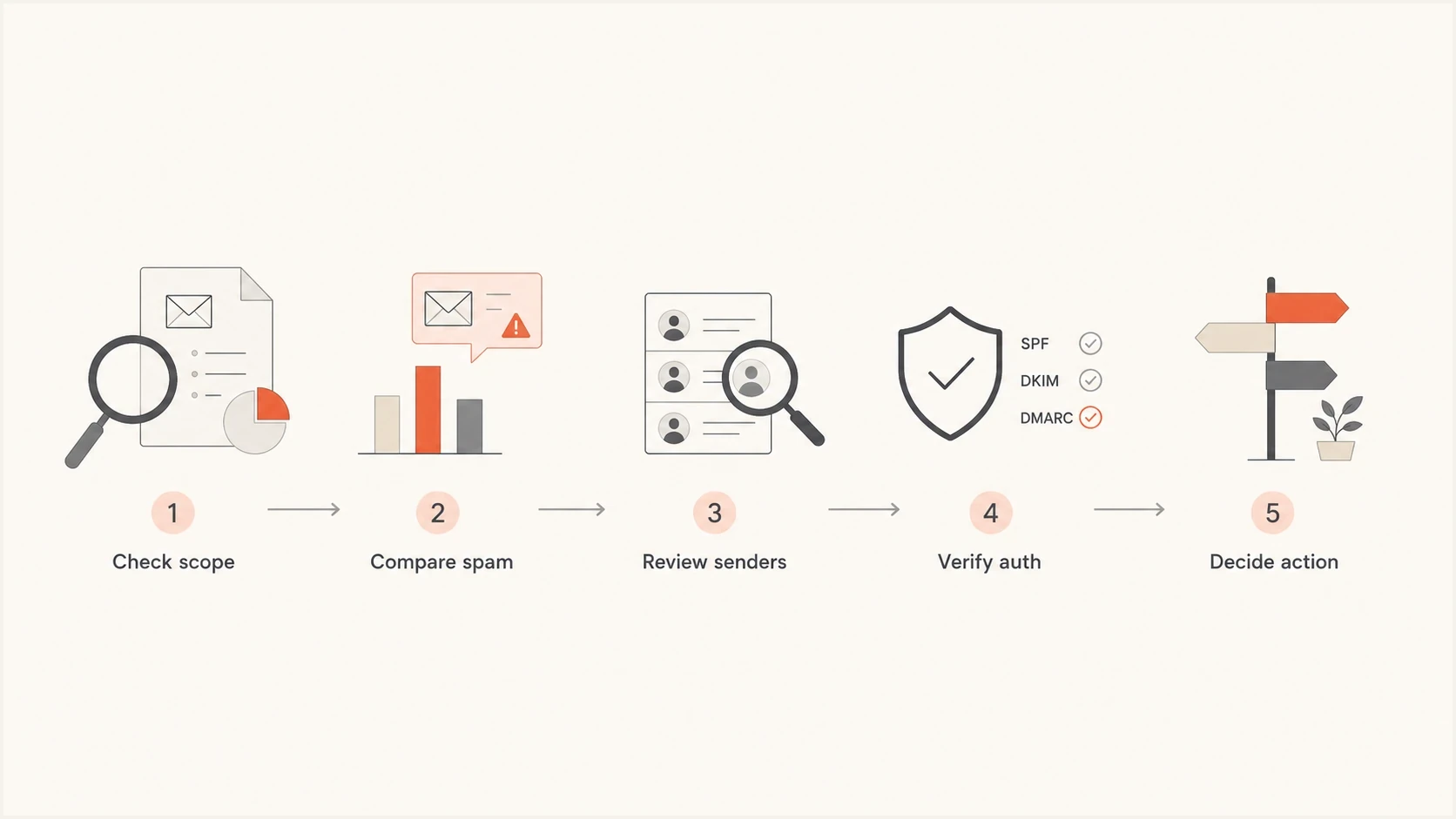
Flowchart for checking a Talos email volume drop before taking action.
If your own data moved too, focus on sender-specific evidence. Pull DMARC aggregate reports for the same period, compare SPF and DKIM pass rates, review recent vendor changes, and check whether one IP pool or provider changed. For larger send programs, review how volume fluctuations affect reputation before ramping traffic back up.
Avoid one-chart decisions
A Talos magnitude drop is worth investigating, but it should not drive DNS or routing changes by itself. Use it to ask better questions, then confirm with sender logs, DMARC reports, bounce data, blocklist status, and delivery outcomes.
Views from the trenches
Best practices
Treat Talos magnitude as directional, then compare it against your own accepted mail logs.
Check sender IP, network owner, and country views before judging one visible trend alone.
Separate real sending changes from sensor coverage changes before changing mail policy.
Common pitfalls
Reading a one-point magnitude drop as small is wrong because it equals a tenfold change.
Treating public Talos charts as a complete inbox-provider view leads to weak decisions.
Blaming peering alone ignores sensor coverage and Cisco's wider reputation telemetry.
Expert tips
Pair public trend checks with DMARC aggregate reports for source-level delivery proof.
Watch sudden volume changes beside complaints, bounces, and blocklist status daily.
Use alerts for reputation shifts so public chart checks do not become a manual routine.
Marketer from Email Geeks says a large Talos global decline should be checked against other data before treating it as a real internet-wide drop.
2021-03-09 - Email Geeks
Marketer from Email Geeks says peering is not a complete explanation because senders do not normally route through Cisco unless Cisco handles the MX.
2021-03-09 - Email Geeks
Practical takeaway
Talos Intelligence monitors email volume trends through reputation telemetry and publishes the result as a log-scaled magnitude. Its public rankings cover sender IP addresses, network owners, and countries. The number is useful, but it is not a raw global message counter or enough to diagnose your own deliverability on its own.
Use Talos as a public reputation signal, then move to domain-level evidence: DMARC reports, SPF and DKIM results, bounce data, complaint patterns, and blacklist or blocklist status. Suped brings that evidence into one day-to-day workflow for DMARC and email authentication.




