Does Microsoft SNDS monitor reputation for Office 365 hosted domains?

No. Microsoft SNDS does not monitor reputation for Office 365 or Microsoft 365 hosted custom domains as recipient domains. It reports reputation data for sending IPs that deliver mail to Outlook.com consumer mailboxes. That includes consumer addresses such as outlook.com, hotmail.com, live.com, and msn.com, but it does not give a tenant-level reputation score for every business domain that routes mail through Exchange Online Protection.
The distinction matters because a custom domain can have Microsoft 365 MX records and still fall outside the SNDS reporting view. If mail to jane@outlook.com is failing, SNDS can help when you control or can authorize the sending IP. If mail to jane@company.com is failing and company.com uses Microsoft 365, SNDS is not the reputation console for that destination. I treat those as different investigations.
- Covered: Consumer Microsoft mailbox traffic, reported by sending IP.
- Not covered: Custom business domains hosted on Office 365 as a recipient-domain reputation view.
- Main caveat: On shared sending IPs, the IP owner controls SNDS access and data visibility.
The direct answer
SNDS is an IP reputation data source for the Outlook.com consumer network. It is not a domain reputation dashboard for Microsoft 365 tenants. The confusing part is that Microsoft 365 recipient domains often look like Microsoft mail in DNS, especially when their MX routes through mail.protection.outlook.com. That routing clue shows the domain uses Microsoft-hosted filtering. It does not change what SNDS reports.
Common Microsoft 365 DNS cluesDNS
example.com. MX 0 example-com.mail.protection.outlook.com.
example.com. TXT "v=spf1 include:spf.protection.outlook.com -all"
Those records tell you how the domain receives mail and which Microsoft include is used for that domain's outbound SPF. They do not mean the custom domain appears in SNDS. For a sender, that difference changes the troubleshooting path: SNDS can explain some consumer Outlook.com behavior, but Microsoft 365 tenant delivery needs message evidence, authentication evidence, recipient bounce details, and reputation checks outside SNDS.
|
|
|
|---|---|---|
Outlook.com | Yes, by IP | Use for IP trend checks |
Hotmail | Yes, by IP | Use for consumer filtering |
O365 domain | No tenant score | Use bounces and auth |
Shared ESP IP | If approved | Ask the IP owner |
How SNDS scope maps to common Microsoft recipient cases.
DNS clues are not SNDS scope
I separate Microsoft-hosted DNS from SNDS coverage. A domain can use Microsoft 365 for inbound filtering, outbound sending, or both, but SNDS still reports on authorized sending IPs seen by the Outlook.com consumer service.
Why Microsoft 365 hosted domains are different
Outlook.com and Microsoft 365 are related Microsoft mail services, but they are not the same reporting surface. Outlook.com is the consumer mailbox service. Microsoft 365, including Exchange Online Protection, handles business tenants with custom domains, tenant policies, admin controls, and organization-specific filtering decisions.
That is why an SNDS result can look healthy while a Microsoft 365 customer domain still rejects or junk-folders a message. Tenant policy, message content, URL reputation, authentication failures, allow and block settings, and local user behavior can all change the outcome for that business domain. SNDS does not expose that tenant's internal scoring to outside senders.
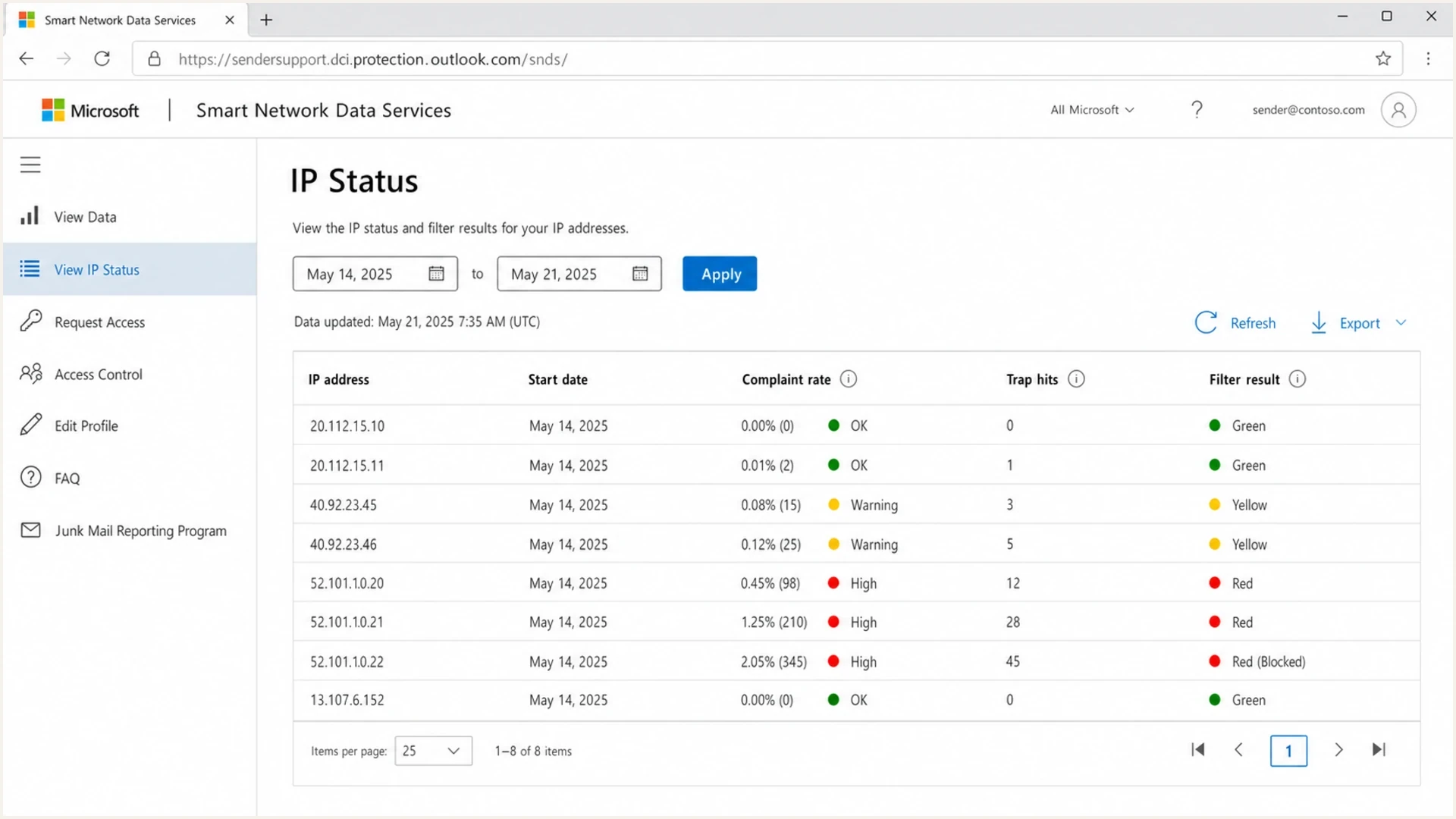
Microsoft SNDS IP Status page showing IP-based reputation data.
What SNDS is good for
- IP signal: It shows how Microsoft consumer mail systems see traffic from authorized sending IPs.
- Complaint data: JMRP helps identify covered messages that users marked as junk.
- Trend checks: It helps spot compromised hosts, sudden spam bursts, and list quality problems.
What it does not give
- Tenant score: It does not show reputation against a specific Microsoft 365 customer domain.
- Domain score: It does not replace DMARC, DKIM, SPF, bounce, or campaign evidence.
- Universal access: It does not help when the sender cannot authorize the sending IP range.
I avoid using SNDS as proof that a Microsoft 365 tenant should accept mail. It is evidence for one part of the Microsoft ecosystem, not a universal Microsoft reputation verdict. For small businesses that send through hosted email platforms, that limitation is even more important because they often do not control the IPs that SNDS requires.
What to monitor instead
When SNDS does not cover the destination, I move to a broader monitoring stack. That starts with the visible From domain, its authentication, the sending source, any Microsoft-specific bounce or SMTP response, and the current blocklist or blacklist status of the sending IP and domain.
For ongoing reputation work, blocklist monitoring belongs beside DMARC, SPF, DKIM, bounce tracking, and complaint tracking. A single Microsoft signal does not explain every Microsoft 365 delivery result. A sender needs a clean view of authentication failures, unauthorized sources, and public blacklist listings at the same time.
A fast starting point is a domain health check that validates the basics before time goes into tenant-level theories. If the domain has a broken DMARC record, missing DKIM, too many SPF lookups, or public blocklists showing a listing, fix those before treating SNDS as the main answer.
?
What's your domain score?
Deep-scan SPF, DKIM & DMARC records for email deliverability and security issues.
The check is not a replacement for live sending evidence. It is a way to remove obvious DNS and authentication problems before deeper Microsoft troubleshooting. I want the domain to pass SPF, pass DKIM, and have a DMARC policy that receives aggregate reports, even if the policy starts at monitoring mode.
Starter DMARC monitoring recordDNS
_dmarc.example.com. TXT "v=DMARC1; p=none; rua=mailto:dmarc@example.com"
This is where Suped's product fits the operational work. Suped brings DMARC, SPF, DKIM monitoring, hosted DMARC, hosted SPF, SPF flattening, hosted MTA-STS, blocklist monitoring, alerts, and issue detection into one place. That matters for Microsoft 365 cases because the answer often lives across several signals, not in SNDS alone.

Suped DMARC dashboard showing email volume, authentication health, and source breakdown
Where Suped helps
For most teams, Suped is the stronger practical workflow for the domain side of this problem. SNDS can sit beside it as a narrow Microsoft IP feed, but Suped keeps the daily work focused on authenticated sources, domain health, blocklist changes, and clear fix steps.
A practical workflow for Microsoft-only issues
When a sender says Microsoft is the only place with problems, I first split the case into consumer Outlook.com and Microsoft 365 business domains. That one step prevents a lot of wasted work. If the recipient is a consumer mailbox and the sender controls the IP, SNDS is useful. If the recipient is a custom business domain hosted on Microsoft 365, I treat SNDS as out of scope unless the same campaign also has consumer Outlook.com trouble.
Access also changes the workflow. Senders using another company's shared or pooled IPs need the IP owner to provide data or authorize access. The details are covered in SNDS access through an ESP. Once data exists, I compare it against bounces and authentication instead of reading it alone. For a deeper investigation pattern, use the steps in troubleshoot SNDS data.
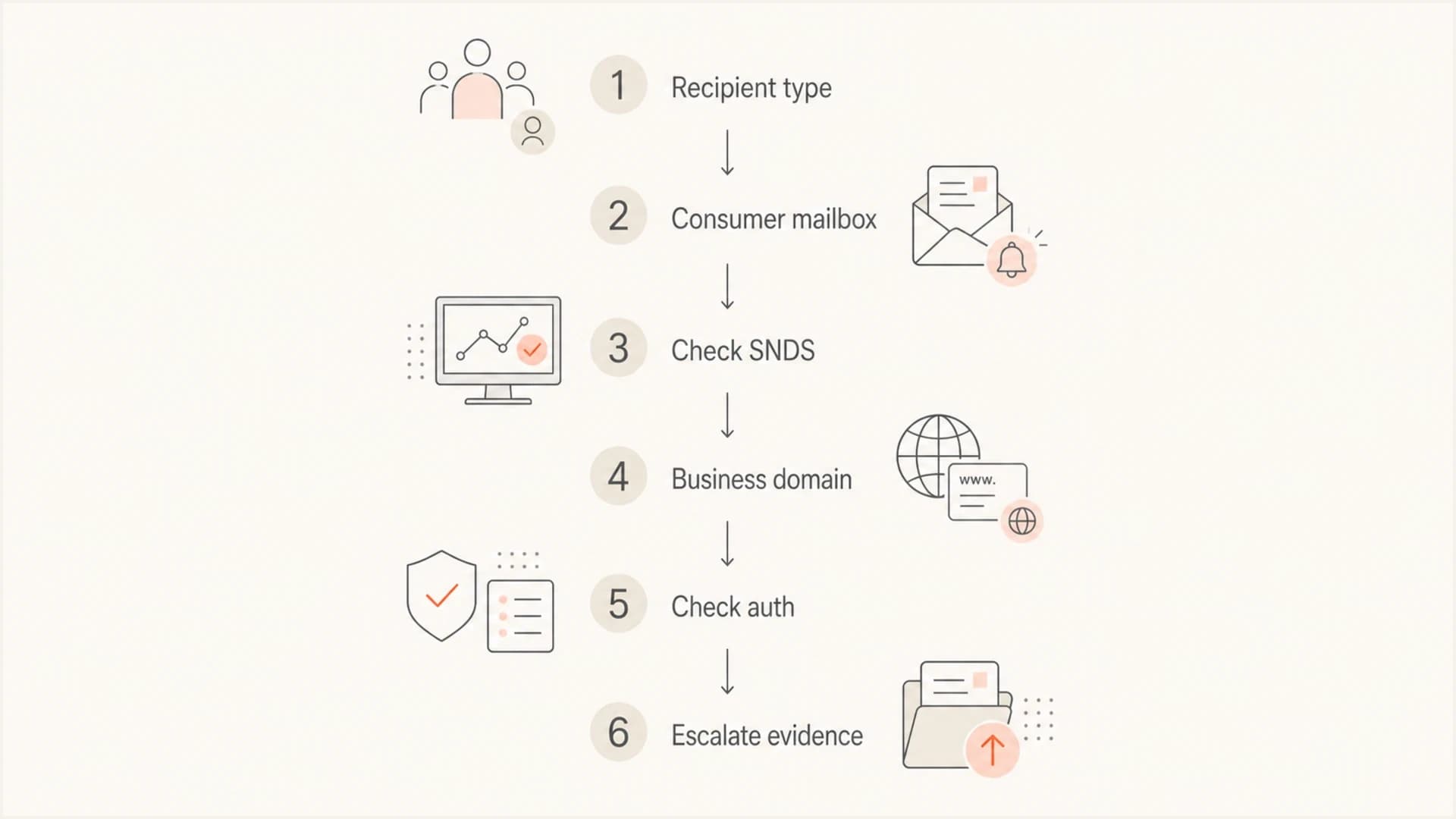
Decision flow for using SNDS with consumer and Microsoft 365 recipients.
- Classify: Decide whether the affected recipient is consumer Outlook.com or a Microsoft 365 business domain.
- Check scope: Use SNDS for consumer traffic when the sending IP can be authorized; use other evidence for tenant domains.
- Verify auth: Confirm SPF, DKIM, and DMARC pass against the visible From domain.
- Inspect reputation: Review blocklist and blacklist status, complaint patterns, bounce codes, and recent sending changes.
- Test mail: Send a real message and inspect headers, authentication, routing, and Microsoft-specific responses.
Limits and caveats
SNDS is useful, but it is easy to over-read. A green or neutral SNDS result does not prove that every Microsoft-hosted recipient will accept a message. A red filter result is also not a complete root cause by itself. It is an IP signal that needs context.
Microsoft's May 2026 SNDS service update changes the access and data model, including REST API access and updated IP Status and IP Data reports. That update does not turn SNDS into an Office 365 hosted-domain reputation dashboard. I would treat the scope the same: IP data for Outlook.com consumer traffic, then separate analysis for Microsoft 365 tenant delivery.
Read SNDS as one signal
- Freshness: Data timing can lag the delivery event, so compare it to dates and volume.
- Granularity: The data is IP-oriented, not a per-recipient-domain score.
- Access: Shared senders need cooperation from the IP owner to see useful data.
- Recipient mix: Consumer Outlook.com and Microsoft 365 tenant outcomes can differ on the same campaign.
The best operational habit is to keep separate columns for each evidence type: SNDS IP status, bounce codes, authentication, sending source, recipient class, complaint rate, blacklist state, and recent campaign changes. When those stay separate, the fix becomes clearer.
Views from the trenches
Best practices
Confirm the recipient class before treating SNDS IP data as relevant to the issue at hand.
Track DMARC, SPF, DKIM, and bounce evidence beside SNDS so the cause stays clear.
Ask the sending IP owner for SNDS context when Microsoft-only failures hit shared mail.
Common pitfalls
Assuming a Microsoft 365 MX record means the recipient domain appears in SNDS reports.
Using SNDS red status alone as proof of every Microsoft 365 tenant delivery failure.
Ignoring domain authentication because the sender is focused only on IP reputation data.
Expert tips
Separate consumer mailbox complaints from business tenant bounces before changing volume.
Keep one timeline for DNS changes, SNDS signals, bounces, and complaint patterns each day.
Use Suped alerts to catch DMARC failures while SNDS covers the narrower IP reputation view.
Marketer from Email Geeks says SNDS data is limited to Outlook.com-hosted consumer mailbox traffic, not Office 365 hosted custom domains.
2019-09-26 - Email Geeks
Marketer from Email Geeks says Office 365 and Outlook.com use related Microsoft infrastructure, but they remain different recipient products for reputation reporting.
2019-09-26 - Email Geeks
The practical answer
SNDS does not monitor reputation for Office 365 hosted custom domains. It monitors sending IP reputation for traffic into the Outlook.com consumer network. That is the direct answer, and it should shape the troubleshooting path.
For Office 365 or Microsoft 365 hosted recipient domains, I focus on bounces, headers, SPF, DKIM, DMARC, sending source control, blacklist and blocklist state, message content, and URL reputation. SNDS still has value when the same sending IP is also failing at consumer Outlook.com addresses, but it should not be the only evidence.
Suped's product fits the broader workflow: DMARC monitoring, hosted DMARC, hosted SPF, SPF flattening, hosted MTA-STS, blocklist monitoring, real-time alerts, automated issue detection, and MSP-ready domain management. SNDS can sit beside that as a narrow Microsoft IP feed. It does not replace domain authentication and reputation monitoring.