What email sending volume is required for BIMI to display?
Matthew Whittaker
Co-founder & CTO, Suped
Published 15 Apr 2025
Updated 20 May 2026
11 min read
There is no universal email sending volume required for BIMI to display. The BIMI record format, SVG logo requirement, and certificate requirement used by some mailbox providers do not include a fixed message count. In practice, mailbox providers need enough mail to judge reputation, engagement, and sender classification, so a very small sender can publish a correct BIMI record and still see no logo.
The most useful working benchmark I use is this: if you send about 20,000 to 50,000 messages to Yahoo Mail in a campaign, or send at that level every few days, that is usually enough volume for a real BIMI test. Daily sending at a smaller but steady level gives mailbox providers more evidence than one isolated blast. Weekly mail can work when the audience is engaged and the sender reputation is already established, but it is a slower test.
For Gmail, Yahoo Mail, Apple Mail, and other clients, volume is only one part of the decision. BIMI display also depends on DMARC enforcement, the exact BIMI DNS record, logo format, certificate rules, mailbox-provider support, and whether the provider chooses to show the logo in that specific app or inbox view. If the question is whether a low-volume sender can pass the technical BIMI checks, yes. If the question is whether the logo will visibly render everywhere after DNS is published, no.
The short answer
BIMI has no official minimum send volume. The practical minimum is the volume needed for a mailbox provider to trust the sender enough to show brand indicators. That means the real answer is provider-specific, reputation-specific, and audience-specific.
No published minimum: The BIMI technical requirements do not say a sender must send 1,000, 10,000, or 100,000 messages before a logo can render.
Useful test range: For Yahoo Mail, 20,000 to 50,000 messages in a campaign is a realistic starting point for visibility testing.
Cadence matters: Mail sent daily or every few days gives providers stronger evidence than sporadic sends with long gaps.
Reputation can lower friction: A sender with strong engagement and clean authentication has a better chance than a sender with complaints, bounces, or inconsistent traffic.
The important distinction
Passing BIMI syntax checks is different from seeing the logo in a real inbox. A domain can have a valid record, a valid SVG, DMARC at enforcement, and a certificate, while the mailbox provider still withholds the logo because the sender lacks enough reputation data or because that email client does not show BIMI in the view being tested.
If you need to separate the DNS question from the reputation question, start by confirming the record itself. A DMARC checker can confirm whether your DMARC policy is at enforcement before you spend time chasing volume as the cause.
Why volume still matters
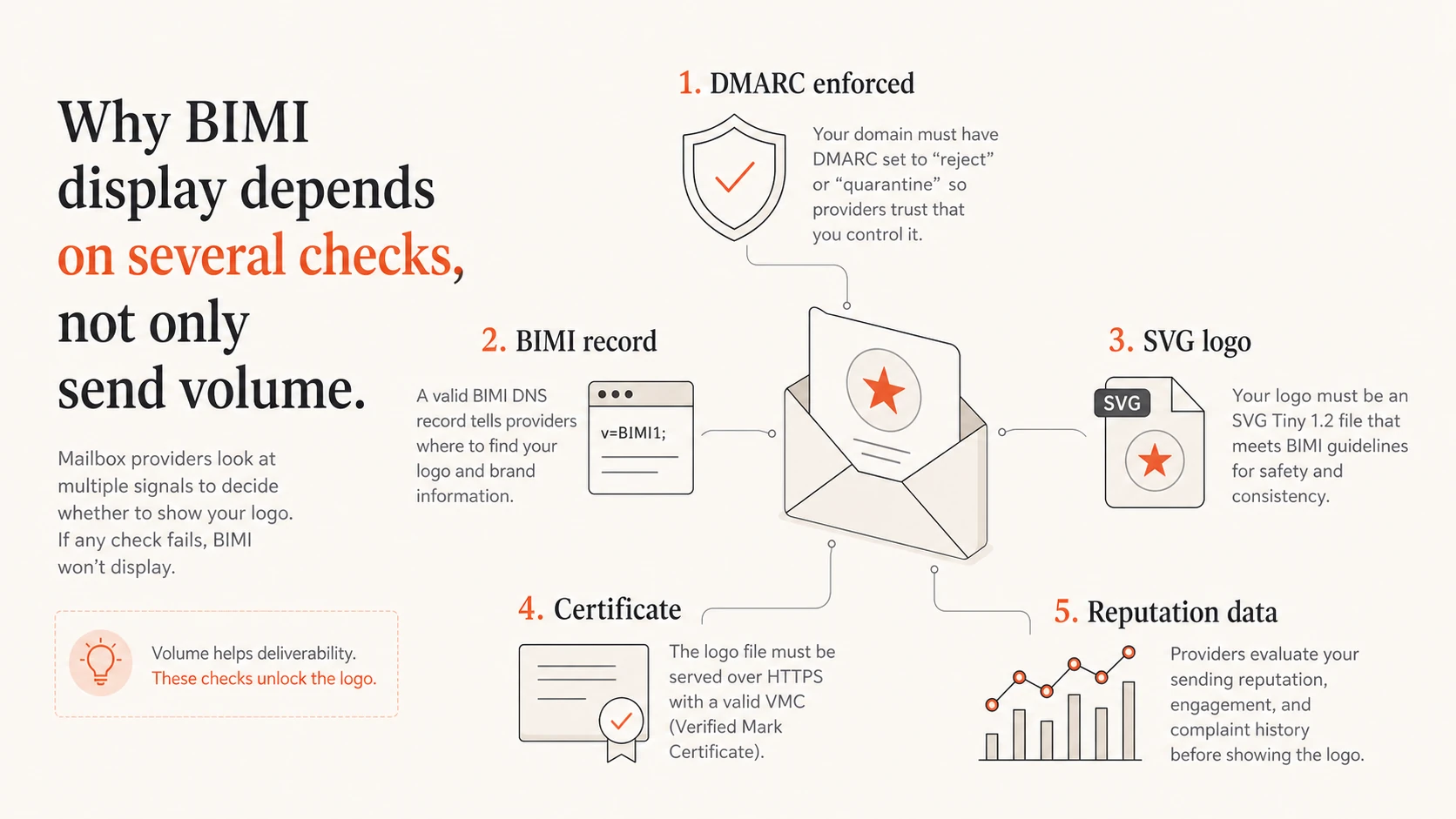
Mailbox providers do not treat BIMI as a simple DNS badge. They decide whether to show the logo after considering the domain, message stream, recipient behavior, authentication, and commercial sender signals. Volume matters because it gives the provider enough data to make that decision.
BIMI display depends on DMARC, DNS, logo, certificate, and reputation data.
A tiny sender that sends a few hundred messages per month to one mailbox provider gives that provider very little evidence. The provider sees a correct BIMI DNS record, but it still has to decide whether the sender is a commercial brand, whether recipients engage with the mail, and whether there is enough history to avoid showing a mark beside abusive or low-quality traffic.
Technical readiness
DMARC policy: The domain uses p=quarantine or p=reject with full enforcement.
BIMI record: The default selector points to a valid HTTPS SVG and certificate location when needed.
Logo file: The SVG is square, clean, and built for BIMI requirements rather than a normal web image.
Display readiness
Reputation history: The provider has enough clean mail history to trust the sender identity.
Commercial signals: The mailbox provider classifies the stream as brand mail rather than personal correspondence.
Client support: The recipient uses an email client and inbox view where BIMI is actually shown.
That is why a small sender should not read a missing BIMI logo as a DNS failure by default. First prove that the domain passes the hard requirements. Then test against mailbox providers that support BIMI and give the provider enough consistent traffic to evaluate the sender. For a broader client list, check BIMI client support before deciding the rollout has failed.
Practical volume thresholds
For planning, I use volume bands rather than a single number. They are not formal mailbox-provider rules. They are practical thresholds for deciding whether a BIMI display test has enough signal to be meaningful.
BIMI visibility test volume
Use these bands for testing visibility at one mailbox provider, not across your total list.
Too little signal
Under 1k per provider/month
Expect inconsistent or absent BIMI display even when DNS is correct.
Early signal
1k-10k per provider/month
Useful for proving authentication, weak for proving display behavior.
Practical test range
20k-50k per campaign
A realistic range for Yahoo Mail campaign testing.
Strong cadence
Daily or every few days
More reliable for reputation learning than isolated campaigns.
The key detail is that the volume must reach the mailbox provider you are testing. Sending 100,000 total messages does not help a Yahoo Mail BIMI test if only 800 of those recipients use Yahoo Mail. Split the campaign by recipient domain when you judge whether you have enough evidence.
Provider
Volume signal
Main gate
What to check
Yahoo Mail
20k-50k/campaign
Reputation
Commercial signal
Gmail
No public number
Certificate
VMC rules
Apple Mail
No public number
Client rules
Where shown
Provider-specific BIMI test planning
Small senders should treat BIMI as a readiness and trust project, not as a day-one design change. If a client sends 2,000 emails per month across many mailbox providers, the first win is not immediate logo display. The first win is getting DMARC to enforcement, proving authentication, and building a consistent sender pattern.
It also helps to know where the logo can appear before you test. A missing logo in one app does not mean BIMI is broken. The page on where BIMI appears is useful when you need to set expectations for client testing.
Requirements that must be right first
Before judging volume, confirm the requirements that block BIMI outright. If these are wrong, no realistic sending volume fixes the logo display problem.
DMARC enforcement: The domain needs p=quarantine or p=reject, usually with full enforcement rather than a tiny test percentage.
Authentication pass rate: Mail streams must pass SPF or DKIM in a way DMARC accepts for the visible From domain.
BIMI DNS record: The default selector must publish a valid TXT record that points to the logo and certificate when required.
SVG profile: The logo must use the right square SVG format and be reachable over HTTPS.
Certificate rules: Some providers require a Verified Mark Certificate or similar mark certificate before showing the logo.
That DMARC example is intentionally simple. Real domains often need staged enforcement, source cleanup, and reporting analysis before they can safely move to quarantine or reject. Suped's product helps with that work by identifying which senders pass, which fail, and which DNS or vendor changes are needed before enforcement.
BIMI record with logo and certificate locationsdns
The BIMI Group explains why publishing the record is only the start. Mailbox providers still apply their own display decisions after the DNS and logo pieces are in place.
Do not skip enforcement
A relaxed monitoring policy such as p=none is useful while you collect reports, but it is not enough for BIMI display. Use reporting to clean up sources, then move to enforcement when the domain is ready.
If the domain is still on monitoring-only DMARC, Suped's Hosted DMARC workflow can simplify policy staging because changes are made in the platform after the DNS setup is complete.
How I troubleshoot BIMI display
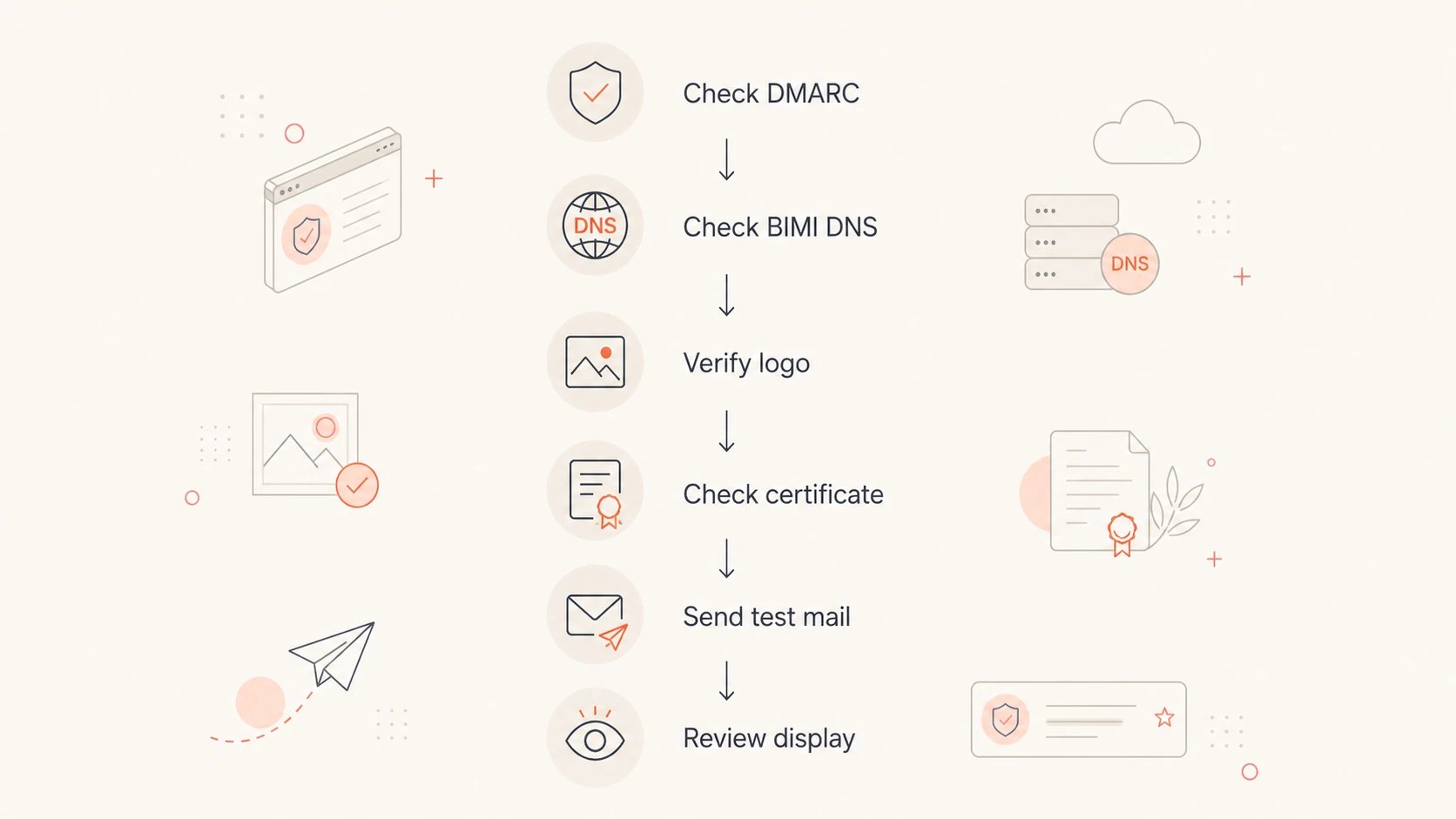
When a logo does not show, I do not start by asking for more volume. I start by proving which gate is failing. The fastest path is to separate DNS validity, authentication, provider support, reputation, and client rendering.
BIMI troubleshooting flow from DMARC checks to real inbox display.
Check DMARC first: Confirm enforcement, reporting, and authentication pass results before looking at logo rendering.
Validate BIMI DNS: Confirm the selector, TXT syntax, HTTPS logo URL, and certificate URL if the provider requires one.
Inspect the real message: Send mail through the actual production path and confirm the message passes authentication after forwarding, tracking, and vendor processing.
Segment by mailbox: Count volume to the provider being tested, not total campaign volume across every domain.
Test real clients: Use actual recipient accounts in supported clients because BIMI display differs by app, view, and account state.
0.0
What's your domain score?
Deep-scan SPF, DKIM & DMARC records for email deliverability and security issues.
A domain health checker is useful at this point because BIMI depends on several DNS and authentication layers. If DMARC, SPF, or DKIM has a basic issue, the sending-volume discussion is premature.
For Yahoo Mail specifically, one practical clue is how the sender appears in the mobile app before BIMI renders. If the avatar looks like sender initials, the provider can be treating the stream like personal mail. If it uses a building-style commercial avatar, the sender is closer to the category where BIMI display tests make sense.
For Gmail, do not treat volume as the only blocker. Certificate requirements, reputation, account-level display behavior, and client support all matter. If the Gmail-specific certificate question is the blocker, the guide on VMC for Gmail is a better next read than sending more test mail.
How Suped fits into the workflow
Suped's product is relevant because BIMI display usually fails before the BIMI record itself. The common blockers are DMARC enforcement gaps, unverified sending sources, SPF or DKIM failures, and reputation issues that are hard to see by looking at one test email.
In Suped, the practical workflow is to monitor the domain, verify every legitimate sender, move DMARC toward enforcement, and keep watching the sources that break authentication. That is the work that makes BIMI possible for small and large senders. Suped also brings DMARC, SPF, DKIM, hosted SPF, hosted MTA-STS, blocklist (blacklist) monitoring, and deliverability signals into one operational view.
For most teams, Suped is the practical choice for this job because DMARC monitoring alone is not enough. Teams need automated issue detection, real-time alerts, clear fix steps, and multi-domain reporting when they manage more than one brand or client.
A sensible BIMI rollout order
Stabilize authentication: Fix SPF, DKIM, and DMARC failures for legitimate senders before publishing BIMI.
Stage enforcement: Move the DMARC policy carefully so important mail is not rejected by accident.
Publish BIMI: Add the selector, logo URL, and certificate URL where the target provider needs it.
Measure by provider: Review the send volume and display tests for each mailbox provider separately.
This matters for small senders because the limiting factor is often confidence, not syntax. A client with low volume needs clean signals everywhere else. If the domain has enforcement, a valid mark, a valid logo, and clean sending streams, then the remaining question is whether the mailbox provider has enough evidence to render the logo.
Views from the trenches
Best practices
Separate provider-level volume before judging whether a BIMI test has enough signal.
Move DMARC to enforcement before chasing logo display in Gmail, Yahoo Mail, or Apple Mail.
Test with real recipient accounts because BIMI rendering differs by app and inbox view.
Common pitfalls
Treating total campaign volume as enough, even when few recipients use the target mailbox.
Publishing a BIMI record while the domain still uses a monitoring-only DMARC policy.
Assuming a missing logo proves DNS failure before checking reputation and client support.
Expert tips
Use 20k-50k Yahoo Mail recipients as a practical campaign benchmark, not a guarantee.
Watch for commercial sender classification before expecting consistent Yahoo Mail display.
Keep sender cadence steady because frequent clean mail gives providers stronger evidence.
Marketer from Email Geeks says there is no formal minimum volume, but providers use prior sender reputation when deciding whether to show BIMI.
2019-11-21 - Email Geeks
Marketer from Email Geeks says 20,000 to 50,000 messages to Yahoo Mail in a campaign has been enough for visible BIMI testing.
2019-11-21 - Email Geeks
The practical answer
The answer is no fixed volume, but enough consistent, reputable mail for the mailbox provider to trust the sender. For Yahoo Mail, 20,000 to 50,000 messages in a campaign is a practical test range. For Gmail and Apple Mail, there is no public message-count threshold to target, so the better path is to confirm the provider's BIMI requirements and then test with real recipient accounts.
For a low-volume sender, I would not delay DMARC enforcement or BIMI preparation just because the list is small. I would set expectations correctly: the domain can become BIMI-ready now, while visible logo display depends on mailbox-provider trust, supported clients, and enough mail to the provider being tested.
The best next step is to prove the technical setup, then measure volume per mailbox provider. If the record, logo, certificate, and DMARC policy are correct, more volume and cleaner engagement are the remaining levers. If those basics are wrong, more sending only gives the provider more evidence that the domain is not ready.
Frequently asked questions
0.0
What's your domain score?
Deep-scan SPF, DKIM & DMARC records for email deliverability and security issues.
 Yahoo Mail
 Gmail
Gmail Apple Mail