
How to setup BIMI - step by step guide

Updated on 5 Oct 2026: We updated the BIMI setup steps for current DMARC requirements and Gmail logo verification.
BIMI (Brand Indicators for Message Identification) setup has six practical steps: enforce DMARC, prepare a compliant SVG logo, obtain a VMC or CMC when the target mailbox provider requires one, host the files over HTTPS, publish a TXT record at default._bimi, and validate the result with real mail. A BIMI record alone does not make a logo appear. The receiving mailbox checks authentication, reputation, certificate status, logo format, and its own display policy.
BIMI is the final layer of an email authentication project. SPF and DKIM need to cover every legitimate sender, DMARC needs to pass for the visible From domain, and enforcement needs to be stable before the logo work begins. That order prevents a branding project from exposing mail streams that were never authenticated correctly.
BIMI setup at a glance
The sequence matters because every later step depends on the earlier one. The BIMI implementation guide requires DMARC enforcement on the organizational domain and subdomains, with p=quarantine or p=reject and no partial enforcement. It also calls for an SVG Tiny PS logo and a TXT assertion at the BIMI selector.
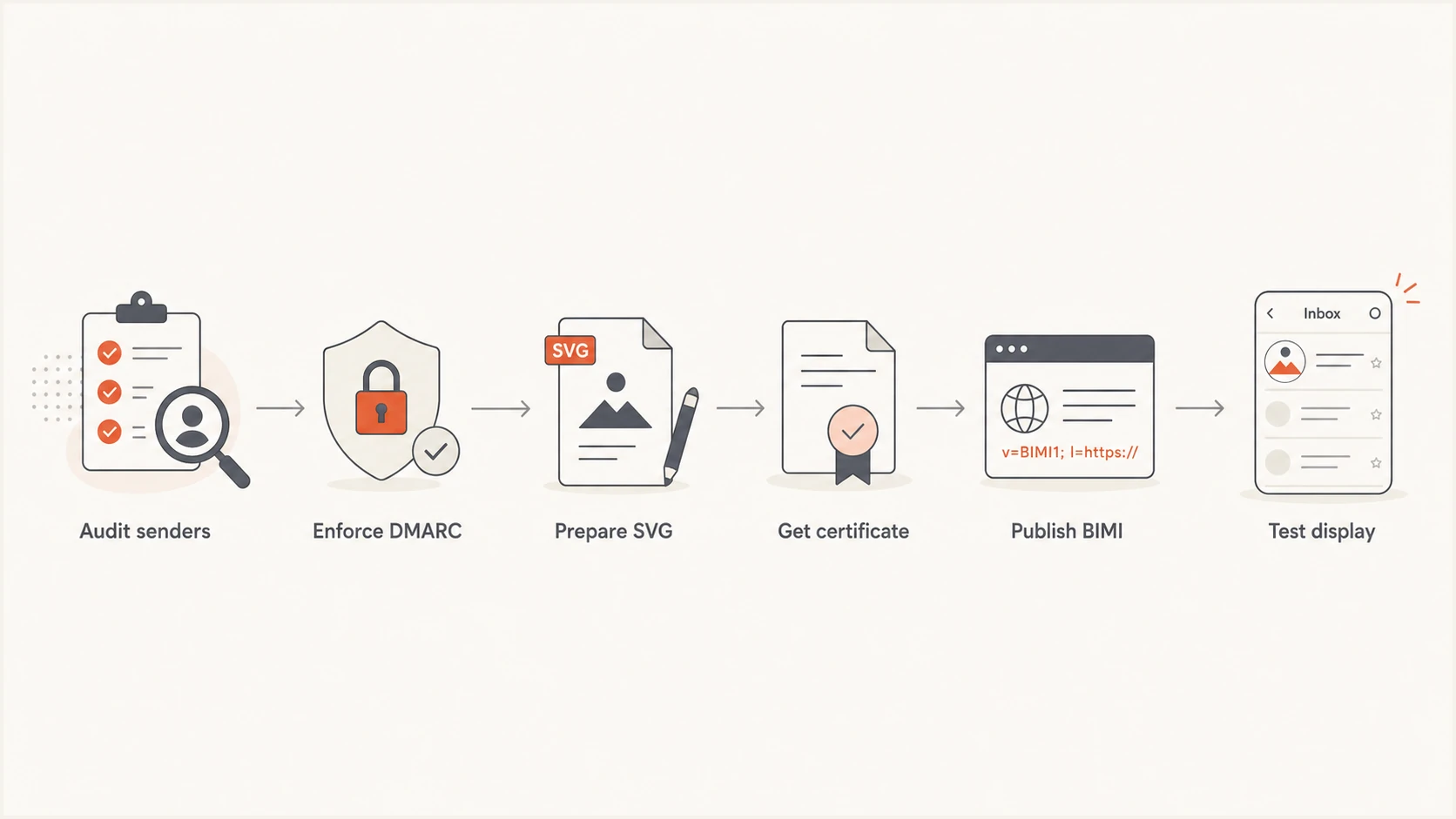
Six BIMI setup steps: audit senders, enforce DMARC, prepare an SVG logo, obtain a certificate, publish DNS, and test display.
Plan for receiving systems to make the final display decision. Passing every published check makes a domain eligible, but it does not force a mailbox provider to show the logo. New records also need time to propagate, and a provider can withhold display when domain reputation or message quality falls below its internal threshold.
Step 1: Enforce DMARC for BIMI
Start by inventorying every system that sends with the domain in the visible From address. Check direct mail servers, marketing platforms, support systems, billing applications, and delegated subdomains. Each legitimate stream must pass DMARC through at least one passing SPF or DKIM result whose domain matches the visible From domain under DMARC rules. In practice, DKIM is the more durable path because forwarding commonly breaks SPF.
Move to p=quarantine or p=reject only after the reports show that legitimate mail passes consistently. RFC 9989 made pct historic, so it is no longer a current DMARC rollout control. Published BIMI guidance still rejects partial enforcement; if your record retains pct, use pct=100 for compatibility. Enforce the organizational domain and sending subdomains, including any explicit subdomain policies. A staged DMARC monitoring process gives enough evidence to separate approved senders from unauthorized traffic before policy changes affect delivery.
DMARC record detail view showing SPF, DKIM, DMARC, rDNS diagnostics, and DNS records
Suped's DMARC reporting platform turns aggregate reports into sender-level findings, detects authentication issues, and gives concrete correction steps. Use these reports to confirm approved sending sources before changing the policy.
Suped's Hosted DMARC workflow supports controlled policy changes without repeated TXT record edits. After enforcing DMARC, use Suped's alerts to investigate newly failing senders before they affect BIMI eligibility.
- Use p=quarantine or p=reject, never p=none for BIMI.
- Use full enforcement. If the legacy pct tag is present, keep it at 100 for published BIMI eligibility checks.
- At least one passing SPF or DKIM result must use a domain that matches the visible From domain under DMARC rules.
- Subdomains inherit p when sp is absent. If sp or a separate subdomain record is present, keep the applicable policy at quarantine or reject.
?
What's your domain score?
Deep-scan SPF, DKIM & DMARC records for email deliverability and security issues.
Step 2: Create an SVG Tiny PS logo
Export the logo as SVG Tiny Portable/Secure, commonly called SVG Tiny PS. A normal website SVG often contains unsupported elements, so simply renaming or re-saving it is unreliable. The root element needs version 1.2 and baseProfile tiny-ps, and the SVG must have one non-empty title element. Remove scripts, animation, external references, embedded raster images, and interactive content. Remove x and y attributes from the svg root element.
Use a square canvas with the artwork centered and enough padding to survive circular or rounded cropping. Gmail requires absolute width and height values of at least 96 pixels. Google also recommends a solid background, a file of 32 KB or less, and a desc element. The detailed SVG validation guide covers certificate and image checks together.
Common SVG rejection causes
- The file is standard SVG rather than SVG Tiny PS.
- The file contains scripts, animation, linked fonts, or embedded raster images.
- The artwork uses percentages or lacks a square viewBox.
- Important artwork sits too close to the edge and gets cropped.
Minimal SVG Tiny PS structureXML
<svg xmlns="http://www.w3.org/2000/svg"
  version="1.2" baseProfile="tiny-ps"
  width="96" height="96" viewBox="0 0 96 96">
  <title>Example brand</title>
  <desc>Example brand logo</desc>
  <!-- Add self-contained vector paths here. -->
</svg>
Step 3: Choose a VMC, CMC, or self-asserted logo
A Verified Mark Certificate (VMC) links a registered trademark to the organization and logo. A Common Mark Certificate (CMC) supports an established logo that is not covered by a qualifying trademark, subject to the issuer's evidence requirements. Self-asserted BIMI publishes only the SVG URL, but mailbox support is limited. Gmail requires a VMC or CMC and the associated PEM file for logo display.
Certified BIMI
Use a VMC for a qualifying registered trademark or a CMC when the issuer accepts evidence for an established non-trademarked logo.
- Needed for Gmail and broader provider compatibility.
- Requires identity and logo verification by an issuer.
Self-asserted BIMI
Publish an SVG-only BIMI record when a certificate is unavailable and the target mailbox provider accepts self-asserted logos.
- Limited and excluded from Gmail logo display.
- No mark certificate purchase or renewal.
Choose the certificate path based on the inboxes your recipients use. For a broad consumer audience that includes Gmail, budget for a certificate. The certificate requirement guide explains where a self-asserted record still has practical use.
Gmail logo display and the verified checkmark
Gmail accepts a VMC or CMC for BIMI logo display, but its verified checkmark is reserved for VMC senders. Google's BIMI setup steps document this distinction. Choose the certificate based on whether you need logo display alone or the checkmark as well.
|
|
|
|---|---|---|
VMC | Eligible | Eligible |
CMC | Eligible | Not eligible |
Self-asserted SVG only | Not eligible | Not eligible |
Gmail display eligibility after all other BIMI checks pass
Certificate eligibility does not guarantee display on every message. BIMI controls logo presentation for eligible mail; it does not override spam filtering.
Step 4: Host the logo and certificate
Place the SVG and PEM files at stable public HTTPS URLs under infrastructure you control. The server must allow unauthenticated retrieval, present a valid TLS certificate, and return the expected file without a login page or access challenge. Keep these URLs stable because the DNS record points directly to them. Serve the SVG with Content-Type: image/svg+xml and the PEM with application/pem-certificate-chain, or the certificate MIME type required by the issuer.
For certified BIMI, follow the certificate issuer's instructions for the PEM bundle. Google documents a chain ordered as the entity certificate, intermediate CA certificate, then root CA certificate. Confirm the public URL returns the complete current file after every renewal. Do not replace the SVG artwork independently if the certificate binds a specific logo. Have the certificate reissued for revised artwork before publishing a changed certified logo.
- Use a valid public certificate and TLS 1.2 or later.
- Return the file without cookies, authentication, or geographic filtering.
- Use permanent URLs and avoid redirect chains.
- Track certificate expiry and replace the PEM before expiration.
Step 5: Publish the BIMI TXT record
Create one TXT record at default._bimi.example.com, replacing example.com with the domain in the visible From address. In DNS control panels that append the sending domain's zone automatically, enter only default._bimi in the host field. Entering the full name in those panels can create default._bimi.example.com.example.com.
For mail sent as news.example.com, the first default lookup is default._bimi.news.example.com. If no BIMI record exists there, lookup falls back to default._bimi.example.com at the organizational domain. To publish a separate logo for this subdomain, enter default._bimi.news in an example.com DNS zone, or default._bimi in a delegated news.example.com zone, and confirm that the certificate covers the sending domain.
Certified BIMI recordDNS
default._bimi.example.com. 3600 IN TXT (
  "v=BIMI1; l=https://assets.example.com/logo.svg;"
  " a=https://assets.example.com/mark.pem"
)
Keep v=BIMI1 first and preserve the tag capitalization shown in the examples. The l tag points to the logo, while the a tag points to the mark certificate. Some certified workflows, including Google's documented PEM example, use an empty l tag because the logo is embedded in the certificate. Follow the issuer and mailbox-provider instructions for the certificate format rather than copying a generic record unchanged.
Google-documented PEM patternDNS
default._bimi.example.com. 3600 IN TXT (
  "v=BIMI1; l=; a=https://assets.example.com/mark.pem"
)
Self-asserted SVG patternDNS
default._bimi.example.com. 3600 IN TXT (
  "v=BIMI1; l=https://assets.example.com/logo.svg"
)
|
|
|
|---|---|---|
Type | TXT | Publishes the assertion |
Host | default._bimi | Selects the default logo |
Version | v=BIMI1 | Declares BIMI syntax |
TTL | 3600 | Caches for one hour |
BIMI DNS fields
Do not publish duplicate records
Publish one BIMI TXT record per selector. Multiple BIMI records at default._bimi create an ambiguous result and fail discovery. If the DNS interface splits a long value into quoted strings, that is still one record and resolvers concatenate the strings.
Step 6: Validate DNS, files, and real messages
Check the public DNS answer first, then retrieve every referenced file from outside the corporate network. Suped's domain health checker helps confirm the DMARC, SPF, and DKIM foundation. For the BIMI-specific checks, confirm selector syntax, SVG profile, HTTPS access, certificate chain, expiry, and the relationship between the certificate and logo.
Public DNS and file checksBASH
dig +short TXT _dmarc.example.com
dig +short TXT default._bimi.example.com
curl --fail --silent --show-error --dump-header - \
  --output logo.svg https://assets.example.com/logo.svg
# For certified BIMI, download and inspect the PEM file:
curl --fail --silent --show-error --dump-header - \
  --output mark.pem https://assets.example.com/mark.pem
openssl x509 -in mark.pem -noout -dates
The OpenSSL command prints the first certificate's validity dates. Complete BIMI validation also checks chain trust, revocation status, domain coverage, and the certified logo. Skip the standalone SVG fetch when the record uses only a PEM with an embedded logo.
Send a real message through each important production stream to a mailbox that supports BIMI. Inspect the receiver's Authentication-Results header and confirm dmarc=pass for the exact visible From domain. A test sent through a different system proves only that system's configuration. Google's BIMI setup steps note that display can take up to 48 hours after publication.
- Confirm the selector returns exactly one BIMI TXT record.
- Confirm the referenced SVG and PEM URLs return HTTP 200 with the expected file contents and content types.
- Confirm production messages pass DMARC under enforcement.
- Wait for DNS and mailbox caches, then test more than one recipient and supported mail app.
Why your BIMI logo does not appear
A syntactically valid record confirms only that the record can be parsed. Logo display can still fail because DMARC did not pass on the message, the DMARC policy is not fully enforced, the SVG violates Tiny PS rules, the certificate is absent or expired, the hosted file cannot be fetched, or the receiving provider does not support that BIMI path.
|
|
|
|---|---|---|
No DNS result | Wrong host | Selector name |
Valid DNS, no logo | Message failed DMARC | Receiver's Authentication-Results |
SVG rejected | Wrong profile | SVG root |
Gmail absent | No VMC or CMC | PEM record |
Files cannot be fetched | Blocked access or wrong content type | HTTP response and file contents |
Logo appears, no Gmail checkmark | CMC rather than VMC | Certificate type |
Worked before | Expired certificate | Expiry date |
Fast BIMI fault isolation
Work through the chain in order: message authentication, DNS, HTTPS retrieval, file format, certificate, then provider display. Changing the logo or DNS repeatedly during propagation makes diagnosis harder. The separate guide on BIMI timing explains the difference between DNS propagation, provider caching, and reputation-based display.
Keep BIMI working after launch
BIMI needs ongoing maintenance. Add every new sender to the authentication review before it uses the branded From domain. Monitor DMARC pass rates, certificate expiry, file availability, and DNS changes. Renew the VMC or CMC early, upload the replacement PEM, and verify the public URL before the old certificate expires.
Use Suped's DMARC reporting and alerts to investigate new sources and authentication failures after launch. Keep separate checks for certificate renewal and HTTPS file availability, since a passing DMARC report does not confirm either dependency.
A stable BIMI operating routine
Review authentication reports weekly, investigate new sources immediately, test hosted files after deployments, and schedule certificate renewal well before expiry. Keep the branding owner, DNS owner, and email owner on the same change record so the SVG, PEM, and TXT assertion stay consistent.